One pipeline. Write it, wire it, or draw it.
Duckle is the open, single-engine ELT stack. One pipeline format, compiled to SQL on DuckDB: write it in Python, wire it from 350+ connectors and components, or draw it on the canvas - or describe it to Duckie, the on-device AI assistant, and verify what it builds. In-pipeline transforms, data quality, and lineage travel with the same artifact. Runs anywhere - laptop, CI, headless, or a browser - and fully offline when you need it. No per-row tax, no lock-in.
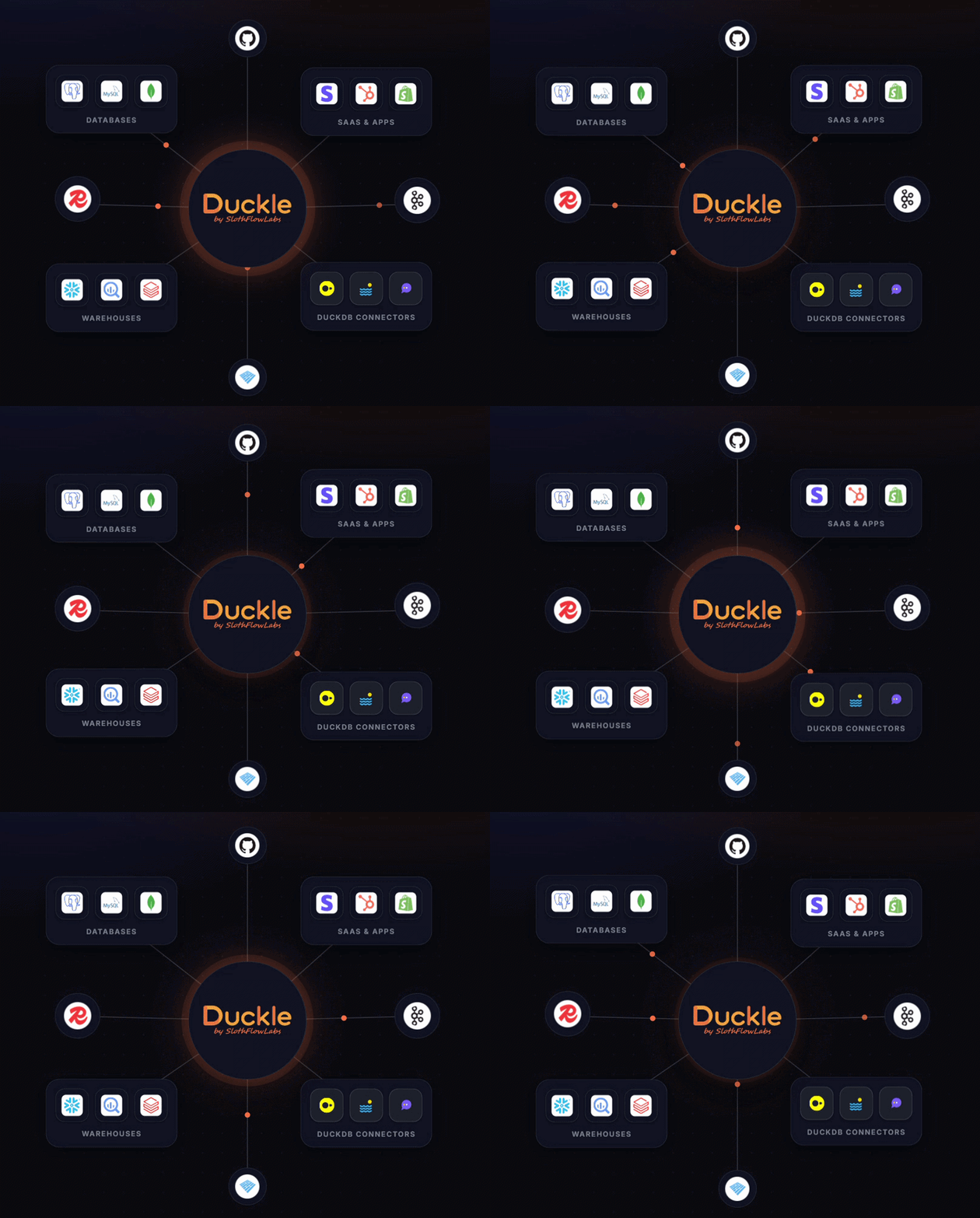
Duckle is an independent open-source project by SlothFlowLabs. It builds on the DuckDB engine but is not part of, affiliated with, or endorsed by DuckDB Labs or MotherDuck.








Star Duckle if it looks useful. It genuinely helps other data engineers find the project.
---
## Quick links
|
**Get started**
- [What is Duckle?](#what-is-duckle)
- [What's new in v0.5.8](#whats-new-in-v058)
- [Quickstart (60 s)](#quickstart-60-seconds)
- [Download / Install](#download--install)
- [Build from source](#build-from-source)
- [Run your first pipeline](#run-your-first-pipeline)
|
**Use the product**
- [Meet Duckie (AI)](#meet-duckie---the-local-ai-pipeline-assistant)
- [How to use Duckle](#how-to-use-duckle)
- [Recipes / examples](#recipes-and-examples)
- [In-app Git (GitHub/GitLab)](#git-integration-github--gitlab)
- [Workspace + Git flow](#workspace-and-git-flow)
- [Schedules](#schedules-and-triggers)
- [Server deployment](#server-deployment-build-pipeline)
- [MCP server: connect Claude, Cursor or any agent](#mcp-server-connect-claude-or-any-llm-to-duckle)
- [Connection management](#connection-management)
- [Context variables](#context-variables)
|
**Reference**
- [Capabilities matrix](#capabilities)
- [Sources](#sources-101-available)
- [Transforms](#transforms-130-available)
- [Sinks](#sinks-63-available)
- [Data quality](#data-quality-27-available)
- [Custom code](#custom-code-6-available)
- [Control flow](#control-flow-18-available)
- [Advanced settings](#advanced-settings-per-node)
- [Engines](#engines)
- [Configuration](#configuration)
|
**Resources**
- [Architecture](#architecture)
- [Clean data for AI](#clean-data-before-it-reaches-your-ai)
- [Performance tips](#performance-tips)
- [FAQ](#faq)
- [Troubleshooting](#troubleshooting)
- [CI / CD](#ci--cd)
- [Status](#status)
- [Roadmap](#roadmap)
- [Contributing](#contributing)
- [Sponsor Duckle](SPONSORS.md)
- [License](#license)
- [Releases](https://github.com/slothflowlabs/duckle/releases)
- [Roadmap doc](docs/roadmap.md)
- [Contributing doc](CONTRIBUTING.md)
|
---
## What is Duckle?
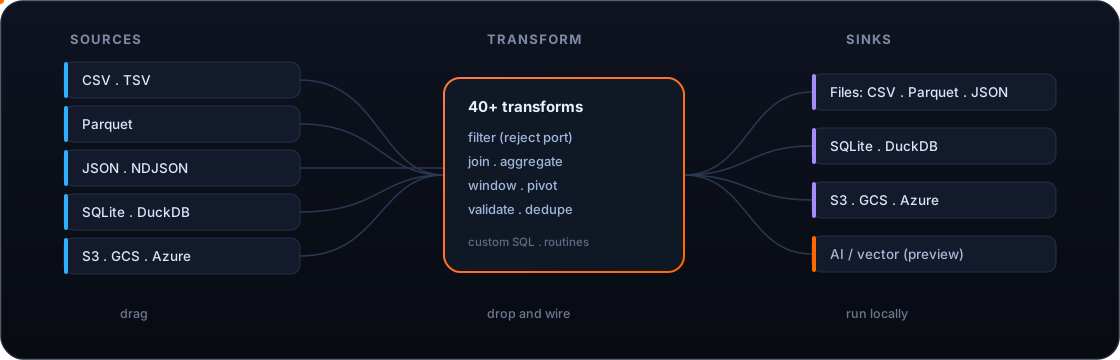
A visual data pipeline studio that runs on your laptop. Drag sources, transforms, validators, and sinks onto a canvas. Wire them together. Press **Run**. Duckle compiles the graph to SQL and executes it through a real columnar engine, with live previews, generated SQL on every node, and zero hidden state.
In short: a free, open-source, single-engine alternative to hosted, per-row-priced ETL platforms like Fivetran and Airbyte - one pipeline for ingest, transform, and load that runs anywhere, and can also run dbt on DuckDB inside the same tool.
Three things make Duckle different from the heavyweights and the toy ETL tools:
1. **An AI assistant that ships in the box.** Describe the pipeline you want in English; Duckie writes the JSON and drops it onto the canvas. The model runs locally - no API key, no telemetry, no cloud round-trip.
2. **362 components ready at install time.** Files, lakehouses, SQL databases, warehouses, NoSQL, vector DBs, streaming brokers, SaaS REST/GraphQL APIs, even FTP and IMAP - working today, not coming-soon.
3. **A self-contained binary you can audit.** ~65 MB download. Engines install on first launch. Workspaces are plain files in a folder you choose. Diff them, branch them, ship them.
---
## What's new in v0.5.8
A native Hugging Face connector for reading and writing Hub datasets, an Esri File Geodatabase source, and a batch of canvas and correctness fixes from your issue reports.
- **Native Hugging Face connector (source + sink).** `src.huggingface` reads any Hub dataset directly over DuckDB's `hf://` (Parquet / CSV / JSON, globs, and revisions like `~parquet`), with a token for private or gated repos. `snk.huggingface` pushes the other way: the pipeline output is materialized to Parquet and committed to a dataset repo over the Hub API (create-repo, git-LFS upload, commit), creating the repo (public or private) if it does not exist. Both carry the real Hugging Face mark on the canvas.
- **Esri File Geodatabase source (#205).** `src.gdb` reads a feature class from a `.gdb` folder via the spatial extension's `ST_Read(layer=)`, so ArcGIS geodatabases load like any other geospatial source.
- **Duplicate context variables are no longer silent (#204).** When two context items defined the same variable name, one used to overwrite the other with no warning and quiet data loss. Validation now flags the collision so you can see and resolve it.
Fixes from your reports: Create Geometry now updates the node schema and preview so downstream nodes see the new geometry column (#206); the Rename Columns preview shows the renamed headers instead of the originals (#207); deleting a pipeline or folder asks for confirmation first (#208); and F2 renames, plus Delete and Enter, now work on pipelines and folders in the project tree (#209).
Full notes: see the [v0.5.8 release](https://github.com/slothflowlabs/duckle/releases/tag/v0.5.8).
---
## Meet Duckie - the local AI pipeline assistant
> Describe what you need. Duckie writes the pipeline.
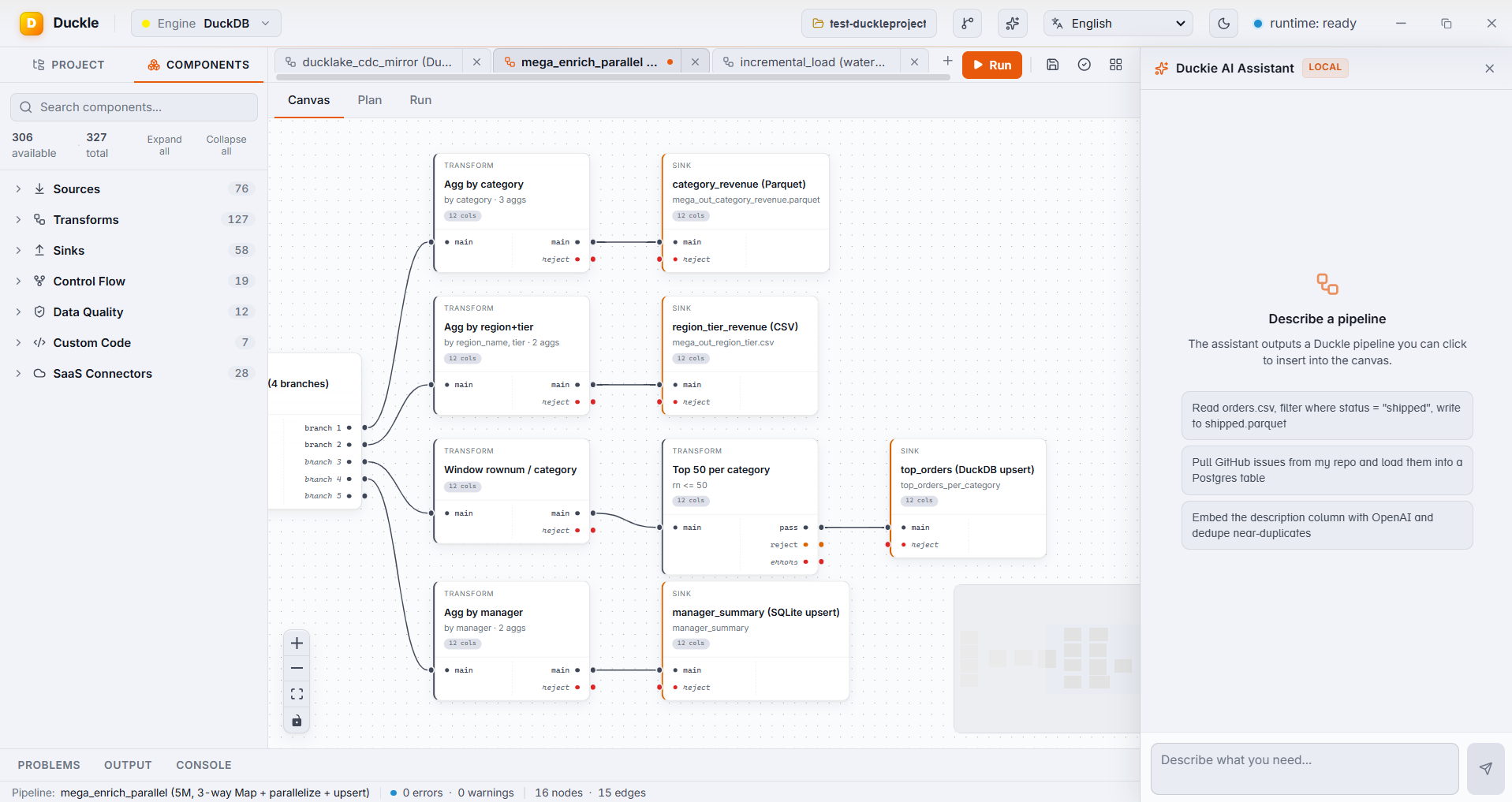
The sidebar on the right is **Duckie AI Assistant** - powered by **Qwen 2.5 Coder 1.5B** running through **llama.cpp**, downloaded once (~1.1 GB) and then run entirely on your CPU. Ask in plain English; Duckie streams back a valid Duckle pipeline definition. One click drops it onto the canvas, ready to inspect, tweak, and run.
| | |
|---|---|
| **Truly local** | The Qwen model runs as a `llama-server` subprocess on `127.0.0.1`. No API keys. No network calls. Disconnect your wifi and it keeps working. |
| **Streamed responses** | Tokens arrive as they're generated, with a blinking caret in the bubble. No "wait 20 seconds for the spinner to vanish" UX. |
| **One-click insert** | When Duckie produces a JSON pipeline, an **Insert into canvas** button appears. The graph populates with positioned nodes, wired edges, and the props the model chose. |
| **Bring-your-own-model option** | The chat plumbing is the same OpenAI-compatible HTTP interface used by `xf.ai.llm` / `xf.ai.embed` connectors. Point `baseUrl` at Ollama, llama.cpp, Cohere, OpenAI, Voyage - anything that speaks the OpenAI shape. |
| **Sandboxed** | The model has no fs / net / tool access. It can only emit text - your pipeline JSON. |
---
## Why Duckle is different
| | |
|---|---|
| **Visual, never opaque** | The canvas compiles to SQL you can read, and every node has a live preview tab. No black box. |
| **Local-first AI** | An assistant that runs on your laptop without an API key. Your prompts, your data, your machine. |
| **Single-file binary, no bundled DB** | ~65 MB app (it embeds the headless runner + MCP server). DuckDB downloads on first launch with a guided step. AI engine is opt-in. |
| **Native speed** | Execution runs through DuckDB: vectorized, columnar, local. A clean-and-export job that crawls in a spreadsheet finishes in milliseconds. |
| **Git-friendly by design** | Pipelines, connections, contexts, and routines persist as plain files in a folder you pick. Diff them, branch them, review them. |
| **362 components ready today** | Files, databases, warehouses, lakehouses, object stores, SaaS APIs, NoSQL, streaming brokers, vector DBs, FTP, IMAP, SMTP. Each is covered by tests. |
| **Honest about scope** | Single-machine and embedded by design. Built to make local and small-team data work fast, not to replace a distributed warehouse. |
| **60 UI languages** | Topbar, palette, chat assistant, properties panel, and common dialogs ship localized. English, Spanish, Chinese (Simplified + Traditional), Hindi, Arabic, Portuguese (Brazil), Bengali, Russian, Japanese, Punjabi, German, Korean, French, Vietnamese, Telugu, Marathi, Turkish, Tamil, Urdu, Persian, Polish, Italian, Ukrainian, Indonesian, Thai, Dutch, Hebrew, Swedish, Greek, Czech, Hungarian, Romanian, Filipino, Malay, Norwegian, Danish, Finnish, Catalan, Bulgarian, Slovak, Croatian, Serbian, Slovenian, Lithuanian, Latvian, Estonian, Khmer, Burmese, Sinhala, Nepali, Swahili, Afrikaans, Welsh, Irish, Icelandic, Albanian, Azerbaijani, Mongolian, Kazakh. RTL (Arabic, Hebrew, Persian, Urdu) supported. Switch languages from the topbar globe. |
| **Open source** | Dual-licensed MIT OR Apache-2.0. Yours to use, fork, and extend. |
---
## Benchmark
### 20M-row CSV into DuckDB
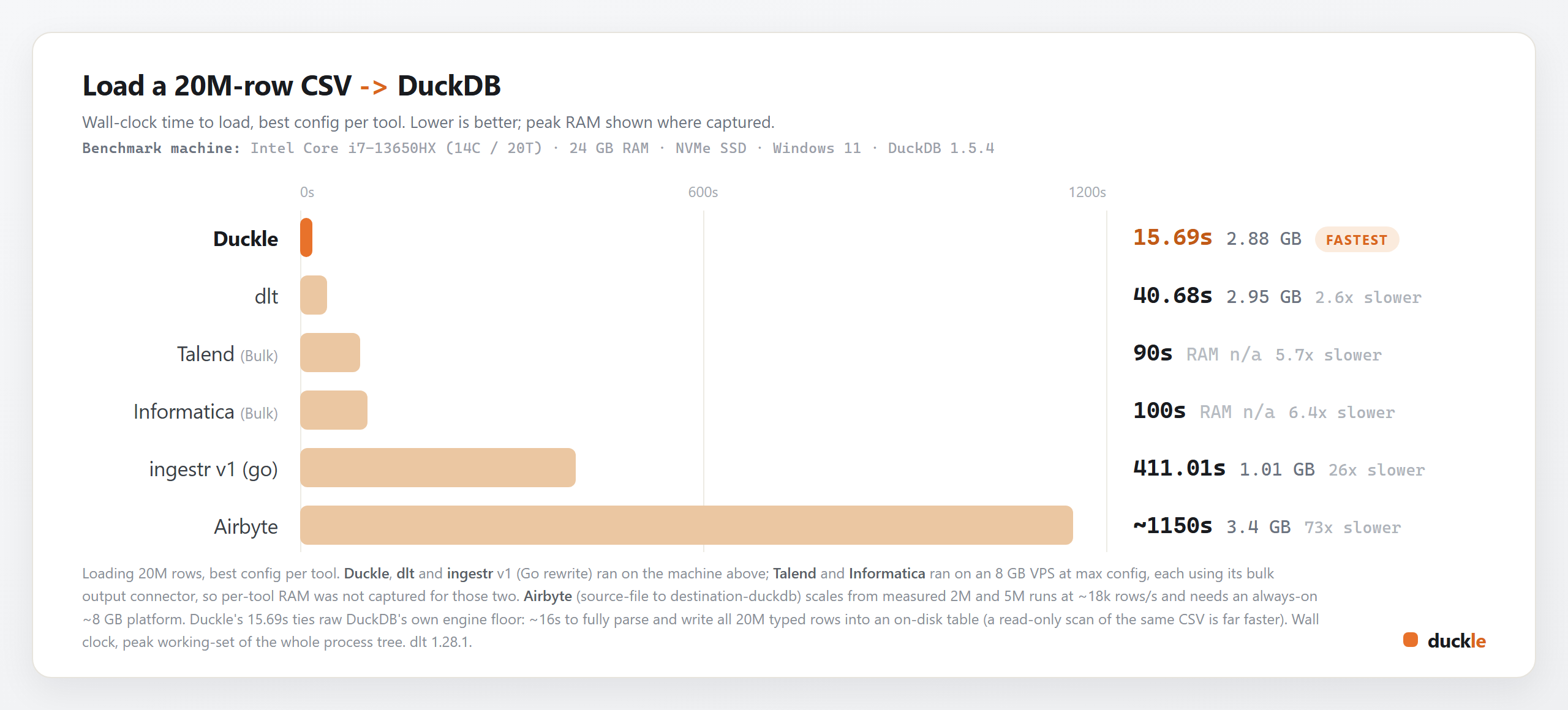
The most common job in data engineering: load a **20M-row CSV into DuckDB**. One identical 2.49 GB file (20M rows of TPC-H lineitem, 16 typed columns), every tool measured at its best configuration, wall-clock time to land the data as a table.
**How it was measured**
- **Machine:** Intel Core i7-13650HX (14C / 20T), 24 GB RAM, NVMe SSD, Windows 11, DuckDB 1.5.4. Duckle, dlt and ingestr ran here.
- **Best config per tool:** dlt used the Arrow plus parquet loader path; Talend and Informatica used their bulk output connectors at max config (their default row-by-row sinks were 5-7x slower). Nothing was left on a slow default to pad the gap.
- **Talend and Informatica** ran on a separate 8 GB VPS, so per-tool peak RAM was not captured for those two.
- **Airbyte** (source-file to destination-duckdb) is scaled from measured 2M and 5M runs at a steady ~18k rows/s, and it also needs an always-on ~8 GB platform just to start.
- Wall-clock time, peak working-set of the whole process tree.
**Why Duckle is this fast:** its 15.69s sits right on top of raw DuckDB's own load floor (~16s to fully parse and write all 20M typed rows into an on-disk table). Duckle wraps the engine with pipelines, connectors, and a UI, then gets out of its way. That is the entire design goal. A read-only scan or aggregate over the same CSV is far faster still; this benchmark measures the heavier "materialize it as a table" job that every ETL tool here performs.
### 96M rows, Postgres to Parquet
A second, harder job against a live database: full-refresh extract of **95,988,640 rows** of TPC-H `lineitem` (14 GB in Postgres 16) out to Parquet.
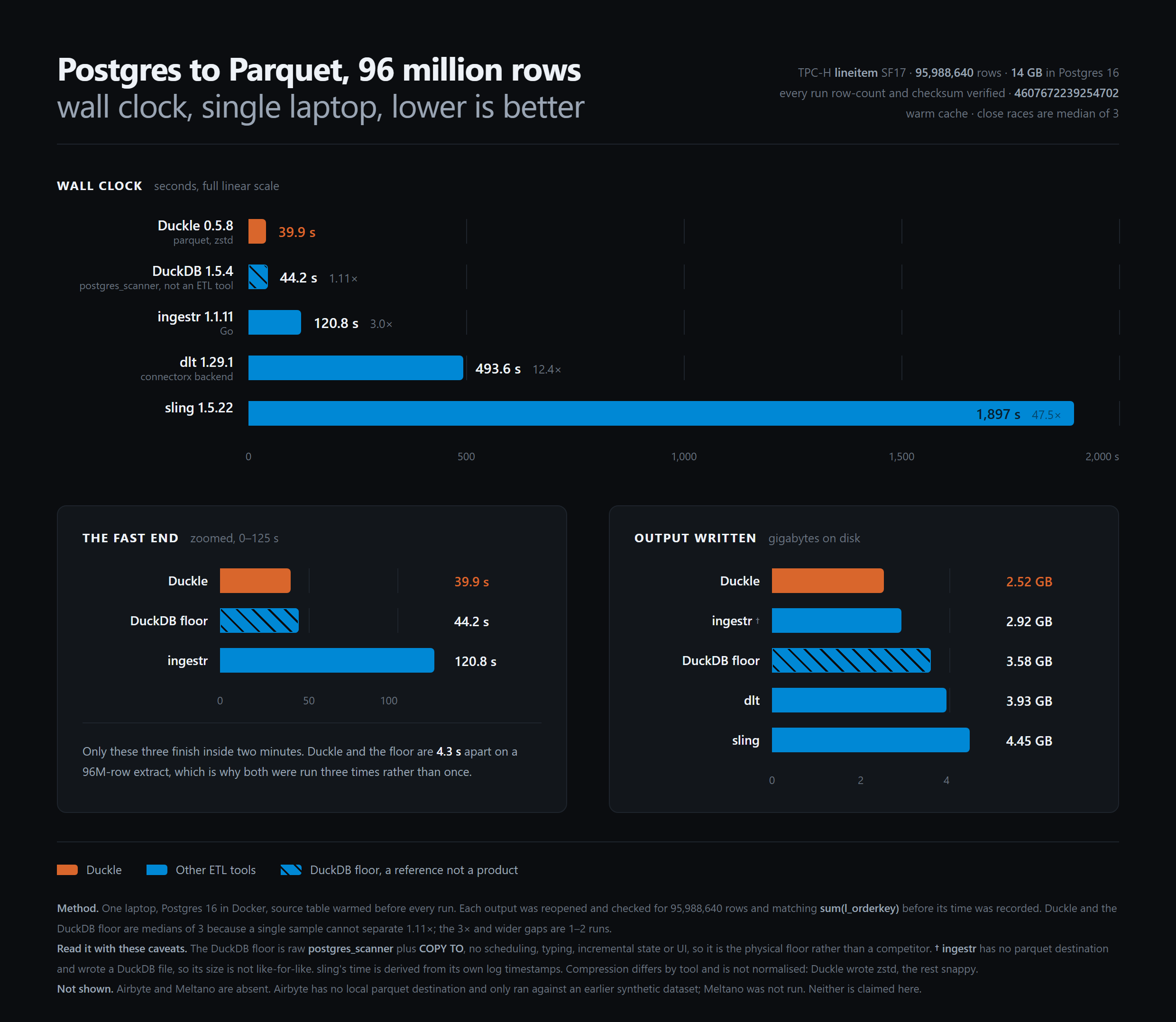
**Run it yourself.** The harness is in this repo at [`benchmarks/pg-to-parquet`](benchmarks/pg-to-parquet). `./bench.sh all` brings up Postgres, generates the data at any scale factor, and times every tool you have installed. No timing is recorded until the output has been reopened and checked for the right row count and the right `sum(l_orderkey)`, so a tool that writes a fast but wrong file gets a failure rather than a number.
**Read it with these caveats**
- **The DuckDB floor is not a competitor.** It is raw `postgres_scanner` plus `COPY TO`: no scheduling, no typing, no incremental state, no UI. It is there to show how much of the clock is the machine reading Postgres. Duckle landing 11% under it is the honest framing, not "Duckle beats DuckDB".
- **ingestr has no Parquet destination** and writes a DuckDB file, so its output size is not like-for-like. Its time is.
- **Compression is not normalised.** Duckle wrote zstd, the others snappy.
- **Airbyte and Meltano are absent.** Airbyte has no local Parquet destination and has only run against an earlier synthetic dataset; Meltano was not wired up. Neither is claimed here.
Hardware, per-run numbers and the two measurement traps that produced wrong figures on the first attempt are written up in [`RESULTS.md`](benchmarks/pg-to-parquet/RESULTS.md).
---
## Status
Duckle is in **public beta**. The visual designer, the DuckDB execution engine, the scheduler, the cloud connectors, and the Duckie AI assistant all work today and are covered by 170+ integration tests across Linux, macOS, and Windows. The catalog is still growing and APIs may evolve before 1.0, but the day-to-day surface is stable enough for real work.
**Scope, stated plainly:** Duckle is a single-machine, embedded studio. If you outgrow one box, point Duckle's output at the system that scales (a warehouse, an object store, a lakehouse). It will not pretend to be a cluster.
The component palette ships **380 nodes** so the roadmap is visible in the product itself:
- **362 available** runs on the DuckDB engine today
- **3 preview** is configurable in the designer (drag, wire, set properties); execution is being wired engine-by-engine
- **15 planned** is reserved in the palette but not yet executable - see [`docs/roadmap.md`](docs/roadmap.md)
---
## Screenshots
Real pipelines, built and run in Duckle - not mockups.
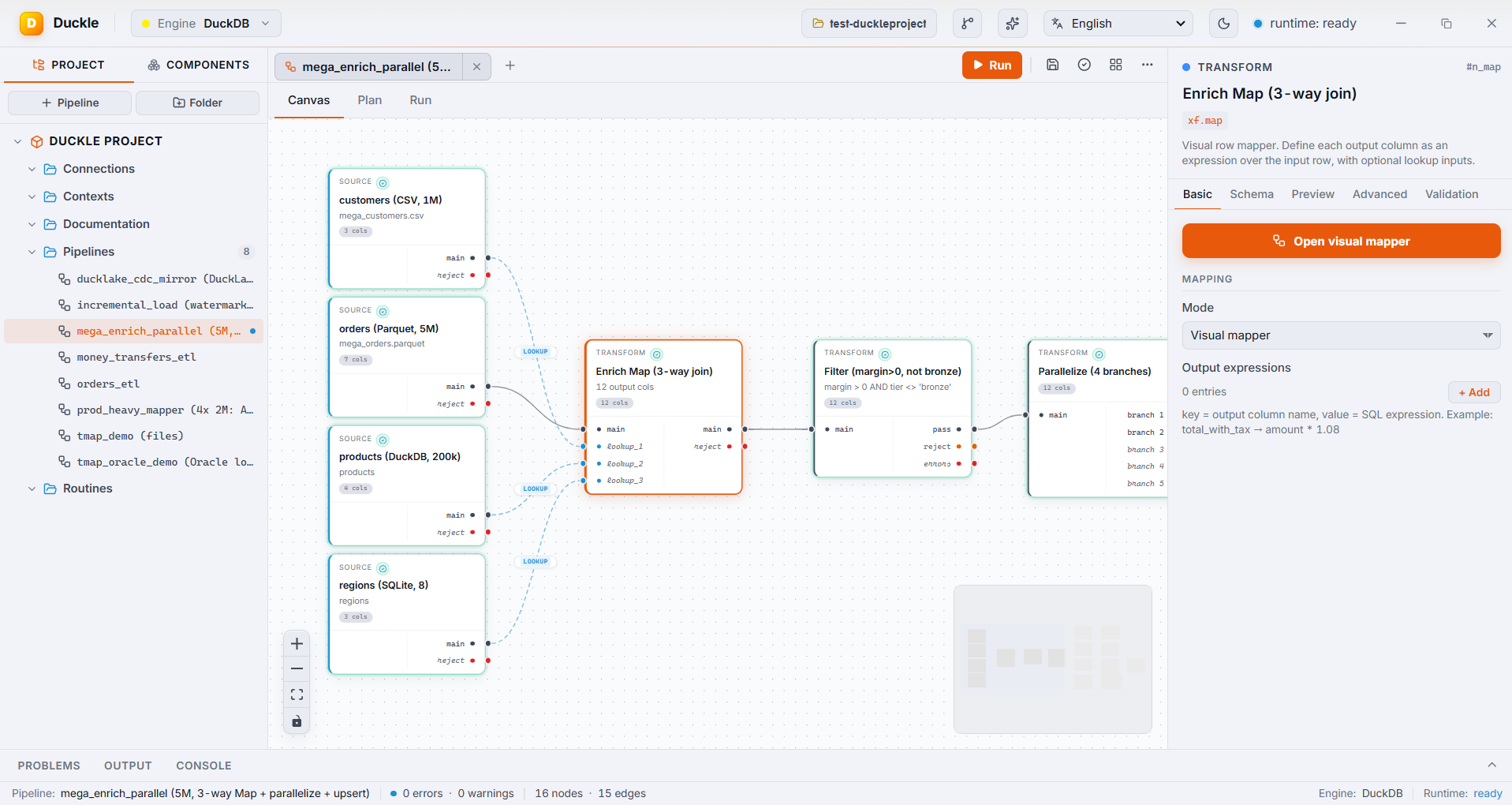
A 5M-row pipeline: a CSV, a Parquet file, a DuckDB table, and a SQLite table enriched through one visual Map (3-way join), no SQL.
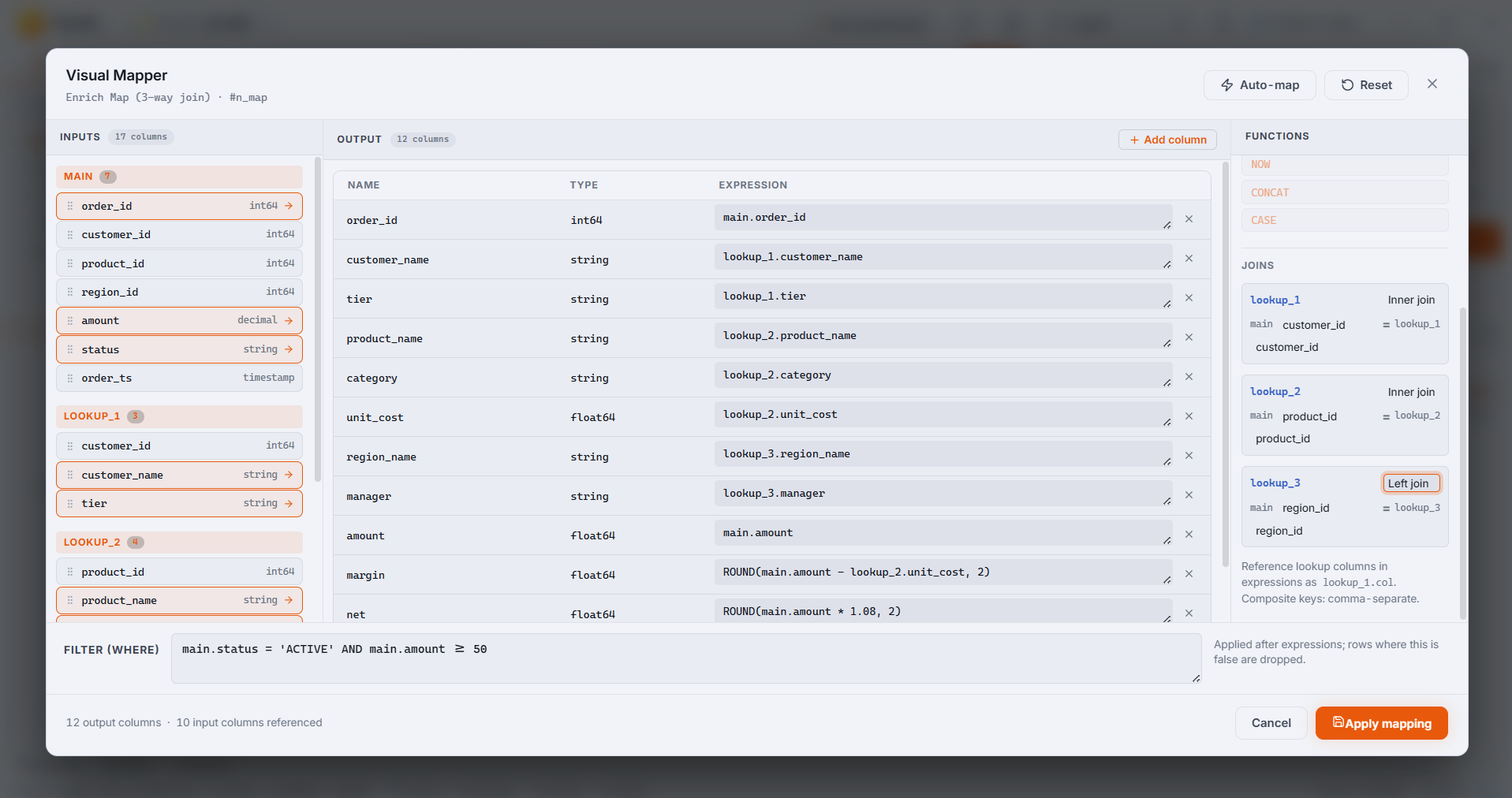
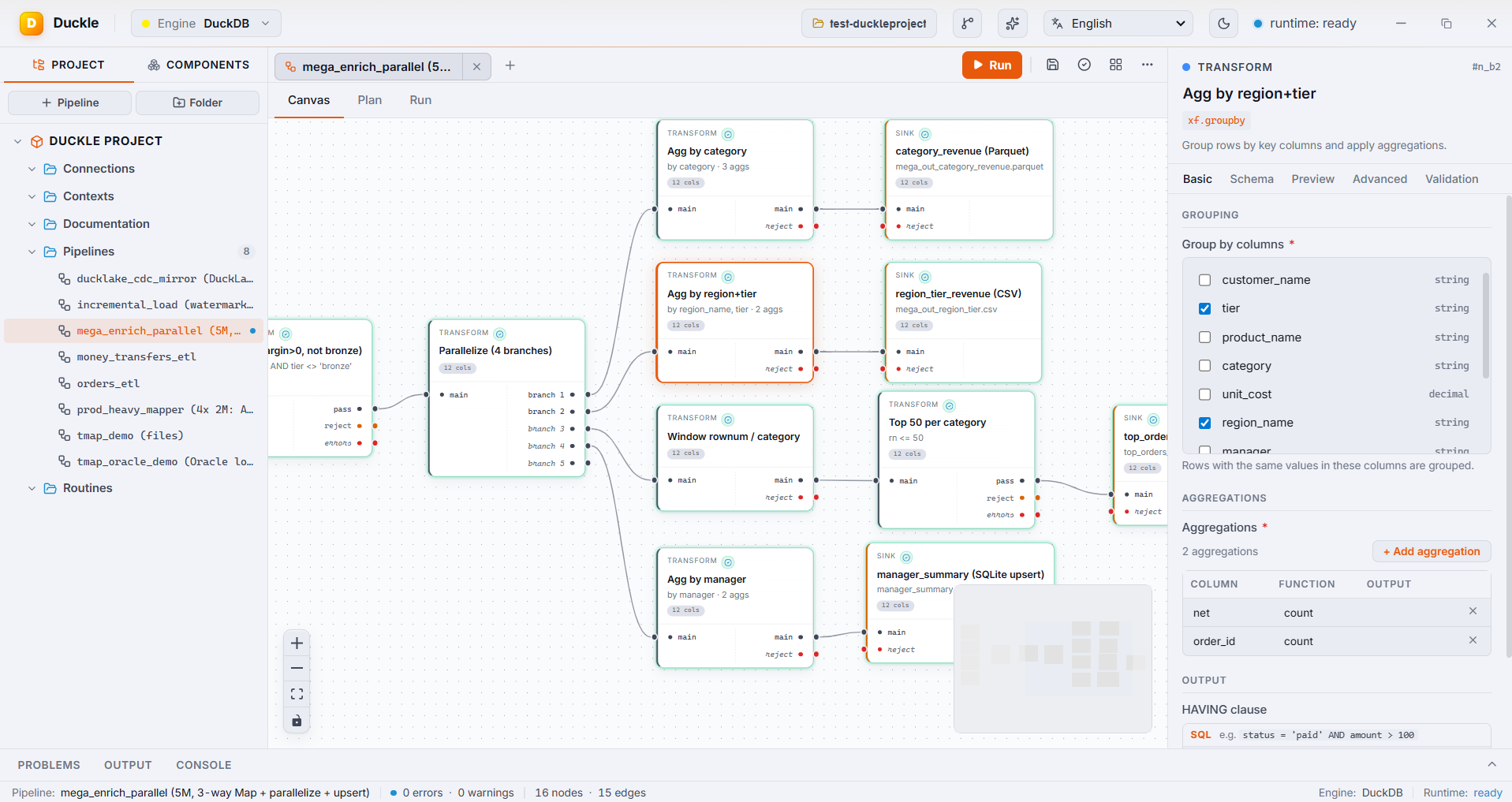
Left: the visual Map editor - main plus lookups, per-output expressions, an inline filter. Right: Parallelize fanning out aggregate, window, and top-N branches.
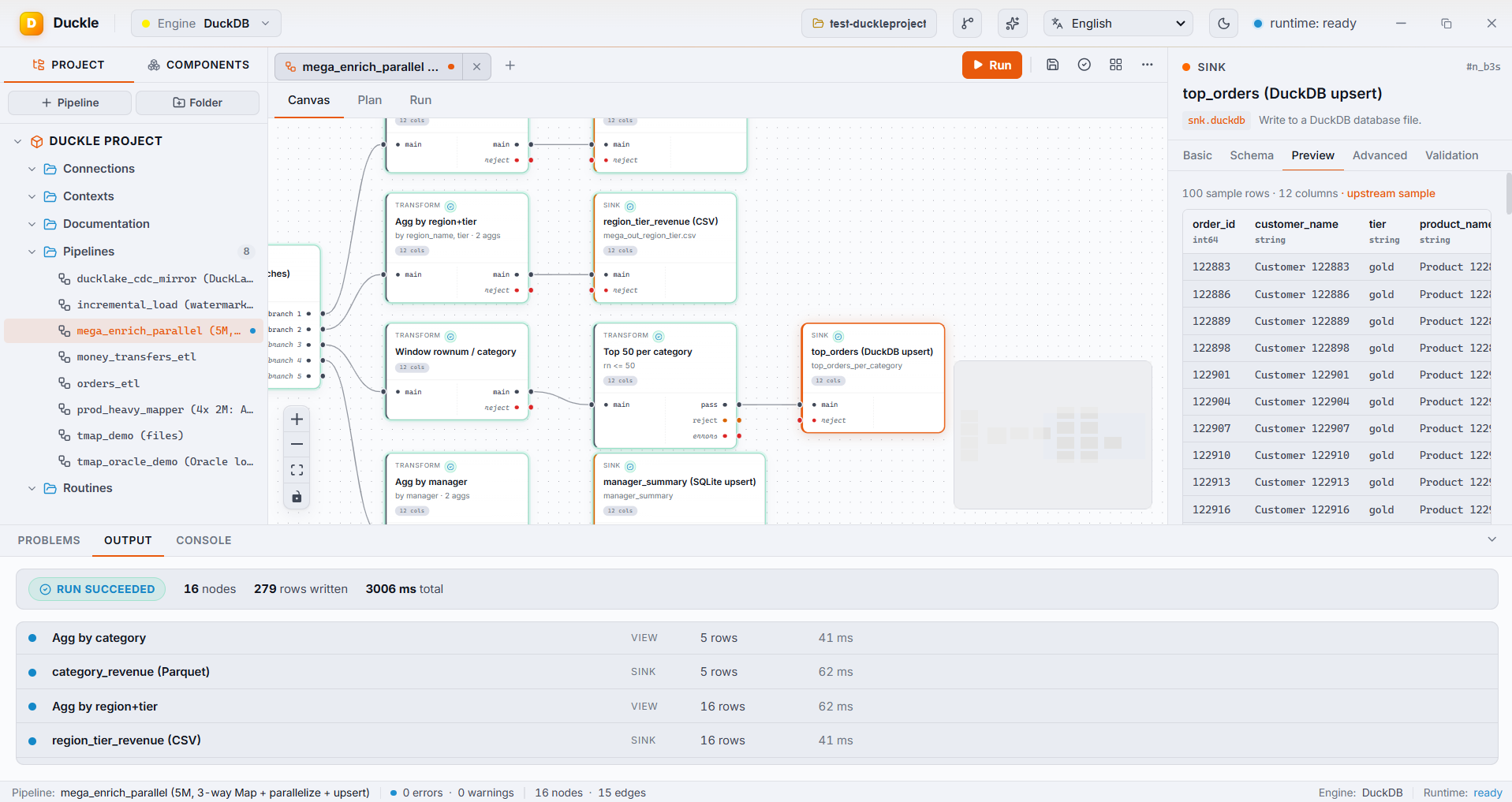
One run, many branches: 16 nodes finish in a few seconds. Concurrency auto-detects from CPU cores; branches write to Parquet, CSV, DuckDB, and SQLite at once.
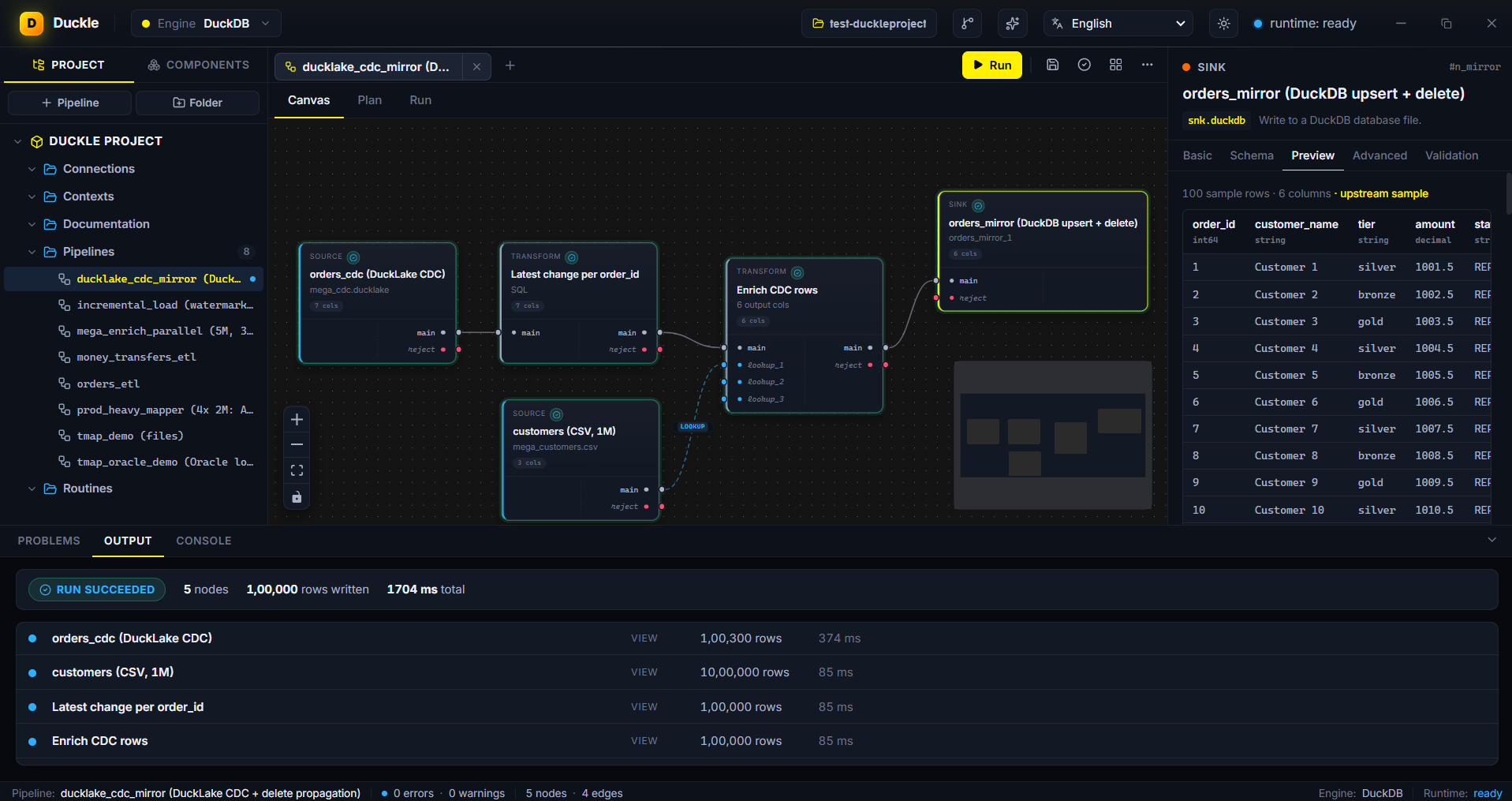
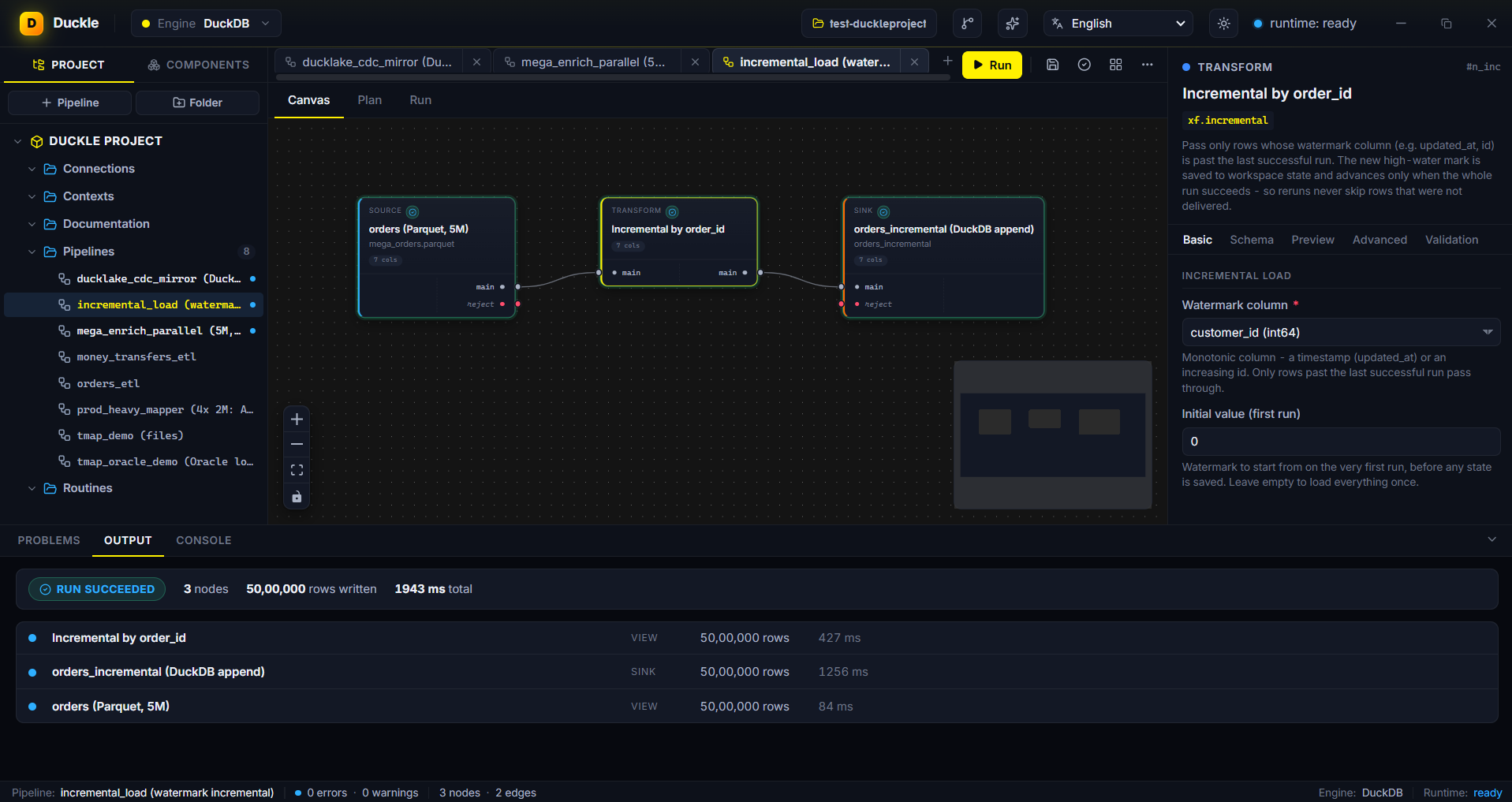
Left: DuckLake CDC change-feed mirrored via upsert + delete propagation (100k rows). Right: watermark incremental load over 5M rows, advancing state only on a fully successful run.
---
## Capabilities
Duckle is not a CSV tool with extras. It reads a broad set of formats and sources, ships a deep transform library, and writes to files, databases, object storage, vector DBs, message buses, and email.
### Sources (103 available)
| Group | Connectors | Status |
|---|---|---|
| **Files** | CSV, TSV, Parquet, JSON, JSONL / NDJSON, Excel (.xlsx), YAML, TOML, Fixed-width (mainframe / banking positional dumps), XML (slash-separated rowPath), Apache Avro (.avro / .ocf, pure-Rust) | Available |
| **Geospatial files** | GeoJSON, Shapefile, GeoPackage, KML, GPX, GML via the `spatial` extension | Available (lazy-loaded) |
| **File Geodatabase** | Esri File Geodatabase (`.gdb`) feature classes via `ST_Read` with a per-layer selector | Available (lazy-loaded) |
| **Hugging Face** | Hugging Face Hub datasets over `hf://` (Parquet / CSV / JSON, globs, revisions); token for private or gated datasets | Available |
| **Lakehouse table formats** | Apache Iceberg, Delta Lake, DuckLake | Available |
| **Embedded databases** | SQLite (read tables), DuckDB (read tables or run a query) | Available |
| **Network relational DBs** | PostgreSQL, MySQL, MariaDB, CockroachDB | Available (live CI for PG + MySQL) |
| **Network relational DBs** | SQL Server (TDS), Oracle (Instant Client at runtime), ClickHouse (HTTP API) | Available |
| **Network relational DBs** | IBM DB2, generic JDBC | Planned |
| **Object storage** | Amazon S3, Google Cloud Storage, Azure Blob, HTTP(S), MinIO, Cloudflare R2, Backblaze B2 | Available (live CI for MinIO) |
| **Cloud warehouses** | MotherDuck, Snowflake (SQL API + PAT/JWT), BigQuery, Redshift (postgres ATTACH), Databricks SQL (Statement Execution + chunk follow), Azure Synapse (TDS), **Teradata** (ODBC, Windows / Linux), **DuckDB Quack** (May 2026 remote protocol - HTTP on :9494, SECRET-based token auth) | Available |
| **Streaming** | Apache Kafka / Redpanda (pure-Rust `rskafka`), NATS JetStream, GCP Pub/Sub (REST + auto-ack), RabbitMQ (`lapin` AMQP), AWS Kinesis (HTTP + SigV4 - no AWS SDK), WebSocket (`ws://` / `wss://`, optional subscribe frame) | Available |
| **Streaming** | Pulsar, Event Hubs, multi-shard Kinesis | Planned |
| **APIs and SaaS (REST)** | Salesforce, HubSpot, Pipedrive, Zendesk, Intercom, Stripe, QuickBooks, Xero, Shopify, Notion, Airtable, Asana, Trello, ClickUp, Monday.com, GitHub, GitLab, Linear, Jira, Slack, Discord, Telegram, Twilio, Mailchimp, SendGrid, Segment - thin pre-configured wrappers over `src.rest` / `src.graphql`. `src.rest` takes a configurable API-key auth header name and offset pagination that stops on a body `total_count`. **Salesforce Bulk** (`src.salesforce.bulk`) - Bulk API 2.0 query source for migration-scale reads: SOQL as an async query job (query / queryAll), paged CSV result sets streamed to disk via `Sforce-Locator`, typed empty relations on 0 records | Available |
| **APIs (protocols)** | OData v4 (follows `@odata.nextLink`), SOAP / generic XML APIs (XML response parsing with namespace local-name match) | Available |
| **Health data (DHIS2)** | `src.dhis2` reads the DHIS2 Web API: aggregate `dataValueSets`, paged metadata lists, tracker exports, and `analytics/dataValueSet.json`. `snk.dhis2` imports back: chunked requests, `importStrategy` (CREATE_AND_UPDATE is DHIS2's upsert), `dryRun`, and real import-summary parsing, so conflicts and a non-zero `ignored` count fail the run instead of passing as a green HTTP 200. Auth via personal access token or HTTP Basic. Raw `/api/analytics` (columnar `headers[]` + `rows[][]`) is not supported | Available |
| **NoSQL and search** | MongoDB (official driver), Cassandra / ScyllaDB (CQL), Elasticsearch / OpenSearch (from+size + search_after), Redis (SCAN + GET), CouchDB (`_all_docs`), DynamoDB (HTTP + SigV4 - no AWS SDK; auto-unwraps typed attributes) | Available |
| **Vector / AI databases** | pgvector (postgres ATTACH), Qdrant (`/points/scroll`), Weaviate (`/v1/objects`), Milvus (`/v1/vector/query`) | Available |
| **Vector / AI databases** | Pinecone (no list-all-vectors API), Chroma, LanceDB | Preview |
| **File transfer** | FTP / FTPS (pure-Rust `suppaftp`) and SFTP (SSH, pure-Rust `russh` + `russh-sftp` on the ring backend; password or private-key auth, optional host-fingerprint pin) - one File Transfer component, pick the protocol. Glob filter, base64 content per file | Available |
| **Mailbox** | IMAP (rustls TLS, `mail-parser`) - basic auth today, OAuth (gmail / o365) on the roadmap | Available |
| **Webhook listener** | Binds `127.0.0.1:port`, collects N inbound HTTP requests with a timeout, parses JSON-object / JSON-array bodies into rows | Available |
| **Desktop** | System clipboard (pure-Rust `arboard`, auto-detects JSON-array shape) | Available |
| **Repos** | Git (commit log or file tree from a local working copy; shells out to system `git` CLI) | Available |
For CSV / TSV sources, the **Schema** panel accepts an optional per-column **Format** (a `strptime` token string such as `%d/%m/%Y`) on Date and Timestamp columns. Several date columns can each parse a different layout in one read - the column is read as text and re-parsed with its own format, working around DuckDB's single global date format. A value that does not match its format becomes null rather than failing the run. Set a Date or Timestamp column's Format to `excel` to convert Excel day-serials correctly. CSV sources also surface `ignoreErrors` (skip unparseable rows) and `nullPadding` (pad short rows with nulls) toggles in the GUI.
For JSON sources, a **Format** selector picks how the file is read (auto / array / JSON Lines / object), and a **skip malformed records** toggle drops records that fail to parse instead of failing the run.
### Transforms (130 available)
| Group | Operations |
|---|---|
| **Fields** | Map (visual mapper: joins a main input to up to 3 lookup inputs with inner / left joins and per-output expressions + filter), Project / Select, Cast, Rename, Add / Drop / Reorder Column, Coalesce, UUID v4 |
| **Rows** | Filter (visual or raw SQL, with reject port), Distinct, Sample, Top N / Limit, Sort, Skip, Top N per Group, Forward Fill, Backward Fill, Constant Fill |
| **Aggregate** | Group By, Rollup, Cube, Count, Window Aggregate, Cumulative, Approx Quantile (t-digest), Approx Count Distinct (HyperLogLog) |
| **Join** | Inner, Left, Right, Full Outer, Cross, Lookup, Semi, Anti, Spatial Join |
| **Set operations** | Union, Union All, Intersect, Except / Minus |
| **Window** | Row Number, Rank, Dense Rank, Lead, Lag, First Value, Last Value, NTile |
| **Strings** | Regex Replace, Regex Extract, Regex Match, Split, Concat, Trim, Case Change, Length, Substring, Format, Hash (md5 / sha1 / sha256), IP Parse, URL Parse, Text Similarity (Levenshtein / Jaro-Winkler / Jaccard), Base64, Pad, Text Match |
| **Date / Time** | Parse, Format, Extract Part, Date Diff / Add, Truncate, Timezone Convert, Time Bin, Current Timestamp, Epoch Convert |
| **Numeric** | Round, Modulo, Absolute, Logarithm, Power, Square Root, Bucketize, Z-Score, Clamp, Sign |
| **JSON / nested** | Parse, Stringify, Flatten, JSONPath Extract, Merge Objects, Array Aggregate, jq Filter (a jq program per row over a JSON column, run in-process by the pure-Rust jaq engine - no external jq, no subprocess) |
| **Array** | Explode / Unnest, Collect List, Element At, Contains, Distinct, Length, Zip Arrays to Table (headings + row-arrays -> one column per heading) |
| **Pivot / shape** | Pivot, Unpivot, Denormalize, Normalize, Transpose |
| **CDC / SCD** | Incremental Load (watermark column; saves the high-water mark to workspace state and advances only on a fully successful run), Diff Detect, SCD Type 1, SCD Type 2 (valid_from / valid_to / is_current), Merge / Upsert (universal across embedded, network, warehouse and Mongo sinks, with optional delete propagation driven by a CDC change-type column), DuckLake CDC change-feed reader, Row Hash (md5 / sha1 / sha256 fingerprint), Audit Stamp (`_loaded_at` / `_loaded_date` / `_source` / `_batch_id`) |
| **AI / Search** | **Vector Similarity Search** (cosine / L2 / inner product over FLOAT[N] via `vss`), **Full-Text Search** (BM25 via `fts`), **Embeddings** (OpenAI-compatible `/v1/embeddings`), **LLM Transform** (per-row chat completion with `{column}` templates), **Classify** (LLM-backed, normalizes to UNKNOWN), **Text Chunker** (RAG-ready, pure local), **PII Redact** (regex - emails / phones / SSNs / cards), **Semantic Dedupe** (cosine over precomputed embeddings) |
| **Geospatial** | Spatial Distance, Length, Perimeter, Area (each auto-picks the planar or spheroidal function from the geometry CRS, and rejects geometry with no CRS), Spatial Buffer (ST_Buffer), Spatial Intersects (ST_Intersects), Flip Coordinates (ST_FlipCoordinates - fix lat,lon vs lon,lat order), Define Projection (ST_SetCRS - stamp a CRS without moving coordinates), Reproject Geometry (ST_Transform between CRS, target CRS preserved on the output), Create Geometry (from X/Y, WKT, or WKB) |
| **Debug** | Log Rows, Assert (hard-fail on SQL predicate violation) |
> **All 6 AI transforms ship today.** Three need a model API (LLM, Classify, Embeddings) and ride the apiKey-in-props pattern; three are pure-local (Chunk, PII Redact, Dedupe).
### Data quality (27 available)
Validators split their input: passing rows continue on the main port, failures route to a **reject** port you can sink, count, or inspect.
| Component | Behavior |
|---|---|
| **Not-Null Check** | Pass rows with no nulls in the chosen columns |
| **Range Check** | Pass rows inside a numeric range (inclusive or exclusive) |
| **Regex Match** | Pass rows whose column fully matches a pattern |
| **Uniqueness Check** | Pass the first row per key; route duplicates to reject |
| **Schema Validate** | Reject rows where any expected column is null |
| **Column Profile** | Per-column stats (count, null %, distinct, min / max, quartiles) via `SUMMARIZE` |
| **Describe** | Column names + types of the input |
| **Histogram** | Value frequencies for one column, most-frequent first |
| **Standardize** | Trim + case-normalize + collapse inner whitespace, in place |
| **Fuzzy Deduplicate** | Keep the first row per near-duplicate cluster |
| **Record Match** | Self-join: emit pairs of rows above a similarity threshold |
| **Address Cleanse** | Address parsing / normalization (planned - needs external lib) |
### Custom code (6 available)
| Capability | What it does |
|---|---|
| **Inline SQL** | Write a `SELECT`; the upstream node is exposed as `input`, result runs as a real materialized stage. A **raw SQL** mode runs verbatim SQL (a leading `WITH` / multiple CTEs / UNIONs) with no input-CTE wrapper |
| **SQL Template** | Parameterized SQL with `${context.var}` substitution |
| **SQL Routines** | Reusable, named SQL saved in the workspace |
| **dbt** | Run a dbt project (or one inline model) as a node, against the pipeline's DuckDB. Wire several upstream sources in and the project reads them all via dbt `sources`, so one project models across Postgres, MySQL, files, and lakes at once. Powered by the dbt Fusion engine, fetched free at first launch (Apache dbt-core fallback); no Python setup. |
| **Shell** | Run any shell command; emits `{stdout, stderr, exit_code, duration_ms}`. Platform-aware default shell. Optional `timeoutMs` kills the child. |
| **WebAssembly UDF** | Per-row WASM transform via pure-Rust `wasmi`. Sandboxed (no fs / net / env). Works with any WASM toolchain (Rust, AssemblyScript, C, TinyGo). |
| **JavaScript UDF** | Per-row JS transform via pure-Rust `boa` interpreter. Sandboxed. Define a `transform(row)` function. |
| **Python / Rust UDFs** | Embedded-language stages | Planned |
### Sinks (64 available)
| Group | Connectors | Status |
|---|---|---|
| **Files** | CSV, TSV, Parquet (ZSTD), JSON, JSONL / NDJSON, Excel (.xlsx), YAML, TOML, XML (configurable wrappers), Avro (schema inferred from first row). Parquet + CSV support Hive-partitioned writes | Available |
| **Geospatial files** | GeoJSON, GeoPackage, Shapefile, KML, GPX via GDAL | Available (lazy-loaded) |
| **Lakehouse** | Apache Iceberg (full table layout), DuckLake - modes: **overwrite**, **append**, **truncate**, **upsert** (set-based delete-by-key + re-insert), **merge** (partial-column `MERGE INTO` that preserves columns the source omits) with optional CDC delete propagation | Available |
| **Embedded databases** | SQLite, DuckDB - modes: **overwrite**, **append**, **upsert** (set-based delete-by-key + re-insert, no PK required), **merge** (partial-column `MERGE INTO` that preserves columns the source omits) with optional CDC delete propagation | Available |
| **Network relational DBs** | PostgreSQL, MySQL, MariaDB, CockroachDB - modes: **overwrite**, **append**, **truncate**, **upsert** (ON CONFLICT / ON DUPLICATE KEY) with optional CDC delete propagation | Available (live CI for PG + MySQL) |
| **Network relational DBs** | SQL Server / Azure Synapse (TDS, multi-row VALUES batched; auto-creates the table if absent; **upsert** via MERGE), Oracle (Instant Client; INSERT ALL, batched per statement; auto-creates the table if absent; **upsert** via MERGE), ClickHouse (HTTP JSONEachRow; upsert by pointing at a ReplacingMergeTree target table) - every MERGE sink supports **CDC delete propagation** (a delete-flag column removes matched rows) | Available (SQL Server + Oracle + MySQL upsert and delete propagation verified live in Docker) |
| **Network relational DBs** | IBM DB2, generic JDBC | Planned |
| **Object storage** | S3, GCS, Azure Blob via DuckDB `httpfs` (MinIO / R2 / B2 via endpoint) | Available |
| **Hugging Face** | Push to a Hugging Face Hub dataset repo (`snk.huggingface`): the upstream is materialized to Parquet and committed over the Hub API (create-repo → preupload → git-LFS → commit); write token required, repo auto-created (public or private) | Available |
| **Cloud warehouses** | MotherDuck, Snowflake (PAT or JWT RS256; **upsert** + delete propagation via MERGE), BigQuery, Redshift, Databricks SQL (**upsert** + delete propagation via MERGE), Azure Synapse, **Teradata** (ODBC), **DuckDB Quack** (concurrent writers to remote DuckDB via the May 2026 protocol) | Available (Snowflake MERGE verified live against the SQL-API emulator) |
| **HTTP APIs** | REST (POST/PUT/PATCH batched JSON-array; configurable API-key auth header name), Webhook (one POST per row), GraphQL mutations | Available |
| **SaaS / CRM** | Salesforce (`snk.salesforce`) - sObject Collections API: **insert / update / upsert (by external Id) / delete**, ≤200 records/request, Bearer token or OAuth 2.0 client-credentials (fresh token minted per run, same auth as `src.salesforce`). **Salesforce Bulk** (`snk.salesforce.bulk`) - Bulk API 2.0 for migration-scale loads: **insert / update / upsert / delete / hardDelete**, DuckDB streams to CSV and each ≤90 MB part runs as an async job | Available |
| **Email (SMTP)** | Per-row SMTP send via pure-Rust `lettre` + rustls. Plain text v1; HTML + attachments follow. | Available |
| **NoSQL** | MongoDB (insert_many batched; **upsert** via replace_one on a key, plus delete propagation via delete_one), Cassandra / ScyllaDB (CQL), Elasticsearch / OpenSearch (`_bulk` NDJSON), Redis (pipelined SET) | Available |
| **NoSQL** | DynamoDB | Planned |
| **Streaming** | Kafka / Redpanda (`rskafka`), NATS JetStream, GCP Pub/Sub (REST + OAuth2), RabbitMQ (`lapin`), WebSocket (`ws://` / `wss://`) | Available |
| **Streaming** | Pulsar, Kinesis | Planned |
| **Vector / AI databases** | pgvector, Pinecone (`/vectors/upsert`), Qdrant (`/points` PUT), Weaviate (`/v1/batch/objects`), Milvus (`/v1/vector/insert`) | Available |
| **Vector / AI databases** | Chroma, LanceDB | Preview (need vendor SDK) |
Database sinks support an optional **dead-letter (validate-before-insert)** step: rows that do not match the declared column types are split off to a dead-letter file (parquet / csv / json) and only the clean rows are inserted.
### Control flow (18 available)
| Component | What it does |
|---|---|
| **Replicate / Tee** | Send the same data to multiple downstream outputs |
| **Merge Streams** | Concatenate multiple input streams (UNION ALL) |
| **Switch / Conditional Split** | Route rows to `case_1..N` outputs by boolean (first match wins); `default` for unmatched |
| **Wait / Delay** | Sleep `N ms / s / min / h` before passing rows through |
| **Throttle** | Inter-stage delay derived from a rows-per-second target |
| **Checkpoint** | Pass rows through and also write a parquet snapshot to a path |
| **Dead Letter Queue** | Terminal sink for rejected rows (JSON / CSV / Parquet) |
| **Run Pipeline** | Inline-execute another pipeline file (`ctl.runpipeline`) |
| **Run Job** | Call a child pipeline (picked from the workspace) passing parent context variables; chain several to build a Master Job (`ctl.runjob`) |
| **Parallelize** | Run the downstream branches wired to its outputs concurrently; branches are unlimited (`ctl.parallelize`) |
| **Iterate** | Run a sub-pipeline N times with `${ITER_INDEX}` substitution |
| **For Each** | Run a sub-pipeline once per input row with `${ITER_ITEM_}` substitution |
| **Try / Catch** | Install a fallback sub-pipeline if the wrapped stage fails |
| **Retry** | Per-stage retry policy (configure on Advanced tab) |
| **Log Message** | Emit an info log line (`{rows}` = upstream count), pass rows through (`ctl.log`) |
| **Warn** | Emit a warning log line, pass rows through (`ctl.warn`) |
| **Die / Fail** | Stop the run with a message: always, only when the input has rows, or only when empty (`ctl.die`) |
| **Schedule** | Cron / interval / file-watch triggers via the orchestration crate |
### Advanced settings (per-node)
Every node has an **Advanced** tab with fields the engine honours at run time:
| Field | What it does |
|---|---|
| **Retry attempts** | Total tries on failure (1 = no retry). Sleeps `backoff * attempt` ms between attempts. |
| **Retry backoff (ms)** | Inter-attempt sleep, linearly scaled by attempt index. |
| **Memory limit (MB)** | `PRAGMA memory_limit` applied to this stage only. |
| **Log row count** | Print the post-stage rowcount to the run output. |
### Orchestration and workspace
| Capability | What it does |
|---|---|
| **Run feedback** | Streaming run events light nodes up stage by stage, with per-node row counts, real mid-query cancel, and run history. |
| **Error traceback** | A failed stage reports the exact compiled SQL plus the underlying DuckDB message, in both the Run view and the NDJSON run log, so any component's failure is debuggable. |
| **Column lineage** | A top-bar **Lineage** button shows, per node, each output column traced back to the source column(s) it derives from. |
| **Dives + dashboards** | Local-first, live-querying, shareable data views, stitched into multi-chart dashboards. Generate a chart from a plain-language question, export a dive to a self-contained HTML file, open standalone `/dive/` and `/dash/` share pages, and find everything in the top-bar **Dives** gallery. |
| **Run logs** | Every run writes component-level NDJSON to `/logs//runtime.log` (start/finish per stage, row counts, durations, `ctl.log` / `ctl.warn` / `ctl.die` messages). Tail it straight into Splunk or Dynatrace. |
| **Schedules** | Cron, fixed-interval, and file-watch triggers, driven by an in-process scheduler. |
| **Context variables** | Per-environment variables; bind any field to one via a Manual / Context dropdown, or reference `${var}` inline. Resolved at run time. |
| **Workspace-relative paths** | Built-in `${workspace}` (alias `${projectroot}`) resolves to the active workspace root, so source / sink paths can be written relative to it and a workspace folder stays portable when copied or moved. No context needed; works in the canvas, schema autodetect, and headless runs. |
| **Run-time path placeholders** | Built-in `${date}`, `${time}`, `${datetime}`, `${timestamp}`, and `${now}` (UTC) stamp the current run time into any path. They resolve fresh on every run (canvas, schedule, headless runner, built bundle), and a sink's parent folder is created automatically, so a path like `${workspace}/exports/${date}/orders.parquet` lands in a new dated folder each day. No context needed. |
| **Cloud credentials** | Saved S3 / GCS / Azure connections become DuckDB SECRETs; cloud reads / writes go through `httpfs`. S3-compatible endpoints (MinIO / R2 / B2) supported via `ENDPOINT` + `URL_STYLE`. |
| **Workspace** | Pipelines, connections, contexts, documents, and routines persist as plain JSON and Markdown files in a folder you choose. |
---
## Clean data before it reaches your AI
Models inherit the quality of their inputs. RAG indexes, embedding stores, and training sets quietly accumulate duplicates, nulls, malformed rows, mixed encodings, and inconsistent schemas. Duckle is built to scrub that data before it lands in a vector store:
- **Deduplicate** with exact Distinct, Uniqueness, and **Fuzzy Deduplicate** (Jaro-Winkler / Levenshtein); use **Record Match** to find near-duplicate pairs with a similarity score
- **Semantic dedupe** with `xf.ai.dedupe` over a precomputed embedding column
- **Profile + describe** every column up front (Column Profile, Describe, Histogram) so issues surface before they reach a model
- **Validate and filter** malformed, empty, or out-of-range records and route failures to a reject port
- **Normalize** types, encodings, casing, and null handling across messy sources (Standardize, Cast, regex / string transforms)
- **Redact PII** (emails, phones, SSNs, credit cards) via `xf.ai.pii` before embedding
- **Chunk + embed** long text via `xf.ai.chunk` -> `xf.ai.embed` for RAG indexing
- **Classify** rows with an LLM (`xf.ai.classify` constrains the model to one of N user-supplied categories)
- **Retrieve with both halves of hybrid search**, locally, no model API required: **Vector Similarity Search** (cosine / L2 / inner product) and **Full-Text Search** (BM25)
- **Land it in your store** - pgvector ships, and **Pinecone**, **Qdrant**, **Weaviate**, **Milvus** all have working sinks that POST batches through each vendor's HTTP API
---
## Engines
Duckle ships a thin shell and installs its engines on first launch.
| Engine | Role | Status |
|---|---|---|
| **DuckDB** | Default execution engine: analytics, file formats, cloud reads, SQL pushdown. Tracking **v1.5.3** (latest stable). A lock-free single-SELECT read (`Engine::query`) powers dives. | Working |
| **Duckie AI Assistant** | Local chat assistant via **llama.cpp** + **Qwen 2.5 Coder 1.5B GGUF**. Downloads ~1.1 GB; runs entirely offline once installed. Managed as a `llama-server` subprocess exposing an OpenAI-compatible API on `127.0.0.1`. | Installable |
| **SlothDB** | Alternate embedded analytical engine ([SouravRoy-ETL/slothdb](https://github.com/SouravRoy-ETL/slothdb)), installed the same way and selectable per pipeline. | Installable |
| **Native** | In-process Rust streaming / incremental engine. | Planned |
### First-launch extension pre-fetch
When the installer downloads the DuckDB CLI it also pre-fetches the extensions Duckle uses, with per-extension progress, so the first time you touch a Postgres source or an Iceberg table there is no surprise network hop mid-pipeline:
`httpfs` (S3 / GCS / HTTP), `azure` (Azure Blob native), `sqlite`, `postgres`, `mysql`, `excel`, `iceberg`, `delta`, `ducklake`, `vss`, `fts`.
`spatial` is lazy-loaded (~50 MB GDAL bundle) - it installs on first use of a geospatial source/sink to keep the initial download small.
---
## Download / Install
Pick the binary for your OS from the [latest release](https://github.com/slothflowlabs/duckle/releases/tag/v0.5.8):
| OS | Asset | How to run |
|---|---|---|
| **Windows** | `Duckle-windows-x64.exe` | Double-click. Unsigned binary - Windows SmartScreen will warn the first time; click "More info" -> "Run anyway". |
| **macOS** (Apple Silicon) | `Duckle-macos-arm64` | `chmod +x Duckle-macos-arm64 && ./Duckle-macos-arm64`. Right-click -> Open the first time to bypass Gatekeeper. |
| **Linux** (x86_64) | `Duckle-linux-x64` | `chmod +x Duckle-linux-x64 && ./Duckle-linux-x64`. Requires WebKitGTK 4.1 (`libwebkit2gtk-4.1-0` on Debian / Ubuntu). |
The single-file binary above is all you need for **Build Pipeline** too: the headless runner is embedded into the app at build time, and exporting a pipeline produces ONE self-contained executable (the engine, the DuckDB CLI, any needed extensions, and the resolved pipeline are all inside that one file). Copy that single file to your server and run or schedule it - no separate runner download required.
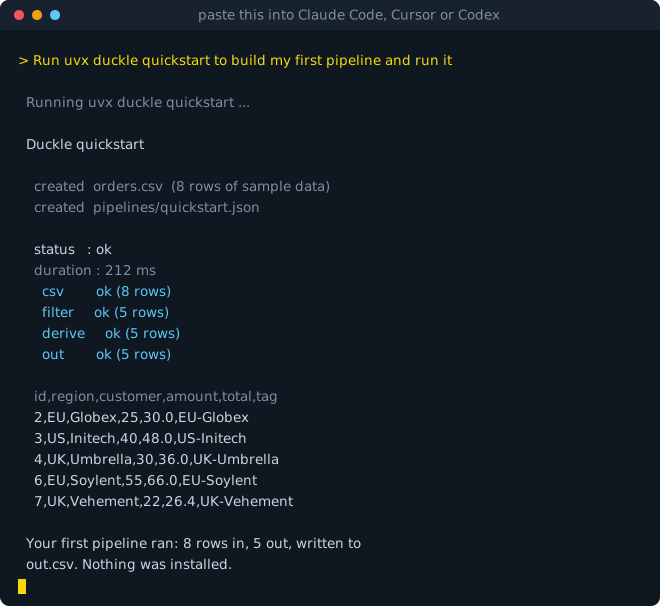
One command, nothing installed: it scaffolds sample data and a pipeline, compiles it to SQL, runs it on DuckDB, and shows you the rows.
```sh
uvx duckle quickstart
```
### Let an agent do it
Paste this into Claude Code, Cursor, or Codex:
> Run `uvx duckle quickstart` to build my first pipeline and run it
Nothing to install first. The agent fetches Duckle and the DuckDB engine on demand, runs a real pipeline, and shows you the rows.
### CLI only (CI, cron, containers)
If you do not want the desktop studio, install just the headless runner. It is about 20 MB rather than ~100 MB, has no GUI dependency, and is what a build step actually needs.
```sh
pip install duckle
```
That is the whole install. It brings the DuckDB CLI with it (via the [`duckdb-cli`](https://pypi.org/project/duckdb-cli/) package published by the DuckDB Foundation), so there is nothing else to fetch and it works offline. Wheels ship for Linux, macOS and Windows on x86-64 and arm64.
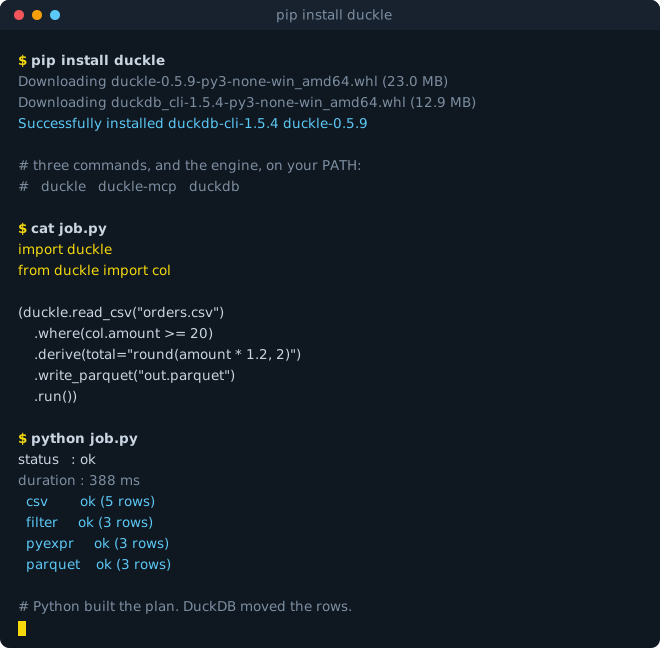
It also gives you a Python API, where pipelines are built as code and executed by DuckDB rather than by Python:
```python
import duckle
from duckle import col
(duckle.read_csv("orders.csv")
.where(col.amount >= 20)
.derive(total="round(amount * 1.2, 2)")
.write_parquet("out.parquet")
.run())
```
Python expressions compile to vectorized SQL at plan time, so no rows pass through the interpreter. See [the PyPI page](https://pypi.org/project/duckle/) for the full API.
The same package provides the `duckle` command-line runner for CI, cron, and containers - it bundles the headless runner and the MCP server per platform:
```sh
pip install duckle # or run ad hoc, no install: uvx duckle --help
```
Pipelines execute as SQL on the DuckDB CLI, so the runner needs a `duckdb` on PATH or `DUCKLE_DUCKDB_BIN` set (`pip install duckdb-cli` is the quickest route). Validation does not:
```sh
duckle validate # compile-check every pipeline under ./pipelines
duckle validate --json # machine-readable, for a CI step
duckle --pipeline my.json # run one
```
`validate` opens no source and writes no sink, so it needs no engine, no credentials and no network. Exit codes are stable: `0` clean, `1` a real finding (a pipeline failed or did not compile), `2` the runner could not start (bad usage, unreadable file, missing engine).
The binary is ~55-78 MB depending on platform (it embeds the headless runner and the bundled MCP server). On first launch you'll be guided through downloading two engines into your app-data directory:
| Engine | Size | Required? | What it powers |
|---|---|---|---|
| **DuckDB CLI** | ~30 MB + extensions | **Yes** - cannot run pipelines without it | Every source / transform / sink that runs as SQL |
| **Duckie AI Assistant** | ~1.1 GB (llama-server + Qwen 2.5 Coder 1.5B GGUF) | Optional | The chat sidebar that generates pipelines from natural language |
App-data location:
- Windows: `%APPDATA%\io.duckle.app\engines\`
- macOS: `~/Library/Application Support/io.duckle.app/engines/`
- Linux: `~/.config/io.duckle.app/engines/`
Delete the `engines/` folder if you ever want to force a fresh install.
---
## Quickstart (60 seconds)
1. **Download** the binary for your OS (see [Download / Install](#download--install) above) - or [build from source](#build-from-source).
2. **Launch it.** First run shows the setup modal:
- Click **Install** on DuckDB (required, takes ~30 s).
- Optionally click **Install** on Duckie AI Assistant (~1.1 GB, takes 5-10 min on average broadband).
3. **Pick a workspace folder.** Pipelines, connections, context variables, and routines live there as plain files.
4. **Build a pipeline two ways:**
- **Drag + wire**: drag a **CSV source** in, point it at [`samples/orders.csv`](samples/orders.csv), hit **Autodetect schema**. Drag a **Filter**, wire it up. Drag a **Parquet sink** with an output path. Press **Run**, watch the nodes light up.
- **Ask Duckie**: click the **Sparkles** icon (top-right of the toolbar), type *"read orders.csv, filter where status = 'paid', write to paid.parquet"*. When Duckie streams back a pipeline, click **Insert into canvas**.
5. **Inspect.** Click any node to see its generated SQL in the **Plan** tab and a live row sample in the **Preview** tab.
That's a real, native ETL pipeline built and run in under a minute. CSV is just the easiest first node; swap in Parquet, JSON, S3, Snowflake, MongoDB, or Stripe the same way.
---
## Run your first pipeline
A worked example using the bundled `samples/orders.csv` data.
### 1. Add a source
- Open the **Components** sidebar (left). Click **Sources -> Files -> CSV**.
- Drag it onto the canvas.
- In the right-side Properties panel:
- **Path**: browse to `samples/orders.csv`
- Click **Autodetect schema** - the **Schema** tab fills in column types from the file, the **Preview** tab shows the first 20 rows.
### 2. Add a transform
- **Components -> Transforms -> Rows -> Filter**. Drag onto canvas.
- Wire the CSV source's `main` output port to the Filter's `main` input.
- In Properties:
- **Predicate**: `status = 'paid'` (you can write raw SQL or use the visual builder)
- Filter has two output ports: `pass` (rows matching) and `reject` (rows that don't).
### 3. Add a sink
- **Components -> Sinks -> Files -> Parquet**.
- Wire Filter's `pass` port to the Parquet sink.
- **Path**: `paid_orders.parquet`. **Write mode**: `overwrite`. **Compression**: `zstd`.
### 4. Run it
- Press **Run** in the toolbar. Nodes light up in execution order; row counts appear under each.
- Open the **Output** tab (bottom panel) to see per-stage timing.
- Click any node to inspect generated SQL in **Plan** + sampled rows in **Preview**.
### 5. Iterate
- Add a **Group By** before the sink to aggregate. Re-run. Sub-second on small data.
- Cancel mid-run with the **Stop** button - the DuckDB process is killed cleanly.
- Save your work: **Cmd/Ctrl-S** writes a JSON pipeline file to your workspace folder.
---
## How to use Duckle
A wider tour of the workflow.
| Step | What you do | Where to look |
|---|---|---|
| **1. Sources** | Drag a source, point it at a file / DB / cloud URL / SaaS endpoint. Click **Autodetect schema** to read columns + a sample. | [Sources reference](#sources-101-available) |
| **2. Transforms** | Wire transforms to source output ports. Configure in the Properties panel. **Preview** tab shows live rows; **Plan** tab shows generated SQL. | [Transforms reference](#transforms-130-available) |
| **3. Data quality** | Drop in a validator (Not-Null, Range, Regex, Uniqueness). Passing rows continue on the main port; failures route to the **reject** port. | [Data quality reference](#data-quality-27-available) |
| **4. Sinks** | Finish with a sink (file, DB, cloud, vector DB, message bus, email). Set write mode (overwrite, append, truncate, upsert). | [Sinks reference](#sinks-63-available) |
| **5. Run** | Press **Run** to execute on DuckDB. Nodes light up stage by stage; **Output** + **Console** show row counts, timing, errors. Stop button kills mid-run. | [Run feedback](#orchestration-and-workspace) |
| **6. Ask Duckie** | For anything you can describe in English, the AI assistant can sketch a pipeline. Iterate by editing the graph or asking follow-ups. | [Meet Duckie](#meet-duckie---the-local-ai-pipeline-assistant) |
| **7. Reuse** | Save Connections, Context variables, and SQL Routines in the workspace; reference `${context.var}` in any field. Everything persists as plain files. | [Workspace and Git flow](#workspace-and-git-flow) |
| **8. Schedule** | Attach a cron, interval, or file-watch trigger to run a pipeline automatically. | [Schedules and triggers](#schedules-and-triggers) |
---
## Recipes and examples
Ready-to-adapt patterns. Each one is a few nodes you wire on the canvas (or ask Duckie to sketch).
### CSV cleanup
> "Read orders.csv, drop nulls, deduplicate by order_id, write to orders_clean.parquet"
```
src.csv -> qa.not_null -> qa.uniqueness -> snk.parquet
```
Set `qa.not_null` to the columns that must be present; set `qa.uniqueness` to `order_id`. Rejected rows go to a `snk.csv` on the `reject` port for inspection.
### Postgres -> Snowflake nightly load
> "Read all rows from Postgres `events`, upsert into Snowflake table `analytics.events` on `event_id`"
```
src.postgres -> snk.snowflake (mode=upsert, conflict=event_id)
```
Attach a `ctl.schedule` with cron `0 2 * * *` to run nightly at 02:00.
### S3 -> partitioned Parquet
> "Read all .json.gz files in `s3://logs/2026/*/*.json.gz`, parse, write Hive-partitioned by `event_date`"
```
src.s3 (glob, autodetect json.gz)
-> xf.derive (event_date = CAST(ts AS DATE))
-> snk.parquet (path=out/, partitionBy=event_date, mode=overwrite_or_ignore)
```
### RAG ingestion
> "Chunk our docs, embed with OpenAI, dedupe near-identicals, store in pgvector"
```
src.s3 (markdown files)
-> xf.ai.chunk (chunkSize=1500, overlap=150)
-> xf.ai.pii (redact)
-> xf.ai.embed (model=text-embedding-3-small, baseUrl=https://api.openai.com)
-> xf.ai.dedupe (threshold=0.95)
-> snk.pgvector (table=docs)
```
### Slack channel digest
> "Pull yesterday's Slack messages from #support, classify by sentiment, email a summary"
```
src.slack (channels.history with oldest=yesterday)
-> xf.ai.classify (categories=positive,negative,neutral)
-> xf.aggregate (group by sentiment, count)
-> snk.email (to=oncall@..., subject=Daily Support Digest)
```
### Webhook -> S3 archive
> "Receive 100 webhooks, archive each one as JSON in S3"
```
src.webhook (port=8080, maxRequests=100, timeoutMs=300000)
-> snk.s3 (path=s3://archive/events/, format=jsonl, partitionBy=event_date)
```
### Git commit-log analytics
> "Build a dashboard of who's been committing what in the last 30 days"
```
src.git (mode=log, maxRows=10000)
-> xf.filter (date > current_date - INTERVAL '30 days')
-> xf.aggregate (group by author_email, count)
-> snk.csv (path=author-stats.csv)
```
More examples live in [`samples/`](samples) - drop the pipeline files into a workspace and open them.
---
## Git integration (GitHub + GitLab)
> Push, pull, branch, and watch CI from inside Duckle. No terminal required.
Click the **Git icon** in the topbar to open the workspace Git panel. Built-in integration with GitHub and GitLab, on the system `git` CLI (no FFI, no embedded git library):
| Feature | What it does |
|---|---|
| **Status snapshot** | Current branch, ahead/behind counts, list of modified / staged / untracked / conflicted files |
| **Stage all + commit** | One-click `git add -A && git commit -m "..."` with your message |
| **Push / Pull** | `git push` and `git pull --ff-only` against `origin`. The button stays disabled when there's nothing to push |
| **Branch list, switch, create** | Lists local branches; click to switch; create new branches inline |
| **Remote URL config** | Add or change `origin` URL from inside the panel - auto-detects GitHub vs GitLab from the host |
| **PAT-prompt fallback** | First tries `git push` using your system credential helper (GitHub CLI, osxkeychain, manager-core). On a 401, prompts for a Personal Access Token, saves it AES-encrypted in `/.duckle/secrets/git.json` (auto-gitignored), retries with the token injected into the HTTPS URL |
| **CI build badge in topbar** | Polls GitHub Actions or GitLab CI every 30 s for the latest pipeline on your current branch. Shows green / red / yellow / gray. Click to open the build in your browser |
**Workflow.** Workspaces are plain folders (see [Workspace and Git flow](#workspace-and-git-flow)) - any standard Git workflow works:
```
Create / clone -> open in Duckle -> edit pipelines -> commit + push ->
PR / MR -> CI runs your pipeline tests -> merge -> pull
```
You can do the entire push / pull / merge loop without leaving Duckle. Heavy operations (interactive rebase, conflict resolution, log archaeology) still live in your terminal or external Git tool - the panel is designed for the everyday flow, not as a full Git replacement.
**Provider detection.** The remote URL host determines which CI API the badge polls:
| Provider | CI source | API |
|---|---|---|
| `github.com` | GitHub Actions | `GET /repos/{owner}/{repo}/actions/runs` |
| `gitlab.com` or self-hosted GitLab | GitLab CI | `GET /api/v4/projects/{id}/pipelines` |
| Other / bitbucket | (no CI badge for now) | - |
The badge uses the same PAT you saved for pushes - no separate auth step.
---
## Workspace and Git flow
A workspace is a folder you pick on first launch. Everything you build lives there as plain text:
```
my-workspace/
pipelines/
orders_etl.pipeline.json # the node graph
nightly_load.pipeline.json
connections/
prod-postgres.connection.json # saved DB credentials (encrypted)
snowflake-analytics.connection.json
contexts/
dev.context.json # variables for dev environment
prod.context.json
routines/
cleanse-addresses.sql # reusable SQL snippets
documents/
runbook.md # plain-Markdown docs
schedules.json # all scheduled runs in this workspace
run-history/
orders_etl/ # one folder per pipeline
2026-05-25T14-30-00.json # one file per run
```
**Git-friendly by design.** Every file is human-readable JSON or Markdown. Standard workflows work:
```bash
git init my-workspace && cd my-workspace
git add . && git commit -m "Initial pipelines"
# Pull a teammate's update
git pull --rebase
# Push your changes
git push
# Branch for a risky migration
git checkout -b feature/upsert-mode
# ...edit pipelines in Duckle...
git diff # readable JSON diffs
git push -u origin feature/upsert-mode
# open PR / MR
```
**Sensitive values** in connections get encrypted with a workspace-local key (`workspace/.duckle/keys/`). Don't commit that file - add `**/.duckle/keys/` to `.gitignore`. The connection JSON files themselves only hold the ciphertext, which is safe.
---
## Schedules and triggers
Pipelines can run on cron, fixed interval, or file-watch triggers. Configure these in the **Schedule panel** (toolbar -> Schedule icon), not as graph nodes.
| Trigger type | Config | Example |
|---|---|---|
| **Cron** | Standard 5-field cron expression with optional timezone | `0 2 * * *` (every day at 2 AM) |
| **Interval** | `every N {seconds, minutes, hours, days}` | `every 15 minutes` |
| **File watch** | Watch a directory for new/changed files matching a glob | `/inbox/*.csv` |
| **Manual** | Run-on-demand only (the default) | - |
Schedules persist to `workspace/schedules.json` and execute via the in-process scheduler crate. They survive app restarts but require Duckle to be running.
For headless / always-on schedules that run when Duckle is closed, build the pipeline into a standalone file and let the operating system's own scheduler run it - see [Server deployment](#server-deployment-build-pipeline) below.
---
## Server deployment (Build Pipeline)
The in-app scheduler runs only while Duckle is open. To run a pipeline on a server with no desktop app, **Build Pipeline** turns it into ONE self-contained executable - the equivalent of a standalone "Job".
Right-click a pipeline (in the project tree or on the canvas) and choose **Build Pipeline**. The output is a single file named after the pipeline (`orders_etl.exe` on Windows, `orders_etl` on macOS / Linux) that embeds everything it needs:
- the headless execution engine,
- the DuckDB CLI,
- only the DuckDB extensions that pipeline's components actually use,
- the resolved pipeline (context variables substituted, routines inlined),
- its secrets (see below).
On first run it self-extracts to a temp cache and uses its **own** embedded DuckDB, so the server needs nothing installed - no Duckle, no DuckDB. There is no folder to copy, no `run.sh`, and no separate runner download. A CSV-to-CSV pipeline builds to about 28 MB; only the extensions a pipeline uses are bundled, so the file stays lean.
```bash
./orders_etl # or orders_etl.exe on Windows
```
The process exits `0` on success and non-zero on failure, and writes the same NDJSON run logs under `logs/` (Splunk / Dynatrace friendly).
**Build options**
| Option | What it does |
|---|---|
| **Target OS** | Pick **Windows**, **Linux**, or **macOS** in the build dialog. The native OS always builds; a **Linux** server file can be cross-built from any host (the Linux engine is bundled for you), while a macOS file can only be produced on a Mac. Appending the payload makes the file unsigned, so do not codesign / Authenticode-sign it. |
| **Context** | Pick a context at build time; its non-secret variables are baked into the pipeline. |
| **Secrets: Environment** | Each secret becomes a `${ENV:KEY}` placeholder, so nothing sensitive is written into the file. The runner resolves real environment variables first, then a `secrets.env` (KEY=VALUE lines) placed next to the file. |
| **Secrets: Passphrase** | Secrets are encrypted inside the file with AES-256-GCM, decrypted at run time from the `DUCKLE_BUNDLE_PASSPHRASE` environment variable. |
**Schedule it** with whatever the server already has - point the OS scheduler straight at the file:
```cron
# Linux cron - run every day at 02:00
0 2 * * * /opt/duckle/orders_etl >> /var/log/orders_etl.log 2>&1
```
On Windows use **Task Scheduler**; on macOS a **launchd** plist; on Linux a **systemd** timer. Full examples in [docs/current/scheduler.md](docs/current/scheduler.md).
**Run against an existing workspace** - the same embedded headless runner can also execute a pipeline JSON directly, resolving context the way the app does:
```bash
duckle-runner --pipeline /path/to/pipeline.json [--workspace /path/to/workspace] [--duckdb /path/to/duckdb]
```
### Web panel (remote management console)
To run and monitor pipelines on a server with a browser instead of the desktop app, start the built-in **web panel** - it is part of the same `duckle-runner` binary, so there is nothing extra to install:
```bash
duckle-runner serve --port 8080 --workspace /path/to/workspace
```
Open `http://localhost:8080`. The panel has three views:
- **Operations** - run history across every pipeline (status, duration, rows, errors) with expandable per-pipeline run logs and optional auto-refresh.
- **Pipelines** - every pipeline in the workspace with its last status and an editable interval schedule.
- **Run** - trigger any pipeline on demand and see its per-node result.
Runs execute in-process through the same engine, are written to the same run history (`/runs/`) and logs (`/logs/`), and a built-in scheduler triggers any pipeline whose interval has elapsed - so the server itself runs your schedules, no OS cron needed. There is **no authentication**: bind it to `127.0.0.1` (the default) or a trusted network, and put it behind a reverse proxy if you need TLS or a login. Use `--host 0.0.0.0` to accept remote connections.
---
## MCP server (connect Claude or any LLM to Duckle)
Duckle ships its own [Model Context Protocol](https://modelcontextprotocol.io)
server, so Claude (or any MCP client - Claude Desktop, Claude Code, Cursor, or
any other LLM agent) can drive Duckle directly: browse the full component catalog
and per-component property schemas, **generate a pipeline straight into a working
directory you choose**, validate it (compile without running), run it headlessly,
read existing pipelines and their run logs, build a standalone artifact, and
manage saved connections.
### Connect with nothing installed
If you have [uv](https://docs.astral.sh/uv/), one line connects any MCP client. Nothing is installed, no engine to configure: uv fetches the package and the DuckDB engine into a throwaway environment and the server finds it there.
```sh
claude mcp add duckle -- uvx duckle mcp
```
For Claude Desktop, Cursor, or any other client, the same thing as config:
```json
{ "mcpServers": { "duckle": { "command": "uvx", "args": ["duckle", "mcp"] } } }
```
`uvx duckle mcp` works because the package and the command are both named `duckle`, so there is no `--from` to remember. If you would rather install it, `pip install duckle` puts `duckle` on PATH and the same `duckle mcp` command applies.
Then ask the agent something like *"use duckle to list the available components"*. It can discover a real connector rather than guess one, compile-check a pipeline with `validate_pipeline` **before anything executes**, run it, and hand back column-level lineage. What it produces is the same JSON the canvas opens, so you can see what it built.
### Connect in one click
The MCP server is also **bundled inside the app** - there is nothing extra to install.
In the designer, click **Connect to Claude** in the top bar to open the connector
popup, then pick your client:
- **Connect to Claude Code** - registers the `duckle` server for you (runs
`claude mcp add` under the hood).
- **Add to Claude Desktop** / **Add to Cursor** - writes the `duckle` entry into
that client's config, with the resolved engine paths filled in (both the
Microsoft Store / MSIX and standalone Claude Desktop layouts are handled).
- Or copy the command / config for any other MCP client.
Restart the AI client, then try *"Use duckle to list the available components"*
to confirm the connection.
### Manual / headless
For a build-from-source or server setup, point any client at the `duckle-mcp`
binary directly. It speaks JSON-RPC over stdio and reuses the DuckDB engine
in-process (no GUI, no Node runtime).
```bash
cargo build -p duckle-mcp --release # target/release/duckle-mcp
claude mcp add duckle -- /path/to/duckle-mcp
```
For Claude Desktop and other clients, add it to `mcpServers`:
```json
{
"mcpServers": {
"duckle": {
"command": "/path/to/duckle-mcp",
"env": {
"DUCKLE_DUCKDB_BIN": "/path/to/duckdb",
"DUCKLE_RUNNER_BIN": "/path/to/duckle-runner"
}
}
}
}
```
Tools: `list_components`, `get_component_schema`, `create_pipeline`,
`validate_pipeline`, `run_pipeline`, `list_pipelines`, `read_pipeline`,
`read_run_logs`, `build_pipeline`, `list_connections`, `create_connection`.
`run_pipeline` / `build_pipeline` need a DuckDB binary (`DUCKLE_DUCKDB_BIN`);
`build_pipeline` also needs `duckle-runner` (`DUCKLE_RUNNER_BIN`). Full guide:
[docs/current/mcp.md](docs/current/mcp.md).
---
## Connection management
Saved connections become DuckDB secrets at runtime so credentials never leak into the pipeline JSON.
| Type | Stored fields | Used by |
|---|---|---|
| **PostgreSQL / MySQL / etc.** | host, port, user, password, database, ssl mode | `src.postgres`, `snk.postgres`, ... |
| **Snowflake** | account, user, role, warehouse, PAT or JWT private key | `src.snowflake`, `snk.snowflake` |
| **S3 / GCS / Azure** | access key, secret, region (or service-account JSON) | All cloud sources/sinks via `httpfs` |
| **MotherDuck / Databricks / BigQuery** | token, workspace URL | Respective sources/sinks |
| **Generic REST / SaaS** | base URL, auth scheme (Bearer / API key / Basic, with a configurable API-key header name), token, custom headers | All REST aliases |
Connections live in `workspace/connections/` as JSON. The token/password field is encrypted with the workspace key; the rest is plain text.
To use a connection in a pipeline, the Properties panel of any compatible source/sink shows a **Connection** dropdown - pick one and the fields auto-fill.
The **Copy SQL** / **Export SQL** output is display-only and never executed. Secret values (passwords, tokens, keys, connection strings) are replaced with named placeholders such as `${DUCKLE_PASSWORD}`, so the exported script stays valid and is safe to share - substitute the real value at run time. To emit the real credentials instead (so the script runs unchanged), set the environment variable `DUCKLE_EXPORT_INCLUDE_SECRETS=1`; the output then contains live secrets and should be handled accordingly.
---
## Context variables
Bind any field to a context variable that resolves at run time. Useful for `dev` vs `prod`, per-environment paths, secrets injected from CI, etc.
In a context file (`workspace/contexts/prod.context.json`):
```json
{
"name": "prod",
"vars": {
"DB_HOST": "db.internal.acme.com",
"S3_BUCKET": "acme-prod-data",
"BATCH_SIZE": "10000"
}
}
```
In the Properties panel of any node, switch a field from **Manual** to **Context** and pick `DB_HOST`. Or inline-reference one with `${DB_HOST}` in a string field.
Pick the active context from the topbar's **Context** dropdown. Switch contexts and re-run without editing the pipeline.
---
## Build from source
**Prerequisites**
- [Rust](https://rustup.rs/) (stable)
- [Node.js](https://nodejs.org/) 18+ and npm
- [`cargo-tauri`](https://tauri.app/) CLI: `cargo install tauri-cli --version "^2"`
- Platform webview dependencies per the [Tauri prerequisites](https://tauri.app/start/prerequisites/). WebView2 is preinstalled on Windows 10 and 11.
**Clone and install**
```bash
git clone https://github.com/slothflowlabs/duckle
cd duckle
npm --prefix frontend install
```
**Run in development** (hot-reloading frontend plus the native shell):
```bash
cargo tauri dev
```
**Build a release binary:**
```bash
# The --features custom-protocol flag is required: without it, tauri-codegen
# embeds the dev URL instead of the bundled frontend.
cargo build --release --manifest-path apps/desktop/Cargo.toml --features custom-protocol
```
Outputs land in `target/release/duckle` (or `duckle.exe`). The engine is not statically linked: DuckDB downloads at first launch, which is why the build is fast and the binary is tiny.
**Run the tests:**
```bash
cargo test # workspace unit + plan tests
DUCKLE_DUCKDB_BIN=/path/to/duckdb cargo test -p duckle-duckdb-engine # full integration suite
```
---
## Architecture
```
duckle/
apps/desktop/ Tauri 2 shell: Tauri commands, engine installer, llama runtime, window
frontend/ React 19 + Vite + TypeScript: the designer UI + chat panel
crates/
duckdb-engine/ Compiles the node graph to SQL and drives the DuckDB CLI
slothdb-engine/ SlothDB adapter
scheduler/ Cron / interval / file-watch triggers
metadata/ Schema and type model
plugin-sdk/ Connector / inspector traits
connectors/ Source and sink connectors
runtime, workflow-engine, transform-engine, stream-engine, execution-core
```
- The **frontend** (React with [@xyflow/react](https://reactflow.dev/)) is the visual designer; it talks to the Rust core over Tauri commands.
- **duckdb-engine** topologically sorts the graph, lowers each node into SQL, and executes by shelling out to the downloaded DuckDB CLI. Non-sink nodes materialize as tables so later stages can reference them; sinks become `COPY ... TO` statements; cancel kills the process. No statically linked database, so the binary stays small.
- **Duckie** is a `llama-server` subprocess on `127.0.0.1` exposing an OpenAI-compatible chat-completions API. The chat panel streams from it via SSE. The model is sandboxed: no fs, no net, no tools - it can only emit text.
- **Everything persists** to the workspace folder you choose, as plain JSON and Markdown files.
---
## Configuration
A few knobs you can set without touching code.
| Setting | Where | Effect |
|---|---|---|
| **Theme** | Topbar sun/moon toggle | Light / dark, persisted to `localStorage` |
| **Workspace** | Topbar workspace pill -> Switch | Change the folder Duckle reads/writes to |
| **Active engine** | Topbar engine selector | DuckDB (default) or SlothDB - per-pipeline |
| **Active context** | Topbar context dropdown | Switches which context variables resolve at run time |
| **AI Assistant baseURL** | `xf.ai.llm` / `xf.ai.embed` / `xf.ai.classify` props | Point at any OpenAI-compatible endpoint (default: Duckie's local llama-server) |
| **Per-stage retry** | Properties panel -> Advanced tab | Total attempts + linear-scaled backoff per stage |
| **Per-stage memory cap** | Properties panel -> Advanced tab | `PRAGMA memory_limit` applied just to that stage |
| **Per-stage materialize** | Properties panel -> Basic tab | `auto`, `view` (lazy), `memory` (read once, table in RAM), or `disk` (read once, streamed via a temp Parquet file for huge intermediates) |
| **DuckDB extensions** | Pre-fetched at install; lazy-loaded for `spatial` | See [First-launch extension pre-fetch](#first-launch-extension-pre-fetch) |
| **Env var `RUST_LOG`** | Before launching the binary | `RUST_LOG=debug duckle.exe` to see verbose engine logs |
| **Env var `DUCKLE_DUCKDB_BIN`** | Before running engine tests | Points the integration test suite at a DuckDB CLI |
| **Env var `DUCKLE_CA_CERT`** | Before launching the binary | Path to a PEM bundle of extra CA certificates to trust (corporate proxy / private CA), added on top of the OS trust store and bundled roots |
| **Env var `DUCKLE_HTTPS_PROXY`** (or standard `HTTPS_PROXY` / `HTTP_PROXY` / `ALL_PROXY`) | Before launching the binary | Routes REST / cloud-API connectors and the in-app updater through an HTTP proxy, e.g. `http://user:pass@proxy:8080`. Use the standard vars to also cover engine / model downloads |
---
## Performance tips
A few patterns that consistently produce sub-second runs at small / medium data scale, and tractable runs at warehouse scale.
| Tip | Why |
|---|---|
| **Use Parquet, not CSV, for intermediate steps** | Columnar + compressed; DuckDB reads only the columns the next stage needs. CSV is fine for source / sink at the edges. |
| **Push filters as early as possible** | `xf.filter` early in the graph compiles to a `WHERE` that runs at scan time, not a post-scan filter. |
| **Use the `vss` + `fts` indexes** | Vector + full-text search hit DuckDB extensions directly. Faster than the alternative of pulling data out and indexing in Python. |
| **Avoid per-row API calls when batch APIs exist** | `xf.ai.embed` batches up to 100 inputs per request; `snk.rest` defaults to one batched request. Per-row patterns (`xf.ai.llm`, `snk.webhook`) are slower by design - use them when you actually need per-row behavior. |
| **Cap heavy aggregates with the per-stage memory limit** | Properties panel -> Advanced -> Memory limit (MB) prevents one big GROUP BY from blowing through all of RAM. |
| **Use `ctl.checkpoint` for long-running pipelines** | A checkpoint stage writes a Parquet snapshot to a path you choose, so a future run can resume from there with `src.parquet`. |
| **Disable `xf.debug.log` in prod** | Logging rows is per-row I/O; fine for dev, costly at scale. |
| **Sort once at the end, not in the middle** | `xf.sort` is a global sort; doing it once before the sink avoids re-sorting downstream. |
| **Put an `xf.dbt` node behind its upstream, not first** | When a dbt node has upstream stages, Duckle warms dbt's project parse in the background while those stages run, so `dbt run` reuses a warm cache instead of paying a cold parse. Set `DUCKLE_DBT_PREWARM=0` to disable. |
---
## FAQ
Is Duckle free? What's the license?
Yes, free + open source. Dual-licensed **MIT OR Apache-2.0**. You can use it commercially, fork it, sell what you build with it. No usage limits, no telemetry.
Is Duckle an open-source alternative to Fivetran or Airbyte?
It covers similar ground - moving data across 160+ sources and destinations - but locally, with nothing to host and no per-row, per-connector, or per-seat billing. Pipelines are built visually or from plain English and compile to readable DuckDB SQL that runs on your machine. The trade-off is scope: Duckle is single-machine and embedded, so for warehouse-scale replication you point its output at the system that scales.
Can I run ETL pipelines without the cloud or a data warehouse?
Yes. Duckle executes on the embedded DuckDB engine, so there is no external warehouse, no server, and no account. It runs fully offline, which suits air-gapped, on-premise, and compliance-sensitive work. Pipelines can still read from and write to cloud systems when needed - it just is not required to run.
How is Duckle different from Airbyte, dbt, or Talend?
Airbyte focuses on hosted extract-and-load connectors; dbt focuses on SQL transformation; Talend is a heavyweight GUI suite (its free Open Studio edition was discontinued in early 2026). Duckle is a single open engine that does extract, transform, and load together - write it in Python, wire it from connectors, or draw it on a canvas - compiles to DuckDB SQL, and can also run dbt on DuckDB inside the same tool. One format, one engine, no per-row tax, no lock-in.
Does Duckle send my data anywhere?
No. The app runs entirely on your machine. The engines (DuckDB, llama.cpp) are downloaded from official upstream releases on first launch and then run locally. The only network calls Duckle makes on your behalf are the ones your pipelines explicitly do (e.g. a `src.s3` reading from your S3 bucket, or `xf.ai.embed` if you configure it to hit OpenAI).
Duckie AI Assistant runs **fully offline** once the model is downloaded.
How big are pipelines this works well on?
DuckDB is excellent on data that fits on one machine - tens of GB on a laptop, hundreds on a workstation. Beyond that, point Duckle's output at a warehouse / lakehouse that scales horizontally. Duckle is honest about being single-machine.
Do I need DuckDB installed first?
No - Duckle downloads it for you on first launch. The download is ~30 MB and includes the most-used extensions (httpfs, postgres, mysql, iceberg, delta, vss, fts, etc.) so the first time you touch a Postgres source there's no mid-pipeline network pause.
How big is the binary, exactly?
About 55-78 MB depending on platform (macOS ~54-67, Windows ~59-68, Linux ~66-78); it embeds the headless runner and the MCP server. The engines aren't statically linked - DuckDB (~50 MB with extensions) and the Duckie LLM (~1.1 GB for the Qwen GGUF) both download on first launch with a guided installer into your app-data folder, so they update independently of the app.
Can I use OpenAI / Cohere / Voyage instead of the local Duckie?
Yes. The AI transforms (`xf.ai.embed`, `xf.ai.llm`, `xf.ai.classify`) accept a `baseUrl` prop. Point it at any OpenAI-compatible `/v1/...` endpoint and an `apiKey` and Duckle uses that instead. The local Duckie chat panel is hardwired to localhost; the pipeline AI transforms are configurable.
Where does my pipeline data live?
In the workspace folder you pick on first launch (see [Workspace and Git flow](#workspace-and-git-flow)). Pipelines are plain JSON files you can commit to Git, diff, branch, and review.
Can multiple people collaborate on the same workspace?
Via Git, yes - check the workspace into a repo and use standard branch/PR flows. Duckle does not have a real-time multiplayer mode (single-machine by design).
Can I run pipelines headlessly / from CI?
Yes. **Build Pipeline** (right-click a pipeline) produces a single self-contained executable that runs anywhere with nothing installed - drop it on a server or CI runner and execute it, or schedule it with cron / systemd / Task Scheduler. The embedded `duckle-runner` can also run a workspace pipeline JSON directly (`duckle-runner --pipeline pipeline.json`). See [Server deployment](#server-deployment-build-pipeline). You can also import the engine crate (`duckle-duckdb-engine`) into your own Rust binary.
Is the Duckie AI assistant any good?
For 90% of common pipelines (read source -> simple transforms -> sink), yes - the Qwen 2.5 Coder model is tuned for structured-JSON generation. For long, complex pipelines you'll likely want to iterate: describe the first half, click insert, then ask for the next half. You can also swap the model: point `xf.ai.llm`'s `baseUrl` at GPT-4 or Claude for more capable pipeline drafting.
Does the Duckie panel need internet after install?
No. Once `llama-server` and the Qwen GGUF are downloaded into your app-data directory, Duckie runs fully offline. Tested by killing wifi and asking it for a pipeline - works fine.
Why DuckDB and not Polars / Apache Spark / X?
DuckDB's SQL surface is wide enough to express most ETL work, it's vectorized and fast on a laptop, it has first-class Iceberg/Delta/Parquet readers, and its extension model lets us add vector + full-text + Postgres ATTACH without code changes. Polars is great but doesn't ship the cloud/format/extension breadth we need; Spark is a great cluster but overkill for the local-first niche we're in.
How do I contribute a new connector?
See the [Contributing](#contributing) section and `crates/duckdb-engine/src/plan.rs` (planner branch) + `crates/duckdb-engine/src/lib.rs` (executor). The shortest path: copy an existing connector with similar shape (e.g. `src.rabbit` for a streaming source, `src.dynamodb` for an HTTP+auth API), adapt, add a test, flip the palette tile.
---
## Troubleshooting
| Symptom | Likely cause | Fix |
|---|---|---|
| **Window opens but content shows "localhost refused to connect"** | Release binary built without `--features custom-protocol` (the v0.0.7 bug) | Rebuild with `cargo build --release --features custom-protocol` per [Build from source](#build-from-source). The release workflow already passes this flag. |
| **"DuckDB CLI not found"** on Run | First-launch installer was skipped or interrupted | Open the engine setup modal from the toolbar; click Install on DuckDB |
| **"Couldn't download Duckie AI Assistant (HTTP 404)"** | Pinned llama.cpp build temporarily unavailable from upstream | Bump `LLAMACPP_BUILD` in `apps/desktop/src/engine_manager.rs` to a recent stable, rebuild |
| **Linux: app won't launch, missing libwebkit** | WebKitGTK 4.1 isn't installed | `sudo apt install libwebkit2gtk-4.1-0` (Debian/Ubuntu) or your distro's equivalent |
| **macOS: "App can't be opened because Apple cannot check it"** | Gatekeeper, unsigned binary | Right-click the binary -> Open -> Open Anyway |
| **Pipeline runs but a connector errors with "extension not loaded"** | Lazy-loaded extension (e.g. `spatial`) downloaded mid-run and failed | Run `duckdb :memory: -c "INSTALL spatial; LOAD spatial;"` from a terminal to pre-install; relaunch Duckle |
| **Chat panel says "AI engine not registered"** | Old version of Duckle before AI shipped (pre-v0.0.10) | Update to latest release |
| **Duckie generates a pipeline but Insert doesn't put anything on the canvas** | Active pipeline tab has been closed; nothing to insert into | Open a pipeline (or create a new one) before clicking Insert |
| **MotherDuck / Snowflake auth fails** | Token expired, or PAT lacks the role you're trying to use | Regenerate in the vendor UI; paste into the Connection in Duckle |
| **Postgres `ATTACH` says "could not connect"** | Local SSL mode mismatch | Connection -> Advanced -> set SSL mode to `disable` for localhost / `require` for production |
| **AI tests skip with no failure** | `DUCKLE_DUCKDB_BIN` isn't set | `export DUCKLE_DUCKDB_BIN=/path/to/duckdb` before `cargo test` |
| **TLS "UnknownIssuer" / "invalid peer certificate" behind a corporate proxy** | A TLS-inspecting proxy (Zscaler, Netskope, ...) re-signs traffic with its own CA | Duckle trusts your OS certificate store on top of its bundled roots, so the proxy CA in the Windows / macOS / Linux store is honoured automatically. If the CA isn't in the store, point `DUCKLE_CA_CERT` at a PEM file containing it. Note: DuckDB's own extension fetch (`extensions.duckdb.org`) and cloud reads (S3 / GCS / Azure) run inside the DuckDB engine with its own TLS, so also allow / exempt `extensions.duckdb.org` from inspection. |
| **REST / cloud calls fail with "Connection Failed" / timeout (os error 10060)** behind a proxy | The network requires an HTTP proxy to reach the internet, and Duckle is connecting directly | Set `HTTPS_PROXY` (and `HTTP_PROXY`) to your proxy URL, e.g. `http://user:pass@proxy:8080`, before launching Duckle - REST / cloud connectors and the updater now route through it. Use `DUCKLE_HTTPS_PROXY` if you want a Duckle-only proxy without changing global env. |
If you see something not listed, please [open an issue](https://github.com/slothflowlabs/duckle/issues) with steps to reproduce + the relevant log line.
---
## CI / CD
Duckle's CI pipeline runs on **both GitHub and GitLab** - the project mirrors to both. Push / pull-request / merge-request / tag events all trigger builds.
| Trigger | GitHub Actions | GitLab CI |
|---|---|---|
| **Push to main or feature branch** | `.github/workflows/ci.yml` | `.gitlab-ci.yml` (`test` + `desktop-build` stages) |
| **Pull request / merge request** | `.github/workflows/ci.yml` | `.gitlab-ci.yml` (same stages, `rules:` gate on MR events) |
| **Tag `v*`** | `.github/workflows/release.yml` | `.gitlab-ci.yml` (`release` stage; uploads binaries to GitLab Releases) |
What each pipeline does:
1. **Frontend** - `npm ci` + `npm run build` (type-check + bundle)
2. **Rust test matrix** - `cargo test --workspace` on Linux + macOS + Windows
3. **Live-service integration tests** - PostgreSQL + MySQL + MinIO services spun up via Docker, real connector code runs against them
4. **Desktop release-build smoke check** - `cargo build --release --features custom-protocol` then grep the binary for the embedded frontend JS chunk (catches the v0.0.7-class "binary loads devUrl" bug at PR time)
5. **Format + clippy** - informational (does not block merge)
6. **On tag**: build the Duckle binary on all three OSes, upload as release assets
See [`.github/workflows/`](.github/workflows/) and [`.gitlab-ci.yml`](.gitlab-ci.yml) for the exact steps. The two pipelines are kept feature-equivalent so contributors can fork to either platform.
### Releasing a new version
Nothing regenerates this README, the hero / flow SVGs, or the download
links automatically - they are hand-maintained, so they drift unless each
release updates them. Treat the README as a release artifact: walk this
checklist every time before tagging.
```bash
# 0. Update the README in the SAME commit as the version bump:
# - bump every vX.Y.Z reference (the Download / Install link, badges)
# - refresh capability tables for any new sources/transforms/sinks
# - add/replace screenshots in docs/assets for shipped features
# - re-check the hero/flow SVG wording if positioning changed
# 1. Bump version in apps/desktop/tauri.conf.json
# 2. Commit (README + version together)
git commit -am "Release: bump to vX.Y.Z"
# 3. Tag + push
git tag vX.Y.Z
git push origin main vX.Y.Z
# Both GitHub Actions and GitLab CI pick up the tag and build the
# release artifacts automatically. Once green, the draft release on
# GitHub gets the binaries uploaded; un-draft + mark Latest with:
gh release edit vX.Y.Z --draft=false --latest
```
---
## Roadmap
A complete planned-component breakdown lives in [`docs/roadmap.md`](docs/roadmap.md). Highlights:
- [ ] **Multi-shard Kinesis** and **Pulsar** streaming (Pulsar blocked on `protoc` at build time)
- [ ] **Apache ORC** read / write (blocked on the Arrow version conflict between `orc-rust` and our workspace pin)
- [x] **SFTP** source (shipped - `russh` + `russh-sftp` on the ring backend, password / key auth, host-fingerprint pin)
- [ ] **OAuth-heavy SaaS** (Google Sheets, Excel Online, full Salesforce OAuth, Gmail / O365 IMAP)
- [ ] **Embedded Python / Rust** code stages (current code.* family: SQL, Shell, JavaScript, WebAssembly all ship)
- [ ] **Hosted documentation site**
- [ ] **Plugin marketplace** via the connector SDK
- [ ] **In-process Native engine** - a Rust streaming / incremental executor as an alternative to shelling out to the DuckDB CLI
---
## Contributing
Contributions, issues, and ideas are welcome. Duckle is young and there is a lot of green field. Open an issue to discuss a change before a large PR, match the existing code style, and keep changes focused. Run `cargo test` and `npm --prefix frontend run build` before submitting. See [CONTRIBUTING.md](CONTRIBUTING.md).
---
## Contributors
Thanks goes to these wonderful people who contribute to Duckle ([emoji key](https://allcontributors.org/docs/en/emoji-key)):
This project follows the [all-contributors](https://github.com/all-contributors/all-contributors) specification. Contributions of any kind - code, docs, design, bug reports, ideas - are welcome and recognized here. Comment on any issue or PR with `@all-contributors please add @name for code, doc` and the bot opens a PR adding them.
---
## License
Licensed under either of **MIT** or **Apache-2.0** at your option.
---


