# dsh-proxy
English | [中文](README.md)
An HTTP + WebSocket reverse proxy that forwards a LAN port to the local DSH service `127.0.0.1:3080`.
Supports Basic Auth, LAN access, and `crypto.randomUUID` polyfill injection.
## DSH plugin (recommended · dsh-proxy)
**Recommended for DSH (DeepSeek Harness) users**: install the proxy as a plugin into the web profile — it **starts and stops with `dsh web`**, no separate process or downloadable binary needed, with a full settings page.
- Same native **Basic Auth** (browser dialog) and full HTTP + WebSocket forwarding as the standalone builds
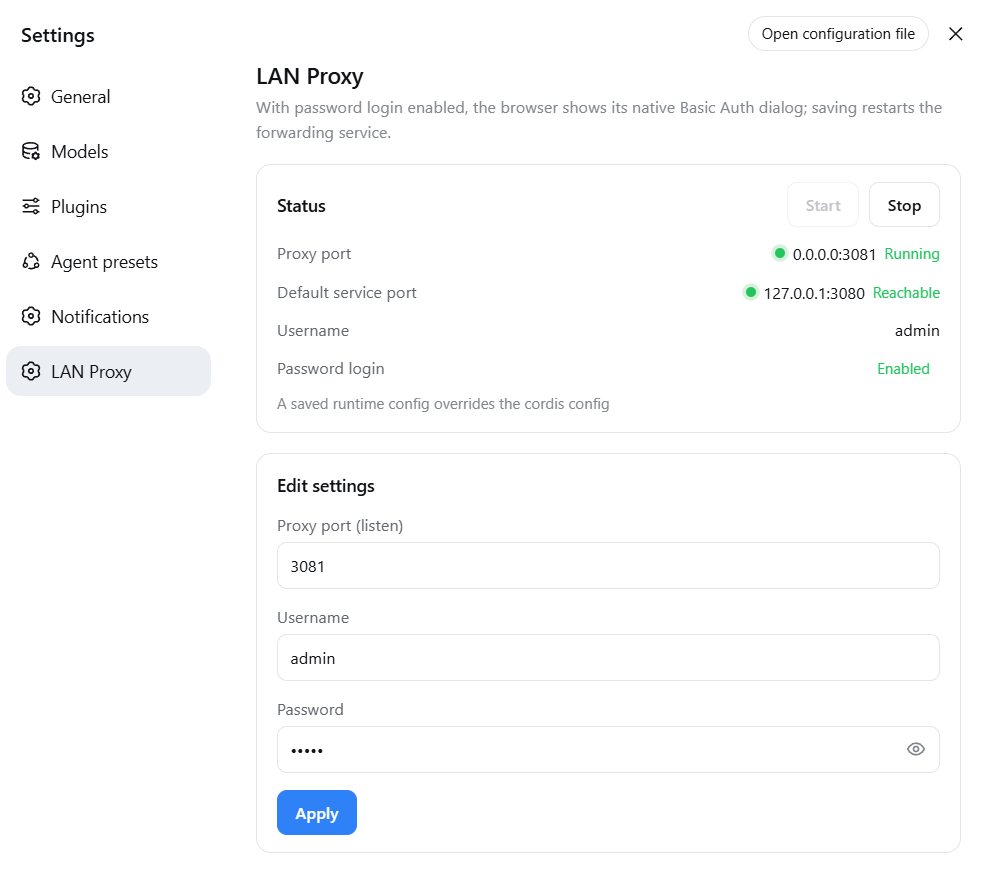
- **Settings page** (DSH settings → LAN Proxy): status lights, start/stop, edit the proxy listen port, username, and password (form pre-fills current values; empty means set blank)
- Empty credentials by default = password login off; password login turns on only when **both** username and password are set
### Install
**Online install (recommended)** — directly from GitHub, no need to download the repository:
```bash
dsh plugin --profile web add github:smanx/dsh-proxy#master
```
**Local install** (repository cloned/downloaded on this machine):
```bash
dsh plugin --profile web add file:C:/mydata/codes/dsh-proxy
```
After restarting `dsh web`, visit `http://:3081` and the browser shows the native Basic Auth dialog.
Details: [`dsh-proxy/README.md`](dsh-proxy/README.md).
## Standalone executables (go/ and node/)
Alternative when you do not use DSH or need a separate process: two equivalent single-file builds (interactive start, config memory, non-interactive CLI flags).
**Download install**: grab the single executable for your platform from [GitHub Releases](https://github.com/smanx/dsh-proxy/releases) (Go ~6-7 MB / Node ~80-120 MB), put it anywhere and run it; on macOS/Linux `chmod +x` first.
| Directory | Language | Single-file size | Notes |
|---|---|---|---|
| [`go/`](go/) | Go (static) | 6-7 MB | Lightweight; Go standard library, ~95% smaller, recommended |
| [`node/`](node/) | Node.js (SEA) | 83-119 MB | Original; packaged with Node's official SEA, no Node install needed |
### Features
- HTTP + WebSocket reverse proxy (Go uses stdlib `httputil.ReverseProxy`, native WS upgrade support)
- Basic Auth (default `admin/admin`, checked uniformly on HTTP and WS handshakes; public static assets such as
`/manifest.webmanifest` bypass auth so the browser does not get a 401 when fetching the manifest)
- Origin alignment + Host rewrite (passes DSH's `/api` same-origin check, so LAN WebSocket is not 403)
- `crypto.randomUUID` polyfill injected into HTML (real-time channels work in non-secure LAN contexts)
- dsh 0.1.1+ client loopback-trust patch: rewrites served JavaScript so the settings
Models page no longer reports "settings are unavailable in this browser" over the LAN
(same behavior as the plugin variant)
- Interactive start: 4 pre-filled editable fields (source port 3080 / target port 3081 / admin / admin), **ports and credentials are editable**
- Config memory: `config.json` next to the executable, pre-filled on next start
- Non-interactive CLI flags (for scheduled tasks / automation):
`dsh-proxy --source-port 3080 --target-port 3081 --user admin --pass admin`
### Build
```bash
# Node build (output in node/dist/)
cd node
npm install
npm run build # all 5 platforms (downloads the Node binary on first run, cached in .sea-cache/)
npm run build:win # Windows only
# Go build (output in go/dist/, no Go runtime needed)
cd go
./build.ps1 # all 5 platforms
./build.ps1 -Target win-x64
```
Artifacts (5 platforms each for both versions: `win-x64`, `linux-x64`, `linux-arm64`, `macos-x64`, `macos-arm64`):
- Node: `dsh-proxy-` (e.g. `dsh-proxy-win-x64.exe`)
- Go: `dsh-proxy-go-` (e.g. `dsh-proxy-go-win-x64.exe`, avoids colliding with the Node name)
On macOS/Linux, `chmod +x` the file first.
The version shown in the startup banner is injected at build time: CI takes the tagged version (e.g. `v1.1.0`);
local builds may pass `-Version` (Go) or `--version` (Node), defaulting to the latest git tag.
### Verification
```bash
# Non-interactive start (example port 3091)
./dsh-proxy-win-x64.exe --source-port 3080 --target-port 3091 --user admin --pass admin
# No credentials → 401; with credentials → 200
curl -i http://127.0.0.1:3091/
curl -u admin:admin http://127.0.0.1:3091/
# WebSocket handshake → OPEN
node -e "const ws=new WebSocket('ws://127.0.0.1:3091/api/events.mux',{headers:{Authorization:'Basic '+Buffer.from('admin:admin').toString('base64')}});ws.onopen=()=>{console.log('OPEN');ws.close()}"
```
## Releases
Pushing a `v*` tag (e.g. `v1.1.0`) triggers GitHub Actions, which **builds both the Node and Go versions**
and publishes them to the GitHub Release (with SHA256SUMS.txt checksums); you can also trigger it manually from the Actions page:
```bash
git tag v1.1.0
git push origin v1.1.0
```
Workflow: `.github/workflows/release.yml`.