# DSH Better Answer View
[简体中文](README.md) | **English**
Make AI answers easier to read and interact with.
DSH Better Answer View is an inline visualization and interaction plugin for DeepSeek Harness. It guides the model to present suitable content as charts, cards, and interactive blocks inside its answers. Blocks can appear between paragraphs; parameters are saved locally, compatible state survives content updates, and previous versions remain accessible.
This working prototype was tested with **DeepSeek Harness Web 0.1.5-rc.3** and **Desktop 0.2.1-rc.3**. It does not restrict Harness release numbers; SDK peers accept the host-provided versions. Activation checks the required tool-registration and authenticated Fetch APIs and reports missing interfaces. Tested versions are evidence of specific checks; other releases still need validation.
## See it in action
Ask normally—there is no need to request a webpage or cards. Comparisons, trends, and steps can become separate inline blocks, with prose providing context and explanation. Simple questions still get simple answers.
The first three examples are **real model answers captured in DSH Desktop**, using plugin 0.3.1. Screenshots show only the answer region and retain the original Chinese content. The first example comes from an actual earnings query; the next two use fictional data. The fourth is a separately labeled, prewritten interactive demo. Images on GitHub are static; run the local demo below to interact with it.
### 1. Google earnings and the stock reaction
Original prompt:
> 谷歌最新财报和股价反应
English translation: **Google's latest earnings and the stock price reaction.**
No display format was requested. The answer compares reported results with market expectations in a table, explains the market's concerns in prose, then uses a separate timeline to distinguish the pre-release close, after-hours trading, and the next premarket snapshot. Source links and measurement notes stay beside the relevant content.
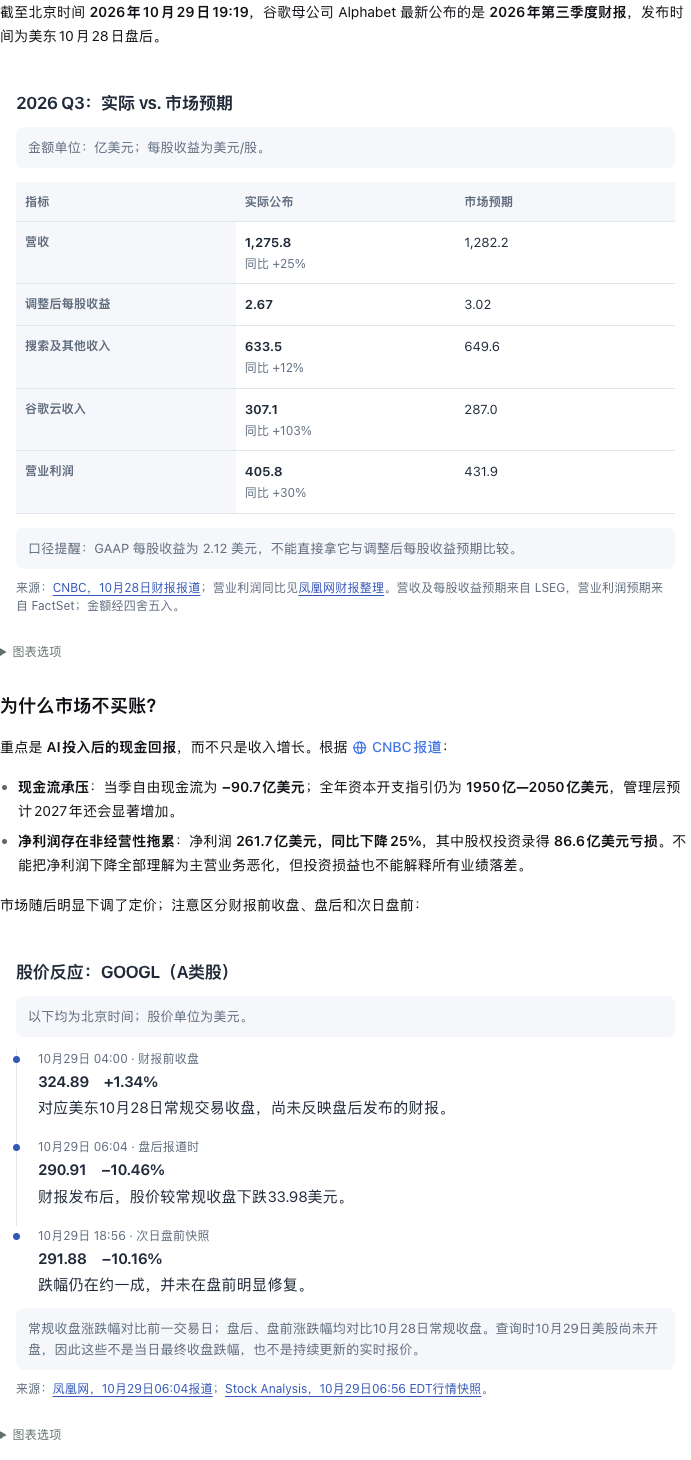
This original model answer was saved on October 29, 2026 and is shown to demonstrate layout and inline embedding. The financial figures and quotes have not been independently verified by this repository; the screenshot is not a live market feed.
### 2. Compare costs, then plan implementation
> Which pricing plan is cheaper, and how should a team roll it out over four weeks?
Full prompt (English translation of the original Chinese prompt)
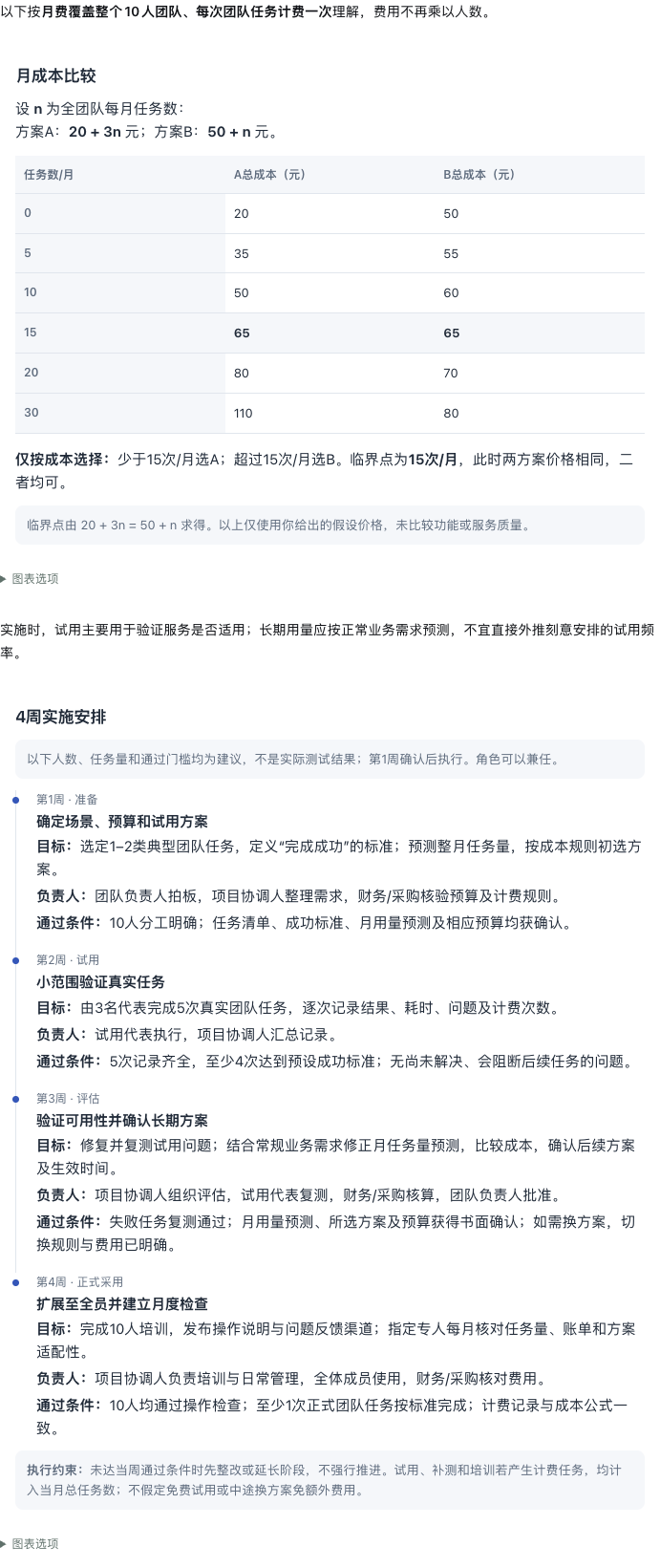
We are preparing to adopt a service for a team of 10. Assume plan A has a fixed monthly fee of 20 yuan plus 3 yuan per team task; plan B has a fixed monthly fee of 50 yuan plus 1 yuan per team task. Compare the total monthly cost at 0, 5, 10, 15, 20, and 30 tasks, explain which plan to choose and the break-even point. Also propose a four-week rollout covering preparation, trial, evaluation, and adoption, specifying each week's goal, responsible role, and acceptance criteria. These prices are hypothetical inputs; base your rollout suggestions on them without looking up external sources.
The actual answer follows **introductory prose → cost comparison → connecting prose → four-week rollout**. The two visual blocks appear separately in the answer and expand to fit their content. There is no separate webpage to open and no duplicate transcription of the table in the prose.
### 3. Diagnose a product problem
> Registrations keep growing. Why aren't task completion and retention keeping up, and what should we investigate over the next two weeks?
Full prompt (English translation of the original Chinese prompt)
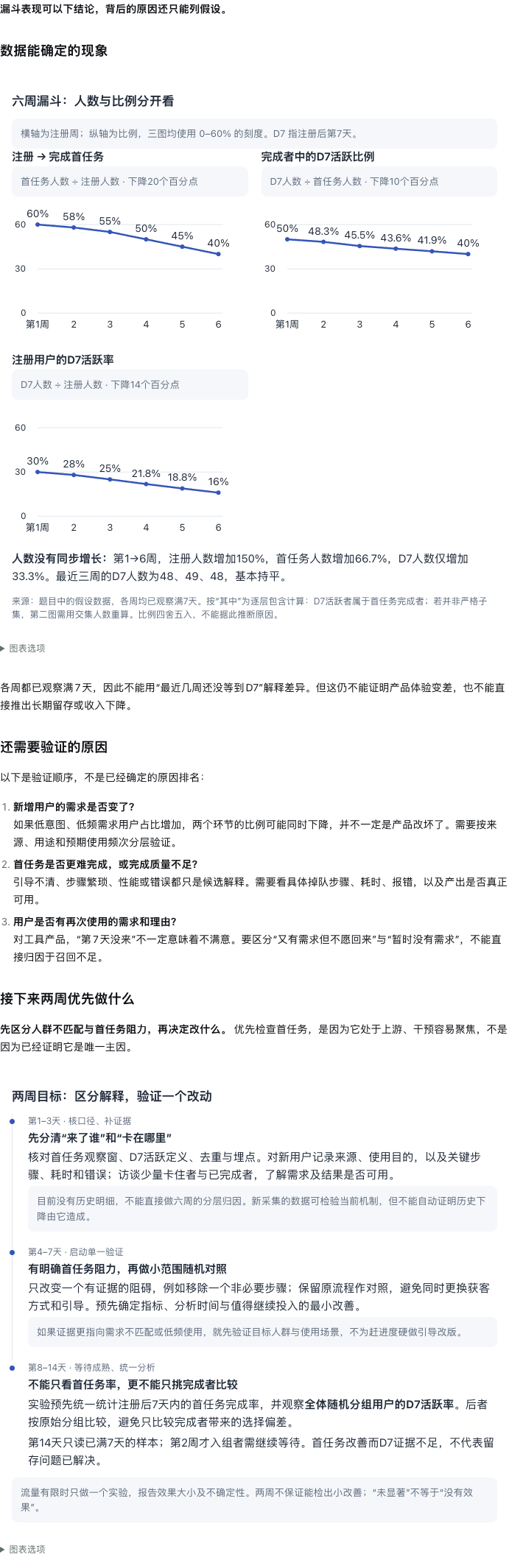
Help identify the main problem with a tool product over the past six weeks and what to prioritize investigating over the next two weeks. New registrations in weeks 1–6 were 120, 150, 180, 220, 260, and 300; of those, 72, 87, 99, 110, 117, and 120 completed their first task; of those, 36, 42, 45, 48, 49, and 48 were still active on day 7. Each week's figures refer to the same registration cohort, and all cohorts have completed seven days of observation. All numbers are hypothetical and there is no other data. Distinguish what the data establishes from causes that still need investigation.
Related trends share one block and a common scale. Prose separates observed patterns from possible causes, followed by another block for the two-week plan. Blocks are grouped by topic, rather than turning every number into a separate card.
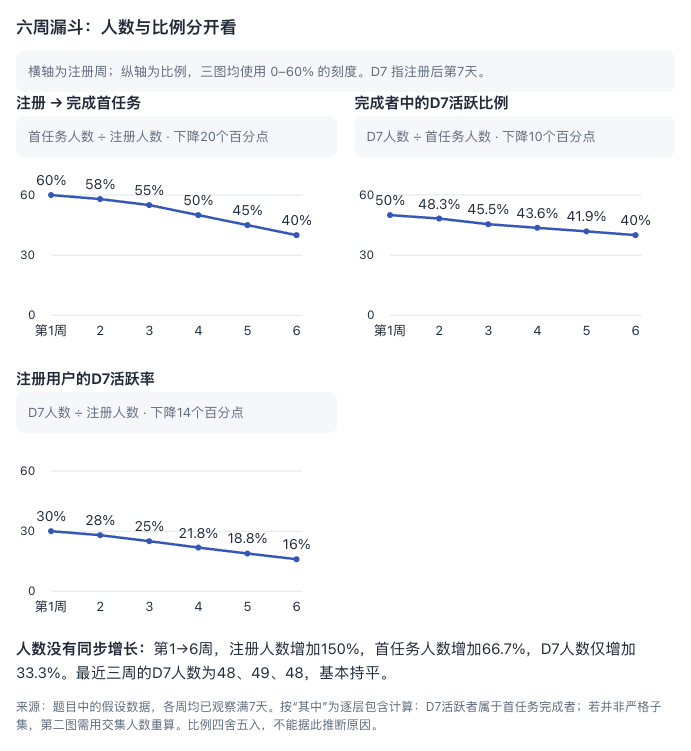
Full answer: trends → possible causes → two-week investigation plan
### 4. Adjust parameters and see the result immediately
A prompt you could try:
> Design a leveling progress calculator: three tasks per day, with three stages requiring 900, 3,600, and 9,000 XP respectively. Let me adjust the reward per task, compare the days required for each stage, and continue the discussion about a selected stage.
The screenshots below demonstrate this interaction using the repository's [leveling demo](examples/leveling.html). **This is a prewritten local demo, not a model-generated answer to the prompt above.**
| 100 XP per task | Adjusted to 150 XP |
| --- | --- |
| 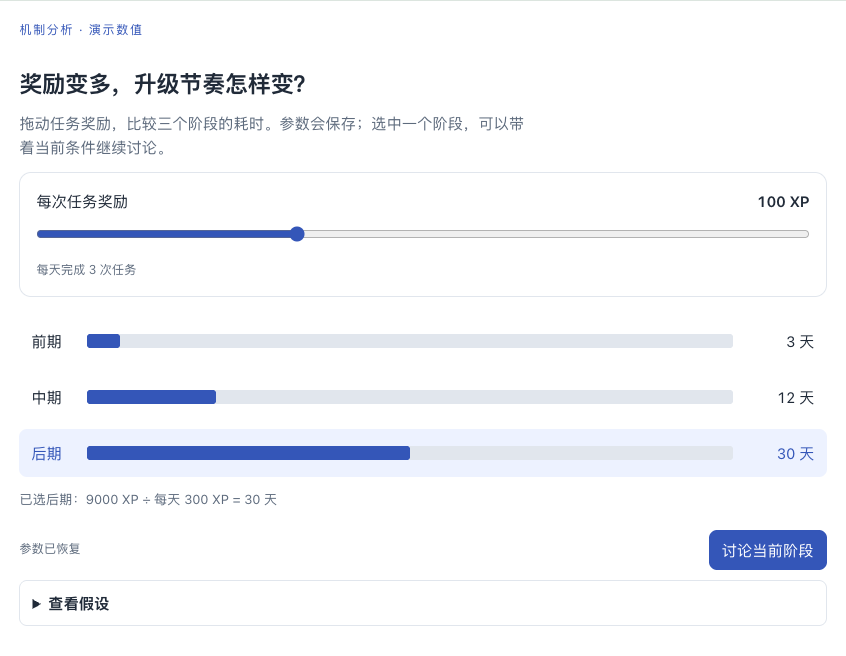 | 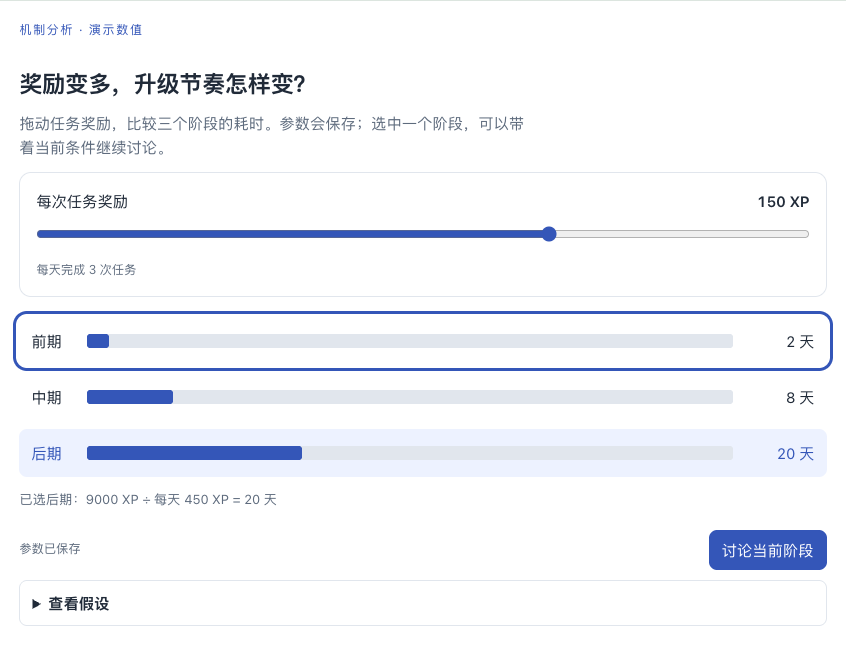 |
Moving the slider recalculates locally without a model request for each adjustment. Browser checks verified that:
- The late stage changes from **30 to 20 days**, and 150 XP is preserved after a reload.
- Clicking “Reduce late-stage requirements by 30%” preserves the reward parameter and changes the result to **14 days**.
- Selecting a stage can prepare a follow-up; it is submitted only after confirmation.
### 5. Keep simple questions simple
Actual question: **What is 17 times 6?**
Actual answer: **17 × 6 = 102。**
No visual block was generated. The aim is to improve answers when presentation helps understanding, not to put every answer in a card.
Layouts vary with the model and question; these are specific observed outputs. Original Chinese prompts are in the [Chinese README](README.md). See [capture provenance and reproduction notes (Chinese)](examples/showcase/README.md) and [validation notes (Chinese)](VALIDATION.md).
## Run the demo
Requires Node.js 22 or later. Clone the repository and run:
```sh
git clone https://github.com/solstice621/dsh-better-answer-view.git
cd dsh-better-answer-view
npm ci --legacy-peer-deps
npm run build
npm run demo
```
Open . Change the reward, select a stage, reload, then click “将后期需求降低 30%” (reduce late-stage requirements by 30%) to test preserved state and version history. “讨论当前阶段” (discuss the current stage) prepares a follow-up outside the embedded content; “发送追问” (send follow-up) submits it.
The demo uses fictional data and makes no model calls. Its send action only displays the captured text. When installed in DSH, the same component sends the follow-up to the current conversation.
Optional environment variables: `PORT` selects the port; `WEB_ANSWER_DATA_DIR` selects the demo data directory. By default, data is written to `work/demo-data/` inside the project.
## Install in DSH
The project and plugin package are both named `dsh-better-answer-view`. Version 0.3.3 replaces the former `dsh-web-answer` / `better-view-for-dsh` package names. Disable and remove the old package before installing the new one to avoid duplicate tool registration. The storage directory and receipt format remain compatible, preserving access to historical answers and saved state.
Install the current main branch for the implementation without a host-version allowlist. The repository includes the prebuilt client; no local build is required. For CLI/Web:
```sh
dsh plugin --profile web add "github:solstice621/dsh-better-answer-view#main"
```
Enter this address in the desktop plugin manager:
```text
github:solstice621/dsh-better-answer-view#main
```
Desktop and separately installed CLI/Web instances use different profiles. Desktop uses its desktop profile; the command above installs only into the CLI's web profile. Historical [GitHub Releases](https://github.com/solstice621/dsh-better-answer-view/releases) retain their own compatibility declarations.
The repository contains source code. After installing dependencies, build and package the plugin:
```sh
npm run build
npm pack
```
Install the resulting `.tgz` through the desktop plugin manager.
To link the built plugin into a DSH Web profile, run from the project directory:
```sh
dsh plugin --profile web add "link:$PWD" --ignore-scripts --offline
dsh --profile web
```
Replace `web` with your intended profile. Restart DSH and refresh the browser if it is already running. This is a local link: moving the project directory will break it.
For an isolated trial, use a separate `DSH_HOME`. Some installation wrappers override this variable; in that case, invoke the bundled Node executable and DSH entry point directly. The locally tested pattern is:
```sh
# Replace this with your DSH installation directory; run inside the plugin project.
WA_DSH_INSTALL=/absolute/path/to/deepseek-harness
export DSH_HOME="$PWD/work/dsh-profile"
export DSH_TELEMETRY_DISABLED=1
"$WA_DSH_INSTALL/runtime/bin/node" \
"$WA_DSH_INSTALL/lib/node_modules/@deepseek-ai/dsh/lib/bin.js" \
plugin --profile web add "link:$PWD" --ignore-scripts --offline
"$WA_DSH_INSTALL/runtime/bin/node" \
"$WA_DSH_INSTALL/lib/node_modules/@deepseek-ai/dsh/lib/bin.js" \
--profile web --no-open --host 127.0.0.1 --port 3092
```
The isolated DSH environment needs its own model configuration to generate answers. The standalone demo does not.
The plugin's bundle patch loads the host entry point. Its client uses DSH's module loader to register custom conversation nodes and tool receipts. It handles the different tool-result formats of the two tested DSH versions; other versions need validation. Version 0.1.3 fixed saved pages not appearing in desktop conversations; existing pages reappear when their conversations are reopened.
Page data defaults to `$DSH_HOME/web-answer/`, or `~/.dsh/web-answer/` when `DSH_HOME` is unset. An absolute `storageDir` can also be specified in plugin configuration.
After installation, simply ask a question, for example:
> Compare two pricing plans at different usage levels and explain the break-even point.
The plugin guides the model to use compact blocks when trends, comparisons, steps, or interaction benefit from visual structure. Simple facts, ordinary explanations, confirmations, and coding questions stay as ordinary text; explicit user format requests take precedence. Visual content appears once, while surrounding prose introduces, connects, or supplements it. This is model guidance, not a semantic deduplication filter for arbitrary answers.
### Presentation updates
- **0.2.0:** Supports prose → visual block → subsequent prose within one answer, without opening a new webpage. Persistent titles and version controls moved under “图表选项” (chart options). Older answers without position markers still show saved content at the end of the turn; historical messages are not rewritten.
- **0.2.1:** Separates independent visual topics into individual tool calls, usually 2–4 blocks when appropriate, with useful prose between them. Multiple cards inside one HTML document are not separate embeds. Closely related elements such as charts and legends can stay together, and a single visual topic needs only one block. This behavior depends on model instruction following.
- **0.3.0:** Adds shared compact styles for comparisons, metrics, timelines, decision notes, and controls. Cards are used when visual structure helps, not for every explanation, translation, or short suggestion. Embedded blocks expand naturally without the former height cap or expand-height button. Full-page layouts, wide tables, and scrolling explanation panels are adapted to the answer column; genuine scrolling input controls retain their interaction.
- **0.3.1:** Adds regressions at actual chat widths. Narrow charts keep a common scale, labels move inside bars when needed, numbers remain complete, and layouts recover when width increases.
## Model tools
| Tool | Purpose | Main parameters |
| --- | --- | --- |
| `render_answer` | Create a visual answer | `title`, `html`, `summary`; optional `initialState`, `stateSchemaVersion` |
| `get_answer` | Read HTML, current state, and revision | `id`; optional `revision` |
| `update_answer` | Update an existing answer | `id`, `expectedRevision`, complete `html`; optional title, summary, and state contract |
Tools are bound to the executing conversation; the model cannot select another conversation. `render_answer` and `update_answer` return small receipts for conversation rendering. HTML is stored locally rather than repeated in the receipt. Before updating, call `get_answer` and use the latest revision to avoid overwriting another update.
The receipt's `embed` field contains a position marker. The model places it unchanged between answer paragraphs, on its own lines without a code fence. The marker is `:::web-answer `, followed by a newline and `:::`. Only successful tool receipts from the same turn are resolved; user text, code samples, and reasoning do not execute markers. Settled visual replies without tool calls keep their prose and inline cards at their original position, even when a later clarification arrives in the same turn. Their reasoning remains in the original process node. When several replies reference the same card, the latest eligible reference owns its placement. Unreferenced cards and unavailable native renderer bridges retain the end-of-turn fallback. Ordinary text, reasoning, and images continue to use the host's native components; historical messages and saved page files are not rewritten.
Updates replace the complete HTML. Keeping `stateSchemaVersion` preserves current state; changing it requires a new `initialState`. Historical versions can be viewed and interacted with locally, but their state cannot be saved.
## Authoring embedded content
Prefer an HTML fragment covering one visual topic; complete HTML documents also work. Shared classes include `.answer-metric-grid`, `.answer-bar-list`, `.answer-timeline`, `.answer-decision`, and `.answer-control`. Custom visuals should use theme variables such as `--answer-fg`, `--answer-muted`, and `--answer-accent`. Inline CSS and classic JavaScript can use native SVG, Canvas, and CSS layouts. CDN resources, external scripts, and `type="module"` are unsupported. Prefix new visual styles with `answer-` to avoid changing common custom classes in old answers.
Use natural height and layouts that adapt to narrow columns. Avoid `100vh` page shells, fixed-height scrolling explanation panels, and wide-table `min-width` constraints. Put long explanations in prose or another purposeful block. Keep tables focused, switching to item-by-item layouts when necessary. Real input controls may retain internal scrolling; special interaction panels can explicitly use `data-answer-scroll`, but ordinary content should not become a scrolling page.
The DOM is already inserted when scripts execute. Initialize immediately; do not wait for `DOMContentLoaded` or `window.load`, which have already fired in the containing document.
```html
```
Bridge API:
- `getState()` returns a copy of the current JSON state.
- `await setState(object)` saves explicit parameters and selections; the promise rejects on failure.
- `await ask(text)` prepares a follow-up with the page ID, revision, and current state. The user must still send it from the host interface.
Calculate locally while dragging and save when the adjustment ends. Avoid requesting the model for every interaction. State must be a JSON object; arbitrary DOM state, scroll position, and third-party component internals are not automatically restored.
The runtime supplies light/dark themes, variables including `--answer-bg`, `--answer-fg`, `--answer-muted`, `--answer-border`, `--answer-soft`, `--answer-accent`, and `--answer-accent-soft`, plus basic `.card`, `.grid`, `.row`, `.badge`, and `.primary` styles. See `examples/leveling.html` for a complete example.
## Current boundaries
- Pages execute after full generation; there is no token-by-token HTML preview. Replacing a page reruns its scripts.
- The iframe allows scripts but not same-origin access. A private MessageChannel saves state and prepares follow-ups. Embedded pages cannot read the host DOM or browser storage, or directly invoke host tools.
- CSP limits external resources and requests; sandboxing restricts top-level navigation and popups. These generic browser settings cannot fully prevent an iframe from navigating itself. The runtime disables the channel and clears the page if navigation is detected. This prototype is not a secure execution environment for arbitrary hostile code.
- HTML is limited to 256 KiB, JSON state to 16 KiB, and follow-up text to 8 KiB. The model must supply a `summary`, so a failed page still has a readable fallback and access to earlier versions.
- Storage uses local files, atomic commits, and revision conflict checks. Concurrent operations within one process are supported; a data directory should have a single writer process. Pages inherited by another conversation are read-only and cannot write back to the original conversation. Cloud sync, cross-conversation copying, and independent page copies after a fork are not implemented.
- Dark mode follows system preferences. Remote images, network data, external navigation, and downloads are outside this version's interaction scope.
## Development and validation
```sh
npm run build
npm test
npm run test:browser
```
Browser tests start the demo with an isolated temporary data directory and check calculations, saving, restart recovery, revision history, state conflicts, follow-ups, themes, mobile layouts, and script-error fallbacks. The default test port is 3101; override it with `TEST_PORT`. On macOS, installed Google Chrome is preferred. Elsewhere, set `CHROME_PATH` or run `npx playwright install chromium`.
Optionally run conversation-node tests with the installed DSH assembler rather than only mocked calls:
```sh
DSH_CONVERSATION_CLIENT_BUNDLE=/absolute/path/to/@deepseek-ai/dsh-client-ui-conversation/lib/client.js \
DSH_CHAT_CLIENT_BUNDLE=/absolute/path/to/desktop/@deepseek-ai/dsh-client-ui-chat/lib/client.js npm test
```
Code overview: `host.js` registers tools and authenticated HTTP APIs; `conversation.js` assembles tool events into conversation nodes; `client.jsx` integrates with DSH slots; `view-ui.jsx` manages page UI; `surface-runtime.js` runs the iframe and bridge; `view-store.js` handles persistence and history.
### Component layout protection (0.3.5)
Use `p.answer-note` for explanatory callouts, `.answer-inline-note` for inline annotations, and `.answer-cell-detail` for secondary table text. Full surfaces should use div/section/article and natural height. Layout repairs are reversible and preserve controls, disclosures, and positioned graphics. See [the component test design](test/COMPONENT_LAYOUT.md) for supported boundaries and stress coverage.