# 🎵 Songloft Quick Start Guide
简体中文 • English
[](https://github.com/songloft-org/songloft)
[](https://hub.docker.com/r/songloft/songloft)
[](https://hub.docker.com/r/songloft/songloft)
[](https://github.com/songloft-org/songloft/releases)
[](https://visitorbadge.io/status?path=songloft-org%2Fsongloft)
[](https://visitorbadge.io/status?path=songloft-org%2Fsongloft)
🎵 A self-hosted music server for personal use — manage only the music you legally own
> 📣 **About the rename**: As of v2.0, this project has been renamed from **MiMusic** to **Songloft** (the core and features remain unchanged — this is only a brand upgrade). The old `mimusic-org` GitHub organization and the `hanxi/mimusic` Docker image will be kept as redirects for at least one year but will no longer be updated. See the [GitHub Releases](https://github.com/songloft-org/songloft/releases) for details.
🏠 GitHub •
📥 Downloads •
📖 Docs •
💬 Issues •
👥 WeChat Group •
📸 Screenshots
> ### 💚 A labor of love · Beware of scams
>
> Songloft is a **fully free** open-source project, built purely out of passion — with no commercial interest whatsoever:
>
> - ✅ **Free forever** —— no paid features, in-app purchases, or subscriptions
> - ✅ **No ads** —— no advertising or commercial promotion of any kind
> - ✅ **No sponsorship / donations** —— there is no payment channel at all
> - ⚠️ **Beware of scams** —— the only official channels are the [GitHub repository](https://github.com/songloft-org/songloft), the [docs site](https://songloft.hanxi.cc), and the [official WeChat group](https://github.com/songloft-org/songloft/issues/2). Anyone charging fees, selling "paid versions", offering paid deployment, or soliciting donations in Songloft's name is unrelated to this project; we never charge anyone, not even inside the group. Please stay alert to scams.
## ✨ Core Features
- 🎵 **Local music management** — Scans local directories and automatically extracts covers and metadata from MP3/FLAC/WAV/APE/OGG/Opus/M4A/M4B/WMA/AIF/AIFF/MKA and other formats
- 🎬 **Video support** — Scans video containers such as MP4/MOV/M4V/MKV/WebM/AVI/TS/MPG/MPEG/FLV/WMV/RM/RMVB/3GP, detects real video tracks, and renders the picture in-app
- 🧩 **JS plugin system** — Runs on a QuickJS sandbox with a permission model, health checks, and hot reload; freely extend audio sources / metadata / device control and more
- 📱 **Cross-platform clients** — The Flutter client supports six platforms: Android, iOS, macOS, Windows, Linux, and Web
- 📦 **Bundle local mode** — The client embeds the Go backend, so no server deployment is needed — play your local music directly on your phone or computer
- 📺 **Kodi plugin client** — Supports big-screen devices like Xbox, Apple TV, Raspberry Pi, and Android TV, optimized for remote control operation for a smooth living-room media experience
- 🌐 **Web interface** — The full edition ships with a built-in web frontend that works out of the box
- 🔑 **JWT authentication** — Dual-token mechanism (Access Token + Refresh Token) with multi-device management
- 📡 **Network songs & radio** — Add network audio URLs and radio streams, transparently cached to the server during playback
- 🔌 **Full REST API** — Built-in Swagger documentation for easy integration and further development
- ⚡ **Lightweight and efficient** — Written in Go, CGO-free, with no external dependencies — ideal for low-power devices like NAS and Raspberry Pi
## 🖼️ Screenshots
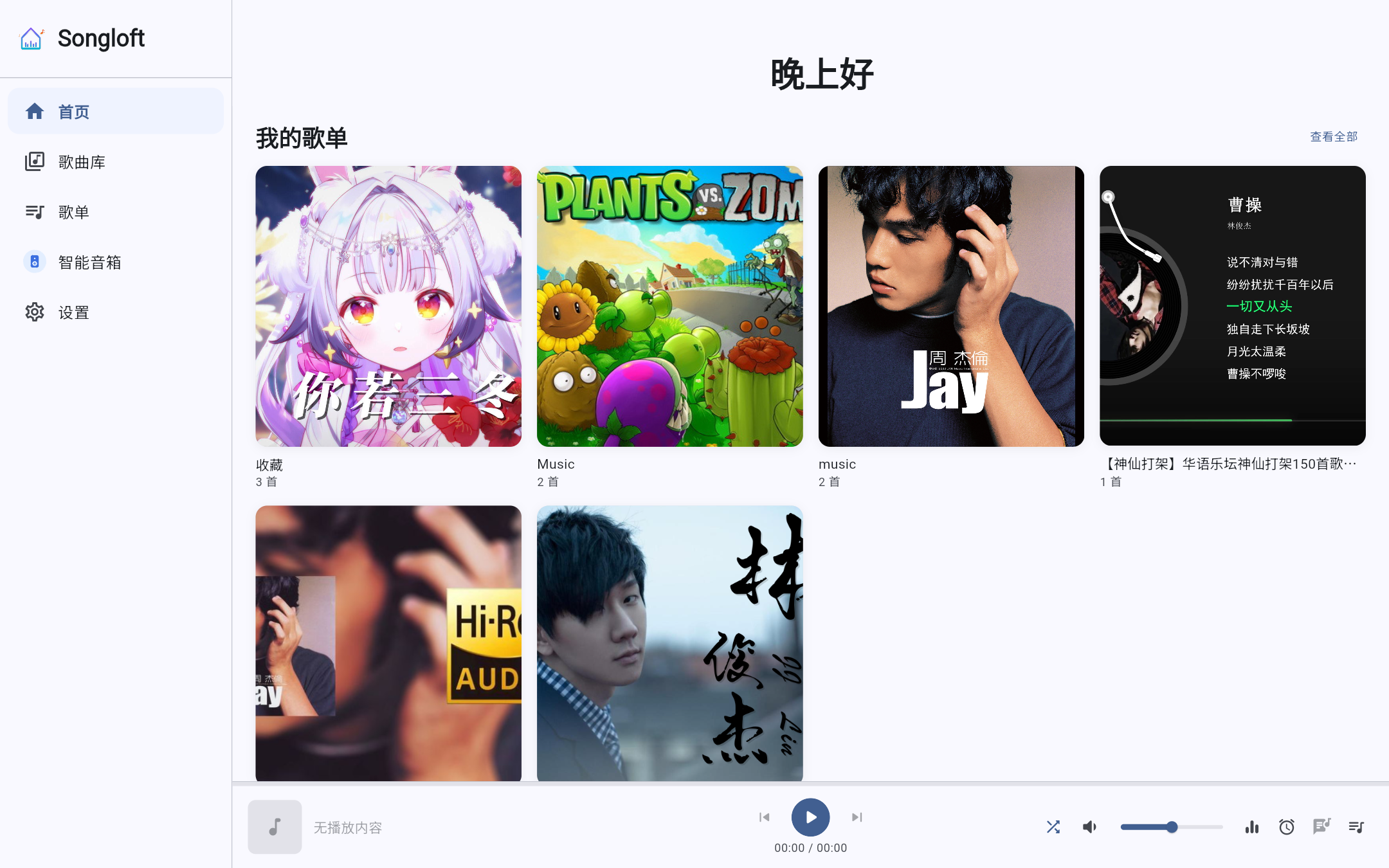

> 📸 More screens (library, playlists, settings, etc. — desktop / mobile with light / dark themes) are in the **[Screenshot Gallery](docs/en/screenshots.md)**.
## ⚖️ Copyright and Disclaimer
Songloft is a **self-hosted tool for personal use**, designed to help users manage the music files they legally own. Before using this project, please be sure to read and understand the following terms:
- 🚫 **No music content provided** — Songloft itself does not bundle, distribute, or store any copyrighted music resources. It is merely open-source software for managing your local music library
- ✅ **Manage only music from legitimate sources** — Users should use Songloft only to manage music files they have legally obtained, including but not limited to:
- Digital music purchased and downloaded by yourself
- Personal backups ripped from physical records
- Works you created or recorded yourself
- Public Domain works
- Works explicitly licensed under open licenses such as CC (Creative Commons)
- 🔌 **Third-party plugin disclaimer** — JS plugins are maintained by the third-party community. **The main repository does not bundle or distribute any finished third-party audio-source plugins**. The copyright of any network audio sources, metadata, or lyrics accessed by plugins belongs to their respective rights holders. **When using features such as network audio sources, users must bear responsibility for copyright compliance themselves** and comply with the laws and regulations of their country/region
- 🏠 **For personal, non-commercial use only** — Using this project for commercial purposes, publicly distributing copyrighted content, or building public services aimed at an unspecified general audience is strictly prohibited
- ⚠️ **Use at your own risk** — Any legal liability, disputes, or losses arising from improper use of this project (including but not limited to infringement of third-party copyrights) are borne solely by the user. The authors and contributors of this project assume no responsibility
- 📩 **Infringement reports** — If you are a copyright holder and believe that this project's code, documentation, or officially distributed plugins infringe your legitimate rights, please contact us via [GitHub Issues](https://github.com/songloft-org/songloft/issues) or email (im.hanxi@gmail.com), and we will handle it promptly after verification. For infringement issues concerning third-party community plugins, please contact the maintainer of that plugin directly
- ™️ **Trademark notice** — All brands, protocols, and product names mentioned in this project and its built-in plugins (including but not limited to "MIoT", "Bluetooth", "Android", "iOS", "macOS", "Windows", "Docker", etc.) belong to their respective trademark owners. These names appear solely for interoperability and nominative fair use purposes. **Songloft is not affiliated with the aforementioned trademark holders, nor has it received any form of authorization or endorsement from them**. See [NOTICE](./NOTICE) for details
- 🔒 **Privacy** — The Songloft server **includes no telemetry whatsoever**; all data is stored locally on your own machine. See [PRIVACY.md](./PRIVACY.md) for details
> 💡 We respect and support intellectual property protection. If you enjoy an artist's work, please purchase or subscribe through official channels to support the creators.
## 📋 Editions
Songloft offers three editions to suit different scenarios:
| Edition | Suffix | Description | Best for |
|------|------|------|----------|
| 🌟 **Full** | none | Includes the web frontend, works out of the box | Recommended for first-time users — just open the service address to see the web interface |
| 📦 **Lite** | `-lite` | Does not include the web frontend, smaller in size | Pairing with the Flutter desktop/mobile client, or decoupled frontend/backend deployment |
| 📱 **Bundle** | `bundled-` | Flutter client with the Go backend embedded | No server deployment needed — play local music directly on your phone or computer |
> 💡 **Recommendation**: For first-time use, download the default **Full** edition — it works out of the box with no extra frontend configuration.
> Want to use it standalone on your phone or computer without deploying a server? Download the **Bundle** edition.
## 🖥️ Platform Support
### 📦 Binaries
#### 🌟 Full Edition (Recommended)
Includes the web frontend, works out of the box:
| Platform | Architecture | Download |
|------|------|--------|
| 🐧 Linux | x86_64 | [songloft-linux-amd64](https://github.com/songloft-org/songloft/releases/latest/download/songloft-linux-amd64) |
| 🐧 Linux | ARM64 | [songloft-linux-arm64](https://github.com/songloft-org/songloft/releases/latest/download/songloft-linux-arm64) |
| 🐧 Linux | ARMv7 | [songloft-linux-armv7](https://github.com/songloft-org/songloft/releases/latest/download/songloft-linux-armv7) |
| 🍎 macOS | x86_64 (Intel) | [songloft-darwin-amd64](https://github.com/songloft-org/songloft/releases/latest/download/songloft-darwin-amd64) |
| 🍎 macOS | ARM64 (Apple Silicon) | [songloft-darwin-arm64](https://github.com/songloft-org/songloft/releases/latest/download/songloft-darwin-arm64) |
| 🪟 Windows | x86_64 | [songloft-windows-amd64.exe](https://github.com/songloft-org/songloft/releases/latest/download/songloft-windows-amd64.exe) |
| 🪟 Windows | ARM64 | [songloft-windows-arm64.exe](https://github.com/songloft-org/songloft/releases/latest/download/songloft-windows-arm64.exe) |
#### 📦 Lite Edition
Does not include the web frontend, smaller in size:
| Platform | Architecture | Download |
|------|------|--------|
| 🐧 Linux | x86_64 | [songloft-linux-amd64-lite](https://github.com/songloft-org/songloft/releases/latest/download/songloft-linux-amd64-lite) |
| 🐧 Linux | ARM64 | [songloft-linux-arm64-lite](https://github.com/songloft-org/songloft/releases/latest/download/songloft-linux-arm64-lite) |
| 🐧 Linux | ARMv7 | [songloft-linux-armv7-lite](https://github.com/songloft-org/songloft/releases/latest/download/songloft-linux-armv7-lite) |
| 🍎 macOS | x86_64 (Intel) | [songloft-darwin-amd64-lite](https://github.com/songloft-org/songloft/releases/latest/download/songloft-darwin-amd64-lite) |
| 🍎 macOS | ARM64 (Apple Silicon) | [songloft-darwin-arm64-lite](https://github.com/songloft-org/songloft/releases/latest/download/songloft-darwin-arm64-lite) |
| 🪟 Windows | x86_64 | [songloft-windows-amd64-lite.exe](https://github.com/songloft-org/songloft/releases/latest/download/songloft-windows-amd64-lite.exe) |
| 🪟 Windows | ARM64 | [songloft-windows-arm64-lite.exe](https://github.com/songloft-org/songloft/releases/latest/download/songloft-windows-arm64-lite.exe) |
#### 📱 Bundle Edition (Embedded Backend, No Server Required)
The client embeds the Go backend — on first launch, click "Use local mode" and select a music directory to get started:
| Platform | Architecture | Download |
|------|------|--------|
| 🤖 Android | ARM64 + ARMv7 | [songloft-bundled-android-arm64-v8a.apk](https://github.com/songloft-org/songloft/releases/latest/download/songloft-bundled-android-arm64-v8a.apk) |
| 🐧 Linux | x86_64 | [songloft-bundled-linux-x64.tar.gz](https://github.com/songloft-org/songloft/releases/latest/download/songloft-bundled-linux-x64.tar.gz) |
| 🍎 macOS | ARM64 (Apple Silicon) | [songloft-bundled-macos-arm64.dmg](https://github.com/songloft-org/songloft/releases/latest/download/songloft-bundled-macos-arm64.dmg) |
| 🪟 Windows | x86_64 | [songloft-bundled-windows-x64.zip](https://github.com/songloft-org/songloft/releases/latest/download/songloft-bundled-windows-x64.zip) |
| 🍎 iOS | ARM64 | [songloft-bundled-ios-arm64.ipa](https://github.com/songloft-org/songloft/releases/latest/download/songloft-bundled-ios-arm64.ipa) |
### 🐳 Docker Images
#### 🌟 Full Edition (Recommended)
| Platform | Download |
|------|--------|
| 🐧 Linux x86_64 | [songloft-docker-linux-amd64.tar](https://github.com/songloft-org/songloft/releases/latest/download/songloft-docker-linux-amd64.tar) |
| 🐧 Linux ARM64 | [songloft-docker-linux-arm64.tar](https://github.com/songloft-org/songloft/releases/latest/download/songloft-docker-linux-arm64.tar) |
| 🐧 Linux ARMv7 | [songloft-docker-linux-arm-v7.tar](https://github.com/songloft-org/songloft/releases/latest/download/songloft-docker-linux-arm-v7.tar) |
#### 📦 Lite Edition
| Platform | Download |
|------|--------|
| 🐧 Linux x86_64 | [songloft-docker-linux-amd64-lite.tar](https://github.com/songloft-org/songloft/releases/latest/download/songloft-docker-linux-amd64-lite.tar) |
| 🐧 Linux ARM64 | [songloft-docker-linux-arm64-lite.tar](https://github.com/songloft-org/songloft/releases/latest/download/songloft-docker-linux-arm64-lite.tar) |
| 🐧 Linux ARMv7 | [songloft-docker-linux-arm-v7-lite.tar](https://github.com/songloft-org/songloft/releases/latest/download/songloft-docker-linux-arm-v7-lite.tar) |
### 📱 Flutter Client
Beyond the web interface, Songloft also offers a more powerful cross-platform Flutter client that supports background playback, local caching, media controls (headphones/lock screen/notification bar), and other capabilities the server web interface cannot provide — covering all six platforms: iOS, Android, macOS, Windows, Linux, and Web.
🔗 **GitHub repository**: [songloft-org/songloft-player](https://github.com/songloft-org/songloft-player)
- **Standard edition** (requires connecting to a server): [songloft-player Releases](https://github.com/songloft-org/songloft-player/releases/latest)
- **Bundle edition** (embedded backend, no server required): [songloft Releases](https://github.com/songloft-org/songloft/releases/latest) (download the `songloft-bundled-*` files)
> 🪟 **Windows users**: install & update the Flutter client in one line via [Scoop](https://scoop.sh):
> ```powershell
> scoop bucket add songloft https://github.com/songloft-org/songloft-scoop
> scoop install songloft-player
> # Update: scoop update songloft-player
> # Uninstall: scoop uninstall songloft-player (add --purge to also remove config data)
> ```
> 💡 **How to use the Bundle edition**: On first launch, tap "Use local mode" on the login page → select a music directory → done automatically. You can switch between local/remote mode at any time from the settings page.
> 💡 When using the **Lite (-lite)** server, we recommend pairing it directly with the Flutter client (no need to deploy a separate web frontend). If you do need a standalone web frontend, refer to the `flutter build web` process in the [songloft-player](https://github.com/songloft-org/songloft-player) repository to build it yourself and serve the static files via a reverse proxy such as Nginx.
### 📺 TV Client
In addition to the Flutter client, for TV we recommend the dedicated **[songloft-tv](https://github.com/boluofan/songloft-tv)** client, designed specifically for Android TV with remote control support.
### 📺 Kodi Plugin
In addition to the Flutter client, Songloft also provides an official **Kodi plugin** that lets you play your Songloft music library directly in the Kodi media center. It's ideal for Kodi-capable big-screen devices such as **Xbox**, Apple TV, Raspberry Pi, and Android TV, optimized for remote control operation for a smooth living-room media experience.
🔗 **GitHub repository**: [songloft-org/plugin.audio.songloft](https://github.com/songloft-org/plugin.audio.songloft)
📥 **Download**: [GitHub Releases](https://github.com/songloft-org/plugin.audio.songloft/releases/latest)
## 🚀 Quick Start
> 🔐 **Security notice (must read)**: The default admin account is `admin / admin`, which is **suitable for local testing only**. For any deployment exposed to the internet or accessed by multiple devices, be sure to set a strong password via the `ADMIN_USERNAME` / `ADMIN_PASSWORD` environment variables before starting; otherwise your music library may be accessible to strangers.
### 📦 Option 1: Run the Binary Directly
#### 🐧 Linux / 🍎 macOS
```bash
# 1️⃣ Download the binary for your platform (the default is the full edition)
# For example, Linux x86_64:
wget https://github.com/songloft-org/songloft/releases/latest/download/songloft-linux-amd64
mv songloft-linux-amd64 songloft
# 2️⃣ Add execute permission
chmod +x songloft
# 3️⃣ Create the required directories
mkdir -p music data
# 4️⃣ Start (recommended to pass credentials via environment variables to keep them out of shell history / process list)
ADMIN_USERNAME=admin ADMIN_PASSWORD='your_strong_password' ./songloft
```
> 🍎 **Note for macOS users**: Binaries downloaded from GitHub carry the Gatekeeper quarantine attribute and will be blocked on first run. Before running, execute:
> ```bash
> xattr -d com.apple.quarantine ./songloft
> ```
#### 🪟 Windows
```powershell
# 1️⃣ Download the binary for your platform (the default is the full edition) and rename it to songloft.exe
# For example, Windows x86_64: songloft-windows-amd64.exe
# 2️⃣ Create the required directories
mkdir music
mkdir data
# 3️⃣ Set environment variables and start (PowerShell)
$env:ADMIN_USERNAME = "admin"
$env:ADMIN_PASSWORD = "your_strong_password"
.\songloft.exe
```
### 🐳 Option 2: Docker Deployment
#### 🌐 Pull from Docker Hub (Recommended)
```bash
# 🌟 Full edition (recommended, includes the web frontend; :latest is the full edition)
docker pull songloft/songloft:latest
# 📦 Lite edition (no web frontend, must be paired with the Flutter client)
docker pull songloft/songloft:lite
# Run the container
docker run -d \
--name songloft \
-p 58091:58091 \
-v /path/to/music:/app/music \
-v /path/to/data:/app/data \
-e ADMIN_USERNAME=admin \
-e ADMIN_PASSWORD='your_strong_password' \
songloft/songloft:latest
```
#### 📥 Import the Image Offline from a Release
Suitable for environments that cannot access Docker Hub directly:
```bash
# 1️⃣ Download the Docker image tar file for your platform (the default is the full edition)
wget https://github.com/songloft-org/songloft/releases/latest/download/songloft-docker-linux-amd64.tar
# 2️⃣ Import the image
docker load -i songloft-docker-linux-amd64.tar
# 3️⃣ List the imported image tags
docker images | grep songloft
# 4️⃣ Start it with the docker run command from the previous section (remember to replace with the imported image tag)
```
#### 🐙 Docker Compose Deployment (Recommended)
Using Docker Compose makes it easier to manage container configuration:
```yaml
version: '3.8'
services:
songloft:
image: songloft/songloft:latest
container_name: songloft
restart: always
ports:
- "58091:58091"
volumes:
- /path/to/music:/app/music
- /path/to/data:/app/data
environment:
- ADMIN_USERNAME=admin
- ADMIN_PASSWORD=your_strong_password
- LISTEN_PORT=58091
```
Save the above as a `docker-compose.yml` file, then run:
```bash
# Start the service
docker-compose up -d
# View logs
docker-compose logs -f
# Stop the service
docker-compose down
```
### 🏠 Method 3: Home Assistant Add-on
If you run Home Assistant OS (HAOS), you can install Songloft as an **add-on** with one click — no manual `docker run` required.
[](https://my.home-assistant.io/redirect/supervisor_add_addon_repository/?repository_url=https%3A%2F%2Fgithub.com%2Fsongloft-org%2Fhome-assistant-addon)
Clicking the badge above opens the "Add add-on repository" dialog in your own Home Assistant; or do it manually:
1. Go to **Settings → Add-ons → Add-on Store**, open the top-right menu **Repositories**, and add: `https://github.com/songloft-org/home-assistant-addon`
2. After refreshing, find **Songloft** in the store and install it
3. On the **Configuration** tab, set the admin username/password and music library path (defaults to `/media`), then start
4. Use the **Open Web UI** button on the add-on page to access it
Put your music in Home Assistant's media folder (`/media`) or share folder (`/share`) to have it scanned. Data is persisted in the add-on's `/data` directory and survives reinstalls.
> 🔐 **Security**: the default `admin/admin` credentials are for local testing only. Set a strong password on the Configuration tab before exposing this instance.
## 📋 Usage Flow
### 1️⃣ Start the Service
Once the service is running, visit `http://localhost:58091` to open the web interface (built in only in the full edition; for the lite edition, please use the [Flutter client](#-flutter-client) to connect).
### 2️⃣ Log In
Log in with the configured admin username and password.
### 3️⃣ Configure the Music Directory
After your first login, go to the "Settings" page to configure the music file directory (`music_path`). For Docker deployments, this is usually set to `/app/music`.
### 4️⃣ Scan for Music
In the web interface, click the "Scan" button, and the system will automatically scan the audio files in the music directory and extract their metadata.
### 5️⃣ Play Music
Once the scan is complete, you can browse and play music in the interface.
## ⚙️ Configuration
Songloft relies on only a few startup-time settings (credentials, port, database path) specified via environment variables or command-line arguments. All other business configuration (music directory, scan rules, cover storage, etc.) is stored in the database `config` table and managed through the web interface after startup.
### 🌍 Environment Variables
| Variable | Description | Default |
|--------|------|--------|
| `ADMIN_USERNAME` | 👤 Admin username | admin |
| `ADMIN_PASSWORD` | 🔐 Admin password | admin |
| `LISTEN_PORT` | 🔌 Service port | 58091 |
| `DB_PATH` | 💾 Database file path | data/songloft.db |
| `BASE_PATH` | 🔗 URL base path (for reverse-proxy subpath deployment, e.g. `/songloft`) | empty (root path) |
| `MUSIC_DIR` | 🎵 Music directory (overrides the database default when non-empty; equivalent to `-music`) | empty |
> 📁 In the Docker image, the music directory and data directory default to `/app/music` and `/app/data` — just mount them with `-v`; to point elsewhere, use `MUSIC_DIR` to set the music directory.
### 💻 Command-Line Arguments
```bash
# View help
./songloft -help
# Specify the port
./songloft -port 8080
# Specify the database file path
./songloft -db data/songloft.db
# Specify the admin account (not recommended — the password appears in shell history and the ps process list)
./songloft -username admin -password your_password
# Specify a subpath (used for reverse-proxy deployment)
./songloft -base-path /songloft
```
> ⚙️ **Priority**: Command-line arguments **take precedence over** environment variables. If neither is provided, it falls back to the defaults (admin account `admin/admin`).
> ⚠️ **Argument format**: Songloft uses single-dash arguments (e.g. `-help`) and does not support double-dash arguments (e.g. `--help`).
> 🔐 **Password security**: We recommend passing the password via the `ADMIN_PASSWORD` environment variable to avoid `-password` being exposed in plaintext in the process list.
## 🌐 Reverse-Proxy Subpath Deployment
If you mount Songloft under a subpath via a reverse proxy such as Nginx (e.g. `https://nas.example.com/songloft/`), you need to configure the `BASE_PATH` environment variable.
### Configuration Steps
**1. Specify BASE_PATH when starting Songloft:**
```bash
# Environment variable
BASE_PATH=/songloft ./songloft
# Or command-line argument
./songloft -base-path /songloft
# Docker
docker run -d \
--name songloft \
-p 58091:58091 \
-v /path/to/music:/app/music \
-v /path/to/data:/app/data \
-e ADMIN_USERNAME=admin \
-e ADMIN_PASSWORD='your_strong_password' \
-e BASE_PATH=/songloft \
songloft/songloft:latest
```
**2. Configure the Nginx reverse proxy:**
```nginx
location /songloft/ {
proxy_pass http://127.0.0.1:58091;
proxy_read_timeout 52w;
proxy_set_header Host $host;
proxy_set_header X-Real-IP $remote_addr;
proxy_set_header X-Forwarded-For $proxy_add_x_forwarded_for;
}
```
> ⚠️ **Note**: Do **not** add a trailing slash to `proxy_pass`. Nginx forwards the full path (including `/songloft/`) to the backend, and Songloft handles stripping the prefix itself.
### Client Connection
| Client type | Server address to enter |
|-----------|--------------|
| Built-in web frontend | Simply visit `https://nas.example.com/songloft/` in the browser — it works automatically |
| Flutter desktop/mobile client | Enter `https://nas.example.com/songloft` |
### Docker Compose Example
```yaml
version: '3.8'
services:
songloft:
image: songloft/songloft:latest
container_name: songloft
restart: always
ports:
- "58091:58091"
volumes:
- /path/to/music:/app/music
- /path/to/data:/app/data
environment:
- ADMIN_USERNAME=admin
- ADMIN_PASSWORD=your_strong_password
- BASE_PATH=/songloft
```
## 💻 System Requirements
| Item | Requirement |
|------|------|
| **Operating system** | 🐧 Linux / 🍎 macOS / 🪟 Windows |
| **Architecture** | x86_64 / ARM64 / ARMv7 |
| **Optional dependency** | 🔧 ffprobe (used to obtain audio technical parameters; works fine without it) |
## ✅ Verify File Integrity
Each Release includes a `checksums.txt` file for verifying the integrity of downloaded files:
```bash
# Download the checksums file
wget https://github.com/songloft-org/songloft/releases/latest/download/checksums.txt
# Verify the files
sha256sum -c checksums.txt
```
## 📌 Version Check
```bash
# View version info (including Git Commit / build time / build type)
./songloft -version
# View full help
./songloft -help
# Check the version via the API
curl http://localhost:58091/api/v1/version
```
Example output:
```text
Songloft Version: x.y.z
Git Commit: abc1234
Build Time: 2026-01-01_00:00:00
Build Type: full
```
## 🔌 Plugin System
Songloft ships with a built-in JS plugin engine. Plugins run inside a QuickJS sandbox with a permission model, health checks, and hot reload, letting you freely extend audio sources / metadata / device control and more.
### 🎯 Getting Plugins
Each plugin is distributed under its own GitHub repository: go to the repository's Releases page to download the latest `.jsplugin.zip`, then upload it on the "Plugin Management" page of the Songloft client to enable it. You can find the current list of available plugins in the [Plugin Collection Issue](https://songloft.hanxi.cc/issues/4).
> Want to see more plugins or contribute? Feel free to leave a comment on the [Plugin Collection Issue](https://songloft.hanxi.cc/issues/4).
> ⚠️ **Copyright notice**: The copyright of any network audio sources, lyrics, covers, or other content accessed by third-party plugins belongs to their respective rights holders. Please use plugins only to access content you personally have the legal right to use, and comply with the laws and regulations of your country or region when downloading / storing / redistributing content. See the [Copyright and Disclaimer](#️-copyright-and-disclaimer) section above for details.
### 🛠️ Plugin Development
To develop custom plugins, refer to the following resources:
- **Development toolchain**: [songloft-org/plugin-toolchain](https://github.com/songloft-org/plugin-toolchain) — `@songloft/plugin-sdk` + `@songloft/plugin-builder` + scaffolding
- **Quick start**: `pnpm create songloft-plugin ` — see the [JS Plugin Development Guide](./docs/js-plugin-development-guide.md) for details
## 📖 API Documentation
The full API documentation (Swagger/OpenAPI format) is available at:
- **Swagger API doc**: [swagger.json](https://github.com/songloft-org/songloft/blob/main/docs/swagger.json)
- **View Swagger UI online**: [petstore.swagger.io](https://petstore.swagger.io/?url=https://raw.githubusercontent.com/songloft-org/songloft/refs/heads/main/docs/swagger.json)
- **View locally**: After starting the service, visit `http://localhost:58091/swagger/index.html`
### Main API Overview
| API group | Path | Description |
|--------|------|------|
| Auth | `/api/v1/auth/*` | Login, refresh token, logout, token management |
| Songs | `/api/v1/songs/*` | Song CRUD, covers, playback, lyrics |
| Playlists | `/api/v1/playlists/*` | Playlist CRUD, playlist song management, import/export |
| JS plugins | `/api/v1/jsplugins/*` | Plugin upload, enable, disable, delete, check for updates |
| Scan | `/api/v1/scan/*` | Music library scanning |
| Config | `/api/v1/configs/*` | System configuration management (generic KV) |
| Settings | `/api/v1/settings/*` | Business feature settings (music directory, HLS proxy, HTTP proxy, auto scan, etc.) |
| Cache management | `/api/v1/cache-manage/*` | Cache stats, cleanup, configuration |
| Upgrade | `/api/v1/upgrade/*` | Version check, upgrade (Docker only) |
| Version | `/api/v1/version` | Version info |
| Health | `/api/v1/health` | Service health status |
| Proxy | `/api/v1/proxy` | Resource proxy (for CORS issues) |
| Logs | `/api/v1/logs/export` | Log export |
## ❓ FAQ
Running into problems? See [Frequently Asked Questions and Solutions](https://songloft.hanxi.cc/faq) 💬
## 🛠️ Support
- **GitHub**: [songloft-org/songloft](https://github.com/songloft-org/songloft)
- **Issues**: [Issues and feedback](https://github.com/songloft-org/songloft/issues)
- 💬 Join the WeChat group: [WeChat group QR code](https://github.com/songloft-org/songloft/issues/2)
- 🐧 QQ group: 979995241 (if full, search for a new group)
## 📝 Changelog
For detailed release notes, see [CHANGELOG.md](CHANGELOG.md).
---
## 📄 License
This project is open-sourced under the [Apache-2.0 License](LICENSE).