# SIFT-Video
## Semantic Indexing for Timelines in Video
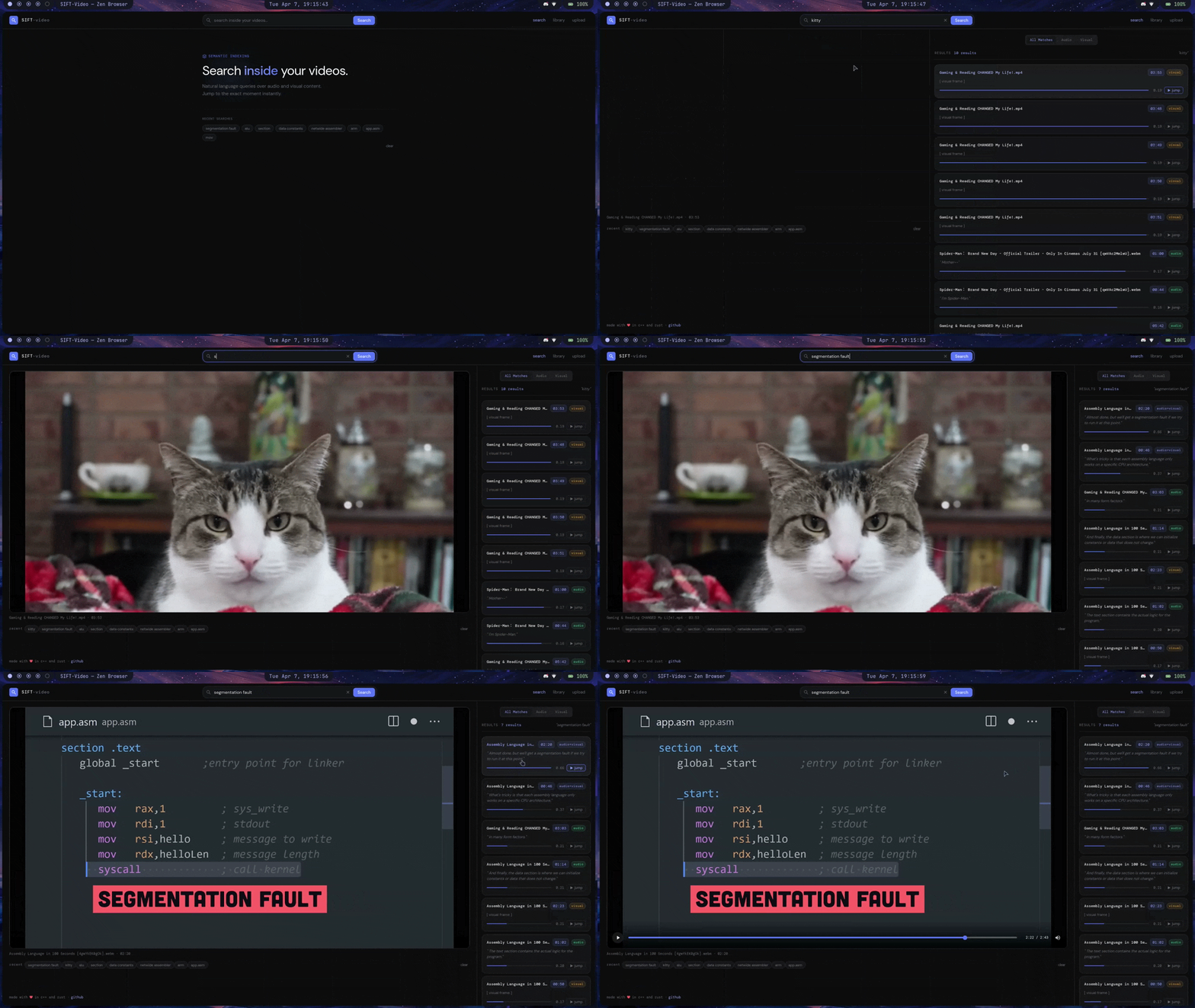
SIFT-Video is a multimodal semantic video search engine that lets you search inside videos using natural language and returns the most relevant timestamps based on audio **and** visual content.
Videos are processed offline, audio and frames are converted into semantic embeddings using pre-trained ONNX models, and indexed in a Qdrant vector database for fast similarity search at query time.


---
---
 ### Live Video Ingestion
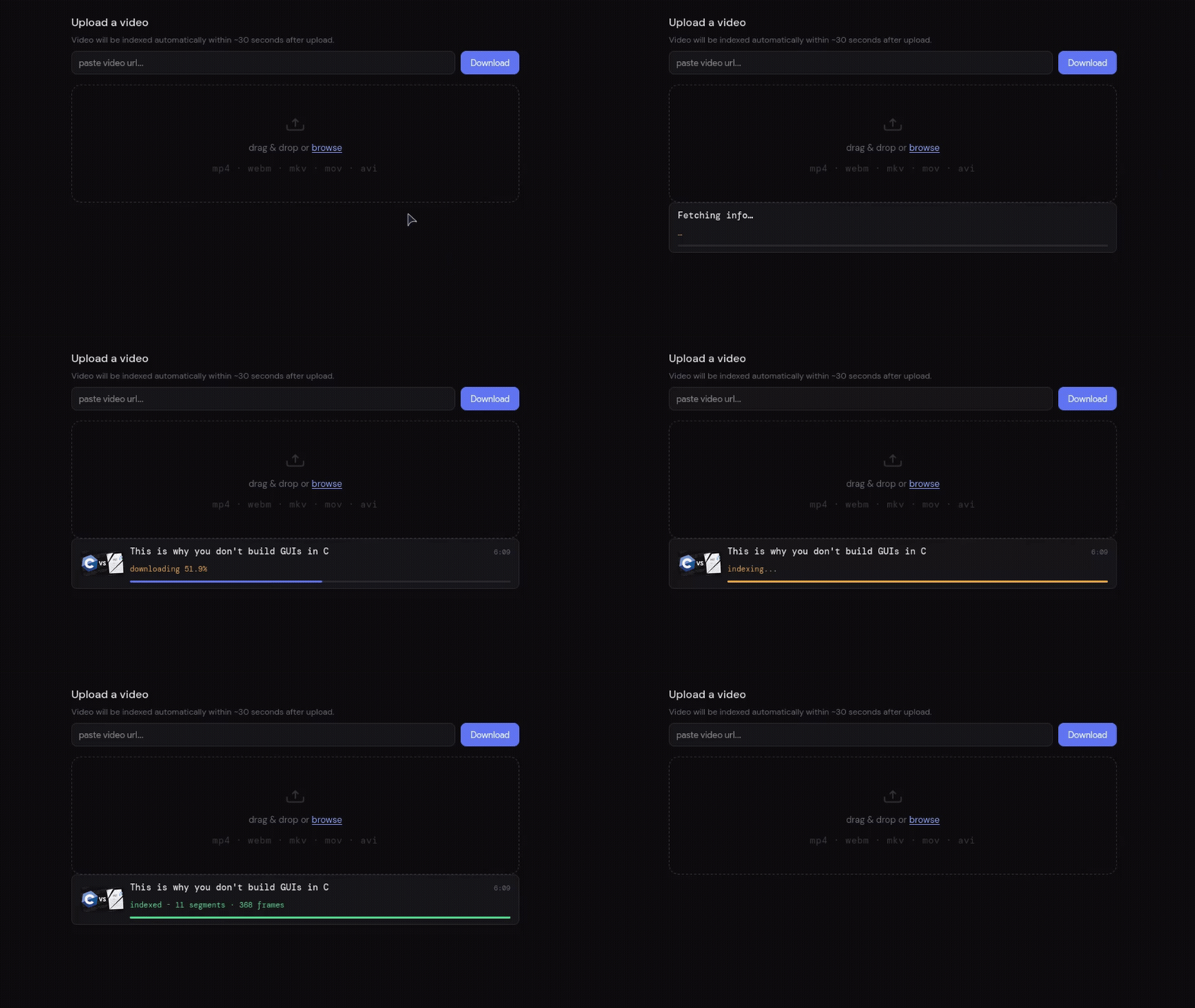
Paste any yt-dlp-compatible URL and watch the pipeline stream SSE events live. The engine downloads, extracts frames, transcribes via Whisper, and embeds into Qdrant automatically.
### Live Video Ingestion
Paste any yt-dlp-compatible URL and watch the pipeline stream SSE events live. The engine downloads, extracts frames, transcribes via Whisper, and embeds into Qdrant automatically.
---
## Quick Start
### Prerequisites
- [Docker](https://docs.docker.com/get-docker/) and Docker Compose
- git
### 1. Clone
```bash
git clone --recurse-submodules https://github.com/sourav4243/sift-video.git
cd sift-video
mkdir -p videos output
```
> If you cloned without `--recurse-submodules`:
> ```bash
> git submodule update --init --recursive
> ```
### 2. Run
#### For CPU
```bash
docker compose pull
docker compose up -d
```
Open `http://localhost:8080` in your browser.
#### For NVIDIA GPU
Requires [`nvidia-container-toolkit`](https://docs.nvidia.com/datacenter/cloud-native/container-toolkit/install-guide.html) on the host.
```bash
docker compose -f docker-compose.gpu.yml pull
docker compose -f docker-compose.gpu.yml up -d
```
GPU builds use separate `:latest-gpu` image tags and offload:
- **Whisper** transcription via `GGML_CUDA`
- **MobileCLIP** inference via the ONNX Runtime CUDA Execution Provider
### 4. Index a video
**Option A - web UI:** open `http://localhost:8080`, go to the **upload** tab, and either paste a URL or drag in a file.
**Option B - drop a file:**
```bash
cp your-video.mp4 videos/
```
The query engine detects it within 30 seconds and triggers the pipeline automatically.
---
## Web UI
The project ships with a full web interface served directly by the query engine at `http://localhost:8080`.
**Search panel** - the default view. Type a natural language query and hit Enter or click Search. Results appear as cards showing the video name, timestamp, match type badge (`audio`, `visual`, or `audio+visual`), the matching transcript excerpt with keyword highlighting, and a relevance score bar. Click any card or its **jump** button to open the built-in video player at that exact moment. Search history is persisted in localStorage and shown as clickable chips.
**Library panel** - lists every indexed video with its audio segment and visual frame counts. Click a video to scope all subsequent searches to that video only (shown as a dismissible filter pill). Click the trash icon to delete a video and remove all its embeddings from Qdrant.
**Upload panel** - two ways to add videos:
- **URL download** - paste any yt-dlp-compatible URL and click Download. A live progress bar streams SSE events from the server through download → transcription → embedding → indexing, showing percentage, video title, thumbnail, and duration. The entry clears itself automatically once indexing completes.
- **File upload** - drag and drop or browse for local video files (mp4, webm, mkv, mov, avi, ogv, up to 1 GB). Indexing begins automatically within ~30 seconds.
**Video player** - the theatre layout activates when you jump to a result. The left panel shows the video with custom controls: play/pause (also `Space` / `k`), a seek bar with click-and-drag support, timestamp display, mute toggle (`m`), fullscreen (`f`), and ±5 s skip with arrow keys. Clicking the logo resets back to the idle home view.
**Match type filter** - a three-way toggle (`All Matches` / `Audio` / `Visual`) re-runs the search automatically on change when a query is active.
---
## Architecture
Four Docker services communicate through a shared `/output` volume and a trigger-file protocol orchestrated by the query engine:
| Service | Language | Role |
| :--- | :--- | :--- |
| `sift_ingestion` | C++ / whisper.cpp | Extracts audio and frames with FFmpeg, transcribes speech with Whisper, writes `transcripts.json` |
| `sift_embedding` | C++ / ONNX Runtime | Reads frame JPEGs, runs MobileCLIP vision encoder, writes `.bin` embedding files |
| `sift_query_engine` | Rust / Axum | Orchestrates the pipeline, serves the REST API and web UI, ingests embeddings into Qdrant |
| `sift_qdrant` | Qdrant | Vector database storing `audio_segments` and `visual_frames` collections |
### Search pipeline
1. User submits a natural-language query via the UI or API.
2. The query engine lazy-loads a **MobileCLIP2-S3-OpenCLIP** text embedder (evicted after 120 s idle).
3. The 768-dimensional query vector is searched in parallel against both Qdrant collections.
4. Audio hits are weighted at **0.3**, visual hits at **0.7**.
5. Results within a **2-second window** of each other in the same video are merged into a single `audio+visual` result.
6. The top results (with timestamps) are returned.
### Ingestion pipeline (triggered automatically)
```
new video in /videos
│
▼
sift_query_engine detects it (30s poll)
│
▼
writes /output/.trigger_ingest
│
▼
sift_ingestion: FFmpeg extracts audio + frames in parallel
→ Whisper transcribes audio → transcripts.json
→ frame_XXXX.jpg files
│
▼
writes /output/.trigger_embed
│
▼
sift_embedding: MobileCLIP encodes each frame → .bin files
│
▼
sift_query_engine: reads transcripts.json + .bin files → upserts into Qdrant
```
---
## API Reference
### `POST /search`
Multimodal vector search.
```json
{
"query": "iron man flying",
"video_id": null,
"match_type": "all"
}
```
`match_type` can be `"all"`, `"audio"`, or `"visual"`.
### `POST /download/progress`
Download a video via yt-dlp. Returns an **SSE stream** of progress events (`meta`, `meta_done`, `downloading`, `download_done`, `indexing`, `done`, `error`).
```json
{ "url": "https://youtube.com/watch?v=..." }
```
### `POST /upload`
Multipart file upload (mp4, webm, mkv, mov, avi, ogv). Max 1 GB.
### `GET /videos/list`
List all indexed videos with audio segment and visual frame counts.
### `GET /videos/:filename`
Stream a video file with HTTP range request support for seeking.
### `DELETE /videos/:filename`
Remove a video from disk and delete all associated embeddings from Qdrant.
### `GET /health`
```json
{ "status": "ok", "qdrant": true, "pipeline_running": false }
```
---
## Configuration
Set in `docker-compose.yml` (or `docker-compose.gpu.yml`):
| Variable | Default | Description |
| :--- | :--- | :--- |
| `QDRANT_URL` | `http://qdrant:6334` | Qdrant gRPC endpoint |
| `RUST_LOG` | `info` | Log level for the query engine |
| `OUTPUT_DIR` | `/output` | Shared volume path |
| `WHISPER_THREADS` | `4` | Whisper CPU thread count (ingestion service) |
> The Qdrant web dashboard is available at `http://localhost:6333/dashboard`.
---
## Technology Stack
### Languages
- **C++17** - ingestion and embedding services (whisper.cpp, ONNX Runtime, OpenCV, FFmpeg)
- **Rust** - query engine, REST API, vector DB interaction (Axum, qdrant-client, open_clip_inference)
- **HTML / CSS / JS** - web UI (vanilla, no framework)
### Models
- **Whisper small.en** (via whisper.cpp) - speech-to-text with timestamps
- **MobileCLIP2-S3-OpenCLIP** (via ONNX Runtime) - text and image embeddings (768-dim)
### Infrastructure
- **FFmpeg** - audio extraction and frame extraction (1 fps, parallelised)
- **Qdrant** - vector database (`audio_segments` + `visual_frames` collections, cosine distance)
- **Docker** - multi-service orchestration
---
## Building from Source
Images are built and pushed to Docker Hub via GitHub Actions on every push to `main` that touches a service directory. You can also build locally:
```bash
# CPU images
docker compose build
# GPU images
docker compose -f docker-compose.gpu.yml build
```
GitHub Actions builds four image variants automatically:
| Image | Tag | Notes |
| :--- | :--- | :--- |
| `meledo/sift-video-query-engine` | `latest` | Rust, CPU only |
| `meledo/sift-video-ingestion` | `latest` | C++, CPU whisper |
| `meledo/sift-video-ingestion` | `latest-gpu` | C++, CUDA whisper (`GGML_CUDA=ON`) |
| `meledo/sift-video-embedding` | `latest` | C++, CPU ONNX Runtime |
| `meledo/sift-video-embedding` | `latest-gpu` | C++, ONNX Runtime + CUDA EP |
---
## Contributing
Suggestions, fixes and improvements are welcome. Feel free to open an issue or a PR.
## License
This project is licensed under [GNU GPLv3](LICENSE).