 Codeg
Codeg
Codeg
Codeg




English · 简体中文 · 繁體中文 · 日本語 · 한국어 · Español · Deutsch · Français · Português · العربية
The multi-agent coding workspace.
Run every AI coding agent in one place — and let them work together.
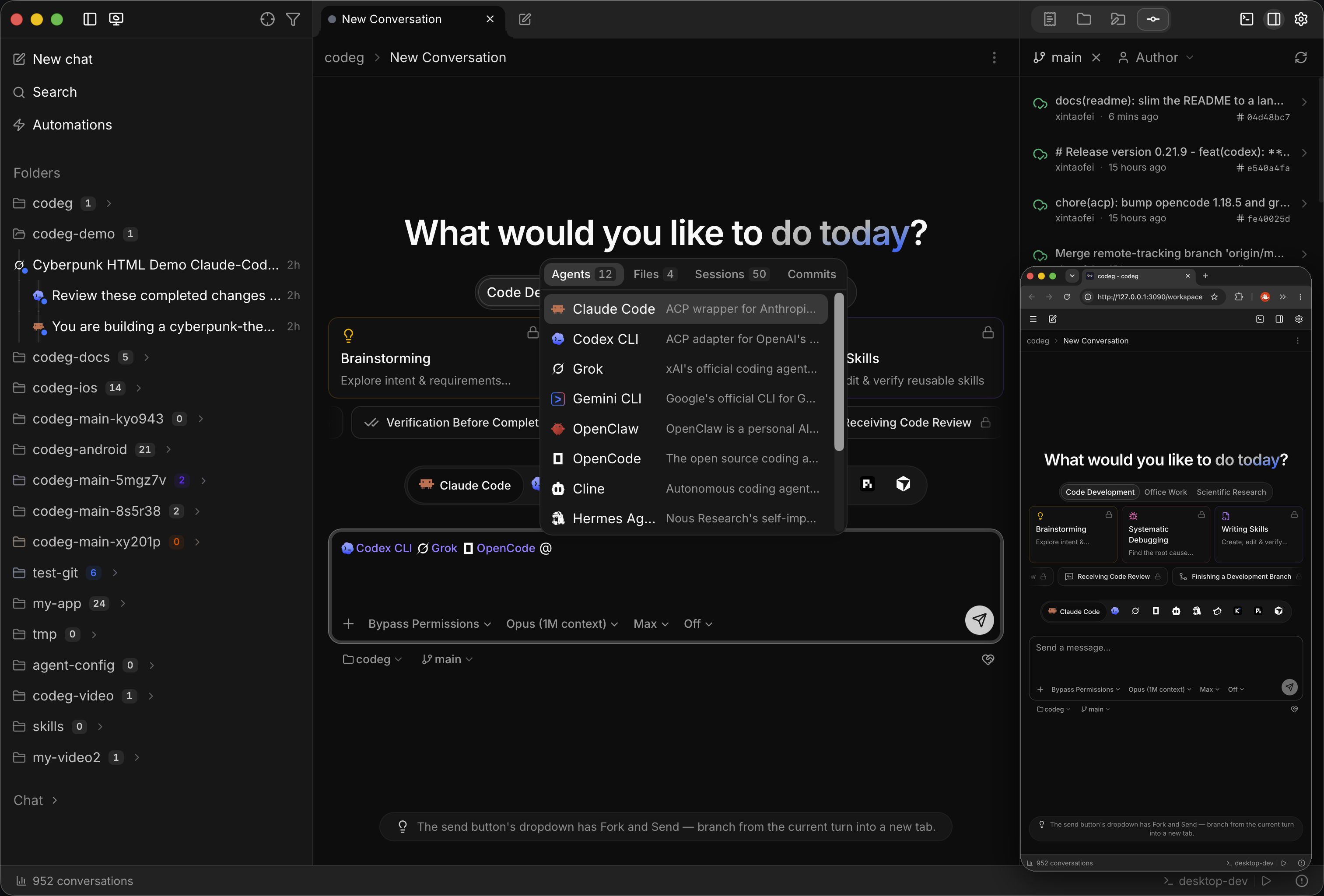
| 🧩 One interface for every agent Fifteen agents built in, and any ACP agent can join — all rendered as the same structured conversation, not a terminal. |
🔎 Sessions that travel Import, search, and resume the history every agent keeps on disk, then hand it to a different agent. |
| 🤝 Agents that work together Delegate across agents with an @, or queue to-dos that run unattended in their own worktrees. |
🌍 Wherever you work Desktop app, self-hosted server or Docker, iPhone, iPad, and Android — and Telegram, Lark, or WeChat. |
 Compshare (UCloud) |
Thanks to Compshare for sponsoring this project! Compshare is UCloud's AI cloud platform, offering cost-effective monthly and pay-as-you-go agent Plan subscriptions for Chinese models, starting at just ¥49/month. It also provides stable officially-proxied access to overseas models. Supports Claude Code, Codex, and API integrations. Enterprise-ready with high concurrency, 24/7 technical support, and self-service invoicing. Users who sign up via this link receive ¥5 in free platform credits! |
 合租巴士 |
Thanks to 合租巴士 for sponsoring this project! 合租巴士 is a reliable and efficient AI relay platform, offering highly stable relay for mainstream models such as Codex and Claude Code. Top-ups are credited at a transparent 1:1 ratio, with Codex rate subsidies as low as 0.08. Join the group via the official website to get $5 in trial credit. |
 APIMart |
Thanks to APIMart for sponsoring this project! APIMart is a low-cost API platform for AI image & video generation — GPT-Image-2 from $0.006/image, 160+ images per dollar. One async API covers both image and video: submit a task, get an ID, fetch results via polling or callback. Batch tens of thousands of images without timeouts, switch models without changing code. Pay-as-you-go with no monthly fee — sign up here to get started. |
 UCloud ·星图AstraFlow |
UCloud ·星图AstraFlow UCloud's AstraFlow large-model platform gives you one-click access to 200+ models: leading open-source models such as Kimi K3, DeepSeek V4/V3, Qwen 3, GLM5.2, and happyhorse are built in — no training of your own required, ready to use out of the box. Sign up with your email through the link above, complete real-name verification, and claim ¥50 in compute credits. |
 Sidrune AI |
Thanks to Sidrune AI for sponsoring this project! Sidrune AI gives you access to GPT, Claude, and other major AI models through a single API. New users who sign up through our dedicated link with promo code SDRCODEG get $3 in API credits. |
 BeeAPI |
Thanks to BeeAPI for sponsoring this project! BeeAPI is a professional multi-model AI API relay and aggregation platform that brings together many providers and a wide range of mainstream AI models. It supports cross-vendor price comparison, smart routing across groups, and unified API access and billing, helping you call AI services more flexibly, reliably, and at a lower cost. |
| ### One Interface for Every Agent Fifteen agents come built in, and any other ACP agent can join from the public registry or its distribution JSON. Codeg speaks the Agent Client Protocol to every one of them, so they all get the same rich conversation — tool cards, live diffs, plans, and permission prompts — instead of a terminal to squint at. Enable UI Render for an agent and it can answer with interactive cards, tables, and charts. [Docs →](https://docs.codeg.app/guide/supported-agents) · [Custom agents →](https://docs.codeg.app/guide/custom-agents) · [UI Render →](https://docs.codeg.app/guide/skills#cards-tables-and-charts-in-replies) |

|
| ### Every Session, Searchable Codeg reads the history every agent CLI keeps on disk: import it in one click, search all of it, and resume any session where it stopped. `@`-mention an old session and the agent you're talking to can read it — even one a different agent wrote. Give conversations colored tags, global or per folder, and filter the sidebar by them. [Docs →](https://docs.codeg.app/guide/aggregation) · [Tags →](https://docs.codeg.app/guide/workspace#tag-conversations) |

|
| ### Multi-Agent Collaboration Type `@`, pick an agent, send. Each mentioned agent runs as its own session, side by side, streaming back into your thread — Claude Code drafting while Codex reviews — and sub-agents show up as cards that fill in while they work. [Docs →](https://docs.codeg.app/guide/multi-agent) |

|
| ### To-dos That Run Unattended Write a job down and walk away. Each to-do gets its own git worktree and branch, starts now or on a schedule, and then waits for your review; accept the diff and the agent lands it, and Codeg checks git before calling it done. The repository panel can add them for you, too: it picks up issues and pull requests by label and author, on a schedule or when a webhook fires. [Docs →](https://docs.codeg.app/guide/tasks) · [Auto-processing →](https://docs.codeg.app/guide/repository#let-it-pick-items-up-by-itself) |

|
| ### Infinite Canvas Lay your work out in space: conversations, files, terminals, and notes become cards on a board, grouped by folder and agent, so several agents can run side by side in plain sight. [Docs →](https://docs.codeg.app/guide/canvas) |

|
| ### Desktop, Server, Mobile & Chat Run Codeg as a desktop app, a self-hosted server you open in any browser, or a single Docker container, and open a remote server from the desktop app in a workspace window of its own. Native iPhone, iPad, and Android clients — plus Telegram, Lark, and WeChat channels — keep your agents in reach, while your files and sessions stay on machines you control. [Docs →](https://docs.codeg.app/getting-started/deployment) · [Remote workspaces →](https://docs.codeg.app/guide/workspace#desktop-and-browser) · [Mobile apps →](https://docs.codeg.app/getting-started/installation#mobile-apps) · [Chat channels →](https://docs.codeg.app/guide/chat-channels) |

|
| ### Office Documents & Research Ask for a deck, a report, or a workbook and watch the real `.pptx`, `.docx`, or `.xlsx` render live beside the conversation; PDFs get a viewer of their own. Bundled research skills — hypotheses, experimental design, statistics, literature search — work with any agent. [Docs →](https://docs.codeg.app/guide/office) · [Research →](https://docs.codeg.app/guide/research) |

|
| ### Browser & Computer Use In the desktop app, links open in a built-in browser beside your files, at desktop, tablet, or phone size: hand the agent a page, an element, a screenshot, or a console error, or let it drive a page you share. In preview, agents can also see and operate the windows you share — and Stop is one click away. [Docs →](https://docs.codeg.app/guide/browser) · [Computer Use →](https://docs.codeg.app/guide/computer-use) |

|
| ### The Full Engineering Loop An editor, live and side-by-side diffs, a full git client with a three-pane merge editor, one-click worktrees, an embedded terminal, and split views — all next to the agent, on the real files in your repo. [Docs →](https://docs.codeg.app/guide/workspace) · [Git & worktrees →](https://docs.codeg.app/guide/git) |

|
 Claude Code
 Codex
Codex
 Gemini CLI
 OpenClaw


 Kimi Code
 Pi
Pi


 DeepSeek Harness