
 ](https://spatie.be/github-ad-click/laravel-analytics)
We invest a lot of resources into creating [best in class open source packages](https://spatie.be/open-source). You can support us by [buying one of our paid products](https://spatie.be/open-source/support-us).
We highly appreciate you sending us a postcard from your hometown, mentioning which of our package(s) you are using. You'll find our address on [our contact page](https://spatie.be/about-us). We publish all received postcards on [our virtual postcard wall](https://spatie.be/open-source/postcards).
## Installation
This package can be installed through Composer.
``` bash
composer require spatie/laravel-analytics
```
Optionally, you can publish the config file of this package with this command:
``` bash
php artisan vendor:publish --tag="analytics-config"
```
The following config file will be published in `config/analytics.php`
```php
return [
/*
* The property id of which you want to display data.
*/
'property_id' => env('ANALYTICS_PROPERTY_ID'),
/*
* Path to the client secret json file. Take a look at the README of this package
* to learn how to get this file. You can also pass the credentials as an array
* instead of a file path.
*/
'service_account_credentials_json' => storage_path('app/analytics/service-account-credentials.json'),
/*
* The amount of minutes the Google API responses will be cached.
* If you set this to zero, the responses won't be cached at all.
*/
'cache_lifetime_in_minutes' => 60 * 24,
/*
* Here you may configure the "store" that the underlying Google_Client will
* use to store it's data. You may also add extra parameters that will
* be passed on setCacheConfig (see docs for google-api-php-client).
*
* Optional parameters: "lifetime", "prefix"
*/
'cache' => [
'store' => 'file',
],
];
```
## How to obtain the credentials to communicate with Google Analytics
### Getting credentials
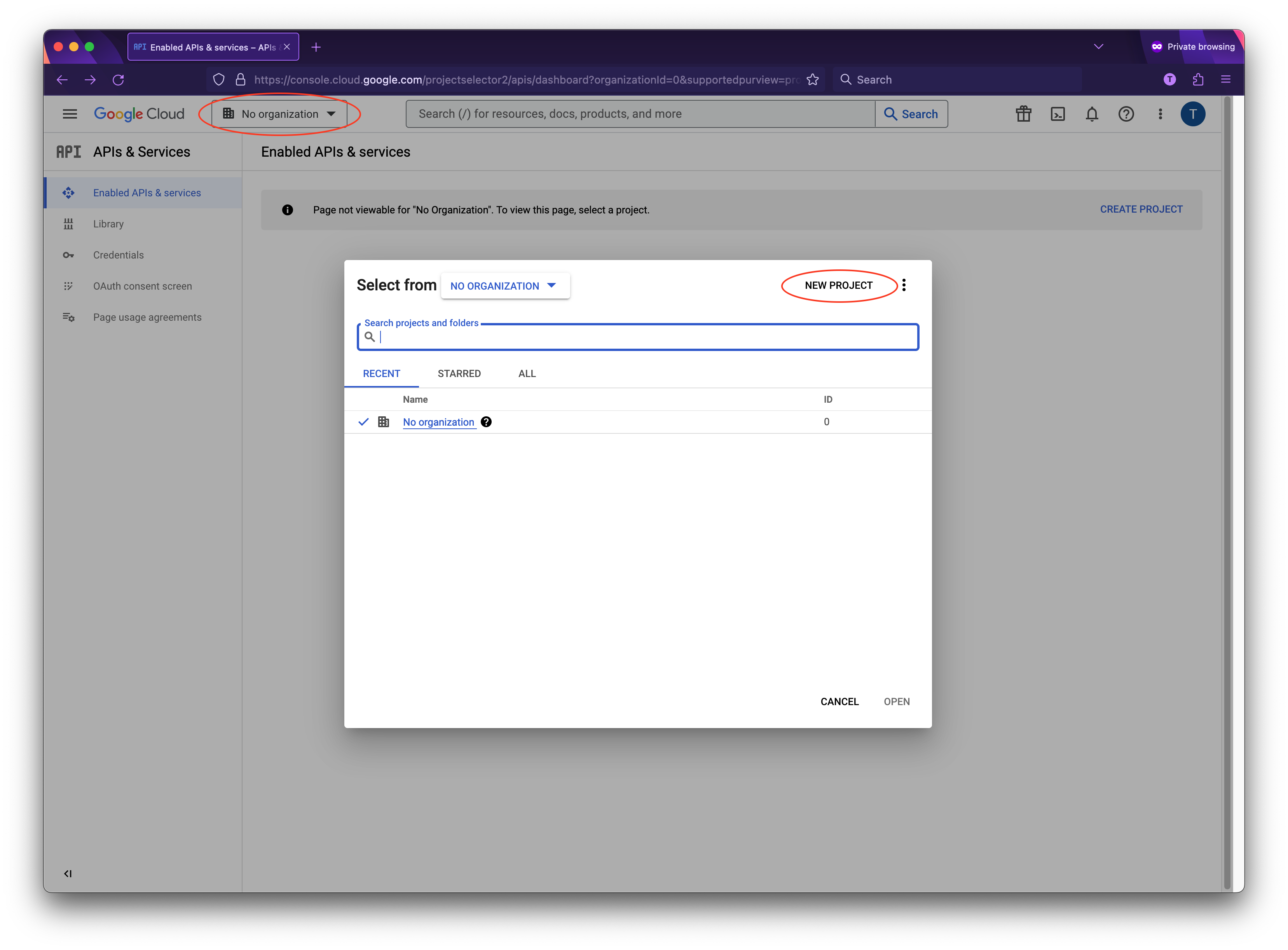
The first thing you’ll need to do is to get some credentials to use Google API’s. I’m assuming that you’ve already created a Google account and are signed in. Head over to [Google API’s site](https://console.developers.google.com/apis) and select or create a project.
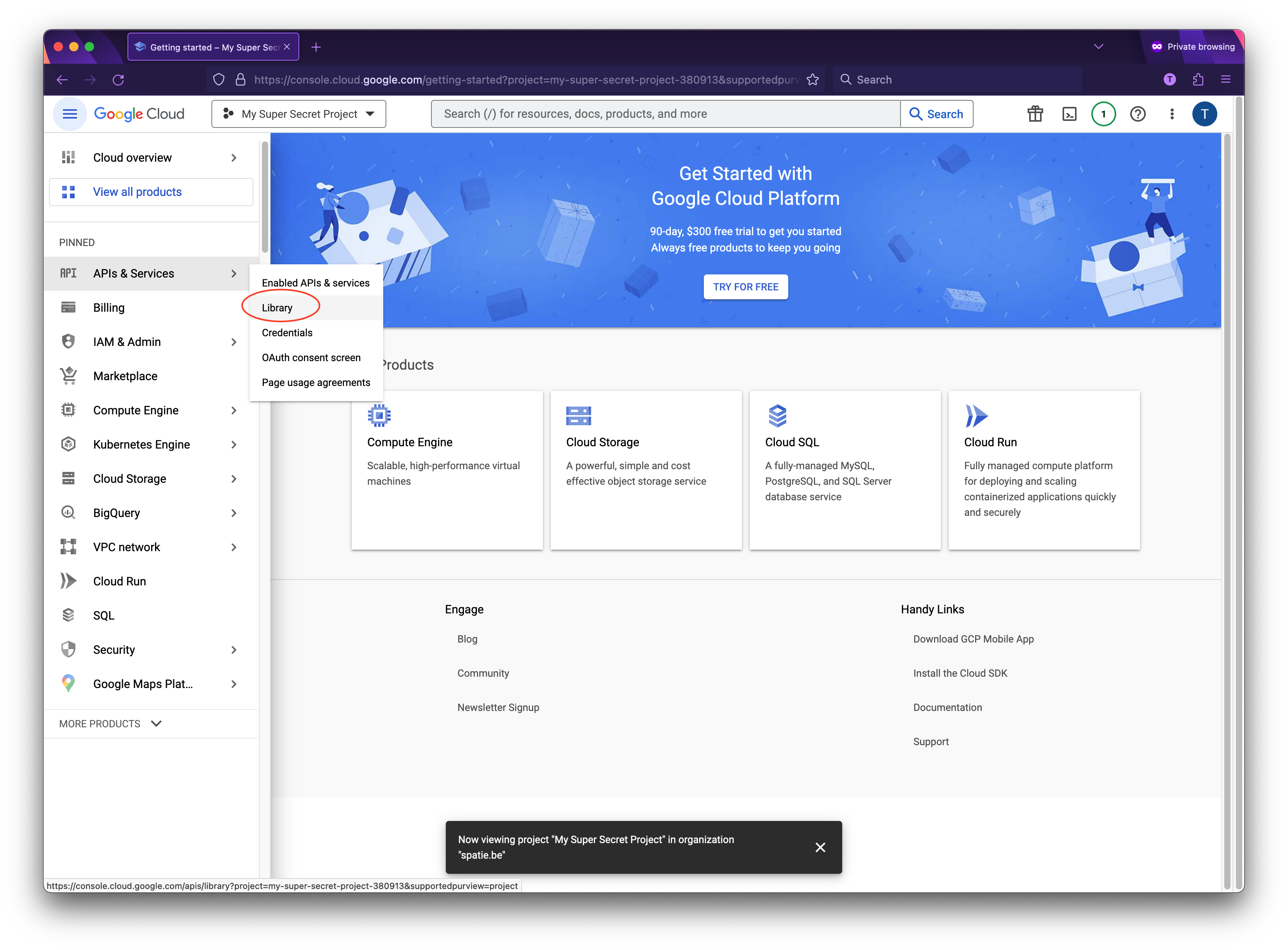
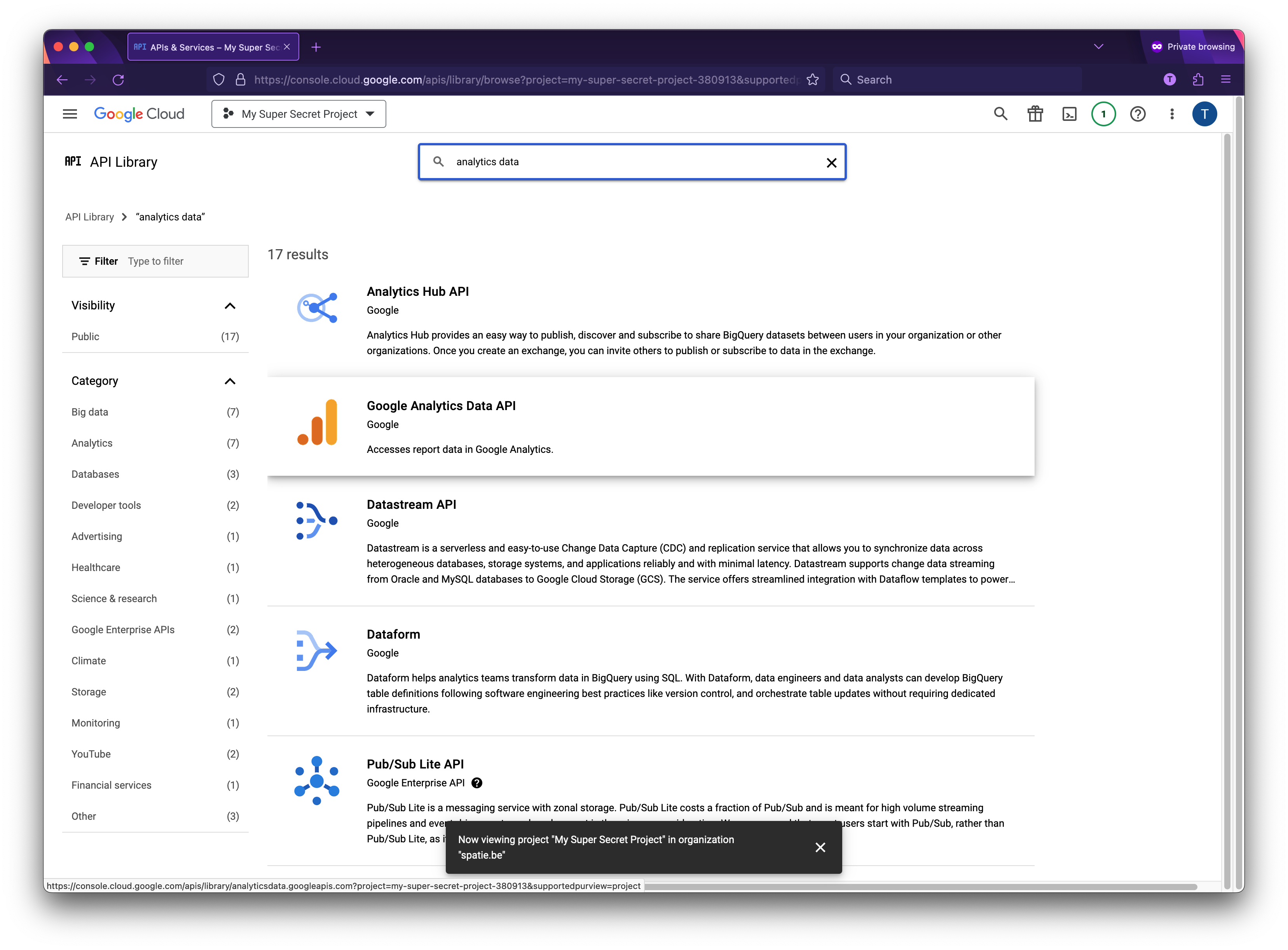
Next up we must specify which API’s the project may consume. Go to the API Library and search for "Google Analytics Data API".
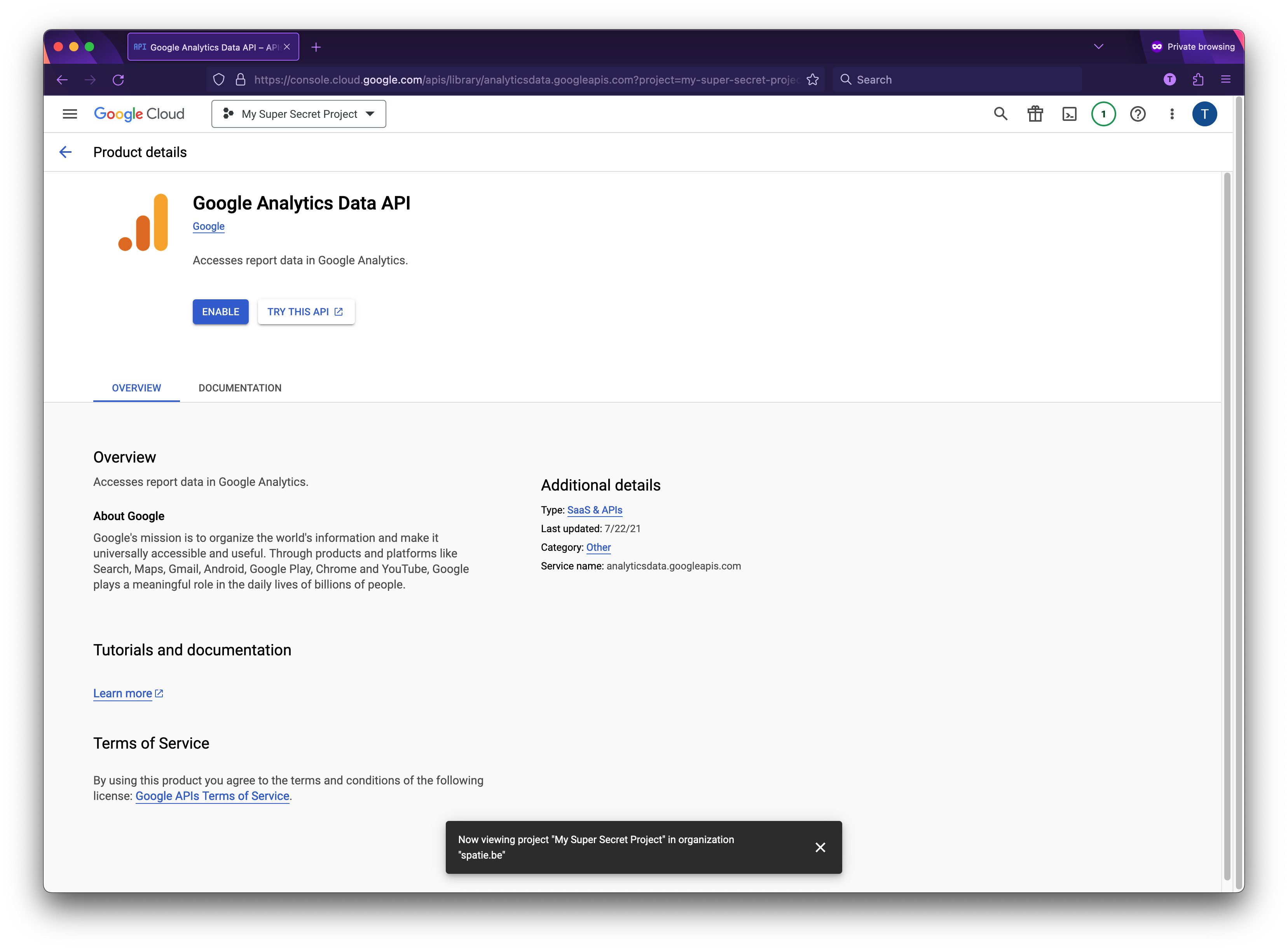
Choose enable to enable the API.
Now that you’ve created a project that has access to the Analytics API it’s time to download a file with these credentials. Click "Credentials" in the sidebar. You’ll want to create a "Service account key".
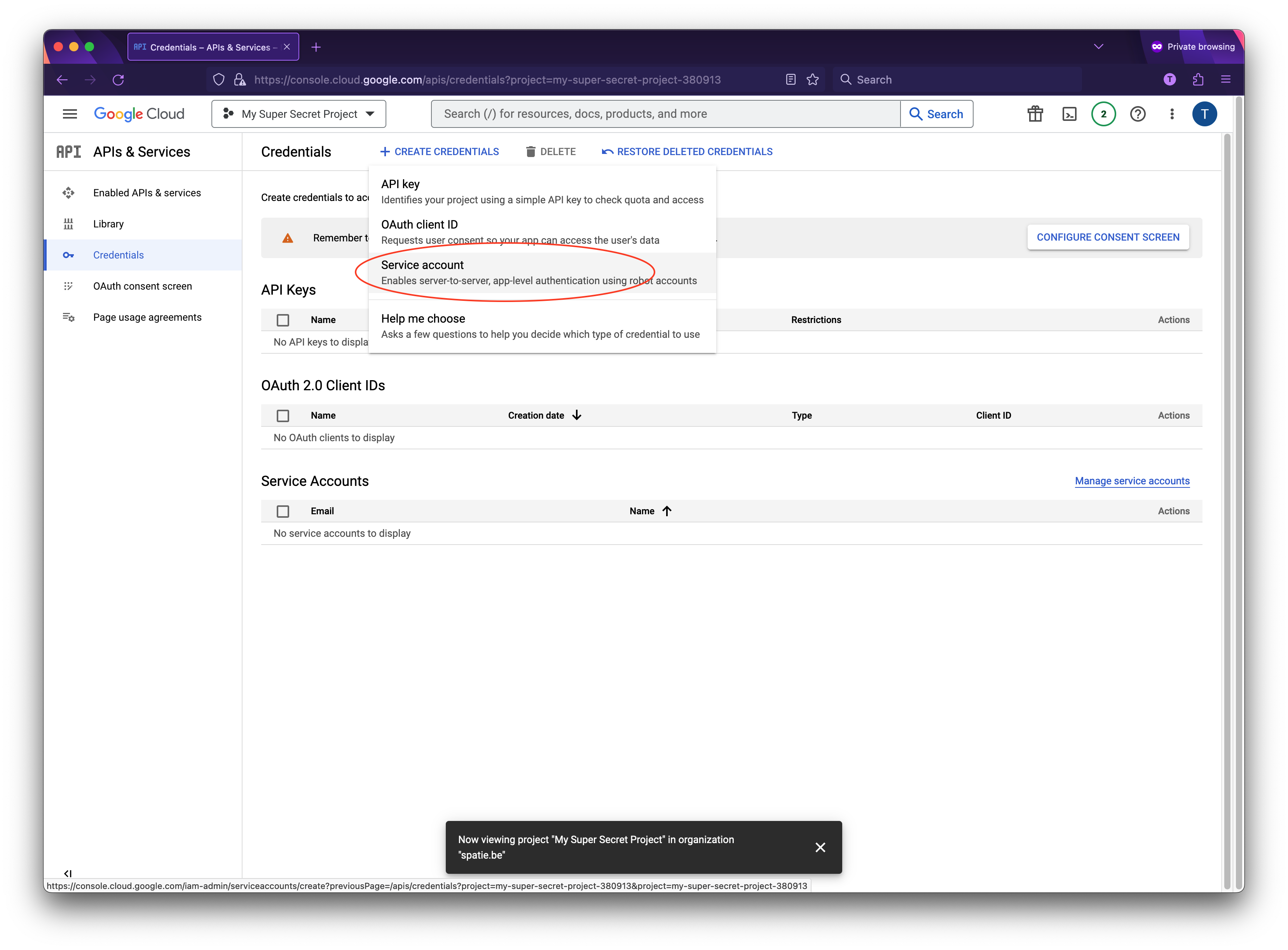
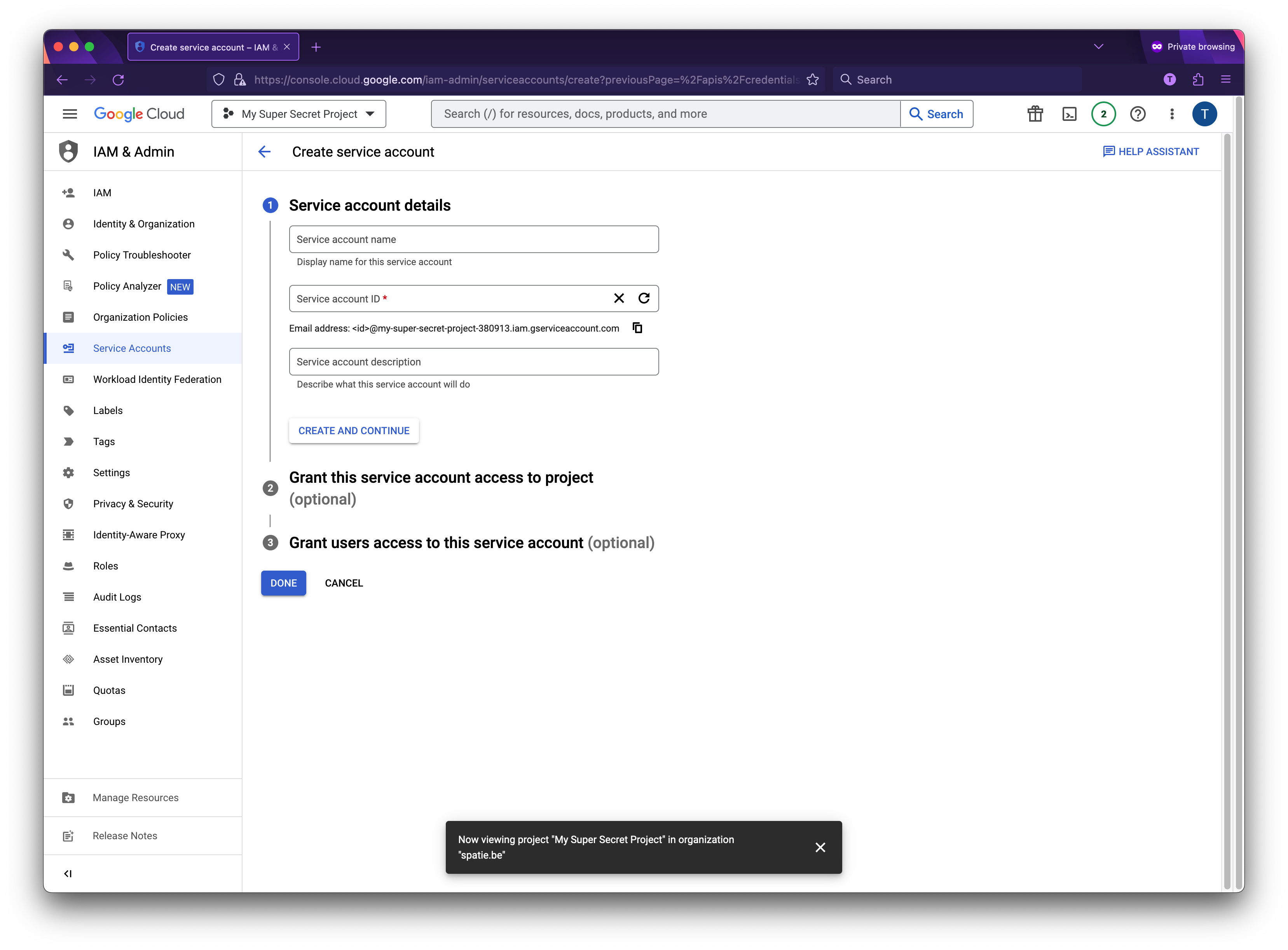
On the next screen you can give the service account a name. You can name it anything you’d like. In the service account id you’ll see an email address. We’ll use this email address later on in this guide.
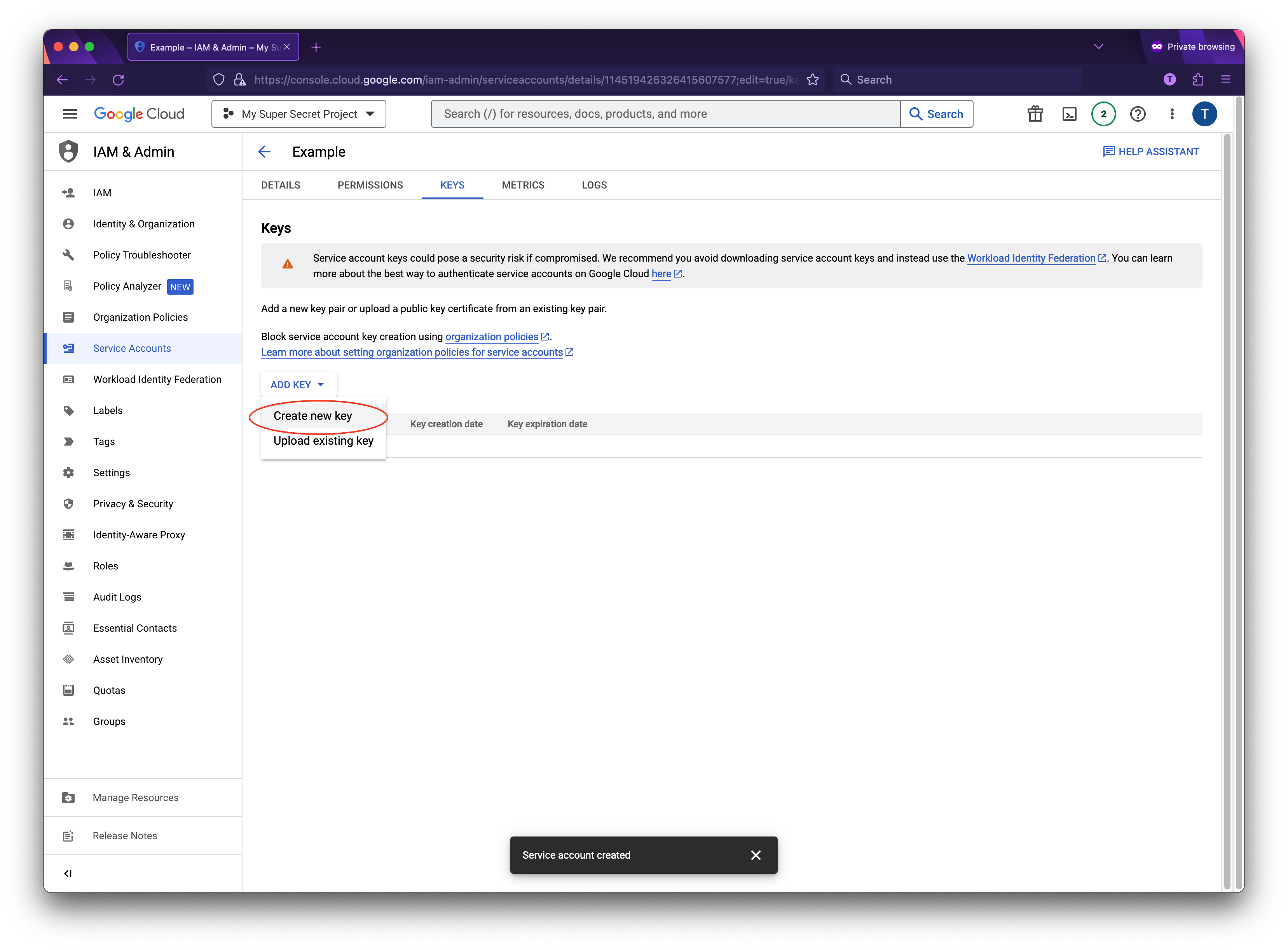
Go to the details screen of your created service account and select "keys", from the "Add key" dropdown select "Create new key".
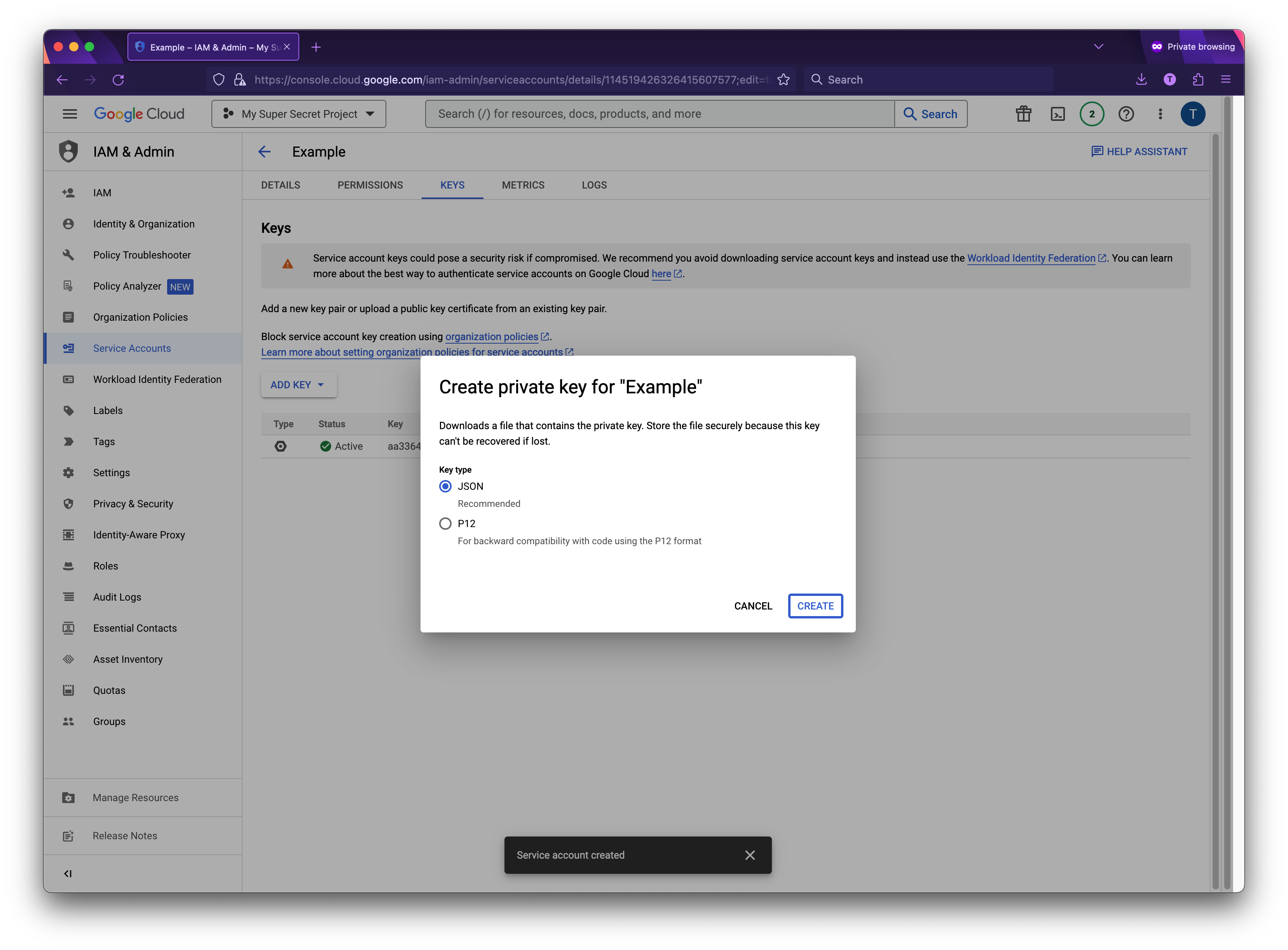
Select "JSON" as the key type and click "Create" to download the JSON file.
Save the json inside your Laravel project at the location specified in the `service_account_credentials_json` key of the config file of this package. Because the json file contains potentially sensitive information I don't recommend committing it to your git repository.
### Granting permissions to your Analytics property
I'm assuming that you've already created a Analytics account on the [Analytics site](https://analytics.google.com/analytics) and are using the new GA4 properties.
First you will need to know your property ID. In Analytics, go to Settings > Property Settings. Here you will be able to copy your property ID. Use this value for the `ANALYTICS_PROPERTY_ID` key in your .env file.
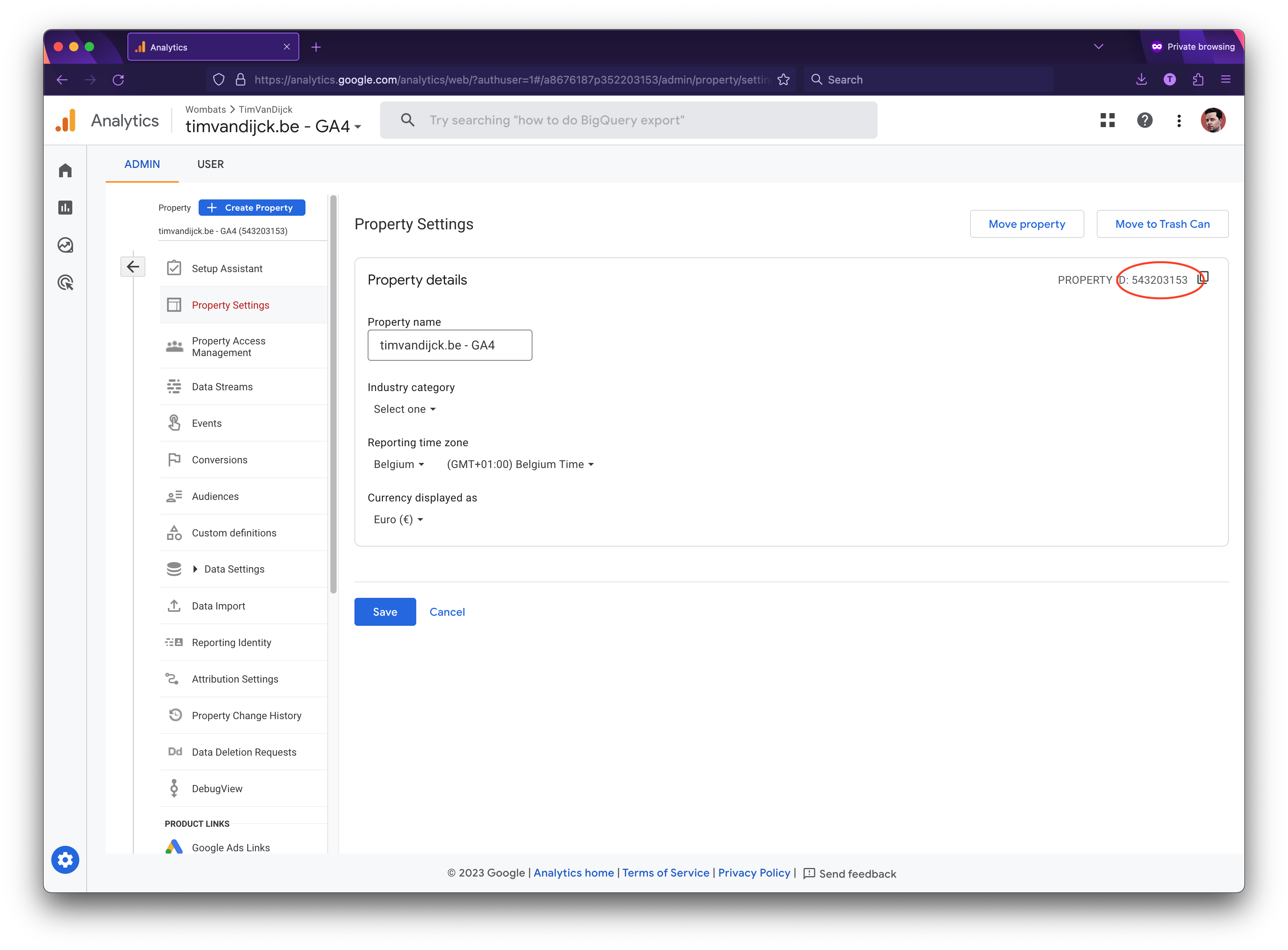
Now we will need to give access to the service account you created. Go to "Property Access Management" in the Admin-section of the property.
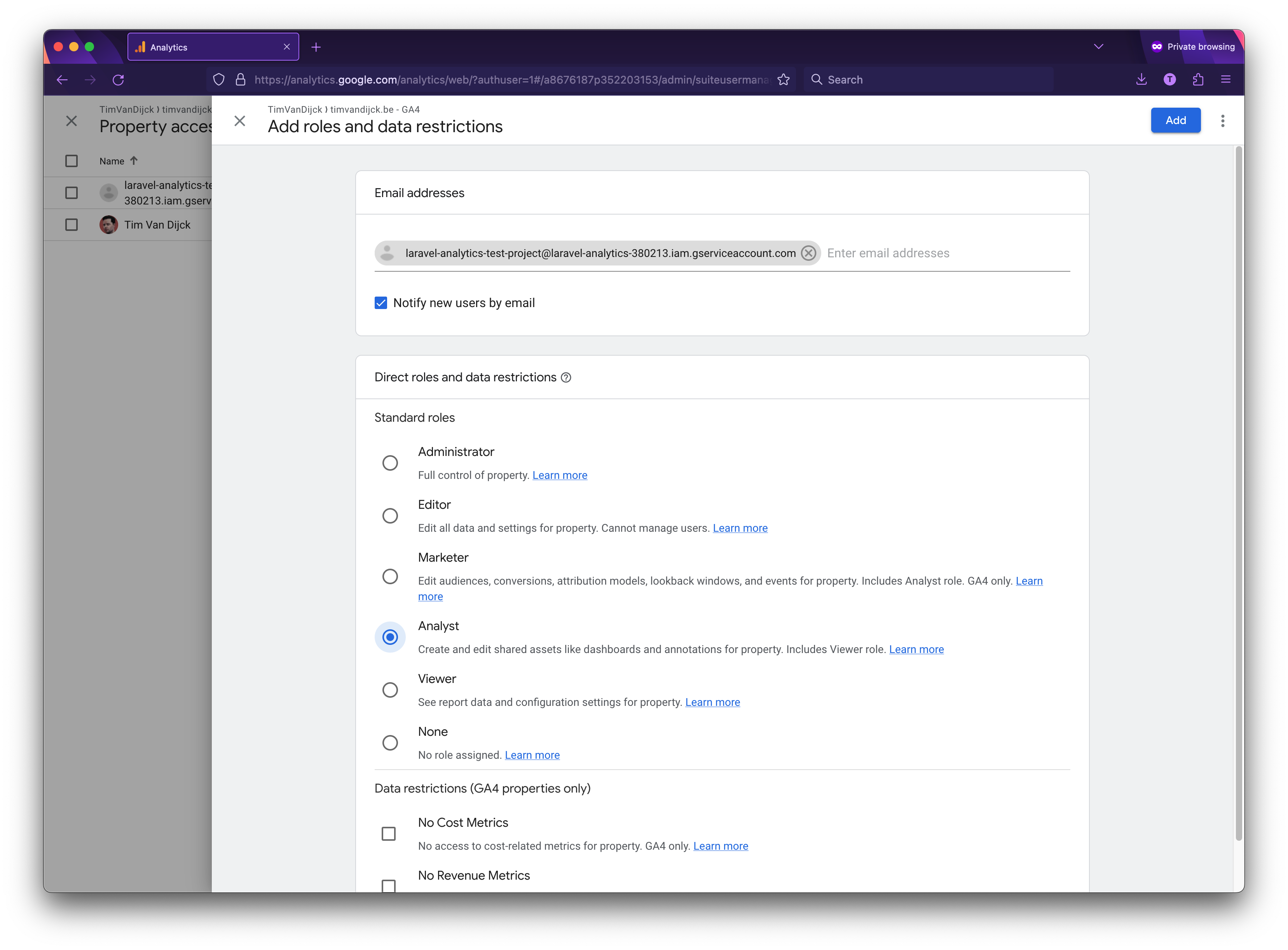
Click the plus sign in the top right corner to add a new user.
On this screen you can grant access to the email address found in the `client_email` key from the json file you download in the previous step. Analyst role is enough.
## Usage
When the installation is done you can easily retrieve Analytics data. Nearly all methods will return an `Illuminate\Support\Collection`-instance.
Here are a few examples using periods
```php
use Spatie\Analytics\Facades\Analytics;
//retrieve visitors and page view data for the current day and the last seven days
$analyticsData = Analytics::fetchVisitorsAndPageViews(Period::days(7));
//retrieve visitors and page views since the 6 months ago
$analyticsData = Analytics::fetchVisitorsAndPageViews(Period::months(6));
```
`$analyticsData` is a `Collection` in which each item is an array that holds keys `date`, `visitors` and `pageViews`
If you want to have more control over the period you want to fetch data for, you can pass a `startDate` and an `endDate` to the period object.
```php
$startDate = Carbon::now()->subYear();
$endDate = Carbon::now();
Period::create($startDate, $endDate);
```
## Provided methods
### Visitors and page views
```php
public function fetchVisitorsAndPageViews(Period $period): Collection
```
The function returns a `Collection` in which each item is an array that holds keys `activeUsers`, `screenPageViews` and `pageTitle`.
### Visitors and page views by date
```php
public function fetchVisitorsAndPageViewsByDate(Period $period): Collection
```
The function returns a `Collection` in which each item is an array that holds keys `date`, `activeUsers`, `screenPageViews` and `pageTitle`.
### Total visitors and pageviews
```php
public function fetchTotalVisitorsAndPageViews(Period $period): Collection
```
The function returns a `Collection` in which each item is an array that holds keys `date`, `date`, `visitors`, and `pageViews`.
### Most visited pages
```php
public function fetchMostVisitedPages(Period $period, int $maxResults = 20): Collection
```
The function returns a `Collection` in which each item is an array that holds keys `fullPageUrl`, `pageTitle` and `screenPageViews`.
### Top referrers
```php
public function fetchTopReferrers(Period $period, int $maxResults = 20): Collection
```
The function returns a `Collection` in which each item is an array that holds keys `screenPageViews` and `pageReferrer`.
### User Types
```php
public function fetchUserTypes(Period $period): Collection
```
The function returns a `Collection` in which each item is an array that holds keys `activeUsers` and `newVsReturning` which can equal to `new` or `returning`.
### Top browsers
```php
public function fetchTopBrowsers(Period $period, int $maxResults = 10): Collection
```
The function returns a `Collection` in which each item is an array that holds keys `screenPageViews` and `browser`.
### Top countries
```php
public function fetchTopCountries(Period $period, int $maxResults = 10): Collection
```
The function returns a `Collection` in which each item is an array that holds keys `screenPageViews` and `country`.
### Top operating systems
```php
public function fetchTopOperatingSystems(Period $period, int $maxResults = 10): Collection
```
The function returns a `Collection` in which each item is an array that holds keys `screenPageViews` and `operatingSystem`.
### All other Google Analytics queries
For all other queries you can use the `get` function.
```php
public function get(Period $period, array $metrics, array $dimensions = [], int $maxResults = 10, array $orderBy = [], int $offset = 0, ?FilterExpression $dimensionFilter = null, bool $keepEmptyRows = false, ?FilterExpression $metricFilter = null): Collection
```
Here's some extra info on the arguments you can pass:
`Period $period`: a Spatie\Analytics\Period object to indicate that start and end date for your query.
`array $metrics`: an array of metrics to retrieve. You can find a list of all metrics [here](https://developers.google.com/analytics/devguides/reporting/data/v1/api-schema#metrics).
`array $dimensions`: an array of dimensions to group the results by. You can find a list of all dimensions [here](https://developers.google.com/analytics/devguides/reporting/data/v1/api-schema#dimensions).
`int $maxResults`: the maximum number of results to return.
`array $orderBy`: of OrderBy objects to sort the results by.
`init $offset`: Defaults to 0, you can use this in combination with the $maxResults param to have pagination.
`bool $keepEmptyRows`: If false or unspecified, each row with all metrics equal to 0 will not be returned. If true, these rows will be returned if they are not separately removed by a filter.
For example:
```php
$orderBy = [
OrderBy::dimension('date', true),
OrderBy::metric('pageViews', false),
];
```
`FilterExpression $dimensionFilter`: filter the result to include only specific dimension values. You can find more details [here](https://cloud.google.com/php/docs/reference/analytics-data/latest/V1beta.RunReportRequest).
For example:
```php
use Google\Analytics\Data\V1beta\Filter;
use Google\Analytics\Data\V1beta\FilterExpression;
use Google\Analytics\Data\V1beta\Filter\StringFilter;
use Google\Analytics\Data\V1beta\Filter\StringFilter\MatchType;
$dimensionFilter = new FilterExpression([
'filter' => new Filter([
'field_name' => 'eventName',
'string_filter' => new StringFilter([
'match_type' => MatchType::EXACT,
'value' => 'click',
]),
]),
]);
```
`FilterExpression $metricFilter`: filter applied after aggregating the report's rows, similar to SQL having-clause. Dimensions cannot be used in this filter. You can find more details [here](https://cloud.google.com/php/docs/reference/analytics-data/latest/V1beta.RunReportRequest).
For example:
```php
use Google\Analytics\Data\V1beta\Filter;
use Google\Analytics\Data\V1beta\FilterExpression;
use Google\Analytics\Data\V1beta\Filter\NumericFilter;
use Google\Analytics\Data\V1beta\NumericValue;
use Google\Analytics\Data\V1beta\Filter\NumericFilter\Operation;
$metricFilter = new FilterExpression([
'filter' => new Filter([
'field_name' => 'eventCount',
'numeric_filter' => new NumericFilter([
'operation' => Operation::GREATER_THAN,
'value' => new NumericValue([
'int64_value' => 3,
]),
]),
]),
]);
```
## Testing
### Faking
To fake calls within the package in your own project you can use the `fake` method on the `Spatie\Analytics\Facades\Analytics` facade.
For example:
```php
actingAs($admin)->get('/analytics');
// Assert
$response->assertStatus(200);
});
```
You can also specify the expected result either as an array or `Illuminate\Support\Collection` to be returned when a method is called on the facade.
For example:
```php
'Test Page',
'activeUsers' => 10,
'screenPageViews' => 20,
],
]);
// Act
$response = $this->actingAs($admin)->get('/analytics');
// Assert
$response->assertStatus(200);
});
```
### Package tests
Run the tests with:
``` bash
vendor/bin/pest
```
## Changelog
Please see [CHANGELOG](CHANGELOG.md) for more information what has changed recently.
## Contributing
Please see [CONTRIBUTING](https://github.com/spatie/.github/blob/main/CONTRIBUTING.md) for details.
## Security
If you've found a bug regarding security please mail [security@spatie.be](mailto:security@spatie.be) instead of using the issue tracker.
## Credits
- [Freek Van der Herten](https://github.com/freekmurze)
- [All Contributors](../../contributors)
Special thanks to [Caneco](https://twitter.com/caneco) for the original logo.
## License
The MIT License (MIT). Please see [License File](LICENSE.md) for more information.
](https://spatie.be/github-ad-click/laravel-analytics)
We invest a lot of resources into creating [best in class open source packages](https://spatie.be/open-source). You can support us by [buying one of our paid products](https://spatie.be/open-source/support-us).
We highly appreciate you sending us a postcard from your hometown, mentioning which of our package(s) you are using. You'll find our address on [our contact page](https://spatie.be/about-us). We publish all received postcards on [our virtual postcard wall](https://spatie.be/open-source/postcards).
## Installation
This package can be installed through Composer.
``` bash
composer require spatie/laravel-analytics
```
Optionally, you can publish the config file of this package with this command:
``` bash
php artisan vendor:publish --tag="analytics-config"
```
The following config file will be published in `config/analytics.php`
```php
return [
/*
* The property id of which you want to display data.
*/
'property_id' => env('ANALYTICS_PROPERTY_ID'),
/*
* Path to the client secret json file. Take a look at the README of this package
* to learn how to get this file. You can also pass the credentials as an array
* instead of a file path.
*/
'service_account_credentials_json' => storage_path('app/analytics/service-account-credentials.json'),
/*
* The amount of minutes the Google API responses will be cached.
* If you set this to zero, the responses won't be cached at all.
*/
'cache_lifetime_in_minutes' => 60 * 24,
/*
* Here you may configure the "store" that the underlying Google_Client will
* use to store it's data. You may also add extra parameters that will
* be passed on setCacheConfig (see docs for google-api-php-client).
*
* Optional parameters: "lifetime", "prefix"
*/
'cache' => [
'store' => 'file',
],
];
```
## How to obtain the credentials to communicate with Google Analytics
### Getting credentials
The first thing you’ll need to do is to get some credentials to use Google API’s. I’m assuming that you’ve already created a Google account and are signed in. Head over to [Google API’s site](https://console.developers.google.com/apis) and select or create a project.

Next up we must specify which API’s the project may consume. Go to the API Library and search for "Google Analytics Data API".


Choose enable to enable the API.

Now that you’ve created a project that has access to the Analytics API it’s time to download a file with these credentials. Click "Credentials" in the sidebar. You’ll want to create a "Service account key".

On the next screen you can give the service account a name. You can name it anything you’d like. In the service account id you’ll see an email address. We’ll use this email address later on in this guide.

Go to the details screen of your created service account and select "keys", from the "Add key" dropdown select "Create new key".

Select "JSON" as the key type and click "Create" to download the JSON file.

Save the json inside your Laravel project at the location specified in the `service_account_credentials_json` key of the config file of this package. Because the json file contains potentially sensitive information I don't recommend committing it to your git repository.
### Granting permissions to your Analytics property
I'm assuming that you've already created a Analytics account on the [Analytics site](https://analytics.google.com/analytics) and are using the new GA4 properties.
First you will need to know your property ID. In Analytics, go to Settings > Property Settings. Here you will be able to copy your property ID. Use this value for the `ANALYTICS_PROPERTY_ID` key in your .env file.

Now we will need to give access to the service account you created. Go to "Property Access Management" in the Admin-section of the property.
Click the plus sign in the top right corner to add a new user.
On this screen you can grant access to the email address found in the `client_email` key from the json file you download in the previous step. Analyst role is enough.

## Usage
When the installation is done you can easily retrieve Analytics data. Nearly all methods will return an `Illuminate\Support\Collection`-instance.
Here are a few examples using periods
```php
use Spatie\Analytics\Facades\Analytics;
//retrieve visitors and page view data for the current day and the last seven days
$analyticsData = Analytics::fetchVisitorsAndPageViews(Period::days(7));
//retrieve visitors and page views since the 6 months ago
$analyticsData = Analytics::fetchVisitorsAndPageViews(Period::months(6));
```
`$analyticsData` is a `Collection` in which each item is an array that holds keys `date`, `visitors` and `pageViews`
If you want to have more control over the period you want to fetch data for, you can pass a `startDate` and an `endDate` to the period object.
```php
$startDate = Carbon::now()->subYear();
$endDate = Carbon::now();
Period::create($startDate, $endDate);
```
## Provided methods
### Visitors and page views
```php
public function fetchVisitorsAndPageViews(Period $period): Collection
```
The function returns a `Collection` in which each item is an array that holds keys `activeUsers`, `screenPageViews` and `pageTitle`.
### Visitors and page views by date
```php
public function fetchVisitorsAndPageViewsByDate(Period $period): Collection
```
The function returns a `Collection` in which each item is an array that holds keys `date`, `activeUsers`, `screenPageViews` and `pageTitle`.
### Total visitors and pageviews
```php
public function fetchTotalVisitorsAndPageViews(Period $period): Collection
```
The function returns a `Collection` in which each item is an array that holds keys `date`, `date`, `visitors`, and `pageViews`.
### Most visited pages
```php
public function fetchMostVisitedPages(Period $period, int $maxResults = 20): Collection
```
The function returns a `Collection` in which each item is an array that holds keys `fullPageUrl`, `pageTitle` and `screenPageViews`.
### Top referrers
```php
public function fetchTopReferrers(Period $period, int $maxResults = 20): Collection
```
The function returns a `Collection` in which each item is an array that holds keys `screenPageViews` and `pageReferrer`.
### User Types
```php
public function fetchUserTypes(Period $period): Collection
```
The function returns a `Collection` in which each item is an array that holds keys `activeUsers` and `newVsReturning` which can equal to `new` or `returning`.
### Top browsers
```php
public function fetchTopBrowsers(Period $period, int $maxResults = 10): Collection
```
The function returns a `Collection` in which each item is an array that holds keys `screenPageViews` and `browser`.
### Top countries
```php
public function fetchTopCountries(Period $period, int $maxResults = 10): Collection
```
The function returns a `Collection` in which each item is an array that holds keys `screenPageViews` and `country`.
### Top operating systems
```php
public function fetchTopOperatingSystems(Period $period, int $maxResults = 10): Collection
```
The function returns a `Collection` in which each item is an array that holds keys `screenPageViews` and `operatingSystem`.
### All other Google Analytics queries
For all other queries you can use the `get` function.
```php
public function get(Period $period, array $metrics, array $dimensions = [], int $maxResults = 10, array $orderBy = [], int $offset = 0, ?FilterExpression $dimensionFilter = null, bool $keepEmptyRows = false, ?FilterExpression $metricFilter = null): Collection
```
Here's some extra info on the arguments you can pass:
`Period $period`: a Spatie\Analytics\Period object to indicate that start and end date for your query.
`array $metrics`: an array of metrics to retrieve. You can find a list of all metrics [here](https://developers.google.com/analytics/devguides/reporting/data/v1/api-schema#metrics).
`array $dimensions`: an array of dimensions to group the results by. You can find a list of all dimensions [here](https://developers.google.com/analytics/devguides/reporting/data/v1/api-schema#dimensions).
`int $maxResults`: the maximum number of results to return.
`array $orderBy`: of OrderBy objects to sort the results by.
`init $offset`: Defaults to 0, you can use this in combination with the $maxResults param to have pagination.
`bool $keepEmptyRows`: If false or unspecified, each row with all metrics equal to 0 will not be returned. If true, these rows will be returned if they are not separately removed by a filter.
For example:
```php
$orderBy = [
OrderBy::dimension('date', true),
OrderBy::metric('pageViews', false),
];
```
`FilterExpression $dimensionFilter`: filter the result to include only specific dimension values. You can find more details [here](https://cloud.google.com/php/docs/reference/analytics-data/latest/V1beta.RunReportRequest).
For example:
```php
use Google\Analytics\Data\V1beta\Filter;
use Google\Analytics\Data\V1beta\FilterExpression;
use Google\Analytics\Data\V1beta\Filter\StringFilter;
use Google\Analytics\Data\V1beta\Filter\StringFilter\MatchType;
$dimensionFilter = new FilterExpression([
'filter' => new Filter([
'field_name' => 'eventName',
'string_filter' => new StringFilter([
'match_type' => MatchType::EXACT,
'value' => 'click',
]),
]),
]);
```
`FilterExpression $metricFilter`: filter applied after aggregating the report's rows, similar to SQL having-clause. Dimensions cannot be used in this filter. You can find more details [here](https://cloud.google.com/php/docs/reference/analytics-data/latest/V1beta.RunReportRequest).
For example:
```php
use Google\Analytics\Data\V1beta\Filter;
use Google\Analytics\Data\V1beta\FilterExpression;
use Google\Analytics\Data\V1beta\Filter\NumericFilter;
use Google\Analytics\Data\V1beta\NumericValue;
use Google\Analytics\Data\V1beta\Filter\NumericFilter\Operation;
$metricFilter = new FilterExpression([
'filter' => new Filter([
'field_name' => 'eventCount',
'numeric_filter' => new NumericFilter([
'operation' => Operation::GREATER_THAN,
'value' => new NumericValue([
'int64_value' => 3,
]),
]),
]),
]);
```
## Testing
### Faking
To fake calls within the package in your own project you can use the `fake` method on the `Spatie\Analytics\Facades\Analytics` facade.
For example:
```php
actingAs($admin)->get('/analytics');
// Assert
$response->assertStatus(200);
});
```
You can also specify the expected result either as an array or `Illuminate\Support\Collection` to be returned when a method is called on the facade.
For example:
```php
'Test Page',
'activeUsers' => 10,
'screenPageViews' => 20,
],
]);
// Act
$response = $this->actingAs($admin)->get('/analytics');
// Assert
$response->assertStatus(200);
});
```
### Package tests
Run the tests with:
``` bash
vendor/bin/pest
```
## Changelog
Please see [CHANGELOG](CHANGELOG.md) for more information what has changed recently.
## Contributing
Please see [CONTRIBUTING](https://github.com/spatie/.github/blob/main/CONTRIBUTING.md) for details.
## Security
If you've found a bug regarding security please mail [security@spatie.be](mailto:security@spatie.be) instead of using the issue tracker.
## Credits
- [Freek Van der Herten](https://github.com/freekmurze)
- [All Contributors](../../contributors)
Special thanks to [Caneco](https://twitter.com/caneco) for the original logo.
## License
The MIT License (MIT). Please see [License File](LICENSE.md) for more information.