One platform to build, search, extract, enrich, map, and monitor data across the entire web.
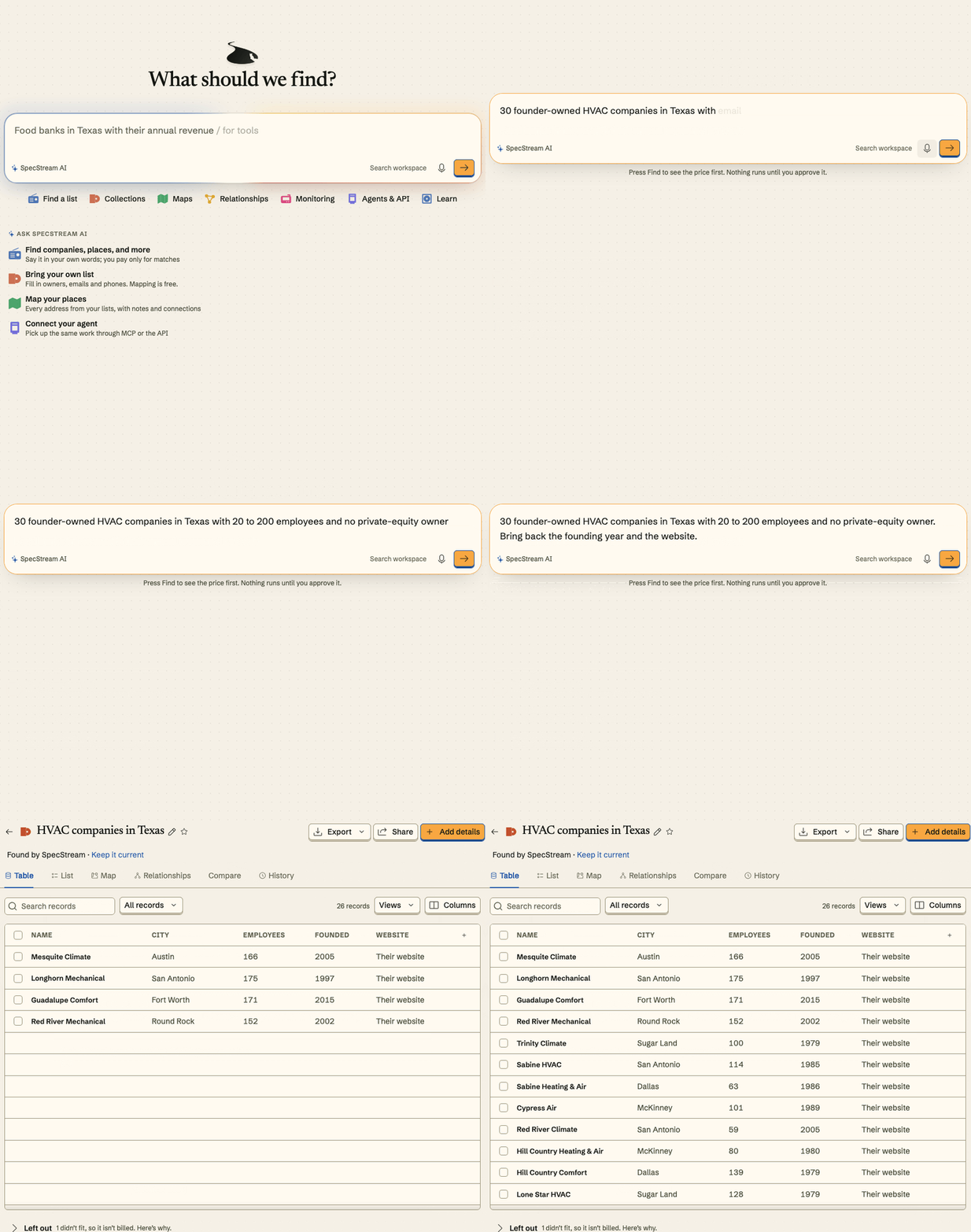
Ask for any dataset in plain words, and SpecStream builds it from the entire live web: every match found, extracted and enriched into structured records, then monitored for change. It runs through the API and MCP, and inside Sheets, CRMs, Slack, n8n, Zapier and the other tools teams already use.
| Product | What it does | Price |
| --- | --- | --- |
| [Search API](https://specstream.ai/search-api) | `GET /v1/web-search`. The most accurate web search API in the world ([scores and method](https://specstream.ai/benchmarks)). Answers a question from the live web in seconds. | $5 per 1,000 searches |
| [Extract API](https://specstream.ai/extract-api) | `POST /v1/extract`. The main text of up to 20 web pages, PDF, Word or Excel files a call. The MCP tool is `read_pages`. | $0.80 per 1,000 pages. A page with no text is not charged. |
| [Deep Search](https://specstream.ai/deep-search) | Ask in plain words. Get every match on the live web, in structured rows. It also enriches a list you have and monitors for change. | 5¢, 15¢ or $1 a row |
Search:
```sh
curl -G https://api.specstream.ai/v1/web-search \
-H "Authorization: Bearer $SPECSTREAM_API_KEY" \
--data-urlencode "q=What is the population of Japan?"
```
Extract:
```sh
curl https://api.specstream.ai/v1/extract \
-H "Authorization: Bearer $SPECSTREAM_API_KEY" \
-H "Content-Type: application/json" \
-d '{"urls": ["https://example.com"]}'
```
Search API in Python: answer a question from the live web in seconds.
```python
# pip install specstream-client
import os
from specstream_client import Client
client = Client(os.environ["SPECSTREAM_API_KEY"])
search = client.web_search(q="What is the population of Japan?")
for source in search["sources"][:1]:
print(source["title"], source["url"], source["snippet"])
```
Extract API in Python: the main text of up to 20 web pages, PDF, Word or Excel files a call.
```python
# pip install specstream-client
import os
from specstream_client import Client
client = Client(os.environ["SPECSTREAM_API_KEY"])
extract = client.extract_pages({"urls": ["https://example.com"]})
for page in extract["results"][:1]:
print(page["title"], page["url"], page["text"])
```
Search API in TypeScript:
```ts
// npm install @specstream/sdk
import { Client } from "@specstream/sdk";
const client = new Client({ apiKey: process.env.SPECSTREAM_API_KEY! });
const search = await client.webSearch({ q: "What is the population of Japan?" });
for (const source of search.sources.slice(0, 1)) {
console.log(source.title, source.url, source.snippet);
}
```
Extract API in TypeScript:
```ts
// npm install @specstream/sdk
import { Client } from "@specstream/sdk";
const client = new Client({ apiKey: process.env.SPECSTREAM_API_KEY! });
const extract = await client.extractPages({ urls: ["https://example.com"] });
for (const page of extract.results.slice(0, 1)) {
console.log(page.title, page.url, page.text);
}
```
- Source URL and read time on every value.
- The Search API and Extract API need no quote and no approval. Each search or page takes its flat price from your balance.
- In Deep Search, the most a run can cost is shown and approved before it runs. Only delivered rows are billed, and a run that finds nothing costs nothing.
- A saved request reruns hourly to yearly, and each row is labeled changed, unchanged or no longer matching.
- Your agent works on your account, inside the spending limits you set.
## Drop-in for the API you already call
SpecStream answers calls written for these search APIs at its own address, in each API's own reply shape. To switch, change the base address and the key. Each search call is one Search API web search on your SpecStream key: $0.005 for up to 10 results ($5 per 1,000 searches), and each 10 results more in the same call add $0.006.
| API you call | Base address you have | SpecStream address | Where the SpecStream key goes |
| --- | --- | --- | --- |
| Tavily | `https://api.tavily.com` | `https://api.specstream.ai/tavily` | Bearer token or `api_key` |
| Exa | `https://api.exa.ai` | `https://api.specstream.ai/exa` | `x-api-key` or Bearer token |
| Brave Search API | `https://api.search.brave.com` | `https://api.specstream.ai` | `X-Subscription-Token` |
| Serper | `https://google.serper.dev` | `https://api.specstream.ai/serper` | `X-API-KEY` |
| Bing Web Search API v7 | `https://api.bing.microsoft.com/v7.0/search` | `https://api.specstream.ai/v7.0/search` | `Ocp-Apim-Subscription-Key` |
| Google Custom Search JSON API | `https://www.googleapis.com` or `https://customsearch.googleapis.com` | `https://api.specstream.ai` | `key=` (`cx` is accepted and not used) |
| SearXNG (JSON) | your instance address | `https://api.specstream.ai/searxng/` | in the address, `key=`, `X-API-Key` or Bearer token |
| Firecrawl v2 | `https://api.firecrawl.dev` | `https://api.specstream.ai/firecrawl` (JavaScript SDK and apps) or `https://api.specstream.ai` (Python SDK) | Bearer token |
The official Tavily and Exa Python SDKs take the address as an argument:
```python
import os
from tavily import TavilyClient
from exa_py import Exa
tavily = TavilyClient(api_key=os.environ["SPECSTREAM_API_KEY"], api_base_url="https://api.specstream.ai/tavily")
exa = Exa(api_key=os.environ["SPECSTREAM_API_KEY"], base_url="https://api.specstream.ai/exa")
```
- A call that names no result count returns 10 results at $0.005 on every route. Brave's own default is 20: send `count=20` for 20 results at $0.011.
- A Firecrawl `/v2/scrape` call is one Extract API page at $0.0008. The Firecrawl JavaScript SDK works with this address. The Firecrawl Python SDK takes the host root: `Firecrawl(api_key=..., api_url="https://api.specstream.ai")`.
- Each route's request and reply fields: [specstream.ai/agents.md](https://specstream.ai/agents.md). Create a key under **Agents & API** at [specstream.ai/workspace](https://specstream.ai/workspace). New accounts start with $10 of credit, no card.
[](https://pypi.org/project/specstream-client/)
[](https://www.npmjs.com/package/@specstream/sdk)
[](https://www.npmjs.com/package/n8n-nodes-specstream)
[](https://registry.modelcontextprotocol.io/v0.1/servers?search=ai.specstream)
[](https://replit.com/integrations?mcp=eyJkaXNwbGF5TmFtZSI6IlNwZWNTdHJlYW0iLCJiYXNlVXJsIjoiaHR0cHM6Ly9hcGkuc3BlY3N0cmVhbS5haS9tY3AifQ==)
This repository holds what you install around SpecStream: MCP client setup, agent plugins and skills, SDKs, the n8n node, a GitHub Action, and examples. The product itself runs at [specstream.ai](https://specstream.ai). Licensed MIT.
| Path | What it is |
| --- | --- |
| [`server.json`](server.json) | Entry for the official MCP Registry, `ai.specstream/specstream` |
| [`skills/`](skills) | Agent skills: `search-web`, `extract-pages`, `compile`, `review-work`, `approve-work`, `continue-work` |
| [`plugins/claude-code/`](plugins/claude-code) | Claude Code plugin (MCP server and the six skills) |
| [`plugins/github-agent/`](plugins/github-agent) | Plugin for agents that read the agent-plugins format |
| [`.cursor-plugin/`](.cursor-plugin) | Cursor plugin |
| [`packages/sdk-py/`](packages/sdk-py) | `specstream-client`: Python client and the `specstream` command |
| [`packages/sdk-ts/`](packages/sdk-ts) | `@specstream/sdk`: TypeScript client |
| [`packages/langchain-specstream/`](packages/langchain-specstream) | `langchain-specstream`: LangChain tools and a retriever |
| [`packages/llama-index-tools-specstream/`](packages/llama-index-tools-specstream) | `llama-index-tools-specstream`: LlamaIndex tool spec and a retriever |
| [`packages/crewai-specstream/`](packages/crewai-specstream) | `crewai-specstream`: CrewAI tools |
| [`packages/specstream-haystack/`](packages/specstream-haystack) | `specstream-haystack`: Haystack list fetcher component and agent tool |
| [`packages/ai-sdk/`](packages/ai-sdk) | `@specstream/ai-sdk`: Vercel AI SDK tools |
| [`packages/mcp-stdio/`](packages/mcp-stdio) | `specstream-mcp-stdio`: stdio proxy for clients that only start local servers |
| [`integrations/n8n/`](integrations/n8n) | `n8n-nodes-specstream`: n8n community node |
| [`integrations/opencode/`](integrations/opencode) | `opencode-specstream`: OpenCode plugin (MCP server and the four skills) |
| [`integrations/openclaw/`](integrations/openclaw) | `@specstream/openclaw-plugin`: OpenClaw plugin (find a list, read its rows, four skills) |
| [`integrations/pi/`](integrations/pi) | `@specstream/pi-package`: Pi package (the hosted MCP server and four skills) |
| [`integrations/obsidian/`](integrations/obsidian) | Obsidian plugin: ask for data in a note, approve the price, get a Markdown table with a source for each value |
| [`integrations/open-webui/`](integrations/open-webui) | Open WebUI tool: quote, approve and read results from a chat, plus the native MCP route |
| [`integrations/anythingllm/`](integrations/anythingllm) | AnythingLLM agent skill, plus the MCP route |
| [`integrations/convex/`](integrations/convex) | Convex component (`@specstream/convex`): live web data as records in your Convex tables, a source for every value |
| [`integrations/fivetran/`](integrations/fivetran) | Fivetran Connector SDK connector: your lists, records and each value with its source page in your warehouse |
| [`integrations/airbyte/`](integrations/airbyte) | Airbyte source (manifest-only): your lists and records, each value with its source page |
| [`integrations/meltano/`](integrations/meltano) | `tap-specstream` on PyPI: Singer tap for Meltano and any Singer target, lists and records with each value's source page |
| [`integrations/coda/`](integrations/coda) | Coda Pack: sync a list into a table with a source column for every value, price a request, find a list from a button |
| [`plugins/grok/`](plugins/grok) | Grok Build plugin (the hosted MCP server and four skills) |
| [`plugins/kiro/`](plugins/kiro) | Kiro power (the hosted MCP server and four skills) |
| [`integrations/vscode/`](integrations/vscode) | VS Code extension: MCP sign-in and `@specstream` chat |
| [`actions/find-action/`](actions/find-action) | GitHub Action that runs a request and uploads a CSV |
| [`Formula/`](Formula) | Homebrew formula for the command line |
| [`examples/`](examples) | Python SDK, TypeScript SDK, OpenAI Agents SDK and LangChain |
## Connect an agent
The MCP server is `https://api.specstream.ai/mcp` (Streamable HTTP). Your agent works on your account: the same balance, permissions and spending limits you have.
1. Open **Agents & API** in the [workspace](https://specstream.ai/workspace) and create an API key. Give it only what the task needs: read, prepare, or execute, the projects it may use, an expiry, and a spending limit.
2. Put it in an environment variable, so no file holds it:
```sh
export SPECSTREAM_API_KEY="ss_live_..."
```
3. Add the server to your client, below.
Clients that support MCP sign-in can connect without a key. Each guide at [specstream.ai/docs/mcp](https://specstream.ai/docs/mcp) shows the current steps.
New accounts start with $10 of credit, no card.
### Claude
In Claude, go to **Customize > Connectors**, choose **Add custom connector**, name it SpecStream and paste `https://api.specstream.ai/mcp`. Steps for both sign-in and a key: [docs/mcp/claude](https://specstream.ai/docs/mcp/claude).
### Claude Code
```sh
claude mcp add --transport http specstream https://api.specstream.ai/mcp \
--header "Authorization: Bearer $SPECSTREAM_API_KEY"
```
Or install the plugin, which adds the server and the six skills. It signs you in through your browser the first time, so no key is needed:
```sh
/plugin marketplace add specstream/specstream-tools
/plugin install specstream@specstream
```
### ChatGPT
Go to [ChatGPT Plugins](https://chatgpt.com/plugins), choose the plus button, then **Add custom MCP server**. Paste `https://api.specstream.ai/mcp` under **Connection** and set **Authentication** to **OAuth**. Steps: [docs/mcp/chatgpt](https://specstream.ai/docs/mcp/chatgpt).
### Codex
Add to `~/.codex/config.toml`:
```toml
[mcp_servers.specstream]
url = "https://api.specstream.ai/mcp"
bearer_token_env_var = "SPECSTREAM_API_KEY"
```
### Cursor
Add to `~/.cursor/mcp.json`, or `.cursor/mcp.json` in one project:
```json
{
"mcpServers": {
"specstream": {
"url": "https://api.specstream.ai/mcp",
"headers": { "Authorization": "Bearer ${env:SPECSTREAM_API_KEY}" }
}
}
}
```
### VS Code
Add to `.vscode/mcp.json`. VS Code asks for the key once and keeps it out of the file.
```json
{
"inputs": [
{ "type": "promptString", "id": "specstream-key", "description": "SpecStream API key", "password": true }
],
"servers": {
"specstream": {
"type": "http",
"url": "https://api.specstream.ai/mcp",
"headers": { "Authorization": "Bearer ${input:specstream-key}" }
}
}
}
```
### Windsurf
Add to `~/.codeium/windsurf/mcp_config.json`:
```json
{
"mcpServers": {
"specstream": {
"serverUrl": "https://api.specstream.ai/mcp",
"headers": { "Authorization": "Bearer ${env:SPECSTREAM_API_KEY}" }
}
}
}
```
### Zed, Cline, and Continue
Cline also connects to the hosted server directly with OAuth sign-in: `cline mcp install specstream --transport http https://api.specstream.ai/mcp`. Zed and Continue, and Cline if you prefer a key, use the stdio proxy. It forwards your key from the environment and nothing else.
```sh
pip install specstream-mcp-stdio
```
Zed, in `settings.json`:
```json
{
"context_servers": {
"specstream": {
"command": "specstream-mcp-stdio",
"args": [],
"env": { "SPECSTREAM_MCP_URL": "https://api.specstream.ai/mcp" }
}
}
}
```
Cline, in `cline_mcp_settings.json`:
```json
{
"mcpServers": {
"specstream": {
"command": "specstream-mcp-stdio",
"args": [],
"env": { "SPECSTREAM_MCP_URL": "https://api.specstream.ai/mcp" }
}
}
}
```
Continue, in `.continue/mcpServers/specstream.yaml`:
```yaml
name: SpecStream
version: 1.0.0
schema: v1
mcpServers:
- name: specstream
type: stdio
command: specstream-mcp-stdio
args: []
env:
SPECSTREAM_MCP_URL: https://api.specstream.ai/mcp
SPECSTREAM_API_KEY: ${{ secrets.SPECSTREAM_API_KEY }}
```
Start Zed and Cline from a shell where `SPECSTREAM_API_KEY` is set. Agents installing SpecStream for someone can follow [llms-install.md](llms-install.md).
### Gemini CLI
Install the extension (the MCP server plus instructions to show the price and wait for a yes):
```sh
gemini extensions install https://github.com/specstream/specstream-tools
```
Or add only the server:
```sh
gemini mcp add --transport http specstream https://api.specstream.ai/mcp \
--header "Authorization: Bearer $SPECSTREAM_API_KEY"
```
Or in `~/.gemini/settings.json`:
```json
{
"mcpServers": {
"specstream": {
"httpUrl": "https://api.specstream.ai/mcp",
"headers": { "Authorization": "Bearer $SPECSTREAM_API_KEY" }
}
}
}
```
### OpenCode
Add the plugin to `opencode.json`. It adds the SpecStream server and the four skills, and `opencode mcp auth specstream` signs you in through your browser:
```json
{
"$schema": "https://opencode.ai/config.json",
"plugin": ["opencode-specstream"]
}
```
Details and options: [`integrations/opencode`](integrations/opencode).
### Replit
[](https://replit.com/integrations?mcp=eyJkaXNwbGF5TmFtZSI6IlNwZWNTdHJlYW0iLCJiYXNlVXJsIjoiaHR0cHM6Ly9hcGkuc3BlY3N0cmVhbS5haS9tY3AifQ==)
The button adds SpecStream to Replit Agent; you sign in when the Project Editor asks. No key goes in the link.
### Any other client that takes a URL
Lovable, Gumloop, Relevance AI, Lindy, Manus, Genspark and the rest: add a remote MCP server, paste `https://api.specstream.ai/mcp`, and sign in when asked. If the client only takes headers, use `Authorization: Bearer $SPECSTREAM_API_KEY`.
### Agents that speak A2A
SpecStream is also an [A2A](https://a2a-protocol.org) agent. The Agent Card is at `https://api.specstream.ai/.well-known/agent-card.json` (A2A 1.0, with the 0.3 fields) and the JSON-RPC endpoint is `https://api.specstream.ai/a2a`. Without a key, the reply shows how SpecStream read the request, the columns and the most it can cost:
```bash
curl -s https://api.specstream.ai/a2a -H 'Content-Type: application/json' -H 'A2A-Version: 1.0' \
-d '{"jsonrpc":"2.0","id":1,"method":"SendMessage","params":{"message":{"messageId":"m1","role":"ROLE_USER","parts":[{"text":"Clinical trials recruiting in Germany for type 2 diabetes, with their sponsor"}]}}}'
```
With `Authorization: Bearer $SPECSTREAM_API_KEY` (or an OAuth token), the reply is a task waiting for approval. Reply on the task with a data part `{"confirm_max_cents": N}`, where N is the quoted maximum, to run it; `GetTask` returns the rows, each value with its `source_url`.
### n8n
Install the community node from **Settings > Community nodes**: `n8n-nodes-specstream`. It reads a request, shows the quote, approves the maximum you type in, and returns the results. Three importable workflows are in [`integrations/n8n/workflows`](integrations/n8n/workflows). An AI agent in n8n can also use the **MCP Client Tool** node with endpoint `https://api.specstream.ai/mcp`, transport HTTP Streamable and a Bearer credential.
### LangChain
```bash
pip install -U langchain-specstream
```
```python
from langchain.agents import create_agent
from langchain_specstream import specstream_tools
agent = create_agent("anthropic:claude-sonnet-5-5", tools=specstream_tools(max_price_usd=5))
```
Two tools and a retriever. The agent writes the request and picks how many rows; the price cap stays in your code, where the model can't raise it. Source URL and read time on every value. Details in [`packages/langchain-specstream`](packages/langchain-specstream).
To load every SpecStream tool over MCP instead:
```python
import os
from langchain_mcp_adapters.client import MultiServerMCPClient
client = MultiServerMCPClient({
"specstream": {
"transport": "streamable_http",
"url": "https://api.specstream.ai/mcp",
"headers": {"Authorization": f"Bearer {os.environ['SPECSTREAM_API_KEY']}"},
}
})
tools = await client.get_tools()
```
A full agent is in [`examples/langchain-mcp`](examples/langchain-mcp).
### LlamaIndex
```bash
pip install -U llama-index-tools-specstream
```
```python
from llama_index.core.agent.workflow import FunctionAgent
from llama_index.tools.specstream import SpecStreamToolSpec
agent = FunctionAgent(tools=SpecStreamToolSpec(max_price_usd=5).to_tool_list(), llm=llm)
```
The same two tools as a tool spec, plus a retriever that returns one node per row with its source in the metadata. The price cap stays on the spec, out of the model's reach. Details in [`packages/llama-index-tools-specstream`](packages/llama-index-tools-specstream).
### CrewAI
```bash
pip install -U crewai-specstream
```
```python
from crewai import Agent
from crewai_specstream import specstream_tools
analyst = Agent(role="Funding analyst", goal="Answer with a source for every claim",
backstory="You work from data, not from memory.", tools=specstream_tools(max_price_usd=5))
```
The same two tools as CrewAI tools, with the key kept as a secret and async crews left unblocked. Details in [`packages/crewai-specstream`](packages/crewai-specstream).
### Vercel AI SDK
```bash
npm install @specstream/ai-sdk ai zod
```
```ts
import { generateText, stepCountIs } from "ai";
import { specstreamTools } from "@specstream/ai-sdk";
const { text } = await generateText({
model: "openai/gpt-5-mini",
tools: specstreamTools({ maxPriceUsd: 5 }),
stopWhen: stepCountIs(5),
prompt: "Find open-source vector databases on GitHub with more than 5,000 stars, with their license.",
});
```
Works with AI SDK 6 and 7. Details in [`packages/ai-sdk`](packages/ai-sdk).
### OpenAI Agents SDK
```python
import os
from agents import Agent, Runner
from agents.mcp import MCPServerStreamableHttp
async with MCPServerStreamableHttp(
name="SpecStream",
params={
"url": "https://api.specstream.ai/mcp",
"headers": {"Authorization": f"Bearer {os.environ['SPECSTREAM_API_KEY']}"},
},
cache_tools_list=True,
) as server:
agent = Agent(name="Researcher", instructions="Use SpecStream when you need data from the live web.", mcp_servers=[server])
result = await Runner.run(agent, "Papers on retrieval-augmented generation published this year, with their authors and DOI. Show me the price first.")
```
A full agent is in [`examples/openai-agents-sdk`](examples/openai-agents-sdk).
Any other client that speaks remote MCP over Streamable HTTP works with the address above and an `Authorization: Bearer` header.
## What the agent does in Deep Search, in order
Nothing is spent until a person, or an agent inside a limit a person set, approves a price.
1. `compile` reads the request and returns how SpecStream understood it: the kind of thing, the conditions every result must meet, the facts to bring back.
2. `quote_capacity_work` returns the price and the most the work can cost. A price lasts 30 minutes.
3. `authorize_capacity_work` approves that exact quote, with the maximum in cents (`confirm_max_cents`) and a stable `idempotency_key`, so a retry never pays twice.
4. `get_find` shows progress while rows arrive. `list_find_rows` returns results with the reason and the source for each fact.
5. `export_find`, `share_find`, and `send_to_destination` move results on. Reading, exporting, and sharing cost nothing.
Each delivered row costs 5 cents, 15 cents or $1 depending on how much it needs, plus 5 cents for a person's email and 15 cents for a phone. A run that finds nothing costs nothing. See [pricing](https://specstream.ai/pricing).
Four skills in [`skills/`](skills) teach an agent this order and where to stop and ask: `compile`, `review-work`, `approve-work`, `continue-work`.
The Search API and Extract API are one call each, `search_web` and `read_pages` on MCP. The `search-web` and `extract-pages` skills teach them.
## SDKs and command line
```sh
pip install specstream-client # Python 3.12+, import specstream_client, command: specstream
npm install @specstream/sdk # Node 22+
brew tap specstream/specstream-tools https://github.com/specstream/specstream-tools
brew install specstream # the command line
```
```python
import os
from specstream_client import Client
client = Client(os.environ["SPECSTREAM_API_KEY"])
read = client.compile("Datasets on urban tree canopy published since 2020 under an open license.")
offer = client.quote_capacity_work({
"ast_hash": read["ast_hash"], "operation": "find",
"requested_units": read["ast"]["limit"]["max"],
})
print(offer["maximum_cents"], offer["expires_at"])
```
```ts
import { Client } from "@specstream/sdk";
const client = new Client({ apiKey: process.env.SPECSTREAM_API_KEY! });
const read = await client.compile("Datasets on urban tree canopy published since 2020 under an open license.");
```
Working scripts that run a request end to end are in [`examples/python-sdk`](examples/python-sdk) and [`examples/typescript-sdk`](examples/typescript-sdk).
### GitHub Action
```yaml
- uses: specstream/specstream-tools/actions/find-action@v1
with:
request: Open tenders on SAM.gov for translation services with a deadline after November 1. Include the buyer and the estimated value.
api_key: ${{ secrets.SPECSTREAM_API_KEY }}
confirm_max_usd: "10"
```
The step stops if the price is above `confirm_max_usd`.
## What comes back
The Search API returns the answer, its rows and the search results it read. The Extract API returns each page's main text, title and published date.
Deep Search returns structured rows for any kind of record: companies, local businesses, grants, tenders, clinical trials, papers, datasets, regulations, vulnerabilities, apps, repositories, packages, podcasts and books. Each condition you wrote is checked against the result's own words and numbers, and a row that fails is not delivered. Facts from many sites join into one record.
SpecStream reads registries and official APIs, maps and directories, job boards, research indexes, news and each result's own site at the moment you ask.
## Docs and support
- [Getting started](https://specstream.ai/docs/getting-started), [API](https://specstream.ai/docs/api), [SDKs](https://specstream.ai/docs/sdk), [MCP](https://specstream.ai/docs/mcp)
- [Pricing](https://specstream.ai/pricing)
- [Agent guide](https://specstream.ai/agents.md) and [`llms.txt`](https://specstream.ai/llms.txt)
- Support: support@specstream.ai
- Security reports: see [SECURITY.md](SECURITY.md)
## License
MIT. See [LICENSE](LICENSE). SpecStream the service is governed by its [terms](https://specstream.ai/terms).
