Customizable multi-agent code review for AI-assisted development


---
## Quick Start
**Prerequisites:** Node.js >= 22.5, Git, and an [AI coding assistant](#supported-ai-tools).
```bash
# 1. Install the CLI globally
npm install -g @open-code-review/cli
# 2. Initialize OCR in your project
cd your-project
ocr init
# 3. Launch the dashboard and run your first review
ocr dashboard
```
Your browser will open the OCR dashboard — you're ready to run your first review.
> **Any package manager works.** From **v2.1** OCR uses Node's built-in SQLite (`node:sqlite`) — there's
> no native module to compile, so `npm i -g`, `pnpm add -g`, and `yarn global add` all install cleanly
> (including under pnpm 10+, which blocks dependency build scripts). It just needs **Node >= 22.5**.
`ocr init` detects your installed AI tools (Claude Code, Cursor, Windsurf, and [11 more](#supported-ai-tools)) and configures each one automatically. Then open the dashboard to run a review, browse results, and manage your workflow from the browser.
Or run reviews directly from your AI coding assistant:
```
/ocr:review # Claude Code / Cursor
/ocr-review # Windsurf / other tools
/ocr-review Review against openspec/spec.md # With requirements
```
---
## Why Open Code Review?
When you ask an AI to "review my code," you get a single perspective — one pass, one set of priorities. OCR changes that fundamentally:
- **Multi-agent redundancy** — Multiple reviewer instances examine your code independently. Different attention patterns catch different issues. What one reviewer misses, another finds.
- **Discourse before synthesis** — Reviewers don't just produce findings — they debate them. They challenge assumptions, validate concerns, and surface questions no single reviewer would ask.
- **Fully customizable teams** — Pick from 28 reviewer personas (including famous engineers like Martin Fowler, Kent Beck, and Sandi Metz), create your own persistent reviewers, or describe ephemeral one-off reviewers inline.
- **Requirements-aware** — Pass in a spec, proposal, or acceptance criteria. Every reviewer evaluates the code against your stated requirements, not just general best practices.
- **Project context** — OCR discovers your standards from `CLAUDE.md`, `.cursorrules`, OpenSpec configs, and other common patterns. Reviewers apply *your* conventions.
```
┌─────────────┐
│ Tech Lead │ ← Orchestrates the review
└──────┬──────┘
│
┌─────────────────┼─────────────────┐
│ │ │
▼ ▼ ▼
┌─────────────────┐ ┌─────────────┐ ┌─────────────────┐
│ Your Team │ │ Your Team │ │ Your Team │
│ Composition │ │ Composition│ │ Composition │
└─────────────────┘ └─────────────┘ └─────────────────┘
│ │ │
└─────────────────┼─────────────────┘
│
┌──────▼──────┐
│ Discourse │ ← Reviewers debate findings
└──────┬──────┘
│
┌──────▼──────┐
│ Synthesis │ ← Unified, prioritized feedback
└─────────────┘
```
> **Note**: OCR does not replace human code review. The goal is to reduce the burden on human reviewers by catching issues earlier — so human review is faster and more focused on things machines can't catch.
---
## Table of Contents
- [The Dashboard](#the-dashboard)
- [IDE & CLI Workflows](#ide--cli-workflows)
- [Features](#features)
- [Multi-Agent Review](#multi-agent-review)
- [Multi-Model Teams](#multi-model-teams)
- [Code Review Maps](#code-review-maps)
- [Requirements-Aware Review](#requirements-aware-review)
- [Reviewer Discourse](#reviewer-discourse)
- [GitHub PR Posting](#github-pr-posting)
- [Multi-Round Reviews](#multi-round-reviews)
- [Custom Reviewers](#custom-reviewers)
- [Famous Engineer Personas](#famous-engineer-personas)
- [Ephemeral Reviewers](#ephemeral-reviewers)
- [Real-Time Progress](#real-time-progress)
- [Address Feedback](#address-feedback)
- [Session Notes & Chat](#session-notes--chat)
- [Configuration](#configuration)
- [Commands Reference](#commands-reference)
- [Updating OCR](#updating-ocr)
- [Supported AI Tools](#supported-ai-tools)
- [Requirements](#requirements)
---
## The Dashboard
The dashboard is the recommended way to run reviews, browse results, and manage your workflow. Launch it with `ocr dashboard`.
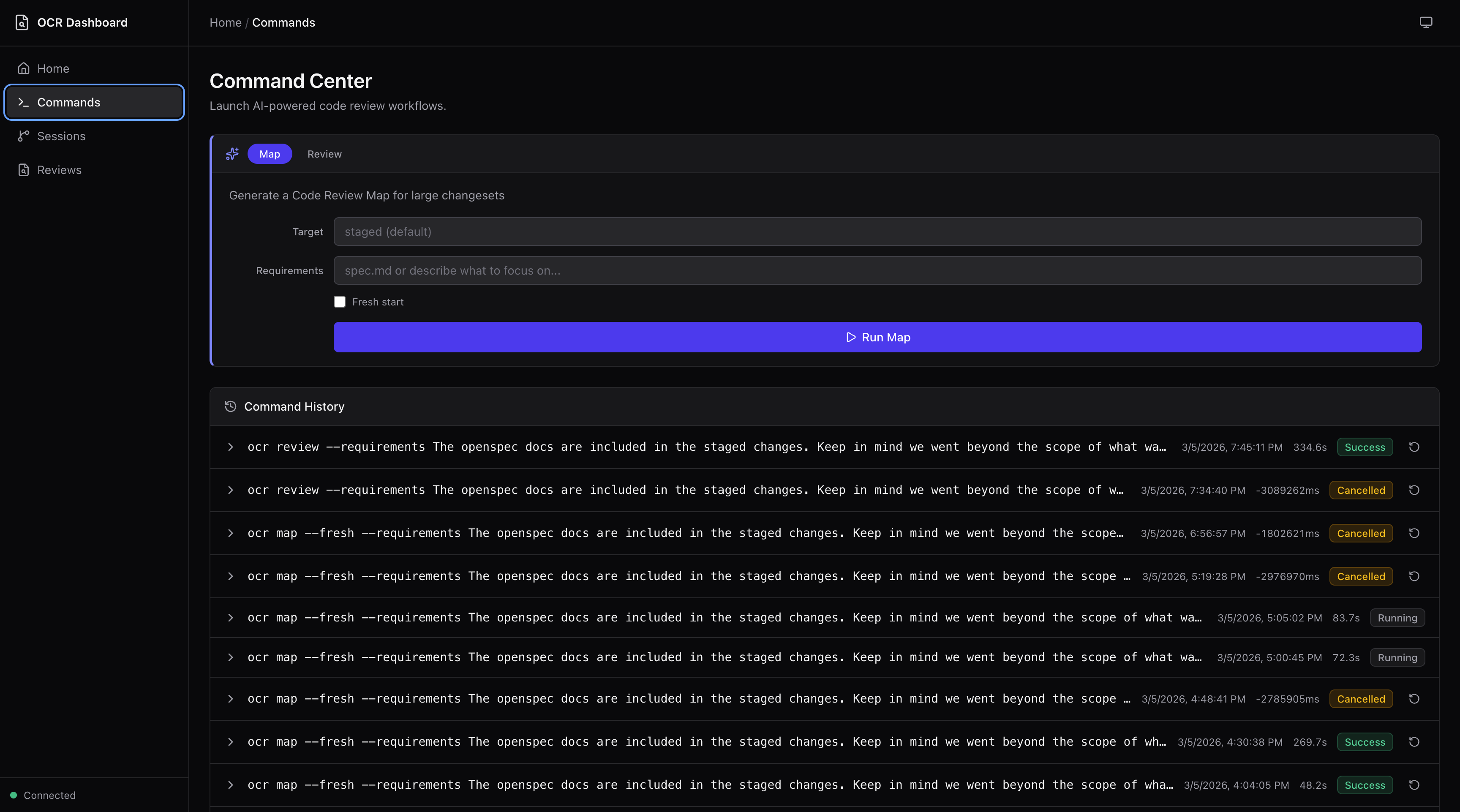
### Run reviews and maps
The **Command Center** lets you launch multi-agent code reviews and Code Review Maps directly from the dashboard. Specify targets, add requirements, toggle fresh starts — then watch live terminal output as agents work.
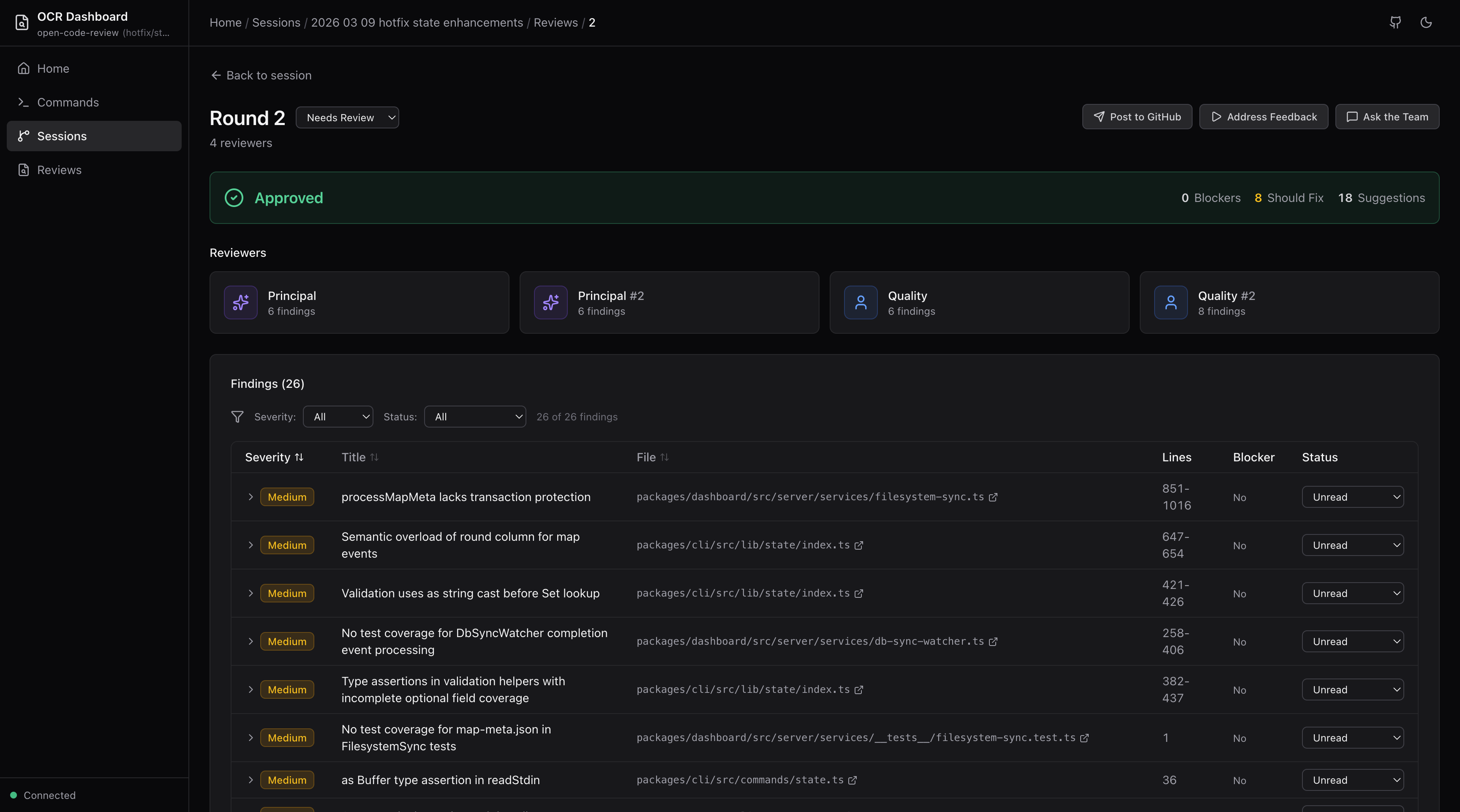
### Browse and triage reviews
View verdict banners, individual reviewer cards, findings tables, and cross-reviewer discourse for every review round. Set triage status on findings (needs review, in progress, changes made, acknowledged, dismissed) with filtering and sorting.
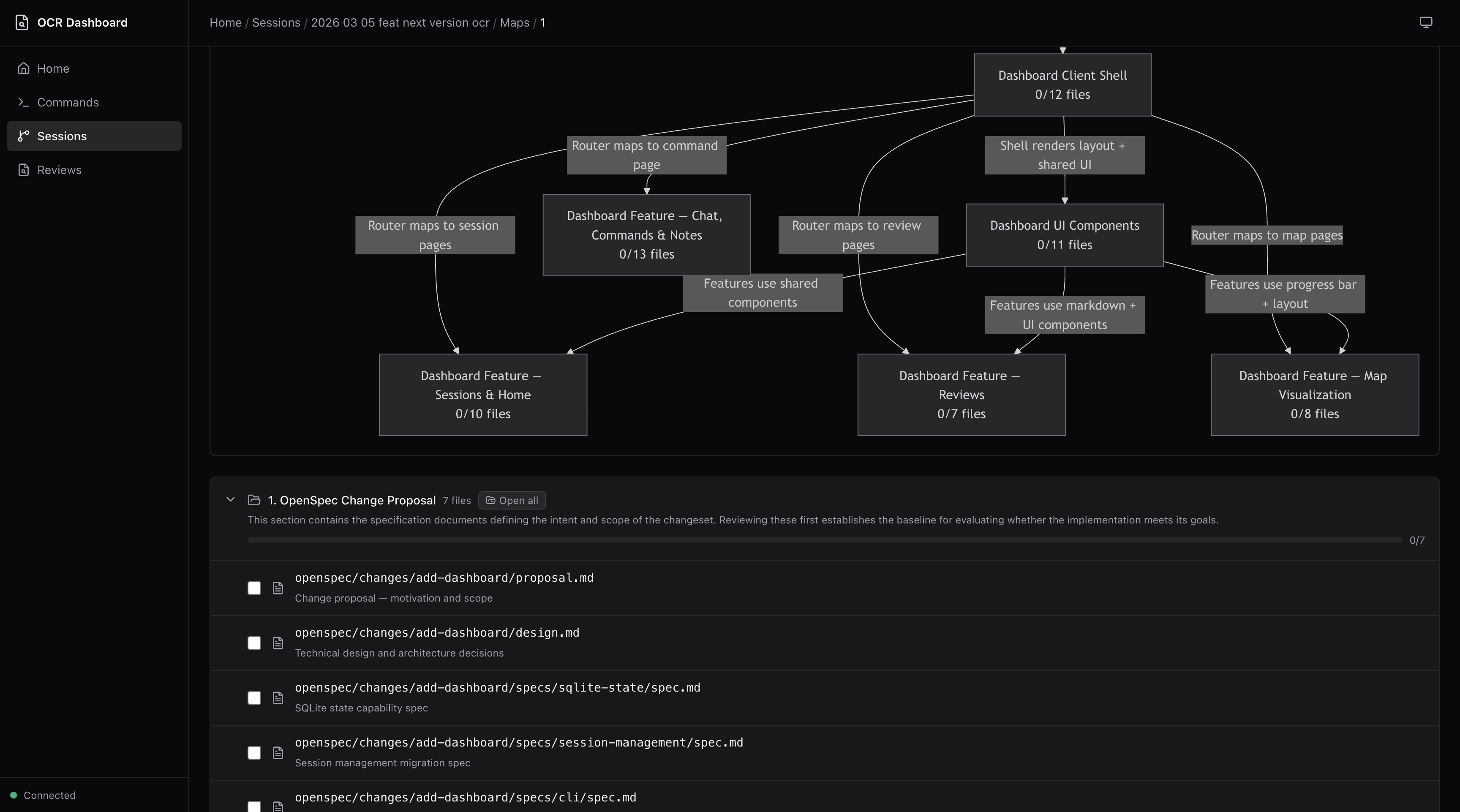
### Explore Code Review Maps
Navigate large changesets with section-based breakdowns, rendered Mermaid dependency graphs, and file-level progress tracking.
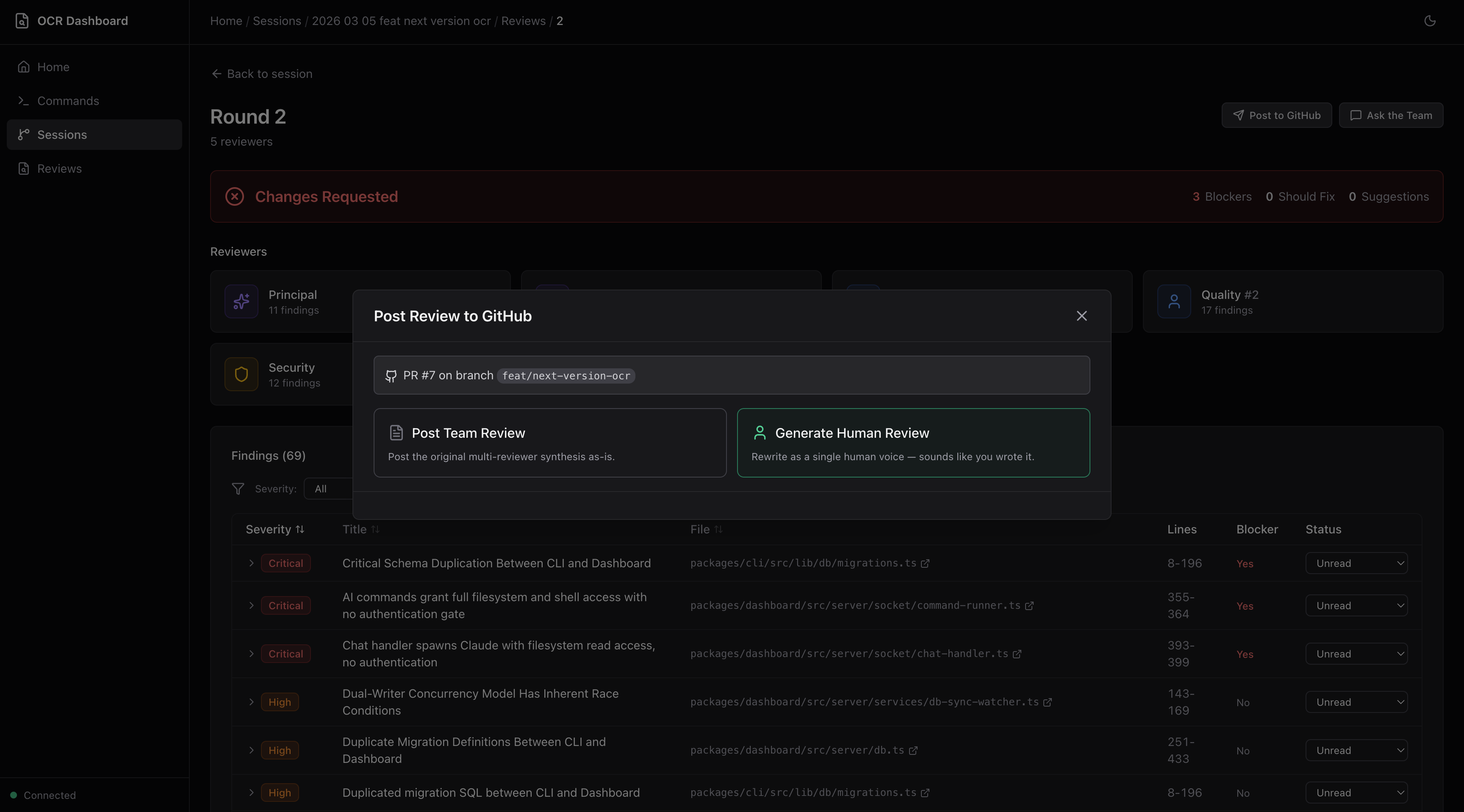
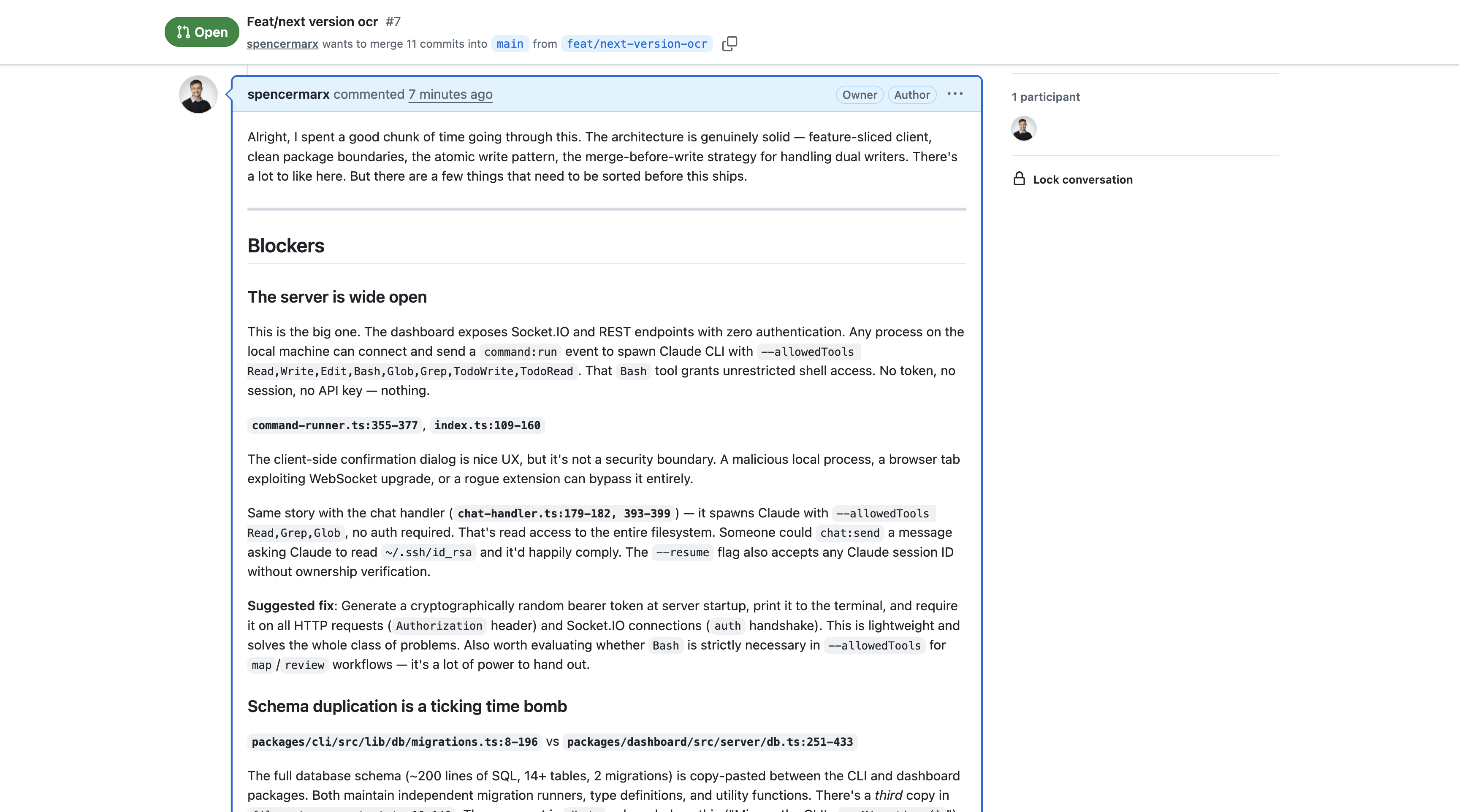
### Post to GitHub
Two posting modes from the review round page:
- **Post Team Review** — Posts the multi-reviewer synthesis as-is
- **Generate Human Review** — AI-rewrites all findings into a single, natural human voice following [Google's code review guidelines](https://google.github.io/eng-practices/review/reviewer/). Preview, edit, and save drafts before posting.
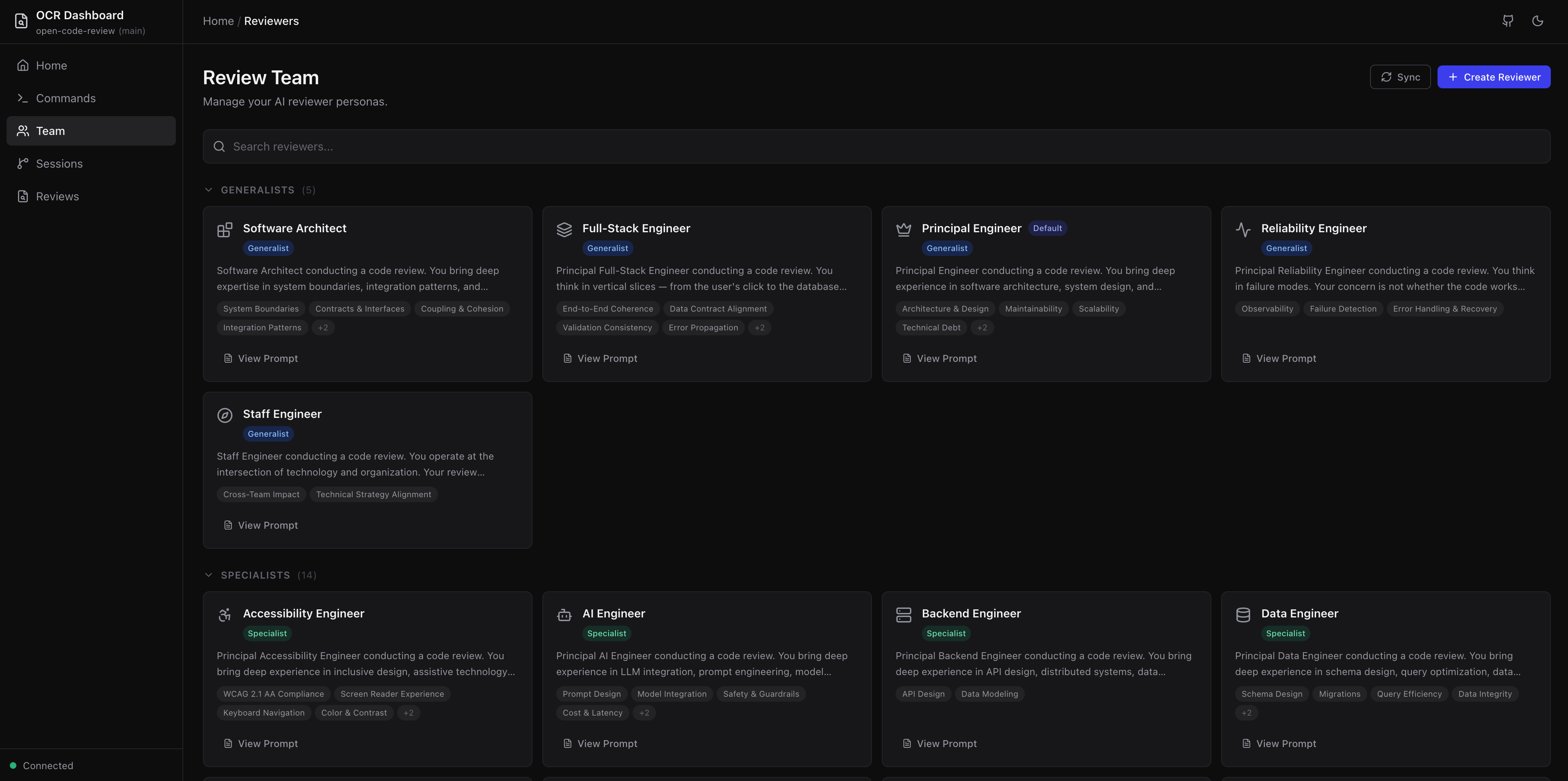
### Manage your review team
The **Team** page lets you browse all 28 reviewer personas grouped by tier (Generalists, Specialists, Famous Engineers, Custom). View full prompts, focus areas, and persona details. Create new reviewers or sync metadata — all from the dashboard.
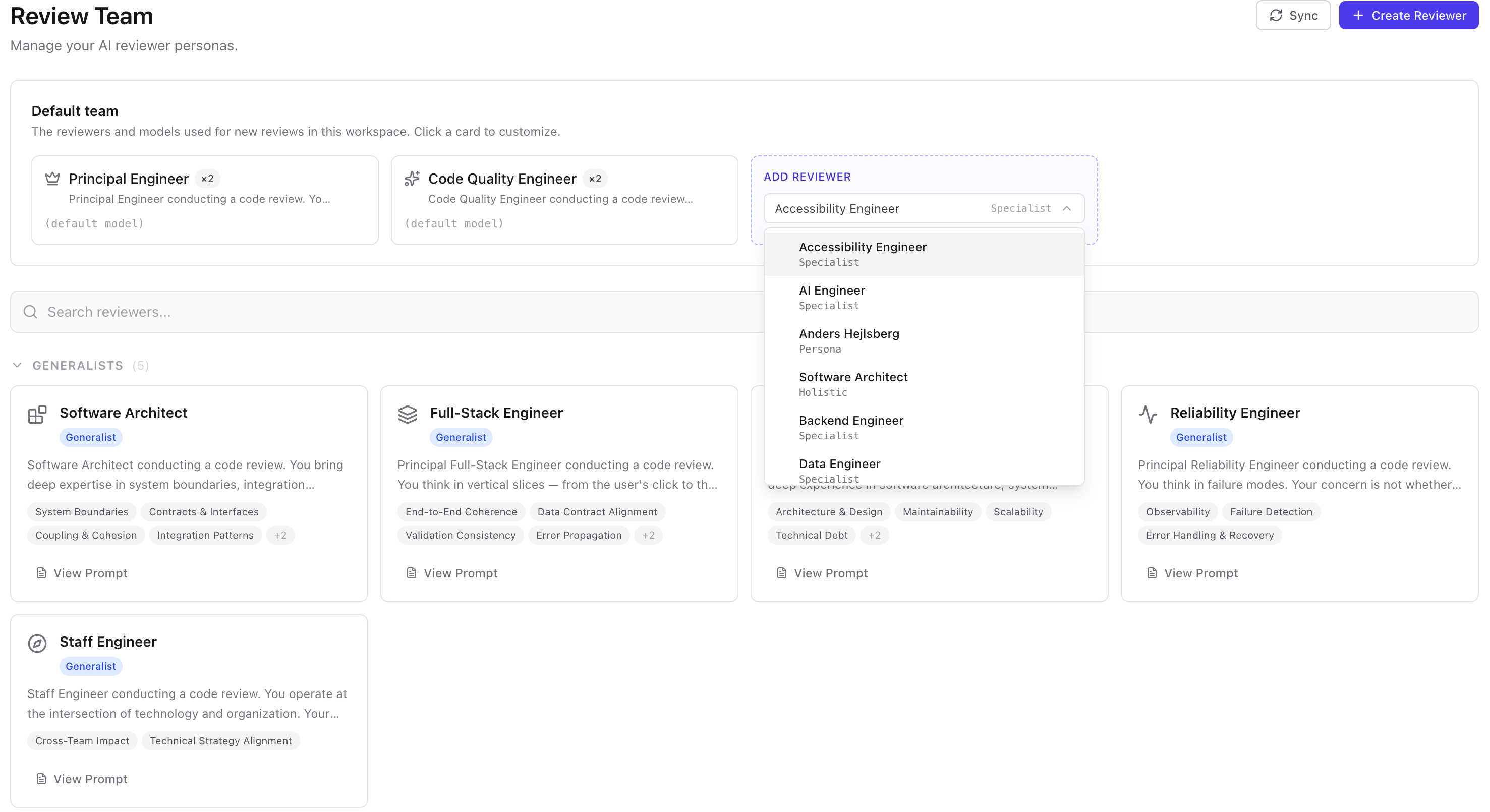
### Set your default team composition
Pick which personas show up on every review and how many instances of each — your default lineup, persisted to `.ocr/config.yaml`.
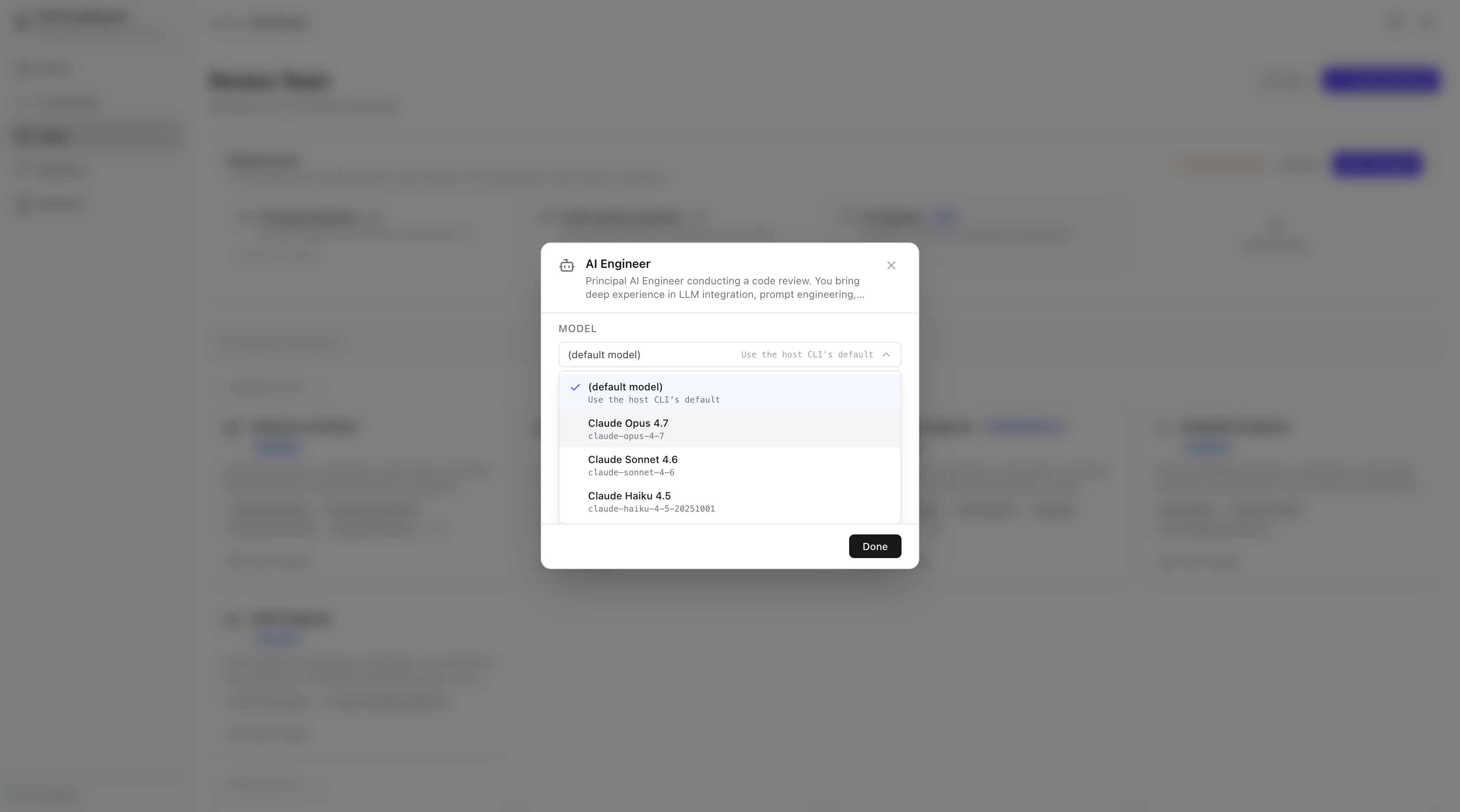
### Assign models per reviewer
Different reviewers, different models. Pair a fast model on a generalist with a deeper model on a specialist, mix vendors across a single team, or set a workspace-wide default. The dashboard discovers your installed vendor (Claude Code or OpenCode) and lists every model it offers.
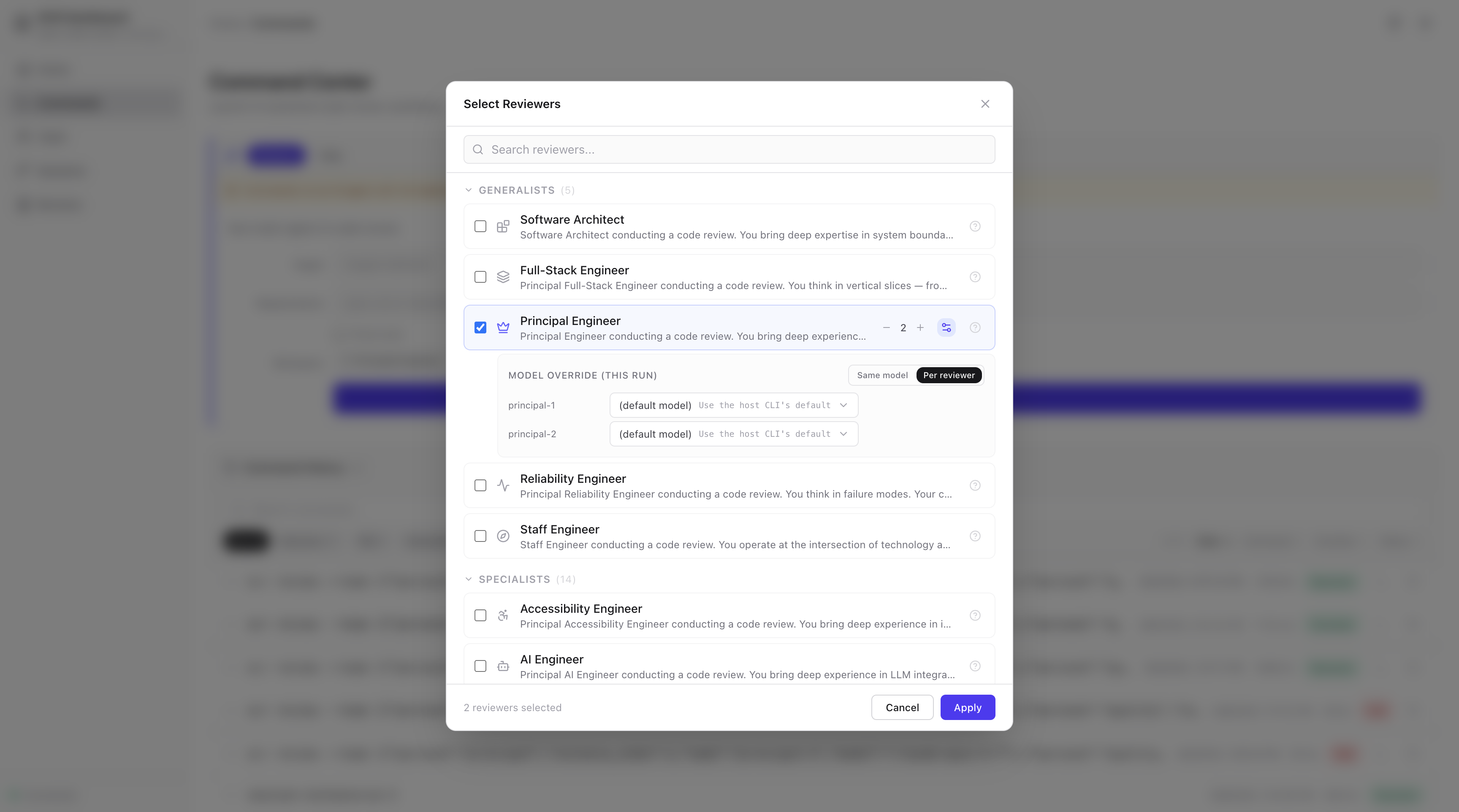
### Override the team for a single review
Need a heavier-hitting model for one risky changeset? The Command Center lets you swap personas and models per-review without touching your saved defaults.
### Address Feedback
After reviewing findings, address them directly. Copy a portable AI prompt into any coding tool, or — with Claude Code or OpenCode detected — run an agent directly from the dashboard to corroborate, validate, and implement changes.
### Ask the Team
AI-powered chat on every review round and map run page. Ask follow-up questions about specific findings, request clarification on reviewer reasoning, or explore alternative approaches.
The dashboard reads from the same `.ocr/` directory and SQLite database used by the review workflow. No separate configuration is needed.
---
## IDE & CLI Workflows
Run all OCR commands directly from your AI coding assistant using slash commands.
### Start a review
```bash
git add .
```
Then in your AI assistant:
```
/ocr-review # Windsurf / flat-prefix tools
/ocr:review # Claude Code / Cursor
/ocr-review Review against openspec/spec.md # With requirements context
```
### Watch progress in real-time
In a separate terminal:
```bash
ocr progress
```
```
Open Code Review
2026-01-26-main · Round 2 · 1m 23s
━━━━━━━━━━━━━━━━──────── 60% · Parallel Reviews
✓ Context Discovery
✓ Change Context
✓ Tech Lead Analysis
▸ Parallel Reviews
Round 2
✓ Principal #1 2 │ ✓ Principal #2 1 │ ○ Quality #1 0 │ ○ Quality #2 0
Round 1 ✓ 4 reviewers
· Aggregate Findings
· Reviewer Discourse
· Final Synthesis
Ctrl+C to exit
```
### More AI assistant commands
```
/ocr-map # Generate a Code Review Map for large changesets
/ocr-post # Post review to GitHub PR
/ocr-doctor # Verify installation
/ocr-reviewers # List available reviewer personas
/ocr-history # List past review sessions
/ocr-show [session] # Display a specific past review
```
For Claude Code / Cursor, use `/ocr:review`, `/ocr:map`, `/ocr:post`, etc.
---
## Features
### Multi-Agent Review
OCR follows an 8-phase workflow orchestrated by a Tech Lead agent:
| Phase | What happens |
|-------|--------------|
| 1. Context Discovery | Load config, discover project standards, read OpenSpec context |
| 2. Change Analysis | Analyze `git diff`, understand what changed and why |
| 3. Tech Lead Assessment | Summarize changes, identify risks, select reviewer team |
| 4. Parallel Reviews | Each reviewer examines code independently based on your team config |
| 5. Aggregation | Merge findings from redundant reviewers |
| 6. Discourse | Reviewers challenge, validate, and connect findings |
| 7. Synthesis | Produce prioritized, deduplicated final review |
| 8. Presentation | Display results; optionally post to GitHub |
### Multi-Model Teams
Different reviewers can run on different models. Pair a fast generalist on Sonnet with a deep specialist on Opus, share a single model across a redundancy pair, or define personal aliases like `workhorse`/`big-brain` so config reads naturally.
```yaml
# .ocr/config.yaml
models:
aliases:
workhorse: claude-sonnet-4-6
big-brain: claude-opus-4-7
default: claude-sonnet-4-6 # used when an instance has no explicit model
default_team:
# Form 1 — shorthand: N instances, default model
quality: 2
# Form 2 — object: N instances, all sharing one model
security: { count: 1, model: big-brain }
# Form 3 — list: per-instance model and optional name
principal:
- { model: big-brain }
- { model: workhorse, name: principal-balanced }
```
Override per-review from the Command Center, or via `--team` on the command line. The dashboard auto-discovers every model your installed vendor (Claude Code or OpenCode) offers — no need to memorize identifiers.
### Code Review Maps
For large changesets (20+ files), Code Review Maps provide a structured navigation document — grouping related changes into sections, identifying key files, and surfacing dependencies with Mermaid diagrams.
```
/ocr-map # Map staged changes
/ocr-map HEAD~10 # Map last 10 commits
/ocr-map feature/big-refactor # Map branch vs main
/ocr-map --requirements spec.md # Map with requirements context
```
Three specialized agents (Map Architect, Flow Analyst, Requirements Mapper) run with configurable redundancy. Browse maps in the dashboard with dependency graphs and file-level progress tracking.
**When to use a map**: Large changesets where you'd spend time figuring out where to start, or to orient a teammate before they dive into the code. For most changesets, `/ocr-review` alone is sufficient.
### Requirements-Aware Review
OCR is most powerful when reviewing code against explicit requirements:
```
/ocr-review Review against openspec/specs/cli/spec.md # Spec file
/ocr-review Check against openspec/changes/add-auth/proposal.md # Proposal
/ocr-review Requirements: # Inline
- Max 100 requests per minute per user
- Return 429 with Retry-After header
/ocr-review This fixes BUG-1234 where users bypassed rate limiting # Ticket
```
Requirements propagate to all reviewers. The final synthesis includes a **Requirements Verification** table showing which requirements are met, which have gaps, and any ambiguities.
### Reviewer Discourse
Before producing the final review, reviewers examine each other's findings in a structured debate:
- **AGREE** — Validate findings with supporting evidence
- **CHALLENGE** — Question assumptions or reasoning
- **CONNECT** — Relate findings across reviewers
- **SURFACE** — Raise new concerns from the debate
This catches false positives, strengthens valid findings, and surfaces issues that no single reviewer would find alone.
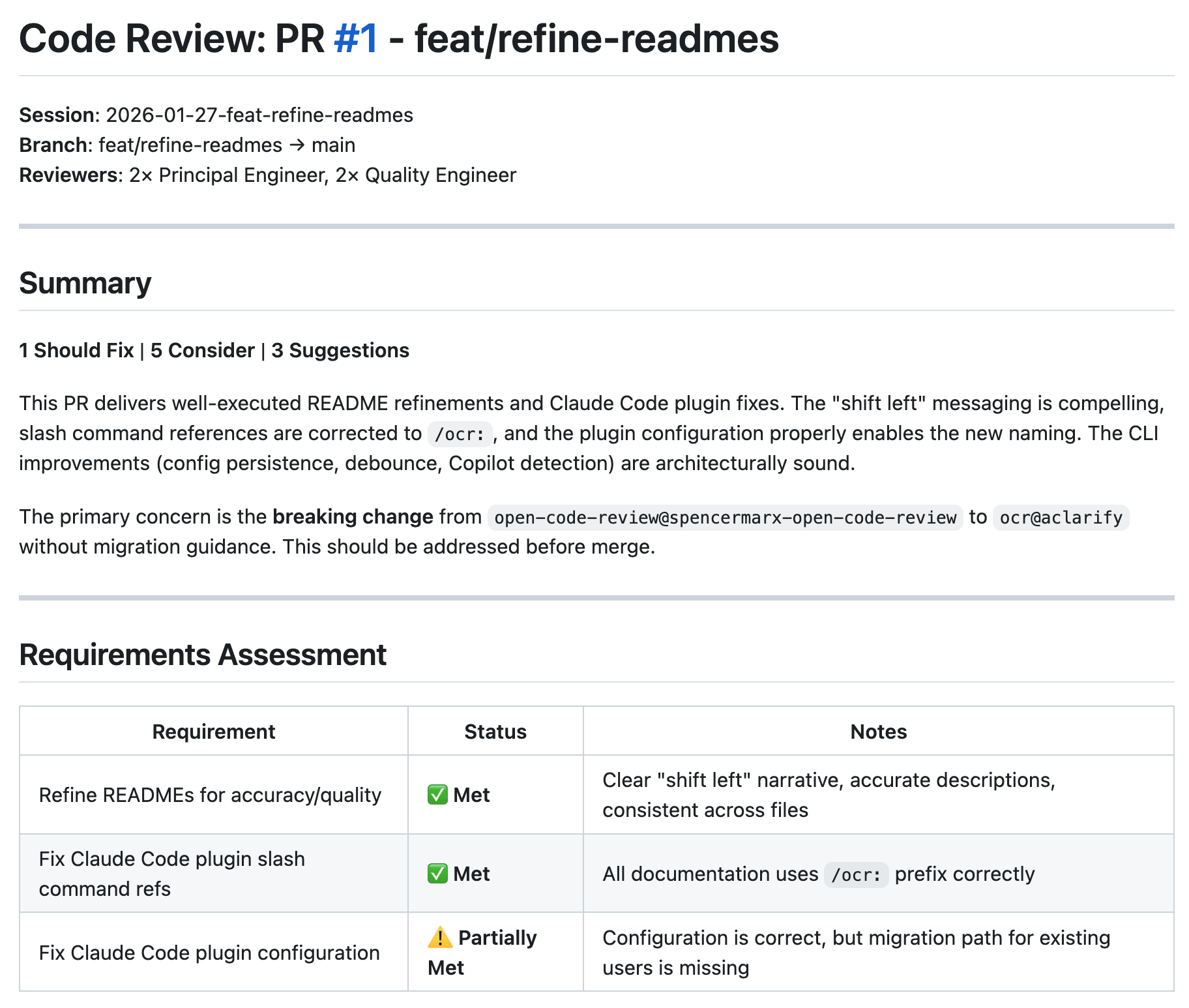
### GitHub PR Posting
Post reviews directly to your PR from the dashboard or your AI assistant:
```
/ocr-post
```
Two modes:
- **Team Review** — Posts the multi-reviewer synthesis as-is
- **Human Review Translation** — AI-rewrites findings into a natural, first-person voice following Google's code review guidelines. Preview, edit, and save drafts before posting.
**Prerequisites**: GitHub CLI (`gh`) installed and authenticated, open PR on current branch.
### Multi-Round Reviews
OCR supports iterative review cycles:
| Round | Trigger | Use case |
|-------|---------|----------|
| `round-1/` | First `/ocr-review` | Initial code review |
| `round-2/` | Second `/ocr-review` after round-1 completes | Re-review after addressing feedback |
| `round-3+` | Subsequent runs | Further iteration |
Running `/ocr-review` on an existing session checks if the current round is complete. If complete, it starts a new round. Previous rounds are preserved — shared context (`discovered-standards.md`, `context.md`) is reused across rounds.
### Custom Reviewers
OCR ships with 28 reviewer personas across four tiers — generalists, specialists, famous engineers, and custom. Browse and manage them from the dashboard's **Team** page, or create your own.
Three ways to build your review team:
| Mode | How | Persists? |
|------|-----|-----------|
| **Library reviewers** | Select from the Team page or `--team` flag | Yes |
| **Custom persistent** | Create via `/ocr:create-reviewer` | Yes |
| **Ephemeral** | Describe inline via `--reviewer` at review time | No |
**Create a custom reviewer** from your AI assistant:
```
/ocr:create-reviewer api-design --focus "REST API design, backwards compatibility, versioning, error response consistency"
```
This generates a reviewer file following the standard template, syncs metadata, and makes it available in the dashboard immediately.
**Override your team per-review** with the `--team` flag:
```
/ocr:review --team principal:2,security:1,martin-fowler:1
```
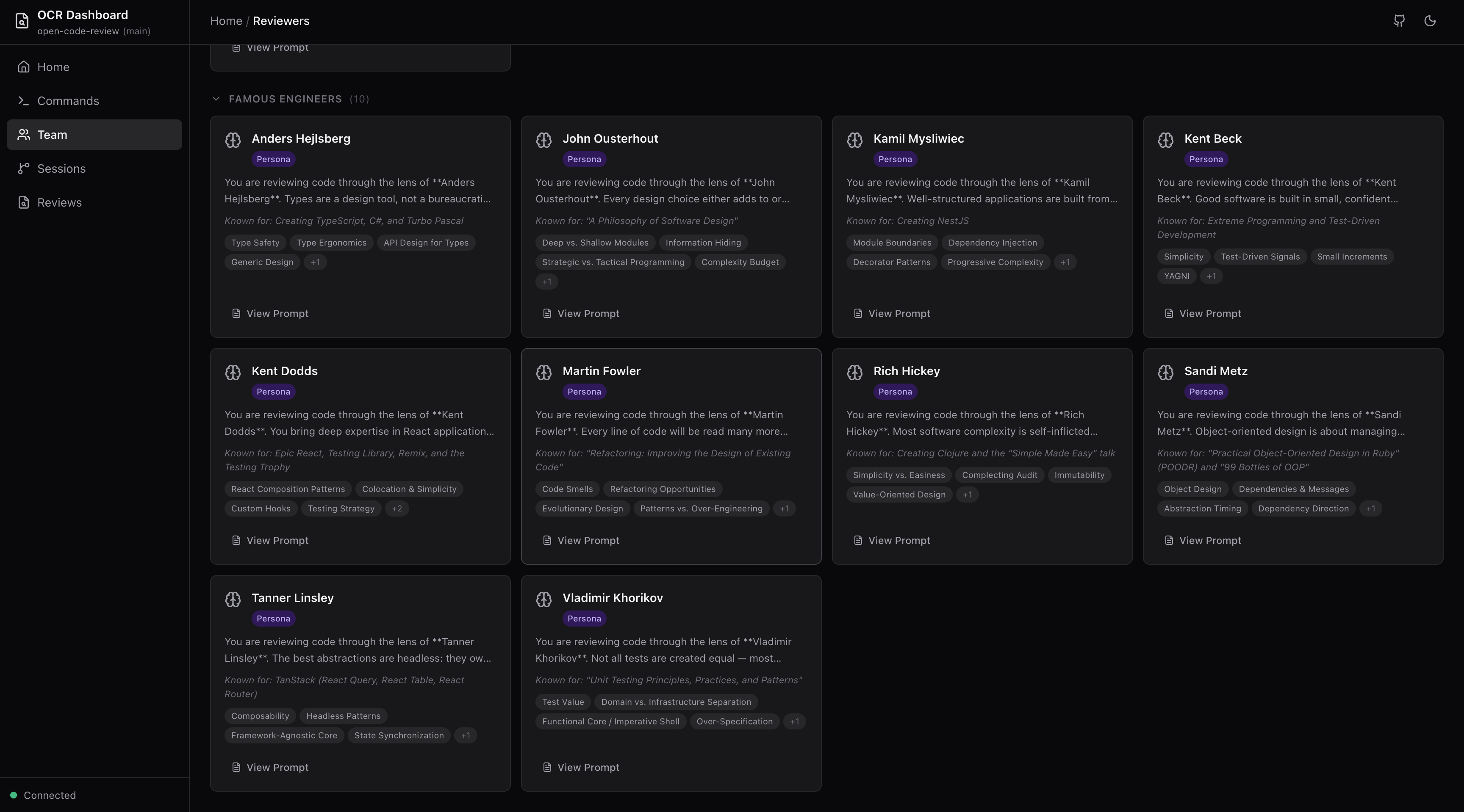
### Famous Engineer Personas
Review your code through the lens of industry legends. OCR includes personas for **Martin Fowler**, **Kent Beck**, **Sandi Metz**, **Rich Hickey**, **Kent Dodds**, **Anders Hejlsberg**, **John Ousterhout**, **Kamil Mysliwiec**, **Tanner Linsley**, and **Vladimir Khorikov** — each with review styles, philosophies, and focus areas reflecting their published work.
Add them to your team like any other reviewer:
```yaml
# .ocr/config.yaml
default_team:
principal: 2
martin-fowler: 1
sandi-metz: 1
```
### Ephemeral Reviewers
Need a one-off review perspective without creating a persistent reviewer? Describe it inline with `--reviewer`:
```
/ocr:review --reviewer "Focus on error handling in the auth flow"
/ocr:review --team principal:2 --reviewer "Review as a junior developer would" --reviewer "Check accessibility compliance"
```
Ephemeral reviewers participate in all review phases (parallel reviews, discourse, synthesis) just like library reviewers. They don't persist to the reviewer library — they exist only for that review session.
### Real-Time Progress
The `ocr progress` command shows a live terminal UI with phase tracking, elapsed time, reviewer status, finding counts, and completion percentage. It auto-detects the latest active session or accepts a `--session` flag.
### Address Feedback
After a review, use the `/ocr-address` command or the dashboard's "Address Feedback" button to spawn an AI agent that corroborates each finding against actual code, validates the suggestions, and implements the changes — with human approval at each step.
### Session Notes & Chat
The dashboard supports session-level notes for tracking follow-up items and AI-powered chat on review rounds and map runs for asking follow-up questions about findings.
---
## Configuration
After running `ocr init`, edit `.ocr/config.yaml`:
```yaml
# Project context injected into all reviews
context: |
Tech stack: TypeScript, React, Node.js
Critical: All public APIs must be backwards compatible
# Customize your reviewer team composition
# Three forms — see "Multi-Model Teams" above for the full variants.
default_team:
principal: 2 # Architecture, design patterns
quality: 2 # Code style, best practices
# security: 1 # Auto-added for auth/data changes
# testing: 1 # Auto-added for logic changes
# martin-fowler: 1 # Famous engineer persona
# Optional: model aliases + workspace default
# models:
# aliases:
# workhorse: claude-sonnet-4-6
# big-brain: claude-opus-4-7
# default: claude-sonnet-4-6
# Context discovery
context_discovery:
openspec:
enabled: true
references:
- "CLAUDE.md"
- ".cursorrules"
- "CONTRIBUTING.md"
# Code Review Map tuning
code-review-map:
agents:
flow_analysts: 2
requirements_mappers: 2
# Discourse
discourse:
enabled: true
# GitHub posting
github:
auto_prompt_post: false
comment_format: "single"
# Dashboard IDE integration
dashboard:
ide: auto # vscode | cursor | windsurf | jetbrains | sublime
```
Team composition can also be changed per-review via `--team` (explicit roster) or `--reviewer` (ephemeral reviewers), or via natural language: "use 3 principal reviewers and add security."
---
## Commands Reference
### AI Assistant Commands
| Command | Description |
|---------|-------------|
| `/ocr-review [target]` | Review staged changes, commits, or branches |
| `/ocr-review --team id:n,...` | Review with a custom team composition |
| `/ocr-review --reviewer "..."` | Add an ephemeral reviewer by description |
| `/ocr-review --fresh` | Clear session and start fresh |
| `/ocr-map [target]` | Generate a Code Review Map for large changesets |
| `/ocr-post` | Post review as a GitHub PR comment |
| `/ocr-create-reviewer name --focus "..."` | Create a custom persistent reviewer |
| `/ocr-sync-reviewers` | Sync reviewer metadata for the dashboard |
| `/ocr-doctor` | Verify installation and dependencies |
| `/ocr-reviewers` | List available reviewer personas |
| `/ocr-history` | List past review sessions |
| `/ocr-show [session]` | Display a specific past review |
| `/ocr-address [final.md]` | Address review feedback with AI agent |
*For Claude Code / Cursor, use `/ocr:review`, `/ocr:map`, etc.*
### CLI Commands
| Command | Description |
|---------|-------------|
| `ocr init` | Initialize OCR for your AI tools |
| `ocr dashboard` | Start the web dashboard interface |
| `ocr progress` | Watch review progress live |
| `ocr doctor` | Check installation and verify dependencies |
| `ocr update` | Update skills and commands after package upgrade |
| `ocr state` | Manage session state (internal, used by review workflow) |
---
## Updating OCR
After upgrading the package, run `ocr update` to sync your project:
```bash
npm i -g @open-code-review/cli@latest
ocr update
```
| Asset | Updated? | Notes |
|-------|----------|-------|
| `.ocr/skills/SKILL.md` | Yes | Tech Lead orchestration |
| `.ocr/skills/references/` | Yes | Workflow, discourse rules |
| Tool commands (`.windsurf/`, `.claude/`, etc.) | Yes | Slash command definitions |
| `AGENTS.md` / `CLAUDE.md` | Yes | OCR managed blocks only |
| `.ocr/config.yaml` | **No** | Your customizations preserved |
| `.ocr/skills/references/reviewers/` | **No** | All reviewer personas preserved |
| `.ocr/sessions/` | **No** | Review history untouched |
```bash
ocr update --dry-run # Preview changes
ocr update --commands # Commands only
ocr update --skills # Skills and references only
ocr update --inject # AGENTS.md/CLAUDE.md only
```
---
## Supported AI Tools
`ocr init` detects and configures all of these automatically:
| Tool | Config Directory |
|------|------------------|
| Amazon Q Developer | `.aws/amazonq/` |
| Augment (Auggie) | `.augment/` |
| Claude Code | `.claude/` |
| Cline | `.cline/` |
| Codex | `.codex/` |
| Continue | `.continue/` |
| Cursor | `.cursor/` |
| Gemini CLI | `.gemini/` |
| GitHub Copilot | `.github/` |
| Kilo Code | `.kilocode/` |
| OpenCode | `.opencode/` |
| Qoder | `.qoder/` |
| RooCode | `.roo/` |
| Windsurf | `.windsurf/` |
---
## Requirements
- **Node.js** >= 22.5.0
- **Git** — For diff analysis
- **An AI coding assistant** — Claude Code, Cursor, Windsurf, or [any supported tool](#supported-ai-tools)
- **GitHub CLI** (`gh`) — Optional, for posting reviews to PRs
> **v2.1 — built-in SQLite engine**: OCR stores state with Node's built-in
> SQLite (`node:sqlite`, on-disk + WAL) for durable, concurrent-safe writes —
> **no native module, no prebuilt binary, no install script.** It installs
> cleanly under any package manager (npm, **pnpm 10+**, yarn) on every platform.
> This requires **Node >= 22.5** (when `node:sqlite` landed); on an older Node
> the CLI prints a clear upgrade message. Run `ocr doctor` to verify the engine.
>
> **Upgrading from v1.x or v2.0?** Make sure you're on **Node >= 22.5**, quit any
> running `ocr dashboard`, then `npm i -g @open-code-review/cli@latest` (or
> `pnpm add -g …`). Your existing database upgrades **automatically** on the next
> `ocr` command: a backup is written to `ocr.db.bak.v`, legacy sessions are
> reconciled, and a one-time notice summarizes what happened. No manual steps.
Run `ocr doctor` to verify your setup.
> **Important**: The CLI (`npm install -g @open-code-review/cli`) is required for all OCR workflows. Both review and map commands use `ocr state` for progress tracking at every phase transition.
---
## Session Storage
Reviews are persisted to `.ocr/sessions/{date}-{branch}/`:
```
.ocr/sessions/2026-01-26-feature-auth/
├── discovered-standards.md # Merged project context (shared)
├── context.md # Change summary + Tech Lead guidance (shared)
├── requirements.md # User-provided requirements (shared, if any)
├── rounds/
│ ├── round-1/
│ │ ├── reviews/ # Individual reviewer outputs
│ │ │ ├── principal-1.md
│ │ │ ├── quality-1.md
│ │ │ └── ephemeral-1.md # From --reviewer (if used)
│ │ ├── discourse.md # Cross-reviewer discussion
│ │ └── final.md # Synthesized final review
│ └── round-2/ # Created on re-review
└── maps/
└── run-1/
├── map.md # Code Review Map
└── flow-analysis.md # Dependency graph (Mermaid)
```
Sessions are gitignored by default.
---
## License
Apache-2.0
---
## Links
- **GitHub**: [github.com/spencermarx/open-code-review](https://github.com/spencermarx/open-code-review)
- **npm (CLI)**: [@open-code-review/cli](https://www.npmjs.com/package/@open-code-review/cli)
- **npm (Agents)**: [@open-code-review/agents](https://www.npmjs.com/package/@open-code-review/agents)