WellSaid
Empathy. Upgraded.


WellSaid helps you communicate with more empathy and clarity by offering iMessage conversation summaries and tone-based reply suggestions.
- [Features](#features)
- [Getting Started](#getting-started)
- [Usage](#usage)
- [How It Works](#how-it-works)
- [Technical Details](#technical-details)
- [Development and Local Usage](#development-and-local-usage)
- [Accessing from Anywhere](#accessing-from-anywhere)
- [iOS Home Screen Icons (and HTTPS Gotchas)](#ios-home-screen-icons-and-https-gotchas)
- [Troubleshooting](#troubleshooting)
- [Acknowledgements](#acknowledgements)
- [Box Art](#box-art)
- [Screenshots](#screenshots)
- [Contributing](#contributing)
- [License](#license)
## Features
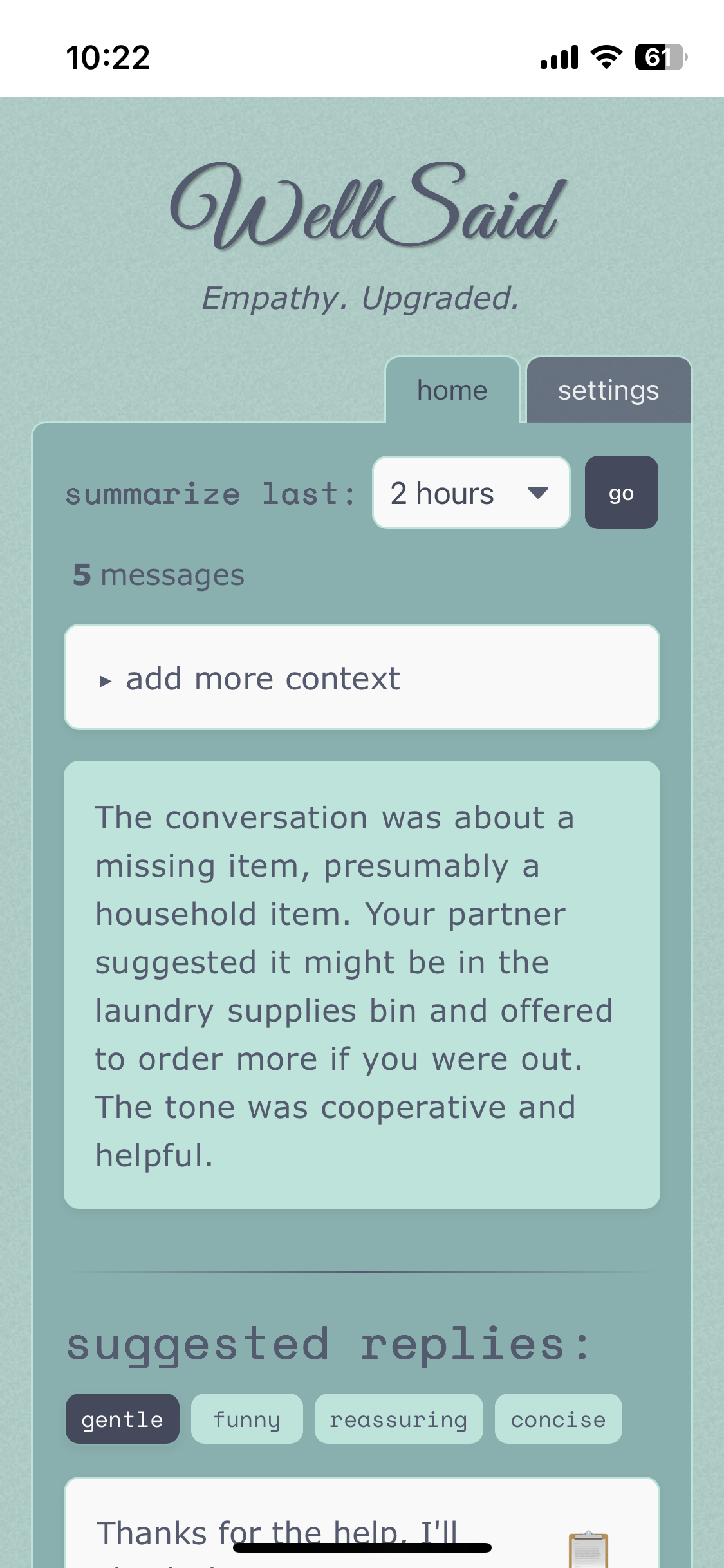
- **Conversation Summaries**: Analyze and summarize your Apple iMessage conversations with a specified contact from the last 15 minutes to 24 hours
- **Smart Reply Suggestions**: Get short, medium, and long AI-generated reply options based on recent and historical conversation context
- **Translate Mode**: Write your raw, unfiltered draft — WellSaid polishes it into short, medium, and long versions in your chosen tone
- **Psychological Profiles**: Optionally describe the emotional stories and patterns of both you and your partner (core belief, triggers, needs) — the AI uses this context to respond with genuine relational intelligence, not just tone-matching
- **Tone Selection**: Set the tone for your replies (gentle, funny, reassuring, concise)
- **Context Addition**: Add additional context to help generate more relevant replies
- **Dark Mode & Accent Colors**: Floating theme picker with 5 accent colors and dark/light toggle, persisted across sessions
- **Message Database Integration**: Connects directly to your macOS Messages app database
## Getting Started
### Requirements
- iMessages database access -- designed to run from a Mac logged into your iCloud
- API key from OpenAI, Anthropic, or Grok, or a local [Khoj](https://khoj.dev/) instance
### Installation
1. Clone the repository
```bash
git clone https://github.com/artificial-eq/WellSaid.git
cd WellSaid
```
2. Install dependencies
```bash
yarn install
```
3. Generate SvelteKit types (required for testing)
```bash
yarn prepare
```
4. Configure environment variables
```bash
cp .env.example .env
```
Update the values in the `.env` file. The following variables are needed:
- **Logging**
- `LOG_LEVEL`: Logging level (info, debug, warn, error)
- **Remote Access**
- `ALLOWED_HOST`: For remote access via Tailscale (see 'Accessing from Anywhere' below) -- leave blank or set to 'all' if you don't need access from outside your local network
- **Security**
- `APP_USERNAME`: A name of your choosing
- `APP_PASSWORD`: A passowrd of your choice
- `JWT_SECRET`: A big, long, hard, random, and unpredictable string.
You can generate one using OpenSSL with the following command in your terminal:
```bash
openssl rand -base64 64
```
- Copy the output of this command and use it as the value for `JWT_SECRET` in your `.env` file. Ensure it's on a single line.
5. Start the development server
```bash
yarn dev
```
The server will run over HTTP by default. If you place `cert.pem` and
`key.pem` in a `.certs` directory at the project root (see the HTTPS section
below), it will automatically use those files and start with HTTPS. Pretty cool.
## Usage
1. Select a time frame (15 min – 24 hours) and click **go** to generate a conversation summary and three suggested replies
2. Copy a suggested reply directly, or write your own draft in the text box and click **translate** to have AI polish it into short, medium, and long versions
3. Use the tone pills (gentle, funny, reassuring, concise) to shape the style of generated replies
4. Click the 🎨 button (bottom right) to switch accent colors or toggle dark mode
5. Optionally fill in **Profiles** in Settings to give the AI emotional context about you and your partner — the more you share, the more attuned the suggestions become
## How It Works
WellSaid connects to your macOS Messages database to fetch your conversations with a specific contact. It then uses an AI provider (OpenAI, Anthropic, Grok, or Khoj) to analyze the conversation and generate:
1. A summary of the conversation, including emotional tone and key topics
2. Three suggested replies (short, medium, and long) in your chosen tone
In **translate mode**, you write a raw draft and the AI rewrites it in your chosen tone — useful when you know what you want to say but want help saying it well.
## Technical Details
### Minimal Dependencies and Efficient Architecture
WellSaid is built with a focus on minimalism and efficiency:
- **Core Dependencies**: Uses only essential libraries for its functionality
- **Frontend**: Built with SvelteKit, providing excellent performance without the overhead of larger frameworks
- **Backend**: Lightweight Node.js server with minimal dependencies
- **Database**: Direct integration with macOS Messages database - no additional database required
- **Authentication**: Simple JWT-based authentication system
This approach results in a lightweight, fast application that runs efficiently on macOS systems while maintaining all core functionality.
- **Frontend**: Svelte 5 with SvelteKit
- **State Management**: Svelte's built-in `$state` runes
- **Styling**: OKLch semantic color system with dark mode and accent theming (`src/variables.css`)
- **Database**: SQLite (macOS Messages database + `settings.db` for runtime config)
- **AI Integration**: OpenAI (gpt-4o), Anthropic (claude-opus-4-7), Grok (grok-3), and/or local [Khoj](https://khoj.dev/)
- **Logging**: Pino for structured logging
## Development and Local Usage
```bash
# Install dependencies first
yarn install
yarn prepare
# Run in development mode with hot-reloading
yarn dev
# Lint code
yarn lint
# Format code
yarn format
# Build optimized version
yarn build
# Run the optimized build locally
yarn preview
# Run tests
yarn test
# Run tests with watch mode
yarn test:watch
# Run tests with coverage report
yarn test:coverage
```
**Note**: Since this application only runs on macOS and accesses local system resources, there is no traditional "production deployment" - the built version is simply run locally on your Mac. The `yarn build` and `yarn preview` commands create and run an optimized version that may provide better performance than development mode.
## Accessing from Anywhere
If you'd like to securely access WellSaid remotely, use [Tailscale](https://tailscale.com) to set up a secure private network that connects your devices.
Once your Tailscale network is set up, all that's required in the app is that you set the `ALLOWED_HOST` variable in your `.env` file to the address provided by Tailscale. For more details, visit [Tailscale's documentation](https://tailscale.com/kb/).
### iPhone Home Screen Icons (and HTTPS Gotchas)
To make your WellSaid app look great when saved to your iPhone's Home Screen, iOS requires a **valid HTTPS certificate**. This step is optional—if you just want to run the app locally in a browser, you can skip it and use plain HTTP.
1. **Install mkcert (if not already installed)**
```bash
brew install mkcert
mkcert -install
```
2. **Generate a local trusted cert and run your app with HTTPS**
```bash
mkcert