# spotDL Installation Guide
spotDL is a free and open-source tool that downloads your Spotify playlists & music
> **The fastest, easiest, and most accurate command-line music downloader**
## Install via Python
> This is our recommended installation method.
If you are on Windows, install Visual C++ Redistributable (link below) and then proceed to
install Python & FFmpeg.
### Prerequisites to spotDL
- [Visual C++ 2019 redistributable](https://docs.microsoft.com/en-us/cpp/windows/latest-supported-vc-redist?view=msvc-170#visual-studio-2015-2017-2019-and-2022)
(on Windows)
- Python 3.10 - 3.14 (added to PATH)
- FFmpeg 4.2 or above (added to PATH)
### Install Python to PATH
> We recommend installing the latest version of Python
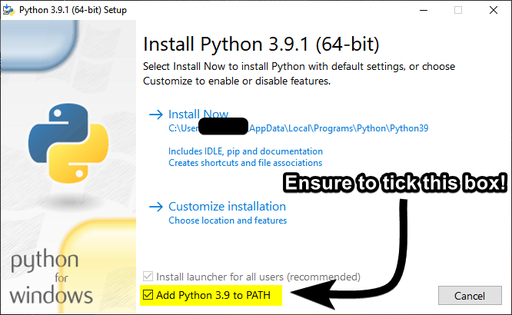
When installing [Python](https://python.org/), ensure to select "**Add to PATH**".
### Installing spotDL
> If you are not on Windows (e.g. OSX/UNIX), replace `pip` with `pip3` and `python` with
> `python3` in all commands.
First, open a terminal. On Windows: Command Prompt, macOS: "Terminal", *UNIX: Bash or Zsh.
Verify you have installed Python correctly via `python -V`. Ensure you have v3.7 or greater.
Next, install spotDL by typing the following:
```shell
pip install spotdl
```
### Installing FFmpeg
If using FFmpeg only for spotDL, you can install FFmpeg to your local directory.
`spotdl --download-ffmpeg` will download FFmpeg to your spotDL installation directory.
We recommend the above option, but if you want to install FFmpeg system-wide,
- [Windows Tutorial](https://windowsloop.com/install-ffmpeg-windows-10/)
- OSX - `brew install ffmpeg`
- Linux - `sudo apt install ffmpeg` or use your distro's package manager
If you require further help, ask in our [Discord Server](https://discord.gg/xCa23pwJWY)
[](https://discord.gg/xCa23pwJWY)
### Installing Deno
We strongly recommend installing Deno. spotDL uses yt-dlp for YouTube downloads, and some
videos require Deno to download successfully. Without Deno, spotDL may fail to download some
songs, including videos marked as "made for kids".
If using Deno only for spotDL, install Deno to your spotDL directory:
```shell
spotdl --download-deno
```
If you want to install Deno system-wide instead, follow the
[official Deno installation guide](https://docs.deno.com/runtime/getting_started/installation/).
## Using Prebuilt Executable
### Download the executable
You can download the latest version from the
[Releases Tab](https://github.com/spotDL/spotify-downloader/releases)
### Running Web UI
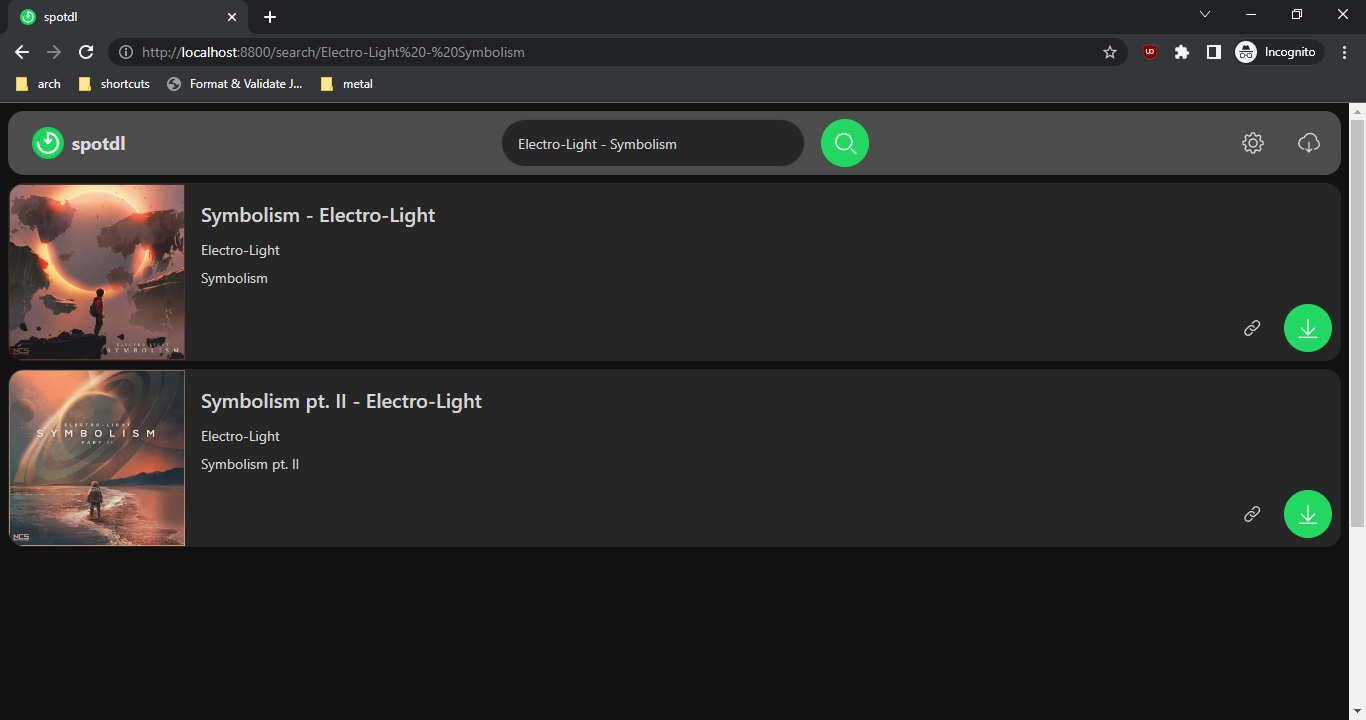
The Web UI will start by default if no arguments are passed to the command line (after
double-clicking, for example).
### Running the CLI
To use the command line interface, just open your terminal and run
`./spotdl-vX.X.X operation [urls]`.
## Docker Setup
spotDL provides a Docker image.
Install Docker:
Install Docker Compose:
Docker documentation:
### Built-in Docker Image
- Build docker image `docker build -t spotdl .`
- List spotdl options: `docker run --rm spotdl --help`
- Download a song:
`docker run --rm -v $(pwd):/music spotdl download https://open.spotify.com/track/0VjIjW4GlUZAMYd2vXMi3b`
If you bind-mount a host directory like `$(pwd):/music`, that directory must be writable by the
container `UID`/`GID`.
### Docker Hub Image
- Pull docker image from Docker hub: `docker pull spotdl/spotify-downloader`
- Download a song using Docker image:
`docker run --rm -v $(pwd):/music spotdl/spotify-downloader download https://open.spotify.com/track/0VjIjW4GlUZAMYd2vXMi3b`
- Create a Docker container
```
docker create \
--name=spotdl \
-v :/music \
spotdl/spotify-downloader
```
### Docker Compose
- Use Docker Compose if you want Docker to manage permissions for you.
- Set your user and group IDs:
```bash
export PUID=$(id -u)
export PGID=$(id -g)
```
- Build the image:
`docker compose build`
- Download a song using Docker Compose:
`docker compose run --rm spotdl download https://open.spotify.com/track/0VjIjW4GlUZAMYd2vXMi3b`
Docker Compose stores downloads in the named volume `spotdl_music:/music`.
- Export files from the volume:
```bash
docker compose up --no-start spotdl
mkdir -p downloads
docker compose cp spotdl:/music/. ./downloads/
```
## Other Installation Methods
### Termux
We have a dedicated Termux installation script:
`curl -L https://raw.githubusercontent.com/spotDL/spotify-downloader/master/scripts/termux.sh | sh`
### Arch User Repository (AUR) package
[You can find the AUR Package here](https://aur.archlinux.org/packages/spotdl)
## Where does spotDL download songs?
spotDL downloads files to the folder where you ran spotDL from.
Open pwsh/powershell/cmd/terminal/similar in the folder you want files to download to, or cd to the
desired folder.
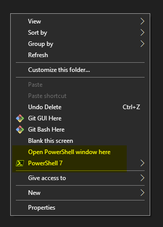
**Windows Shortcut:** Navigate to the folder you want the files to download to.
`SHIFT + RIGHT CLICK`, then select "Open PowerShell window here"
## We have a public Discord server at **[discord.gg/xCa23pwJWY](https://discord.gg/xCa23pwJWY)!**
[](https://discord.gg/xCa23pwJWY)