# ucode
**A free, open-source AI coding agent for your terminal.**
Builds whole apps in about a minute on Google Gemini's free tier — then opens them and clicks through to check its own work.
[](https://www.npmjs.com/package/ucode-agent)
[](https://www.npmjs.com/package/ucode-agent)

[](https://github.com/sppideey/ucode-agent/actions/workflows/test.yml)
[](LICENSE)

[](https://nodejs.org)
[](https://github.com/sppideey/ucode-agent/stargazers)
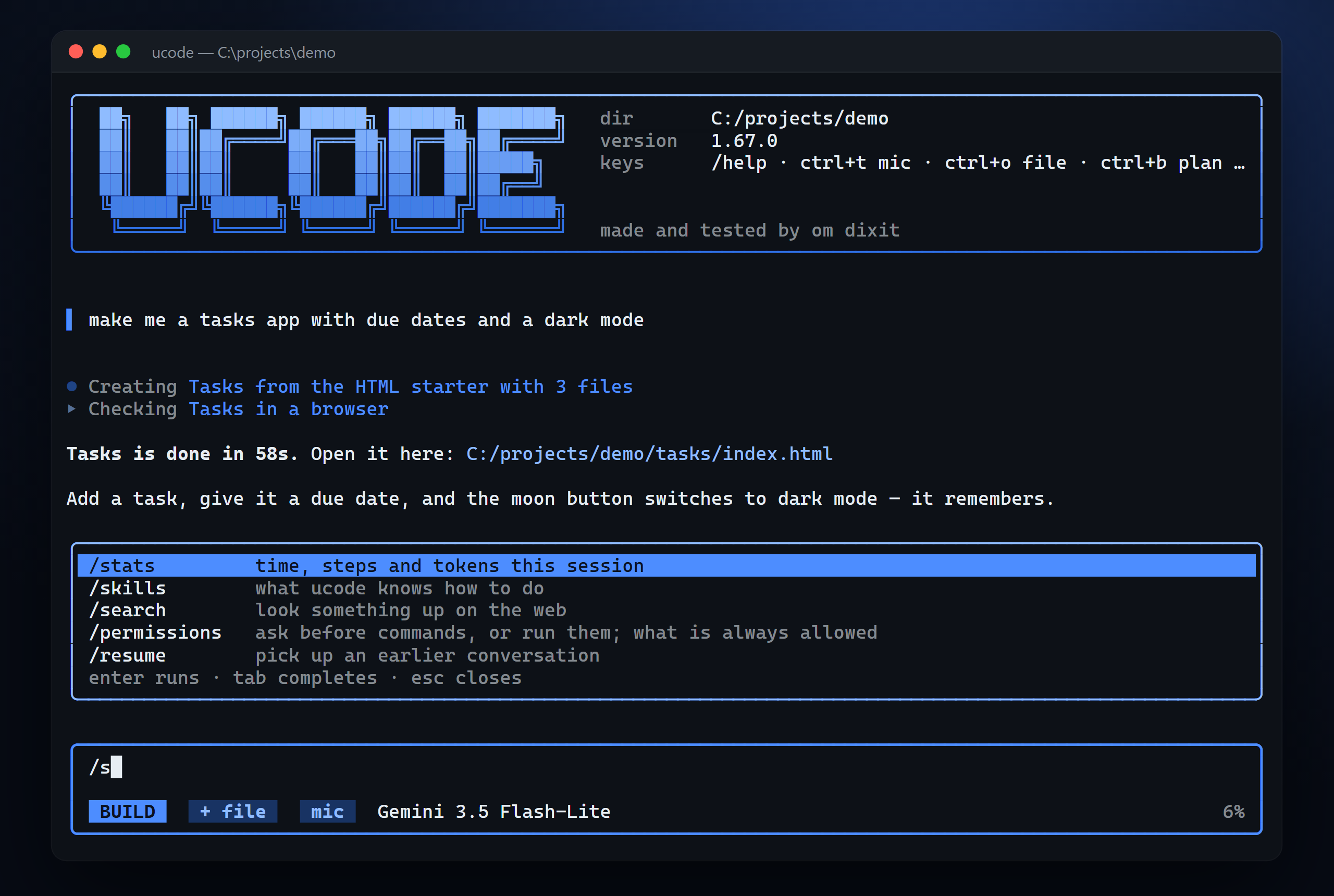
```bash
npm i -g ucode-agent # Node 22 or newer
ucode login YOUR_KEY # a free key from aistudio.google.com/apikey
ucode # in any project folder
```
A coding agent that lives in your terminal, like Claude Code or Codex CLI — but
free: it runs on Gemini's free tier, or on Ollama with no internet at all. It
reads your code, edits it, runs your commands, checks its own work, and keeps
every conversation on disk. If it helps you, a ⭐ helps other people find it.
## At a glance
| | |
| --- | --- |
| **Builds** | a whole app in about a minute, from a starter that already works, opened for you when it does |
| **Thinks** | a thinking level per step — cheap on easy steps, more on the plan, most when a fix has failed |
| **Designs** | its own tone, typefaces and accent for every app, and a check that sends the generated look back |
| **Checks** | types, syntax, related tests, the running server's errors, and the page itself — opened and clicked |
| **Fixes** | sends problems back to the model, tries a different approach when a fix fails, learns the common ones |
| **Edits real code** | finds the code first, smallest change in the code's own style; renames by code shape |
| **Undoes** | `/undo [n]` puts the whole project back, including what commands changed |
| **Git** | `/diff`, `/commit` with a written message, `/review` for bugs |
| **Extends** | MCP servers, hooks, skills, your own slash commands |
| **Pops up** | type `/` for a live list of commands; questions, pickers, `/help`, `/stats`, `/mcp` and the rest open over the input box, not in the chat |
| **Restyles** | itself and your terminal, when you ask: "make ucode orange and my terminal navy" |
| **Automates** | `ucode -p "task" --json` for scripts and CI; `npm run eval` runs ten real jobs |
| **Stays free** | Gemini's free tier, paced to its per-minute limit — or Ollama, offline |
It opens on a quiet screen — the name, the place to type, and the version in the
corner:
```
██╗ ██╗ ██████╗ ██████╗ ██████╗ ███████╗
██║ ██║██╔════╝██╔═══██╗██╔══██╗██╔════╝
██║ ██║██║ ██║ ██║██║ ██║█████╗
██║ ██║██║ ██║ ██║██║ ██║██╔══╝
╚██████╔╝╚██████╗╚██████╔╝██████╔╝███████╗
╚═════╝ ╚═════╝ ╚═════╝ ╚═════╝ ╚══════╝
╭──────────────────────────────────────────────────────────────────────────────╮
│ Ask anything… │
│ │
│ BUILD Gemini 3.5 Flash-Lite 0% │
╰──────────────────────────────────────────────────────────────────────────────╯
try build me a landing page for a coffee shop
explain what this project does and how it fits together
add a dark mode toggle that remembers the choice
made and tested by om dixit · v1.68.1
```
A light crosses the wordmark once as it opens, and the three lines under the box
are there so an empty screen has something to say. Once you are talking, each
message you send is marked down its left edge in the same blue as the input, so
your own words are easy to find in a long session — and each step the agent
takes carries the shape of the work: a hollow diamond to look, a filled one to
change, an arrow to run.
```
▌ build a notes dashboard
◇ Read 3 files
◆ Writing index.html +148 -0
▸ Running npm run dev
The dashboard is at http://localhost:3000, and `npm run dev` brings it back up.
╭──────────────────────────────────────────────────────────────────────────────────╮
│ now add a dark mode toggle │
│ │
│ BUILD Gemini 3.5 Flash-Lite 4% │
╰──────────────────────────────────────────────────────────────────────────────────╯
```
The status sits inside the input box because it describes the thing you are
typing into. Three facts, no more: the live mode, the answering model, and how
full the context window is. The percentage turns amber at 75%, which is where
older turns start being folded into a summary. While a turn is running the
middle of that row carries the spinner and the way out of it, and hands the
space straight back when it finishes.
## Install
```bash
npm i -g ucode-agent
```
Then save your Google key (free at [aistudio.google.com/apikey](https://aistudio.google.com/apikey)):
```bash
ucode login YOUR_KEY
```
It is written to `~/.ucode/.env` as `GEMINI_API_KEY`. A `.env` in
the project you are working on wins over that one, and a real environment
variable wins over both.
Then, in any project:
```bash
ucode
```
Needs Node 22 or newer.
## The models
Served by Google (aistudio.google.com), with one key.
One key, every current Gemini model. Flash-Lite is the default; `/model` (or
`/models`) shows the rest and switches.
| Model | Free? | For |
| --- | --- | --- |
| **Gemini 3.5 Flash-Lite** ★ | free | the default — fast, reliable with tools, 500 free requests a day |
| Gemini 3.8 Flash | free | the newest Flash — smarter, about 20 free requests a day |
| Gemini 3.7 Flash | free | about 20 free requests a day, often busy at peak hours |
| Gemini 3.6 Flash | free | about 20 free requests a day |
| Gemini 3.5 Flash | free | smarter, but only about 20 free requests a day |
| Gemini 3.1 Flash-Lite | free | older and lighter, 500 free requests a day |
| Gemini 3 Flash Preview | free | older preview, slow to answer |
| Gemma 4 31B | free | Google's open model — slow (about 30s a step) and sometimes errors |
| Gemini 3.1 Pro Preview | **paid** | the strongest — needs billing turned on for your key |
| Gemini Pro (latest) | **paid** | Google's newest Pro — needs billing turned on for your key |
When Google releases a newer one (a 3.9 Flash, say), `/model` finds it on its
own and lists it — marked new, and paid if it is a Pro. `ucode -m gemini-3.8-flash`
starts on a model.
Free limits are per model, and they start again at midnight in California
(12:30 PM in India). When one model has used its free requests for the day,
ucode says so — with when it comes back — and offers to carry on with
Flash-Lite, which has its own 500; `/model` marks it USED UP until then. A
Pro model on a key without billing is said to be not free, rather than retried.
A per-minute limit is waited out exactly as long as Google says, and the next
requests are spaced to fit it.
When Google is overloaded and Flash-Lite stops answering, ucode carries on with
3.5 Flash by itself and goes back to Flash-Lite a few minutes later; the newer
Flash models and Gemma carry on with Flash-Lite the same way.
## What it does
**Twenty-one tools, and any MCP server you add.** `create_app`, `read_file`, `read_files`, `write_file`,
`batch_write`, `edit_file`, `multi_edit`, `edit_files`, `rename_symbol`,
`find_symbol`, `outline`, `type_of`, `add_block`, `list_dir`, `glob`, `grep`,
`run_command`, `run_commands`, `look_at_app`, `web_search`, `deploy`. Read-only
calls run in parallel, and start the moment the model finishes writing them —
while the rest of its reply is still arriving. Anything that writes runs on its
own, in order.
**It asks rather than guesses.** `type_of` opens a language service on the
TypeScript the project itself has installed and gives back the exact signature,
the JSDoc, and where a thing is defined — inferred types included. `find_symbol`
answers "where is this declared", which is the question `grep` is usually being
asked badly. `rename_symbol` renames by code shape, knowing where strings and
comments begin, because a find-and-replace that matched too much is the most
common broken edit.
**It checks itself as it goes.** After a change: an incremental type check that
answers in about a second rather than a cold minute, then the tests that reach
the files just changed, then anything the running dev server has complained
about since the last look. All three come back the way an error does, so the
model fixes them without being told.
**New apps are ready in seconds.** A starter installed once is kept and
hard-linked into the next app — the same files under another name, so it costs
no extra disk and skips the wait entirely.
**Apps start from a ready-made starter — and finish in the same call.**
`create_app` copies a starter that is already known to build, and takes the
app's files with it, so a one-page app is a single round trip: the starter
lands, the model's files are written over it, and the starter's own files come
back inside the result so there is nothing to read afterwards.
The default starter is `plain-html`: one page, one stylesheet, one module,
nothing to install and nothing to build. A tasks app, a game, a calculator or a
visualisation is finished before a framework would have finished installing.
`next-shadcn` is there for routes, a database or many screens — Next.js 16,
TypeScript, Tailwind 4, shadcn/ui with 25 components, light/dark, toasts and a
considered theme. Setting that up by hand is about four minutes
(`create-next-app` and the shadcn CLI measured at 116s and 130s) plus a dozen
round trips; the copy takes under a second, and its install runs in the
background while the model writes the first components.
**Built to be fast, and measured.** A traced build of a small Next.js app went
from 17 minutes and 116 model steps to about 6 minutes and 25 steps, by fixing
where the time actually went:
- Edits return the file as it now stands, so the model does not re-read it.
- Files written more than a few steps ago stop being re-sent in full; the
conversation stays small, so every step answers faster.
- A file-write whose JSON is malformed — a missing comma, an unescaped quote in
the code, raw line breaks — is repaired instead of thrown away with all its
output.
- An edit whose `old_string` is slightly off — a middle line remembered wrong,
escapes written out, a blank line at either end, a different indent — still
lands, through the fallback matchers from opencode's edit tool. Found in two
places is still refused, and so is a match far bigger than what was asked
for. `replace_all` does a rename in one call.
- A missing file comes back with the lookalikes beside it ("did you mean
App.jsx?"), and a tool named with the wrong case runs as the tool it means,
instead of each costing a round trip to learn a spelling.
- Every write is parsed on the spot, so a syntax error comes back in the same
step rather than a minute later from a failed build.
- A failed build that is missing a component or package says exactly which
command fixes it.
- The starter is the shadcn models already know (Radix), so the code they write
compiles the first time.
- A new app goes out without the tools it has nothing to point at — no symbol
lookup, no rename, no type query in an empty folder — and an instruction pack
that loads itself sends its short form, with the full one a `load_skill`
away. Both are re-read by the provider on every step, so what is not in the
request is time off every one of them.
- Ready-made blocks for a page with no build step as well as for React: a list you
can add to, tick off, rename and remove, a filter row, a localStorage store, a
dialog, toasts, a theme toggle. Typing is the slowest part of a build, and each
block is a hundred lines nobody has to type.
- A nested argument written the wrong way — a JSON string, a { path: contents } map
— is read rather than refused. Each refusal was a round trip spent being told
something that could simply be parsed.
- A tool that was not offered is refused rather than quietly run, so withholding one
from a new project, or from plan mode, means what it says.
- The closing message is cut to eight lines. A build that ends with the request
read back and every feature ticked off is a status report nobody asked for,
and it is the last thing left on screen.
`UCODE_TRACE=1` writes every model call and tool, with its duration, to
`~/.ucode/trace.jsonl`.
Measured on "build me a simple todo app" — same prompt, same model, two traced
runs: **27 model calls, 8 failed tool calls, no finished app** before this round of
work; **14 model calls, no failures, a working app in under two minutes** after it.
**Deploy in one line.** Say "deploy it", or type `/deploy [folder]`, and the app
goes live on Vercel. ucode picks a short project name that fits the app and is
free (`food-iq`, else `food-iq-app`…), copies the app's `.env` keys to Vercel as
encrypted variables, refuses code with a secret written into it (and says how to
move it to a server route), and gives you the link. Deploying again updates the
same link. Needs a token from vercel.com/account/tokens in `~/.ucode/.env` as
`VERCEL_TOKEN=...`.
**A look for every app.** `create_app` takes a design preset — ocean, grove,
sunset, graphite, violet or citrus — each a full light and dark palette with its
own font, so apps stop looking like the same default blue.
**Every turn can be taken back.** `/undo` puts back every file the last turn
changed — a rewritten file returns byte for byte, a file that did not exist
before is removed again. Each write keeps the original the first time that turn
touches it, so what comes back is the state before the turn rather than before
the last of six edits to the same file. An agent that writes to your disk on
its own should be able to take it back, whether or not the project has git.
**It notices when it is going round in circles.** The same failing edit, an edit
that changes nothing, or a build failing on the same errors three times gets a
firm, specific note; if that does not work, the turn moves to another model.
**It never dies at the daily limit.** When the free daily limit runs out mid-build,
ucode counts down to the reset and carries on by itself.
**You can see it working.** The status row shows the current step with a light
sweeping across it, the step count and the time, and each answer ends with
`✓ Done in 6m 12s · 25 steps`. When a dev server comes up, the app opens in your
browser (`UCODE_OPEN=0` turns that off).
**`/stats` and `ucode doctor`.** `/stats` shows the session's time, steps, tokens,
files and builds. `ucode doctor` (or `/doctor`) checks Node, npm, git, the API
key and today's free requests left, the browser, the Vercel token and the
version, with the fix for anything wrong.
**Parallel workers.** When a build splits into parts that touch different files
— the API route, the upload component, the results view — the model hands them
to up to three workers that build at the same time, each line in the transcript
tagged with the worker's name. File writes take turns so two never collide.
**Installs that start early.** The moment a `package.json` with dependencies is
written, its install starts in the background while the rest of the app is
still being written. An install the model asks for later waits for that one
instead of running twice, and anything run in that folder waits for it too.
**It opens what it built and uses it.** Every app build ends with a look — not
when the model remembers to ask for one, but as part of the same pass that
type-checks. It opens the app in a real browser (the Edge or Chrome already on
your machine, so there is nothing extra to download) at 375px and 1440px, and
serves the folder itself when there is no dev server to point at, which is how
a three-file app gets checked at all.
Then it uses the app. It types into the first field, presses Enter, and clicks
the button that submits — and if the page gains no elements, changes no text
and stores nothing, that is reported as the thing to fix before anything else.
A page that renders and has no working behaviour passes a type check, a syntax
check and a screenshot; the only way to find out is to press something.
It also reports console errors, failed requests, content that spills off a
phone screen, broken images and unlabeled controls, saves screenshots to
`.ucode/screenshots`, and has Gemini review them the way a designer
would. The model fixes what it finds before calling the app done. Both widths load at once, and the designer review — the slow part — runs
on the first look at an app in each request and is skipped, not waited on, when
the vision model is busy. The look after the fixes re-runs only the fast checks:
a few seconds.
**Errors fixed before you see them.** When the model says it is done, ucode
type-checks every file it changed — `tsc --noEmit` for TypeScript projects,
a syntax check for JavaScript and Python — and hands any errors back to fix,
up to three rounds.
**A plan you can see.** For longer jobs the model keeps a short checklist, with
a bar across the top for how far along it is and one row per step, so the one in
progress is findable without reading the rest:
```
━━━━────── 2/5
✓ Scaffold
✓ Upload
▸ Score dial
○ Findings
○ Polish
```
**It knows the project before it asks.** Each turn starts with a map of every
file and the names each code file exports, so the model goes straight to the
right file instead of searching for it.
**Project memory.** `UCODE.md` in a project — and `~/.ucode/UCODE.md` for how you
like to work everywhere — is read at the start of every turn. `/remember