# brainstorm-mcp
[](https://www.npmjs.com/package/brainstorm-mcp)
[](https://www.npmjs.com/package/brainstorm-mcp)
[](https://github.com/spranab/brainstorm-mcp/blob/main/LICENSE)
[](https://ideacred.com/profile/spranab)
[](https://www.producthunt.com/products/brainstorm-3?launch=brainstorm-4)
Ask one model a design question and you get one confident answer, with no
signal about which parts it is unsure of. Ask three and the disagreement is
the signal.
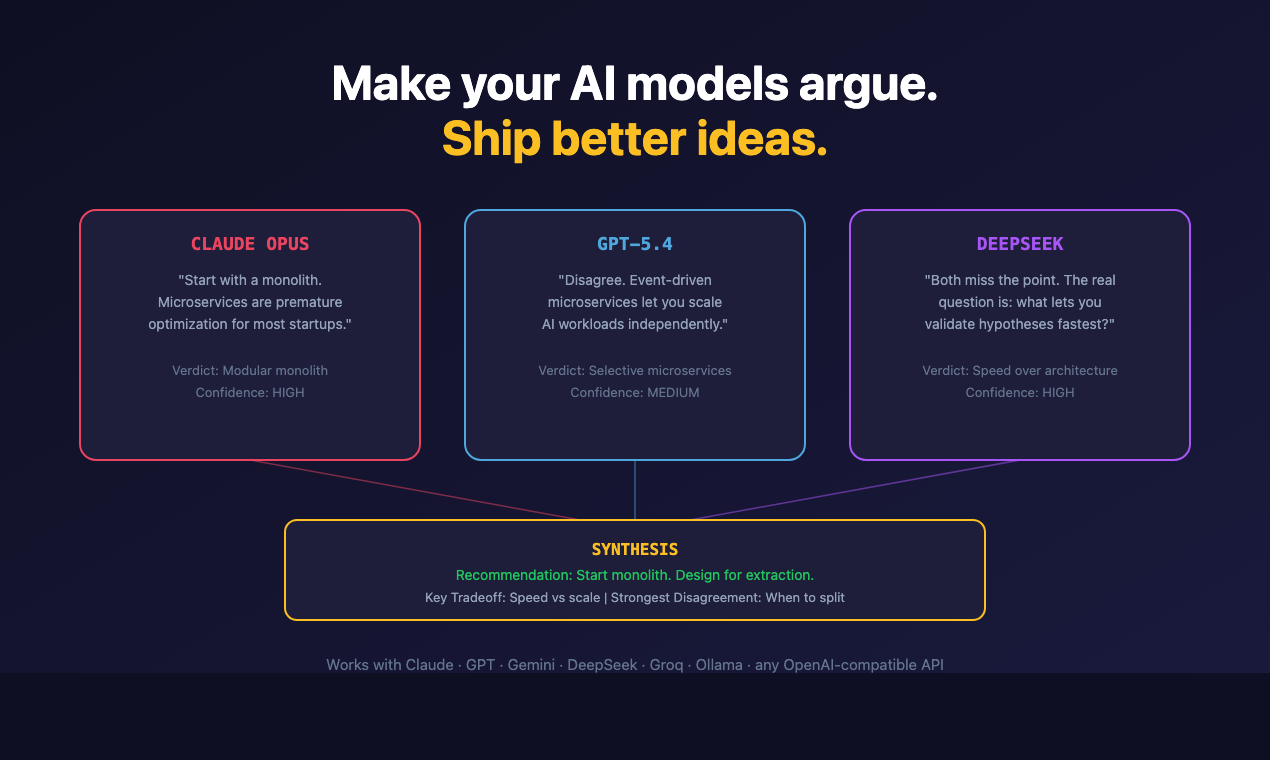
brainstorm-mcp runs multi-round debates between GPT, Gemini, DeepSeek, Claude
and local Ollama models from inside your editor: they see and critique each
other's answers across rounds, then you get a 3-bullet synthesis —
recommendation, key tradeoffs, strongest disagreement. Also does instant
quick mode, multi-model code review with verdicts, and red-team/Socratic
styles. Hosted mode needs zero API keys.
**Don't trust one AI. Make them argue.**
## Quick start (60 seconds)
```bash
claude mcp add brainstorm -- npx -y brainstorm-mcp
```
Then ask Claude: *"Brainstorm using opus, sonnet, and haiku about whether we should use GraphQL or REST."*
That runs in hosted mode: no API keys, no provider accounts. The debate uses the models already
available in your environment, and you get the 3-bullet synthesis at the end.
### Demo
[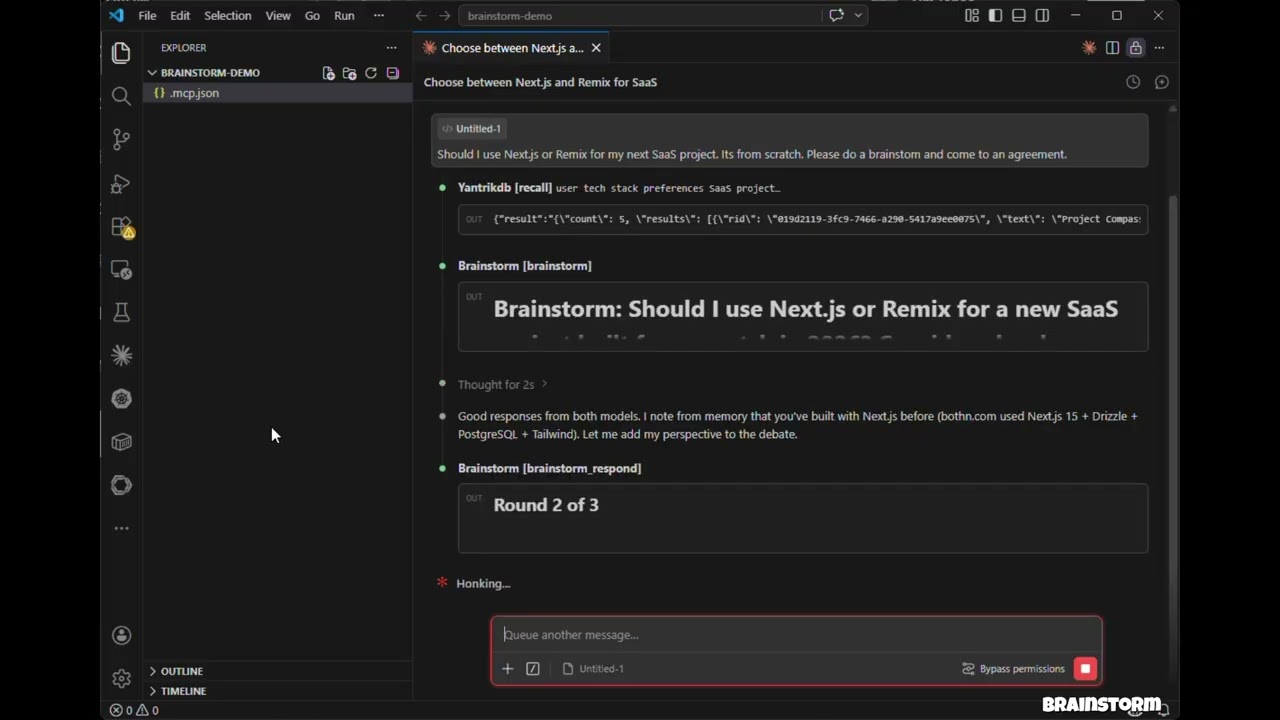](https://youtu.be/L5kli5_fgkI)
> Click to watch: 3 models debate, cross-examine, and produce a structured verdict — all inside Claude Code.
## Features
- **Hosted mode** — No API keys needed. Uses models in your environment (Claude Opus/Sonnet/Haiku) via sub-agents
- **API mode** — Direct model API calls with parallel execution across OpenAI, Gemini, DeepSeek, Groq, Ollama
- **CLI mode** — Debate through agent CLIs you already have (`claude`, `codex`, and more) so debates run on your **subscription instead of API credits**
- **brainstorm_quick** — Instant multi-model perspectives in under 10 seconds
- **brainstorm_review** — Multi-model code review with structured findings, severity ratings, and verdicts
- **Debate styles** — Freeform, red-team (adversarial), and Socratic (probing questions)
- **Context injection** — Ground debates in actual code, diffs, or architecture docs
- **3-bullet synthesis verdicts** — Recommendation, Key Tradeoffs, Strongest Disagreement
- **Claude as participant** — Claude debates alongside external models with full conversation context
- **Multi-round debates** — Models see and critique each other's responses across rounds
- **Parallel execution** — All models respond concurrently within each round
- **Resilient** — One model failing doesn't abort the debate
- **Cross-platform** — Works on macOS, Windows, and Linux
## Install
The one-line command under Quick start is enough for hosted mode. Add provider keys to
bring GPT, Gemini, DeepSeek, Groq or Ollama into the debate; per-client setup follows.
### Claude Code
Add to your project's `.mcp.json`:
```json
{
"mcpServers": {
"brainstorm": {
"command": "npx",
"args": ["-y", "brainstorm-mcp"],
"env": {
"OPENAI_API_KEY": "sk-...",
"GEMINI_API_KEY": "AIza...",
"DEEPSEEK_API_KEY": "sk-..."
}
}
}
}
```
### Claude Desktop
Add to `claude_desktop_config.json`:
```json
{
"mcpServers": {
"brainstorm": {
"command": "npx",
"args": ["-y", "brainstorm-mcp"],
"env": {
"OPENAI_API_KEY": "sk-...",
"DEEPSEEK_API_KEY": "sk-..."
}
}
}
}
```
### Manual Install
```bash
npm install -g brainstorm-mcp
brainstorm-mcp
```
> **Hosted mode** requires no API keys — just install and go. The host (Claude Code) executes prompts using its own model access.
## Configuration
### Option 1: Environment Variables (simplest)
```
OPENAI_API_KEY=sk-...
GEMINI_API_KEY=AIza...
DEEPSEEK_API_KEY=sk-...
```
### Option 2: Config File (full control)
Set `BRAINSTORM_CONFIG` to point to a JSON config:
```json
{
"providers": {
"openai": { "model": "gpt-6.1-sol", "apiKeyEnv": "OPENAI_API_KEY" },
"gemini": { "model": "gemini-3.8-flash", "apiKeyEnv": "GEMINI_API_KEY" },
"deepseek": { "model": "deepseek-flash", "apiKeyEnv": "DEEPSEEK_API_KEY" },
"ollama": { "model": "llama3.1", "baseURL": "http://localhost:11434/v1" }
}
}
```
Known providers (`openai`, `gemini`, `deepseek`, `groq`, `mistral`, `together`, `moonshot`,
`minimax`, `glm`, `qwen`, `xai`) don't need a `baseURL`, and the ones with a built-in default model
(`openai`, `gemini`, `deepseek`, `moonshot`, `minimax`, `glm`, `qwen`, `xai`) don't need a `model` either.
Use `provider:default` (e.g. `openai:default`) to mean a provider's default model.
Env-var detection: `OPENAI_API_KEY`, `GEMINI_API_KEY`, `DEEPSEEK_API_KEY`, `MOONSHOT_API_KEY`,
`MINIMAX_API_KEY`, `ZAI_API_KEY`, `DASHSCOPE_API_KEY` (Qwen), `XAI_API_KEY` (Grok; `GROK_API_KEY` also works). Each also accepts
`_BASE_URL` and `_DEFAULT_MODEL`.
| Provider | Default model |
|----------|---------------|
| `openai` | `gpt-6.1-sol` (also `gpt-6-astra`, `gpt-6-sol`, `gpt-6-luna`, `gpt-5.5`) |
| `gemini` | `gemini-3.8-flash` (`gemini-3.1-pro-preview` for Pro) |
| `deepseek` | `deepseek-flash` (`deepseek-v4-pro`) |
| `xai` | `grok-4.7` |
| `moonshot` | `kimi-k3` |
| `minimax` | `MiniMax-M3` |
| `glm` | `glm-5.3` |
| `qwen` | `qwen3.8-max` |
Reasoning models (GPT-5/6, o-series, Kimi K3, Gemini 3, DeepSeek V4, Grok 4+, GLM-5, MiniMax M3,
Qwen 3.5+) are sent the token budget they need and no `temperature`; inline `…` blocks
are stripped from replies.
Any model id the provider serves works, including OpenAI's GPT-6 (`openai:gpt-6-astra`) and the
gpt-5.x reasoning models: brainstorm picks the request shape each model expects and retries with
the other shape if the API rejects it.
### Option 3: CLI Providers (use a subscription, not API credits)
If you already pay for Claude Code, Codex, Gemini CLI, and friends, brainstorm can shell out to
those CLIs instead of buying API credits. **Any agent CLI found on your `PATH` is registered
automatically at startup** — no configuration needed:
```
[brainstorm] Detected CLI provider(s) on PATH: claude, codex (subscription-based, no API cost)
```
Use them like any other provider:
```json
{ "topic": "GraphQL vs REST", "models": ["claude:sonnet", "codex:default", "openai:gpt-6.1-sol"] }
```
Built-in adapters:
| Provider | Command | Default model | Status |
|----------|---------|---------------|--------|
| `claude` | `claude -p` | `sonnet` | verified |
| `codex` | `codex exec` | `default` | verified |
| `gemini` | `gemini -p` | `default` | best-effort, verify locally |
| `cursor-agent` | `cursor-agent -p` | `default` | best-effort |
| `opencode` | `opencode run` | `default` | best-effort |
| `qwen` | `qwen -p` | `default` | best-effort |
| `kimi` | `kimi --print` | `default` | best-effort |
| `droid` | `droid exec` | `default` | best-effort |
`:default` means "let the CLI use whatever model it's configured with". CLI calls run
with tools disabled and a read-only sandbox where the CLI supports it — they generate text, they
don't touch your repo. Provider-specific API key env vars (`ANTHROPIC_API_KEY`, `OPENAI_API_KEY`)
are stripped from the child process so the CLI falls back to your subscription login.
Env knobs:
| Variable | Effect |
|----------|--------|
| `BRAINSTORM_CLI_PROVIDERS` | `auto` (default), `off`, or a comma-separated list of adapters to detect |
| `BRAINSTORM_PREFER_CLI` | `1` — debates with no explicit `models` use only CLI providers, skipping metered APIs |
| `BRAINSTORM_CLI_TIMEOUT_MS` | Per-call timeout for CLI providers (default 300000) |
To pin a model or add a CLI that isn't built in, use the config file:
```json
{
"providers": {
"claude": { "type": "cli", "model": "opus" },
"my-cli": {
"type": "cli",
"adapter": "custom",
"command": "some-agent-cli",
"args": ["run", "--model", "{{model}}", "--quiet", "{{prompt}}"],
"promptVia": "arg",
"model": "some-model"
}
}
}
```
Template placeholders: `{{model}}`, `{{system}}`, `{{prompt}}`, `{{outfile}}`. A lone placeholder
that resolves to nothing drops out of the command line along with the flag introducing it, so
`["--model", "{{model}}"]` works even for `provider:default`. Set `"promptVia": "stdin"` to pipe
the prompt instead of passing it as an argument.
#### Coding-plan backends through the Claude CLI
Moonshot (Kimi), MiniMax, and Z.ai (GLM) sell coding-plan subscriptions that speak the Anthropic
API. Point the `claude` binary at one of them and that vendor joins the debate on the plan you
already pay for:
```json
{
"providers": {
"moonshot": { "type": "cli", "backend": "moonshot", "model": "kimi-k3" },
"minimax": { "type": "cli", "backend": "minimax", "model": "MiniMax-M3" },
"glm": { "type": "cli", "backend": "glm", "model": "glm-5.3" }
}
}
```
| Backend | Endpoint | Token env var |
|---------|----------|---------------|
| `moonshot` | `https://api.moonshot.ai/anthropic` | `MOONSHOT_API_KEY` |
| `minimax` | `https://api.minimax.io/anthropic` | `MINIMAX_API_KEY` |
| `glm` | `https://api.z.ai/api/anthropic` | `ZAI_API_KEY` |
The token is read from your environment at call time — the config file holds the variable name,
never the secret. `ANTHROPIC_API_KEY` is stripped from the child so your Anthropic account is
never billed for these. Any CLI provider also accepts an `"env"` block to override the backend
manually; a value of `"$NAME"` indirects through the server's environment.
These vendors are reachable as plain metered APIs too — `moonshot`, `minimax`, `glm` and `qwen`
have known base URLs, so `MOONSHOT_API_KEY` alone is enough to register `moonshot` as an API
provider.
## Tools
| Tool | Description | Annotation |
|------|-------------|------------|
| `brainstorm` | Multi-round debate between AI models (API or hosted mode) | readOnly |
| `brainstorm_quick` | Instant multi-model perspectives — parallel, no rounds | readOnly |
| `brainstorm_review` | Multi-model code review with findings, severity, verdict | readOnly |
| `brainstorm_respond` | Submit Claude's response in an interactive session | readOnly |
| `brainstorm_collect` | Submit model responses in a hosted session | readOnly |
| `list_providers` | Show configured providers, API key status, and detected CLIs | readOnly |
| `add_provider` | Add a new API or CLI provider at runtime | non-destructive |
## Usage Examples
### Example 1: Quick Multi-Model Perspectives
**Prompt:** "Use brainstorm_quick to compare Redis vs PostgreSQL for session storage"
**Tool called:** `brainstorm_quick`
```json
{ "topic": "Redis vs PostgreSQL for session storage in a Node.js app" }
```
**Output:** Each configured model responds independently in parallel. You get a side-by-side comparison in under 10 seconds with model names, responses, timing, and cost.
**Error handling:** If a model fails (rate limit, timeout), the tool continues with remaining models and shows which ones failed.
---
### Example 2: Multi-Model Code Review
**Prompt:** "Review this diff for security issues" (with a git diff pasted)
**Tool called:** `brainstorm_review`
```json
{
"diff": "diff --git a/src/auth.ts ...",
"title": "Add JWT authentication middleware",
"focus": ["security", "correctness"]
}
```
**Output:** A structured verdict (approve / approve with warnings / needs changes) with a findings table showing severity, category, file, line numbers, and suggestions. Includes model agreement analysis — issues flagged by multiple models have higher confidence.
**Error handling:** If synthesis fails, raw model reviews are still returned.
---
### Example 3: Hosted Mode Brainstorm (No API Keys)
**Prompt:** "Brainstorm using opus, sonnet, and haiku about whether we should use GraphQL or REST"
**Tool called:** `brainstorm`
```json
{
"topic": "GraphQL vs REST for our public API",
"models": ["opus", "sonnet", "haiku"],
"mode": "hosted",
"rounds": 2,
"style": "redteam"
}
```
**Output:** The tool returns prompts for each model. The host (Claude Code) spawns sub-agents with different models, collects responses, and feeds them back via `brainstorm_collect`. After all rounds, a synthesis model produces a 3-bullet verdict: Recommendation, Key Tradeoffs, Strongest Disagreement.
**Error handling:** Sessions expire after 10 minutes. If a session is not found, a clear error message is returned with instructions to start a new one.
## How It Works
### API / CLI Mode
1. You ask Claude to brainstorm a topic
2. The tool sends the topic to all configured providers in parallel — HTTP for API providers, a spawned subprocess for CLI providers
3. Claude reads their responses and contributes its own perspective
4. Models see each other's responses and refine across rounds
5. A synthesizer produces the final verdict
### Hosted Mode
1. You ask Claude to brainstorm with specific models (e.g., opus, sonnet, haiku)
2. The tool returns prompts — no API calls are made
3. Claude spawns sub-agents with different models to execute prompts
4. Responses are collected and fed back for the next round
5. Repeat until synthesis
## Privacy Policy
brainstorm-mcp runs entirely on your machine and does **not** collect, store, or transmit any personal data, telemetry, or analytics.
In **API mode**, prompts are sent directly from your machine to the model providers you configure (OpenAI, Gemini, DeepSeek, etc.) using your own API keys. In **CLI mode**, prompts are passed to agent CLIs installed on your machine, which talk to their own vendors under your existing subscription. In **hosted mode**, no external API calls are made.
Debate sessions are stored in-memory only with a 10-minute TTL. No data is written to disk unless you explicitly save results.
Full privacy policy: [PRIVACY.md](PRIVACY.md)
## Support
- **Issues**: https://github.com/spranab/brainstorm-mcp/issues
- **Email**: developer@pranab.co.in
- **Repository**: https://github.com/spranab/brainstorm-mcp
## Development
```bash
git clone https://github.com/spranab/brainstorm-mcp.git
cd brainstorm-mcp
npm install
npm run build
npm start
```
## Related projects
Other agent infrastructure by the same author, built to be used together:
- [saga-mcp](https://github.com/spranab/saga-mcp) — SQLite-backed project
tracker: once the debate settles, the decision goes somewhere durable.
- [yantrikdb-mcp](https://github.com/yantrikos/yantrikdb-mcp) — persistent
cognitive memory so the agent remembers what you decided and why.
- [swarmcode](https://github.com/spranab/swarmcode) — real-time channel
between Claude Code instances on different machines.
- [truenas-mcp](https://github.com/spranab/truenas-mcp) — 278 TrueNAS SCALE
actions behind one hierarchical tool.
- [mcpier](https://github.com/spranab/mcpier) — self-hosted MCP control plane
that keeps API keys off your clients.
## License
MIT