How EngGauge works
Point it at an engineer’s GitLab or GitHub handle. It reads their merged work, the comments reviewers left, and the code that drew them, then assesses it against your competency ladder — with every claim citing a specific merge or pull request.
Setup
One thing is required. Everything else is optional.
- A code host — required
-
GitLab or GitHub, cloud or self-hosted. A read-only token is
enough:
read_apion GitLab, orreposcope (read) on GitHub. Set the host in Settings → Code hosts if you are not on gitlab.com or github.com — you will be asked to grant access to that host the first time. - A model API key — optional
- OpenAI, Anthropic or Gemini unlocks Full mode: weighted rubric scores, a level verdict, and recurring themes across requests. Without one it runs in Lite mode on Chrome’s built-in on-device model. Requests go from your browser straight to the provider on your own key — see the privacy policy.
- Confluence and Jira — optional
- Adds documentation quality, project scope, and — where your rubric asks for them — cycle time and rework rate. Dimensions that need a source you have not connected are scored unscored, never guessed.
Running an assessment
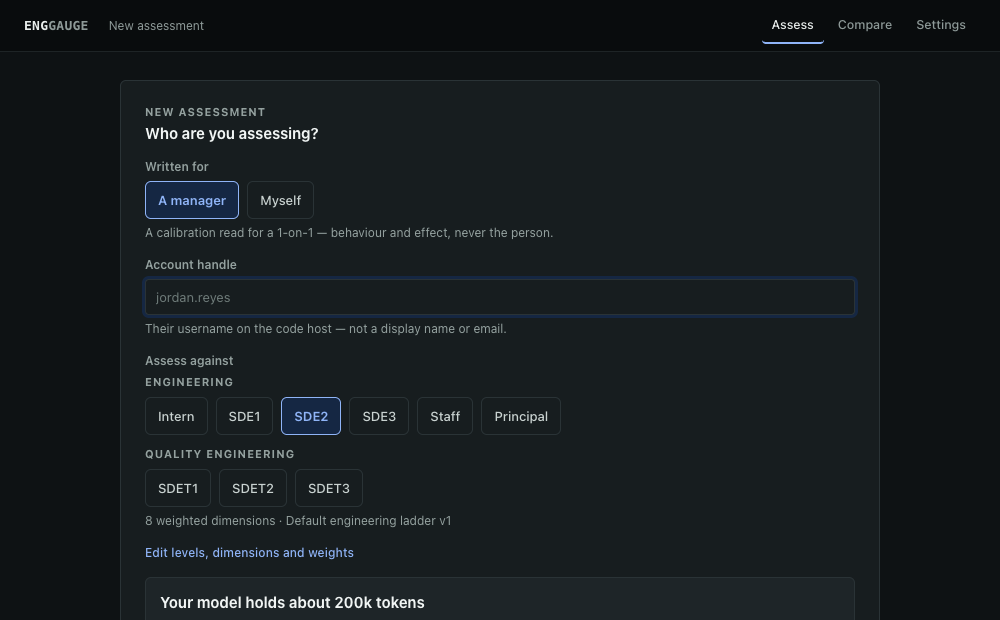
- Enter the engineer’s account handle — their username on the code host, not a display name or email.
- Pick the level to assess against. Levels come from your active competency model.
- Set the window and how many requests to analyse. The form tells you roughly what the run will cost before you start it.
A full run is several minutes and 150+ API calls. Keep the tab open — the analysis runs in the page, not in the background, because Chrome shuts down an idle extension worker after about thirty seconds. Cancel is safe at any point.
If your code host rate-limits mid-run, EngGauge waits and retries rather than throwing the run away. The progress step tells you how long it is waiting.
Reading the report
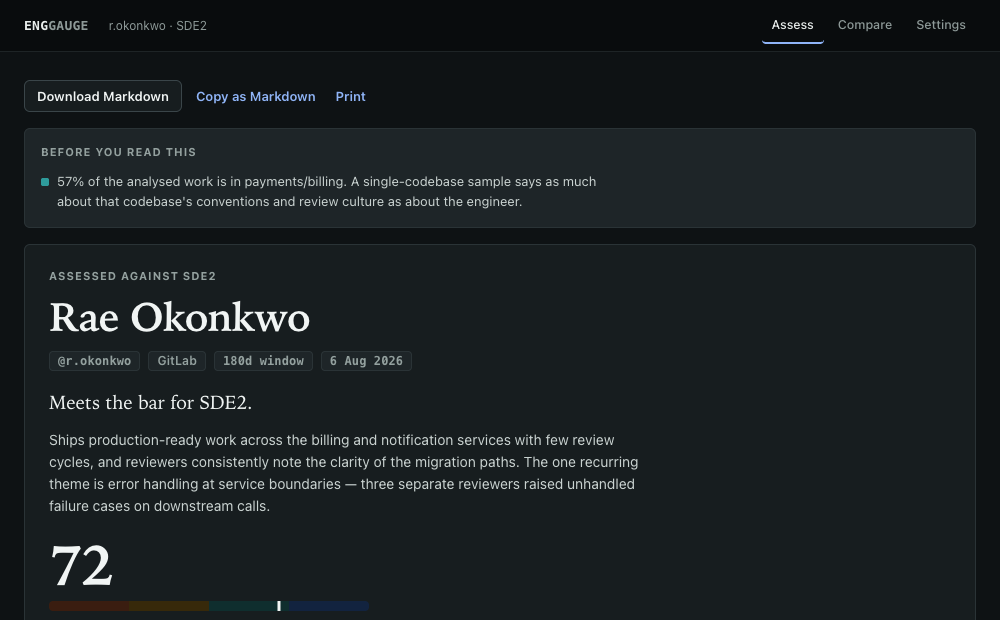
- Read the caveats first
- They sit above the verdict on purpose. A well-argued paragraph about four merge requests reads exactly like a well-argued paragraph about forty. Below a threshold you set, the report shows its findings but withholds the level verdict, because a small sample can support “here is what reviewers keep raising” and cannot support “does not meet the bar”.
- The score is arithmetic, not opinion
- It is computed locally from the weighted dimensions beneath it — the model never supplies it. Unscored dimensions are excluded and the remaining weights renormalised, so missing data lowers confidence rather than the score.
- Every claim links to its evidence
- Request numbers in the text are real links. The audit trail in the sidebar lists exactly which requests fed the assessment and why each one qualified. If you disagree with a score, open the citation — the merge request is the thing to argue with, not the report.
- Reject evidence you do not accept
- Mark any request as not representative — a spike, a one-off firefight, someone else’s work merged under this account — and give a reason. It is recorded, it travels into the export, and Re-run without them produces a score that never saw it. The original report is not silently rewritten.
Your competency model
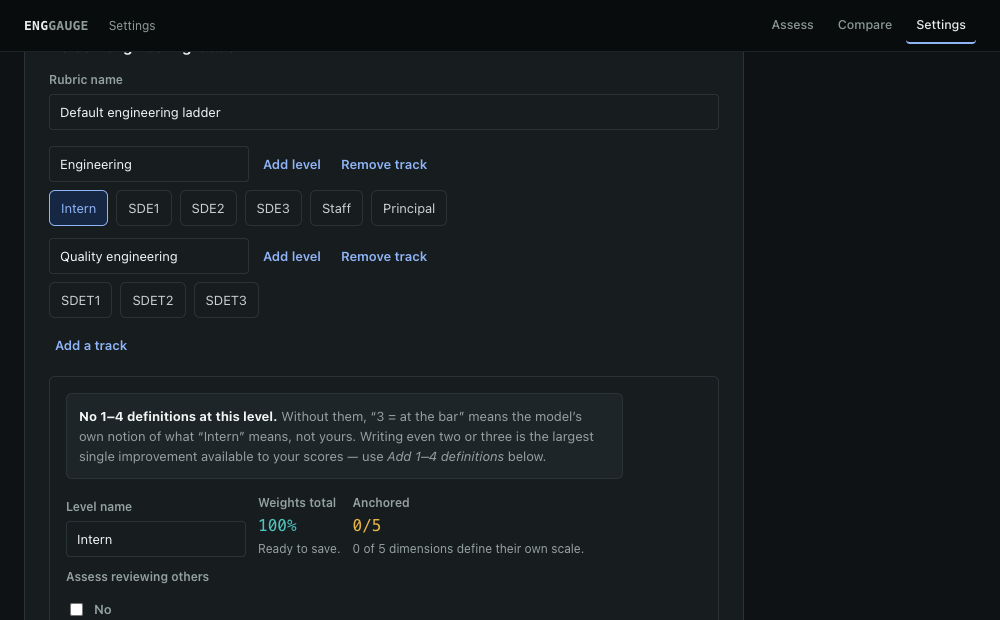
Every score in every report comes from here. A rubric that is not yours does not fail loudly — it produces a confident, well-argued number about the wrong thing — so it is worth ten minutes before your first real run.
- Tracks group levels that are assessed on different work. Quality engineering ships separately because test design and flake elimination are not product-feature delivery.
- Weights must total 100% for each level. Saving is blocked until they do — a wrong denominator changes every score at that level and nothing downstream can detect it.
- 1–4 definitions per dimension are the highest-leverage field on the page. Your own wording for “at the bar” moves the model’s agreement with your calibration far more than adjusting weights does.
- Editing the built-in ladder forks it. The shipped one stays available to reset to, and a future update cannot overwrite yours.
Reports record the rubric name and version that produced them. Edit the rubric and the version bumps, which is why two reports made either side of an edit refuse to be compared: the numbers were produced against different definitions.
Self-assessment
Switch Written for to Myself on the form. The prompt changes addressee — it is written to you, in the second person — and states no level verdict. Nothing is sent anywhere different; the report is stored in your own browser like any other. Running it on yourself before your manager does is the intended use.
Export and compare
- Download or copy as Markdown pastes cleanly into Confluence, Jira, Slack or Docs. The caveats and limitations travel with the conclusions — exporting a verdict without the sample size it rests on is the easiest way to misuse this.
- Print uses a stylesheet that drops the navigation and prints every link’s URL after it.
- Compare puts two assessments of the same person side by side, dimension by dimension. There is deliberately no overall-score trend line, and a single point of movement is labelled as within model noise rather than as growth.
If the report comes back empty
This is almost always Settings → Analysis & privacy → Which work counts. Those rules decide what is worth assessing before anything reaches a model, and their defaults are guesses about your team’s conventions.
- Eligible target branches — if your team merges to
developortrunkand the list saysmain, every request scores as trivial. Blank accepts every branch. - Excluded repositories — path fragments to skip. Check none of them accidentally matches a repo you care about.
- Review bot accounts — their comments are counted separately so automated volume never inflates a human-engagement score. Accounts ending in
[bot]are detected automatically.
Also worth checking: the handle is spelled right, and the window is long enough.
Other problems
- “The model returned something that is not valid JSON”
- Usually the response ran out of room. Reduce the number of requests, or pick a model with a larger output limit.
- The run says the context window is too small
- EngGauge trims evidence to fit and tells you what it dropped, cutting diffs first and reviewer comments last. If it is trimming a lot, either analyse fewer requests or choose a larger model.
- Rate limited
- It waits and retries automatically. If a quota is exhausted for the hour — GitHub’s limit resets hourly — the run stops and says so. Shorten the window and try again later.
- Lite mode cannot score dimensions
- Not a bug. Chrome’s on-device model holds roughly 6,000 tokens; a full assessment prompt is well past 100,000. Lite summarises each request separately, which genuinely cannot produce weighted scores, a verdict, or cross-request themes. Add an API key for those.
- Confluence or Jira found nothing
- The engineer’s code-host account and Atlassian account may use different emails. Enter their Atlassian email on the form to link them.
- A re-run is faster than the first
- Fetched data is reused for a few hours so that changing a rubric or level does not repeat 150 API calls. Clear it in Settings if a repository has changed in a way EngGauge should notice immediately.
What it cannot do
It reads merged code review. That is a real but partial view of an engineer. It cannot see design discussions that happened in a room, incident response, mentoring that never touched a merge request, or work done on a branch that never landed. The higher the level, the more of the job lives outside what it can read — which is why Staff and Principal assessments should be read as one input among several.
It produces evidence, not decisions. Treat a verdict as a starting point for a conversation with the person, backed by citations you can both open.