TUICommander
The IDE that understands AI agents.
Run parallel agents on isolated branches with full observability.





Website •
Download •
Nightly •
All Features •
Plugins •
Plugin API •
Docs
---
---
## Community & support
Join **TUICommander & Co** using the Discord badge above for questions, discussion, and ideas. In the **TUICommander** category, use **#support** for questions and troubleshooting, **#ideas** for suggestions, and **#plugins** for plugin showcases, development help, and requests. The server is checked once a day.
Report reproducible bugs in [GitHub issues](https://github.com/sstraus/tuicommander/issues), with steps to reproduce.
## The problem
You're running Claude Code in one terminal, Gemini CLI in another, Codex in a third. One hit a rate limit 10 minutes ago and you didn't notice. Another is waiting for a Y/N confirmation. You switch between windows and still lose track.
The more sessions you run, the worse it gets. The tooling doesn't understand what's happening inside the terminal.
## The solution
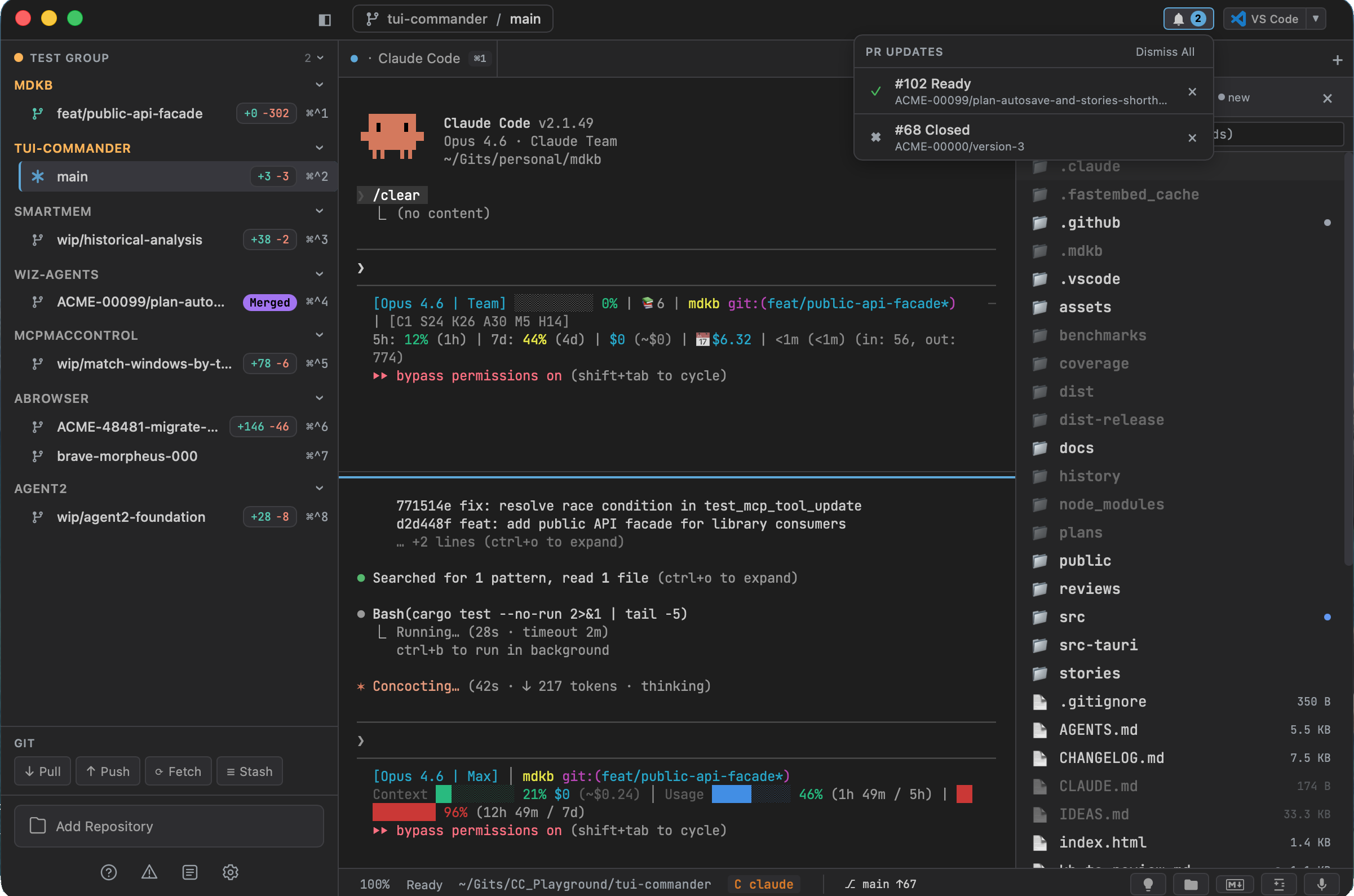
**TUICommander is an AI-native IDE** — designed from the ground up for multi-agent development. Agents, code, diffs, PRs, CI status, and usage analytics live in one window. No context switching. No lost threads.
AI-native means the agents are not an afterthought. Rate limit detection, question recognition, session-aware resume, and usage tracking are core — not plugins.
---
## What makes it different
### Run many AI sessions in parallel
Launch Claude Code on five branches at once — or mix agents. Each session runs in its own Git worktree — no context collision, no stash conflicts, no "which terminal was that?" moments.
- Up to 50 terminal sessions running simultaneously
- Each session works on its own isolated copy of the repo
- Activity dashboard showing every session at a glance
### Agent observability — not just terminals
TUICommander auto-detects **10 AI coding agents** (Claude Code, Codex CLI, Gemini CLI, Amp, Cursor Agent, OpenCode, Droid, Goose, Grok, pi) and understands what they're doing:
- **Rate limit detection** — Provider-specific patterns with countdown timers per session.
- **Question detection** — Y/N prompts, numbered options, inquirer-style menus. Tab indicator, notification sound, keyboard overlay.
- **Usage tracking** — Provider-aware Claude, Codex, and Grok limits with color-coded thresholds and native dashboards; Gemini remains terminal-detection only until it exposes a stable account quota API.
- **Activity dashboard** — Every session at a glance: agent type, status (working / waiting / rate-limited / idle), last activity.
- **Session-aware resume** — Auto-discovers agent session IDs from disk (Claude Code, Gemini CLI, Codex CLI, Grok). Resume exactly where you left off.
No other tool knows that your agent is stuck.
### Progress — what happened while you were away
Every project gets an append-only journal. Agents write two kinds of entry — `done` when the work they announced is finished, `blocked` when they cannot continue without you — and TUICommander writes a third, `intent`, read off the agent's own `intent:` marker, so an agent that never calls the tool still leaves a trail of what it set out to do.
- **MCP `progress` tool** — `type`, `text`, and an optional free-text `step`. One call appends the entry and raises the toast.
- **Toolbar bell** with the number of entries that arrived since your last visit; the dialog freezes the last-visit divider so it never moves under the line you are reading.
- **Blocked entries in red**, a blocked-only filter, per-entry deletion. No pause, no clear, no correction — you read it and delete what you do not want to keep.
- **Nothing is written inside your repositories** — one SQLite database in TUICommander's configuration directory, with the project as a column. No `.tuic` directory, nothing for Git to ignore, no file-watcher event.
- A worktree files under its parent project, so a repository and its worktrees show one history.
- One global switch plus a per-agent override; off globally removes the tool from every agent's tool list.
[Project Progress →](docs/user-guide/project-progress.md)
### Git worktrees, fully managed
Click a branch in the sidebar. TUICommander auto-creates a git worktree — a fully isolated copy of the repo. The terminal opens *inside* it. Switch to another branch: your previous terminals are preserved. Switch back: they're exactly as you left them.
- Automatic worktree creation on branch click
- Worktree Manager — PR status, dirty file counts, last commit at a glance
- Post-merge cleanup dialog — delete branch, archive worktree in one click
- Configurable base branch, setup scripts, auto-fetch intervals
### See what your agents changed — without leaving
The feedback loop happens in the same window:
- **Git Panel** — Staging, inline commit, blame with age heatmap, canvas commit graph, stashes, branches with ahead/behind counts.
- **Diff views** — Side-by-side, unified, or scroll-all-files. Word-level highlighting, hunk and line-level restore.
- **PR management** — Merge via GitHub API with auto-detected merge method. Post-merge cleanup.
- **Multiple GitHub accounts** — Run more than one github.com login *and* any number of GitHub Enterprise Server accounts side by side. Bind each repo to the account that monitors it; ambiguous repos ask instead of guessing. Every account polls independently — a rate limit on one never stalls the others.
- **GitHub Issues** — Filter by assigned/created/mentioned, labels with colors, close/reopen.
- **CI Auto-Heal** — When CI fails, TUICommander fetches failure logs and injects them into the agent for automatic fix.
- **Built-in code editor** — Syntax highlighting, find/replace, disk conflict detection, a VS Code-style change-overview ruler, and a Cmd/Ctrl+hover go-to-definition affordance.
- **File browser** — Directory tree, content search (grep), git status indicators.
### AI Chat — ego over ACP
TUICommander used to carry its own LLM client and autonomous agent loop. Both
were removed: it stores no model API key and makes no provider HTTP call.
Intelligence comes from `ego` over ACP, while TUICommander stays the environment
— terminals, repositories and the MCP server that agents drive.
The panel streams ego conversations, reasoning, tool calls, plans, permissions,
and elicitation forms. Sessions belong to repositories rather than terminal
tabs, so a turn keeps running while you move elsewhere. See
[`docs/user-guide/ai-chat.md`](docs/user-guide/ai-chat.md).
### MCP Proxy Hub — one connection for all your tools
Aggregate all your MCP servers into a single endpoint. Claude Code, Cursor, VS Code — each agent connects once and gets access to every upstream tool.
- Auto-configures Claude Code, Cursor, Windsurf, VS Code, Zed, Amp, Gemini, Codex, Grok, OpenCode, Droid, Goose, and pi
- Circuit breakers, health checks, hot-reload per upstream
- Credential management via OS keyring, OAuth 2.1 support
- Tool filtering: whitelist or blacklist per upstream server
### Control from anywhere
A **mobile companion PWA** lets you monitor agents from your phone, answer questions with one tap, and track rate limits in real time.
- QR code scan for instant LAN connection
- Tailscale auto-HTTPS or E2E-encrypted cloud relay — no VPN or port forwarding
- Live WebSocket output, suggest follow-up chips, slash menu
**`tuic-remote` headless daemon** *(beta)* — Run the backend where the code is: a Linux build host, a server, any machine with no desktop environment. Pure Rust binary, no Tauri and no GUI, serving the same HTTP/WebSocket API as the desktop app. Point a desktop TUICommander at it and its repositories, terminals and agents behave like local ones.
- Published for Linux x64/ARM64, macOS ARM and Windows x64 — together with `tuic-bridge`, which gives the agents running on that machine the full `tuicommander` MCP tool surface
- Every TCP request is authenticated: the headless build has no loopback bypass, so an SSH tunnel does not make the daemon local. `GET /health` is the only unauthenticated route
- `--instance ` for a fully isolated configuration directory and keyring vault
- Default port 9877 (`TUIC_PORT` to override), optional manual TLS
[Remote Access →](docs/user-guide/remote-access.md) • [`tuic-remote` setup →](docs/user-guide/remote-access.md#tuic-remote-beta)
### Agents that coordinate
**Agent Teams** — Claude Code's sub-agents run as native TUICommander tabs instead of tmux panes. Full session awareness, output parsing, and question detection for each sub-agent.
**Inter-agent messaging** — When multiple agents work in parallel, they discover peers, send messages, and receive push notifications through TUICommander as the coordination hub.
### Automate repetitive workflows
**29 built-in Smart Prompts** turn common tasks into one-click operations: Smart Commit, Review Changes, Create PR, Fix CI, and more. Context variables like branch, diff, and PR data are resolved automatically.
- Inject mode (PTY write), headless mode (subprocess), or shell script mode (direct execution)
- 35 context variables auto-resolved from git, GitHub, terminal, and file context
- Create your own prompts with the same variable system
### Talk to your agents
On-device speech-to-text powered by whisper-rs. No cloud service, no API keys, no data leaving your machine.
- GPU-accelerated on macOS (Metal), Windows and Linux (Vulkan, CPU when no driver is present)
- Push-to-talk hotkey — text injected into the active terminal
- 4 model sizes from Small (488 MB) to Large V2 (3 GB), incl. large-v3-turbo (1.6 GB)
### Extend everything
**Plugin system** — Obsidian-style plugins with hot reload and a community registry:
- 5 capability tiers from read-only watchers to scoped Tauri invoke
- TUIC SDK v1.0: `tuic.activeRepo`, `tuic.toast`, `tuic.onRepoChange` and more
- Terminal output watchers with regex triggers
- Status bar tickers, custom panels, notification contributions
- Browse and install with one click
[Browse the plugin registry →](https://github.com/sstraus/tuicommander-plugins) • [Plugin Authoring Guide →](docs/plugins.md)
### Built to be scripted — CLI, HTTP, and MCP control surface
TUICommander isn't a black box. Everything you click, you can also drive from a script, another tool, or an AI agent.
- **`tuic` CLI companion** — Open files with cursor goto (`tuic src/main.rs:42:8`), manage sessions (`ls` / `new` / `kill` / `send`), orchestrate agents (`spawn` / `ls` / `send`), plus a tmux-compatibility alias mode. Installs from Settings, auto-updates on launch.
- **HTTP API** — REST + WebSocket + SSE on a local port: list/create/close sessions, stream live output, spawn agents, read terminal grids and scrollback, query process CPU/RSS. Script TUIC from anything that can hit a socket.
- **MCP control surface** — TUIC is itself an MCP server. Connected agents get `session`, `agent`, `repo`, `ui`, and `progress` tools — including `drive_agent` (atomic send → wait-for-idle → read) and delta cursors that return only new output. *(Distinct from the MCP Proxy Hub above, which aggregates your upstream servers.)*
- **Custom "Open in…" launchers** — Define your own editor/tool commands with placeholder tokens: `{file}`, `{repo}`, `{fileDir}`, `{cwd}`, `{home}`, `{line}`, `{column}`. iTerm2, Tower, and the full JetBrains family ship built in.
[CLI guide →](docs/user-guide/cli.md) • [HTTP API →](docs/api/http-api.md) • [MCP server →](docs/backend/mcp-http.md)
---
Terminal features — 50 sessions, splits, detach, find, persistence
- Up to 50 concurrent PTY sessions, each with independent zoom (8–32px)
- Split panes: vertical (`Cmd+\`) or horizontal (`Cmd+Alt+\`), up to 4 panes, drag-resize
- Detachable tabs: float any terminal into its own OS window, re-attaches on close
- Find in terminal (`Cmd+F`): regex, case-sensitive, whole word, match navigation
- Cross-terminal search: type `~` in command palette to search all open terminal buffers
- Session persistence: terminals survive restarts with lazy restore on branch click
- Tab management: reorder by drag, rename by double-click, reopen last 10 closed tabs
- Tab status dots: idle, busy, done, unseen, question, error
- Copy on select, configurable bell (visual/sound/both), scroll shortcuts
- International keyboard support, Kitty keyboard protocol
- 11 bundled monospace fonts (JetBrains Mono, Fira Code, Hack, Cascadia Code, and more)
Git integration — Worktrees, Git Panel, PR management
- Auto-create worktrees per branch with configurable base branch and setup scripts
- Worktree Manager (`Cmd+Shift+W`): all worktrees across all repos, orphan detection, batch operations
- Git Panel (`Cmd+Shift+D`): staging, commit, log with canvas commit graph, stashes, branches, blame with age heatmap
- PR management: merge via GitHub API, auto-detect merge method, post-merge cleanup dialog
- Multi-account GitHub: multiple github.com logins + GitHub Enterprise Server accounts (PAT), per-repo account bindings with an ambiguity chooser, isolated per-account polling/rate-limits/circuit-breaker
- GitHub Issues: filter by assigned/created/mentioned, labels with colors, close/reopen
- Auto-delete branch on PR close, CI Auto-Heal, PR notifications
- Repository groups: named, colored, collapsible, drag-and-drop reordering
- Park repos: temporarily hide repos you're not using
- Quick branch switcher: hold `Cmd+Ctrl`, press `1-9` to switch instantly
- Auto-fetch on configurable interval
Productivity — Smart Prompts, palette, keybindings, dictation
- Smart Prompts (`Cmd+Shift+K`): 29 built-in AI automation prompts with auto-resolved context variables
- Command palette (`Cmd+P`): fuzzy search all actions, files (`!`), file contents (`?`), terminal buffers (`~`)
- Configurable keybindings with chord support and conflict detection
- Claude Usage Dashboard: rate limits, 7-day chart, 52-week heatmap, per-project breakdown
- Prompt library (`Cmd+K`): saved prompts with variable substitution
- IDE launchers: open in VS Code, Cursor, Zed, JetBrains, iTerm2, Tower, or any detected tool — plus user-defined custom launchers with `{file}`/`{repo}`/`{line}`/`{column}` tokens
- Ideas panel (`Cmd+Alt+N`): quick notes with image paste and send-to-terminal
- Voice dictation: streaming on-device Whisper with partial results
- Focus mode (`Cmd+Alt+Enter`): maximize active tab, hide sidebar and panels
- Project Progress: append-only per-project journal of agent `done` / `blocked` reports plus captured `intent:` markers, with a toolbar bell for unseen entries
Developer & automation — CLI, HTTP/MCP control, command blocks, generators, process manager
- `tuic` CLI: file open with cursor goto, session/agent orchestration, tmux-compat alias mode, auto-update
- HTTP API (REST + WebSocket + SSE): sessions, live output stream, agent spawn, terminal grid/scrollback ops, process stats
- MCP control surface: `session` / `agent` / `repo` / `ui` / `progress` tools, `drive_agent` atomic send→wait→read, delta cursors for incremental reads
- `tuic-remote` headless daemon (beta): same HTTP/WebSocket API with no Tauri and no GUI, `tuic-bridge` for the agents on that machine, isolated `--instance` config + keyring, authenticated on every TCP request
- Custom launchers: user-defined exec + args with `{file}`/`{repo}`/`{fileDir}`/`{cwd}`/`{home}`/`{line}`/`{column}` placeholder tokens
- Command blocks: terminal output segmented per prompt+output cycle — semantic scrollbar marks, fold (`Cmd+Shift+.`), block search (`Cmd+Shift+B`), navigate (`Cmd+Shift+Up/Down`)
- Generators (command palette): Password, UUID v4/v7, ULID, CUID2, JWT secret, TOTP secret, Nano ID, Slug, Ed25519 keypair — generated natively in Rust
- Process Manager: CPU% and RSS for TUIC and every child process tree, with a self-contained HTML monitor
- Runtime diagnostics: CPU-spike watchdog, FD/thread-leak detection, health snapshots via the local logs endpoint
- Auto-standby: SIGSTOP idle + unfocused PTY groups after N minutes, SIGCONT on focus or agent message
> **Full feature reference:** **[docs/FEATURES.md](docs/FEATURES.md)**
---
## Get started
**[Download the latest release](https://github.com/sstraus/tuicommander/releases/latest)** — macOS builds are signed and notarized.
The macOS desktop app requires **macOS 12 Monterey or later**, with system WebKit updated to **Safari 17.4 or later** for Mermaid diagrams. Older WebKit versions are unsupported. Windows uses WebView2; Linux uses WebKitGTK.
Install via terminal:
```bash
# macOS (Homebrew)
brew install sstraus/tap/tuicommander
# macOS / Linux (shell)
curl -fsSL https://tuicommander.com/install.sh | sh
# Windows (PowerShell)
irm https://tuicommander.com/install.ps1 | iex
```
Want the bleeding edge? The **[Nightly](https://github.com/sstraus/tuicommander/releases/tag/tip)** is rebuilt on every push to `main`.
Build from source
**Prerequisites:** Node.js 24+, Rust toolchain, [Tauri CLI](https://tauri.app/start/)
```bash
pnpm install
pnpm tauri dev # Development with hot reload
pnpm tauri build # Production build
pnpm test # Run tests
```
See [docs/guides/development-setup.md](docs/guides/development-setup.md) for platform-specific instructions.
## Built with
Rust + [Tauri v2](https://tauri.app) backend, [SolidJS](https://solidjs.com) UI, native terminal via [alacritty_terminal](https://crates.io/crates/alacritty_terminal) + canvas rendering, [whisper-rs](https://github.com/tazz4843/whisper-rs) dictation, [Vite](https://vite.dev) + LightningCSS build. ~80 MB RAM.
## Documentation
| | |
|---|---|
| [Getting Started](docs/user-guide/getting-started.md) | First-run guide |
| [Features](docs/FEATURES.md) | Complete feature reference with all keyboard shortcuts |
| [AI Agents](docs/user-guide/ai-agents.md) | Agent detection, rate limits, question detection |
| [Project Progress](docs/user-guide/project-progress.md) | The per-project journal agents report into |
| [Remote Access](docs/user-guide/remote-access.md) | Mobile PWA, SSH tunnels, remote connections, `tuic-remote` daemon |
| [Plugins](https://github.com/sstraus/tuicommander-plugins) | Community plugin registry: browse and install ready-made plugins |
| [Plugin API](docs/plugins.md) | Build plugins for TUICommander |
| [HTTP API](docs/api/http-api.md) | REST/WebSocket/SSE endpoints |
| [Architecture](docs/architecture/overview.md) | System design and component overview |
| [Development Setup](docs/guides/development-setup.md) | Build from source |
| [Modes](docs/user-guide/modes.md) | Desktop, browser, mobile, and remote daemon |
| [Troubleshooting](docs/user-guide/troubleshooting.md) | Common setup and runtime problems |
---
Apache 2.0 licensed. Zero telemetry. Runs locally.
Follow the releases — new features land weekly.
## License
[Apache 2.0](LICENSE) © 2026 Stefano Straus