# DreamSim: Learning New Dimensions of Human Visual Similarity using Synthetic Data
### [Project Page](https://dreamsim-nights.github.io/) | [Paper](https://arxiv.org/abs/2306.09344) | [Bibtex](#bibtex)
[](https://colab.research.google.com/drive/1taEOMzFE9g81D9AwH27Uhy2U82tQGAVI?usp=sharing)
[Stephanie Fu](https://stephanie-fu.github.io)\* $^{1}$, [Netanel Tamir](https://netanel-tamir.github.io)\* $^{2}$, [Shobhita Sundaram](https://ssundaram21.github.io)\* $^{1}$, [Lucy Chai](https://people.csail.mit.edu/lrchai/) $^1$, [Richard Zhang](http://richzhang.github.io) $^3$, [Tali Dekel](https://www.weizmann.ac.il/math/dekel/) $^2$, [Phillip Isola](https://web.mit.edu/phillipi/) $^1$.
(*equal contribution, order decided by random seed)
$^1$ MIT, $^2$ Weizmann Institute of Science, $^3$ Adobe Research.
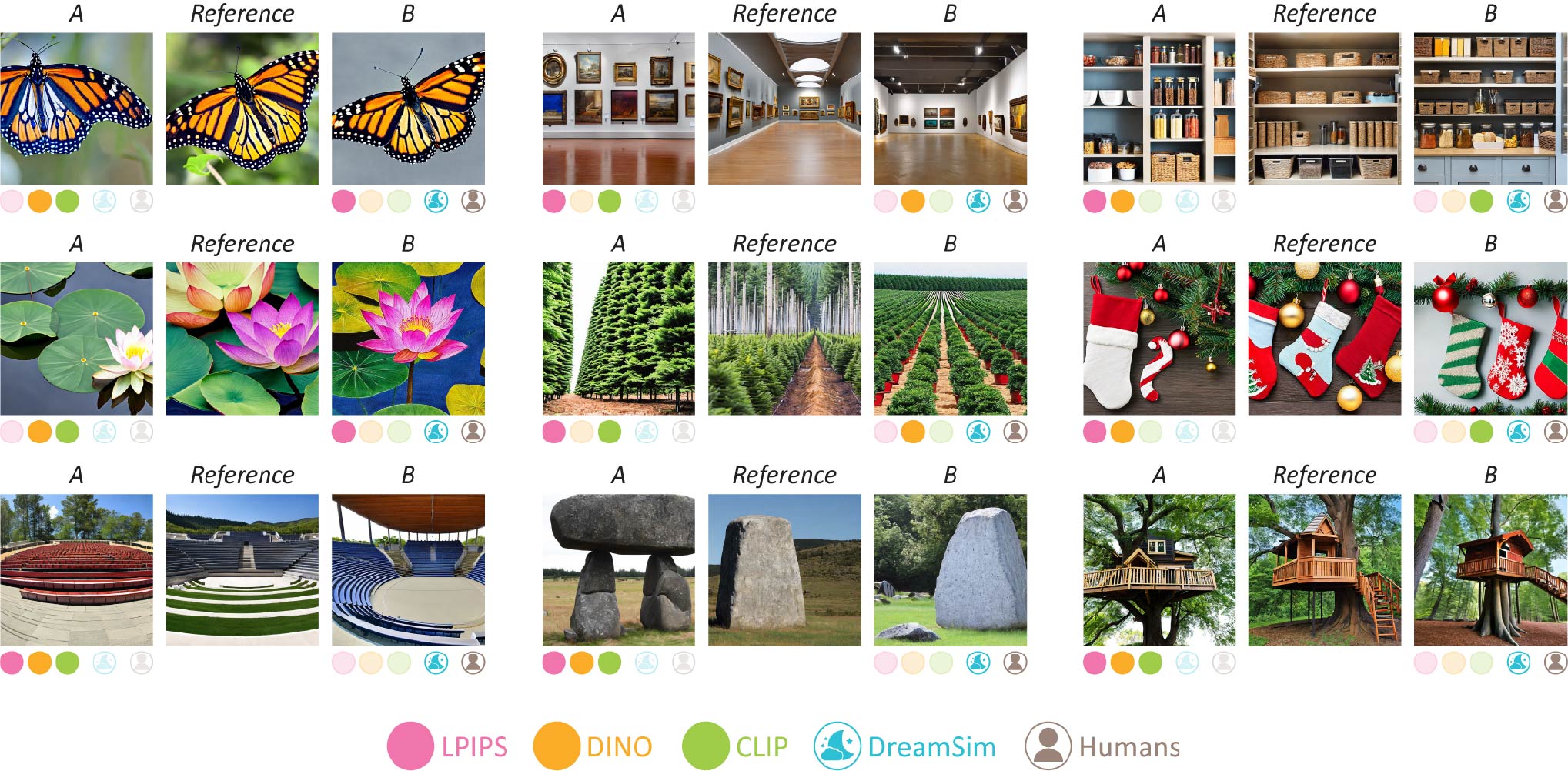
**Summary**
Current metrics for perceptual image similarity operate at the level of pixels and patches. These metrics compare images in terms of their low-level colors and textures, but fail to capture mid-level differences in layout, pose, semantic content, etc. Models that use image-level embeddings such as DINO and CLIP capture high-level and semantic judgements, but may not be aligned with human perception of more finegrained attributes.
DreamSim is a new metric for perceptual image similarity that bridges the gap between "low-level" metrics (e.g. LPIPS, PSNR, SSIM) and "high-level" measures (e.g. CLIP). Our model was trained by concatenating CLIP, OpenCLIP, and DINO embeddings, and then finetuning on human perceptual judgements. We gathered these judgements on a dataset of ~20k image triplets, generated by diffusion models. Our model achieves better alignment with human similarity judgements than existing metrics, and can be used for downstream applications such as image retrieval.
## 🚀 Newest Updates
**10/14/24:** We released 4 new variants of DreamSim! These new checkpoints are:
- DINOv2 B/14 and SynCLR B/16 as backbones
- DINOv2 B/14 and DINO B/16 trained with the original contrastive loss on both CLS and dense features.
- To extract features from the model variant trained through both the CLS and patch features, set `use_patch_model=True` when calling `dreamsim()`.
These models (and the originals) are further evaluated in **our new NeurIPS 2024 paper, [When Does Perceptual Alignment Benefit Vision Representations?](https://arxiv.org/abs/2410.10817)**
We find that our perceptually-aligned representations outperform the baseline models on a variety of standard computer vision tasks, including semantic segmentation, depth estimation, object counting, instance retrieval, and retrieval-augmented generation. These results point towards perceptual alignment as a useful objective for learning general-purpose vision representations. See the paper and our [blog post](https://percep-align.github.io)
for more details.
Here's the updated NIGHTS performance table:
| | NIGHTS - Val | NIGHTS - Test |
|-------------------|--------------|---------------|
| `ensemble` | 96.9% | 96.2% |
| `dino_vitb16` | 95.6% | 94.8% |
| `open_clip_vitb32` | 95.6% | 95.3% |
| `clip_vitb32`| 94.9% | 93.6% |
| `dinov2_vitb14` | 94.9% | 95.0% |
| `synclr_vitb16`| 96.0% | 95.9% |
| `dino_vitb16 (patch)` | 94.9% | 94.8% |
| `dinov2_vitb14 (patch)`| 95.5% | 95.1% |
**9/14/24:** We released new versions of the ensemble and single-branch DreamSim models compatible with `peft>=0.2.0`.
We also released the entire [100k (unfiltered) NIGHTS dataset](#new-download-the-entire-100k-pre-filtered-nights-dataset) and the [JND (Just-Noticeable Difference) votes](#new-download-the-jnd-data).
## Table of Contents
* [Requirements](#requirements)
* [Setup](#setup)
* [Usage](#usage)
* [Quickstart](#quickstart-perceptual-similarity-metric)
* [Single-branch models](#single-branch-models)
* [Feature extraction](#feature-extraction)
* [Image retrieval](#image-retrieval)
* [Perceptual loss function](#perceptual-loss-function)
* [NIGHTS Dataset](#nights-novel-image-generations-with-human-tested-similarities-dataset)
* [Experiments](#experiments)
* [Citation](#citation)
## Requirements
- Linux
- Python 3
## Setup
**Option 1:** Install using pip:
```pip install dreamsim```
The package is used for importing and using the DreamSim model.
**Option 2:** Clone our repo and install dependencies.
This is necessary for running our training/evaluation scripts.
```
python3 -m venv ds
source ds/bin/activate
pip install -r requirements.txt
export PYTHONPATH="$PYTHONPATH:$(realpath ./dreamsim)"
```
To install with conda:
```
conda create -n ds
conda activate ds
conda install pip # verify with the `which pip` command
pip install -r requirements.txt
export PYTHONPATH="$PYTHONPATH:$(realpath ./dreamsim)"
```
## Usage
**For walk-through examples of the below use-cases, check out our [Colab demo](https://colab.research.google.com/drive/1taEOMzFE9g81D9AwH27Uhy2U82tQGAVI?usp=sharing).**
### Quickstart: Perceptual similarity metric
The basic use case is to measure the perceptual distance between two images. **A higher score means more different, lower means more similar**.
The following code snippet is all you need. The first time that you run `dreamsim` it will automatically download the model weights. The default model settings are specified in `./dreamsim/config.py`. **To extract features from the model variant trained through both the CLS and patch features, set `use_patch_model=True` when calling `dreamsim()`.**
```
from dreamsim import dreamsim
from PIL import Image
device = "cuda"
model, preprocess = dreamsim(pretrained=True, device=device)
img1 = preprocess(Image.open("img1_path")).to(device)
img2 = preprocess(Image.open("img2_path")).to(device)
distance = model(img1, img2) # The model takes an RGB image from [0, 1], size batch_sizex3x224x224
```
To run on example images, run `demo.py`. The script should produce distances (0.4453, 0.2756).
### Single-branch models
By default, DreamSim uses an ensemble of CLIP, DINO, and OpenCLIP (all ViT-B/16). If you need a lighter-weight model you can use *single-branch* versions of DreamSim where only a single backbone is finetuned. **The single-branch models provide a ~3x speedup over the ensemble.**
The available options are OpenCLIP-ViTB/32, DINO-ViTB/16, CLIP-ViTB/32, in order of performance. To load a single-branch model, use the `dreamsim_type` argument. For example:
```
dreamsim_dino_model, preprocess = dreamsim(pretrained=True, dreamsim_type="dino_vitb16")
```
### Feature extraction
To extract a *single image embedding* using dreamsim, use the `embed` method as shown in the following snippet:
```
img1 = preprocess(Image.open("img1_path")).to("cuda")
embedding = model.embed(img1)
```
The perceptual distance between two images is the cosine distance between their embeddings. If the embeddings are normalized (true by default) L2 distance can also be used.
### Image retrieval
Our model can be used for image retrieval, and plugged into existing such pipelines. The code below ranks a dataset of images based on their similarity to a given query image.
To speed things up, instead of directly calling `model(query, image)` for each pair, we use the `model.embed(image)` method to pre-compute single-image embeddings, and then take the cosine distance between embedding pairs.
```
import pandas as pd
from tqdm import tqdm
import torch.nn.functional as F
# let query be a sample image.
# let images be a list of images we are searching.
# Compute the query image embedding
query_embed = model.embed(preprocess(query).to("cuda"))
dists = {}
# Compute the (cosine) distance between the query and each search image
for i, im in tqdm(enumerate(images), total=len(images)):
img_embed = model.embed(preprocess(im).to("cuda"))
dists[i] = (1 - F.cosine_similarity(query_embed, img_embed, dim=-1)).item()
# Return results sorted by distance
df = pd.DataFrame({"ids": list(dists.keys()), "dists": list(dists.values())})
return df.sort_values(by="dists")
```
### Perceptual loss function
Our model can be used as a loss function for iterative optimization (similarly to the LPIPS metric). These are the key lines; for the full example, refer to the [Colab](https://colab.research.google.com/drive/1taEOMzFE9g81D9AwH27Uhy2U82tQGAVI?usp=sharing).
```
for i in range(n_iters):
dist = model(predicted_image, reference_image)
dist.backward()
optimizer.step()
```
## NIGHTS (Novel Image Generations with Human-Tested Similarities) Dataset
DreamSim is trained by fine-tuning on the NIGHTS dataset. For details on the dataset structure and creation, refer to the [dataset page](https://github.com/ssundaram21/dreamsim/tree/main/dataset).
Run `./dataset/download_dataset.sh` to download and unzip the NIGHTS dataset into `./dataset/nights`. The unzipped dataset size is 58 GB.
Having trouble with the large file sizes? Run `./dataset/download_chunked_dataset.sh` to download the NIGHTS dataset split into 200 smaller zip files. The output of this script is identical to `download_dataset.sh`.
### (new!) Download the entire 100k pre-filtered NIGHTS dataset
We only use the 20k unanimous triplets for training and evaluation, but release all 100k triplets (many with few and/or split votes) for research purposes. Run `./dataset/download_unfiltered_dataset.sh` to download and unzip this unfiltered version of the NIGHTS dataset into `./dataset/nights_unfiltered`. The unzipped dataset size is 289 GB.
### (new!) Download the JND data
Download the just-noticeable difference (JND) votes by running `./dataset/download_jnd_dataset.sh`. The CSV will be downloaded to `./dataset/jnd_votes.csv`. Check out the [Colab](https://colab.research.google.com/drive/1taEOMzFE9g81D9AwH27Uhy2U82tQGAVI?usp=sharing) for an example of loading a JND trial.
### Visualize NIGHTS and embeddings with the [Voxel51](https://github.com/voxel51/fiftyone) demo:
[](https://try.fiftyone.ai/datasets/nights/samples)
## Experiments
### Download resources
Run `./training/download_models.sh` to download and unzip necessary ViT checkpoints (for CLIP, OpenCLIP, and MAE) into `./models`.
### Training
To finetune a perceptual model on the dataset, run `./training/train.py`. For example, to finetune an ensemble of DINO, CLIP, and OpenCLIP using LoRA, run:
```
python ./training/train.py --config ./configs/train_ensemble_model_lora.yaml
```
We provide more sample configs in `./configs`, including examples of finetuning with LoRA and with an MLP head. See `./training/train.py` for a full list and description of training options.
### Evaluation
To evaluate a perceptual model on the dataset, run `./evaluation/eval_percep.py`. For example, to evaluate a trained checkpoint against a baseline model on the dataset, run:
```
python ./evaluation/eval_percep.py --config ./configs/eval_ensemble.yaml
```
See `./evaluate/eval_percep.py` for a full list and description of evaluation options.
## Citation
If you find our work or any of our materials useful, please cite our papers:
```
@misc{fu2023dreamsim,
title={DreamSim: Learning New Dimensions of Human Visual Similarity using Synthetic Data},
author={Stephanie Fu and Netanel Tamir and Shobhita Sundaram and Lucy Chai and Richard Zhang and Tali Dekel and Phillip Isola},
year={2023},
eprint={2306.09344},
archivePrefix={arXiv},
primaryClass={cs.CV}
}
```
```
@misc{sundaram2024doesperceptualalignmentbenefit,
title={When Does Perceptual Alignment Benefit Vision Representations?},
author={Shobhita Sundaram and Stephanie Fu and Lukas Muttenthaler and Netanel Y. Tamir and Lucy Chai and Simon Kornblith and Trevor Darrell and Phillip Isola},
year={2024},
eprint={2410.10817},
archivePrefix={arXiv},
primaryClass={cs.CV},
url={https://arxiv.org/abs/2410.10817},
}
```
## Acknowledgements
Our code borrows from the ["Deep ViT Features as Dense Visual Descriptors"](https://dino-vit-features.github.io/) repository for ViT feature extraction, and takes inspiration from the [UniverSeg](https://github.com/JJGO/UniverSeg) respository for code structure.