Phonebook

A self-hosted, open-source alternative to Emerge Tools Snapshots: harvest your existing Compose @Previews and SwiftUI #Previews into a browsable, static HTML gallery — no SaaS account required.

![License](https://img.shields.io/badge/license-MIT-blue?style=flat-square) [![Glama MCP server score](https://glama.ai/mcp/servers/stag-build/phonebook/badges/score.svg)](https://glama.ai/mcp/servers/stag-build/phonebook)
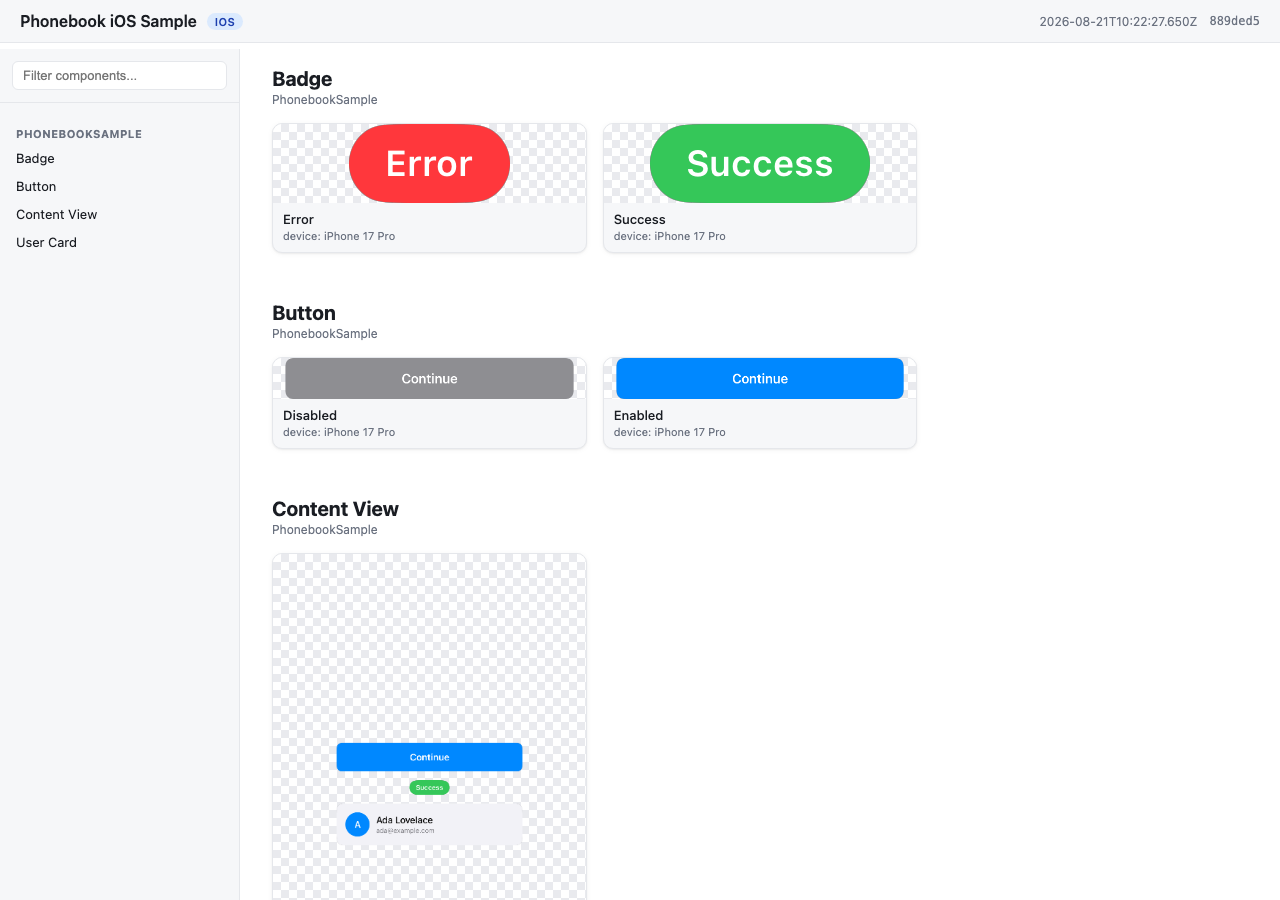
Phonebook turns screenshots your team already has into a Storybook-style component gallery. No new test code, no design tokens to maintain by hand — it renders what's already in your codebase into a static site designers can open without installing anything. Each repo runs Phonebook independently; v1 is single-platform, so one Android repo (or one iOS repo) produces one bundle and one site. ## Features - **Zero new test code** — reuses `@Preview` / `#Preview` you've already written - **No SaaS account** — self-hosted, runs entirely in your CI or locally - **MCP-first** — a coding agent can check setup, analyze coverage, add missing previews, and build the gallery for you - **Smart component grouping** — `component / state` cards inferred from preview names, no required annotation - **Cross-platform** — Android (Roborazzi + ComposablePreviewScanner, runs on the JVM, no emulator) and iOS (SnapshotPreviews, runs on a simulator) - **Version-aware setup** — `init`/`doctor` resolve library versions against your project's Kotlin version and catch Kotlin/Roborazzi metadata mismatches before they cause opaque compiler crashes ## Demo [![Watch the Phonebook promo video](https://img.youtube.com/vi/trHbUaG784w/maxresdefault.jpg)](https://youtu.be/trHbUaG784w) ![Phonebook gallery screenshot](https://raw.githubusercontent.com/stag-build/phonebook/main/docs/demo.png) A gallery generated from `samples/ios` — `component / state` cards grouped from the app's own `#Preview`s, no extra annotation. **[Browse the live gallery →](https://stag-build.github.io/phonebook/)** ## How it works 1. `phonebook generate` runs your platform's preview-rendering engine and harvests the output into a **bundle** (`manifest.json` + `images/`). - Android: [Roborazzi](https://github.com/takahirom/roborazzi) + [ComposablePreviewScanner](https://github.com/sergio-sastre/ComposablePreviewScanner), run on the JVM via Robolectric. No emulator, works on Linux CI. - iOS: [SnapshotPreviews](https://github.com/getsentry/SnapshotPreviews), run via `xcodebuild test` on a simulator. Requires macOS. 2. `phonebook build` turns that bundle into a static site — by default it writes `index.html` directly into the bundle directory (reusing the images already there, no copying), so the site lands at `/index.html`. Pass `-o ` to instead copy everything into a standalone site directory (for publishing elsewhere, or later merging multiple bundles). Plain HTML/CSS/JS, works from `file://` or any static host. ## Installation
npm ```sh npm install -g @stag-build/phonebook ```
Homebrew ```sh brew install stag-build/phonebook/phonebook ``` Or tap first, then install: ```sh brew tap stag-build/phonebook brew install phonebook ``` Formula source: [stag-build/homebrew-phonebook](https://github.com/stag-build/homebrew-phonebook).
No install (npx) ```sh npx @stag-build/phonebook ```
## Using it with a coding agent (recommended) Most people won't run the CLI directly — Phonebook is built to be driven by a coding agent (Claude Code, Codex, etc.) through its MCP server. The agent adds previews, runs setup checks, and generates the gallery for you; the CLI underneath is the engine it calls. The server runs via `npx @stag-build/phonebook mcp` — no install step needed. Pick your client below.
Claude Code ```sh claude mcp add phonebook -- npx -y @stag-build/phonebook mcp ```
Codex CLI Add to `~/.codex/config.toml`: ```toml [mcp_servers.phonebook] command = "npx" args = ["-y", "@stag-build/phonebook", "mcp"] ```
Claude Desktop Add to your Claude Desktop config (`~/Library/Application Support/Claude/claude_desktop_config.json` on macOS): ```json { "mcpServers": { "phonebook": { "command": "npx", "args": ["-y", "@stag-build/phonebook", "mcp"] } } } ```
Cursor Add to `.cursor/mcp.json` (project) or `~/.cursor/mcp.json` (global): ```json { "mcpServers": { "phonebook": { "command": "npx", "args": ["-y", "@stag-build/phonebook", "mcp"] } } } ```
Xcode (Codex Agent) — Xcode 26.3+ Add to `.codex/config.toml` at your project's workspace root. Xcode's agent runs with a minimal `PATH`, so the command wraps `npx` in a shell that adds the usual Homebrew/nvm locations first: ```toml [mcp_servers.phonebook] command = "/bin/zsh" args = [ "-lc", "PATH=/opt/homebrew/bin:/usr/local/bin:/usr/bin:/bin:/usr/sbin:/sbin; npx -y @stag-build/phonebook mcp" ] enabled = true ```
Xcode (Claude Code Agent) — Xcode 26.3+ Add the `mcpServers` block to `~/Library/Developer/Xcode/CodingAssistant/ClaudeAgentConfig/.claude.json`: ```json { "mcpServers": { "phonebook": { "command": "/bin/zsh", "args": [ "-lc", "PATH=/opt/homebrew/bin:/usr/local/bin:/usr/bin:/bin:/usr/sbin:/sbin; npx -y @stag-build/phonebook mcp" ] } } } ```
**Android Studio (Gemini Agent Mode):** not supported yet — its MCP integration only connects to remote `httpUrl` servers, not local stdio processes like Phonebook's. Use one of the terminal-based clients above (Claude Code, Codex CLI) from the Android repo instead. Then, from a chat in your Android or iOS repo, just ask: > "Use the phonebook MCP and create a catalog for my designer." The agent figures out the rest — checking setup, filling in missing previews, generating, and building the site. For more targeted asks, it also exposes: `check_setup` (setup diagnosis, same as `phonebook doctor`), `analyze_coverage` (components missing previews or dark variants), `get_preview_guidance`, `run_generate`, and `run_build`. ## Quickstart: Android Run `phonebook init` first — it detects your project's Kotlin version and prints these instructions with **library versions resolved to be compatible with it** (e.g. Kotlin 2.0 projects get Roborazzi 1.60.0; Kotlin 2.2+ gets the latest). The versions below are what a current-Kotlin project gets (see `samples/android/app/build.gradle.kts` for a full working example): ```kotlin // app/build.gradle.kts plugins { id("io.github.takahirom.roborazzi") // root build.gradle.kts: version "1.72.0" apply false } roborazzi { generateComposePreviewRobolectricTests { enable = true packages = listOf("dev.stag.phonebook.sample") // your app's package } } dependencies { testImplementation("org.robolectric:robolectric:4.14.1") testImplementation("io.github.takahirom.roborazzi:roborazzi:1.72.0") testImplementation("io.github.takahirom.roborazzi:roborazzi-compose:1.72.0") testImplementation("io.github.sergio-sastre.ComposablePreviewScanner:android:0.9.3") testImplementation("io.github.takahirom.roborazzi:roborazzi-compose-preview-scanner-support:1.72.0") testImplementation("androidx.compose.ui:ui-test-junit4") // version from your Compose BOM, or pin one } ``` Add a `phonebook.config.json` next to `settings.gradle.kts`: ```json { "appName": "My Android App", "platform": "android", "android": { "modules": [":app"], "variant": "debug" } } ``` Then, from the repo containing Phonebook: ```sh npx @stag-build/phonebook generate -C /path/to/your/android/repo npx @stag-build/phonebook build -C /path/to/your/android/repo ``` Open `phonebook-out/index.html`. ## Quickstart: iOS Add the [SnapshotPreviews](https://github.com/getsentry/SnapshotPreviews) SPM package to your project and a small XCTest target that subclasses `SnapshotTest` (see `samples/ios` for a full working example): ```swift // PhonebookSnapshotTests.swift import Foundation import SnapshottingTests final class PhonebookSnapshotTests: SnapshotTest { override class func snapshotPreviews() -> [String]? { guard let raw = ProcessInfo.processInfo.environment["SNAPSHOTS_ONLY_FILTER"], !raw.isEmpty else { return nil // record every #Preview } return raw.components(separatedBy: "\n") } } ``` Reading `SNAPSHOTS_ONLY_FILTER` is what lets `phonebook generate --changed` (or `--files A.swift,B.swift`) render only the previews in the files you just edited; with the variable unset, every `#Preview` is recorded as before. Add `phonebook.config.json` next to your `.xcodeproj`: ```json { "appName": "My iOS App", "platform": "ios", "ios": { "project": "MyApp.xcodeproj", "scheme": "MyApp", "simulator": "iPhone 17 Pro" } } ``` Your scheme must build and test the snapshot test target (see `PhonebookSample.xcscheme` in the sample). Then: ```sh npx @stag-build/phonebook generate -C /path/to/your/ios/repo npx @stag-build/phonebook build -C /path/to/your/ios/repo ``` Open `phonebook-out/index.html`. ## Naming convention Phonebook groups screenshots into `component / state` cards from your existing preview names — no required annotation. See [docs/naming-convention.md](docs/naming-convention.md) for the full rules and examples. ## Configuration `phonebook.config.json`: | Key | Type | Default | Notes | | --- | --- | --- | --- | | `appName` | string | — | Required. Shown in the gallery header. | | `platform` | `"android"` \| `"ios"` | — | Required. | | `output` | string | `"phonebook-out"` | Bundle output directory, relative to the config file. | | `android.modules` | string[] | `[":app"]` | Gradle modules to record. | | `android.variant` | string | `"debug"` | Build variant; Phonebook runs `:recordRoborazzi`. | | `ios.project` | string | — | Path to `.xcodeproj`, relative to the config file. One of `project`/`workspace` required. | | `ios.workspace` | string | — | Path to `.xcworkspace`, relative to the config file. | | `ios.scheme` | string | — | Required. Scheme that includes the SnapshotPreviews test target. | | `ios.simulator` | string | `"iPhone 17 Pro"` | Simulator device name used for `-destination`. | | `ios.onlyTesting` | string | auto-detected | `-only-testing:` filter so `generate` runs just the snapshot class, not the app's whole test suite. Auto-derived from the `SnapshotTest` subclass; set `""` to run everything. | Both `generate` and `build` accept `-C ` (project directory containing `phonebook.config.json`). `generate` takes `-o ` to override the bundle output and `--allow-empty` to tolerate a run that records no previews. `build` takes an optional bundle path — with none, it uses the project's bundle directory — and `-o ` for the site output; without `-o`, `build` writes `index.html` straight into the bundle directory and reuses its `images/` in place (no copying), which is what the quickstarts above do. Pass `-o ` to instead copy the bundle's images into a separate, standalone site directory. ## `phonebook init` and `phonebook doctor` `phonebook init` detects your platform and scaffolds `phonebook.config.json` plus the dependency/setup snippets — with library versions resolved against your project's Kotlin version and your app package filled in. It never edits your build files for you. `phonebook doctor` checks that everything `generate` needs is wired up: plugin and test dependencies (resolved through Gradle version catalogs when you use them), the scanner's `packages` value, Kotlin/Roborazzi compatibility, and the toolchain (JDK/Xcode/simulator). Add `--deep` to also compile the test sources — slower, but authoritative when a static check and reality disagree. On iOS, if SnapshotPreviews is linked but no `SnapshotTest` subclass exists yet, `doctor` names the exact target and folder to add it to (parsed from the `.pbxproj`), so you're never just told to "add the class" with no location. `phonebook init --write-snapshot-class` is the one exception to init's hands-off rule: when doctor's iOS check identifies the linking target *and* that target's source folder is one of Xcode's filesystem-synchronized groups, it writes `/PhonebookSnapshots.swift` directly — safe because a synchronized folder is picked up by Xcode automatically, so no `project.pbxproj` edit is made. It refuses (with the reason) in every other case: no SnapshotPreviews wiring yet, a non-synchronized-group project, or a subclass that already exists. `phonebook mcp` runs the MCP server — see "Using it with a coding agent" above for setup and example prompts. ## Requirements **Android**: JDK 17+. No emulator needed — Roborazzi renders on the JVM via Robolectric, so `generate` runs on Linux CI. **iOS**: macOS with Xcode installed, plus a booted or bootable simulator (`generate` runs `xcodebuild test` against a named simulator destination). Requires a macOS runner in CI. See [docs/ci.md](docs/ci.md) for CI recipes and [docs/naming-convention.md](docs/naming-convention.md) for the naming rules. ## Roadmap Post-v1 (M5), not yet built: - [ ] Search and filters in the generated gallery - [ ] Multi-bundle merge with a side-by-side view (cross-platform sites) - [ ] Version diffing between two runs (the manifest already carries commit + image hashes to enable this) - [ ] Additional CI recipe docs ## License MIT — see [LICENSE](LICENSE).