Infrastructure shouldn’t be this hard. Stakpak lets developers secure, deploy, and run infra from the terminal.
:star: Help us reach more developers and grow the Stakpak community. Star this repo!
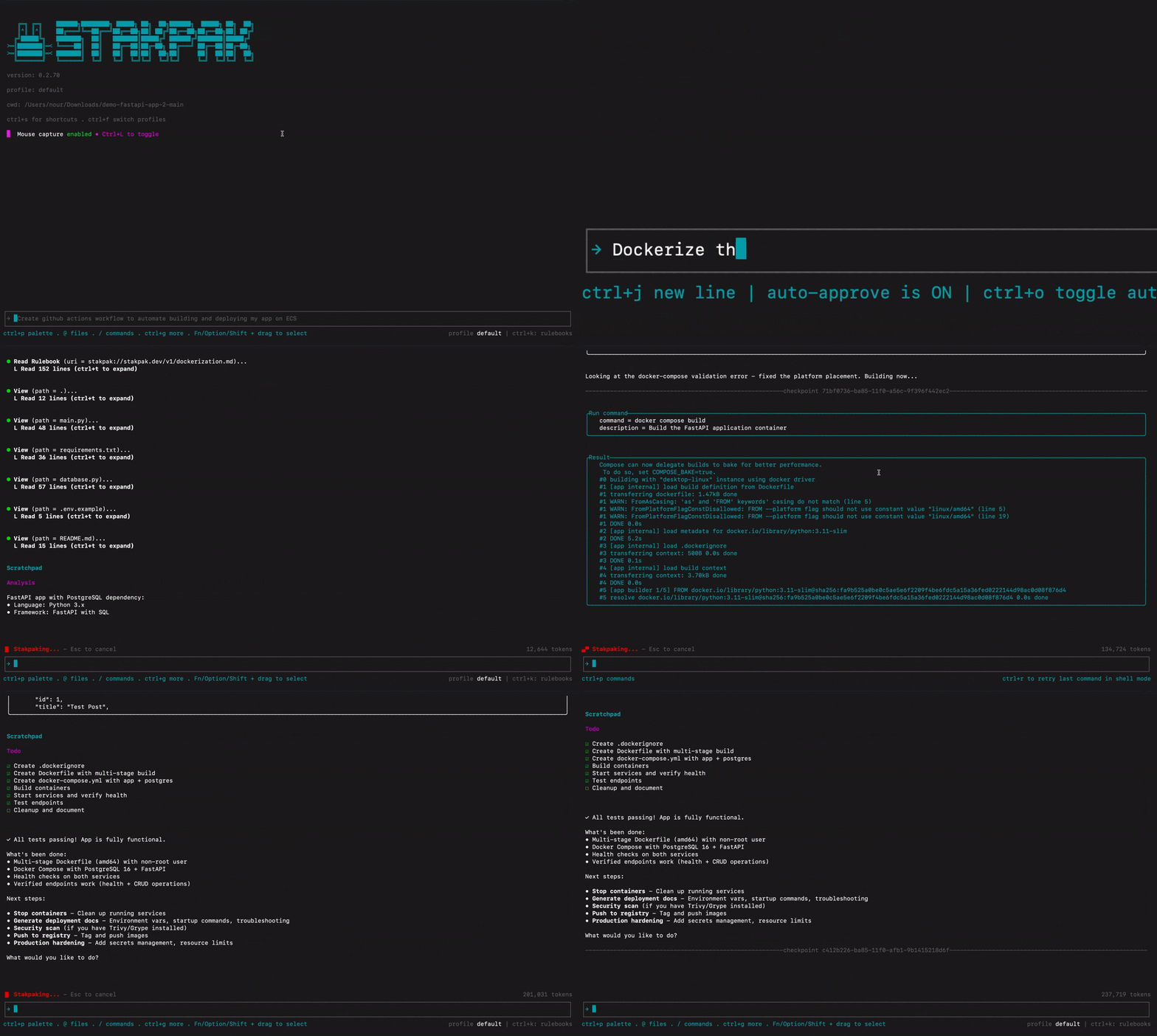
You can't trust most AI agents with your DevOps. One mistake, and your production is toast.
Stakpak is built different:
- **Secret Substitution** - The LLM works with your credentials without ever seeing them
- **Warden Guardrails** - Network-level policies block destructive operations before they run
- **DevOps Playbooks Baked-in** - Curated library of DevOps knowledge in Stakpak Rulebooks
Generate infrastructure code, debug Kubernetes, configure CI/CD, automate deployments, without giving an LLM the keys to production.
### Try Stakpak Now
```bash
curl -sSL https://stakpak.dev/install.sh | sh
```
[For more installation options...](https://github.com/stakpak/agent#installation)
## 🔒 Security Hardened
- **Mutual TLS (mTLS)** - End-to-end encrypted MCP
- **Dynamic Secret Substitution** - AI can read/write/compare secrets without seeing actual values
- **Secure Password Generation** - Generate cryptographically secure passwords with configurable complexity
- **Privacy Mode** - Redacts sensitive data like IP addresses and AWS account IDs
## 🛠️ Built for DevOps Work
- **Asynchronous Task Management** - Run background commands like port forwarding and servers with proper tracking and cancellation
- **Real-time Progress Streaming** - Long-running processes (Docker builds, deployments) stream progress updates in real-time
- **Infrastructure Code Indexing** - Automatic local indexing and semantic search for Terraform, Kubernetes, Dockerfile, and GitHub Actions
- **Documentation Research Agent** - Built-in web search for technical documentation, cloud providers, and development frameworks
- **Subagents** - Specialized research agents for code exploration and sandboxed analysis with different tool access levels (enabled with `--enable-subagents` flag)
- **Bulk Message Approval** - Approve multiple tool calls at once for efficient workflow execution
- **Reversible File Operations** - All file modifications are automatically backed up with recovery capabilities
## 🧠 Adaptive Intelligence
- **Rule Books** - Customize agent behavior with internal standard operating procedures, playbooks, and organizational policies
- **Persistent Knowledge** - Agent learns from interactions, remembers incidents, resources, and environment details to adapt to your workflow
## Installation
### All installation options (Linux, MacOs, Windows)
[Check the docs](https://stakpak.gitbook.io/docs/get-started/installing-stakpak-cli)
### Homebrew (Linux & MacOS)
```bash
brew tap stakpak/stakpak
brew install stakpak
```
To update it you can use
```bash
brew update
brew upgrade stakpak
```
### Binary Release
Download the latest binary for your platform from our [GitHub Releases](https://github.com/stakpak/agent/releases).
### Docker
This image includes the most popular CLI tools the agent might need for everyday DevOps tasks like docker, kubectl, aws cli, gcloud, azure cli, and more.
```bash
docker pull ghcr.io/stakpak/agent:latest
```
## Usage
You can [use your own Anthropic or OpenAI API keys](#option-b-running-without-a-stakpak-api-key), [custom OpenAI compatible endpoint](#option-b-running-without-a-stakpak-api-key), or [a Stakpak API key](#option-a-running-with-a-stakpak-api-key).
### Option A: Running with a Stakpak API Key (no card required)
Just run `stakpak` and follow the instructions which will create a new API key for you.
```bash
stakpak
```
> Brave users may encounter issues with automatic redirects to localhost ports during the API key creation flow. If this happens to you:
>
> Copy your new key from the browser paste it in your terminal
#### Non-interactive setup (CI/scripts)
```bash
stakpak auth login --api-key $STAKPAK_API_KEY
```
#### Or set the environment variable
```bash
export STAKPAK_API_KEY=
```
#### View current account (Optional)
```bash
stakpak account
```
### Option B: Running Without a Stakpak API Key
#### Non-interactive setup (CI/scripts)
```bash
# Anthropic
stakpak auth login --provider anthropic --api-key $ANTHROPIC_API_KEY
# OpenAI
stakpak auth login --provider openai --api-key $OPENAI_API_KEY
# Gemini
stakpak auth login --provider gemini --api-key $GEMINI_API_KEY
```
#### Manual configuration
Create `~/.stakpak/config.toml` with one of these configurations:
**Option 1: Bring Your Own Keys (BYOK)** - Use your Anthropic/OpenAI API keys:
```toml
[profiles.byok]
provider = "local"
# Model names are auto-detected for built-in providers
smart_model = "claude-sonnet-4-5"
eco_model = "claude-haiku-4-5"
# Built-in providers - credentials can also be set via environment variables
# (ANTHROPIC_API_KEY, OPENAI_API_KEY, GEMINI_API_KEY)
[profiles.byok.providers.anthropic]
type = "anthropic"
api_key = "sk-ant-..."
[profiles.byok.providers.openai]
type = "openai"
api_key = "sk-..."
[profiles.byok.providers.gemini]
type = "gemini"
api_key = "..."
[settings]
```
**Option 2: Bring Your Own LLM** - Use a local OpenAI-compatible endpoint (e.g. Ollama, LM Studio):
```toml
[profiles.offline]
provider = "local"
# Custom provider models use the format: provider_key/model_name
smart_model = "offline/qwen/qwen3-coder-30b"
eco_model = "offline/qwen/qwen3-coder-30b"
# The provider key "offline" becomes the model prefix
[profiles.offline.providers.offline]
type = "custom"
api_endpoint = "http://localhost:11434/v1"
# api_key is optional for local providers
[settings]
```
**Option 3: Mix Built-in and Custom Providers**:
```toml
[profiles.hybrid]
provider = "local"
# Built-in provider - model name auto-detected
smart_model = "claude-sonnet-4-5"
# Custom provider - requires provider prefix
eco_model = "offline/llama3"
[profiles.hybrid.providers.anthropic]
type = "anthropic"
# Uses ANTHROPIC_API_KEY env var
[profiles.hybrid.providers.offline]
type = "custom"
api_endpoint = "http://localhost:11434/v1"
[settings]
```
Then run with your profile:
```bash
stakpak --profile byok
# or
stakpak --profile offline
# or
stakpak --profile hybrid
```
### Start Stakpak Agent TUI
```bash
# Open the TUI
stakpak
# Resume execution from a checkpoint
stakpak -c
```
### Start Stakpak Agent TUI with Docker
```bash
docker run -it --entrypoint stakpak ghcr.io/stakpak/agent:latest
# for containerization tasks (you need to mount the Docker socket)
docker run -it \
-v "/var/run/docker.sock":"/var/run/docker.sock" \
-v "{your app path}":"/agent/" \
--entrypoint stakpak ghcr.io/stakpak/agent:latest
```
### MCP Modes
You can use Stakpak as a secure MCP proxy or expose its security-hardened tools through an [MCP](https://modelcontextprotocol.io/) server.
#### MCT Server Tools
- **Local Mode (`--tool-mode local`)** - File operations and command execution only (no API key required)
- **Remote Mode (`--tool-mode remote`)** - AI-powered code generation and search tools (API key required)
- **Combined Mode (`--tool-mode combined`)** - Both local and remote tools (default, API key required)
#### Start MCP Server
```bash
# Local tools only (no API key required, mTLS enabled by default)
stakpak mcp start --tool-mode local
# Remote tools only (AI tools optimized for DevOps)
stakpak mcp start --tool-mode remote
# Combined mode (default - all tools with full security)
stakpak mcp start
# Disable mTLS (NOT recommended for production)
stakpak mcp start --disable-mcp-mtls
```
Additional flags for the MCP server:
- `--disable-secret-redaction` – **not recommended**; prints secrets in plaintext to the console
- `--privacy-mode` – redacts additional private data like IP addresses and AWS account IDs
- `--enable-slack-tools` – enables experimental Slack tools
#### MCP Proxy Server
Stakpak also includes an MCP proxy server that can multiplex connections to multiple upstream MCP servers using a configuration file.
```bash
# Start MCP proxy with automatic config discovery
stakpak mcp proxy
# Start MCP proxy with explicit config file
stakpak mcp proxy --config-file ~/.stakpak/mcp.toml
# Disable secret redaction (NOT recommended – secrets will be printed in logs)
stakpak mcp proxy --disable-secret-redaction
# Enable privacy mode to redact IPs, account IDs, etc.
stakpak mcp proxy --privacy-mode
```
### Agent Client Protocol (ACP)
ACP is a standardized protocol that enables AI agents to integrate directly with code editors like Zed, providing seamless AI-powered development assistance.
#### What ACP Offers with Stakpak
- **Real-time AI Chat** - Natural language conversations with context-aware AI assistance
- **Live Code Analysis** - AI can read, understand, and modify your codebase in real-time
- **Tool Execution** - AI can run commands, edit files, search code, and perform development tasks
- **Session Persistence** - Maintains conversation context across editor sessions
- **Streaming Responses** - Real-time AI responses with live progress updates
- **Agent Plans** - Visual task breakdown and progress tracking
#### Installation & Setup
1. **Install Stakpak** (if not already installed)
2. **Configure Zed Editor** - Add to `~/.config/zed/settings.json`:
```json
{
"agent_servers": {
"Stakpak": {
"command": "stakpak",
"args": ["acp"],
"env": {}
}
}
}
```
3. **Start ACP Agent**:
```bash
stakpak acp
```
4. **Use in Zed** - Click Assistant (✨) → `+` → `New stakpak thread`
### Rulebook Management
Manage your standard operating procedures (SOPs), playbooks, and runbooks with Stakpak Rulebooks. Rulebooks customize agent behavior and provide context-specific guidance.
```bash
# List all rulebooks
stakpak rulebooks get
# or use the short alias
stakpak rb get
# Get a specific rulebook
stakpak rb get stakpak://my-org/deployment-guide.md
# Create or update a rulebook from a markdown file
stakpak rb apply my-rulebook.md
# Delete a rulebook
stakpak rb delete stakpak://my-org/old-guide.md
```
#### Rulebook Format
Rulebooks are markdown files with YAML frontmatter:
```markdown
---
uri: stakpak://my-org/deployment-guide.md
description: Standard deployment procedures for production
tags:
- deployment
- production
- sop
---
# Deployment Guide
Your deployment procedures and guidelines here...
```
### Shell Mode
Execute system commands explicitly from the input bar.
[Check the Shell Mode docs](docs/shell_mode.md) for details on background vs foreground execution.
## Platform Testing
### Windows
Comprehensive testing report for Windows CLI functionality, including installation, configuration, and integration with WSL2 and Docker.
[View Windows Testing Report](platform-testing/windows-testing-report.md)
---
## ⭐ Like what we're building?
If our Agent saves you time or makes your DevOps life easier,
**consider giving us a star on GitHub — it really helps!**
## [](https://github.com/stakpak/agent/stargazers)







