

---
## About
MessengerKit is a drop-in UI for messenger interfaces on iOS built in Swift. Centred around a single `UIViewController`, MessengerKit is themeable to fit your needs and includes a number of powerful features:
- `UICollectionView` based with pre-loading and caching of size calculation for bubbles.
- Auto-growing input view.
- Multiple included cell types: text, large-emoji, image, video.
- Presentation of `SFSafariViewController`
- Built-in, customisable themes.
- A custom theming system to bring your own `UICollectionViewCell`s, headers, footers, and input views.
- Avatar support (currently only in the `travamigos` theme).
The framework was built for and is used in production at [Travamigos](https://travamigos.com).
## Screenshots
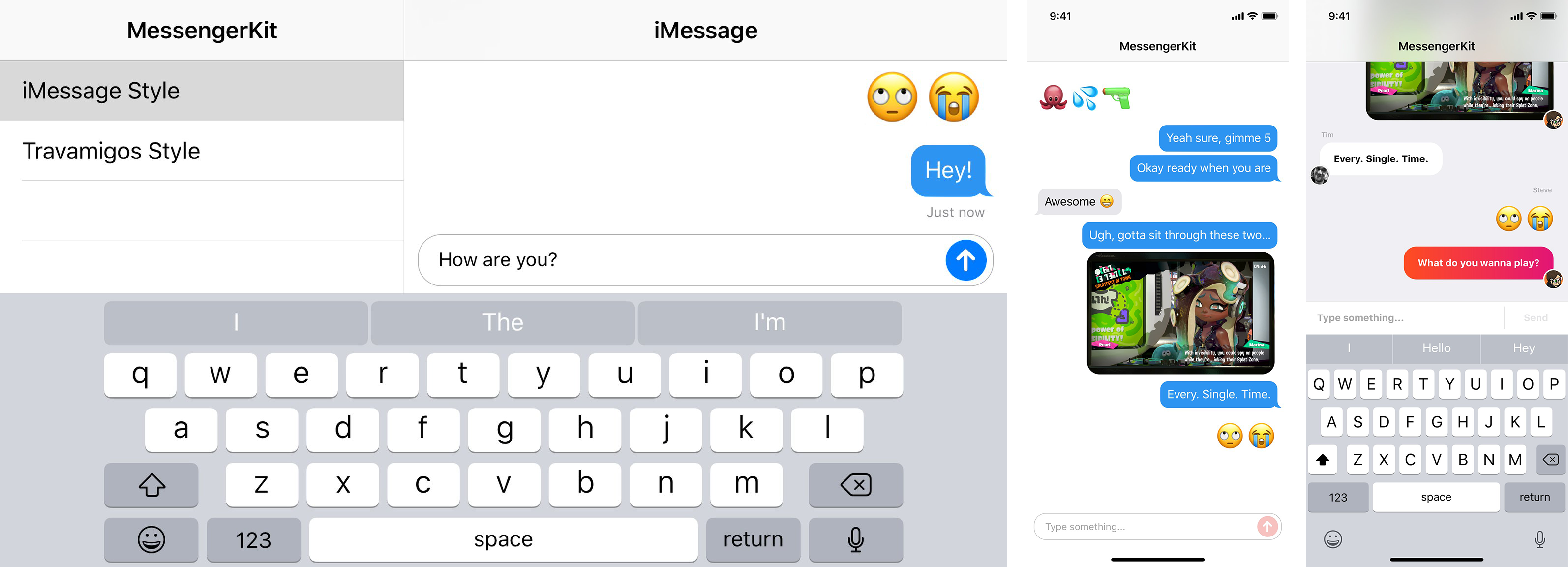
## Documentation
- [Getting Started](https://github.com/steve228uk/MessengerKit/wiki/Getting-Started)
- [Customising an Existing Style](https://github.com/steve228uk/MessengerKit/wiki/Customising-an-Existing-Style)
- [Creating a Custom Style](https://github.com/steve228uk/MessengerKit/wiki/Creating-a-Custom-Style)
## Installation
MessengerKit requires Swift 4.2 and iOS 10.0 or later.
### Manual
Drag the contents of the `MessengerKit` folder into your Xcode Project.
### CocoaPods
Add the following to your project's Podfile.
```ruby
pod 'MessengerKit', :git => 'https://github.com/steve228uk/MessengerKit.git'
```
## Credits
MessengerKit was written by [@steve228uk](https://twitter.com/steve228uk) for [Travamigos](https://travamigos.com) and is available under the MIT license.
It makes use of [KeyboardUtility](https://github.com/JunyuKuang/KeyboardUtility) by [@JunyuKuang](https://github.com/JunyuKuang).