# ctxlayer
[](LICENSE)




[](https://github.com/GoogleCloudPlatform/knowledge-catalog/blob/main/okf/SPEC.md)
Agent context layer — an MCP service on Cloudflare that:
- serves curated org docs (Markdown, with Vectorize-backed RAG search) as MCP
resources and a `search_docs` tool — and speaks the [Open Knowledge Format
(OKF)](https://github.com/GoogleCloudPlatform/knowledge-catalog/blob/main/okf/SPEC.md)
in and out, so an org's library round-trips with any OKF bundle;
- proxies other MCP servers (HTTP/SSE natively; a stdio MCP server is
supported via bring-your-own-bridge — run your own stdio↔HTTP bridge and
register its URL as a `streamable_http` upstream), centralising per-user
credentials sealed at rest;
- exposes a React + Vite SPA for self-onboarding, BlockNote + Yjs
collaborative markdown editing, admin upstream management, and usage
analytics.
**Contents** — [Screenshots](#screenshots) ·
[What it does](#what-it-does) ·
[OKF interop](#open-knowledge-format-okf--early-adopter) ·
[Quickstart](#quickstart-contributors-hacking-on-ctxlayer) ·
[Deploying to production](#deploying-ctxlayer-to-production) ·
[Useful scripts](#useful-scripts) ·
[Layout](#layout)
## Screenshots
| | |
| --- | --- |
| [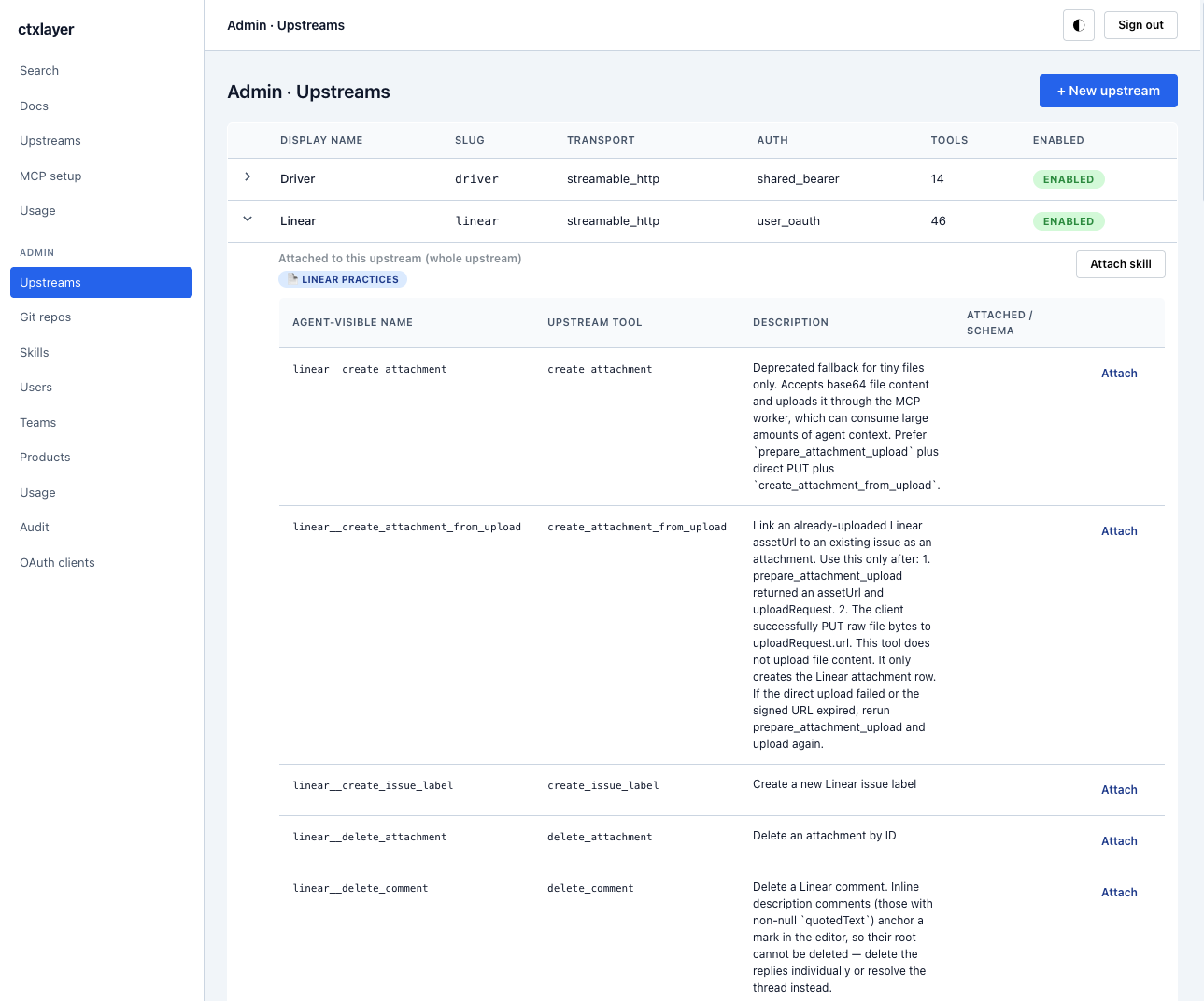](docs/screenshots/admin-upstreams.png) | [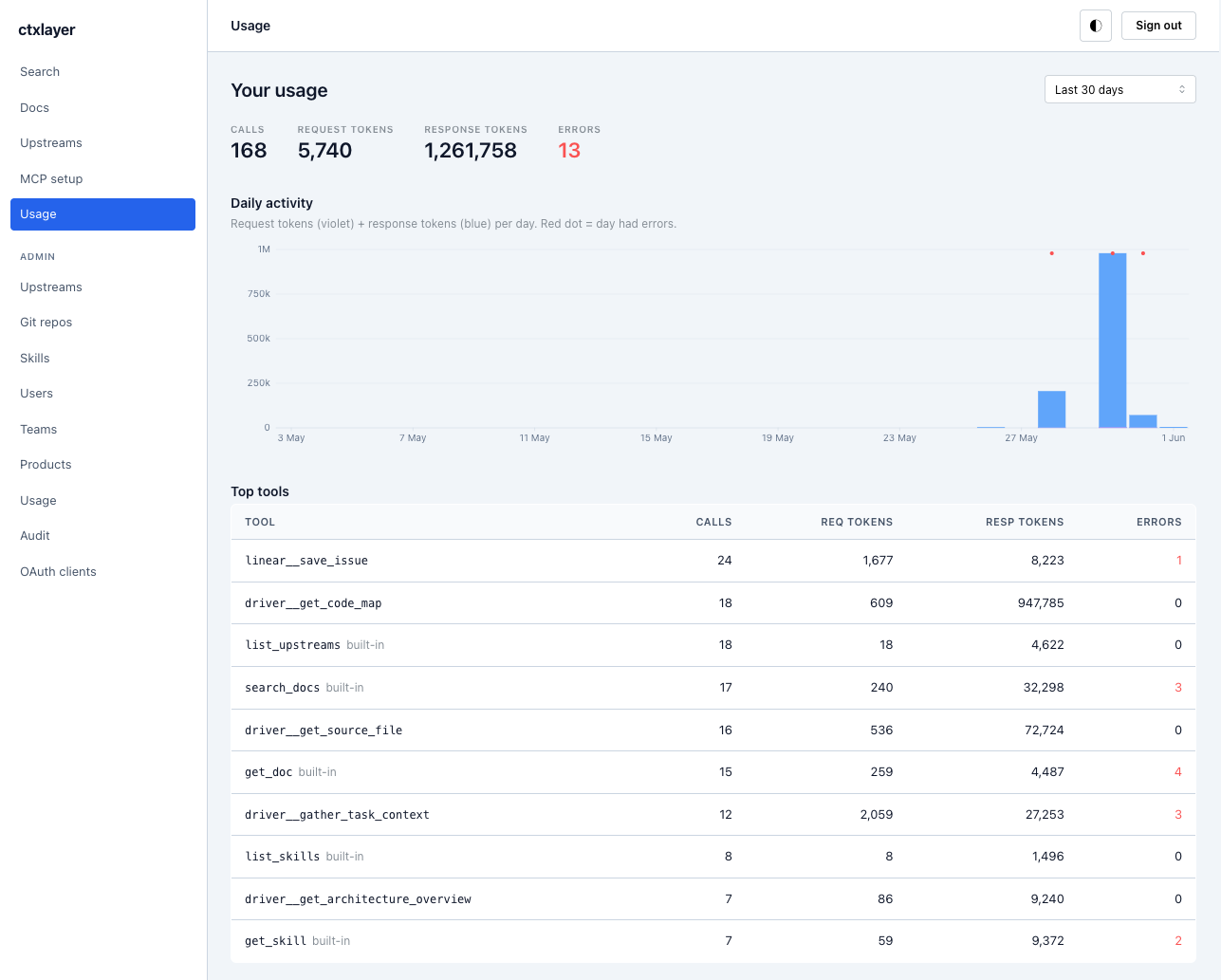](docs/screenshots/usage.png) |
| **Curate & gate upstream MCP servers** — cache their tools, attach org playbooks + docs per tool | **Usage analytics** — calls, tokens, and top tools per user / upstream |
| [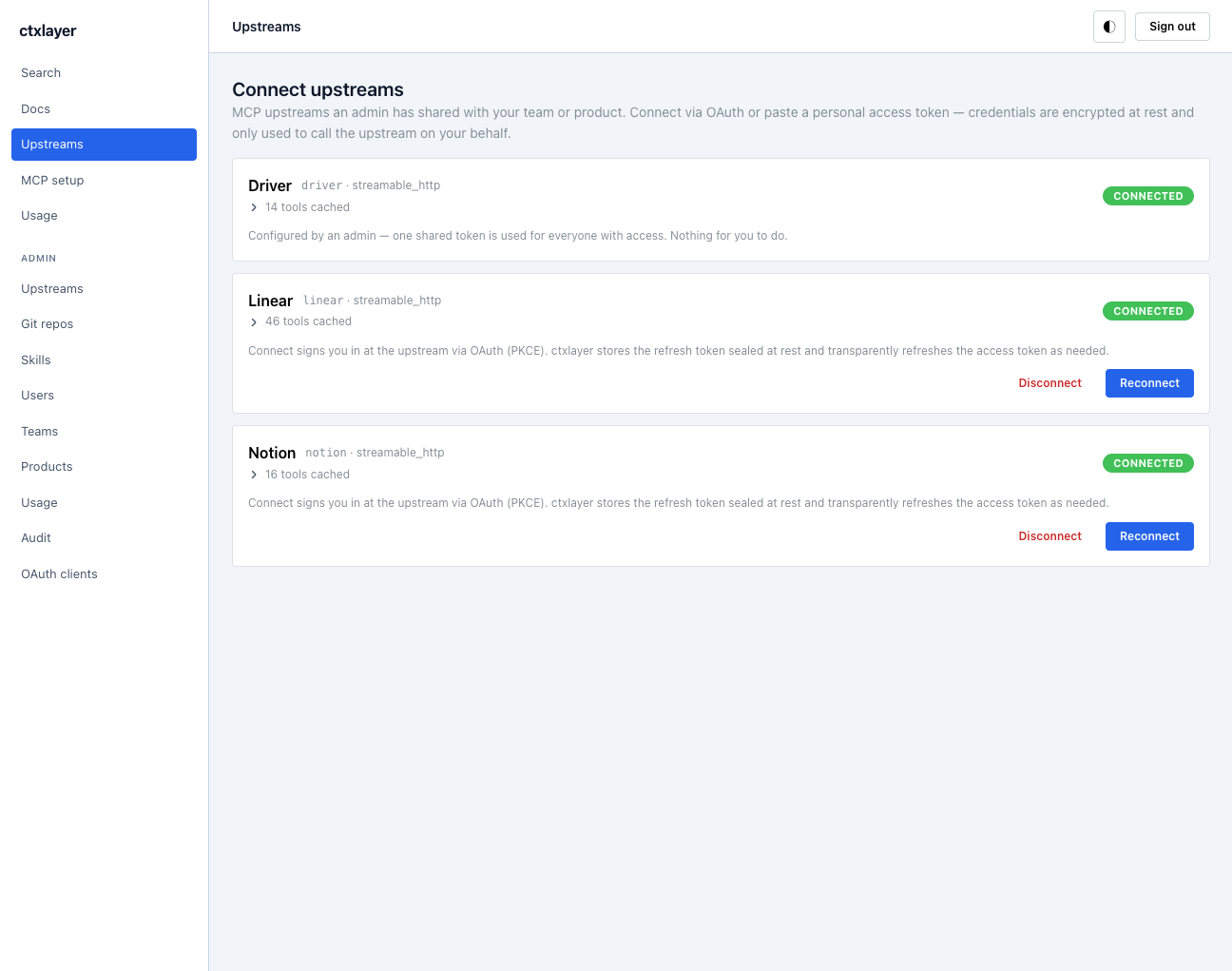](docs/screenshots/connect-upstreams.png) | [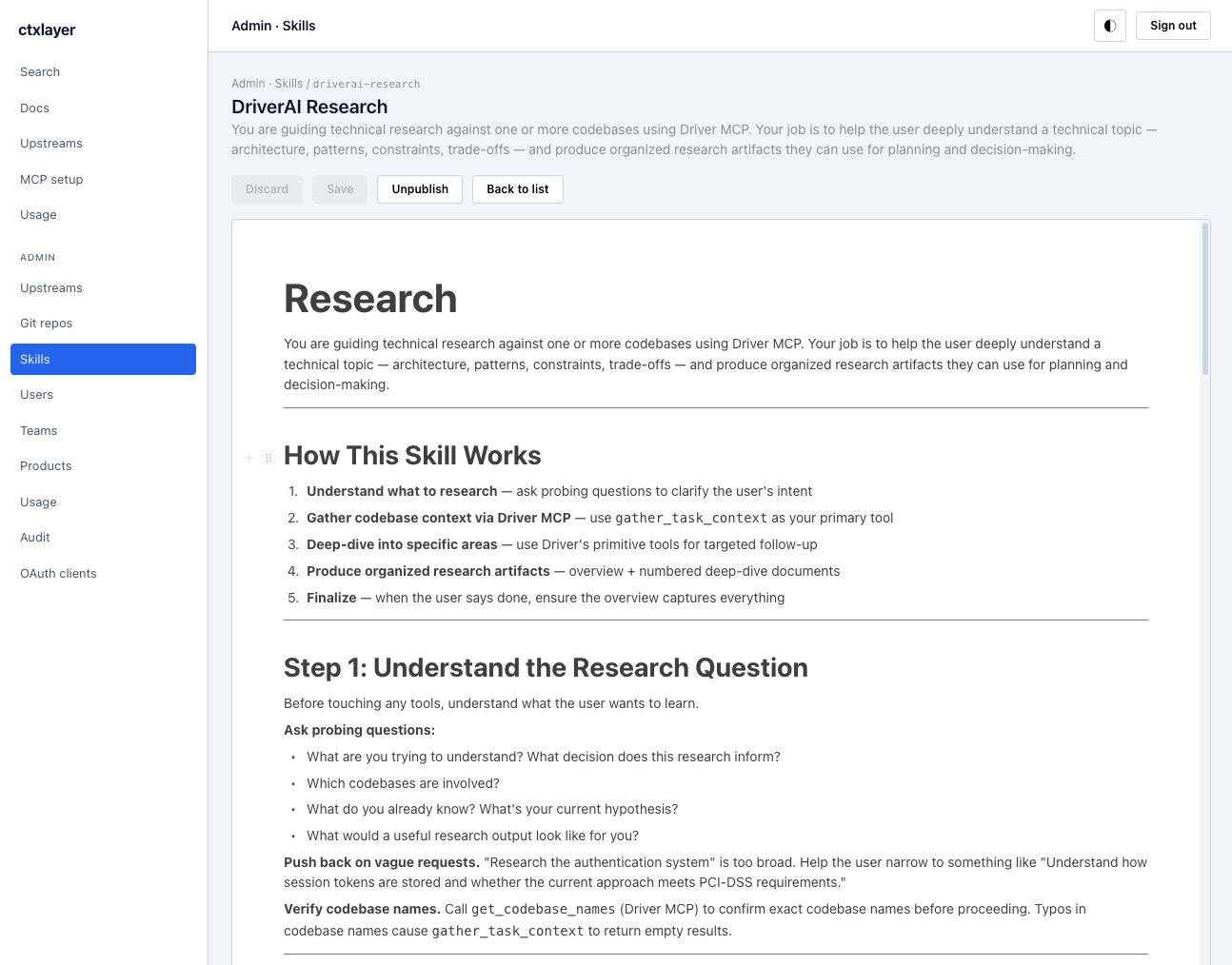](docs/screenshots/skills.png) |
| **Self-service onboarding** — connect upstreams via OAuth or a personal token, sealed at rest | **Curated skills** — procedural playbooks agents load on demand |
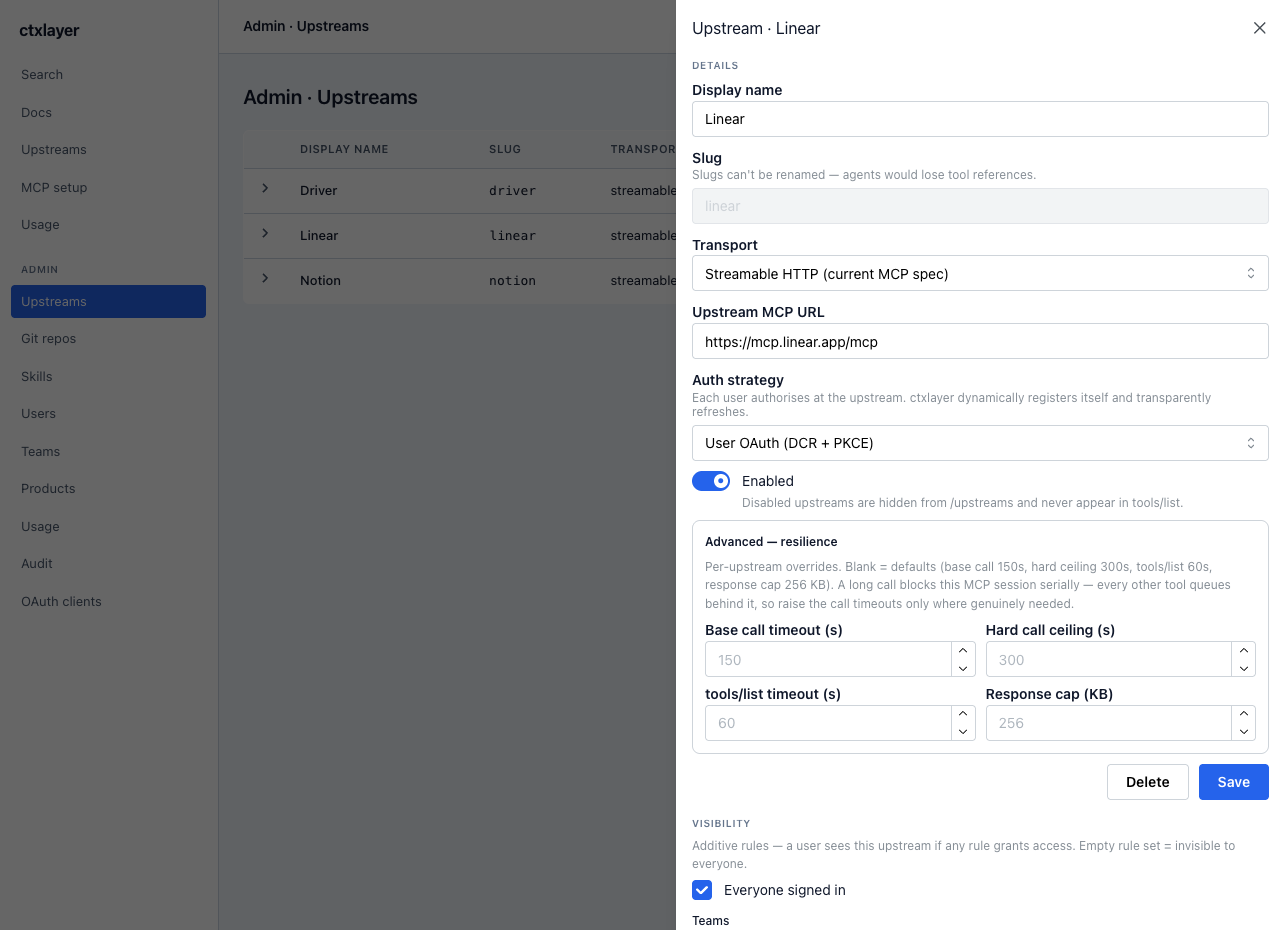
Per-upstream config — transport, auth strategy, resilience caps, and team/product visibility
Pointers: **[`CONTRIBUTING.md`](CONTRIBUTING.md)** for the contributor on-ramp
(the [Quickstart](#quickstart-contributors-hacking-on-ctxlayer) below is the
copy-pasteable version), **[`docs/PLAN.md`](docs/PLAN.md)** for the
architecture & data-model reference, **[`CLAUDE.md`](CLAUDE.md)** /
**[`AGENTS.md`](AGENTS.md)** for AI agents working in this repo, and
`docs/plan/G-conventions.md` for conventions and gotchas.
> **Integration surfaces.** The supported, stable contract for external
> clients is the **MCP** surface (`/mcp`, `/sse`) plus the OAuth provider.
> The `/api/*` REST endpoints are an **internal contract for the bundled
> SPA** — not versioned and subject to change between releases. Build agents
> and scripts against MCP, not `/api`.
## What it does
- **Sign-in & admission** — GitHub / Google OAuth with org/domain/user
allowlists, plus `request` (admin-approval queue) and `invite` / join-code
admission policies; per-request user lifecycle (suspend cuts live sessions).
- **Doc library** — BlockNote editor with realtime Yjs collaboration
(`DocRoomDO`), revision history with autosave coalescing, folders, per-doc
locks, team/product/free-form tags; open-read org-wide.
- **RAG search** — hybrid retrieval (dense + lexical over Vectorize, LLM query
rewrite, cross-encoder rerank) behind the `search_docs` tool and `/api/search`.
- **MCP server** (`/mcp`, `/sse`) — built-ins (`search_docs`, `get_doc`,
`list_upstreams`, `describe_upstream`, `list_skills` / `get_skill`,
`draft_skill`, `poll_task` / `list_tasks`, `reload_upstreams`, …), doc +
skill resources, and an OAuth provider for MCP clients.
- **Upstream proxy** — aggregate other MCP servers (Streamable HTTP / SSE;
stdio via bring-your-own-bridge) under namespaced tools, with per-user or
shared credentials sealed AES-GCM at rest, static or DCR OAuth, per-team/
product/role visibility, per-tool ACLs, timeouts + response-size caps, an
async submit→poll path for slow tools, and a cached tool catalogue with a
degraded-response shrink guard.
- **Skills** — curated procedural playbooks served over MCP, attachable per
upstream or per tool, authorable by any user (private drafts → org sharing),
in-app AI drafting, SKILL.md export.
- **Git sync** — mirror Markdown from GitHub / GitLab / Azure DevOps repos
(PAT or OAuth) into the library on a cron, and propose edits back as PRs
(round-trip-safe normalisation, HTML + frontmatter guards).
- **Usage & audit** — per-user/upstream call + token analytics with error
detail, and an admin audit log covering role, credential, visibility and
content mutations.
## Open Knowledge Format (OKF) — early adopter
ctxlayer natively speaks the **[Open Knowledge
Format](https://github.com/GoogleCloudPlatform/knowledge-catalog/blob/main/okf/SPEC.md)**,
Google Cloud's open convention for agent-friendly knowledge: a directory of
Markdown files with YAML frontmatter. ctxlayer's doc library *is*, structurally,
an OKF bundle — so an org's curated context is portable, not locked in.
- **Import** — register an OKF git repo as a source (or paste/upload a `.md`).
Frontmatter (`type`, `description`, `resource`, `tags`, `title`, …) is parsed
onto the doc; unknown / extra producer keys (`okf_version`, etc.) are kept
verbatim.
- **Edit** — the doc editor's right rail *is* the frontmatter editor. The OKF
fields carry an **OKF** badge with a tooltip pointing at the matching spec key.
- **Export** — **"Export as OKF (.md)"** in the rail, or `GET
/api/docs/:id/export`, emits a spec-compliant file: synthesised frontmatter
(rail fields + preserved unknown keys) followed by the body.
- **Git write-back** — edits to a doc synced from an OKF repo propose a PR that
keeps and refreshes the frontmatter block.
OKF `tags` map to ctxlayer's free-form tags (not the team/product tags, which
gate visibility). Full mapping, round-trip contract, and fidelity caveats:
**[`docs/plan/M-okf.md`](docs/plan/M-okf.md)**.
## Quickstart (contributors hacking on ctxlayer)
These steps are for **local development of this codebase**. End users of a
deployed ctxlayer and operators standing it up don't need any of this; see
[Deploying ctxlayer](#deploying-ctxlayer-to-production) below.
```bash
brew install mkcert nss # macOS contributors only; see docs/plan/G-conventions.md G11 for Linux/Windows
bun install
cp .dev.vars.example .dev.vars # then edit it — see "Filling in .dev.vars" below
bun run migrate:local # apply D1 migrations to the local (miniflare) DB
bun run seed:local # load fixture teams + products (NOT upstreams/docs — add those in-app)
bun run dev # or split-terminals: dev:worker + dev:web (recommended)
bun run verify # typecheck + lint (Biome) + unit + integration tests (all offline)
```
### Filling in `.dev.vars`
To sign in locally you need at least one IdP. The quickest is a **GitHub OAuth
app** ( → "New OAuth App"):
- Authorization callback URL: `https://localhost:8787/idp/github/callback`
- Put its client id/secret in `GITHUB_CLIENT_ID` / `GITHUB_CLIENT_SECRET`.
- Set `ALLOWED_GITHUB_USERS=` — the allowlist gates who may sign in.
- Set `ADMIN_EMAILS=` so the admin pages are reachable.
- Generate `ENCRYPTION_KEY` and `SESSION_COOKIE_SECRET` with
`openssl rand -base64 32` each.
- `PUBLIC_BASE_URL` is already set to `https://localhost:8787` in the example.
**Local dev needs no Cloudflare account** — miniflare emulates D1, KV, R2, and
Queues offline. Workers AI and Vectorize have no local emulator, so
`search_docs` returns nothing locally (the reindex consumer soft-skips
Vectorize in dev) — that's expected; exercise RAG end-to-end against a real
deploy. `bun run verify` is fully offline; `bun run verify:full` additionally
runs the `smoke` suite, which needs a running Worker (`bun run dev:worker`) or
a preview URL.
The first dev run calls `scripts/setup-dev-tls.mjs` via the `predev` hook
and generates a locally-trusted cert in `.dev-tls/`. Both Vite and Wrangler
then serve HTTPS on localhost — required for the `__Host-` session cookie
to work in dev. The cert never leaves your machine.
Two dev-loop notes: prefer **separate terminals** (`bun run dev:worker` +
`bun run dev:web`) when debugging the worker — `bun run dev` shares one TTY
via `concurrently`, which interleaves streams and worsens wrangler's
stack-trace elision. And to wire **Claude Desktop to a local ctxlayer**, shim
it through `mcp-remote` with the mkcert CA
(`"command": "npx", "args": ["-y", "mcp-remote", "https://localhost:8787/mcp"]`
plus `NODE_EXTRA_CA_CERTS` pointing at `mkcert -CAROOT`/rootCA.pem in
`claude_desktop_config.json`), and connect upstreams in the browser first at
`https://localhost:5173/upstreams` — proxied tools register only for users
with stored credentials at session init.
## Deploying ctxlayer to production
If you're standing up an instance of ctxlayer for your org (no source
edits), you don't need `bun run dev` or `mkcert`. Cloudflare's edge
provides real HTTPS for the public hostname automatically.
The install has four phases: **(1)** provision Cloudflare resources,
**(2)** configure at least one identity provider, **(3)** set deployment
secrets, **(4)** deploy and pin to a custom domain. The step-by-step
sequence is in the four numbered subsections below.
### 1. Provision Cloudflare resources
```bash
wrangler login # or set CLOUDFLARE_API_TOKEN + CLOUDFLARE_ACCOUNT_ID
bun install
bun run bootstrap # provisions D1, KV, R2, both Vectorize indexes,
# all four queues, and patches the IDs into wrangler.toml
bun run migrate:remote # applies migrations 0001..N to remote D1
```
`bootstrap` is idempotent — re-runnable any time. The manual fallback
(if you're not using the script) is:
```bash
wrangler d1 create ctxlayer
wrangler kv namespace create OAUTH_KV
wrangler r2 bucket create ctxlayer-docs
wrangler vectorize create ctxlayer-docs --dimensions 768 --metric cosine
wrangler vectorize create ctxlayer-docs-lexical --dimensions 768 --metric cosine # hybrid search's lexical leg — without it search silently degrades to dense-only
wrangler queues create ctxlayer-usage
wrangler queues create ctxlayer-reindex
wrangler queues create ctxlayer-git-sync
wrangler queues create ctxlayer-jobs # async submit→poll for slow upstream tools — without it those calls never run
# then replace the committed resource IDs in wrangler.toml with the printed
# ones (the binding comments there document which IDs to swap)
```
### 2. Identity provider configuration
ctxlayer ships **GitHub** and **Google** sign-in. Enabling an IdP is a
two-sided contract: the OAuth app at the provider, and the matching
client-id/secret + allowlist on the worker. **At least one IdP must be
enabled** — the sign-in page hides any IdP whose `*_CLIENT_ID` secret is
unset, and the allowlist is what decides who can sign in under the default
`open_domain` policy (§2d covers the `request`/`invite` alternatives).
> **Plan the hostname first.** Every IdP callback URL bakes in
> `PUBLIC_BASE_URL`. If you intend to use a custom domain (recommended
> — see §4 below), decide it now so you register callbacks against the
> real hostname once, instead of re-registering after a workers.dev
> bootstrap.
#### 2a. GitHub OAuth App
1. **GitHub → Settings → Developer settings → OAuth Apps → New OAuth App.**
*(Org-owned apps live under the org's settings; personal apps under
the user's. Org-owned is preferable for centralised control.)*
2. Fill in:
- **Application name**: e.g. `ctxlayer (acme)`
- **Homepage URL**: `https://ctxlayer.acme.com`
- **Authorization callback URL**: `https://ctxlayer.acme.com/idp/github/callback`
- **Enable Device Flow**: leave off.
3. Click **Register application**, then **Generate a new client secret**.
Save the client ID and the secret — the secret is shown only once.
4. If you plan to require **org membership** (`ALLOWED_GITHUB_ORG`):
- The worker requests scope `read:org` and calls
`GET /user/orgs` to verify membership. Org owners may need to
**approve third-party access** under
*Organization → Settings → Third-party access → OAuth app policy*.
- Org-owned OAuth apps skip that approval flow.
5. Set the client creds (secrets) and the login allowlist (a non-secret
`[vars]` value, injected at deploy from `.prod.vars`):
```bash
wrangler secret put GITHUB_CLIENT_ID
wrangler secret put GITHUB_CLIENT_SECRET
# ALLOWED_GITHUB_USERS is a [vars] value — do NOT `wrangler secret put` it
# (that collides with the empty [vars] default: Cloudflare error 10053).
# Put the logins in the gitignored .prod.vars; scripts/deploy.mjs injects
# them at deploy time (same pattern as PUBLIC_BASE_URL):
echo 'ALLOWED_GITHUB_USERS=alice,bob' >> .prod.vars # comma-separated logins
# — or, instead of (or in addition to) ALLOWED_GITHUB_USERS —
# ALLOWED_GITHUB_ORG is declared in wrangler.toml [vars]; edit the
# value to your org slug ("acme-inc") and deploy. Leaving both empty
# disables GitHub sign-in entirely.
```
A user passes the allowlist when they're in `ALLOWED_GITHUB_ORG` **or**
their login is in `ALLOWED_GITHUB_USERS`. `ALLOWED_GITHUB_USERS` is
the cheap path (no extra API call), checked first.
#### 2b. Google Workspace / Google OAuth Client
1. **Google Cloud Console → APIs & Services → OAuth consent screen.**
- **User type**: *Internal* for a Workspace deployment scoped to
your domain (recommended); *External* if you'll allow personal
Google accounts via per-email allowlist.
- Scopes: `openid`, `email`, `profile`.
2. **Credentials → Create Credentials → OAuth Client ID.**
- **Application type**: *Web application*
- **Authorized JavaScript origins**: `https://ctxlayer.acme.com`
- **Authorized redirect URIs**: `https://ctxlayer.acme.com/idp/google/callback`
3. Save the client ID and secret.
4. Set the secrets and allowlist:
```bash
wrangler secret put GOOGLE_CLIENT_ID
wrangler secret put GOOGLE_CLIENT_SECRET
# ALLOWED_GOOGLE_HD lives in wrangler.toml [vars] — set it to your
# Workspace hosted domain (e.g. "acme.com") so Google forces the
# account chooser to that domain and the worker verifies the
# `hd` claim on the returned id_token.
# For ad-hoc allowlisting, set ALLOWED_GOOGLE_EMAILS in wrangler.toml
# [vars] (comma-separated emails, case-insensitive) and deploy.
```
A user passes when their `id_token.hd` matches `ALLOWED_GOOGLE_HD`
**or** their email is in `ALLOWED_GOOGLE_EMAILS`. Both empty
disables Google.
#### 2c. Allowlists live in `[vars]`; only `ADMIN_EMAILS` is a secret
All four sign-in allowlists — `ALLOWED_GOOGLE_HD`, `ALLOWED_GOOGLE_EMAILS`,
`ALLOWED_GITHUB_ORG`, and `ALLOWED_GITHUB_USERS` — are declared in
`wrangler.toml [vars]` with empty defaults. The first three aren't
sensitive, so you can edit them in `wrangler.toml` directly.
`ALLOWED_GITHUB_USERS` carries personal logins, so its committed default
stays empty and the real value is injected at deploy from the gitignored
`.prod.vars` by `scripts/deploy.mjs` — the same pattern as `PUBLIC_BASE_URL`,
so nothing personal lands in git.
`ADMIN_EMAILS` is the one binding still set via `wrangler secret put`
(admin identity, not an allowlist). Don't declare it in `[vars]`: an empty
default would block the secret with Cloudflare error 10053 (*binding name
already in use*). The same trap applies in reverse to `ALLOWED_GITHUB_USERS`
now that it's a `[vars]` key — a worker still carrying an **old**
`ALLOWED_GITHUB_USERS` secret must `wrangler secret delete` it before the
first deploy that injects the var.
#### 2d. Admission policy & user lifecycle (`ACCESS_POLICY`)
The allowlists above are only the **default** gate. `ACCESS_POLICY`
(`wrangler.toml [vars]`, injectable from `.prod.vars`) picks how an
authenticated-but-not-allowlisted identity is handled:
| `ACCESS_POLICY` | Who gets in |
| --- | --- |
| `open_domain` *(default)* | The allowlists are the gate — a match admits as `active`, everyone else is rejected. Existing behaviour; nothing changes. |
| `request` | Opens an admin-approval queue. **Members-only** when `ALLOWED_GITHUB_ORG` / `ALLOWED_GOOGLE_HD` is set (outsiders rejected); **open** (anyone who can sign in lands `pending`) when no org/domain boundary is configured. The user sees an "access pending approval" page; an admin approves them in **Admin · Users › Pending**. |
| `invite` | Invite / join-code only; unknowns rejected. |
Two admission mechanisms work under **any** policy and admit directly:
- **Invites** (Admin · Invites) — pre-authorise emails (single or bulk paste);
a matching sign-in is admitted as `active`.
- **Join codes** (Admin · Join codes) — a shared secret you distribute;
optionally domain-restricted, with expiry / max-uses. Redeem via the
`/sign-in` code field or a `/sign-in?join=CODE` deep link. Stored hashed;
shown in full once.
Offboarding lives on **Admin · Users**: **suspend** (reversible lock-out — also
revokes the user's live MCP/CLI tokens immediately) and **delete** (removes the
identity, FK-cleans memberships/roles/credentials). A suspended or deleted user
is cut on their next request — the session is re-checked against the DB every
call. Design notes: [`docs/plan/L-entitlement.md`](docs/plan/L-entitlement.md).
### 3. Deployment secrets
Beyond the IdP credentials, the worker needs:
```bash
# 32 random bytes, base64. Used by crypto/aead.ts (AES-GCM at rest for
# every user_credentials.ciphertext + every shared_bearer token).
# Losing or rotating this invalidates every stored upstream credential.
wrangler secret put ENCRYPTION_KEY # openssl rand -base64 32
# 32+ random bytes, base64. Used to HMAC-sign __Host-ctx_session and
# the IdP state cookie. Rotation logs every user out.
wrangler secret put SESSION_COOKIE_SECRET # openssl rand -base64 32
# Comma-separated emails that auto-promote to admin on first sign-in.
# Subsequent role changes happen via the admin Users page.
wrangler secret put ADMIN_EMAILS # e.g. "you@acme.com,ops@acme.com"
```
Optional / later:
- `ALERT_WEBHOOK_URL` — ops alerts (cron failures, unknown queues) POSTed
as JSON to this URL (leave unset to disable).
- `CI_SMOKE_OAUTH_CLIENT_ID` / `_SECRET` — only for CI smoke runs that
drive an inbound MCP OAuth handshake.
### 4. Custom domain (recommended over workers.dev)
The default `*.workers.dev` URL works for smoke-testing, but every
production install should pin a real domain so the OAuth callback URLs
never have to change.
**Requires**: the parent zone is on Cloudflare (i.e. you transferred
DNS for `acme.com` to Cloudflare). Workers Custom Domains and Routes
both require this — Cloudflare needs to control the zone to mint the
TLS certificate and route traffic.
Add this to `wrangler.toml`:
```toml
workers_dev = false # disable the *.workers.dev URL once the custom domain is live
[[routes]]
pattern = "ctxlayer.acme.com"
custom_domain = true # Cloudflare manages DNS + cert automatically
```
Then redeploy (`bun run deploy`). Cloudflare provisions an A/AAAA record
and a TLS cert on first deploy; subsequent deploys are no-ops on the
routing side.
Finalise the deployment so everything points at the real hostname:
1. Set `PUBLIC_BASE_URL=https://ctxlayer.acme.com` in your gitignored
`.prod.vars` (copy from `.prod.vars.example`; the same file carries
`ALLOWED_GITHUB_USERS`). `scripts/deploy.mjs` injects both at deploy
time, so the committed `wrangler.toml` stays a generic template. Redeploy.
2. Update the **GitHub OAuth App** callback URL to
`https://ctxlayer.acme.com/idp/github/callback`
(GitHub OAuth apps allow only one callback URL — swap, don't add).
3. Update the **Google OAuth Client** authorized JS origins +
redirect URIs to the new hostname.
4. Confirm:
```bash
curl https://ctxlayer.acme.com/api/health # → {"ok":true}
curl https://ctxlayer.acme.com/.well-known/oauth-authorization-server | head
```
5. Wire your MCP clients to `https://ctxlayer.acme.com/mcp` (see
`/app/mcp-setup` in the SPA for per-client config snippets).
**Routes vs. Custom Domains** — if `ctxlayer.acme.com` already has
another origin behind it (you're sharing a hostname with another
service), use a route pattern instead:
```toml
[[routes]]
pattern = "ctxlayer.acme.com/*"
zone_name = "acme.com"
```
Routes don't auto-create DNS; you'll need a CNAME/A record pointing the
subdomain at the worker beforehand. For green-field deployments
`custom_domain = true` is simpler.
### Production health checklist
After the first deploy on the real domain:
- `curl https:///api/version` returns 200.
- Sign-in works for an allowed user; an outside-domain user is
rejected with `?error=wrong_domain` or `not_in_org`.
- The first allowlisted user in `ADMIN_EMAILS` auto-promotes; the
admin pages under `/app/admin/*` are reachable for them and 403
for everyone else.
- `wrangler tail` shows no `ENCRYPTION_KEY missing` or
`SESSION_COOKIE_SECRET missing` errors on cold starts.
- Connect at least one upstream via `/app/admin/upstreams` →
`/upstreams` (paste-bearer or OAuth) and call a proxied tool from
Claude — confirms the AES-GCM cred path end-to-end.
### Operational notes
- **Rotating `ENCRYPTION_KEY`** invalidates every stored credential —
users must reconnect every upstream. `key_version` on
`user_credentials` is already in the schema for a future versioned
rotation, but the rotation tooling is unwritten.
- **Rotating `SESSION_COOKIE_SECRET`** logs everyone out (current
sessions HMAC-verify against the old secret and fail).
- **Adding a second admin** — promote them via
`/app/admin/users`, then drop the bootstrap account from
`ADMIN_EMAILS` if you no longer want auto-promotion on next sign-in.
- **Audit log** (`/app/admin/audit`) is the source of truth for role
changes, credential revocations, doc locks, and folder ops.
### Security posture
A few rules the worker enforces that are operator-visible:
- **Upstream URLs must be `https://`.** `/app/admin/upstreams` rejects
`http://` URLs at the form layer, except for `http://localhost`,
`http://127.0.0.1`, and `http://[::1]` (so local dev still works).
The Worker runtime additionally has `global_fetch_strictly_public`
set in `wrangler.toml`, which blocks egress to RFC 1918 / link-local
ranges at the fetch layer.
- **Proxied tool failures show `upstream_error: …` to the agent.** The
real upstream error text is logged server-side only, since upstream
errors can carry API keys or internal hostnames. To see the real
message, `bun run logs` (or grep for `[upstream-proxy]` in
`bun run logs:all`).
- **The reindex consumer acks "permanent" failures** (e.g. a broken
BlockNote payload that fails markdown render) instead of looping
retries forever. They show up in logs as `permanent failure;
dropping`. Transient errors (R2 / AI / D1) still retry with the
queue's backoff.
- **IdP allowlist failures redirect to `/sign-in` with a reason code**
(`wrong_domain`, `not_in_org`, etc.). The reason leaks the shape of
the configured allowlist; acceptable for the UX win of telling a
legitimate user *why* they were rejected. If your threat model
needs that hidden, collapse to a generic `access_denied` server-side.
- **The SPA ships hardened response headers.** A
`Content-Security-Policy` (tight `script-src 'self'`, no inline/eval),
plus `X-Frame-Options: DENY` / `frame-ancestors 'none'` (clickjacking)
and `nosniff`, live in `apps/web/public/_headers` — Workers Assets
serves the SPA shell directly, so these can't be set in worker code.
`Strict-Transport-Security` (HSTS) is **not** committed there; it's
injected into `dist/_headers` at deploy time by `scripts/deploy.mjs`,
so a localhost dev build never pins HSTS for `localhost`. Tune the CSP
in lockstep with the bundle — the file documents why each directive is
what it is.
## Useful scripts
| Command | What it does |
| --- | --- |
| `bun run dev` | Vite + wrangler dev in one terminal via `concurrently` |
| `bun run dev:worker` | wrangler dev only (`https://localhost:8787`) |
| `bun run dev:web` | Vite dev only (`https://localhost:5173`) |
| `bun run build` | Web (Vite) + worker (wrangler dry-run) |
| `bun run typecheck` | TypeScript across all workspaces |
| `bun run lint` / `format` | Biome lint (read-only) / format-write across the repo |
| `bun run test` / `test:int` | Vitest unit tests / worker integration tests (miniflare D1) |
| `bun run verify` | typecheck + lint + test + test:int — the pre-PR gate, fully offline |
| `bun run verify:full` | `verify` **plus** `smoke` (needs a running Worker or preview URL) |
| `bun run smoke` | Hit `/api/health`, `/api/version`, `/api/config`, `/api/me`, `/.well-known/oauth-authorization-server`, `POST /mcp`, `/sign-in`. Pass `SMOKE_ME_OK=1` if your CI sends a session cookie. |
| `bun run bootstrap` | Provision D1 / KV / R2 / Vectorize / queues and patch IDs into `wrangler.toml` |
| `bun run migrate:local` / `migrate:remote` | Apply D1 migrations |
| `bun run seed:local` / `seed:remote` | Seed fixtures. `seed:remote` requires explicit invocation + 3s abort window |
| `bun run deploy` / `deploy:preview` | Build web + worker, deploy. Preview uses `wrangler versions upload`. |
| `bun run logs` / `logs:all` / `logs:mcp` | `wrangler tail` filters (errors / all / `/mcp` traffic) against the live deploy |
## Layout
```
apps/worker/ Cloudflare Worker — Hono routes, MCP server, OAuth provider,
DOs (McpSessionDO + DocRoomDO), upstream proxy, queue consumers
apps/web/ React SPA — Vite, BlockNote editor, admin pages, /upstreams
packages/shared/ Zod schemas + types shared between worker and SPA (the wire contract)
docs/ PLAN.md + topic deep-dives under docs/plan/
scripts/ Bootstrap, dev-TLS, smoke, seed, deploy
```