EdenText

Powerful word processor — just one URL away.
Free · Open Source · Private by Design


CI License: AGPL-3.0 Version Status: beta

▶ Open EdenText

--- EdenText is a web-based, powerful word processor for everything from quick notes to full-length books. No server, no account — processing runs locally and your documents never leave your computer. Just one URL away, or completely offline as a slim browser app — it opens with under 2 MB of download, dictionaries and fonts follow as needed[^1]. The interface comes in English, German, Spanish, French, Portuguese, Greek, Russian, Ukrainian, Japanese and Chinese (simplified and traditional). > [!NOTE] > EdenText is young, in **beta** and actively developed — more features are on > the way. It is tested — the full suite plus LibreOffice round-trip checks run > on every commit — but expect occasional bugs, and keep backups of documents > you care about. The browser copy also keeps the last three versions of the open > document, and offers them if it ever fails to load one. > > **Found a bug, or a document that doesn't look right?** Please > [open an issue](https://github.com/stffnb/edentext/issues) — every report helps. > Documents that EdenText displays differently from Word, LibreOffice or WPS Office are > especially welcome: attach the file (or a stripped-down copy) and it becomes a > test case. EdenText editing a thesis: numbered chapters, formulas and a running header ## Features - **Real page layout** — A4/Letter pages, margins, headers & footers, footnotes, columns, page and line numbering, watermarks; mirrored margins and chapters opening on a right-hand page for books - **Opens and saves `.odt` and `.docx`**, exports PDF; templates (`.ott`/`.dotx`) and a letter gallery (DIN 5008); password-protected files in both formats - **Compatible with Word and LibreOffice** — documents keep their layout in all three, verified by automated round-trip and layout tests - **Styles** — paragraph, character, table and list styles with inheritance, chapter numbering - **Tables** with styles, sorting and spreadsheet-style formulas - **Everything a thesis needs** — table of contents, captions, cross-references, citations & bibliography, alphabetical index, formulas (LaTeX) - **Review tools** — track changes and threaded comments with margin balloons, printable markup, spell check (English, German, Spanish, French, Portuguese, Greek, Russian and Ukrainian), synonyms (all of these but Greek), grammar check (English) - **Optional AI assistant** — with your own provider or a local model; answers questions about the document and edits it as tracked changes. Can be switched off; requests go directly to the provider, without an EdenText server - **Private by design** — your documents never leave your computer, all processing runs locally; works offline as an installable app. The site counts anonymous visits (GoatCounter, EU-hosted, no cookies); the editor sends nothing, unless you switch on the AI assistant, which sends to the provider you chose. Documents are autosaved in the browser; Recent documents can drop closed ones at the next start or not save them there at all, and a private window leaves nothing behind once it is closed - **Any current browser** — in Chrome and Edge, Save writes back to the opened file, and so does Brave once `brave://flags/#file-system-access-api` is enabled; otherwise each save is a download, so turn on "Always ask where to save" in the browser settings to pick the location Where the browser keeps EdenText from matching Word or LibreOffice exactly is described under [Known limitations](CHANGELOG.md#known-limitations). ## Gallery The documents behind these pictures are in [`docs/showcase/`](docs/showcase/) as `.odt` and `.docx`, ready to open in EdenText, LibreOffice or Word. They are built by `scripts/showcase/run.mjs`; the photographs are NASA's and the book is Lewis Carroll's, both public domain.
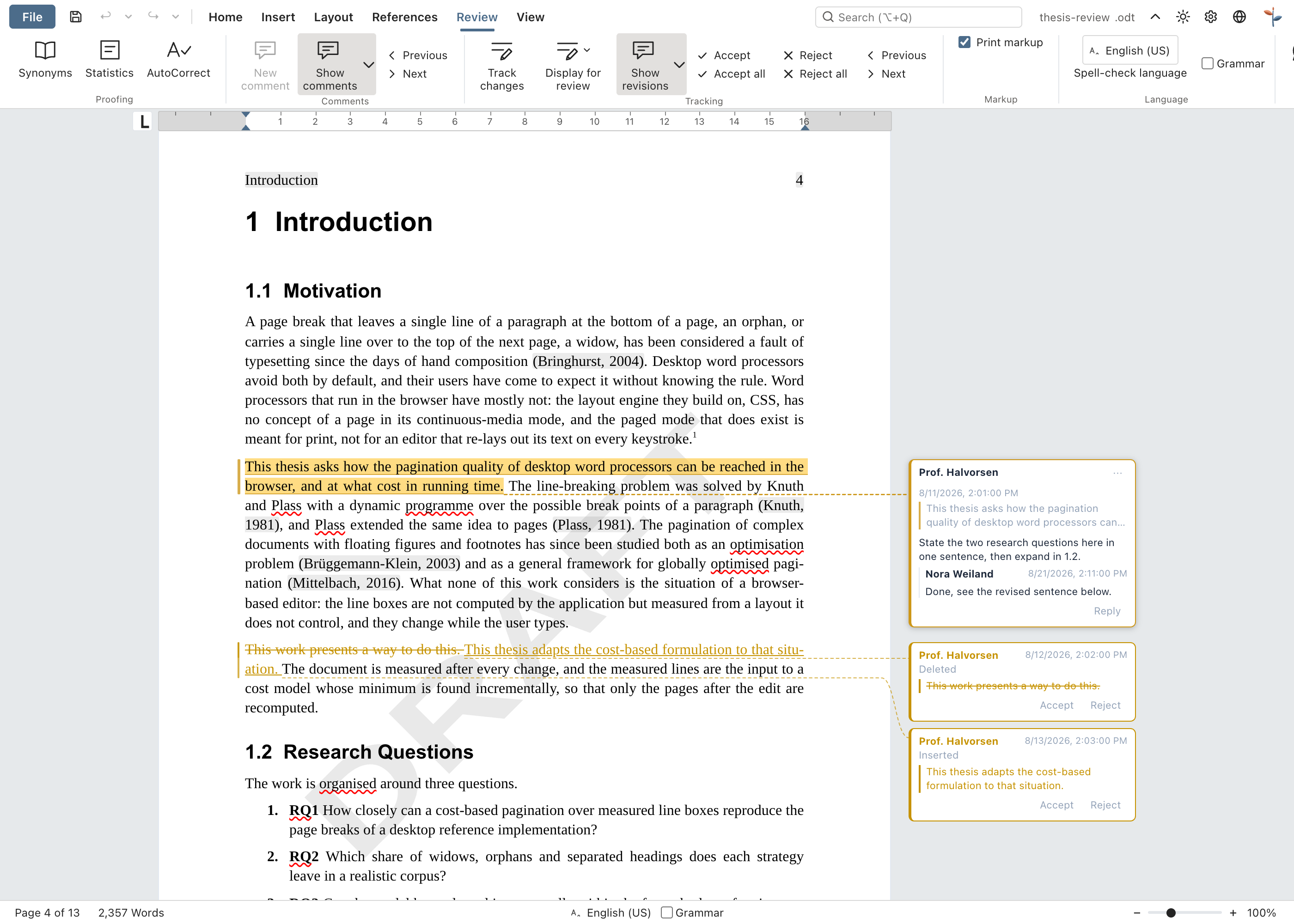
Tracked changes and comments
Review — tracked changes, threaded comments in the margin, a draft watermark
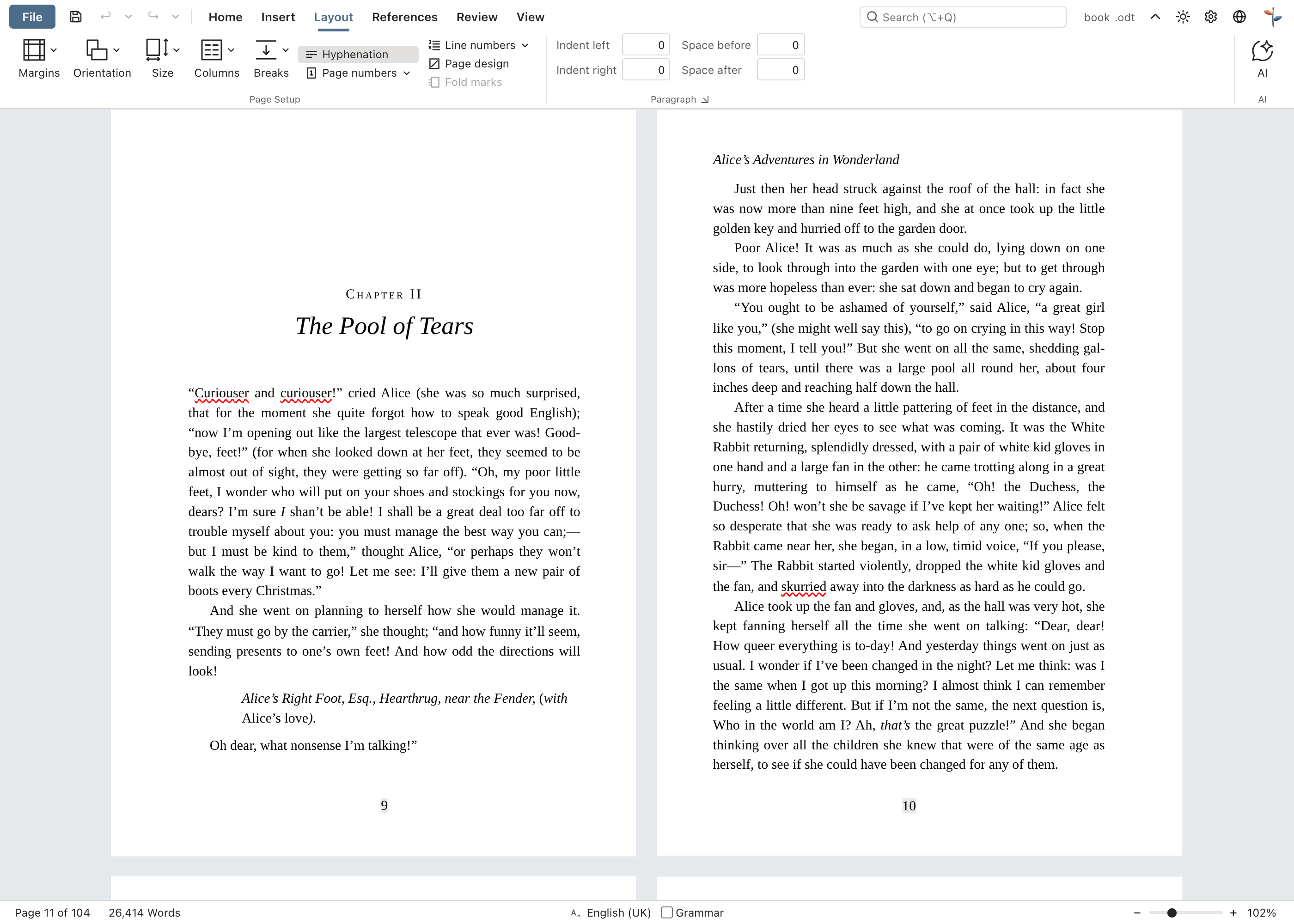
A book on facing pages
Book — A5, mirrored margins, chapters opening on a right-hand page, running heads; the numbering restarts after the front matter, so page 11 prints the folio 9
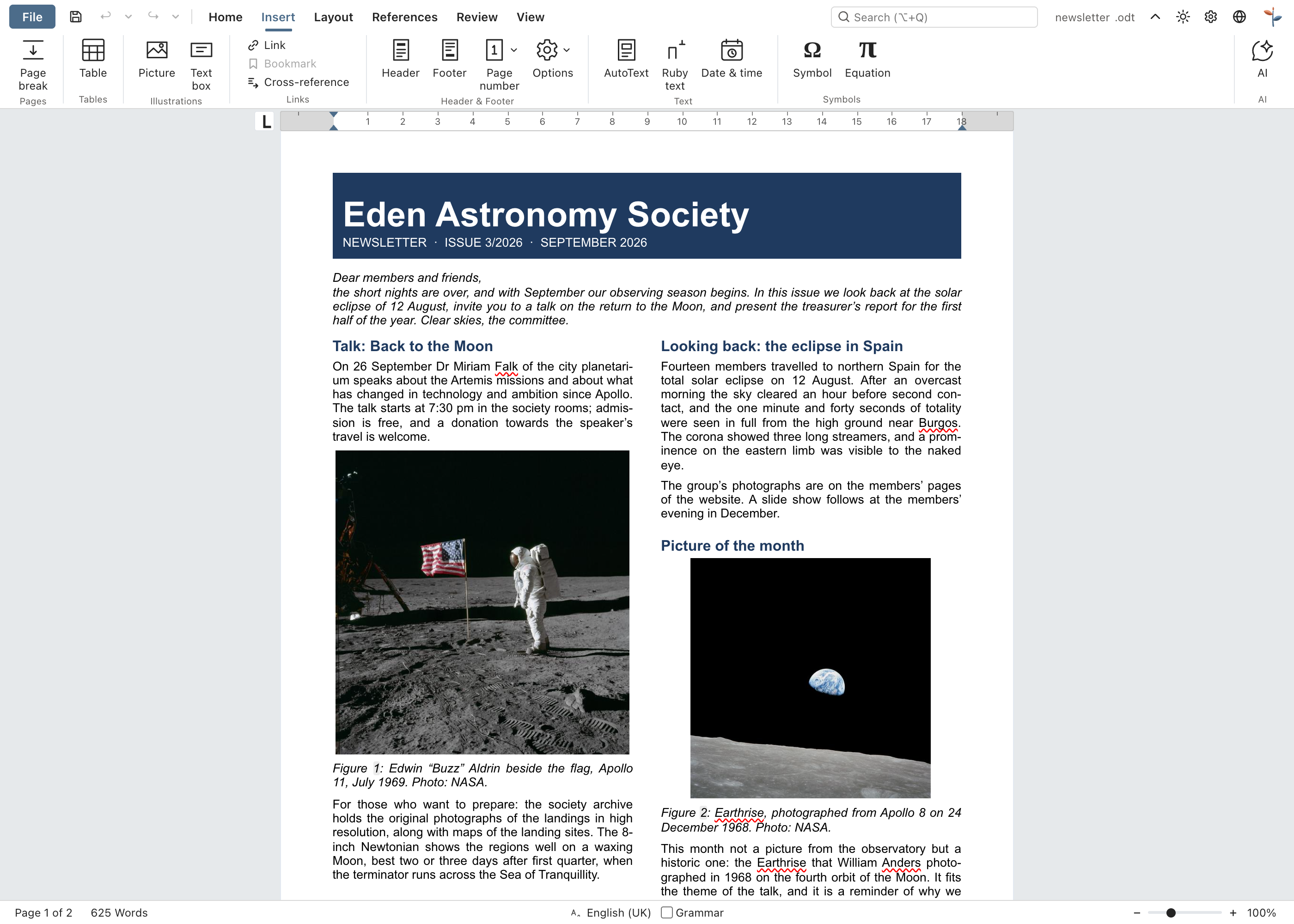
A newsletter in two columns
Newsletter — columns, pictures with captions, a sidebar box
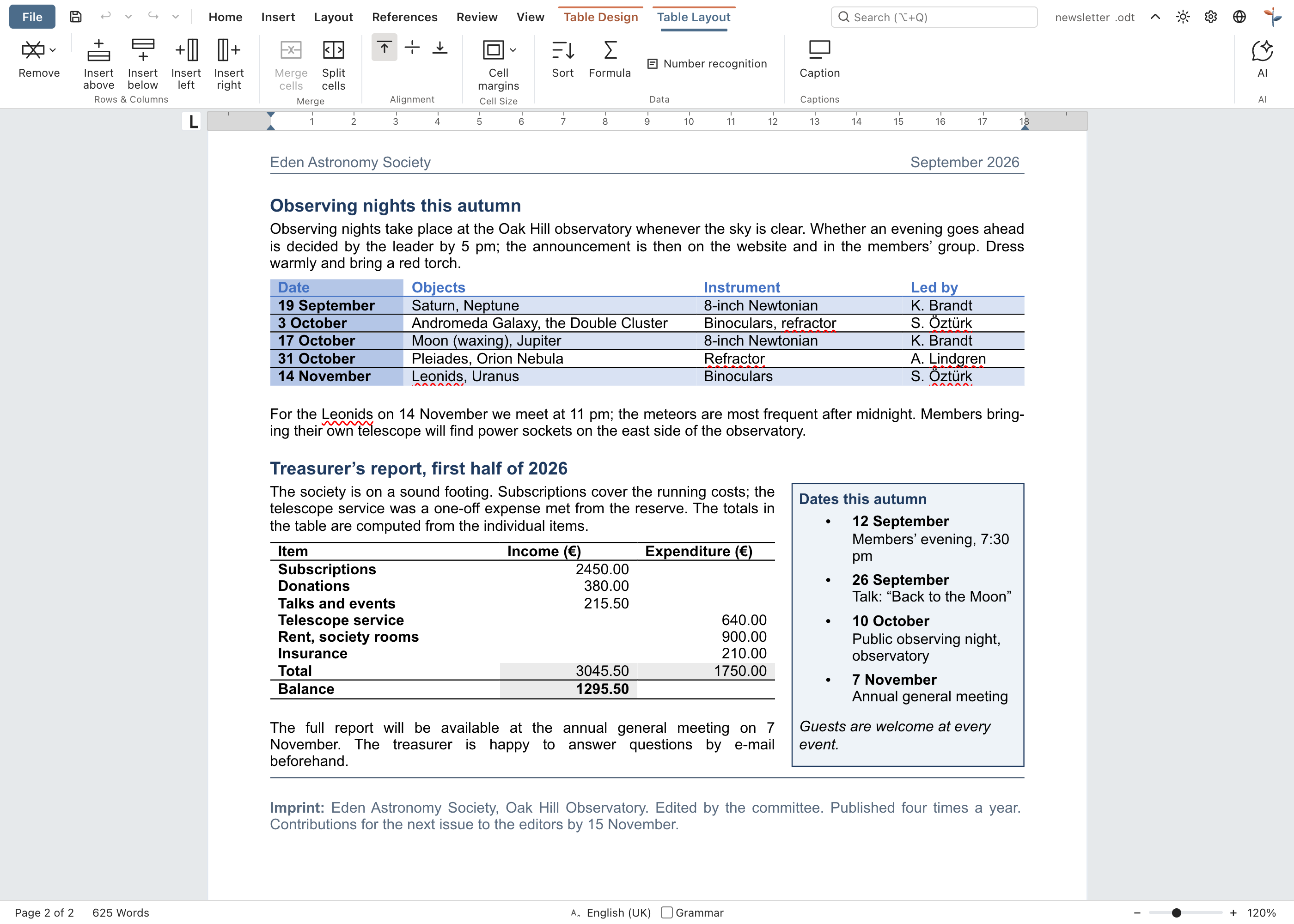
Tables with formulas
Tables — table styles and spreadsheet-style formulas
## Desktop app Each release also carries unsigned desktop installers built with Electron: - **macOS** — `EdenText--arm64.dmg` (Apple silicon) or `EdenText-.dmg` (Intel). Drag the app into Applications. As it is unsigned, open it the first time via right-click → Open, or run `xattr -d com.apple.quarantine /Applications/EdenText.app`. - **Windows** — `EdenText-Setup-.exe`. SmartScreen warns about an unknown publisher: More info → Run anyway. - **Linux** — `EdenText-.AppImage` (`chmod +x`, then run it) or the `.deb` (`sudo apt install ./edentext_*.deb`). ## Development ```bash npm install npm run dev # dev server with hot-reload npm test # test suite npm run build # production build → dist/ cd desktop && npm install && npm start # desktop app on the same build ``` Built with Svelte 5, TypeScript, Vite and TipTap 3 (ProseMirror). ## Self-hosting There is no backend and no state on the server; documents stay in the browser. A container image is published for each release (amd64 and arm64): ```bash docker run -p 8080:80 ghcr.io/stffnb/edentext ``` Or serve the files yourself: every release carries an `edentext-.zip` of the built app, and `npm run build` produces the same folder in `dist/` — point any web server at it, or build the image locally with `docker build -t edentext .`. ## Architecture ```mermaid flowchart TD Browser[Browser: local, offline-capable app] --> App[App shell and Svelte UI] App --> Editor[TipTap / ProseMirror editor] Editor <--> Document[Structured document and editor extensions] Document --> Layout[Styles, page layout, pagination and frames] Document <--> Storage[localStorage: documents, settings and recovery copies] Document <--> Interchange[ODT and DOCX import/export] Interchange --> Files[Browser file APIs, downloads and templates] Editor --> Tools[Spell check, grammar, formulas and review tools] Layout --> Render[Editable browser pages] ``` EdenText runs entirely in the browser: `App.svelte` composes the interface around the TipTap document model and its editor extensions. Styles and layout turn that model into editable pages; storage keeps local state and recovery copies. Import and export translate the same model to ODT and DOCX, while browser file APIs save or download the resulting files. See the [architecture guides](docs/architecture/) for format and layout invariants. ## Contributing Contributions are welcome — see [CONTRIBUTING.md](CONTRIBUTING.md). Merging requires a signed [CLA](CLA.md), checked automatically on every pull request. ### Contributors Thanks to everyone who helped — with ideas, bug reports, testing and feedback: - Patrick R. — alpha and beta tester - [@Deleh](https://github.com/Deleh) — beta tester ## License Copyright © 2026 Steffen Becker · Made in Germany [AGPL-3.0](LICENSE). A [commercial license](LICENSE.commercial.md) is available for use cases the AGPL does not fit. Bundled fonts and language data keep their own licenses — see [THIRD-PARTY-NOTICES.md](THIRD-PARTY-NOTICES.md). *EdenText is an independent project, not affiliated with Microsoft or The Document Foundation. `.docx` and `.odt` are supported for interoperability.* [^1]: Over the wire, compressed: ~0.6 MB of app code, the rest the spell checker with the dictionary for the browser's language and the fonts a page shows. Everything else is fetched and kept for offline use once it is needed; all fonts, dictionaries and thesauri together are ~15 MB, or ~23 MB with the English grammar check.