 ](https://stripe.com/docs/mobile/android)
# Stripe Android SDK
[](https://github.com/stripe/stripe-android/actions?query=workflow%3ACI)
[](https://github.com/stripe/stripe-android/releases)
[](https://github.com/stripe/stripe-android/blob/master/LICENSE)
> [!TIP]
> Want to chat live with Stripe engineers? Join us on our [Discord server](https://stripe.com/go/developer-chat).
The Stripe Android SDK makes it quick and easy to build an excellent payment experience in your Android app. We provide powerful and customizable UI elements that can be used out-of-the-box to collect your users' payment details. We also expose the low-level APIs that power those UIs so that you can build fully custom experiences.
Get started with our [📚 integration guides](https://stripe.com/docs/payments/accept-a-payment?platform=android) and [example projects](#examples), or [📘 browse the SDK reference](https://stripe.dev/stripe-android/).
> Updating to a newer version of the SDK? See our [migration guide](https://github.com/stripe/stripe-android/blob/master/MIGRATING.md) and [changelog](https://github.com/stripe/stripe-android/blob/master/CHANGELOG.md).
Table of contents
=================
* [Features](#features)
* [Releases](#releases)
* [Installation](#installation)
* [Requirements](#requirements)
* [Configuration](#configuration)
* [Getting Started](#getting-started)
* [Examples](#examples)
## Features
**Simplified Security**: Use the SDK to collect credit card numbers and remain [PCI compliant](https://stripe.com/docs/security#pci-dss-guidelines). This means sensitive data is sent directly to Stripe instead of passing through your server. For more information, see our [Integration Security Guide](https://stripe.com/docs/security).
**SCA-Ready**: The SDK automatically performs native [3D Secure authentication](https://stripe.com/docs/payments/3d-secure) to comply with [Strong Customer Authentication](https://stripe.com/docs/strong-customer-authentication) regulation in Europe.
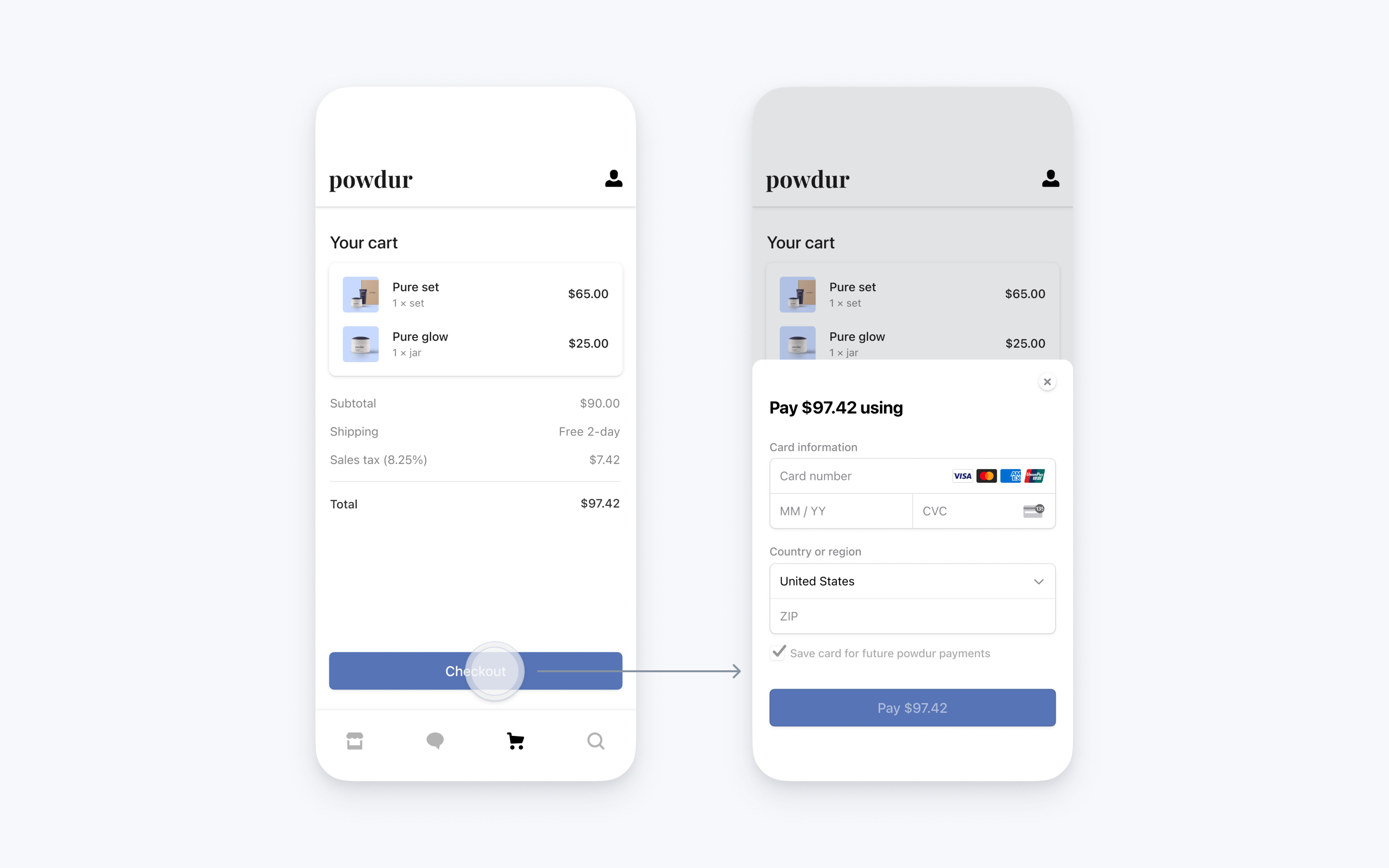
**Native UI**: We provide native screens and elements to collect payment. For example, [PaymentSheet](https://stripe.com/docs/payments/accept-a-payment?platform=android) is a prebuilt UI that combines all the steps required to pay - collecting payment details, and confirming the payment - into a single sheet that displays on top of your app.
](https://stripe.com/docs/mobile/android)
# Stripe Android SDK
[](https://github.com/stripe/stripe-android/actions?query=workflow%3ACI)
[](https://github.com/stripe/stripe-android/releases)
[](https://github.com/stripe/stripe-android/blob/master/LICENSE)
> [!TIP]
> Want to chat live with Stripe engineers? Join us on our [Discord server](https://stripe.com/go/developer-chat).
The Stripe Android SDK makes it quick and easy to build an excellent payment experience in your Android app. We provide powerful and customizable UI elements that can be used out-of-the-box to collect your users' payment details. We also expose the low-level APIs that power those UIs so that you can build fully custom experiences.
Get started with our [📚 integration guides](https://stripe.com/docs/payments/accept-a-payment?platform=android) and [example projects](#examples), or [📘 browse the SDK reference](https://stripe.dev/stripe-android/).
> Updating to a newer version of the SDK? See our [migration guide](https://github.com/stripe/stripe-android/blob/master/MIGRATING.md) and [changelog](https://github.com/stripe/stripe-android/blob/master/CHANGELOG.md).
Table of contents
=================
* [Features](#features)
* [Releases](#releases)
* [Installation](#installation)
* [Requirements](#requirements)
* [Configuration](#configuration)
* [Getting Started](#getting-started)
* [Examples](#examples)
## Features
**Simplified Security**: Use the SDK to collect credit card numbers and remain [PCI compliant](https://stripe.com/docs/security#pci-dss-guidelines). This means sensitive data is sent directly to Stripe instead of passing through your server. For more information, see our [Integration Security Guide](https://stripe.com/docs/security).
**SCA-Ready**: The SDK automatically performs native [3D Secure authentication](https://stripe.com/docs/payments/3d-secure) to comply with [Strong Customer Authentication](https://stripe.com/docs/strong-customer-authentication) regulation in Europe.
**Native UI**: We provide native screens and elements to collect payment. For example, [PaymentSheet](https://stripe.com/docs/payments/accept-a-payment?platform=android) is a prebuilt UI that combines all the steps required to pay - collecting payment details, and confirming the payment - into a single sheet that displays on top of your app.
 **Google Pay**: Stripe is fully compatible with [Google Pay](https://stripe.com/docs/google-pay).
**Stripe API**: We provide [low-level APIs](https://stripe.dev/stripe-android/payments-core/com.stripe.android/-stripe/index.html) that correspond to objects and methods in the Stripe API. You can build a custom UI on top of this layer.
**Localized**: We support the following localizations: Bulgarian, Catalan, Chinese (Hong Kong), Chinese (Simplified), Chinese (Traditional), Croatian, Czech, Danish, Dutch, English (US), English (United Kingdom), Estonian, Filipino, Finnish, French, French (Canada), German, Greek, Hungarian, Indonesian, Italian, Japanese, Korean, Latvian, Lithuanian, Malay, Maltese, Norwegian Bokmål, Norwegian Nynorsk (Norway), Polish, Portuguese, Portuguese (Brazil), Romanian, Russian, Slovak, Slovenian, Spanish, Spanish (Latin America), Swedish, Turkish, Thai, Vietnamese and Welsh (United Kingdom).
**Digital Goods**: You can use the SDK to process payments via Stripe, including for digital goods and services consumed within your app (e.g. subscriptions, in-game currencies, game levels, access to premium content, or unlocking a full version).
## Releases
* The [changelog](CHANGELOG.md) provides a summary of changes in each release.
* The [migration guide](MIGRATING.md) provides instructions on upgrading from older versions.
## Installation
### Requirements
* Android 6.0 (API level 23) and above
* `compileSdkVersion` 36 and above
* [Android Gradle Plugin](https://developer.android.com/studio/releases/gradle-plugin) 8.13.2
* [Gradle](https://gradle.org/releases/) 9.3.1
* [Kotlin](https://kotlinlang.org/docs/releases.html) 2.3.10
### Configuration
Add `stripe-android` to your `build.gradle` dependencies.
```
dependencies {
implementation 'com.stripe:stripe-android:23.25.0'
}
```
### Compatibility with Jetpack Compose
To ensure broad compatibility across the ecosystem, `stripe-android` updates its dependencies (including Jetpack Compose) to their latest versions on a monthly basis.
`stripe-android` uses Jetpack Compose internally and expects consumers to use a compatible version:
**Google Pay**: Stripe is fully compatible with [Google Pay](https://stripe.com/docs/google-pay).
**Stripe API**: We provide [low-level APIs](https://stripe.dev/stripe-android/payments-core/com.stripe.android/-stripe/index.html) that correspond to objects and methods in the Stripe API. You can build a custom UI on top of this layer.
**Localized**: We support the following localizations: Bulgarian, Catalan, Chinese (Hong Kong), Chinese (Simplified), Chinese (Traditional), Croatian, Czech, Danish, Dutch, English (US), English (United Kingdom), Estonian, Filipino, Finnish, French, French (Canada), German, Greek, Hungarian, Indonesian, Italian, Japanese, Korean, Latvian, Lithuanian, Malay, Maltese, Norwegian Bokmål, Norwegian Nynorsk (Norway), Polish, Portuguese, Portuguese (Brazil), Romanian, Russian, Slovak, Slovenian, Spanish, Spanish (Latin America), Swedish, Turkish, Thai, Vietnamese and Welsh (United Kingdom).
**Digital Goods**: You can use the SDK to process payments via Stripe, including for digital goods and services consumed within your app (e.g. subscriptions, in-game currencies, game levels, access to premium content, or unlocking a full version).
## Releases
* The [changelog](CHANGELOG.md) provides a summary of changes in each release.
* The [migration guide](MIGRATING.md) provides instructions on upgrading from older versions.
## Installation
### Requirements
* Android 6.0 (API level 23) and above
* `compileSdkVersion` 36 and above
* [Android Gradle Plugin](https://developer.android.com/studio/releases/gradle-plugin) 8.13.2
* [Gradle](https://gradle.org/releases/) 9.3.1
* [Kotlin](https://kotlinlang.org/docs/releases.html) 2.3.10
### Configuration
Add `stripe-android` to your `build.gradle` dependencies.
```
dependencies {
implementation 'com.stripe:stripe-android:23.25.0'
}
```
### Compatibility with Jetpack Compose
To ensure broad compatibility across the ecosystem, `stripe-android` updates its dependencies (including Jetpack Compose) to their latest versions on a monthly basis.
`stripe-android` uses Jetpack Compose internally and expects consumers to use a compatible version:
| 20.22.0-20.31.0 | Compose UI 1.4.x |
| 20.32.0-20.53.0 | Compose UI 1.5.x |
| 21.0.0-22.6.1 | Compose UI 1.6.x or Compose UI 1.7.x or Compose UI 1.8.x |
| 22.7.0-22.8.1 | Compose UI 1.9.x |
| 23.0.0-Current | Compose UI 1.10.x |