The Docker dashboard for people who live in SSH sessions.
A zero-dependency terminal UI and a scriptable health checker for Docker hosts.
**DockTUI** is a fast terminal dashboard for monitoring, debugging and managing Docker containers, Compose stacks, images, volumes and networks. It is pure Python standard library, drives the regular `docker` CLI, and therefore works anywhere Docker works: your laptop, a jump host, a production box over SSH, or a remote daemon via `DOCKER_HOST`.
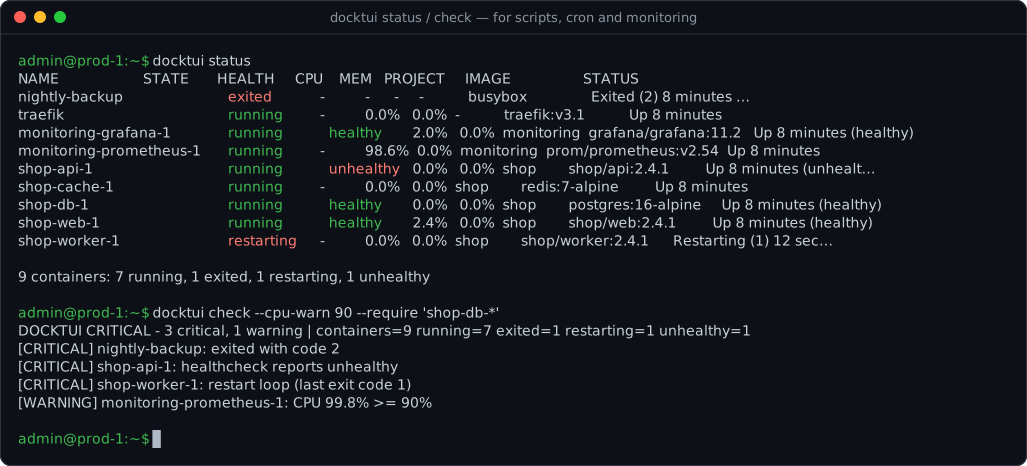
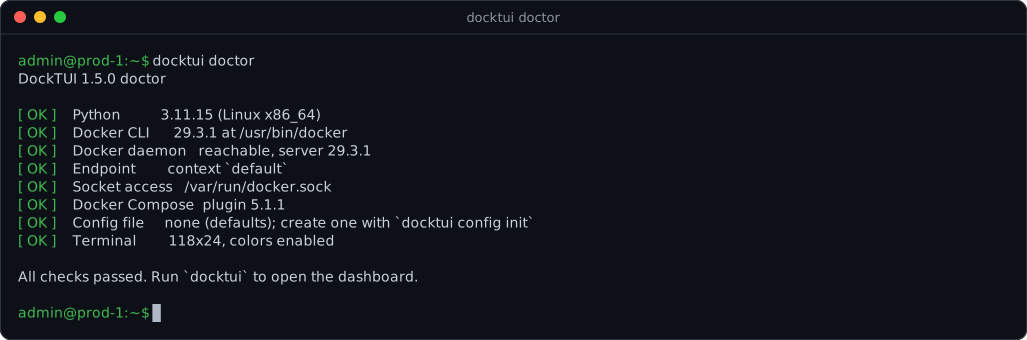
It is also a **non-interactive tool for ops**: `docktui status` prints a snapshot, `docktui check` is a ready-made Nagios/Icinga/Zabbix/cron health check with proper exit codes, and `docktui doctor` tells you exactly why Docker isn't working.
---
## Contents
- [Why admins like it](#why-admins-like-it)
- [Install](#install)
- [Quick start](#quick-start)
- [Scripting & monitoring](#scripting--monitoring) — `status`, `check`, `doctor`
- [Dashboard features](#dashboard-features)
- [Configuration](#configuration)
- [Remote hosts](#remote-docker-hosts-ssh--tcp)
- [Keyboard reference](#keyboard-reference)
- [Troubleshooting](#troubleshooting)
- [Development](#development)
## Why admins like it
- **Nothing to install on the server but Python.** No Go/Rust binary to ship, no Docker SDK, no TUI framework, no agent. `pipx install` and go — also on air-gapped hosts (copy one wheel).
- **Uses your existing Docker setup.** DockTUI shells out to `docker`, so contexts, `DOCKER_HOST`, TLS certs, SSH keys, rootless Docker and group permissions all just work.
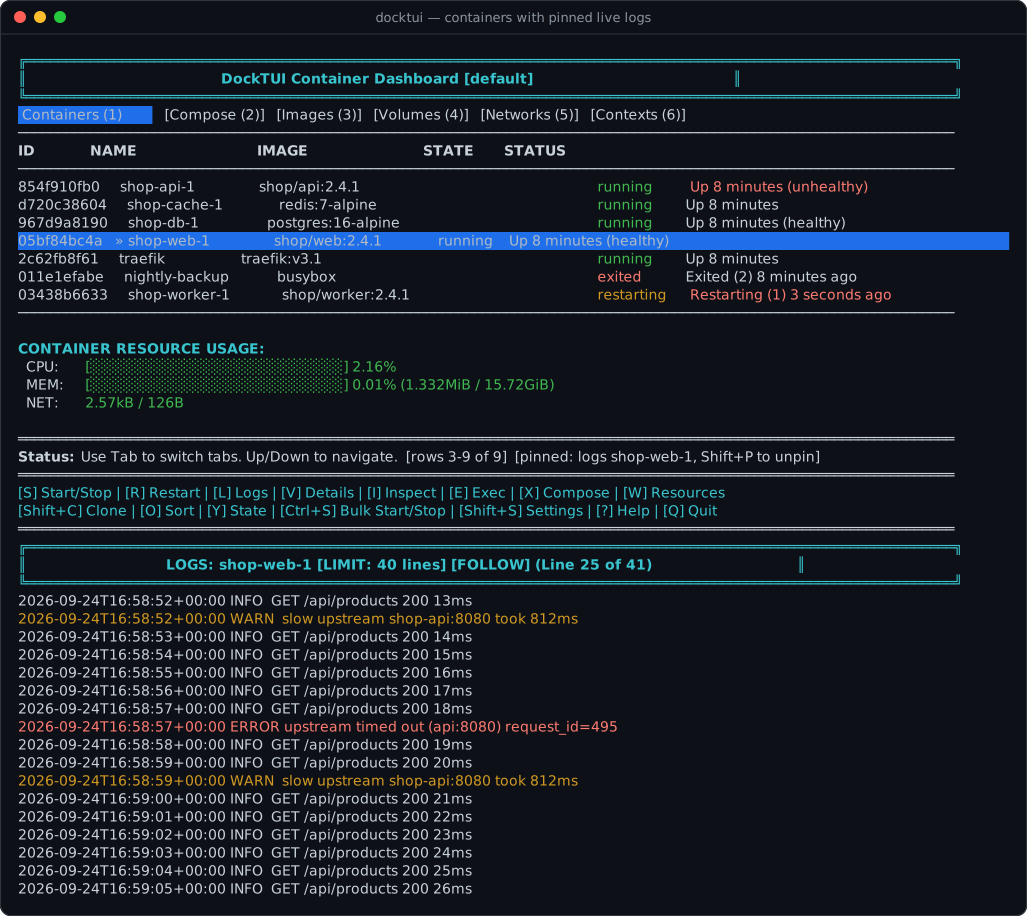
- **Built for real hosts, not demos.** Scrollable lists for hundreds of containers, Compose-aware grouping, health status, crash/restart detection, bulk start/stop of a filtered set, and live logs pinned under the container list.
- **Scriptable.** JSON output, glob filters, and Nagios-compatible exit codes (`0` OK, `1` WARNING, `2` CRITICAL, `3` UNKNOWN).
- **Safe by default.** Destructive actions (delete, prune, bulk stop) ask for confirmation; prune requires typing a keyword.
- **Your shortcuts.** Bind `Ctrl+` to any command you run inside containers all day (`tail -f /var/log/app.log`, `env`, `df -h`).
## Install
DockTUI needs Python 3.9+ and the Docker CLI. It has **zero runtime dependencies**.
```bash
# Recommended: isolated install with pipx (or: uv tool install ...)
pipx install git+https://github.com/strmax195-hue/docktui.git
# Plain pip
pip install git+https://github.com/strmax195-hue/docktui.git
# A specific release wheel (see the Releases page for the file name)
pip install https://github.com/strmax195-hue/docktui/releases/download/v1.5.0/docktui-1.5.0-py3-none-any.whl
```
Air-gapped host? Download the `.whl` from [Releases](https://github.com/strmax195-hue/docktui/releases), copy it over, and `pip install docktui-*.whl` — there is nothing else to fetch.
If `docktui` is not on your `PATH` (common on Windows), run `python -m docktui` instead.
## Quick start
```bash
docktui doctor # check Docker CLI, daemon, permissions, compose, config, terminal
docktui # open the dashboard
docktui -H ssh://admin@prod-1 # dashboard for a remote daemon over SSH
docktui status # one-shot table of containers, then exit
docktui check # health check for scripts and monitoring
```
## Scripting & monitoring
All sub-commands accept `-H/--host`, `--docker-timeout` and `-c/--config`, and never need a TTY.
### `docktui status` — snapshot
```text
$ docktui status --filter 'shop*'
NAME STATE HEALTH CPU MEM PROJECT IMAGE STATUS
shop-api-1 running unhealthy 12.3% 41.0% shop shop/api:2.4.1 Up 3 hours (unhealthy)
shop-db-1 running healthy 1.1% 22.5% shop postgres:16 Up 3 days (healthy)
shop-web-1 running - 0.4% 3.2% shop nginx:1.27 Up 3 days
3 containers: 3 running, 0 exited, 0 restarting, 1 unhealthy
```
| Option | Meaning |
| --- | --- |
| `--json` | Machine-readable output (name, state, health, exit code, CPU %, memory %, Compose project/service, ports…) |
| `-f, --filter GLOB` | Only containers **or Compose projects** matching the glob (repeatable) |
| `-x, --exclude GLOB` | Skip matching containers/projects (repeatable) |
| `--no-stats` | Skip `docker stats` for a faster answer on busy hosts |
```bash
# Names of all unhealthy containers
docktui status --json --no-stats | jq -r '.[] | select(.health=="unhealthy") | .name'
```
### `docktui check` — health check with exit codes
`check` flags a container as **CRITICAL** when its healthcheck is `unhealthy`, it is in a restart loop, it is `dead`, it exited with a non-zero code (except `143`/SIGTERM from a normal `docker stop`), or a `--require`d container is missing or not running. It raises a **WARNING** for exit code `137` (OOM killer or stop timeout) and for CPU/memory at or above your thresholds.
```bash
docktui check --cpu-warn 90 --mem-warn 90 --require 'postgres*' --require 'nginx' --exclude 'ci-runner-*'
docktui check --json # structured output
docktui check -q # no output, exit code only
```
**Cron** — mail yourself only when something is wrong:
```cron
*/5 * * * * docktui check --mem-warn 90 >/tmp/docktui-check.txt || mail -s "docker: $(head -1 /tmp/docktui-check.txt)" ops@example.com
It also warns about unencrypted `tcp://…:2375` endpoints, a missing `ssh` client for `ssh://` hosts, broken config JSON and too-small terminals. Exit code is `1` if anything failed.
### `docktui config`
```bash
docktui config init # write a config file with every option and its default
docktui config path # where DockTUI reads/writes its config
docktui config show # effective configuration as JSON (after CLI overrides)
```
## Dashboard features
| Area | What you get |
| --- | --- |
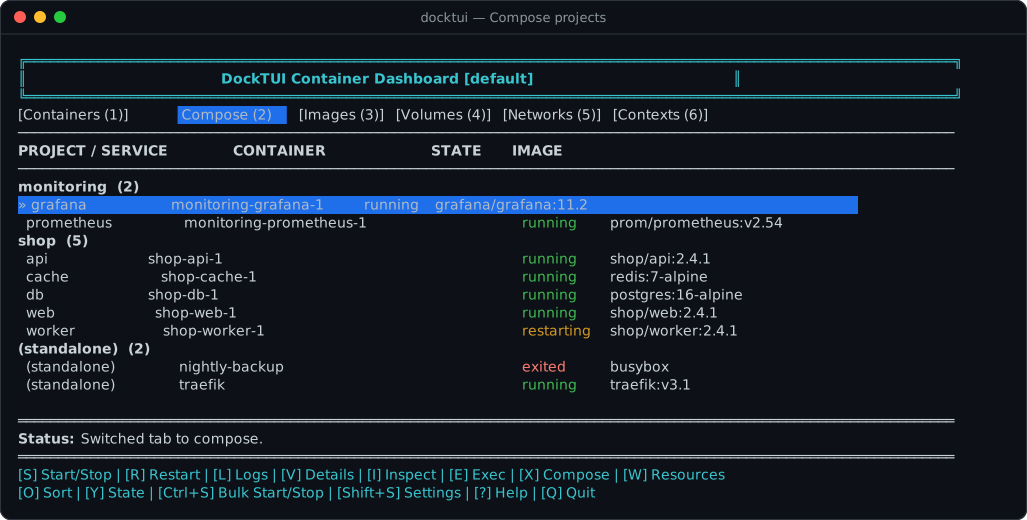
| **Containers** | State, health and status at a glance; unhealthy/restarting rows highlighted; live CPU/memory/network bars with alert threshold; sort and state filters; scrolls smoothly through hundreds of containers. |
| **Compose** | Containers grouped by Compose project/service; start/stop/restart a whole project; `up`, `down`, `build`, `up --build`; aggregated project logs. |
| **Bulk actions** | Filter (`/`, `Y`) then `Ctrl+S` to stop or start the whole matching set in one Docker call. |
| **Logs** | Follow mode with live streaming, search and next-match, errors/warnings-only filter, regex highlights, adjustable tail, export to file, and **pin logs under the dashboard** (`P`) while you keep navigating. |
| **Exec** | Presets, history with type-to-search, background output view or a real interactive `docker exec -it` shell, plus your own `Ctrl+` hotkeys. |
| **Inspect & details** | Readable summary (ports, mounts, env, labels, networks, IP/MAC, restart policy, limits), raw `inspect` JSON, `docker top`, and a generated `docker-compose.yml` snippet. |
| **Change things** | Rename, clone with new name/ports, edit live CPU/memory limits (`docker update`). |
| **Images / volumes / networks** | Browse, delete with confirmation, Docker Hub search & pull with live progress, in-app volume file browser. |
| **Cleanup** | Disk-usage view with separate system / images / volumes / everything prune, each behind a typed confirmation. |
| **Hosts** | Docker contexts tab, `DOCKER_HOST`/`-H` support, and a named endpoint registry to hop between servers without touching your shell. |
| **Comfort** | Dark, light and high-contrast themes, `NO_COLOR` / `--no-color`, mouse-wheel scrolling, in-app settings editor (`Shift+S`), Windows/macOS/Linux. |
## Configuration
DockTUI reads the first file that exists:
1. `$DOCKTUI_CONFIG`
2. `$XDG_CONFIG_HOME/docktui/config.json`
3. `~/.config/docktui/config.json`
4. `~/.docktui.json`
…or the file given with `-c/--config`. Command-line flags override the file. `docktui config init` writes a complete file for you, and the in-app editor (`Shift+S`) saves back to the same file it was loaded from.
```json
{
"refresh_interval": 3.0,
"docker_timeout": 15.0,
"theme": "dark",
"log_tail_limit": 100,
"log_tail_step": 10,
"log_max": 500,
"cpu_alert_threshold": 80.0,
"exec_history_cap": 10,
"exec_presets": ["sh", "bash", "env", "ps aux", "df -h"],
"poll_intervals": {
"containers": 3.0,
"images": 15.0,
"volumes": 30.0,
"networks": 30.0
},
"hotkey_overlays": {
"ctrl+l": "tail -n 200 /var/log/app/current.log",
"ctrl+e": "env",
"ctrl+d": "df -h"
},
"log_highlights": [
{"label": "errors", "pattern": "ERROR|FATAL|panic"},
{"label": "auth", "pattern": "AUTH|login"}
],
"endpoints": [
{"name": "prod", "host": "ssh://admin@prod.example", "description": "Production"},
{"name": "stage", "host": "ssh://admin@stage.example", "description": "Staging"}
],
"active_endpoint": "prod"
}
```
Notes:
- `hotkey_overlays` keys are `ctrl+`. `Ctrl+C/H/I/J/M/S/Z` are reserved by the terminal or DockTUI and are ignored. The command runs in the selected running container and opens in the Exec view.
- Invalid values (e.g. a string where a number belongs) fall back to defaults instead of crashing; `docktui doctor` points out broken JSON.
## Remote Docker hosts (SSH / TCP)
```bash
docktui -H ssh://admin@prod-1 # or: export DOCKER_HOST=ssh://admin@prod-1
docktui -H tcp://10.0.0.5:2376 # TLS; configure DOCKER_TLS_VERIFY / DOCKER_CERT_PATH as usual
```
- **Compose files:** Compose runs on the machine running DockTUI. Paths from a remote container's labels must exist locally; missing files or working directories are reported explicitly. Multiple config files keep their override order. Build/up operations allow at least 300 seconds.
- **SSH** runs non-interactively: use key-based auth (agent loaded) and make sure the host key is already in `known_hosts`, otherwise SSH waits for a prompt that never comes.
- **Plain `tcp://…:2375`** is unauthenticated and unencrypted; `docktui doctor` warns about it. Prefer `ssh://` or TLS on 2376.
- **Connection priority:** an explicit `-H` wins; otherwise Docker environment (`DOCKER_CONTEXT`, then `DOCKER_HOST`) wins over `active_endpoint` in config, followed by Docker's current context. All snapshot, streaming and interactive commands use the same connection; DockTUI never changes your process environment. An unknown configured endpoint produces a configuration error.
- **Endpoint switcher**: named `endpoints` in the config (or `N` on the Contexts tab) switch DockTUI's per-instance `DOCKER_HOST` without touching your shell environment. The active endpoint is shown in the title bar.
- When `DOCKER_HOST` is set, Docker contexts are overridden; the Contexts tab says so and disables switching.
## Keyboard reference
### Global Controls
- **`Tab` or `1`-`6`**: Switch between **Containers**, **Compose**, **Images**, **Volumes**, **Networks**, and **Contexts** tabs.
- **`↑` / `↓` (Arrow Keys) or Mouse Scroll Wheel**: Navigate list items and scroll text logs.
- **`G`**: Force refresh data.
- **`/`**: Filter list items by name/attributes on the active tab.
- **`C`**: Clear the active text search filter on the current tab.
- **`M`**: Cycle between **Dark**, **Light**, and **High-Contrast** theme presets.
- **`Shift+S`**: Open the in-app Settings editor.
- **`?`**: Open the in-app keyboard help screen.
- **`Q`**: Exit DockTUI.
- **`Esc` while work is pending**: Cancel background operations first. Cancellation stops the local command; Docker-side work may already have started. A second press follows the current view's normal Back/Exit behavior.
### Containers & Compose Tabs
- **`Ctrl+S`**: Bulk start or stop every container matching the active filter/state (asks for confirmation, runs as one `docker stop`/`docker start`).
- **`Ctrl+`**: Run your own `hotkey_overlays` command in the selected container.
- **`Shift+P`**: Unpin the pinned logs/details pane.
- **`S`**: Start or Stop the selected container.
- **`S` on a Compose project row**: Start or stop all containers in that project group.
- **`R`**: Restart the selected container.
- **`R` on a Compose project row**: Restart all containers in that project group.
- **`L`**: Open fullscreen **Logs View** (supports real-time streaming using background threads, opens aggregated project logs when a Compose project row is selected).
- **`V`**: Open readable **Details View**.
- **`I`**: Open fullscreen interactive **Inspect View**.
- **`T`**: Open processes running inside the container (**Top View**).
- **`E`**: Execute a shell command inside the running container (prompts to run interactively via `docker exec -it` or in background **Exec View**).
- **`X`**: Generate and view a `docker-compose.yml` snippet representing the container configuration (**Compose Snippet View**).
- **`W`**: Edit live **CPU and memory limits** (`docker update`).
- **`Shift+C`**: Clone the selected container (name and ports pre-filled, image inherited).
- **`N`**: Rename the selected container.
- **`O`**: Cycle sort mode.
- **`Y`**: Cycle state filter.
- **`P`**: Open **System Disk Usage & Cleanup Dashboard**.
### Images Tab
- **`D`**: Delete the selected image (asks for confirmation).
- **`F`**: Open the **Registry Search & Pull** dialog (Docker Hub).
- **`P`**: Open **System Disk Usage & Cleanup Dashboard**.
### Volumes Tab
- **`D`**: Delete the selected volume (asks for confirmation).
- **`Shift+F`**: Open the **Volume File Browser**.
- **`P`**: Open **System Disk Usage & Cleanup Dashboard**.
### Networks Tab
- **`D`**: Delete the selected network (asks for confirmation).
### Contexts Tab
- **`U`**: Switch active Docker context to the selected context.
- **`N`**: Add a new endpoint (`name|host|description`) and activate it.
### In-View Navigation (Logs, Inspect, Exec, Details, Top, System, Settings, Search, Pull, Files Views)
- **`↑` / `↓` (Arrow Keys) or Mouse Scroll Wheel**: Scroll content.
- **`Esc` or View Key**: Return back to the main dashboard.
- **Logs View Features**:
- `P`: Pin the logs under the dashboard (they keep following live) and return to the container list; `Shift+P` unpins.
- `F`: Toggle follow mode to keep refreshing and pinning logs to the newest lines.
- `Space`: Pause follow mode.
- `/`: Search/filter logs for specific terms.
- `N`: Jump to the next search match.
- `E`: Toggle error/warning-only log lines.
- `H`: Toggle log highlight patterns (regex) from your config.
- `O`: Export the current logs buffer to a local file.
- `C`: Clear active log filters.
- `+` / `-`: Increase/decrease log line retrieval limits.
- **Inspect, Details, Top, Compose Snippet Views**:
- `P` (Details View only): Pin the details view to the bottom half of the terminal.
- `O`: Export the current view buffer to a local file.
- **Exec View Features**:
- `R`: Re-run the current command.
- `E`: Execute a new preset, recent, or custom command (supports inline type-to-search auto-completion).
- **System View Features**:
- `X`: Trigger `docker system prune -f` after typing `PRUNE`.
- `I`: Trigger `docker image prune -f` after typing `IMAGES`.
- `V`: Trigger `docker volume prune -f` after typing `VOLUMES`.
- `A`: Trigger `docker system prune -f --volumes` after typing `ALL`.
- **Settings View Features**:
- `Up` / `Down`: Move between settings.
- `Enter`: Edit the highlighted setting.
- `O`: Export settings to a file.
- `S`: Save the configuration.
- `Esc`: Return without saving.
- **Search & Pull View Features**:
- `Up` / `Down`: Move through search results.
- `Enter`: Pull the highlighted image (live progress view).
- `O`: Export search results or pull progress to a file.
- `Esc`: Cancel and return.
- **Volume File Browser Features**:
- `Up` / `Down`: Move through entries.
- `Enter`: Open a directory.
- `Backspace`: Go up one level.
- `O`: Export the file list to a file.
- `Esc`: Return to the dashboard.
## Troubleshooting
Start with **`docktui doctor`** — it checks every item below and prints the fix.
| Symptom | Fix |
| --- | --- |
| `Cannot connect to the Docker daemon` | Start Docker Desktop / `sudo systemctl start docker`. |
| `permission denied … docker.sock` | `sudo usermod -aG docker $USER`, then log out and back in (or use rootless Docker). |
| Remote host hangs on start | SSH is waiting for a password or host-key prompt. Use key auth and `ssh admin@host` once to accept the key. |
| `docktui: command not found` | Your Python scripts directory is not on `PATH`; use `pipx`, or run `python -m docktui`. |
| Colors look wrong / you want none | `--theme light`, `--theme high-contrast`, or `--no-color` (`NO_COLOR=1`). |
| Commands time out on a slow host | Increase `--docker-timeout` (or `docker_timeout` in the config). |
Streaming buffers are bounded (500 lines by default; pull progress follows `log_max`). Completion distinguishes success, failure, and cancellation. On Unix, canceled streams also terminate their process group, including SSH helpers.
## How it works
DockTUI wraps the `docker` CLI via `subprocess`, so your existing configuration, permissions and security context are preserved without an SDK or a privileged helper. Input is read non-blockingly with `msvcrt` on Windows and `termios`/`select` on Unix.
| Module | Responsibility |
| --- | --- |
| `cli.py` | Argument parsing, sub-commands and dashboard start-up |
| `report.py` | Pure functions behind `status` / `check` (health parsing, rules, text/JSON output) |
| `doctor.py` | Environment diagnostics |
| `docker_client.py` | `docker` subprocess wrapper, `DOCKER_HOST` parsing, per-instance host override |
| `config.py` | `Config` dataclass: lookup paths, load/validate/save |
| `jobs.py` / `snapshot.py` | Background work, cancellation, UI result delivery and resource snapshots |
| `tui.py` | Dashboard orchestrator: one `draw_*` method per view, key-handler table |
| `log_stream.py` | Background `LineStreamer` for log follow and image pulls |
| `screen.py` / `styles.py` / `keymap.py` / `dialogs.py` | Layout helpers, themes, key bindings, input dialogs |
## Development
```bash
git clone https://github.com/strmax195-hue/docktui.git
cd docktui
pip install -e ".[dev]"
pre-commit install # optional: ruff + mypy on every commit
pytest # unit tests; no Docker daemon required (subprocess is mocked)
ruff check . && ruff format --check .
mypy
```
The screenshots in this README are generated from the real UI: `scripts/demo/up.sh` starts a demo environment and `python scripts/screenshots.py` (needs `pip install pyte`) re-renders `assets/screenshot-*.svg`.
CI runs the tests on Linux, macOS and Windows with Python 3.9–3.14, lint and type checks, CodeQL, and an integration job that exercises `status`/`check`/`doctor` against a real Docker daemon.
See [CONTRIBUTING.md](CONTRIBUTING.md) to get started, [ROADMAP.md](ROADMAP.md) for what's next, and [CHANGELOG.md](CHANGELOG.md) for release notes. Maintainers: [docs/release-checklist.md](docs/release-checklist.md).
If DockTUI saves you a few `docker ps` a day, a ⭐ on GitHub helps other admins find it.
## License
MIT — see [LICENSE](LICENSE).
### Development module map
`ContainerDashboard` coordinates state, actions and the input loop. Terminal
input and restoration live in `docktui/terminal.py`; the `docktui/views/`
package renders dashboard resources, logs, text screens and dialogs. Background
operations use `jobs.py` and immutable connection snapshots. Log severity and
highlight formatting live in `log_format.py`. Public dashboard methods remain
available for integrations. Unix PTY tests cover quit, Ctrl+C and resize.
Configuration writes use atomic replacement: failed writes preserve the previous
file. `docktui doctor` reports invalid original values even when runtime settings
use safe defaults. Unknown active endpoints fail rather than selecting a
different Docker host. CI requires 50% combined statement/branch coverage and
35% branch coverage. The measured diagnostics baseline was 53.29% combined
and 42.23% branches; coverage JSON is retained as an artifact.
### Container diagnosis
Details (`V`) shows the latest healthcheck probe time, exit code and output
(up to 4096 characters). Press `E` in Details to toggle a bounded feed of
container die/restart/OOM/health/destroy events. Disconnects are displayed; the
feed reconnects using its last nanosecond cursor and suppresses replayed events.
Events use the selected connection and stop on context/endpoint switches or app exit.
### Log windows and target highlights
In Logs, `W` sets `SINCE,UNTIL` (Docker duration or timestamp strings); empty
values clear boundaries. `T` toggles timestamps. A finite Until window disables
follow; clear Until before enabling it. Errors-only, search and clear-filter
operate on the retained bounded history, so changing them preserves lines.
Finite Compose windows use supported per-container Docker logs commands, with
service prefixes; they do not pass the unsupported --until flag to Compose.
Persistent defaults use `log_since`, `log_until`, `log_timestamps`. Highlight
presets are selected by container name, then Compose service, then project:
```json
{"log_presets": {"service:app/web": [{"label": "failures", "pattern": "panic|fatal"}]}}
```
Target keys also accept `container:web-1` and `project:app`; global
`log_highlights` remains the fallback. `H` toggles the selected patterns.
### Prometheus textfile collector
```bash
docktui status --prometheus --metrics-limit 1000 > docktui.prom.tmp
mv docktui.prom.tmp docktui.prom
```
Metrics include collection success, successful collection Unix time in seconds,
selected container count, running/unhealthy gauges, CPU and memory ratios
(percent divided by 100). CPU ratios may exceed 1 on multicore hosts. Missing
metrics are omitted. Failure exits 1 and emits success=0 without container
samples. Replace the textfile atomically, including failure output, and alert
on collection_success and timestamp age. Labels use endpoint and container
name, with escaping and a 128-character cap (hash suffix for long values).
Per-container cardinality is capped by metrics-limit (1..10000); a truncation
gauge reports the cap. Arbitrary Docker labels and image tags are excluded.
### Checking several endpoints
```bash
docktui check --hosts prod,stage --workers 4 --host-timeout 10 --json
```
Names come from configured endpoints. Up to 64 names are accepted, duplicates
are checked once, concurrency is capped at 16, and each worker receives a
frozen connection environment and a total host deadline across commands.
JSON keeps each endpoint's status, rows, findings, duration and error. One
failure does not prevent checks of other hosts, including unknown names.
Aggregate priority is CRITICAL > UNKNOWN > WARNING > OK, retaining Nagios
codes 2/3/1/0. Single-host commands keep their codes. --hosts and --host
cannot be combined.


 It also warns about unencrypted `tcp://…:2375` endpoints, a missing `ssh` client for `ssh://` hosts, broken config JSON and too-small terminals. Exit code is `1` if anything failed.
### `docktui config`
```bash
docktui config init # write a config file with every option and its default
docktui config path # where DockTUI reads/writes its config
docktui config show # effective configuration as JSON (after CLI overrides)
```
## Dashboard features
It also warns about unencrypted `tcp://…:2375` endpoints, a missing `ssh` client for `ssh://` hosts, broken config JSON and too-small terminals. Exit code is `1` if anything failed.
### `docktui config`
```bash
docktui config init # write a config file with every option and its default
docktui config path # where DockTUI reads/writes its config
docktui config show # effective configuration as JSON (after CLI overrides)
```
## Dashboard features