# vuejs-interview-questions
List of 300 VueJS Interview Questions
> Click :star:if you like the project. Pull Requests are highly appreciated. Follow
me [@SudheerJonna](https://twitter.com/SudheerJonna) for technical updates.
---
> I recommend this [Vue.js course](https://zerotomastery.io/courses/learn-vue-js/?utm_source=github&utm_medium=sponsor&utm_campaign=vue-interview-questions) to become top 10% at Vue and [this coding interview bootcamp](https://zerotomastery.io/courses/learn-data-structures-and-algorithms/?utm_source=github&utm_medium=sponsor&utm_campaign=vue-interview-questions) to ace your coding interview and actually get hired.
---
### Table of Contents
-------------------------------------------------------------------
| No. | Questions |
|-----|----------------------------------------------------------------------------------------------------------------------------------------------------------------|
| 1 | [What is VueJS](#what-is-vuejs) |
| 2 | [What are the major features of VueJS](#what-are-the-major-features-of-vuejs) |
| 3 | [What are the lifecycle methods of VueJS](#what-are-the-lifecycle-methods-of-vuejs) |
| 4 | [What are the different API styles available](#what-are-the-different-api-styles-available) |
| 5 | [What are the conditional directives](#what-are-the-conditional-directives) |
| 6 | [What is the difference between v-show and v-if directives](#what-is-the-difference-between-v-show-and-v-if-directives) |
| 7 | [What is the purpose of v-for directive?](#what-is-the-purpose-of-v-for-directive) |
| 8 | [What is a vue instance?](#what-is-vue-instance) |
| 9 | [How do you achieve a conditional group of elements?](#how-do-you-achieve-conditional-group-of-elements) |
| 10 | [How do you reuse elements with a key attribute?](#how-do-you-reuse-elements-with-key-attribute) |
| 11 | [Why should you not use if and for directives together on the same element?](#why-should-not-use-if-and-for-directives-together-on-the-same-element) |
| 12 | [Why do you need to use a key attribute on for directive?](#why-do-you-need-to-use-key-attribute-on-for-directive) |
| 13 | [What are the array detection mutation methods?](#what-are-the-array-detection-mutation-methods) |
| 14 | [What are the array detection non mutation methods?](#what-are-the-array-detection-non-mutation-methods) |
| 15 | [What are the caveats of array changes detection?](#what-are-the-caveats-of-array-changes-detection) |
| 16 | [What are the caveats of object changes detection?](#what-are-the-caveats-of-object-changes-detection) |
| 17 | [How do you use for directive with a range?](#how-do-you-use-v-for-directive-with-a-range) |
| 18 | [How do you use for directive on template?](#how-do-you-use-v-for-directive-on-template) |
| 19 | [How do you use event handlers?](#how-do-you-use-event-handlers) |
| 20 | [What are the event modifiers provided by vue?](#what-are-the-event-modifiers-provided-by-vue) |
| 21 | [What are key modifiers?](#what-are-key-modifiers) |
| 22 | [How do you define custom key modifier aliases?](#how-do-you-define-custom-key-modifier-aliases) |
| 23 | [What are the supported System Modifier Keys?](#what-are-the-supported-system-modifier-keys) |
| 24 | [What are the supported Mouse Button Modifiers?](#what-are-the-supported-mouse-button-modifiers) |
| 25 | [How do you implement two way binding?](#how-do-you-implement-two-way-binding) |
| 26 | [What are the supported modifiers on model?](#what-are-the-supported-modifiers-on-model) |
| 27 | [What are components and give an example?](#what-are-components-and-give-an-example) |
| 28 | [What are props?](#what-are-props) |
| 29 | [When component needs a single root element?](#when-component-needs-a-single-root-element) |
| 30 | [How do you communicate from child to parent using events?](#how-do-you-communicate-from-child-to-parent-using-events) |
| 31 | [How do you implement model on custom input components?](#how-do-you-implement-model-on-custom-input-components) |
| 32 | [What are slots?](#what-are-slots) |
| 33 | [What is global registration in components?](#what-is-global-registration-in-components) |
| 34 | [Why do you need local registration?](#why-do-you-need-local-registration) |
| 35 | [What is the difference between local and global registration in module system?](#what-is-the-difference-between-local-and-global-registration-in-module-system) |
| 36 | [What are possible prop types?](#what-are-possible-prop-types) |
| 37 | [What is the data flow followed by props?](#what-is-the-data-flow-followed-by-props) |
| 38 | [What are non prop attributes?](#what-are-non-prop-attributes) |
| 39 | [Describe about validations available for props?](#describe-about-validations-available-for-props) |
| 40 | [How do you customize model directive for a component?](#how-do-you-customize-model-directive-for-a-component) |
| 41 | [What are the possible ways to provide transitions?](#What-are-the-possible-ways-to-provide-transitions) |
| 42 | [What is vue router and their features?](#what-is-vue-router-and-their-features) |
| 43 | [What are the steps to use vue router and give an example?](#what-are-the-steps-to-use-vue-router-and-give-an-example) |
| 44 | [What is dynamic route matching?](#what-is-dynamic-route-matching) |
| 45 | [How to make router param changes as reactive?](#how-to-make-router-param-changes-as-reactive) |
| 46 | [What is route matching priority?](#what-is-route-matching-priority) |
| 47 | [What are nested routes?](#what-are-nested-routes) |
| 48 | [What are single file components?](#what-are-single-file-components) |
| 49 | [Is Single File Components violating separation of concerns?](#is-single-file-components-violating-separation-of-concerns) |
| 50 | [What are the problems solved by Single File Components?](#what-are-the-problems-solved-by-single-file-components) |
| 51 | [What are filters?](#what-are-filters) |
| 52 | [What are the different ways to create filters?](#what-are-the-different-ways-to-create-filters) |
| 53 | [How do you chain filters](#how-do-you-chain-filters) |
| 54 | [Is it possible to pass parameters for filters?](#is-it-possible-to-pass-parameters-for-filters) |
| 55 | [What are plugins and their various services?](#what-are-plugins-and-their-various-services) |
| 56 | [ How to create a plugin?](#how-to-create-a-plugin) |
| 57 | [How to use a plugin?](#how-to-use-a-plugin) |
| 58 | [What are mixins?](#what-are-mixins) |
| 59 | [What are global mixins?](#what-are-global-mixins) |
| 60 | [How do you use mixins in CLI?](#how-do-you-use-mixins-in-cli) |
| 61 | [What are the merging strategies in mixins?](#what-are-the-merging-strategies-in-mixins) |
| 62 | [What are custom options merging strategies?](#what-are-custom-options-merging-strategies) |
| 63 | [What are custom directives?](#what-are-custom-directives) |
| 64 | [How do you register directives locally?](#how-do-you-register-directives-locally) |
| 65 | [What are the hook functions provided by directives?](#what-are-the-hook-functions-provided-by-directives) |
| 66 | [What are the directive Hook Arguments?](#what-are-the-directive-hook-arguments) |
| 67 | [How do you pass multiple values to a directive?](#how-do-you-pass-multiple-values-to-a-directive) |
| 68 | [What is function shorthand in directive hooks?](#what-is-function-shorthand-in-directive-hooks) |
| 69 | [What is the benefit of render functions over templates?](#what-is-the-benefit-of-render-functions-over-templates) |
| 69 | [What is a render function?](#What-is-a-render-function) |
| 70 | [Explain the structure of createElement with arguments](#explain-the-structure-of-createelement-with-arguments) |
| 71 | [How can you write duplicate virtual nodes in a component?](#how-can-you-write-duplicate-virtual-nodes-in-a-component) |
| 72 | [List down the template equivalents in render functions?](#list-down-the-template-equivalents-in-render-functions) |
| 73 | [What are functional components?](#what-are-functional-components) |
| 74 | [What are the similarities between VueJS and ReactJS?](#what-are-the-similarities-between-vuejs-and-reactjs) |
| 75 | [What is the difference between VueJS and ReactJS?](#what-is-the-difference-between-vuejs-and-reactjs) |
| 76 | [What are the advantages of VueJS over ReactJS?](#what-are-the-advantages-of-vuejs-over-reactjs) |
| 77 | [What are the advantages of ReactJS over VueJS?](#what-are-the-advantages-of-reactjs-over-vuejs) |
| 78 | [What are the differences between VueJS and Angular?](#What-are-the-differences-between-vuejs-and-angular) |
| 79 | [What are dynamic components?](#what-are-dynamic-components) |
| 80 | [What is the purpose of keep alive tag?](#what-is-the-purpose-of-keep-alive-tag) |
| 81 | [What are async components?](#what-are-async-components) |
| 82 | [What is the structure of async component factory?](#what-is-the-structure-of-async-component-factory) |
| 83 | [What are inline templates?](#what-are-inline-templates) |
| 84 | [What are X Templates?](#what-are-x-templates) |
| 85 | [What are recursive components?](#what-are-recursive-components) |
| 86 | [How do you resolve circular dependencies between components?](#how-do-you-resolve-circular-dependencies-between-components) |
| 87 | [How do you make sure vue application is CSP complaint?](#how-do-you-make-sure-vue-application-is-csp-complaint) |
| 88 | [What is the difference between full and runtime only builds?](#what-is-the-difference-between-full-and-runtime-only-builds) |
| 89 | [List down different builds of vuejs?](#list-down-different-builds-of-vuejs) |
| 90 | [How do you configure vuejs in webpack?](#how-do-you-configure-vuejs-in-webpack) |
| 91 | [What is the purpose of vuejs compiler?](#what-is-the-purpose-of-vuejs-compiler) |
| 92 | [What is Dev Tools and its purpose?](#what-is-dev-tools-and-its-purpose) |
| 93 | [What is the browser support of VueJS?](#what-is-the-browser-support-of-vuejs) |
| 94 | [How do you use various CDNs?](#how-do-you-use-various-cdns?) |
| 95 | [How do you force update?](#how-do-you-force-update) |
| 96 | [What is the purpose of vuejs once directive?](#what-is-the-purpose-of-vuejs-once-directive) |
| 97 | [How do you access the root instance?](#how-do-you-access-the-root-instance) |
| 98 | [List out top 10 organizations using Vuejs?](#list-out-top-10-organizations-using-vuejs) |
| 99 | [What is the purpose of renderError?](#what-is-the-purpose-of-rendererror) |
| 100 | [How do you access parent instance?](#how-do-you-access-parent-instance) |
| 101 | [What is vuex?](#what-is-vuex) |
| 102 | [What are the major components of State Management Pattern?](#what-are-the-major-components-of-state-management-pattern) |
| 103 | [How do you represent one way data flow in vuex?](#how-do-you-represent-one-way-data-flow-in-vuex) |
| 104 | [What is a vuejs loader?](#what-is-a-vuejs-loader) |
| 105 | [How do you configure vue loader in webpack?](#how-do-you-configure-vue-loader-in-webpack) |
| 106 | [What are asset url transform rules?](#what-are-asset-url-transform-rules) |
| 107 | [How do you work with preprocessors using vue loader?](#how-do-you-work-with-preprocessors-using-vue-loader) |
| 108 | [What is scoped CSS?](#What-is-scoped-CSS) |
| 109 | [Is it possible to mix both local and global styles?](#is-it-possible-to-mix-both-local-and-global-styles) |
| 110 | [How do you use deep selectors?](#how-do-you-use-deepselectors) |
| 111 | [Is parent styles leaked into child components in scoped css?](#is-parent-styles-leaked-into-child-components-in-scoped-css) |
| 112 | [How do you style dynamic generated content using scoped css?](#how-do-you-style-dynamic-generated-content-using-scoped-css) |
| 113 | [Is CSS modules supported in Vuejs?](#is-css-modules-supported-in-vuejs) |
| 114 | [Can I use runtime builds for all templates?](#can-i-use-runtime-builds-for-all-templates) |
| 115 | [How to use CSS modules in vuejs?](#how-to-use-css-modules-in-vuejs) |
| 116 | [Can I use CSS modules for preprocessors?](#can-i-use-css-modules-for-preprocessors) |
| 117 | [Is it possible to use custom inject name for CSS modules?](#is-it-possible-to-use-custom-inject-name-for-css-modules) |
| 118 | [What is hot reloading in vue loader?](#what-is-hot-reloading-in-vue-loader) |
| 119 | [What is the default behavior of hot reloading?](#what-is-the-default-behavior-of-hot-reloading) |
| 120 | [How do you disable hot reloading explicitly?](#how-do-you-disable-hot-reloading-explicitly) |
| 121 | [How do you use hot reloading?](#how-do-you-use-hot-reloading) |
| 122 | [What are state preservation rules in hot reloading?](#what-are-state-preservation-rules-in-hot-reloading) |
| 123 | [How to create functional components using vue loader?](#how-to-create-functional-components-using-vue-loader) |
| 124 | [How do you access global properties of functional components?](#how-do-you-access-global-properties-of-functional-components) |
| 125 | [How do you perform testing in vuejs?](#how-do-you-perform-testing-in-vuejs) |
| 126 | [How do you apply linting for css?](#how-do-you-apply-linting-for-css) |
| 127 | [How do you use eslint plugin?](#how-do-you-use-eslint-plugin) |
| 128 | [What is the purpose of eslint loader?](#what-is-the-purpose-of-eslint-loader) |
| 129 | [What is CSS extraction?](#what-is-css-extraction) |
| 130 | [What are custom blocks?](#what-are-custom-blocks) |
| 131 | [What are the features of stylelint?](#what-are-the-features-of-stylelint?) |
| 132 | [What are the principles for vuex application structure?](#what-are-the-principles-for-vuex-application-structure) |
| 133 | [Does Vuex support hot reloading??](#does-vuex-support-hot-reloading) |
| 134 | [What is the purpose of hotUpdate API of vuex store?](#what-is-the-purpose-of-hotupdate-api-of-vuex-store) |
| 135 | [How do you test mutations?](#how-do-you-test-mutations) |
| 136 | [How do you test your getters?](#how-do-you-test-your-getters) |
| 137 | [What is the procedure to run tests in node?](#what-is-the-procedure-to-run-tests-in-node) |
| 138 | [What is the procedure to run tests in browser?](#what-is-the-procedure-to-run-tests-in-browser) |
| 139 | [What is the purpose of strict mode in vuex?](#what-is-the-purpose-of-strict-mode-in-vuex) |
| 140 | [Can I use strict mode in production environment?](#can-i-use-strict-mode-in-production-environment) |
| 141 | [What is vuex plugin?](#what-is-vuex-plugin) |
| 142 | [How do you mutate state in plugins?](#how-do-you-mutate-state-in-plugins) |
| 143 | [What is vuex store?](#what-is-vuex-store) |
| 144 | [What are the differences of vuex store and plain global object?](#what-are-the-differences-of-vuex-store-and-plain-global-object) |
| 145 | [What is the reason not to update the state directly?](#what-is-the-reason-not-to-update-the-state-directly) |
| 146 | [What is Single state tree?](#what-is-single-state-tree) |
| 147 | [How do you install vuex?](#how-do-you-install-vuex) |
| 148 | [Do I need promise for vuex?](#do-i-need-promise-for-vuex) |
| 149 | [How do you display store state in vue components?](#how-do-you-display-store-state-in-vue-components) |
| 150 | [How do you inject store into child components?](#how-do-you-inject-store-into-child-components) |
| 151 | [What is mapState helper?](#what-is-mapstate-helper) |
| 152 | [How do you combine local computed properties with mapState helper?](#how-do-you-combine-local-computed-properties-with-mapstate-helper) |
| 153 | [Do you need to replace entire local state with vuex?](#do-you-need-to-replace-entire-local-state-with-vuex) |
| 154 | [What are vuex getters?](#what-are-vuex-getters?) |
| 155 | [What is a property style access?](#what-is-a-property-style-access) |
| 156 | [What is a method style access?](#what-is-a-method-style-access) |
| 157 | [What is mapGetter helper?](#what-is-mapgetter-helper) |
| 158 | [What are mutations?](#what-are-mutations) |
| 159 | [How do you commit with payload?](#how-do-you-commit-with-payload) |
| 160 | [What is object style commit?](#what-is-object-style-commit) |
| 161 | [What are the caveats with vuex mutations?](#what-are-the-caveats-with-vuex-mutations) |
| 162 | [Why mutations should be synchronous?](#why-mutations-should-be-synchronous) |
| 163 | [How do you perform mutations in components?](#how-do-you-perform-mutations-in-components) |
| 164 | [Is it mandatory to use constants for mutation types?](#is-it-mandatory-to-use-constants-for-mutation-types) |
| 165 | [How do you perform asynchronous operations?](#how-do-you-perform-asynchronous-operations) |
| 166 | [What are differences between mutations and actions?](#what-are-differences-between-mutations-and-actions) |
| 167 | [Give an example usage of actions?](#give-an-example-usage-of-actions?) |
| 168 | [How do you dispatch actions?](#how-do-you-dispatch-actions) |
| 169 | [Can you dispatch an action using payload or object?](#can-you-dispatch-an-action-using-payload-or-object) |
| 170 | [Can I use styled components in vuejs?](#can-i-use-styled-components-in-vuejs) |
| 171 | [How do you dispatch actions in components?](#how-do-you-dispatch-actions-in-components) |
| 172 | [How do you compose actions?](#how-do-you-compose-actions) |
| 173 | [What are modules in vuex?](#what-are-modules-in-vuex) |
| 174 | [What is module local state?](#what-is-module-local-state) |
| 175 | [What is namespacing in vuex](#what-is-namespacing-in-vuex) |
| 176 | [What is the default namespace behavior in vuex?](#what-is-the-default-namespace-behavior-in-vuex) |
| 177 | [When do you reuse modules?](#when-do-you-reuse-modules) |
| 178 | [What are the principles enforced by vuex?](#what-are-the-principles-enforced-by-vuex) |
| 179 | [Can I perform mutations directly in strict mode?](#can-i-perform-mutations-directly-in-strict-mode) |
| 180 | [How to use model directive with two way computed property?](#how-to-use-model-directive-with-two-way-computed-property) |
| 181 | [What is Vue CLI?](#what-is-vue-cli) |
| 182 | [What are the features provided by Vue CLI?](#what-are-the-features-provided-by-vue-cli) |
| 183 | [What is instant prototyping?](#what-is-instant-prototyping) |
| 184 | [How do you create project using Vue CLI?](#how-do-you-create-project-using-vue-cli) |
| 185 | [How do you create project using GUI?](#how-do-you-create-project-using-gui) |
| 186 | [What are plugins in vue CLI?](#what-are-plugins-in-vue-cli) |
| 187 | [How do you install plugins in an existing Vue CLI project?](#how-do-you-install-plugins-in-an-existing-vue-cli-project) |
| 188 | [How to access local plugins in a project?](#how-to-access-local-plugins-in-a-project) |
| 189 | [How do you create UI plugins kind of behavior?](#how-do-you-create-ui-plugins-kind-of-behavior) |
| 190 | [What are presets?](#what-are-presets) |
| 191 | [What is the versioning behavior in preset plugins?](#what-is-the-versioning-behavior-in-preset-plugins) |
| 192 | [How do you allow plugin prompts?](#how-do-you-allow-plugin-prompts) |
| 193 | [What are remote presets?](#what-are-remote-presets) |
| 194 | [Can I use local presets?](#can-i-use-local-presets) |
| 195 | [What is the purpose of browserslist option?](#what-is-the-purpose-of-browserslist-option) |
| 196 | [How do you find VueJS version using API?](#how-do-you-find-vuejs-version-using-api) |
| 197 | [How do you create reactive objects](#how-do-you-create-reactive-objects) |
| 198 | [What is the purpose new slot directive?](#what-is-the-purpose-new-slot-directive) |
| 199 | [What is the use of compile method?](#what-is-the-use-of-compile-method) |
| 200 | [What does nextTick do in VueJS?](#what-does-nexttick-do-in-vuejs) |
| 201 | [What is async error handling?](#what-is-async-error-handling) |
| 202 | [What are Dynamic Directive Arguments?](#what-are-dynamic-directive-arguments) |
| 203 | [What are the drawbacks of dynamic directive arguments?](#what-are-the-drawbacks-of-dynamic-directive-arguments) |
| 204 | [What is the special handling for null values in dynamic directive arguments?](#what-is-the-special-handling-for-null-values-in-dynamic-directive-arguments) |
| 205 | [Can I use dynamic directive null value for slots?](#can-i-use-dynamic-directive-null-value-for-slots) |
| 206 | [What is Vue I18n plugin?](#what-is-vue-i-8n--plugin) |
| 207 | [#What are the types of formatting?](#what-are-the-types-of-formatting) |
| 208 | [What is custom formatting?](#what-is-custom-formatting) |
| 209 | [How do you handle Pluralization?](#how-do-you-handle-pluralization) |
| 210 | [How to implement DateTime localization?](#how-to-implement-date-time-localization) |
| 211 | [How do you implement Number localization?](#how-do-you-implement-number-localization) |
| 212 | [How do you perform locale changing](#how-do-you-perform-locale-changing) |
| 213 | [What is Lazy loading translations?](#what-is-lazy-loading-translations) |
| 214 | [What is the main difference between method and computed property?](#what-is-the-main-difference-between-method-and-computed-property) |
| 215 | [What is vuetify?](#what-is-vuetify) |
| 216 | [How do you watch for nested data changes?](#how-do-you-watch-for-nested-data-changes) |
| 217 | [How to trigger watchers on initialization?](#how-to-trigger-watchers-on-initialization) |
| 218 | [What is the purpose of comments option?](#what-is-the-purpose-of-comments-option) |
| 219 | [How to identify whether code is running on client or server?](#how-to-identify-whether-code-is-running-on-client-or-server) |
| 220 | [How do you watch route object changes?](#how-do-you-watch-route-object-changes) |
| 221 | [How do you sync current route in vuex store?](#how-do-you-sync-current-route-in-vuex-store) |
| 222 | [What are navigation guards in vue router?](#what-are-navigation-guards-in-vue-router) |
| 223 | [Can I use computed property in another computed property?](#can-i-use-computed-property-in-another-computed-property) |
| 224 | [How can I use imported constant in template section?](#How-can-i-use-imported-constant-in-template-section) |
| 225 | [Is recommended to use async for computed properties?](#is-recommended-to-use-async-for-computed-properties) |
| 226 | [What happens if you use duplicate field names?](#what-happens-if-you-use-duplicate-field-names) |
| 227 | [Why the component data must be a function?](#why-the-component-data-must-be-a-function) |
| 228 | [What is the reason for recommendation for multi-word component names?](#what-is-the-reason-for-recommendation-for-multi-word-component-names) |
| 229 | [How to use composition API in Vue2.0?](#how-to-use-composition-api-in-vue2.0) |
| 230 | [What is composition API?](#what-is-composition-api) |
| 231 | [What is the best way to re-render a component?](#what-is-the-best-way-to-re-render-a-component) |
1. ### What is VueJS?
**Vue.js** is an open-source, progressive Javascript framework for building user interfaces that aim to be
incrementally adoptable. The core library of VueJS is focused on the `view layer` only, and is easy to pick up and
integrate with other libraries or existing projects.
**[⬆ Back to Top](#table-of-contents)**
2. ### What are the major features of VueJS?
Below are the some of major features available with VueJS
1. **Virtual DOM:** It uses virtual DOM similar to other existing frameworks such as ReactJS, Ember etc. Virtual DOM
is a light-weight in-memory tree representation of the original HTML DOM and updated without affecting the
original DOM.
2. **Components:** Used to create reusable custom elements in VueJS applications.
3. **Templates:** VueJS provides HTML based templates that bind the DOM with the Vue instance data
4. **Routing:** Navigation between pages is achieved through vue-router
5. **Light weight:** VueJS is light weight library compared to other frameworks.
**[⬆ Back to Top](#table-of-contents)**
3. ### What are the lifecycle methods of VueJS?
Lifecycle hooks are a window into how the library you're using works behind-the-scenes. By using these hooks, you
will know when your component is created, added to the DOM, updated, or destroyed. Let's look at lifecycle diagram
before going to each lifecycle hook in detail,
1. **Creation(Initialization):**
Creation Hooks allow you to perform actions before your component has even been added to the DOM. You need to use
these hooks if you need to set things up in your component both during client rendering and server rendering.
Unlike other hooks, creation hooks are also run during server-side rendering.
1. beforeCreate:
This hook runs at the very initialization of your component. hook observes data and initialization events in
your component. Here, data is still not reactive and events that occur during the component's lifecycle have
not been set up yet.
```javascript
new Vue({
data: {
count: 10
},
beforeCreate: function () {
console.log('Nothing gets called at this moment')
// `this` points to the view model instance
console.log('count is ' + this.count);
}
})
// count is undefined
```
2. created:
This hook is invoked when Vue has set up events and data observation. Here, events are active and access to
reactive data is enabled though templates have not yet been mounted or rendered.
```javascript
new Vue({
data: {
count: 10
},
created: function () {
// `this` points to the view model instance
console.log('count is: ' + this.count)
}
})
// count is: 10
```
**Note:** Remember that, You will not have access to the DOM or the target mounting element (this.$el) inside of
creation hooks
2. **Mounting(DOM Insertion):**
Mounting hooks are often the most-used hooks and they allow you to access your component immediately before and
after the first render.
1. beforeMount:
The beforeMount allows you to access your component immediately before and after the first render.
```javascript
new Vue({
beforeMount: function () {
// `this` points to the view model instance
console.log(`this.$el is yet to be created`);
}
})
```
2. mounted:
This is a most used hook and you will have full access to the reactive component, templates, and rendered
DOM (via. this.$el). The most frequently used patterns are fetching data for your component.
```javascript
I'm text inside the component.
new Vue({
el: '#app',
mounted: function() {
console.log(this.$el.textContent); // I'm text inside the component.
}
})
```
3. **Updating (Diff & Re-render):**
Updating hooks are called whenever a reactive property used by your component changes, or something else causes
it to re-render
1. beforeUpdate:
The beforeUpdate hook runs after data changes on your component and the update cycle begins, right before the
DOM is patched and re-rendered.
```javascript
{{counter}}
...// rest of the code
new Vue({
el: '#app',
data() {
return {
counter: 0
}
},
created: function() {
setInterval(() => {
this.counter++
}, 1000)
},
beforeUpdate: function() {
console.log(this.counter) // Logs the counter value every second, before the DOM updates.
}
})
```
2. updated:
This hook runs after data changes on your component and the DOM re-renders.
```javascript
{{counter}}
...//
new Vue({
el: '#app',
data() {
return {
counter: 0
}
},
created: function() {
setInterval(() => {
this.counter++
}, 1000)
},
updated: function() {
console.log(+this.$refs['dom'].textContent === this.counter) // Logs true every second
}
})
```
4. **Destruction (Teardown):**
Destruction hooks allow you to perform actions when your component is destroyed, such as cleanup or analytics
sending.
1. beforeDestroy:
`beforeDestroy` is fired right before teardown. If you need to cleanup events or reactive subscriptions,
beforeDestroy would probably be the time to do it. Your component will still be fully present and functional.
```javascript
new Vue ({
data() {
return {
message: 'Welcome VueJS developers'
}
},
beforeDestroy: function() {
this.message = null
delete this.message
}
})
```
2. destroyed:
This hooks is called after your component has been destroyed, its directives have been unbound and its event
listeners have been removed.
```javascript
new Vue ({
destroyed: function() {
console.log(this) // Nothing to show here
}
})
```
**[⬆ Back to Top](#table-of-contents)**
4. ### What are the different API styles available?
The Vue components can be created in two different API styles
1. **Options API:** The Options API uses component logic using an object of options such as `data`, `props`,
`computed`, `methods` and life cycle methods etc. The properties will be accessible inside functions using
component instance(i.e, `this`).
2. **Composition API:** The Composition API uses component logic using imported API functions. The Single File
Components(SFCs) requires `setup` attribute(`
Welcome to Vue routing app!
HomeServices
```
**Step 2:** Import Vue and VueRouter packages and then apply router
```javascript
import Vue from 'vue';
import VueRouter from 'vue-router';
Vue.use(VueRouter)
```
**Step 3:** Define or import route components.
```javascript
const Home = { template: '
Home
' }
const Services = { template: '
Services
' }
```
**Step 4:** Define your route where each one maps to a component
```javascript
const routes = [
{ path: '/home', component: Home },
{ path: '/services', component: Services }
]
```
**Step 5:** Create the router instance and pass the `routes` option
```javascript
const router = new VueRouter({
routes // short for `routes: routes`
})
```
**Step 6:** Create and mount the root instance.
```javascript
const app = new Vue({
router
}).$mount('#app')
```
Now you are able to navigate different pages(Home, Services) with in Vue application.
**[⬆ Back to Top](#table-of-contents)**
43. ### What is dynamic route matching?
Sometimes it may be required to map routes to the same component based on a pattern.
Let's take a user component with the mapped URLs like `/user/john/post/123` and `/user/jack/post/235` using dynamic
segments,
```javascript
const User = {
template: '
User {{ $route.params.name }}, PostId: {{ $route.params.postid }}
'
}
const router = new VueRouter({
routes: [
// dynamic segments start with a colon
{ path: '/user/:name/post/:postid', component: User }
]
})
```
**[⬆ Back to Top](#table-of-contents)**
44. ### How to make router param changes as reactive?
When you navigate from one URL to other(mapped with a single component) using routes with params then the same
component instance will be reused. Even though it is more efficient than destroying the old instance and then
creating a new one, the lifecycle hooks of the component will not be called.
This problem can be solved using either of the below approaches,
1. **Watch the $route object:**
```javascript
const User = {
template: '
User {{ $route.params.name }}
',
watch: {
'$route' (to, from) {
// react to route changes...
}
}
}
```
2. **Use beforeRouteUpdate navigation guard:** This is only available since 2.2 version.
```javascript
const User = {
template: '
User {{ $route.params.name }}
',
beforeRouteUpdate (to, from, next) {
// react to route changes and then call next()
}
}
```
Note that the beforeRouteEnter guard does NOT have access to `this`. Instead you can pass a callback to `next` to
access the vm instance.
**[⬆ Back to Top](#table-of-contents)**
45. ### What is route matching priority?
Sometimes the URL might be matched by multiple routes and the confusion of which route need to be mapped is
resolved by route matching priority. The priority is based on order of routes configuration. i.e, The route which
declared first has higher priority.
```javascript
const router = new VueRouter({
routes: [
// dynamic segments start with a colon
{ path: '/user/:name', component: User } // This route gets higher priority
{ path: '/user/:name', component: Admin }
{ path: '/user/:name', component: Customer }
]
})
```
**[⬆ Back to Top](#table-of-contents)**
46. ### What are nested routes?
Generally, the app is composed of nested components which are nested multiple levels deep. The segments of a URL
corresponds to a certain structure of these nested components. To render components into the nested outlet, you
need to use the `children` option in `VueRouter` constructor config.
Let's take a user app composed of profile and posts nested components with respective routes. You can also define a
default route configuration when there is no matching nested route.
```javascript
const router = new VueRouter({
routes: [
{ path: '/user/:id', component: User,
children: [
{
// UserProfile will be rendered inside User's when /user/:id/profile is matched
path: 'profile',
component: UserProfile
},
{
// UserPosts will be rendered inside User's when /user/:id/posts is matched
path: 'posts',
component: UserPosts
},
// UserHome will be rendered inside User's when /user/:id is matched
{ path: '',
component: UserHome },
]
}
]
})
```
**[⬆ Back to Top](#table-of-contents)**
47. ### What are single file components?
Single File Components are an easy concept to understand. Earlier you might heard about all three parts(HTML,
JavaScript and CSS) of your application kept in different components. But Single File Components encapsulate the
structure, styling and behaviour into one file. In the beginning, it seems strange to have all three parts in one
file, but it actually makes a lot more sense.
Let's take an example of Singile File Components
```vue
Welcome {{ name }}!
```
**[⬆ Back to Top](#table-of-contents)**
48. ### Is Single File Components violating separation of concerns?
As for the latest modern UI development, separation of concerns is not equal to separation of file types. So it is
preferred to divide codebase layers into loosely-coupled components and compose them instead of dividing the
codebase into three huge layers that interweave with one another. This way makes Single File Components more
cohesive and maintainable by combining template, logic and styles together inside a component.
You can also still maintain javascript and CSS files separately with hot-reloading and pre-compilation features.
For example,
```vue
This section will be pre-compiled and hot reloaded
```
**[⬆ Back to Top](#table-of-contents)**
49. ### What are the problems solved by Single File Components?
The Single File Components solve the common problems occurred in a javascript driven application with a .vue
extension. The list of issues are,
1. Global definitions force unique names for every component
2. String templates lack syntax highlighting and require ugly slashes for multiline HTML
3. No CSS support means that while HTML and JavaScript are modularized into components, CSS is conspicuously left
out
4. No build step restricts us to HTML and ES5 JavaScript, rather than preprocessors like Pug (formerly Jade) and
Babel.
**[⬆ Back to Top](#table-of-contents)**
50. ### What are filters?
Filters can be used to apply common text formatting. These Filters should be appended to the end of the JavaScript
expression, denoted by the "pipe" symbol. You can use them in two specific cases:
1. mustache interpolations
2. v-bind expressions
For example, Let's define a local filter named capitalize in a component's options
```javascript
filters: {
capitalize: function (value) {
if (!value) return ''
value = value.toString()
return value.charAt(0).toUpperCase() + value.slice(1)
}
}
```
Now you can use the filter in either mustache interpolation or v-bind expression,
```vue
{{ username | capitalize }}
```
**[⬆ Back to Top](#table-of-contents)**
51. ### What are the different ways to create filters?
You can define filters in two ways,
1. **Local filters:**
You can define local filters in a component's options. In this case, filter is applicable to that specific
component.
```javascript
filters: {
capitalize: function (value) {
if (!value) return ''
value = value.toString()
return value.charAt(0).toUpperCase() + value.slice(1)
}
}
```
2. **Global filters:**
You can also define a filter globally before creating the Vue instance. In this case, filter is applicable to all
the components with in the vue instance,
```javascript
Vue.filter('capitalize', function (value) {
if (!value) return ''
value = value.toString()
return value.charAt(0).toUpperCase() + value.slice(1)
})
new Vue({
// ...
})
```
**[⬆ Back to Top](#table-of-contents)**
52. ### How do you chain filters?
You can chain filters one after the other to perform multiple manipulations on the expression. The generic
structure of filter chain would be as below,
```vue
{{ message | filterA | filterB | filterB ... }}
```
In the above chain stack, you can observe that message expression applied with three filters, each separated by a
pipe(|) symbol. The first filter(filterA) takes the expression as a single argument and the result of the
expression becomes an argument for second filter(filterB) and the chain continue for remaining filters.
For example, if you want to transform date expression with a full date format and uppercase then you can apply
dateFormat and uppercase filters as below,
```vue
{{ birthday | dateFormat | uppercase }}
```
**[⬆ Back to Top](#table-of-contents)**
53. ### Is it possible to pass parameters for filters?
Yes, you can pass arguments for a filter similar to a javascript function. The generic structure of filter
parameters would be as follows,
```vue
{{ message | filterA('arg1', arg2) }}
```
In this case, filterA takes message expression as first argument and the explicit parameters mentioned in the
filter as second and third arguments.
For example, you can find the exponential strength of a particular value
```vue
{{ 2 | exponentialStrength(10) }}
```
**[⬆ Back to Top](#table-of-contents)**
54. ### What are plugins and their various services?
Plugins provides global-level functionality to Vue application. The plugins provide various services,
1. Add some global methods or properties. For example, vue-custom-element
2. Add one or more global assets (directives, filters and transitions). For example, vue-touch
3. Add some component options by global mixin. For example, vue-router
4. Add some Vue instance methods by attaching them to Vue.prototype.
5. A library that provides an API of its own, while at the same time injecting some combination of the above. For
example, vue-router
**[⬆ Back to Top](#table-of-contents)**
55. ### How to create a plugin?
The Plugin is created by exposing an `install` method which takes Vue constructor as a first argument along with
options. The structure of VueJS plugin with possible functionality would be as follows,
```javascript
MyPlugin.install = function (Vue, options) {
// 1. add global method or property
Vue.myGlobalMethod = function () {
// some logic ...
}
// 2. add a global asset
Vue.directive('my-directive', {
bind (el, binding, vnode, oldVnode) {
// some logic ...
}
// ...
})
// 3. inject some component options
Vue.mixin({
created: function () {
// some logic ...
}
// ...
})
// 4. add an instance method
Vue.prototype.$myMethod = function (methodOptions) {
// some logic ...
}
}
```
**[⬆ Back to Top](#table-of-contents)**
56. ### How to use a plugin?
You can use plugin by passing your plugin to Vue's **use** global method. You need to apply this method before
start your app by calling new Vue().
```javascript
// calls `MyPlugin.install(Vue, { someOption: true })`
Vue.use(MyPlugin)
new Vue({
//... options
})
```
**[⬆ Back to Top](#table-of-contents)**
57. ### What are mixins?
Mixin gives us a way to distribute reusable functionalities in Vue components. These reusable functions are merged
with existing functions. A mixin object can contain any component options. Let us take an example of mixin with
`created` lifecycle which can be shared across components,
```javascript
const myMixin = {
created(){
console.log("Welcome to Mixins!")
}
}
var app = new Vue({
el: '#root',
mixins: [myMixin]
})
```
**Note:** Multiple mixins can be specified in the mixin array of the component.
**[⬆ Back to Top](#table-of-contents)**
58. ### What are global mixins?
Sometimes there is a need to extend the functionality of Vue or apply an option to all Vue components available in
our application. In this case, mixins can be applied globally to affect all components in Vue. These mixins are
called as global mixins.
Let's take an example of global mixin,
```javascript
Vue.mixin({
created(){
console.log("Write global mixins")
}
})
new Vue({
el: '#app'
})
```
In the above global mixin, the mixin options spread across all components with the console running during the
instance creation. These are useful during test, and debugging or third party libraries. At the same time, You need
to use these global mixins sparsely and carefully, because it affects every single Vue instance created, including
third party components.
**[⬆ Back to Top](#table-of-contents)**
59. ### How do you use mixins in CLI?
Using Vue CLI, mixins can be specified anywhere in the project folder but preferably within `/src/mixins` for ease
of access. Once these mixins are created in a `.js` file and exposed with the `export` keyword, they can be
imported in any component with the `import` keyword and their file paths.
**[⬆ Back to Top](#table-of-contents)**
60. ### What are the merging strategies in mixins?
When a mixin and the component itself contain overlapping options, the options will be merged based on some
strategies.
1. The data objects undergo a recursive merge, with the component's data taking priority over mixins in cases of
overlapping or conflicts.
```javascript
var mixin = {
data: function () {
return {
message: 'Hello, this is a Mixin'
}
}
}
new Vue({
mixins: [mixin],
data: function () {
return {
message: 'Hello, this is a Component'
}
},
created: function () {
console.log(this.$data); // => { message: "Hello, this is a Component'" }
}
})
```
2. The Hook functions which are overlapping merged into an array so that all of them will be called. Mixin hooks
will be called before the component's own hooks.
```javascript
const myMixin = {
created(){
console.log("Called from Mixin")
}
}
new Vue({
el: '#root',
mixins: [myMixin],
created(){
console.log("Called from Component")
}
})
// Called from Mixin
// Called from Component
```
3. The options that expect object values(such as methods, components and directives) will be merged into the same
object. In this case, the component's options will take priority when there are conflicting keys in these
objects.
```javascript
var mixin = {
methods: {
firstName: function () {
console.log('John')
},
contact: function () {
console.log('+65 99898987')
}
}
}
var vm = new Vue({
mixins: [mixin],
methods: {
lastName: function () {
console.log('Murray')
},
contact: function () {
console.log('+91 893839389')
}
}
})
vm.firstName() // "John"
vm.lastName() // "Murray"
vm.contact() // "+91 893839389"
```
**[⬆ Back to Top](#table-of-contents)**
61. ### What are custom options merging strategies?
Vue uses the default strategy which overwrites the existing value while custom options are merged. But if you want
a custom option merged using custom login then you need to attach a function to `Vue.config.optionMergeStrategies`
For the example, the structure of `myOptions` custom option would be as below,
```javascript
Vue.config.optionMergeStrategies.myOption = function (toVal, fromVal) {
// return mergedVal
}
```
Let's take below Vuex 1.0 merging strategy as an advanced example,
```javascript
const merge = Vue.config.optionMergeStrategies.computed
Vue.config.optionMergeStrategies.vuex = function (toVal, fromVal) {
if (!toVal) return fromVal
if (!fromVal) return toVal
return {
getters: merge(toVal.getters, fromVal.getters),
state: merge(toVal.state, fromVal.state),
actions: merge(toVal.actions, fromVal.actions)
}
}
```
**[⬆ Back to Top](#table-of-contents)**
62. ### What are custom directives?
Custom Directives are tiny commands that you can attach to DOM elements. They are prefixed with v- to let the
library know you're using a special bit of markup and to keep syntax consistent. They are typically useful if you
need low-level access to an HTML element to control a bit of behavior.
Let's create a custom focus directive to provide focus on specific form element during page load time,
```javascript
// Register a global custom directive called `v-focus`
Vue.directive('focus', {
// When the bound element is inserted into the DOM...
inserted: function (el) {
// Focus the element
el.focus()
}
})
```
Now you can use v-focus directive on any element as below,
```vue
```
**[⬆ Back to Top](#table-of-contents)**
63. ### How do you register directives locally?
You can also register directives locally(apart from globally) using directives option in component as below,
```javascript
directives: {
focus: {
// directive definition
inserted: function (el) {
el.focus()
}
}
}
```
Now you can use v-focus directive on any element as below,
```vue
```
**[⬆ Back to Top](#table-of-contents)**
64. ### What are the hook functions provided by directives?
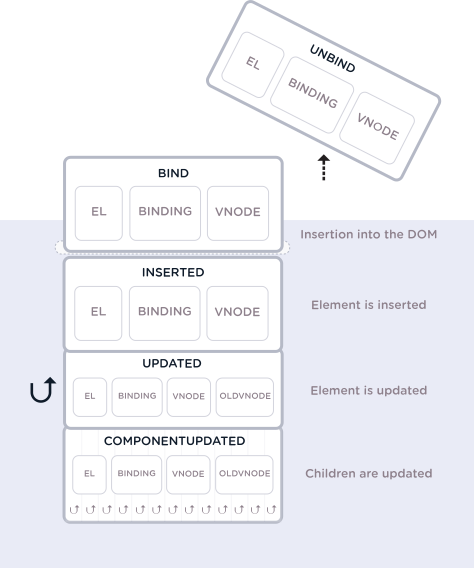
A directive object can provide several hook functions,
1. bind: This occurs once the directive is attached to the element.
2. inserted: This hook occurs once the element is inserted into the parent DOM.
3. update: This hook is called when the element updates, but children haven't been updated yet.
4. componentUpdated: This hook is called once the component and the children have been updated.
5. unbind: This hook is called only once when the directive is removed.
**Note:** There are several arguments that can be passed to the above hooks.
**[⬆ Back to Top](#table-of-contents)**
65. ### What are the directive Hook Arguments?
All the hooks have `el`, `binding`, and `vnode` as arguments. Along with that, **update** and **componentUpdated**
hooks expose `oldVnode`, to differentiate between the older value passed and the newer value. Below are the
arguments passed to the hooks,
1. `el`: The element the directive is bound to and it can be used to directly manipulate the DOM.
2. `binding`: An object containing the following properties.
1. `name`: The name of the directive, without the `v-` prefix.
2. `value`: The value passed to the directive. For example in `v-my-directive="1 + 1"`, the value would be 2.
3. `oldValue`: The previous value, only available in update and componentUpdated. It is available whether or not
the value has changed.
4. `expression`: The expression of the binding as a string. For example in `v-my-directive="1 + 1"`, the
expression would be "1 + 1".
5. `arg`: The argument passed to the directive, if any. For example in v-my-directive:foo, the arg would be "
foo".
6. `modifiers`: An object containing modifiers, if any. For example in v-my-directive.foo.bar, the modifiers
object would be `{ foo: true, bar: true }`.
3. `vnode`: The virtual node produced by Vue's compiler.
4. `oldVnode`: The previous virtual node, only available in the update and componentUpdated hooks.
The arguments can be represented diagrammatically across the hooks as below,
**[⬆ Back to Top](#table-of-contents)**
66. ### How do you pass multiple values to a directive?
A directive can take any valid javascript expression. So if you want to pass multiple values then you can pass in a
JavaScript object literal.
Let's pass object literal to an avatar directive as below
```vue
```
Now let us configure avatar directive globally,
```javascript
Vue.directive('avatar', function (el, binding) {
console.log(binding.value.width) // 500
console.log(binding.value.height) // 400
console.log(binding.value.url) // path/logo
console.log(binding.value.text) // "Iron Man"
})
```
**[⬆ Back to Top](#table-of-contents)**
67. ### What is function shorthand in directive hooks?
In few cases, you may want the same behavior on `bind` and `update` hooks irrespective of other hooks. In this
situation you can use function shorthand,
```javascript
Vue.directive('theme-switcher', function (el, binding) {
el.style.backgroundColor = binding.value
})
```
**[⬆ Back to Top](#table-of-contents)**
68. ### What is the benefit of render functions over templates?
In VueJS, the templates are very powerful and recommended to build HTML as part of your application. However, some
of the special cases like dynamic component creation based on input or slot value can be achieved through render
functions. Also, these functions gives the full programmatic power of javascript eco system.
**[⬆ Back to Top](#table-of-contents)**
69. ### What is a render function?
Render function is a normal function which receives a `createElement` method as it's first argument used to create
virtual nodes. Internally Vue.js' templates actually compile down to render functions at build time. Hence
templates are just syntactic sugar of render functions.
Let's take an example of simple Div markup and corresponding render function.
The HTML markup can be written in template tag as below,
```vue
Welcome to Vue render functions
```
and the compiled down or explicit render function would appear as below,
```javascript
render: function (createElement) {
return createElement('div', {
'class': {
'is-rounded': this.isRounded
}
}, [
createElement('p', 'Welcome to Vue render functions')
]);
}
```
**Note:** The react components are built with render functions in JSX.
**[⬆ Back to Top](#table-of-contents)**
70. ### Explain the structure of createElement with arguments?
The createElement accepts few arguments to use all the template features.
Let us see the basic structure of createElement with possible arguments,
```javascript
// @returns {VNode}
createElement(
// An HTML tag name, component options, or async function resolving to one of these.
// Type is {String | Object | Function}
// Required.
'div',
// A data object corresponding to the attributes you would use in a template.
// Type is {Object}
// Optional.
{
// Normal HTML attributes
attrs: {
id: 'someId'
},
// Component props
props: {
myProp: 'somePropValue'
},
// DOM properties
domProps: {
innerHTML: 'This is some text'
},
// Event handlers are nested under `on`
on: {
click: this.clickHandler
},
// Similar to `v-bind:style`, accepting either a string, object, or array of objects.
style: {
color: 'red',
fontSize: '14px'
},
// Similar to `v-bind:class`, accepting either a string, object, or array of strings and objects.
class: {
className1: true,
className2: false
}
// ....
},
// Children VNodes, built using `createElement()`, or using strings to get 'text VNodes'.
// Type is {String | Array}
// Optional.
[
'Learn about createElement arguments.',
createElement('h1', 'Headline as a child virtual node'),
createElement(MyComponent, {
props: {
someProp: 'This is a prop value'
}
})
]
)
```
See details of the date object in
official [doc](https://vuejs.org/v2/guide/render-function.html#The-Data-Object-In-Depth).
**[⬆ Back to Top](#table-of-contents)**
71. ### How can you write duplicate virtual nodes in a component?
All virtual nodes(VNodes) in the component tree must be unique.i.e, You can't write duplicated nodes in a
straightforward way. If you want to duplicate the same element/component many times then you should use factory
function.
The below render function is invalid where you are trying to duplicate h1 element 3 times,
```javascript
render: function (createElement) {
var myHeadingVNode = createElement('h1', 'This is a Virtual Node')
return createElement('div', [
myHeadingVNode, myHeadingVNode, myHeadingVNode
])
}
```
You can make duplicates with factory function,
```javascript
render: function (createElement) {
return createElement('div',
Array.apply(null, { length: 3 }).map(function () {
return createElement('h1', 'This is a Virtual Node')
})
)
}
```
**[⬆ Back to Top](#table-of-contents)**
72. ### List down the template equivalents in render functions?
VueJS provides proprietary alternatives and plain javascript usage for the template features.
Let's list down them in a table for comparison,
| Templates | Render function |
| ----------------------------------------------------------------------------------------------------------------- | -------------------------------------------------------------------------------------------------------------------------------------------------------------------------------------------- |
| Conditional and looping directives: v-if and v-for | Use JavaScript's if/else and map concepts |
| Two-way binding: v-model | Apply own JS logic with value binding and event binding |
| Capture Event modifiers: .passive, .capture, .once and .capture.once or .once.capture | &, !, ~ and ~! |
| Event and key modifiers: .stop, .prevent, .self, keys(.enter, .13) and Modifiers Keys(.ctrl, .alt, .shift, .meta) | Use javascript solutions: event.stopPropagation(), event.preventDefault(), if (event.target !== event.currentTarget) return, if (event.keyCode !== 13) return and if (!event.ctrlKey) return |
| Slots: slot attributes | Render functions provide this.$slots and this.$scopedSlots instance properties |
**[⬆ Back to Top](#table-of-contents)**
73. ### What are functional components?
The functional components are just simple functions to create simple components just by passing a context. Every
functional component follows two rules,
1. **Stateless:** It doesn't keep any state by itself
2. **Instanceless:** It has no instance, thus no this
You need to define `functional: true` to make it functional. Let's take an example of functional components,
```javascript
Vue.component('my-component', {
functional: true,
// Props are optional
props: {
// ...
},
// To compensate for the lack of an instance,
// we are now provided a 2nd context argument.
render: function (createElement, context) {
// ...
}
})
```
**Note:** The functional components are quite popular in React community too.
**[⬆ Back to Top](#table-of-contents)**
74. ### What are the similarities between VueJS and ReactJS?
Even though ReactJS and VueJS are two different frameworks there are few similarities(apart from the common goal of
utilized in interface design) between them.
1. Both frameworks are based on the **Virtual DOM** model
2. They provide features such Component-based structure and reactivity
3. They are intended for working with the root library, while all the additional tasks are transferred to other
libraries(routing, state management etc).
**[⬆ Back to Top](#table-of-contents)**
75. ### What is the difference between VueJS and ReactJS?
Even though VueJS and ReactJS share few common features there are many difference between them.
Let's list down them in a table format.
| Feature | VueJS | ReactJS |
| --------------------- | ------------------------------------ | -------------------------------------------------- |
| Type | JavaScript MVVM Framework | JavaScript Library |
| Platform | Primarily focused on web development | Both Web and Native |
| Learning Curve | Easy to learn the framework | A steep learning curve and requires deep knowledge |
| Simplicity | Vue is simpler than React | React is more complex than Vue |
| Bootstrap Application | Vue-cli | CRA (Create React App) |
**[⬆ Back to Top](#table-of-contents)**
76. ### What are the advantages of VueJS over ReactJS?
Vue has the following advantages over React
1. Vue is smaller and faster
2. The convenient templates ease the process of developing
3. It has simpler javascript syntax without learning JSX
**[⬆ Back to Top](#table-of-contents)**
77. ### What are the advantages of ReactJS over VueJS?
React has the following advantages over Vue
1. ReactJS gives more flexibility in large apps developing
2. Easy to test
3. Well-suited for mobile apps creation
4. The eco system is quite big and well matured.
**[⬆ Back to Top](#table-of-contents)**
78. ### What are the differences between VueJS and Angular?
The the syntax of Vue and Angular is common at some points because Angular is the basis for VueJS development in
the beginning.
But there are many differences between VueJS and Angular as listed,
| Feature | VueJS | Angular |
| --------------- | ------------------------------------------- | ------------------------------------------------------------------------ |
| Complexity | Easy to learn, simple API and design | The framework is bit huge and need some learning curve on typescript etc |
| Binding of Data | One-way binding | Two-way binding |
| Learning Curve | Easy to learn the framework | A steep learning curve and requires deep knowledge |
| Founders | Created by Former Google Employee | Powered by Google |
| Initial Release | February 2014 | September 2016 |
| Model | Based on Virtual DOM(Document Object Model) | Based on MVC(Model-View-Controller) |
**[⬆ Back to Top](#table-of-contents)**
79. ### What are dynamic components?
The dynamic component will allow you to dynamically switch between multiple components without updating the route
of the application and even retaining the state of the component when switching back to the initial component. It
works by using `` tag with `v-bind:is` attribute which accept dynamic component.
Let's create a dynamic component vue instance to switch between different pages of a website,
```javascript
new Vue({
el: '#app',
data: {
currentPage: 'home'
},
components: {
home: {
template: "
Home
"
},
about: {
template: "
About
"
},
contact: {
template: "
Contact
"
}
}
})
```
Now you can use the dynamic component which holds the current page,
```html
```
The component will be unmounted when it is switched away but it is possible to force the inactive component alive
using `` component
**Note:** The value of `:is` attribute can be either name of the registered component or the actual imported object
itself.
**[⬆ Back to Top](#table-of-contents)**
80. ### What is the purpose of keep alive tag?
Keep-alive tag is an abstract component used to preserve component state or avoid re-rendering. When you wrapped <
keep-alive> tag around a dynamic component, it caches the inactive component instances without destroying them.
Let's see the example usage of it,
```javascript
```
When there are multiple conditional children, it requires that only one child is rendered at a time.
```javascript
```
**Note:** Remember that keep-alive tag doesn't render a DOM element itself, and doesn't show up in the component
parent chain.
**[⬆ Back to Top](#table-of-contents)**
81. ### What are async components?
In large applications, we may need to divide the app into smaller chunks and only load a component from the server
when it's needed. To make this happen, Vue allows you to define your component as a factory function that
asynchronously resolves your component definition. These components are known as async component.
Let's see an example of async component using webpack code-splitting feature,
```javascript
Vue.component('async-webpack-example', function (resolve, reject) {
// Webpack automatically split your built code into bundles which are loaded over Ajax requests.
require(['./my-async-component'], resolve)
})
```
Vue will only trigger the factory function when the component needs to be rendered and will cache the result for
future re-renders.
**[⬆ Back to Top](#table-of-contents)**
82. ### What is the structure of async component factory?
Async component factory is useful to resolve the component asynchronously. The async component factory can return
an object of the below format.
```javascript
const AsyncComponent = () => ({
// The component to load (should be a Promise)
component: import('./MyComponent.vue'),
// A component to use while the async component is loading
loading: LoadingComponent,
// A component to use if the load fails
error: ErrorComponent,
// Delay before showing the loading component. Default: 200ms.
delay: 200,
// The error component will be displayed if a timeout is
// provided and exceeded. Default: Infinity.
timeout: 3000
})
```
**[⬆ Back to Top](#table-of-contents)**
83. ### What are inline templates?
If you keep an `inline-template` on a child component then it will use its inner content as a template instead of
treating as reusable independent content.
```javascript
Inline templates
Treated as component component owne content
```
**Note:** Even though this inline-templates gives more flexibility for template authoring, it is recommended to
define template using template property or tag inside .vue component.
**[⬆ Back to Top](#table-of-contents)**
84. ### What are X Templates?
Apart from regular templates and inline templates, you can also define templates using a script element with the
type `text/x-template` and then referencing the template by an id.
Let's create a x-template for simple use case as below,
```javascript
```
Now you can define the template using reference id,
```javascript
Vue.component('x-template-example', {
template: '#script-template'
})
```
**[⬆ Back to Top](#table-of-contents)**
85. ### What are recursive components?
The Components that can recursively invoke themselves in their own template are known as recursive components.
```javascript
Vue.component('recursive-component', {
template: `
`
});
```
Recursive components are useful for displaying comments on a blog, nested menus, or basically anything where the
parent and child are the same, eventhough with different content.
**Note:** Remember that recursive component can lead infinite loops with `max stack size exceeded` error, so make
sure recursive invocation is conditional(for example, v-if directive).
**[⬆ Back to Top](#table-of-contents)**
86. ### How do you resolve circular dependencies between components?
In complex applications, vue components will actually be each other's descendent and ancestor in the render tree.
Let's say componentA and componentB included in their respective templates which makes circular dependency,
```javascript
//ComponentA
```
```javascript
//ComponentB
```
This can be solved by either registering(or wait until) the child component in `beforeCreate` hook or using
webpack's asynchronous import while registering the component,
**Solution1:**
```javascript
beforeCreate: function () {
this.$options.components.componentB = require('./component-b.vue').default
}
```
**Solution2:**
```javascript
components: {
componentB: () => import('./component-b.vue')
}
```
**[⬆ Back to Top](#table-of-contents)**
87. ### How do you make sure vue application is CSP complaint?
Some environments(Google Chrome Apps) prohibits the usage of `new Function()` for evaluating expressions and the
full builds of vue applications depends on this feature to compile templates. Due to this reason, the full builds
of VueJS application are not CSP complaint.
In this case you can use **runtime-only** builds with Webpack + vue-loader or Browserify + vueify technology stack
through which templates will be precompiled into render functions. This way you can make sure VueJS applications
are 100% CSP complaint.
**[⬆ Back to Top](#table-of-contents)**
88. ### What is the difference between full and runtime only builds?
There are two types of builds provided by VueJS,
**1. Full:** These are the builds that contain both the compiler and the runtime.
**2. Runtime Only:** These builds doesn't include compiler but the code is responsible for creating Vue instances,
rendering and patching virtual DOM. These are about 6KB lighter min+gzip.
**[⬆ Back to Top](#table-of-contents)**
89. ### List down different builds of vuejs?
Below are the list of different builds of VueJS based on type of build,
| Type | UMD | CommonJS | ES Module (for bundlers) | ES Module (for browsers) |
| ------------------------- | ------------------ | --------------------- | ------------------------ | ------------------------ |
| Full | vue.js | vue.common.js | vue.esm.js | vue.esm.browser.js |
| Runtime only | vue.runtime.js | vue.runtime.common.js | vue.runtime.esm.js | NA |
| Full (production) | vue.min.js | NA | NA | vue.esm.browser.min.js |
| Runtime-only (production) | vue.runtime.min.js | NA | NA | NA |
**[⬆ Back to Top](#table-of-contents)**
90. ### How do you configure vuejs in webpack?
You can configure vueJS in webpack using alias as below,
```javascript
module.exports = {
// ...
resolve: {
alias: {
'vue$': 'vue/dist/vue.esm.js' // 'vue/dist/vue.common.js' for webpack 1
}
}
}
```
**[⬆ Back to Top](#table-of-contents)**
91. ### What is the purpose of vuejs compiler?
The compiler is is responsible for compiling template strings into JavaScript render functions.
For example, the below code snippet shows the difference of templates which need compiler and not,
```javascript
// this requires the compiler
new Vue({
template: '
{{ message }}
'
})
// this does not
new Vue({
render (h) {
return h('div', this.message)
}
})
```
**[⬆ Back to Top](#table-of-contents)**
92. ### What is Dev Tools and its purpose?
DevTools is a browser extension allowing you to inspect and debug your Vue applications in a more user-friendly
interface. You can find the below extensions for different browsers or environments,
1. Chrome Extension
2. Firefox Addon
3. Standalone Electron app (works with any environment)
The DevTools plugins can be used as shown in the below snapshot,
**Note:**
1. If the page uses a production/minified build of Vue.js, devtools inspection is disabled by default so the Vue
pane won't show up.
2. To make it work for pages opened via `file://` protocol, you need to check "Allow access to file URLs" for this
extension in Chrome's extension management panel.
**[⬆ Back to Top](#table-of-contents)**
93. ### What is the browser support of VueJS?
It supports all ECMAScript5 complaint browsers as mentioned in this [url](https://caniuse.com/#feat=es5). VueJS
doesn't support IE8 browser and below, because it uses ECMAScript 5 features that are un-shimmable(require support
from the underlying JS engine) in IE8.
**[⬆ Back to Top](#table-of-contents)**
94. ### How do you use various CDNs?
VueJS is available in jsdelivr, unpkg and cdnjs etc CDNs. Normally you can use them for prototyping or learning
purposes.
For example, you can use them using jsdelivr with latest versions as below,
```javascript
```
You can use it for native ES modules as below,
```javascript
```
**Note:** You can remove version number to get latest version.
**[⬆ Back to Top](#table-of-contents)**
95. ### How do you force update?
It is extremely rare situation of having to manually force an update despite the fact that no reactive data has
changed. i.e, To force the Vue instance to re-render manually. You can do it force update using **vm.$forceUpdate()
** API method.
**Note:** It does not affect all child components but only the instance itself and child components with inserted
slot content.
**[⬆ Back to Top](#table-of-contents)**
96. ### What is the purpose of vuejs once directive?
If you want to render `a lot of static content` then you need to make sure it only evaluated once and then cached
thereafter. In this case, you can use `v-once` directive by wrapping at the root level.
The example usage of v-once directive would be as below,
```javascript
Vue.component('legal-terms', {
template: `
Legal Terms
... a lot of static content goes here...
`
})
```
**Note:** It is recommended not to overuse unless there is slow rendering due to lot of static content.
**[⬆ Back to Top](#table-of-contents)**
97. ### How do you access the root instance?
The root instance(new Vue()) can be accessed with the `$root` property.
Let's see the usage of root instance with an example.
First let's create a root instance with properties and methods as below,
```javascript
// The root Vue instance
new Vue({
data: {
age: 26
},
computed: {
fullName: function () { /* ... */ }
},
methods: {
interest: function () { /* ... */ }
}
})
```
Now you can access root instance data and it's methods with in subcomponents as below,
```javascript
// Get root data
this.$root.age
// Set root data
this.$root.age = 29
// Access root computed properties
this.$root.fullName
// Call root methods
this.$root.interest()
```
It is recommend using Vuex to manage state instead of using root instance as a global store.
**[⬆ Back to Top](#table-of-contents)**
98. ### List out top 10 organizations using Vuejs?
Below are the top 10 organizations using VueJS for their applications or products,
1. Facebook - Used on marketing side of its Newsfeed
2. Netflix - Used in two internal apps for building movie streaming interfaces
3. Adobe - Used for Portfolio, a custom website builder designed to help users showcase their creative work
4. Xiaomi - Used for products where it sells from consumer electronics to software
5. Alibaba - Provide their apps an excellent experience to its customers
6. WizzAir - A budget airline WizzAir used for their customers user interface
7. EuroNews
8. Laracasts
9. GitLab
10. BMW
**[⬆ Back to Top](#table-of-contents)**
99. ### What is the purpose of renderError?
When the default render function encounters an error then you can use rennderError as an alternative render output.
The error will be passed to renderError as the second argument.
The example usage of renderError is as below,
```javascript
new Vue({
render (h) {
throw new Error('An error')
},
renderError (h, err) {
return h('div', { style: { color: 'red' }}, err.stack)
}
}).$mount('#app')
```
**[⬆ Back to Top](#table-of-contents)**
100. ### How do you access parent instance?
The $parent object refers to the **immediate outer scope**. The parent will be accessible as
`this.$parent` for the child, and the child will be pushed into the parent's $children array. It establishes a
parent-child relationship between the two instances(parent and child). You can access parent data and properties
similar to $root.
**[⬆ Back to Top](#table-of-contents)**
101. ### What is vuex?
Vuex is a state management pattern + library (Flux-inspired Application Architecture) for Vue.js applications. It
serves as a centralized store for all the components in an application, with rules ensuring that the state can only
be mutated in a predictable fashion.
**[⬆ Back to Top](#table-of-contents)**
102. ### What are the major components of State Management Pattern?
The state management has state, view and actions as major components. The pattern followed by these components in a
application is known as State Management Pattern. Below are the components in a detail,
1. The **state**, which is the source of truth that drives our app
2. The **view**, which is just a declarative mapping of the state
3. The **actions**, which are the possible ways the state could change in reaction to user inputs from the view.
Let us take a counter example which follows state management pattern with the above 3 components,
```javascript
new Vue({
// state
data () {
return {
count: 0
}
},
// view
template: `
{{ count }}
`,
// actions
methods: {
increment () {
this.count++
}
}
})
```
**[⬆ Back to Top](#table-of-contents)**
103. ### How do you represent one way data flow in vuex?
Vue.js has a one-way data flow model, through the props property. The same concept can be represented in vuex has
below,
**[⬆ Back to Top](#table-of-contents)**
104. ### What is a vuejs loader?
Vue loader is a loader for webpack that allows you to author Vue components in a format called Single-File
Components (SFCs).
For example, it authors HelloWorld component in a SFC,
```javascript
{{ message }}
```
**[⬆ Back to Top](#table-of-contents)**
105. ### How do you configure vue loader in webpack?
Vue Loader's configuration is a bit different from other loaders by adding Vue Loader's plugin to your webpack
config. The vue loader plugin is required for cloning any other rules(js and css rules) defined and applying them
to the corresponding language blocks(
```
//child.vue
```javascript
child
```
Now the background color of child wrapper is going to be blue instead red.
**[⬆ Back to Top](#table-of-contents)**
112. ### How do you style dynamic generated content using scoped css?
The scoped css style doesn't impact v-html directive's dynamically generated content. In this case, you can use
deep selectors to solve this styling issue.
**[⬆ Back to Top](#table-of-contents)**
113. ### Is CSS modules supported in Vuejs?
Yes, vue-loader provides first-class integration with CSS Modules as an alternative for simulated scoped CSS.
**[⬆ Back to Top](#table-of-contents)**
114. ### Can I use runtime builds for all templates?
No, templates (or any Vue-specific HTML) are ONLY allowed in .vue files and render functions are required in other
cases.
**[⬆ Back to Top](#table-of-contents)**
115. ### How to use CSS modules in vuejs?
Below are the steps to use css modules in VueJS,
1. **Enable CSS modules:** CSS Modules must be enabled by passing modules: true option to css-loader
```javascript
// webpack.config.js
{
module: {
rules: [
// ... other rules omitted
{
test: /\.css$/,
use: [
'vue-style-loader',
{
loader: 'css-loader',
options: {
// enable CSS Modules
modules: true,
// customize generated class names
localIdentName: '[local]_[hash:base64:8]'
}
}
]
}
]
}
}
```
2. **Add module attribute:** Add the module attribute to your `
```
3. **Inject CSS modules:** You can inject CSS modules object with computed property $style
```javascript
Background color should be in blue
```
It can work with object/array syntax of :class binding.
**[⬆ Back to Top](#table-of-contents)**
116. ### Can I use CSS modules for preprocessors?
Yes, you can use preprocessors with CSS Modules.
For example, sass-loader can configured in webpack file for sass preprocessor.
```javascript
// webpack.config.js -> module.rules
{
test: /\.scss$/,
use: [
'vue-style-loader',
{
loader: 'css-loader',
options: { modules: true }
},
'sass-loader'
]
}
```
**[⬆ Back to Top](#table-of-contents)**
117. ### Is it possible to use custom inject name for CSS modules?
You can customize the name of the injected computed property by giving the module attribute a value. This will be
helpful to avoid overwriting injected styled if you have more than one
```
**[⬆ Back to Top](#table-of-contents)**
118. ### What is hot reloading in vue loader?
Hot reloading is not about reloading the page when you edit any .vue file. Instead, when you edit a *.vue file, all
instances of that component will be swapped in without reloading the page. It improves the development experience
when you are tweaking the templates or styling of your components.
**[⬆ Back to Top](#table-of-contents)**
119. ### What is the default behavior of hot reloading?
Hot Reload is always enabled except below situations:
1. webpack target is node (SSR)
2. webpack minifies the code
3. process.env.NODE_ENV === 'production'
**[⬆ Back to Top](#table-of-contents)**
120. ### How do you disable hot reloading explicitly?
You can use `hotReload: false` option to disable the Hot Reload explicitly.
It can be configured as below,
```javascript
module: {
rules: [
{
test: /\.vue$/,
loader: 'vue-loader',
options: {
hotReload: false // disables Hot Reload
}
}
]
}
```
**[⬆ Back to Top](#table-of-contents)**
121. ### How do you use hot reloading?
The vue loader plugin internally uses hot reloading. If you are scaffolding project with `vue-cli`, hot reloading
comes out of the box but if you are manually setting up the project then hot reloading is enabled by default with
`webpack-dev-server --hot` command.
**[⬆ Back to Top](#table-of-contents)**
122. ### What are state preservation rules in hot reloading?
Below are the state preservation rules in hot reloading,
1. When editing the `` of a component, instances of the edited component will re-render in place,
preserving all current private state.
2. When editing the `
```
**Note:** You can use a specific version/tag via URLs like https://unpkg.com/vuex@2.0.0. If you don't mention any
version then it will point to latest version.
**[⬆ Back to Top](#table-of-contents)**
148. ### Do I need promise for vuex?
Yes, vuex requires Promise. If your supporting browsers do not implement Promise (e.g. IE), you can use a polyfill
library, such as es6-promise using npm or yarn.
```javascript
npm install es6-promise --save # NPM
yarn add es6-promise # Yarn
```
After that import into anywhere in your application,
```javascript
import 'es6-promise/auto'
```
**[⬆ Back to Top](#table-of-contents)**
149. ### How do you display store state in vue components?
Since Vuex stores are reactive, you can retrieve" state from store by simply returning store's state from within a
computed property. i.e, Whenever store state changes, it will cause the computed property to re-evaluate, and
trigger associated DOM updates.
Let's take a hello word component which display store's state in the template,
```javascript
// let's create a hello world component
const Greeting = {
template: `
{{ greet }}
`,
computed: {
greet () {
return store.state.msg
}
}
}
```
**[⬆ Back to Top](#table-of-contents)**
150. ### How do you inject store into child components?
Vuex provides a mechanism to "inject" the store into all child components from the root component with the store
option. It will be enabled by vue.use(vuex).
For example, let's inject into our app component as below,
```javascript
const app = new Vue({
el: '#app',
// provide the store using the "store" option.
// this will inject the store instance to all child components.
store,
components: { Greeting },
template: `
`
})
```
Now the store will be injected into all child components of the root and will be available on them as **this.$store
**
```javascript
// let's create a hello world component
const Greeting = {
template: `
{{ greet }}
`,
computed: {
greet () {
return this.$store.state.msg
}
}
}
```
**[⬆ Back to Top](#table-of-contents)**
151. ### What is mapState helper?
In Vuex application, creating a computed property every time whenever we want to access the store's state property
or getter is going to be repetitive and verbose, especially if a component needs more than one state property. In
this case, we can make use of the mapState helper of vuex which generates computed getter functions for us.
Let's take an increment example to demonstrate mapState helper,
```javascript
// in full builds helpers are exposed as Vuex.mapState
import { mapState } from 'vuex'
export default {
// ...
computed: mapState({
// arrow functions can make the code very succinct!
username: state => state.username,
// passing the string value 'username' is same as `state => state.username`
usernameAlias: 'username',
// to access local state with `this`, a normal function must be used
greeting (state) {
return this.localTitle + state.username
}
})
}
```
We can also pass a string array to mapState when the name of a mapped computed property is the same as a state sub
tree name
```javascript
computed: mapState([
// map this.username to store.state.username
'username'
])
```
**[⬆ Back to Top](#table-of-contents)**
152. ### How do you combine local computed properties with mapState helper?
You can use object spread operator syntax in order to combine mapState helper(which returns an object) with other
local computed properties. This way it simplify merging techniques using utilities.
```javascript
computed: {
localComputed () { /* ... */ },
// mix this into the outer object with the object spread operator
...mapState({
// ...
})
}
```
**[⬆ Back to Top](#table-of-contents)**
153. ### Do you need to replace entire local state with vuex?
No, if a piece of state strictly belongs to a single component, it could be just fine leaving it as local state.
i.e, Even though vuex used in the application, it doesn't mean that you need to keep all the local state in vuex
store. Other than that the code becomes more verbose and indirect although it makes your state mutations more
explicit and debuggable.
**[⬆ Back to Top](#table-of-contents)**
154. ### What are vuex getters??
Vuex getters acts as computed properties for stores to compute derived state based on store state. Similar to
computed properties, a getter's result is cached based on its dependencies, and will only re-evaluate when some of
its dependencies have changed.
Let's take a todo example which as completedTodos getter to find all completed todos,
```javascript
const store = new Vuex.Store({
state: {
todos: [
{ id: 1, text: 'Vue course', completed: true },
{ id: 2, text: 'Vuex course', completed: false },
{ id: 2, text: 'Vue Router course', completed: true }
]
},
getters: {
completedTodos: state => {
return state.todos.filter(todo => todo.completed)
}
}
})
```
**Note:** Getters receive state as first argument.
**[⬆ Back to Top](#table-of-contents)**
155. ### What is a property style access?
You can access values of store's getter object(store.getters) as properties. This is known as property style
access.
For example, you can access todo's status as a property,
```javascript
store.getters.todosStatus
```
The getters can be passed as 2nd argument for other getters. For example, you can derive completed todo's count
based on their status as below,
```javascript
getters: {
completedTodosCount: (state, getters) => {
return getters.todosStatus === 'completed'
}
}
```
**Note:** The getters accessed as properties are cached as part of Vue's reactivity system.
**[⬆ Back to Top](#table-of-contents)**
156. ### What is a method style access?
You can access store's state in a method style by passing arguments.
For example, you can pass user id to find user profile information as below,
```javascript
getters: {
getUserProfileById: (state) => (id) => {
return state.users.find(user => user.id === id)
}
}
```
After that you can access it as a method call,
```javascript
store.getters.getUserProfileById(111); {id: '111', name: 'John', age: 33}
```
**[⬆ Back to Top](#table-of-contents)**
157. ### What is mapGetter helper??
The mapGetters is a helper that simply maps store getters to local computed properties.
For example, the usage of getters for todo app would be as below,
```javascript
import { mapGetters } from 'vuex'
export default {
computed: {
// mix the getters into computed with object spread operator
...mapGetters([
'completedTodos',
'todosCount',
// ...
])
}
}
```
**[⬆ Back to Top](#table-of-contents)**
158. ### What are mutations?
Vuex mutations are similar to any events with a string `type` and a `handler`. The handler function is where we
perform actual state modifications, and it will receive the state as the first argument.
For example, the counter example with increment mutation would be as below,
```javascript
const store = new Vuex.Store({
state: {
count: 0
},
mutations: {
increment (state) {
// mutate state
state.count++
}
}
})
```
You can't directly invoke mutation instead you need to call `store.commit` with its type. The above mutation would
be triggered as follows
```javascript
store.commit('increment')
```
**[⬆ Back to Top](#table-of-contents)**
159. ### How do you commit with payload?
You can also pass **payload** for the mutation as an additional argument to `store.commit`.
For example, the counter mutation with payload object would be as below,
```javascript
mutations: {
increment (state, payload) {
state.count += payload.increment
}
}
```
And then you can trigger increment commit
```javascript
store.commit('increment', {
increment: 20
})
```
**Note:** You can also pass primitives as payload.
**[⬆ Back to Top](#table-of-contents)**
160. ### What is object style commit?
You can also commit a mutation is by directly using an object that has a **type** property.
```javascript
store.commit({
type: 'increment',
value: 20
})
```
Now the entire object will be passed as the payload to mutation handlers(i.e, without any changes to handler
signature).
```javascript
mutations: {
increment (state, payload) {
state.count += payload.value
}
}
```
**[⬆ Back to Top](#table-of-contents)**
161. ### What are the caveats with vuex mutations?
Since a Vuex store's state is made reactive by Vue, the same reactivity caveats of vue will apply to vuex
mutations. These are the rules should be followed for vuex mutations,
1. It is recommended to initialize store's initial state with all desired fields upfront
2. Add new properties to state Object either by set method or object spread syntax
```javascript
Vue.set(stateObject, 'newProperty', 'John')
```
(OR)
```javascript
state.stateObject = { ...state.stateObject, newProperty: 'John' }
```
**[⬆ Back to Top](#table-of-contents)**
162. ### Why mutations should be synchronous?
You need to remember that mutation handler functions must be synchronous. This is why because any state mutation
performed in the callback is essentially un-trackable. It is going to be problematic when the devtool will need to
capture a "before" and "after" snapshots of the state during the mutations.
```javascript
mutations: {
someMutation (state) {
api.callAsyncMethod(() => {
state.count++
})
}
}
```
**[⬆ Back to Top](#table-of-contents)**
163. ### How do you perform mutations in components?
You can commit mutations in components with either **this.$store.commit('mutation name')** or mapMutations helper
to map component methods to **store.commit** calls.
For example, the usage of mapMutations helper on counter example would be as below,
```javascript
import { mapMutations } from 'vuex'
export default {
methods: {
...mapMutations([
'increment', // map `this.increment()` to `this.$store.commit('increment')`
// `mapMutations` also supports payloads:
'incrementBy' // map `this.incrementBy(amount)` to `this.$store.commit('incrementBy', amount)`
]),
...mapMutations({
add: 'increment' // map `this.add()` to `this.$store.commit('increment')`
})
}
}
```
**[⬆ Back to Top](#table-of-contents)**
164. ### Is it mandatory to use constants for mutation types?
No, it is not mandatory. But you might observed that State management implementations such Flux and Redux use
constants for mutation types. This convention is just a preference and useful to take advantage of tooling like
linters, and putting all constants in a single file allows your collaborators to get an at-a-glance view of what
mutations are possible in the entire application.
For example, the mutations can be declared as below,
```javascript
// mutation-types.js
export const SOME_MUTATION = 'SOME_MUTATION'
```
And you can configure them in store as follows,
```javascript
// store.js
import Vuex from 'vuex'
import { SOME_MUTATION } from './mutation-types'
const store = new Vuex.Store({
state: { ... },
mutations: {
// ES2015 computed property name feature to use a constant as the function name
[SOME_MUTATION] (state) {
// mutate state
}
}
})
```
**[⬆ Back to Top](#table-of-contents)**
165. ### How do you perform asynchronous operations?
In Vuex, mutations are synchronous transactions. But if you want to handle asynchronous operations then you should
use **actions**.
**[⬆ Back to Top](#table-of-contents)**
166. ### What are differences between mutations and actions?
Actions are similar to mutations, but there are two main differences,
1. Mutations perform mutations on the state, actions commit mutations.
2. Actions can contain arbitrary asynchronous operations unlike mutations.
**[⬆ Back to Top](#table-of-contents)**
167. ### Give an example usage of actions?
Vuex provides actions property similar mutations property in order to define action handlers. These action handlers
receive context object as an argument which has same properties and methods of store instance.
Let's see counter example to demonstrate increment action which commits respective mutation,
```javascript
const store = new Vuex.Store({
state: {
count: 0
},
mutations: {
increment (state) {
state.count++
}
},
actions: {
increment (context) {
context.commit('increment')
}
}
})
```
**[⬆ Back to Top](#table-of-contents)**
168. ### How do you dispatch actions?
Actions are simply triggered with the store.dispatch method as below,
```javascript
store.dispatch('increment')
```
**[⬆ Back to Top](#table-of-contents)**
169. ### Can you dispatch an action using payload or object style?
Yes, actions support both payload and object style format similar to mutations.
```javascript
// dispatch with a payload
store.dispatch('incrementAsync', {
amount: 10
})
// dispatch with an object
store.dispatch({
type: 'incrementAsync',
amount: 10
})
```
**[⬆ Back to Top](#table-of-contents)**
170. ### Can I use Styled Components in VueJS?
Styled components is a CSS-in-JS library used mainly for ReactJS applications. If you want to use it for VueJS
applications, there is a VueJS styled components library port available, however, it is not a common practice.
**[⬆ Back to Top](#table-of-contents)**
171. ### How do you dispatch actions in components?
You can dispatch actions in components with **this.$store.dispatch('action name')**, or use the **mapActions**
helper which maps component methods to store.dispatch calls.
For example, you can dispatch increment actions in counter component as below,
```javascript
import { mapActions } from 'vuex'
export default {
// ...
methods: {
...mapActions([
'increment', // map `this.increment()` to `this.$store.dispatch('increment')`
// `mapActions` also supports payloads:
'incrementBy' // map `this.incrementBy(amount)` to `this.$store.dispatch('incrementBy', amount)`
]),
...mapActions({
add: 'increment' // map `this.add()` to `this.$store.dispatch('increment')`
})
}
}
```
**[⬆ Back to Top](#table-of-contents)**
172. ### How do you compose actions?
You can write multiple actions together to handle more complex async flows either by chaining promises or
async/await. i.e, `store.dispatch` can handle Promise returned by the triggered action handler and it also returns
Promise.
Let's take two actions to see how they are combined and handled async flows,
```javascript
actions: {
actionOne ({ commit }) {
return new Promise((resolve, reject) => {
setTimeout(() => {
commit('first mutation')
resolve()
}, 1000)
})
},
actionTwo ({ dispatch, commit }) {
return dispatch('actionA').then(() => {
commit('second mutation')
})
}
}
```
As per the above example, When you try to dispatch actionTwo it dispatches actionOne first and then commits
respective mutation. You can still simplify with async/await as below,
```javascript
actions: {
async actionOne ({ commit }) {
commit('first mutation', await getDataAsPromise())
},
async actionTwo ({ dispatch, commit }) {
await dispatch('actionOne') // wait for `actionA` to finish
commit('second mutation', await getSomeDataAsPromise())
}
}
```
**[⬆ Back to Top](#table-of-contents)**
173. ### What are modules in vuex?
If you keep all state of our application in a single big state, the store can get really bloated. To solve this
problem, Vuex allows us to divide our store into modules. Here, each module can contain its own state, mutations,
actions, getters, and even nested modules.
Let's take an example with multiple modules, configuring them in vuex and accessing different modules,
```javascript
const moduleOne = {
state: { ... },
mutations: { ... },
actions: { ... },
getters: { ... }
}
const moduleTwo = {
state: { ... },
mutations: { ... },
actions: { ... },
getters: { ... }
}
const store = new Vuex.Store({
modules: {
one: moduleOne,
two: moduleTwo
}
})
store.state.one // -> `moduleOne's state
store.state.two // -> `moduleTwo's state
```
**[⬆ Back to Top](#table-of-contents)**
174. ### What is module local state?
When you use modules the local state will be available to mutations, getters and actions in different ways.
1. Both mutations and getters will receive module local state as first argument.
```javascript
const moduleOne = {
state: { count: 0 },
mutations: {
increment (state) {
state.count++; // Here state refers local module state
}
},
getters: {
average (state) {
return state.count / 2
}
}
}
```
2. In actions, local state will be available as first argument.
```javascript
const moduleOne = {
actions: {
incrementConditional ({ state, commit, rootState }) {
if (state.count < rootState.count) {
commit('increment')
}
}
}
}
```
**[⬆ Back to Top](#table-of-contents)**
175. ### What is namespacing in vuex?
**[⬆ Back to Top](#table-of-contents)**
176. ### What is the default namespace behavior in vuex?
By default, actions, mutations and getters inside modules are still registered under the global namespace. Because
of that multiple modules react to the same mutation/action type.
**[⬆ Back to Top](#table-of-contents)**
177. ### When do you reuse modules?
Sometime you may need to create multiple instances of a module.
For example, it is needed in the below cases,
1. If multiple stores that use the same module
2. Register the same module multiple times in the same store.
In those cases, you need to assign to a variable and export it for reusability,
```javascript
const MyReusableModule = {
// state
// mutations, actions, getters...
}
```
**[⬆ Back to Top](#table-of-contents)**
178. ### What are the principles enforced by vuex?
Vuex enforces below high-level principles,
1. The Application-level state need to be centralized in the store
2. The state should be mutated by committing mutations only(i.e, for synchronous transactions)
3. The actions should be used for asynchronous transactions.
**[⬆ Back to Top](#table-of-contents)**
179. ### Can I perform mutations directly in strict mode?
In strict mode, you can't mutate state directly using `v-model` attribute. If you use v-model it throws an error
because mutation is not performed inside an explicit Vuex mutation handler.
For example, the below input throws an error due to v-model usage
```javascript
```
In this case, you need to bind the 's value. It can be resolved using value attribute as below,
```javascript
computed: {
...mapState({
username: state => state.user.username
})
},
methods: {
updateProfile (e) {
this.$store.commit('updateProfile', e.target.value)
}
},
mutations: {
updateProfile (state, username) {
state.user.username = username
}
}
```
**[⬆ Back to Top](#table-of-contents)**
180. ### How to use model directive with two way computed property?
You can still use model directive using two-way computed property with a setter.
```javascript
computed: {
username: {
get () {
return this.$store.state.user.username
},
set (value) {
this.$store.commit('updateProfile', value)
}
}
}
mutations: {
updateProfile (state, username) {
state.user.username = username
}
}
```
**[⬆ Back to Top](#table-of-contents)**
181. ### What is Vue CLI?
Vue CLI is a simple command line interface for scaffolding Vue.js projects. It will be helpful for rapid Vue.js
development. You can install the npm package globally as below,
```javascript
npm install -g @vue/cli
# OR
yarn global add @vue/cli
```
You can find the install version using `vue --version` command.
**Note:** Vue CLI requires Node.js version 8.9 or above (8.11.0+ recommended).
**[⬆ Back to Top](#table-of-contents)**
182. ### What are the features provided by Vue CLI?
VueCLI provides below major features,
1. Interactive project scaffolding via @vue/cli
2. A rich collection of official plugins integrating the best tools in the frontend ecosystem.
3. A full graphical user interface to create and manage Vue.js projects.
4. Zero config rapid prototyping via combination of @vue/cli and @vue/cli-service-global
5. A runtime dependency (@vue/cli-service) built on top of webpack and extensible via plugins
183. ### What is instant prototyping?
In Vue CLI, Instant prototyping is known as rapid prototyping with just a single *.vue file with the `vue serve`(
similar to vue create) and `vue build` commands. But you need to install below global addon for this.
```javascript
npm install -g @vue/cli-service-global
# or
yarn global add @vue/cli-service-global
```
You can also provide entry component for `vue serve` and target file for `vue build` using below commands
```javascript
vue serve MyComponent.vue
vue build MyComponent.vue
```
**[⬆ Back to Top](#table-of-contents)**
184. ### How do you create project using vue CLI?
You can create project using `vue create` command
```javascript
vue create my-app
```
You can either choose the default preset or select "Manually select features" to pick the features you need.
The default preset prompt would be as below,
and the manual select features would be as below,
**[⬆ Back to Top](#table-of-contents)**
185. ### How do you create project using GUI?
You can also create and manage projects using a graphical interface with the `vue ui` command. Once you apply this
command, it opens a browser window with a GUI that guides you through the project creation process.
**[⬆ Back to Top](#table-of-contents)**
186. ### What are plugins in vue CLI?
Vue CLI uses a plugin-based architecture where each plugin can modify the internal webpack configuration and inject
commands to `vue-cli-service`. i.e, Each feature is implemented as a plugin. This architecture makes Vue CLI
flexible and extensible.
**[⬆ Back to Top](#table-of-contents)**
187. ### How do you install plugins in an existing Vue CLI project?
You can install a plugin into an already created project with the `vue add` command.
```javascript
vue add @vue/eslint
(OR)
vue add @vue/cli-plugin-eslint
```
You can also add options for plugin
```javascript
vue add @vue/eslint --config airbnb --lintOn save
```
If a plugin is already installed, you can skip the installation and only invoke its generator with the `vue invoke`
command.
**[⬆ Back to Top](#table-of-contents)**
188. ### How to access local plugins in a project?
If you need access to the plugin API in your project without creating a full plugin, you can use the
`vuePlugins.service` option in your package.json file
```javascript
{
"vuePlugins": {
"service": ["my-service.js"]
}
}
```
**[⬆ Back to Top](#table-of-contents)**
189. ### How do you create UI plugins kind of behavior?
You can also add files that will behave like UI plugins with the `vuePlugins.ui` option
```javascript
{
"vuePlugins": {
"ui": ["my-ui.js"]
}
}
```
**[⬆ Back to Top](#table-of-contents)**
190. ### What are presets?
A Vue CLI preset is a JSON object that contains pre-defined options and plugins for creating a new project without
interactive prompts to select them. During project creation(using vue create), the presets will be saved in a
`~/.vuerc` which can modified at any time.
For example, the generated JSON object(or preset) would be as below
```javascript
{
"useConfigFiles": true,
"router": true,
"vuex": true,
"cssPreprocessor": "sass",
"plugins": {
"@vue/cli-plugin-babel": {},
"@vue/cli-plugin-eslint": {
"config": "airbnb",
"lintOn": ["save", "commit"]
}
}
}
```
**[⬆ Back to Top](#table-of-contents)**
191. ### What is the versioning behavior in preset plugins?
You can explicitly specify versions of the plugins being used.
```javascript
{
"plugins": {
"@vue/cli-plugin-eslint": {
"version": "^3.0.0",
// ... other options for this plugin
}
}
}
```
For official plugins, the CLI will automatically use the latest version available in the registry
**[⬆ Back to Top](#table-of-contents)**
192. ### How do you allow plugin prompts?
Each plugin can inject its own prompts during the project creation process irrespective of preset declarations
using **prompts: true** setting
For example, user can pick their own ESLint config using the below configuration
```javascript
{
"plugins": {
"@vue/cli-plugin-eslint": {
// let the users pick their own ESLint config
"prompts": true
}
}
}
```
**[⬆ Back to Top](#table-of-contents)**
193. ### What are remote presets?
You can share a preset with other developers by publishing it in a git repo. The repo can be published in either
github, GitLab or BitBucket.
The repo will contain below files,
1. **preset.json:** The main file containing the preset data and it is required.
2. **generator.js:** A generator that can inject or modify files in the project.
3. **prompts.js:** A prompts file that can collect options for the generator.
You can apply `--preset` option to use remote presets while creating the project
```javascript
# use preset from GitHub repo
vue create --preset username/repo my-project
```
**[⬆ Back to Top](#table-of-contents)**
194. ### Can I use local presets?
Yes, Vue CLI will load local presets if the value for the --preset option is a relative or absolute file path, or
ends with .json. i.e, You can work with local presets directly. These local presets avoids repeatedly pushing the
preset to a remote repo to test.
```javascript
// Directory contains preset.json file
vue create --preset ./my-preset my-project
(OR)
vue create --preset my-preset.json my-project
```
**[⬆ Back to Top](#table-of-contents)**
195. ### What is the purpose of browserslist option?
The `browserslist` option is available in package.json file in order to specify a range of browsers the project is
supported. This value is going to be used by babel and autoprefixer to transpile javascript features and applying
vendor prefixes.
For example, you can declare it as follows,
```javascript
"browserslist": [
"last 1 version",
"> 1%",
"IE 10"
]
```
**[⬆ Back to Top](#table-of-contents)**
196. ### How do you find VueJS version using API?
The community plugins and components might need different strategies for different versions. In this case, you can
use **Vue.version** which provides installed version of Vue as a string.
For example, you can implement different logic based on different versions
```javascript
let version = Number(Vue.version.split('.')[0])
if (version === 2) {
// Vue v2.x.x
} else if (version === 1) {
// Vue v1.x.x
} else {
// Unsupported versions of Vue
}
```
**[⬆ Back to Top](#table-of-contents)**
197. ### How do you create reactive objects?
In version 3.0 you can create a reactive object with the reactive() API.
```javascript
const reactiveState = reactive({
count: 0
})
```
In version 2.6, you can create reactive objects with Vue.observable() global API.
```javascript
const reactiveState = Vue.observable({
count: 0
})
```
These observable objects can be used directly in computed properties and render functions.
```javascript
const Demo = {
render(h) {
return h('button', {
on: { click: () => { reactiveState.count++ }}
}, `count is: ${state.count}`)
}
}
```
**[⬆ Back to Top](#table-of-contents)**
198. ### What is the purpose new slot directive?
In Vue 2.6 version, the new slot syntax is provided using v-slot directive which aligns syntax with Vue 3.0. This
is going to be replacement for old slot syntax.
The comparison for old and new slot syntax:
```javascript
text slot: {{ msg }}
text slot: {{ msg }}
```
**[⬆ Back to Top](#table-of-contents)**
199. ### What is the use of compile method?
VueJS provides compile method which is used to compile a template string into a render function. This method is
only available in the full build.
For example, you can compile template message:
```javascript
var result = Vue.compile('
{{ msg }}
')
new Vue({
data: {
msg: 'Welcome to Vue world'
},
render: result.render,
staticRenderFns: result.staticRenderFns
})
```
**[⬆ Back to Top](#table-of-contents)**
200. ### What does nextTick do in VueJS?
The nextTick method is just a comfortable way to execute a function after the data has been set, and the DOM has
been updated. As an example, the usage is going to be similar to setTimeout:
```javascript
// modify data
vm.msg = 'Welcome to Vue'
// DOM not updated yet
Vue.nextTick(function () {
// DOM updated
})
// usage as a promise (2.1.0+)
Vue.nextTick()
.then(function () {
// DOM updated
})
```
**[⬆ Back to Top](#table-of-contents)**
201. ### What is async error handling?
From 2.6 version onwards, Vue's built-in error handling mechanism can capture errors inside v-on handlers. Also,if
any of your lifecycle hooks or event handlers performs asynchronous operations, you can now return a Promise from
the function so that any uncaught errors from that Promise chain are also sent to your error handlers.
Let's take an example of mounted lifecycle hook,
```javascript
export default {
async mounted() {
// if an async error is thrown here, it now will get
// caught by errorCaptured and Vue.config.errorHandler
this.todos = await api.getTodos()
}
}
```
**[⬆ Back to Top](#table-of-contents)**
202. ### What are Dynamic Directive Arguments?
In Vue 2.6 release onwards, Directive arguments can now accept dynamic JavaScript expressions. i.e, the specific
argument that we want to use is only known at runtime.
Let's assign dynamic key and event directives for a div element,
```javascript
```
**[⬆ Back to Top](#table-of-contents)**
203. ### What are the drawbacks of dynamic directive arguments?
Apart from the benefits of dynamic directives arguments, it brings two drawbacks or considerations on the usage
1. **Constraints on expressions:** When you perform complex JavaScript expressions, make sure that html attribute
names cannot contain spaces and quotes.
The below expression doesn't work as expected
```javascript
```
Instead you may need to use string template syntax
```javascript
```
2. **Custom Directives:** The custom directive implementations need to have potential argument changes in addition
to value changes.
**[⬆ Back to Top](#table-of-contents)**
204. ### What is the special handling for null values in dynamic directive arguments?
Dynamic argument values are expected to be strings but it allows `null` as a special value that explicitly
indicates that the binding should be removed. Other types will be treated as mistakes and will trigger a warning.
So null value can be applied for v-bind and v-on.
**[⬆ Back to Top](#table-of-contents)**
205. ### Can I use dynamic directive null value for slots?
No. It can be applied only for v-bind and v-on but not v-slot. This is because v-slot is not a binding and cannot
be removed.
**[⬆ Back to Top](#table-of-contents)**
206. ### What is Vue I18n plugin?
Vue I18n is an internationalization plugin of Vue.js. It easily integrates some localization features to your
Vue.js Application.
The simple usage with in html would be as below,
```javascript
{{ $t("user.message") }}
```
and after that configure them in javascript
```javascript
// Ready translated locale messages
const messages = {
en: {
user: {
message: 'Good morning'
}
},
de: {
user: {
message: 'Guten Morgen'
}
}
}
// Create VueI18n instance with options
const i18n = new VueI18n({
locale: 'de', // set locale
messages, // set locale messages
})
// Create a Vue instance with `i18n` option
new Vue({ i18n }).$mount('#app')
```
The output is going to be like this,
Guten Morgen
**[⬆ Back to Top](#table-of-contents)**
207. ### What are the types of formatting?
Basically there are 4 types of formatting available in i18n plugin,
1. **Named formatting:** First You need to define the message keys in curly braces({})
```javascript
const messages = {
en: {
message: {
greeting: '{msg} Morning'
}
}
}
```
After that pass argument value along with key in the template
```javascript
{{ $t('message.greeting', { msg: 'Good' }) }}
```
It outputs the result as below,
```javascript
Good Morning
```
2. **List formatting:** First you need to define zero index based keys in the messages,
```javascript
const messages = {
en: {
message: {
greeting: '{0} Morning'
}
}
}
```
After that pass argument value with in an array
```javascript
{{ $t('message.greeting', ['Good']) }}
```
Finally it outputs the result as below,
```javascript
Good morning
```
**Note:** It also accepts array-like object
```javascript
{{ $t('message.greeting', {'0': 'Good'}) }}
```
3. **HTML formatting:** This formatting is required when want to render your translation as an HTML message and not
a static string.
```javascript
const messages = {
en: {
message: {
greeting: 'Good Morning'
}
}
}
```
After that use it in the html directive template as below
```javascript
```
Finally it outputs the result as below
```javascript
Good
Morning
```
4. **Ruby on rails format:** First you need to define with percentile and curly braces as below,
```javascript
const messages = {
en: {
message: {
greeting: '%{msg} Morning'
}
}
}
```
After that pass argument with key similar to named formatting
```javascript
{{ $t('message.greeting', { msg: 'Good' }) }}
```
Finally it renders the output as below,
```javascript
Good Morning
```
**[⬆ Back to Top](#table-of-contents)**
208. ### What is custom formatting?
You can use custom formatting for some of the formatting cases such as ICU formatting syntax (message "pattern"
strings with variable-element placeholders enclosed in {curly braces}). It implement Formatter Interface.
```javascript
// Custom Formatter implementation
class CustomFormatter {
constructor (options) {
// ...
}
interpolate (message, values) {
// return the interpolated array
return ['resolved message string']
}
}
// register with `formatter` option
const i18n = new VueI18n({
locale: 'en-US',
formatter: new CustomFormatter(/* here the constructor options */),
messages: {
'en-US': {
// ...
},
// ...
}
})
// Run!
new Vue({ i18n }).$mount('#app')
```
**[⬆ Back to Top](#table-of-contents)**
209. ### How do you handle Pluralization?
You can translate with pluralization by defining the locale that have a pipe | separator, and define plurals in
pipe separator. Remember that template should use $tc() instead of $t().
First you need to define the messages,
```javascript
const messages = {
en: {
user: 'user | users',
friend: 'no friend | one friend | {count} friends'
}
}
```
And the template can configure the messages with values
```javascript
{{ $tc('user', 1) }}
{{ $tc('user', 10) }}
{{ $tc('friend', 0) }}
{{ $tc('friend', 1) }}
{{ $tc('friend', 10, { count: 10 }) }}
```
Finally it outputs the result as below
```javascript
user
users
no friend
one friend
10 friends
```
**[⬆ Back to Top](#table-of-contents)**
210. ### How to implement DateTime localization?
You can localize the datetime with definition formats(e.g. short, long, etc).
Lets follow below steps to localize date and time,
1. For example, you can add definition formats for English and Jappan locale as below
```javascript
const dateTimeFormats = {
'en-US': {
short: {
year: 'numeric', month: 'short', day: 'numeric'
},
long: {
year: 'numeric', month: 'short', day: 'numeric',
weekday: 'short', hour: 'numeric', minute: 'numeric'
}
},
'ja-JP': {
short: {
year: 'numeric', month: 'short', day: 'numeric'
},
long: {
year: 'numeric', month: 'short', day: 'numeric',
weekday: 'short', hour: 'numeric', minute: 'numeric', hour12: true
}
}
}
```
2. After that You need to specify the dateTimeFormats option of VueI18n constructor
```javascript
const i18n = new VueI18n({
dateTimeFormats
})
new Vue({
i18n
}).$mount('#app')
```
3. And then add them to the template
```javascript
{{ $d(new Date(), 'short') }}
{{ $d(new Date(), 'long', 'ja-JP') }}
```
4. Finally it outputs the result
```javascript
May 20, 2019
2019年5月20日
```
**[⬆ Back to Top](#table-of-contents)**
211. ### How do you implement Number localization?
You can localize the number with definition formats(e.g. currency, etc)
Lets follow below steps to localize numbers,
1. You need to add definition formats. For example, lets add it for English and Japanese locales
```javascript
const numberFormats = {
'en-US': {
currency: {
style: 'currency', currency: 'USD'
}
},
'ja-JP': {
currency: {
style: 'currency', currency: 'JPY', currencyDisplay: 'symbol'
}
}
}
```
2. After that specify the numberFormats option of VueI18n constructor
```javascript
const i18n = new VueI18n({
numberFormats
})
new Vue({
i18n
}).$mount('#app')
```
3. Now let's configure them in template
```javascript
{{ $n(10, 'currency') }}
{{ $n(50, 'currency', 'ja-JP') }}
```
4. Finally it outputs the result
```javascript
$10.00
¥50
```
**[⬆ Back to Top](#table-of-contents)**
212. ### How do you perform locale changing?
All child components of a root instance are localized using the locale property of the VueI18n class. You can
change the value of the locale property of the VueI18n instance as below.
```javascript
const i18n = new VueI18n({
locale: 'de', // set locale
...
})
// create root Vue instance
new Vue({
i18n,
...
}).$mount('#app')
// change other locale
i18n.locale = 'en'
```
You can also use component's VueI18n instance referenced as the $i18n property which will be used to change the
locale.
```javascript
```
**[⬆ Back to Top](#table-of-contents)**
213. ### What is Lazy loading translations?
The loading of all translation files at once is unnecessary and it may impact the performance too. It will be easy
for lazy loading or asynchronously loading the translation files when you use webpack. i.e, You can dynamically
load or import language translations using webpack as below,
```javascript
//i18n-setup.js
import Vue from 'vue'
import VueI18n from 'vue-i18n'
import messages from '@/lang/en'
import axios from 'axios'
Vue.use(VueI18n)
export const i18n = new VueI18n({
locale: 'en', // set locale
fallbackLocale: 'en',
messages // set locale messages
})
const loadedLanguages = ['en'] // our default language that is preloaded
function setI18nLanguage (lang) {
i18n.locale = lang
axios.defaults.headers.common['Accept-Language'] = lang
document.querySelector('html').setAttribute('lang', lang)
return lang
}
export function loadLanguageAsync (lang) {
if (i18n.locale !== lang) {
if (!loadedLanguages.includes(lang)) {
return import(/* webpackChunkName: "lang-[request]" */ `@/lang/${lang}`).then(msgs => {
i18n.setLocaleMessage(lang, msgs.default)
loadedLanguages.push(lang)
return setI18nLanguage(lang)
})
}
return Promise.resolve(setI18nLanguage(lang))
}
return Promise.resolve(lang)
}
```
After that loadLanguageAsync function can be used inside a vue-router beforeEach hook.
```javascript
router.beforeEach((to, from, next) => {
const lang = to.params.lang
loadLanguageAsync(lang).then(() => next())
})
```
**[⬆ Back to Top](#table-of-contents)**
214. ### What is the main difference between method and computed property?
The main difference between a computed property and a method is that computed properties are cached and
invoke/change only when their dependencies change. Whereas a method will evaluate every time it's called.
**[⬆ Back to Top](#table-of-contents)**
215. ### What is vuetify?
Vuetify is a semantic component material framework for Vue. It aims to provide clean, semantic and reusable
components that make building application easier. The installation and configuration is simple as below,
```javascript
npm install Vuetify
```
```javascript
import Vue from 'vue'
import Vuetify from 'vuetify' // Import Vuetify to your project
Vue.use(Vuetify) // Add Vuetify as a plugin
```
**[⬆ Back to Top](#table-of-contents)**
216. ### How do you watch for nested data changes?
You can use deep watcher by setting `deep: true` in the options object. This option enables us to detect nested
value changes inside Objects.
```javascript
vm.$watch('someObject', callback, {
deep: true
})
vm.someObject.nestedValue = 123
// callback is fired
```
**Note:** This is not required to listen for Array mutations.
**[⬆ Back to Top](#table-of-contents)**
217. ### How to trigger watchers on initialization?
You can use `immediate: true` option in order to trigger watchers when the vue instance (or component) is being
created. i.e This option will trigger the callback immediately with the current value of the expression.
```javascript
watch: {
test: {
immediate: true,
handler(newVal, oldVal) {
console.log(newVal, oldVal)
},
},
},
```
**[⬆ Back to Top](#table-of-contents)**
218. ### What is the purpose of comments option?
When `comments` option enabled, it will preserve and render HTML comments found in templates. By default, it's
value is false. Let's see the action in an example,
```javascript
{{ msg }}
```
**Note:** This option is only available in the full build, with in-browser compilation. i.e, It won't work with
Single File Components(SFC).
**[⬆ Back to Top](#table-of-contents)**
219. ### How to identify whether code is running on client or server?
You can use `vm.$isServer` method to know whether the current Vue instance is running on the server or client.
The usage would be as below,
```javascript
const Vue = require('vue');
Vue.prototype.$isServer
(OR)
this.$isServer // With in component
```
**[⬆ Back to Top](#table-of-contents)**
220. ### How do you watch route object changes?
You can setup a watcher on the `$route` in your component. It observes for route changes and when changed ,sets the
message property.
```javascript
watch:{
$route (to, from){
this.message = 'Welcome';
}
}
```
**[⬆ Back to Top](#table-of-contents)**
221. ### How do you sync current route in vuex store?
You can use `vue-router-sync` library to sync current $route object in vuex store's state.
The usage is quite straight forward with two steps
1. **Installation:**
```bash
npm install vuex-router-sync
```
2. **Sync router and store:**
```javascript
import { sync } from 'vuex-router-sync'
import store from './vuex/store' // vuex store instance
import router from './router' // vue-router instance
const unsync = sync(store, router) // Returns an unsync callback function
unsync() // Unsyncs store from router
```
**[⬆ Back to Top](#table-of-contents)**
222. ### What are navigation guards in vue router?
The navigation guards of vue-router are used to protect navigations either by redirecting it or canceling it.
Below are the 3 different ways to hook into router navigations
1. Global:
2. Per-route:
3. In-component:
**[⬆ Back to Top](#table-of-contents)**
223. ### Can I use computed property in another computed property?
Yes, you can access it directly as you would data props.
For example, the comboTwo computed property uses comboOne computed property as below,
```javascript
data() {
return {
propOne: 'prop1',
propTwo: 'prop2'
}
},
computed: {
comboOne() {
return this.propOne + ',' + this.propTwo;
},
comboTwo() {
return this.comboOne.split(',').join('-');
}
}
```
**[⬆ Back to Top](#table-of-contents)**
224. ### How can I use imported constant in template section?
The variables need to be exposed on your data in order to use them in template section. i.e, You can't use them
directly on template.
```javascript
CREATE: {{CREATE_PROP}}
UPDATE: {{UPDATE_PROP}}
DELETE: {{DELETE_PROP}}
```
**[⬆ Back to Top](#table-of-contents)**
225. ### Is recommended to use async for computed properties?
No, it is not recommended. Computed properties should be synchronous. But if you still use asynchronous actions
inside them, they may not work as expected and can lead to an unexpected behaviour.
For example, the below usage of async/await is not recommended,
```javascript
async someComputedProperty () {
return await someFunction()
},
```
**Note:** If you still prefer to use async computed properties for some reason then you can consider using
additional plugin such as `vue-async-computed`.
**[⬆ Back to Top](#table-of-contents)**
226. ### What happens if you use duplicate field names?
**[⬆ Back to Top](#table-of-contents)**
227. ### Why the component data must be a function?
The component data must be a function instead directly providing the object. This is because each instance needs to
maintain an independent copy of the returned data object. Otherwise one component instance data changes will impact
the data of all other instances.
For example, the below code snippets gives an idea on correct approach,
```js
data: { // Bad
message: 'Hello'
}
data: function () { //Good
return {
message: 'Hello'
}
}
```
**[⬆ Back to Top](#table-of-contents)**
228. ### What is the reason for recommendation for multi-word component names?
Component names should always be multi-word, except for root level or built-in vue components(such as
`` or `` etc). This recommendation is to prevent conflicts with existing and future HTML
elements, since all HTML elements are a single word.
```js
Vue.component('user', { //bad approach
// ...
})
Vue.component('user-profile', { //good approach
// ...
})
```
**[⬆ Back to Top](#table-of-contents)**
229. ### What is the best way to re-render a component?
The best way to force Vue to re-render a component is to set a `:key` on the component. i.e, Whenever the component
to be re-rendered, just change the value of the key then Vue will re-render the component.
**[⬆ Back to Top](#table-of-contents)**
230. ### How does reactivity works with ref?
VueJS automatically detects the changes to ref's value and updates the DOM with a dependency-tracking based
reactivity system.
1. When a component is rendered for the first time, it tracks every ref that was used during the render.
2. Whenever a ref is mutated, it will trigger a re-render of the component.
231. ### How to use composition API in Vue2.0?
Vue 2.0 does not have native support for the Composition API, but you can use it via the official plugin:
`@vue/composition-api`.
Let's see the usage in step-by-step instructions,
1. Install the Plugin
```javascript
npm install @vue/composition-api
# or
yarn add @vue/composition-api
```
2. Register the plugin in your `main.js` file,
```javascript
import Vue from 'vue';
import VueCompositionAPI from '@vue/composition-api';
Vue.use(VueCompositionAPI);
new Vue({
render: h => h(App),
}).$mount('#app');
```
3. Using Composition API in Components
You can now use `ref`, `reactive`, `computed`, `watch`, `onMounted`, etc., in your Vue 2 components.
#### Example: Counter Component
```javascript
Count: {{ count }}
```
**Note:**
- The `@vue/composition-api` plugin is compatible with **Vue 2.6+**.
- It does **not include all Vue 3 features** (e.g., `
```
* `ref()` creates a **reactive reference** to a primitive value.
* `count.value` is how you access/update the value inside a `ref`.
2. **Reactive State:** `**ref()**` **and** `**reactive()**`
##### `ref()`
* Used for **primitive values**.
* Wraps a value in a reactive object.
```js
const message = ref('Hello');
message.value = 'Hi';
```
##### `reactive()`
* Used for **objects**.
* Deeply reactive, making every property reactive.
```js
const user = reactive({ name: 'Alice', age: 25 });
user.age++;
```
3. **Computed Properties**
Creates values that automatically update when dependencies change.
```js
import { ref, computed } from 'vue';
setup() {
const firstName = ref('John');
const lastName = ref('Doe');
const fullName = computed(() => `${firstName.value} ${lastName.value}`);
return { fullName };
}
```
4. **Watchers**
Both `watch()` and `watchEffect()` are used to run side effects when data changes:
```js
watch(count, (newVal, oldVal) => {
console.log('Count changed:', newVal);
});
watchEffect(() => {
console.log('Count is now', count.value);
});
```
5. **Lifecycle Hooks**
Composition API uses new lifecycle hooks imported from Vue.
```js
import { onMounted, onUnmounted } from 'vue';
onMounted(() => {
console.log('Component is mounted');
});
onUnmounted(() => {
console.log('Component is unmounted');
});
```
6. **Reusable Logic with Composables**
You can encapsulate logic in **composable functions** and reuse across components:
Example: Reuse logic of counter using `useCounter.js`
```js
import { ref } from 'vue';
export function useCounter(initialValue = 0) {
const count = ref(initialValue);
const increment = () => count.value++;
const decrement = () => count.value--;
const reset = () => count.value = initialValue;
return { count, increment, decrement, reset };
}
```
Using it in a component
```js
Count: {{ count }}
```
**[⬆ Back to Top](#table-of-contents)**
233. ### What are the benefits of composition API?
The composition API provides several benefits over the traditional Options API as listed below.
1. Better logic reuse and code organization:
2. Better typescript support:
3. Easier testing
4. Smaller production bundles
**[⬆ Back to Top](#table-of-contents)**
234. ### What are composition functions?
Composition API is a set of additive, function-based APIs that allow flexible composition of component logic.
**[⬆ Back to Top](#table-of-contents)**
235. ### What is teleport?
The `` component allows you to render a part of your component's template into a different location in
the DOM — outside the current component's hierarchy.
#### Example:
1. Wrap teleport component around the modal template inside `app.vue` file
```js
Page Content
This is a modal rendered with teleport
```
2. Render modal component inside main `index.html` file
```js
```
In Vue 2, this functionality was possible via the community plugin `portal-vue`
#### Use cases
1. Modals
2. Toasts
3. Tooltips
4. Context menus
5. Dropdowns
6. Anything that needs to break out of DOM nesting
**[⬆ Back to Top](#table-of-contents)**
236. ### What is the purpose of html directive?
The `v-html` directive is used to update the inner html of a DOM element with latest data. It is similar to
innerHTML property in DOM.
The example usage of this directive as shown below,
```javascript
{{ htmlContent }}
```
**Note:** This directive should be used with trused content only but not on user provided content. Otherwise it can
leads to XSS vulnerabilities.
**[⬆ Back to Top](#table-of-contents)**
237. ### What are the key differences between Vue 2 and Vue 3?
| Feature | Vue 2 | Vue 3 |
| ------------------ | ------------------------- | ------------------------------------ |
| API Style | Options API | Composition API + Options API |
| Reactivity System | `Object.defineProperty()` | Proxy-based (faster & more reliable) |
| Performance | Moderate | Improved (~2x faster in some cases) |
| Tree-shaking | Limited | Fully tree-shakable |
| TypeScript Support | Partial | Built-in and first-class support |
| Fragment Support | Not supported | Supported |
| Teleport/Portals | Plugin-based | Native support |
| Suspense | Not available | Native support for async components |
**[⬆ Back to Top](#table-of-contents)**
238. ### What is watch() and how is it used?
The `watch()` function observes a **reactive source**((like `ref`, `reactive`, getter functions or computed values)) and
runs a **callback function** whenever that source changes.
**Syntax:**
```js
watch(source, callback, options ?)
```
- **source:** a ref, reactive property, getter function, or array of them.
- **callback(newValue, oldValue):** function to run when the value changes.
- **options (optional):** object to control behavior (e.g., immediate, deep).
#### Example 1: Watching a `ref`
```js
import {ref, watch} from 'vue';
const count = ref(0);
watch(count, (newVal, oldVal) => {
console.log(`Count changed from ${oldVal} to ${newVal}`);
});
count.value = 5; // triggers the watch callback
```
#### Example 2: Watching a function (getter)
```js
const firstName = ref('Sudheer');
const lastName = ref('Jonna');
watch(
() => `${firstName.value} ${lastName.value}`,
(newFullName, oldFullName) => {
console.log(`Full name changed from ${oldFullName} to ${newFullName}`);
}
);
```
#### Example 3: Watching a `reactive` object deeply
```javascript
import {reactive, watch} from 'vue';
const user = reactive({name: 'Sudheer', age: 38});
watch(
() => user,
(newUser, oldUser) => {
console.log('User object changed:', newUser);
},
{deep: true}
);
```
The main uses of `watch()` are:
1. Watching route changes
2. Triggering API calls
3. Responding to complex data changes
4. Manually reacting to specific state updates
**[⬆ Back to Top](#table-of-contents)**
239. ### What is watch() and how is it used?
In **Composition API**, lifecycle hooks are functions you call **inside the `setup()` function** to hook into different
stages of a component's lifecycle. These hooks replace the traditional options API lifecycle methods (like `created()`,
`mounted()`, etc.) with function-based hooks that are imported from Vue.
#### Main Lifecycle Hooks
| Lifecycle Stage | Composition API Hook | Description |
| ------------------------- | -------------------- | ------------------------------------------------------- |
| Before component creation | `onBeforeMount()` | Called right before the component is mounted |
| Component mounted | `onMounted()` | Called after the component has been mounted |
| Before update | `onBeforeUpdate()` | Called before the component updates the DOM |
| After update | `onUpdated()` | Called after the component updates the DOM |
| Before unmount | `onBeforeUnmount()` | Called right before the component is unmounted |
| Component unmounted | `onUnmounted()` | Called after the component is unmounted |
| Error captured | `onErrorCaptured()` | Called when an error from a child component is captured |
| Activated (keep-alive) | `onActivated()` | Called when a kept-alive component is activated |
| Deactivated (keep-alive) | `onDeactivated()` | Called when a kept-alive component is deactivated |
The above hooks can be imported from `vue` and used inside `setup()` function. For example, the usage of hooks will be
as follows,
```js
import {onMounted, onBeforeUnmount} from 'vue'
export default {
setup() {
onMounted(() => {
console.log('Component is mounted!')
})
onBeforeUnmount(() => {
console.log('Component is about to unmount')
})
}
}
```
**[⬆ Back to Top](#table-of-contents)**
240. ### Whats the difference between `watch()` and `watchEffect()`?
Both watch and watchEffect are Composition API functions used for reactivity, but they serve different purposes and
behave differently.
**watch:** It is used to watch specific reactive sources (like ref or computed) and respond to changes. This
function is lazy. i.e, The callback is not called immediately but only on changes. It is useful when you need to
access both old and new values, and performs side-effects conditionally.
```js
watch(count, (newVal, oldVal) => {
console.log('Count changed:', newVal);
});
```
**watchEffect:** This function is automatic and eager. It runs a function immediately and tracks its dependencies
automatically. It cannot access old values directly.
```js
watchEffect(() => {
console.log(`Count is ${count.value}`);
});
```
**[⬆ Back to Top](#table-of-contents)**
241.

 1. **Creation(Initialization):**
Creation Hooks allow you to perform actions before your component has even been added to the DOM. You need to use
these hooks if you need to set things up in your component both during client rendering and server rendering.
Unlike other hooks, creation hooks are also run during server-side rendering.
1. beforeCreate:
This hook runs at the very initialization of your component. hook observes data and initialization events in
your component. Here, data is still not reactive and events that occur during the component's lifecycle have
not been set up yet.
```javascript
new Vue({
data: {
count: 10
},
beforeCreate: function () {
console.log('Nothing gets called at this moment')
// `this` points to the view model instance
console.log('count is ' + this.count);
}
})
// count is undefined
```
2. created:
This hook is invoked when Vue has set up events and data observation. Here, events are active and access to
reactive data is enabled though templates have not yet been mounted or rendered.
```javascript
new Vue({
data: {
count: 10
},
created: function () {
// `this` points to the view model instance
console.log('count is: ' + this.count)
}
})
// count is: 10
```
**Note:** Remember that, You will not have access to the DOM or the target mounting element (this.$el) inside of
creation hooks
2. **Mounting(DOM Insertion):**
Mounting hooks are often the most-used hooks and they allow you to access your component immediately before and
after the first render.
1. beforeMount:
The beforeMount allows you to access your component immediately before and after the first render.
```javascript
new Vue({
beforeMount: function () {
// `this` points to the view model instance
console.log(`this.$el is yet to be created`);
}
})
```
2. mounted:
This is a most used hook and you will have full access to the reactive component, templates, and rendered
DOM (via. this.$el). The most frequently used patterns are fetching data for your component.
```javascript
1. **Creation(Initialization):**
Creation Hooks allow you to perform actions before your component has even been added to the DOM. You need to use
these hooks if you need to set things up in your component both during client rendering and server rendering.
Unlike other hooks, creation hooks are also run during server-side rendering.
1. beforeCreate:
This hook runs at the very initialization of your component. hook observes data and initialization events in
your component. Here, data is still not reactive and events that occur during the component's lifecycle have
not been set up yet.
```javascript
new Vue({
data: {
count: 10
},
beforeCreate: function () {
console.log('Nothing gets called at this moment')
// `this` points to the view model instance
console.log('count is ' + this.count);
}
})
// count is undefined
```
2. created:
This hook is invoked when Vue has set up events and data observation. Here, events are active and access to
reactive data is enabled though templates have not yet been mounted or rendered.
```javascript
new Vue({
data: {
count: 10
},
created: function () {
// `this` points to the view model instance
console.log('count is: ' + this.count)
}
})
// count is: 10
```
**Note:** Remember that, You will not have access to the DOM or the target mounting element (this.$el) inside of
creation hooks
2. **Mounting(DOM Insertion):**
Mounting hooks are often the most-used hooks and they allow you to access your component immediately before and
after the first render.
1. beforeMount:
The beforeMount allows you to access your component immediately before and after the first render.
```javascript
new Vue({
beforeMount: function () {
// `this` points to the view model instance
console.log(`this.$el is yet to be created`);
}
})
```
2. mounted:
This is a most used hook and you will have full access to the reactive component, templates, and rendered
DOM (via. this.$el). The most frequently used patterns are fetching data for your component.
```javascript
 **Note:**
1. If the page uses a production/minified build of Vue.js, devtools inspection is disabled by default so the Vue
pane won't show up.
2. To make it work for pages opened via `file://` protocol, you need to check "Allow access to file URLs" for this
extension in Chrome's extension management panel.
**[⬆ Back to Top](#table-of-contents)**
93. ### What is the browser support of VueJS?
It supports all ECMAScript5 complaint browsers as mentioned in this [url](https://caniuse.com/#feat=es5). VueJS
doesn't support IE8 browser and below, because it uses ECMAScript 5 features that are un-shimmable(require support
from the underlying JS engine) in IE8.
**[⬆ Back to Top](#table-of-contents)**
94. ### How do you use various CDNs?
VueJS is available in jsdelivr, unpkg and cdnjs etc CDNs. Normally you can use them for prototyping or learning
purposes.
For example, you can use them using jsdelivr with latest versions as below,
```javascript
```
You can use it for native ES modules as below,
```javascript
```
**Note:** You can remove version number to get latest version.
**[⬆ Back to Top](#table-of-contents)**
95. ### How do you force update?
It is extremely rare situation of having to manually force an update despite the fact that no reactive data has
changed. i.e, To force the Vue instance to re-render manually. You can do it force update using **vm.$forceUpdate()
** API method.
**Note:** It does not affect all child components but only the instance itself and child components with inserted
slot content.
**[⬆ Back to Top](#table-of-contents)**
96. ### What is the purpose of vuejs once directive?
If you want to render `a lot of static content` then you need to make sure it only evaluated once and then cached
thereafter. In this case, you can use `v-once` directive by wrapping at the root level.
The example usage of v-once directive would be as below,
```javascript
Vue.component('legal-terms', {
template: `
**Note:**
1. If the page uses a production/minified build of Vue.js, devtools inspection is disabled by default so the Vue
pane won't show up.
2. To make it work for pages opened via `file://` protocol, you need to check "Allow access to file URLs" for this
extension in Chrome's extension management panel.
**[⬆ Back to Top](#table-of-contents)**
93. ### What is the browser support of VueJS?
It supports all ECMAScript5 complaint browsers as mentioned in this [url](https://caniuse.com/#feat=es5). VueJS
doesn't support IE8 browser and below, because it uses ECMAScript 5 features that are un-shimmable(require support
from the underlying JS engine) in IE8.
**[⬆ Back to Top](#table-of-contents)**
94. ### How do you use various CDNs?
VueJS is available in jsdelivr, unpkg and cdnjs etc CDNs. Normally you can use them for prototyping or learning
purposes.
For example, you can use them using jsdelivr with latest versions as below,
```javascript
```
You can use it for native ES modules as below,
```javascript
```
**Note:** You can remove version number to get latest version.
**[⬆ Back to Top](#table-of-contents)**
95. ### How do you force update?
It is extremely rare situation of having to manually force an update despite the fact that no reactive data has
changed. i.e, To force the Vue instance to re-render manually. You can do it force update using **vm.$forceUpdate()
** API method.
**Note:** It does not affect all child components but only the instance itself and child components with inserted
slot content.
**[⬆ Back to Top](#table-of-contents)**
96. ### What is the purpose of vuejs once directive?
If you want to render `a lot of static content` then you need to make sure it only evaluated once and then cached
thereafter. In this case, you can use `v-once` directive by wrapping at the root level.
The example usage of v-once directive would be as below,
```javascript
Vue.component('legal-terms', {
template: `
 **[⬆ Back to Top](#table-of-contents)**
104. ### What is a vuejs loader?
Vue loader is a loader for webpack that allows you to author Vue components in a format called Single-File
Components (SFCs).
For example, it authors HelloWorld component in a SFC,
```javascript
**[⬆ Back to Top](#table-of-contents)**
104. ### What is a vuejs loader?
Vue loader is a loader for webpack that allows you to author Vue components in a format called Single-File
Components (SFCs).
For example, it authors HelloWorld component in a SFC,
```javascript
 and the manual select features would be as below,
 **[⬆ Back to Top](#table-of-contents)**
185. ### How do you create project using GUI?
You can also create and manage projects using a graphical interface with the `vue ui` command. Once you apply this
command, it opens a browser window with a GUI that guides you through the project creation process.
**[⬆ Back to Top](#table-of-contents)**
185. ### How do you create project using GUI?
You can also create and manage projects using a graphical interface with the `vue ui` command. Once you apply this
command, it opens a browser window with a GUI that guides you through the project creation process.
 **[⬆ Back to Top](#table-of-contents)**
186. ### What are plugins in vue CLI?
Vue CLI uses a plugin-based architecture where each plugin can modify the internal webpack configuration and inject
commands to `vue-cli-service`. i.e, Each feature is implemented as a plugin. This architecture makes Vue CLI
flexible and extensible.
**[⬆ Back to Top](#table-of-contents)**
187. ### How do you install plugins in an existing Vue CLI project?
You can install a plugin into an already created project with the `vue add` command.
```javascript
vue add @vue/eslint
(OR)
vue add @vue/cli-plugin-eslint
```
You can also add options for plugin
```javascript
vue add @vue/eslint --config airbnb --lintOn save
```
If a plugin is already installed, you can skip the installation and only invoke its generator with the `vue invoke`
command.
**[⬆ Back to Top](#table-of-contents)**
188. ### How to access local plugins in a project?
If you need access to the plugin API in your project without creating a full plugin, you can use the
`vuePlugins.service` option in your package.json file
```javascript
{
"vuePlugins": {
"service": ["my-service.js"]
}
}
```
**[⬆ Back to Top](#table-of-contents)**
189. ### How do you create UI plugins kind of behavior?
You can also add files that will behave like UI plugins with the `vuePlugins.ui` option
```javascript
{
"vuePlugins": {
"ui": ["my-ui.js"]
}
}
```
**[⬆ Back to Top](#table-of-contents)**
190. ### What are presets?
A Vue CLI preset is a JSON object that contains pre-defined options and plugins for creating a new project without
interactive prompts to select them. During project creation(using vue create), the presets will be saved in a
`~/.vuerc` which can modified at any time.
For example, the generated JSON object(or preset) would be as below
```javascript
{
"useConfigFiles": true,
"router": true,
"vuex": true,
"cssPreprocessor": "sass",
"plugins": {
"@vue/cli-plugin-babel": {},
"@vue/cli-plugin-eslint": {
"config": "airbnb",
"lintOn": ["save", "commit"]
}
}
}
```
**[⬆ Back to Top](#table-of-contents)**
191. ### What is the versioning behavior in preset plugins?
You can explicitly specify versions of the plugins being used.
```javascript
{
"plugins": {
"@vue/cli-plugin-eslint": {
"version": "^3.0.0",
// ... other options for this plugin
}
}
}
```
For official plugins, the CLI will automatically use the latest version available in the registry
**[⬆ Back to Top](#table-of-contents)**
192. ### How do you allow plugin prompts?
Each plugin can inject its own prompts during the project creation process irrespective of preset declarations
using **prompts: true** setting
For example, user can pick their own ESLint config using the below configuration
```javascript
{
"plugins": {
"@vue/cli-plugin-eslint": {
// let the users pick their own ESLint config
"prompts": true
}
}
}
```
**[⬆ Back to Top](#table-of-contents)**
193. ### What are remote presets?
You can share a preset with other developers by publishing it in a git repo. The repo can be published in either
github, GitLab or BitBucket.
The repo will contain below files,
1. **preset.json:** The main file containing the preset data and it is required.
2. **generator.js:** A generator that can inject or modify files in the project.
3. **prompts.js:** A prompts file that can collect options for the generator.
You can apply `--preset` option to use remote presets while creating the project
```javascript
# use preset from GitHub repo
vue create --preset username/repo my-project
```
**[⬆ Back to Top](#table-of-contents)**
194. ### Can I use local presets?
Yes, Vue CLI will load local presets if the value for the --preset option is a relative or absolute file path, or
ends with .json. i.e, You can work with local presets directly. These local presets avoids repeatedly pushing the
preset to a remote repo to test.
```javascript
// Directory contains preset.json file
vue create --preset ./my-preset my-project
(OR)
vue create --preset my-preset.json my-project
```
**[⬆ Back to Top](#table-of-contents)**
195. ### What is the purpose of browserslist option?
The `browserslist` option is available in package.json file in order to specify a range of browsers the project is
supported. This value is going to be used by babel and autoprefixer to transpile javascript features and applying
vendor prefixes.
For example, you can declare it as follows,
```javascript
"browserslist": [
"last 1 version",
"> 1%",
"IE 10"
]
```
**[⬆ Back to Top](#table-of-contents)**
196. ### How do you find VueJS version using API?
The community plugins and components might need different strategies for different versions. In this case, you can
use **Vue.version** which provides installed version of Vue as a string.
For example, you can implement different logic based on different versions
```javascript
let version = Number(Vue.version.split('.')[0])
if (version === 2) {
// Vue v2.x.x
} else if (version === 1) {
// Vue v1.x.x
} else {
// Unsupported versions of Vue
}
```
**[⬆ Back to Top](#table-of-contents)**
197. ### How do you create reactive objects?
In version 3.0 you can create a reactive object with the reactive() API.
```javascript
const reactiveState = reactive({
count: 0
})
```
In version 2.6, you can create reactive objects with Vue.observable() global API.
```javascript
const reactiveState = Vue.observable({
count: 0
})
```
These observable objects can be used directly in computed properties and render functions.
```javascript
const Demo = {
render(h) {
return h('button', {
on: { click: () => { reactiveState.count++ }}
}, `count is: ${state.count}`)
}
}
```
**[⬆ Back to Top](#table-of-contents)**
198. ### What is the purpose new slot directive?
In Vue 2.6 version, the new slot syntax is provided using v-slot directive which aligns syntax with Vue 3.0. This
is going to be replacement for old slot syntax.
The comparison for old and new slot syntax:
```javascript
**[⬆ Back to Top](#table-of-contents)**
186. ### What are plugins in vue CLI?
Vue CLI uses a plugin-based architecture where each plugin can modify the internal webpack configuration and inject
commands to `vue-cli-service`. i.e, Each feature is implemented as a plugin. This architecture makes Vue CLI
flexible and extensible.
**[⬆ Back to Top](#table-of-contents)**
187. ### How do you install plugins in an existing Vue CLI project?
You can install a plugin into an already created project with the `vue add` command.
```javascript
vue add @vue/eslint
(OR)
vue add @vue/cli-plugin-eslint
```
You can also add options for plugin
```javascript
vue add @vue/eslint --config airbnb --lintOn save
```
If a plugin is already installed, you can skip the installation and only invoke its generator with the `vue invoke`
command.
**[⬆ Back to Top](#table-of-contents)**
188. ### How to access local plugins in a project?
If you need access to the plugin API in your project without creating a full plugin, you can use the
`vuePlugins.service` option in your package.json file
```javascript
{
"vuePlugins": {
"service": ["my-service.js"]
}
}
```
**[⬆ Back to Top](#table-of-contents)**
189. ### How do you create UI plugins kind of behavior?
You can also add files that will behave like UI plugins with the `vuePlugins.ui` option
```javascript
{
"vuePlugins": {
"ui": ["my-ui.js"]
}
}
```
**[⬆ Back to Top](#table-of-contents)**
190. ### What are presets?
A Vue CLI preset is a JSON object that contains pre-defined options and plugins for creating a new project without
interactive prompts to select them. During project creation(using vue create), the presets will be saved in a
`~/.vuerc` which can modified at any time.
For example, the generated JSON object(or preset) would be as below
```javascript
{
"useConfigFiles": true,
"router": true,
"vuex": true,
"cssPreprocessor": "sass",
"plugins": {
"@vue/cli-plugin-babel": {},
"@vue/cli-plugin-eslint": {
"config": "airbnb",
"lintOn": ["save", "commit"]
}
}
}
```
**[⬆ Back to Top](#table-of-contents)**
191. ### What is the versioning behavior in preset plugins?
You can explicitly specify versions of the plugins being used.
```javascript
{
"plugins": {
"@vue/cli-plugin-eslint": {
"version": "^3.0.0",
// ... other options for this plugin
}
}
}
```
For official plugins, the CLI will automatically use the latest version available in the registry
**[⬆ Back to Top](#table-of-contents)**
192. ### How do you allow plugin prompts?
Each plugin can inject its own prompts during the project creation process irrespective of preset declarations
using **prompts: true** setting
For example, user can pick their own ESLint config using the below configuration
```javascript
{
"plugins": {
"@vue/cli-plugin-eslint": {
// let the users pick their own ESLint config
"prompts": true
}
}
}
```
**[⬆ Back to Top](#table-of-contents)**
193. ### What are remote presets?
You can share a preset with other developers by publishing it in a git repo. The repo can be published in either
github, GitLab or BitBucket.
The repo will contain below files,
1. **preset.json:** The main file containing the preset data and it is required.
2. **generator.js:** A generator that can inject or modify files in the project.
3. **prompts.js:** A prompts file that can collect options for the generator.
You can apply `--preset` option to use remote presets while creating the project
```javascript
# use preset from GitHub repo
vue create --preset username/repo my-project
```
**[⬆ Back to Top](#table-of-contents)**
194. ### Can I use local presets?
Yes, Vue CLI will load local presets if the value for the --preset option is a relative or absolute file path, or
ends with .json. i.e, You can work with local presets directly. These local presets avoids repeatedly pushing the
preset to a remote repo to test.
```javascript
// Directory contains preset.json file
vue create --preset ./my-preset my-project
(OR)
vue create --preset my-preset.json my-project
```
**[⬆ Back to Top](#table-of-contents)**
195. ### What is the purpose of browserslist option?
The `browserslist` option is available in package.json file in order to specify a range of browsers the project is
supported. This value is going to be used by babel and autoprefixer to transpile javascript features and applying
vendor prefixes.
For example, you can declare it as follows,
```javascript
"browserslist": [
"last 1 version",
"> 1%",
"IE 10"
]
```
**[⬆ Back to Top](#table-of-contents)**
196. ### How do you find VueJS version using API?
The community plugins and components might need different strategies for different versions. In this case, you can
use **Vue.version** which provides installed version of Vue as a string.
For example, you can implement different logic based on different versions
```javascript
let version = Number(Vue.version.split('.')[0])
if (version === 2) {
// Vue v2.x.x
} else if (version === 1) {
// Vue v1.x.x
} else {
// Unsupported versions of Vue
}
```
**[⬆ Back to Top](#table-of-contents)**
197. ### How do you create reactive objects?
In version 3.0 you can create a reactive object with the reactive() API.
```javascript
const reactiveState = reactive({
count: 0
})
```
In version 2.6, you can create reactive objects with Vue.observable() global API.
```javascript
const reactiveState = Vue.observable({
count: 0
})
```
These observable objects can be used directly in computed properties and render functions.
```javascript
const Demo = {
render(h) {
return h('button', {
on: { click: () => { reactiveState.count++ }}
}, `count is: ${state.count}`)
}
}
```
**[⬆ Back to Top](#table-of-contents)**
198. ### What is the purpose new slot directive?
In Vue 2.6 version, the new slot syntax is provided using v-slot directive which aligns syntax with Vue 3.0. This
is going to be replacement for old slot syntax.
The comparison for old and new slot syntax:
```javascript