




Results render inline in the sidebar with keyword highlighting; hover a row to preview the matching message.
## How it differs from the built-in search The DSH sidebar already has a search icon; it matches session titles. This plugin searches message bodies. | | Built-in sidebar search | This plugin | | --- | --- | --- | | Searches | Session titles | Message text: what you typed, optionally each turn's final answer | | Good for | You remember what the session is called | You remember a sentence but not which session it is in | ## Features - **Millisecond results**: on one machine with one dataset, a search takes 0.7 ms median (p95 2.8 ms, worst 13 ms); comparable plugins range from 22–38 ms to 12 s. - **Usable right after install**: no FTS dependency, no external index service. On first start a ~3 MB sidecar index is built in the background: first results after about 2 s, fully built in 4.7 s. Backfill runs in child processes; the resident host process peaks around 70 MB. - **Only real user input is indexed**: by default only what you typed is searchable — skill catalogs and runtime-context injections from the harness do not pollute results. Tick "output" to search final answers as well. - **No Chinese tokenizer needed**: `炒股界面` matches `优化炒股界面与 K线缩放` directly; when a long keyword has no hit, matching falls back to two-character chunks. - **Inline sidebar UI**: results sit in the sidebar with keyword highlighting and a hover preview; clicking opens the session and scrolls to the first keyword (if that message is not loaded yet, the conversation opens at the top). - **Zero dependencies, no build**: five JS files, installable with `dsh plugin add`, no `allowBuilds` approval and no build script to run. ## Installation After installing, refresh the page. A "Find history" entry appears on the sidebar Plugins page and can be disabled at any time. **Install from GitHub source** ```bash dsh plugin --profile web add github:sukirk/dsh-find-history ``` **Let an AI assistant install it** > Install and verify this plugin following `INSTALL_GUIDE.md` in the `sukirk/dsh-find-history` repository. The package is plain JS with no build step, so a git install needs no `allowBuilds` approval. ## Usage Click the icon in the "Workspaces" header (a magnifier with a clock inside, placed left of the built-in search icon) and type a keyword. | Control | Behavior | | --- | --- | | Scope | By default only your input; tick "output" to also search each turn's final answer | | Multiple keywords | Space-separated; messages containing all of them rank first, partial matches fill up the rest | | `Aa` | Match case | | `ab` | Match whole word | | `.*` | Regular expression; the panel reports an invalid pattern | | Folder icon | Filter by workspace, multi-select | | List icon | Group by session, showing where each session matched | | Sort icon | Sort by time (default) or relevance | | Keyboard | `↑` `↓` move, `Enter` open, `Esc` close | | Click a result | Opens the session and highlights the first keyword; archived sessions are unarchived first | | Pagination | 24 per page, "Load more" at the bottom |
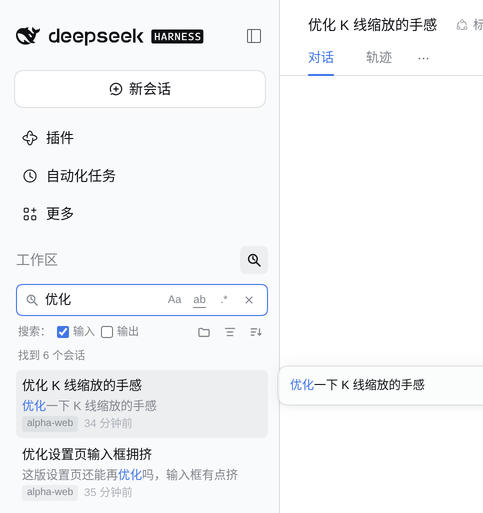
Hover a result row to preview the matching message, with the hit highlighted.
## Performance Measured 2026-10-28 on DSH `0.2.1-rc.4`, Linux, 142 sessions / 196 MB of compressed logs (818 MB uncompressed), same machine, median of 5 runs each. | | **This plugin** | [Victue](https://github.com/Victue/dsh-session-search) 0.3.2 | [session-flow](https://github.com/YeqingTang/dsh-session-flow) 1.5.0 | [Ziminli](https://github.com/Ziminli/dsh-session-search) 0.1.1 | | --- | --- | --- | --- | --- | | Single search | **0.7 ms** (p95 2.8 ms) | 22–36 ms | 33–38 ms | 12.6 s | | First usable | Background indexing: results in ~2 s, built in 4.7 s | Index build 5.7 s | First query 2.9–3.8 s | First success 14.5 s | | Scope | User input (answers optional) | All message text | 20 most recent sessions | Last answer per session | Note: the three others search different pools, so only end-to-end latency is compared, not recall coverage. Ziminli re-reads session logs on every query, so 12.6 s is inherent to that design; session-flow only scans the 20 most recent sessions (5 s budget), so older sessions never match; Victue and this plugin both maintain a local index — the difference is indexing cost and the query path. ## Privacy and data - Reads only session logs under `~/.dsh/sessions/`; writes only under `~/.dsh/cache/find-history/`. - The sidecar index stores your input text and the plain text of each final answer (~3 MB), not the raw logs; deleting that directory clears it. - No external network access. Searches go through a local same-origin route, `/dsh-find-history/search`. - Archived sessions are not indexed. Full uninstall: ```bash dsh plugin --profile web remove dsh-find-history && rm -rf ~/.dsh/cache/find-history ``` ## Compatibility and known limits - Targets the `0.2.1-rc.x` web profile and needs Node ≥ 22 (it decompresses zstd frame by frame with the built-in module instead of the `zstd` command); so far only tested on Linux. - The sidebar header row has no public slot, so the entry icon is injected into the DOM. If the icon does not appear: refresh the page, then check that "Find history" is enabled on the sidebar Plugins page. A sidebar structure change in DSH will require an update here. - Highlighting uses the browser's CSS Custom Highlight API (Chromium 105+); without it the plugin still scrolls to the first match but does not highlight. - The output pool holds only each turn's final answer; process messages and tool calls are not indexed. - Index build time grows linearly with the number of sessions; search is an in-memory scan, about 46 ms for 100k messages, so it stays in the millisecond range as the corpus grows.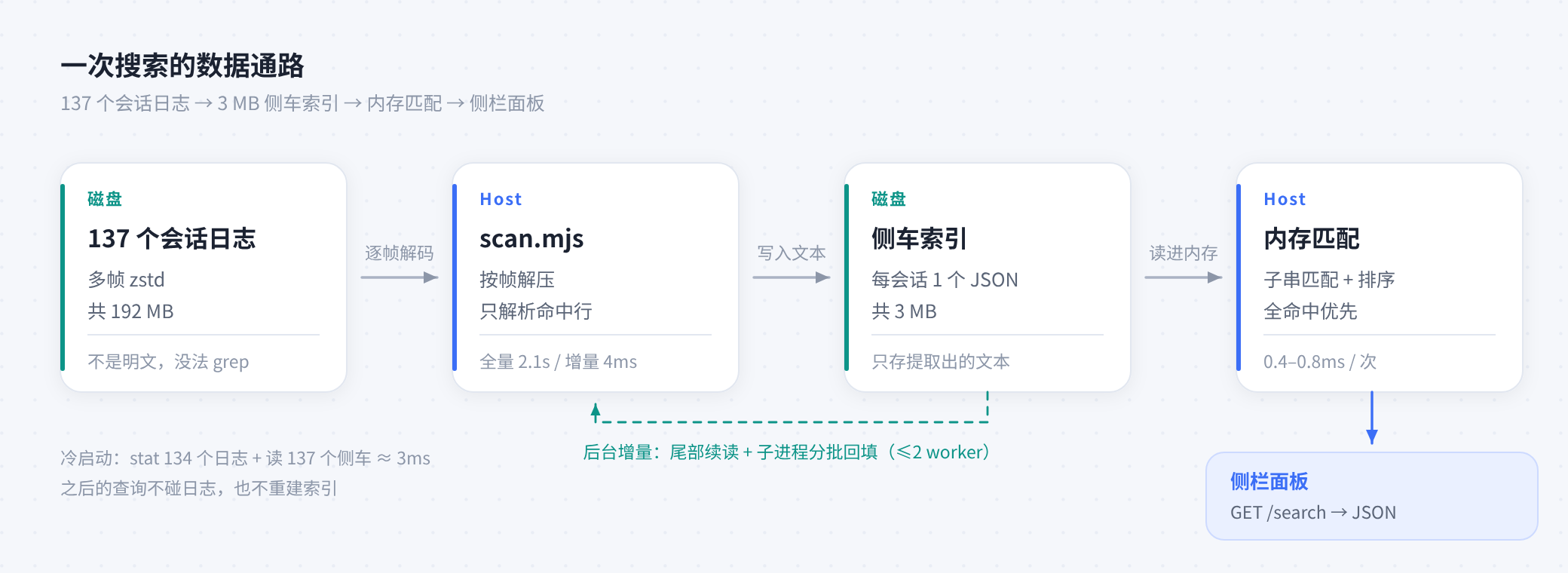 DSH writes each session to `~/.dsh/sessions/