# dsh-waterball-pet
一个适用于 DeepSeek Harness Web UI 的漂浮水球宠物插件。水球使用纯 SVG 绘制,
内部颜色会随 Agent 的会话状态变化(外层白色渐变保持不变),球体带柔和投影与
底部接触阴影,便于在浅色页面上看清边界。眼睛可在设置中切换白色/黑色或隐藏。
支持在 Web UI 中开关、调整大小和拖动位置。
> This is a floating water-ball pet plugin for the DeepSeek Harness Web UI. It is
> drawn with SVG and reacts to Agent session events: the ball's inner color
> changes with the state while the white outer edge of the gradient stays
> constant. A soft drop shadow and a static ground contact shadow keep the ball
> visible against light page backgrounds. Eyes can be switched to white or black,
> or hidden, from the plugin settings. The Web UI settings card controls
> visibility, size, and position.
## 状态外观
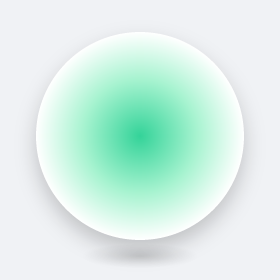
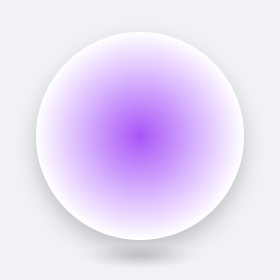
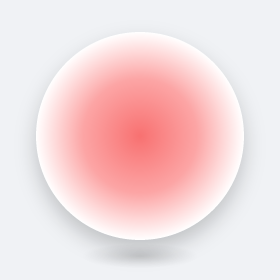
以下为不同状态下的水球样式:
| 状态 | 黑色眼睛 | 白色眼睛 | 隐藏眼睛 |
| --- | --- | --- | --- |
| 空闲 · `idle` |  |
|  |
|  |
| 思考 / 工作 · `waiting` |
|
| 思考 / 工作 · `waiting` |  |
|  |
|  |
| 工具调用 · `jumping` |
|
| 工具调用 · `jumping` |  |
|  |
|  |
| 授权等待 · `authorizing` |
|
| 授权等待 · `authorizing` |  |
|  |
|  |
| 做出你的抉择 · `questioning` |
|
| 做出你的抉择 · `questioning` |  |
|  |
|  |
| 完成 · `done` |
|
| 完成 · `done` |  |
|  |
|  |
| 出错 · `failed` |
|
| 出错 · `failed` |  |
|  |
|  |
| 停止 / 中断 · `stopped` |
|
| 停止 / 中断 · `stopped` |  |
|  |
|  |
| 点击挥手 · `waving` |
|
| 点击挥手 · `waving` |  |
|  |
|  |
### 状态、内部颜色与操作
水球内部颜色随状态变化,外层白色渐变始终不变。眼睛颜色与显隐可在设置中调整。
| 状态 | `mood` | 内部颜色 | 触发事件 / 操作 | 动画与持续时间 |
| --- | --- | --- | --- | --- |
| 空闲 | `idle` | 蓝色 `#4fb3f7` | 没有活动;`activity/status` 的 `idle` | 上下浮动 |
| 思考 / 工作 | `waiting` | 绿色 `#34d399` | `turn/start`、`step/start`、`assistant/chunk`;或 `activity/status` 的 `waiting` / `thinking` | 左右张望,持续到下一状态 |
| 工具调用 | `jumping` | 紫色 `#a855f7` | `tool/call`;或 `activity/status` 的 `tool` | 跳跃,持续到工具结果 |
| 授权等待 | `authorizing` | 黄色 `#facc15` | `approval/asked` | 柔和呼吸,直到 `approval/decided`(批准→继续,拒绝/取消→出错) |
| 做出你的抉择 | `questioning` | 粉色 `#ec4899` | `tool/call` 的 `ask_user_question` | 左右摆动,直到 `tool/result`(回答→继续思考;取消/关闭→停止) |
| 工具结果后继续思考 | `waiting` | 绿色 `#34d399` | `tool/result` | 回到思考动画 |
| 完成 | `done` | 青色 `#22d3ee` | `activity/status` 的 `done`;或 `turn/end` 的 `reason=completed` | 欢快跳动约 2.5 秒 |
| 出错 | `failed` | 红色 `#f87171` | `turn/end` 的 `reason=error` | 低头沮丧约 3 秒 |
| 中断 / 停止 | `stopped` | 深灰 `#111827` | `turn/end` 的 `reason=aborted`、`blocked`、`max-tokens` 或其他停止原因 | 静止下沉约 3 秒 |
| 点击挥手 | `waving` | 橙色 `#fb923c` | 单击水球 | 左右摇摆约 1.6 秒 |
标准 DSH 会话事件始终作为状态来源;如果额外安装了活动状态插件,也兼容
`activity/status` 事件。
## 安装
### 从 GitHub 安装(推荐)
需要已安装 Node.js、pnpm 和 DeepSeek Harness:
```sh
dsh plugin --profile web add github:sundusk/dsh-waterball-pet
```
仓库已包含构建后的 host/browser 两个插件部分,安装时不需要执行第三方构建脚本,
可以直接使用。安装完成后重启 `dsh web`,然后打开 Web UI,在「设置 → 插件」的
插件配置列表中启用「水球宠物」(卡片与内置的 Shell / Agent loop / Web search
卡片平级,位于「Web UI 插件」分组之外)。
> **兼容性注意:白名单问题**
>
> 插件能够从 GitHub 安装成功,不代表当前 DeepSeek Harness 宿主版本已经允许
> `waterball` 设置命名空间。Harness 的 `@deepseek-ai/dsh-host-apiproxy` 会维护一份
> Web UI 设置白名单;如果你的版本还没有包含 `waterball`,可能出现以下情况:
>
> - 插件已经安装,但设置卡片显示不可用或只读;
> - 启用、大小、位置等设置无法保存;
> - 某些宿主版本中水球覆盖层也可能不会显示。
>
> 遇到这些情况,请先升级 DeepSeek Harness 到包含 `waterball` 白名单的版本,重启
> `dsh web` 后再检查。修改本机 npx 缓存中的宿主文件只能作为临时开发排查手段,
> 不会替其他用户解决这个问题,也可能在重新安装后被覆盖。这个兼容性问题属于
> Harness 宿主,不是 npm/GitHub 分发方式本身造成的。
### 本地开发安装
```sh
dsh plugin --profile web add link:<本仓库绝对路径>
```
重启 `dsh web` 后生效。插件代码修改后运行 `pnpm build`,并将更新后的 `lib/`
一并提交。
## 结构
- `src/index.ts` — host 半区:监听标准 session 事件与可选的 `activity/status` 相位,
提供 `GET /api/waterball/status`,注册 `waterball` 设置命名空间。
- `src/client/index.ts` — browser 半区:渲染水球、轮询状态、注册插件配置卡片。
- `cordis.patch.yml` — bundle patch 插件行,插件 ID 为 `ui-waterball`。
- `shared/` — 独立仓库使用的客户端构建预设。
- `lib/` — 已提交的 host/browser 构建产物,保证 GitHub 安装无需执行构建脚本。
## English
### State appearance
Water ball styles for each state:
| State | Black eyes | White eyes | Hidden eyes |
| --- | --- | --- | --- |
| Idle · `idle` | | | |
| Thinking / working · `waiting` | | | |
| Tool call · `jumping` | | | |
| Awaiting approval · `authorizing` | | | |
| Awaiting your choice · `questioning` | | | |
| Completed · `done` | | | |
| Error · `failed` | | | |
| Stopped / interrupted · `stopped` | | | |
| Click reaction · `waving` | | | |
### State, ball colors, and interactions
The water-ball's inner color follows the current state; the white outer edge of
the gradient never changes. Eye color and visibility are adjustable in settings.
| State | `mood` | Ball color | Trigger / operation | Animation and duration |
| --- | --- | --- | --- | --- |
| Idle | `idle` | Blue `#4fb3f7` | No active work; `activity/status` phase `idle` | Gentle bobbing |
| Thinking / working | `waiting` | Green `#34d399` | `turn/start`, `step/start`, `assistant/chunk`; or `activity/status` phase `waiting` / `thinking` | Side-to-side tilt until the next state |
| Tool call | `jumping` | Purple `#a855f7` | `tool/call`; or `activity/status` phase `tool` | Hopping until the tool result |
| Awaiting approval | `authorizing` | Yellow `#facc15` | `approval/asked` | Soft breathing until `approval/decided` (allowed → continue; rejected/cancelled → error) |
| Awaiting your choice | `questioning` | Pink `#ec4899` | `tool/call` of `ask_user_question` | Side-to-side tilt until `tool/result` (answered → continue thinking; cancelled/dismissed → stopped) |
| Thinking after a tool result | `waiting` | Green `#34d399` | `tool/result` | Returns to the thinking animation |
| Completed | `done` | Cyan `#22d3ee` | `activity/status` phase `done`; or `turn/end` with `reason=completed` | Cheerful jump for about 2.5 seconds |
| Error | `failed` | Red `#f87171` | `turn/end` with `reason=error` | Drooping animation for about 3 seconds |
| Stopped / interrupted | `stopped` | Dark gray `#111827` | `turn/end` with `reason=aborted`, `blocked`, `max-tokens`, or another stop reason | Sinking animation for about 3 seconds |
| Click reaction | `waving` | Orange `#fb923c` | Click the water ball | Side-to-side wave for about 1.6 seconds |
The plugin always supports standard DSH session events. It also accepts the optional
`activity/status` events when an activity-tracking plugin is installed.
### Install from GitHub
Requirements: Node.js, pnpm, and DeepSeek Harness.
```sh
dsh plugin --profile web add github:sundusk/dsh-waterball-pet
```
The repository includes the prebuilt host and browser artifacts, so installation does
not need to run a third-party build script. Restart `dsh web`, then enable **Water Ball
Pet** under **Settings → Plugins → Web UI Plugins**.
> **Compatibility note: host allowlist**
>
> A successful GitHub installation does not guarantee that the installed DeepSeek Harness
> host supports the `waterball` settings namespace. The Harness
> `@deepseek-ai/dsh-host-apiproxy` package maintains an allowlist for Web UI settings.
> If your Harness version does not include `waterball`, the plugin may install but its
> settings card can be unavailable or read-only, settings such as enabled/size/position
> may not persist, and some host versions may not render the water-ball overlay.
>
> If this happens, upgrade DeepSeek Harness to a release that includes `waterball` in the
> host allowlist, restart `dsh web`, and check again. Editing the local npx cache is only a
> temporary development workaround; it does not fix other users' installations and may be
> overwritten during reinstall. This is a Harness host compatibility issue, not a GitHub
> or npm distribution issue.
### Local development
```sh
dsh plugin --profile web add link:
```
Run `pnpm build` after changing the source and commit the updated `lib/` artifacts.
## 桌面悬浮球(推荐)
水球不只可以活在网页里。如果你希望它出现在整个电脑桌面上——即使不看 DeepSeek
Harness 的 Web UI,也能随时知道任务进度——可以试试
[dsh-macDesktop-pet](https://github.com/sundusk/dsh-macDesktop-pet):一款 macOS 原生
悬浮球应用,在桌面上显示一颗置顶的发光小球,颜色随 Agent 状态呼吸变化(思考=绿、
调工具=紫、完成=青、出错=红),瞄一眼桌面即可掌握运行状态。
> Desktop companion: a native macOS app that shows an always-on-top glowing ball breathing
> with the Agent's state, so you can track progress at a glance without opening the Web UI.
|
### 状态、内部颜色与操作
水球内部颜色随状态变化,外层白色渐变始终不变。眼睛颜色与显隐可在设置中调整。
| 状态 | `mood` | 内部颜色 | 触发事件 / 操作 | 动画与持续时间 |
| --- | --- | --- | --- | --- |
| 空闲 | `idle` | 蓝色 `#4fb3f7` | 没有活动;`activity/status` 的 `idle` | 上下浮动 |
| 思考 / 工作 | `waiting` | 绿色 `#34d399` | `turn/start`、`step/start`、`assistant/chunk`;或 `activity/status` 的 `waiting` / `thinking` | 左右张望,持续到下一状态 |
| 工具调用 | `jumping` | 紫色 `#a855f7` | `tool/call`;或 `activity/status` 的 `tool` | 跳跃,持续到工具结果 |
| 授权等待 | `authorizing` | 黄色 `#facc15` | `approval/asked` | 柔和呼吸,直到 `approval/decided`(批准→继续,拒绝/取消→出错) |
| 做出你的抉择 | `questioning` | 粉色 `#ec4899` | `tool/call` 的 `ask_user_question` | 左右摆动,直到 `tool/result`(回答→继续思考;取消/关闭→停止) |
| 工具结果后继续思考 | `waiting` | 绿色 `#34d399` | `tool/result` | 回到思考动画 |
| 完成 | `done` | 青色 `#22d3ee` | `activity/status` 的 `done`;或 `turn/end` 的 `reason=completed` | 欢快跳动约 2.5 秒 |
| 出错 | `failed` | 红色 `#f87171` | `turn/end` 的 `reason=error` | 低头沮丧约 3 秒 |
| 中断 / 停止 | `stopped` | 深灰 `#111827` | `turn/end` 的 `reason=aborted`、`blocked`、`max-tokens` 或其他停止原因 | 静止下沉约 3 秒 |
| 点击挥手 | `waving` | 橙色 `#fb923c` | 单击水球 | 左右摇摆约 1.6 秒 |
标准 DSH 会话事件始终作为状态来源;如果额外安装了活动状态插件,也兼容
`activity/status` 事件。
## 安装
### 从 GitHub 安装(推荐)
需要已安装 Node.js、pnpm 和 DeepSeek Harness:
```sh
dsh plugin --profile web add github:sundusk/dsh-waterball-pet
```
仓库已包含构建后的 host/browser 两个插件部分,安装时不需要执行第三方构建脚本,
可以直接使用。安装完成后重启 `dsh web`,然后打开 Web UI,在「设置 → 插件」的
插件配置列表中启用「水球宠物」(卡片与内置的 Shell / Agent loop / Web search
卡片平级,位于「Web UI 插件」分组之外)。
> **兼容性注意:白名单问题**
>
> 插件能够从 GitHub 安装成功,不代表当前 DeepSeek Harness 宿主版本已经允许
> `waterball` 设置命名空间。Harness 的 `@deepseek-ai/dsh-host-apiproxy` 会维护一份
> Web UI 设置白名单;如果你的版本还没有包含 `waterball`,可能出现以下情况:
>
> - 插件已经安装,但设置卡片显示不可用或只读;
> - 启用、大小、位置等设置无法保存;
> - 某些宿主版本中水球覆盖层也可能不会显示。
>
> 遇到这些情况,请先升级 DeepSeek Harness 到包含 `waterball` 白名单的版本,重启
> `dsh web` 后再检查。修改本机 npx 缓存中的宿主文件只能作为临时开发排查手段,
> 不会替其他用户解决这个问题,也可能在重新安装后被覆盖。这个兼容性问题属于
> Harness 宿主,不是 npm/GitHub 分发方式本身造成的。
### 本地开发安装
```sh
dsh plugin --profile web add link:<本仓库绝对路径>
```
重启 `dsh web` 后生效。插件代码修改后运行 `pnpm build`,并将更新后的 `lib/`
一并提交。
## 结构
- `src/index.ts` — host 半区:监听标准 session 事件与可选的 `activity/status` 相位,
提供 `GET /api/waterball/status`,注册 `waterball` 设置命名空间。
- `src/client/index.ts` — browser 半区:渲染水球、轮询状态、注册插件配置卡片。
- `cordis.patch.yml` — bundle patch 插件行,插件 ID 为 `ui-waterball`。
- `shared/` — 独立仓库使用的客户端构建预设。
- `lib/` — 已提交的 host/browser 构建产物,保证 GitHub 安装无需执行构建脚本。
## English
### State appearance
Water ball styles for each state:
| State | Black eyes | White eyes | Hidden eyes |
| --- | --- | --- | --- |
| Idle · `idle` | | | |
| Thinking / working · `waiting` | | | |
| Tool call · `jumping` | | | |
| Awaiting approval · `authorizing` | | | |
| Awaiting your choice · `questioning` | | | |
| Completed · `done` | | | |
| Error · `failed` | | | |
| Stopped / interrupted · `stopped` | | | |
| Click reaction · `waving` | | | |
### State, ball colors, and interactions
The water-ball's inner color follows the current state; the white outer edge of
the gradient never changes. Eye color and visibility are adjustable in settings.
| State | `mood` | Ball color | Trigger / operation | Animation and duration |
| --- | --- | --- | --- | --- |
| Idle | `idle` | Blue `#4fb3f7` | No active work; `activity/status` phase `idle` | Gentle bobbing |
| Thinking / working | `waiting` | Green `#34d399` | `turn/start`, `step/start`, `assistant/chunk`; or `activity/status` phase `waiting` / `thinking` | Side-to-side tilt until the next state |
| Tool call | `jumping` | Purple `#a855f7` | `tool/call`; or `activity/status` phase `tool` | Hopping until the tool result |
| Awaiting approval | `authorizing` | Yellow `#facc15` | `approval/asked` | Soft breathing until `approval/decided` (allowed → continue; rejected/cancelled → error) |
| Awaiting your choice | `questioning` | Pink `#ec4899` | `tool/call` of `ask_user_question` | Side-to-side tilt until `tool/result` (answered → continue thinking; cancelled/dismissed → stopped) |
| Thinking after a tool result | `waiting` | Green `#34d399` | `tool/result` | Returns to the thinking animation |
| Completed | `done` | Cyan `#22d3ee` | `activity/status` phase `done`; or `turn/end` with `reason=completed` | Cheerful jump for about 2.5 seconds |
| Error | `failed` | Red `#f87171` | `turn/end` with `reason=error` | Drooping animation for about 3 seconds |
| Stopped / interrupted | `stopped` | Dark gray `#111827` | `turn/end` with `reason=aborted`, `blocked`, `max-tokens`, or another stop reason | Sinking animation for about 3 seconds |
| Click reaction | `waving` | Orange `#fb923c` | Click the water ball | Side-to-side wave for about 1.6 seconds |
The plugin always supports standard DSH session events. It also accepts the optional
`activity/status` events when an activity-tracking plugin is installed.
### Install from GitHub
Requirements: Node.js, pnpm, and DeepSeek Harness.
```sh
dsh plugin --profile web add github:sundusk/dsh-waterball-pet
```
The repository includes the prebuilt host and browser artifacts, so installation does
not need to run a third-party build script. Restart `dsh web`, then enable **Water Ball
Pet** under **Settings → Plugins → Web UI Plugins**.
> **Compatibility note: host allowlist**
>
> A successful GitHub installation does not guarantee that the installed DeepSeek Harness
> host supports the `waterball` settings namespace. The Harness
> `@deepseek-ai/dsh-host-apiproxy` package maintains an allowlist for Web UI settings.
> If your Harness version does not include `waterball`, the plugin may install but its
> settings card can be unavailable or read-only, settings such as enabled/size/position
> may not persist, and some host versions may not render the water-ball overlay.
>
> If this happens, upgrade DeepSeek Harness to a release that includes `waterball` in the
> host allowlist, restart `dsh web`, and check again. Editing the local npx cache is only a
> temporary development workaround; it does not fix other users' installations and may be
> overwritten during reinstall. This is a Harness host compatibility issue, not a GitHub
> or npm distribution issue.
### Local development
```sh
dsh plugin --profile web add link:
```
Run `pnpm build` after changing the source and commit the updated `lib/` artifacts.
## 桌面悬浮球(推荐)
水球不只可以活在网页里。如果你希望它出现在整个电脑桌面上——即使不看 DeepSeek
Harness 的 Web UI,也能随时知道任务进度——可以试试
[dsh-macDesktop-pet](https://github.com/sundusk/dsh-macDesktop-pet):一款 macOS 原生
悬浮球应用,在桌面上显示一颗置顶的发光小球,颜色随 Agent 状态呼吸变化(思考=绿、
调工具=紫、完成=青、出错=红),瞄一眼桌面即可掌握运行状态。
> Desktop companion: a native macOS app that shows an always-on-top glowing ball breathing
> with the Agent's state, so you can track progress at a glance without opening the Web UI.