# SuperPlane
SuperPlane is an open source automation engine for AI-driven engineering.
It lets you orchestrate engineering workflows across the tools you use — such as Git, LLMs, CI/CD, observability, incident tools, and infrastructure — with durable execution, approvals, and operational UI.
SuperPlane executes your processes deterministically, providing the exact guardrails both humans and AI need to safely interact with your systems.
## Project status



SuperPlane is in **beta**. Self-host the core engine ([installation guide](https://docs.superplane.com/installation/overview/)) or use [SuperPlane Cloud](https://app.superplane.com) for managed runners and one-click app installs. Core primitives and integrations are maturing; breaking changes are possible. Report issues on [GitHub](https://github.com/superplanehq/superplane/issues/new).
## What it does
SuperPlane orchestrates your existing stack into git-backed **apps** with durable execution — workflows too complex for a single script or CI job.
- **Apps**: A deployable unit combining a workflow graph, custom console UI, app-scoped memory, and deterministic execution. Versioned in git (`canvas.yaml`, `console.yaml`); defines guardrails for AI agents and human operators.
- **Event-driven orchestration**: Multi-step workflows across your Git, CI/CD, observability, incident tools, and notifications — triggered by webhooks, schedules, and tool events, with approvals, policy checks, and human-in-the-loop steps.
- **Console dashboards**: Define your own per-app operational UI as a dynamic grid of panels. Use it to display KPIs, tables, charts, runbooks, pinned nodes, and workflow controls, backed by live data from memory, runs, and executions.
- **Agents & operators**: Built-in per-app agent to design workflows and debug runs; CLI and [skills](https://github.com/superplanehq/skills) for external coding agents. Same RBAC on all paths.
## How it works
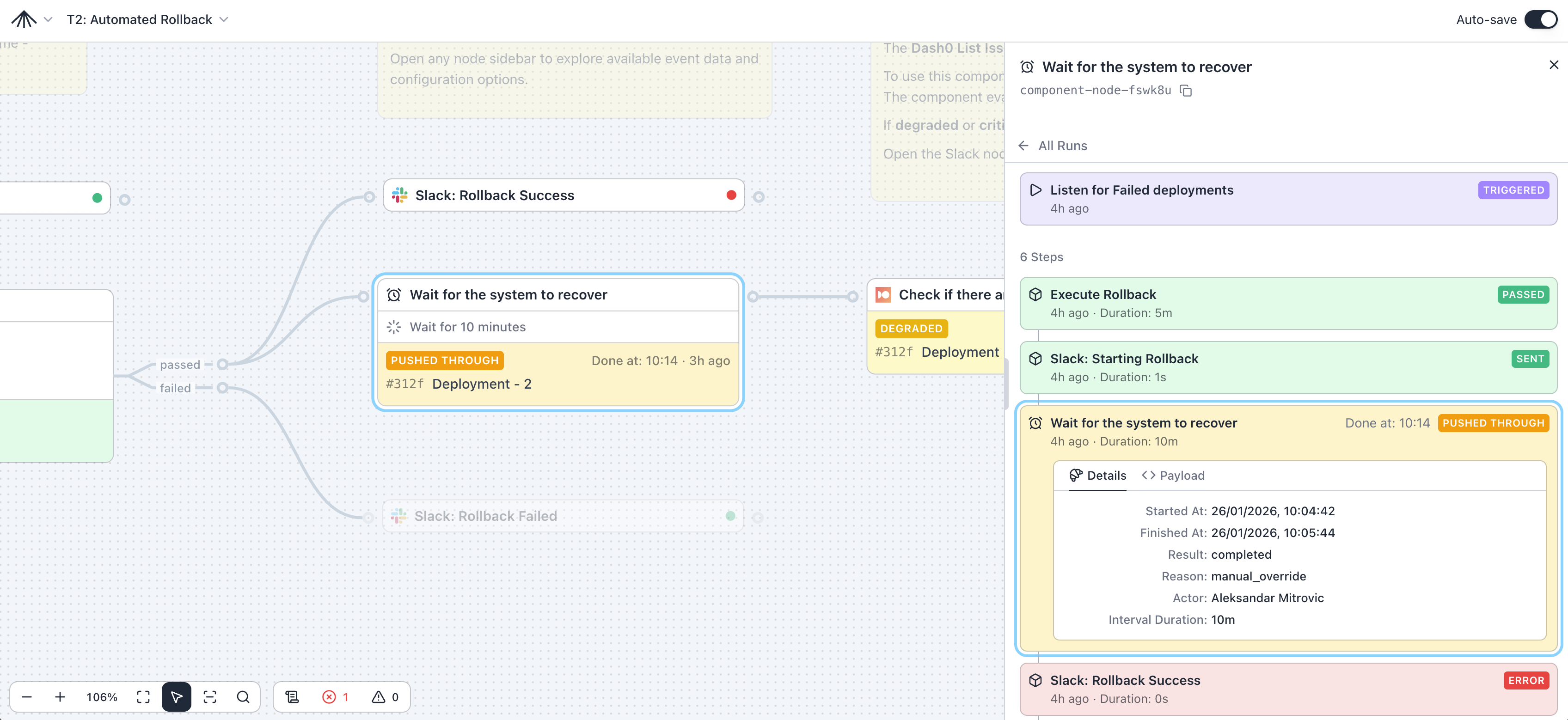
- **Canvases**: A graph of steps and their dependencies; a single canvas can express multiple workflows and run them concurrently.
- **Components**: Each node is a trigger or action, built-in or integration-backed that performs a specific task (for example: deploy a service, open an incident, post a notification, wait for a condition, require approval, etc.).
- **Events & triggers**: Incoming events match triggers and start runs with the event payload as input.
- **Runs & durable execution**: Runs, run items, and payloads are tracked across restarts; failed steps can resume without custom retry logic.
- **Memory**: App-scoped JSON storage that persists across runs.
### Example use cases
A few concrete things teams build with SuperPlane:
- **PR preview environments**: on pull request, provision an ephemeral environment, run tests, and post the live URL back to the PR.
- **Policy-gated production deploy**: when CI finishes green, hold outside business hours, require on-call + product approval, then trigger the deploy.
- **Progressive delivery (10% → 50% → 100%)**: deploy in waves, wait/verify at each step, and rollback on failure with an approval gate.
- **Release train with a multi-repo ship set**: wait for tags/builds from a set of services, fan-in once all are ready, then dispatch a coordinated deploy.
- **“First 5 minutes” incident triage**: on incident created, fetch context in parallel (recent deploys + health signals), generate an evidence pack, and open an issue.
## Quick start
**Local (demo container):**
```
docker pull ghcr.io/superplanehq/superplane-demo:stable
docker run --rm -p 3000:3000 -v spdata:/app/data -ti ghcr.io/superplanehq/superplane-demo:stable
```
Open [http://localhost:3000](http://localhost:3000).
**Cloud:** Sign up at [app.superplane.com](https://app.superplane.com) ([cloud beta overview](https://superplane.com/blog/superplane-cloud-beta/)).
For a guided first workflow, see the [quick start guide](https://docs.superplane.com/get-started/quickstart/).
## Supported Integrations
SuperPlane integrates with the tools you already use. Each integration provides triggers (events that start workflows) and components (actions you can run).
> View the full list in our [documentation](https://docs.superplane.com/components/). Missing a provider? [Open an issue](https://github.com/superplanehq/superplane/issues/new).
### AI & LLM
### Version Control & CI/CD
### Cloud & Infrastructure
### Observability
### Incident Management
### Communication
### Ticketing
### Developer Tools
## Security
- **RBAC** and **API keys** for programmatic access — see [access control](https://docs.superplane.com/concepts/access-control/) and [API keys](https://docs.superplane.com/concepts/service-accounts/)
- **Secrets** stored encrypted — see [secrets](https://docs.superplane.com/concepts/secrets/)
## Production installation
**Footprint:** PostgreSQL, RabbitMQ, and the SuperPlane application (bundled in the single-host Docker Compose installer). Deploy on a single Linux host or Kubernetes (GKE, EKS) with external PostgreSQL. See the [installation overview](https://docs.superplane.com/installation/overview/) for topology-specific upgrade paths.
- **[Single Host Installation](https://docs.superplane.com/installation/overview/#single-host-installation)** — AWS EC2, GCP Compute Engine, Hetzner, DigitalOcean, Linode, or any Linux server
- **[Kubernetes Installation](https://docs.superplane.com/installation/overview/#kubernetes)** — GKE, EKS, or any Kubernetes cluster
Installation admins can enable private network access during owner setup or later in `/admin/settings` when SuperPlane needs to reach tools inside a VPC, private Kubernetes cluster, or another closed network. Environment variables still take precedence: set `BLOCKED_HTTP_HOSTS` or `BLOCKED_PRIVATE_IP_RANGES` to override the UI-controlled policy, and set either variable to an empty value to disable that specific block list entirely.
## Contributing
We welcome your bug reports, ideas for improvement, and focused PRs.
- Read the **[Contributing Guide](CONTRIBUTING.md)** to get started.
- Issues: use GitHub issues for bugs and feature requests.
## License
Apache License 2.0. See `LICENSE`.
## Community
- **[Discord](https://discord.superplane.com)** - Join our community for discussions, questions, and collaboration
- **[X](https://x.com/superplanehq)** - Follow us for updates and announcements