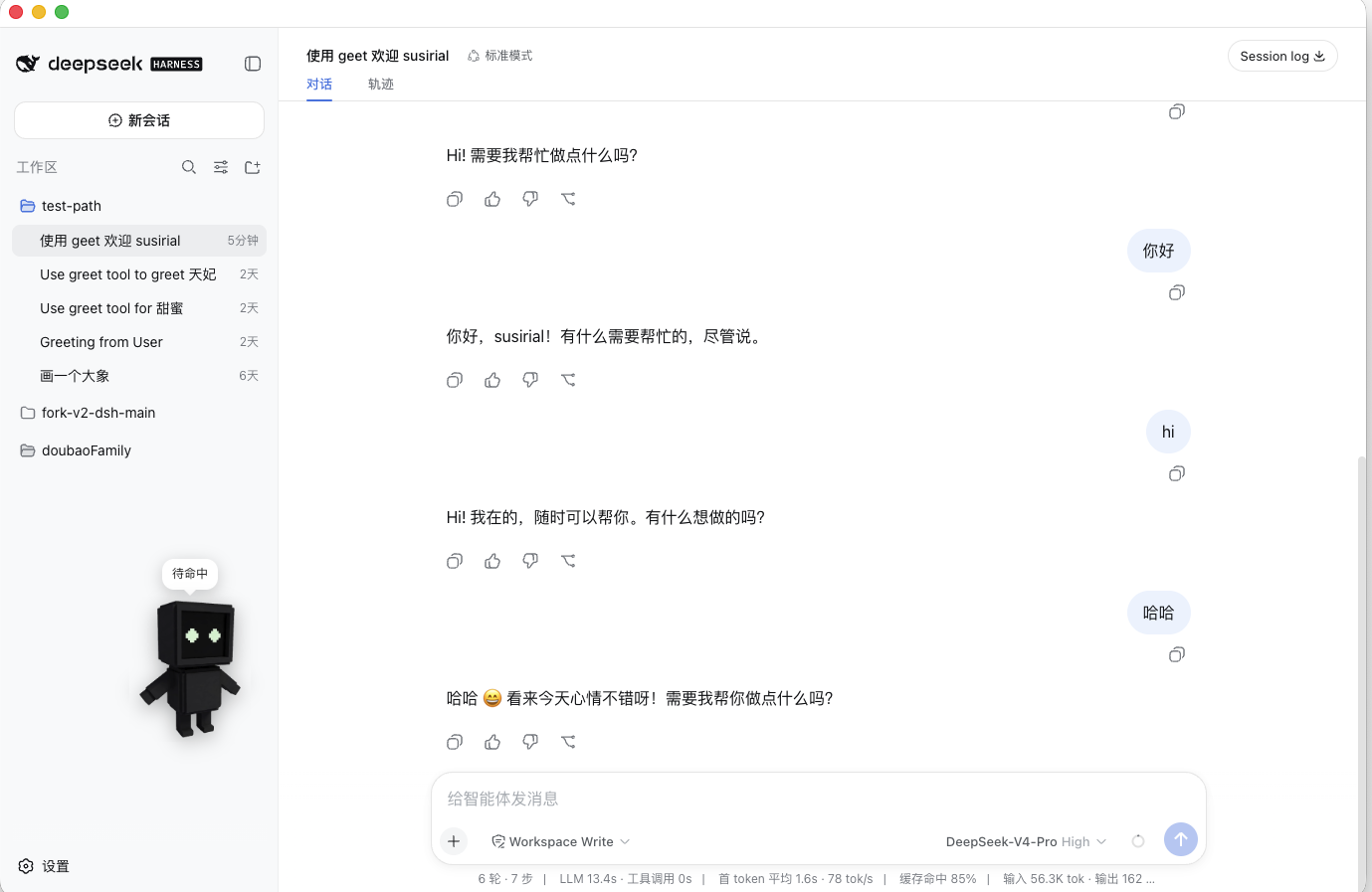
TRAE Bao animated desktop pet

TRAE Bao for DeepSeek Harness

A conversation-aware digital pet that lives inside DSH Desktop.

TRAE 宝不是循环播放的 GIF。它会跟随 Agent 的思考、工具调用、完成与失败状态实时行动。

简体中文 · Quick start · Watch the trailer

CI MIT code license Node.js version DeepSeek Harness plugin TypeScript

TRAE Bao reacting inside a DeepSeek Harness conversation

> Click the screenshot to play the trailer. This is an independent community plugin and is not an official TRAE or DeepSeek product. ## Why TRAE Bao? Coding agents already have a lifecycle. TRAE Bao makes it visible: - **Conversation-aware** — nine animations follow new sessions, queued prompts, reasoning, tool execution, success, and failure. - **Native to DSH Desktop** — uses the official `shell.overlay` and `settings.section` slots without replacing the product layout. - **Made to be yours** — replace every action with a WebP and map built-in or custom sounds to all nine states plus left- and right-click. - **Safe local storage** — user assets stay under `$DSH_HOME/pet-assets/dsh-juan-pet/`; imports are size-, extension-, MIME-, and magic-byte checked. - **Desktop-quality file picking** — the Host owns the native dialog, including a macOS sheet that avoids the white flash caused by renderer file inputs. - **Headless-safe engineering** — strict TypeScript, 44 unit tests, and a Loader/export/assets smoke test. ## See it in action | Conversation companion | Configure every state | | --- | --- | | [![TRAE Bao in chat](./docs/dsh-trae宝在对话界面.png)](./docs/trae-park-hero.mp4) | ![TRAE Bao settings](./docs/dsh-trae宝配置界面.png) | | Replace one action | Choose built-in or custom audio | | --- | --- | | ![Replace a TRAE Bao action](./docs/dsh-trae宝替换某个动作图片示意图.png) | ![Configure TRAE Bao sounds](./docs/dsh-trae宝配置和导入音效.png) | ## Quick start ### Requirements - [DSH Desktop](https://github.com/anywhere-labs/deepseek-harness-desktop) with an active `desktop` profile - Node.js `^22.19.0` or `>=24.0.0` The pet runs inside **DSH Desktop**. Installing, updating, and removing it uses Desktop's own `dsh` CLI, not a second app. Desktop does not put `dsh` on your system PATH, so open the tray command **Open DSH Terminal** first. That launches a system terminal with a private, profile-aware `dsh` for the current Desktop profile. ### Install from GitHub 1. From the DSH Desktop tray, choose **Open DSH Terminal**. 2. In that terminal, run: ```sh dsh plugin --profile desktop add github:susirial/dsh-traebao ``` 3. **Quit DSH Desktop from the tray and reopen it.** Closing only the window does not restart the Host or reload the Client bundle. Open **Settings → TRAE 宝** to enable, position, resize, mute, preview, or customize your companion. ### Install from a local checkout ```sh git clone https://github.com/susirial/dsh-traebao.git cd dsh-traebao corepack pnpm install --frozen-lockfile corepack pnpm run check # Run in the tray-opened Desktop terminal; "." is anchored to this checkout. dsh plugin --profile desktop add . ``` The GitHub repository keeps verified `lib/` artifacts checked in, so direct GitHub installation does not need to execute an install-time build script. ### Update, verify, or remove ```sh # Update the Git dependency dsh plugin --profile desktop update dsh-plugin-juan-pet # Confirm the bundle is present in the composed profile dsh --profile desktop --dump-config # Remove it dsh plugin --profile desktop remove dsh-plugin-juan-pet ``` Restart Desktop after update or removal.
What if dsh is not on PATH? This is expected in a normal terminal. From the Desktop tray, choose **Open DSH Terminal**; it adds a profile-aware `dsh` only to that terminal session. If you have a DSH Desktop source checkout, you can also call its pinned CLI directly: ```sh /path/to/su-dsh-desktop/dsh-plugin-desktop/node_modules/.bin/dsh \ plugin --profile desktop add github:susirial/dsh-traebao ``` As a last resort, `npx -y --package @deepseek-ai/dsh dsh ...` works, but it may fetch a CLI version different from your Desktop installation.
## Agent lifecycle → pet behavior | DSH activity | TRAE Bao state | | --- | --- | | New conversation | `waving` | | Prompt queued / turn starts | `jumping` | | Tool running | `waiting` | | Reasoning or partial output | `review` | | Turn completes successfully | `happy` | | New tool or turn error | `failed` | | Drag left / right | `running-left` / `running-right` | | Everything else | `idle` | Edge-triggered states have priorities and hold times, so a repeated snapshot does not restart the same reaction. Errors outrank success, and active tools outrank ordinary reasoning. ## Customize TRAE Bao In **Settings → TRAE 宝** you can: - turn the pet, bubble, or audio on and off; - choose a size from 64–320 px and set its saved position; - preview any state; - choose a sound for each state and mouse interaction; - replace one action image, restore its default, or batch import all actions; - import and delete MP3, WAV, OGG, or M4A sounds. For batch image import, use these case-insensitive filenames: ```text idle.webp waving.webp running-left.webp running-right.webp waiting.webp review.webp jumping.webp happy.webp failed.webp ``` You can select files through the system picker, drag them onto the target row, or paste them. WebP files are limited to 10 MB; audio files are limited to 20 MB. ## Architecture TRAE Bao is one installable package with two independently built halves: ```text cordis.patch.yml │ ├── Host (ESM / Node) │ ├── SettingsScope source │ ├── static and user-asset routes │ ├── validated asset store under $DSH_HOME │ └── optional Electron-native file picker │ └── Client (CJS / browser Loader row) ├── shell.overlay → draggable animated pet ├── settings.section → preview and asset library └── CurrentConversation → PetStateController ``` The overlay is additive and supports both Desktop compatibility and advanced shells. In browser-only DSH deployments, the Electron picker is absent and the UI falls back to drag-and-drop or paste. ## Development ```sh corepack pnpm install --frozen-lockfile corepack pnpm run build corepack pnpm run typecheck corepack pnpm run test corepack pnpm run verify:loader # Build + typecheck + all tests + Loader smoke corepack pnpm run check ``` The source of truth is `src/`; `lib/` is committed because DSH installs Git-hosted plugins as ready-to-load packages. ## Compatibility and limitations - Tested against the DSH `0.1.1-rc.2` package family and Cordis `4.0.1`. - Audio starts only after the first user gesture because browser autoplay policies still apply. - Position is stored in window pixels and is not automatically rewritten when the window shrinks. - The bundled character is TRAE Bao; character selection is intentionally out of scope. - The Desktop profile must provide WebServer, settings, slots, sessions, and SettingsScope. ## Security and privacy TRAE Bao has no telemetry and sends no pet data to an external service. Mutation routes require same-origin requests. Static routes reject traversal, uploaded data is magic-byte checked, and user files are atomically written with private permissions. See [SECURITY.md](./SECURITY.md) for reporting. ## Contributing Bug reports, platform verification, new tests, and carefully licensed pet assets are welcome. Read [CONTRIBUTING.md](./CONTRIBUTING.md) before opening a pull request. ## License and credits The plugin code is available under the [MIT License](./LICENSE). Bundled visual and audio media have separate provenance and are not automatically covered by the code license; read [ASSETS.md](./ASSETS.md) before redistributing them. TRAE, DeepSeek, and related marks belong to their respective owners. This community project is not endorsed by or affiliated with those owners.