# State machine cat - API
If you want to integrate state-machine-cat in your own application in some way,
there is an API. If you're looking into samples of how to use it: the
[command line](../src/cli),
[website](https://state-machine-cat.js.org) already do.
> Make sure that if you integrate state-machine-cat into your software, your
> software respects state-machine-cat's license ([The MIT License](../LICENSE))
## Basic use
```javascript
import { render } from "state-machine-cat";
try {
const lSVGInAString = await render(
`
on => off: click;
off => on: clack;
`,
{
outputType: "svg",
direction: "left-right",
},
);
console.log(lSVGInAString);
} catch (pError) {
console.error(pError);
}
```
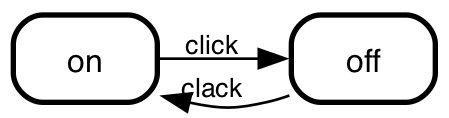
This will dump an svg picture on stdout, which would look like this:
 ## Public API
### `async function render (script: string | IStateMachine, options: IRenderOptions): Promise`
The main render function. It parses and renders the _smcat_ `script` you pass
it, talking any `options` into account and either
#### `script`
A string containing the script you want to get rendered. This is typically in
the _smcat_ language (see the
[readme](../README.md)
for details), but if you pass "json" to the `inputType` option, `render`
will expect an abstract syntax tree of a state machine. If you pass "scxml"
it'll expect scxml.
#### `options`
An object, with attributes to steer the behaviour of the render function. You
can get the actual list of the options you can pass, their allowed values
and the defaults you'd get when you don't specify them from the
`smcat.getAllowedValues()` function below, so you don't have to hard
code the parameters or the values you can pass them.
At the time of writing the API does _no validation_ on the values of these
options. Instead it expects the caller to sanitize and validate them before
calling it. The `smcat.getAllowedValues()` will simplify that, but despite
this I'm thinking of moving the validations behind the API anyway somewhere
in the future.
##### `options.inputType`
How to interpret the `script` parameter. Defaults to `smcat` - which means
`render` will expect `script` to be in the _smcat_ language.
Allowed values: call `smcat.getAllowedValues().inputType.values`
##### `options.outputType`
The type of output to emit when parsing and rendering was successful. Defaults
to "svg".
Allowed values: call `smcat.getAllowedValues().outputType.values`
##### `options.direction`
The direction to render the states in. Only makes sense when the output is a
graph, so it only works for outputTypes `dot` and `svg`.
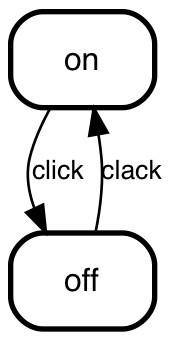
Here's what `top-down` and `left-right` would be doing to the simple sample in
_basic use_ above:
## Public API
### `async function render (script: string | IStateMachine, options: IRenderOptions): Promise`
The main render function. It parses and renders the _smcat_ `script` you pass
it, talking any `options` into account and either
#### `script`
A string containing the script you want to get rendered. This is typically in
the _smcat_ language (see the
[readme](../README.md)
for details), but if you pass "json" to the `inputType` option, `render`
will expect an abstract syntax tree of a state machine. If you pass "scxml"
it'll expect scxml.
#### `options`
An object, with attributes to steer the behaviour of the render function. You
can get the actual list of the options you can pass, their allowed values
and the defaults you'd get when you don't specify them from the
`smcat.getAllowedValues()` function below, so you don't have to hard
code the parameters or the values you can pass them.
At the time of writing the API does _no validation_ on the values of these
options. Instead it expects the caller to sanitize and validate them before
calling it. The `smcat.getAllowedValues()` will simplify that, but despite
this I'm thinking of moving the validations behind the API anyway somewhere
in the future.
##### `options.inputType`
How to interpret the `script` parameter. Defaults to `smcat` - which means
`render` will expect `script` to be in the _smcat_ language.
Allowed values: call `smcat.getAllowedValues().inputType.values`
##### `options.outputType`
The type of output to emit when parsing and rendering was successful. Defaults
to "svg".
Allowed values: call `smcat.getAllowedValues().outputType.values`
##### `options.direction`
The direction to render the states in. Only makes sense when the output is a
graph, so it only works for outputTypes `dot` and `svg`.
Here's what `top-down` and `left-right` would be doing to the simple sample in
_basic use_ above:
 The other two options (`bottom-top` and `right-left`) do what's promised
on the tin.
##### `options.engine`
The GraphViz engine to use to convert `dot` to `svg`. This defaults to `dot`
which in the vast majority of cases will yield the best results.
Allowed values: call `smcat.getAllowedValues().engine.values`
#### `options.dotGraphAttrs`, `options.dotNodeAttrs`, `options.dotEdgeAttrs`
An array of name/ value pairs that represent graph (/node /edge) level parameters
to pass to graphviz before rendering. They will override the defaults.
E.g. to use a transparent background (instead of the default white
one) and to draw edges as line segments instead of as splines:
```javascript
dotGraphAttrs: [
{
name: "bgcolor",
value: "transparent",
},
{
name: "splines",
value: "lines",
},
];
```
See [styling](./styling.md) for a more elaborate example.
The [GraphViz documentation](https://www.graphviz.org/documentation/) (specifically
the [Nodes, Edge and Graph attributes](https://graphviz.org/doc/info/attrs.html)
section) has a complete list of attributes you can use.
### `getAllowedValues()`
Returns an object with all the possible options, and for each option the default
and an array of possible values. It'll typically look like this:
```javascript
{
inputType: {
default: "smcat",
values: [
{name: "smcat"},
{name: "json"},
{name: "scxml"}
]
},
outputType: {
default: "svg",
values: [
{name: "smcat"},
{name: "dot"},
{name: "json"},
{name: "ast"},
{name: "svg"},
{name: "scxml"}
]
},
engine: {
default: "dot",
values: [
{name: "dot"},
{name: "circo"},
{name: "fdp"},
{name: "neato"},
{name: "osage"},
{name: "twopi"}
]
},
direction: {
default: "top-down",
values: [
{name: "top-down"},
{name: "bottom-top"},
{name: "left-right"},
{name: "right-left"}
]
}
}
```
### `version`
The current version of the state-machine-cat package as a
[semver](https://semver.org) compliant string.
The other two options (`bottom-top` and `right-left`) do what's promised
on the tin.
##### `options.engine`
The GraphViz engine to use to convert `dot` to `svg`. This defaults to `dot`
which in the vast majority of cases will yield the best results.
Allowed values: call `smcat.getAllowedValues().engine.values`
#### `options.dotGraphAttrs`, `options.dotNodeAttrs`, `options.dotEdgeAttrs`
An array of name/ value pairs that represent graph (/node /edge) level parameters
to pass to graphviz before rendering. They will override the defaults.
E.g. to use a transparent background (instead of the default white
one) and to draw edges as line segments instead of as splines:
```javascript
dotGraphAttrs: [
{
name: "bgcolor",
value: "transparent",
},
{
name: "splines",
value: "lines",
},
];
```
See [styling](./styling.md) for a more elaborate example.
The [GraphViz documentation](https://www.graphviz.org/documentation/) (specifically
the [Nodes, Edge and Graph attributes](https://graphviz.org/doc/info/attrs.html)
section) has a complete list of attributes you can use.
### `getAllowedValues()`
Returns an object with all the possible options, and for each option the default
and an array of possible values. It'll typically look like this:
```javascript
{
inputType: {
default: "smcat",
values: [
{name: "smcat"},
{name: "json"},
{name: "scxml"}
]
},
outputType: {
default: "svg",
values: [
{name: "smcat"},
{name: "dot"},
{name: "json"},
{name: "ast"},
{name: "svg"},
{name: "scxml"}
]
},
engine: {
default: "dot",
values: [
{name: "dot"},
{name: "circo"},
{name: "fdp"},
{name: "neato"},
{name: "osage"},
{name: "twopi"}
]
},
direction: {
default: "top-down",
values: [
{name: "top-down"},
{name: "bottom-top"},
{name: "left-right"},
{name: "right-left"}
]
}
}
```
### `version`
The current version of the state-machine-cat package as a
[semver](https://semver.org) compliant string.