
# SFPanel
한국어 · English


**An all-in-one server management web panel for homelabs, VPSes and NAS boxes.** One single Go binary manages Docker, firewall, disk, network, terminal and an app store — ready the moment it's installed, with zero runtime dependencies.
- 🪶 **Single binary** — Go backend + embedded React SPA. SQLite built in (CGO-free), zero external dependencies. One `curl | sudo bash` and you're done.
- 🐳 **Docker optional** — if the socket is reachable it manages containers and Compose stacks; if not, only those menus disappear and everything else keeps working.
- 🤖 **AI coding sessions in the browser** — run Claude Code, Codex and Gemini CLI on the server; sessions survive a closed tab, so you can pick up where you left off on your phone.
- 🔒 **Security built in** — HTTPS by default on fresh installs (own CA), JWT + TOTP 2FA + one-time recovery codes, login rate-limiting, type-to-confirm on destructive actions.
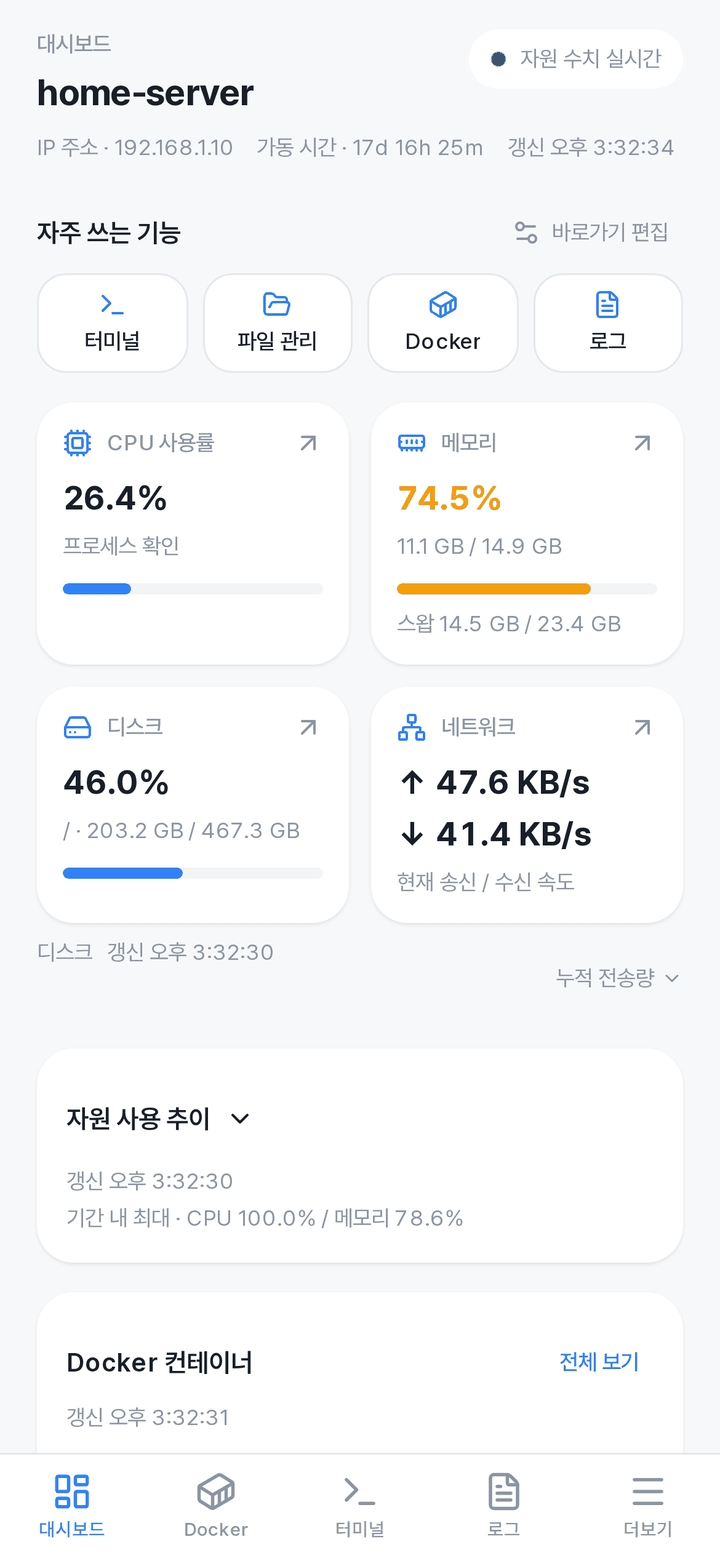
- 📱 **Desktop to mobile** — Korean/English, responsive web + PWA, native Windows/macOS/Linux apps (Tauri), and an Android app.
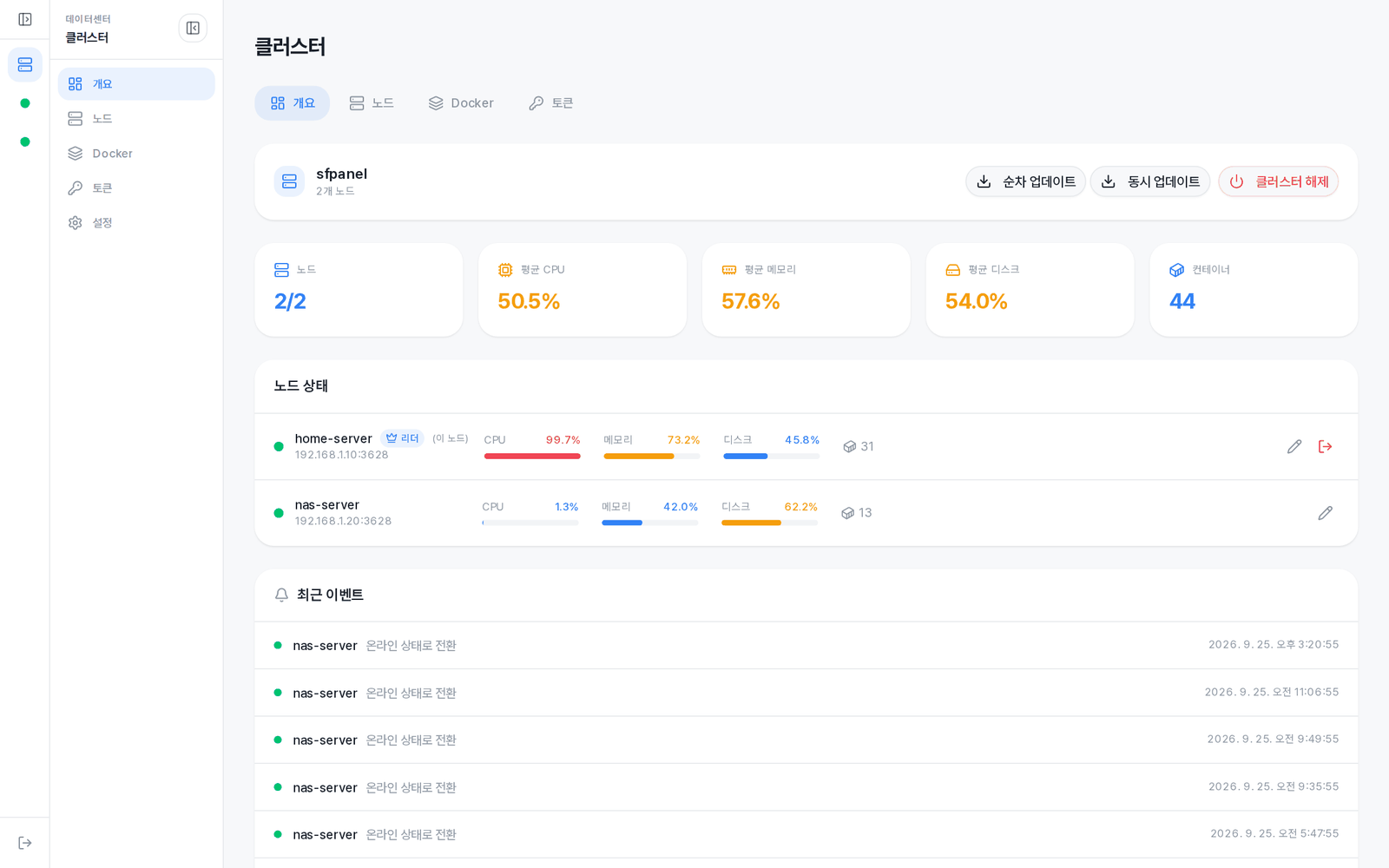
- 🧩 **Cluster optional** — single-node by default. Scale out to a Raft multi-node setup (live overview + transparent `?node=` proxy) when you need it.
## Screenshots
| Dashboard | Terminal · AI coding sessions |
|:---:|:---:|
| 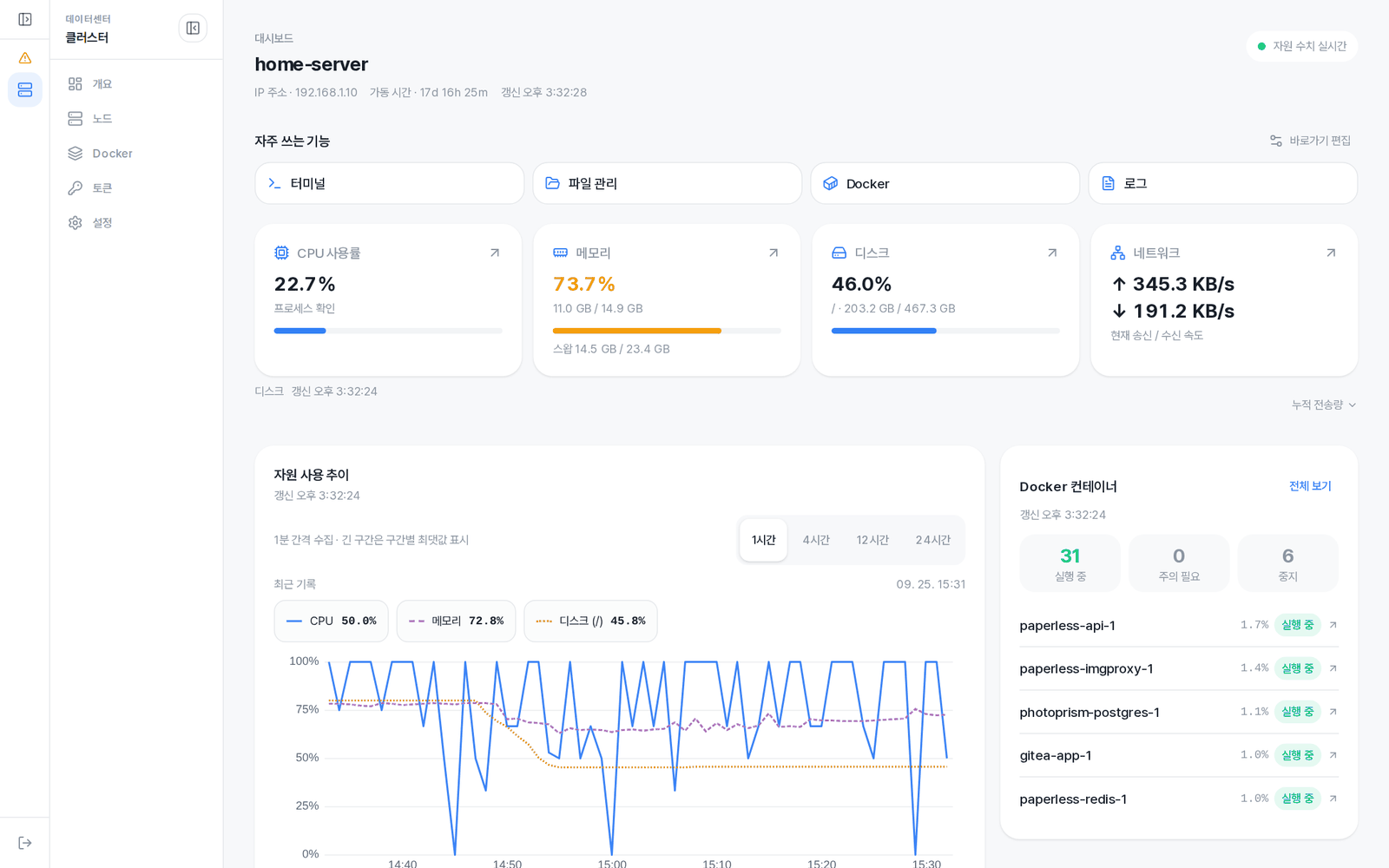 |
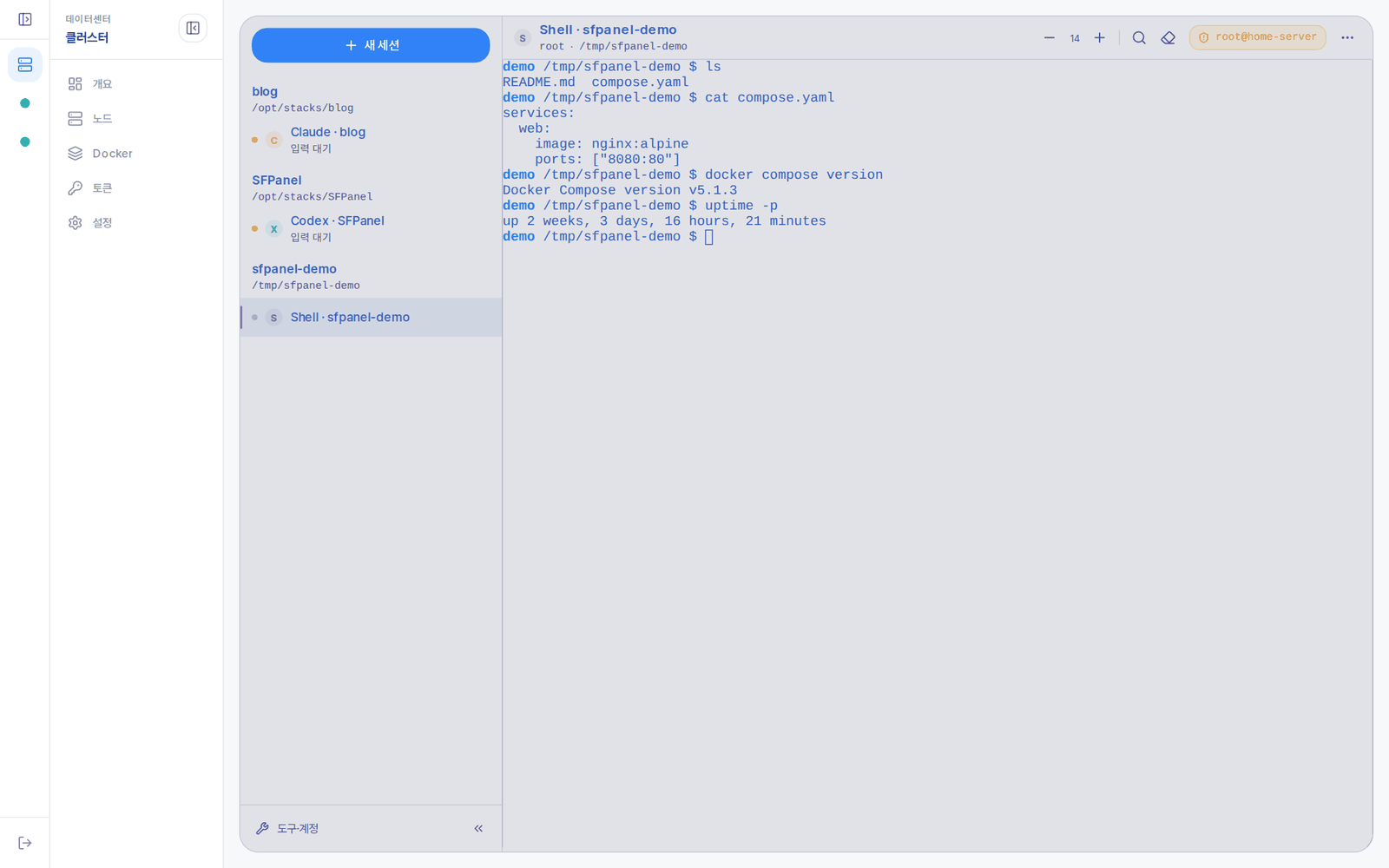 |
| **Docker** | **App Store** |
|
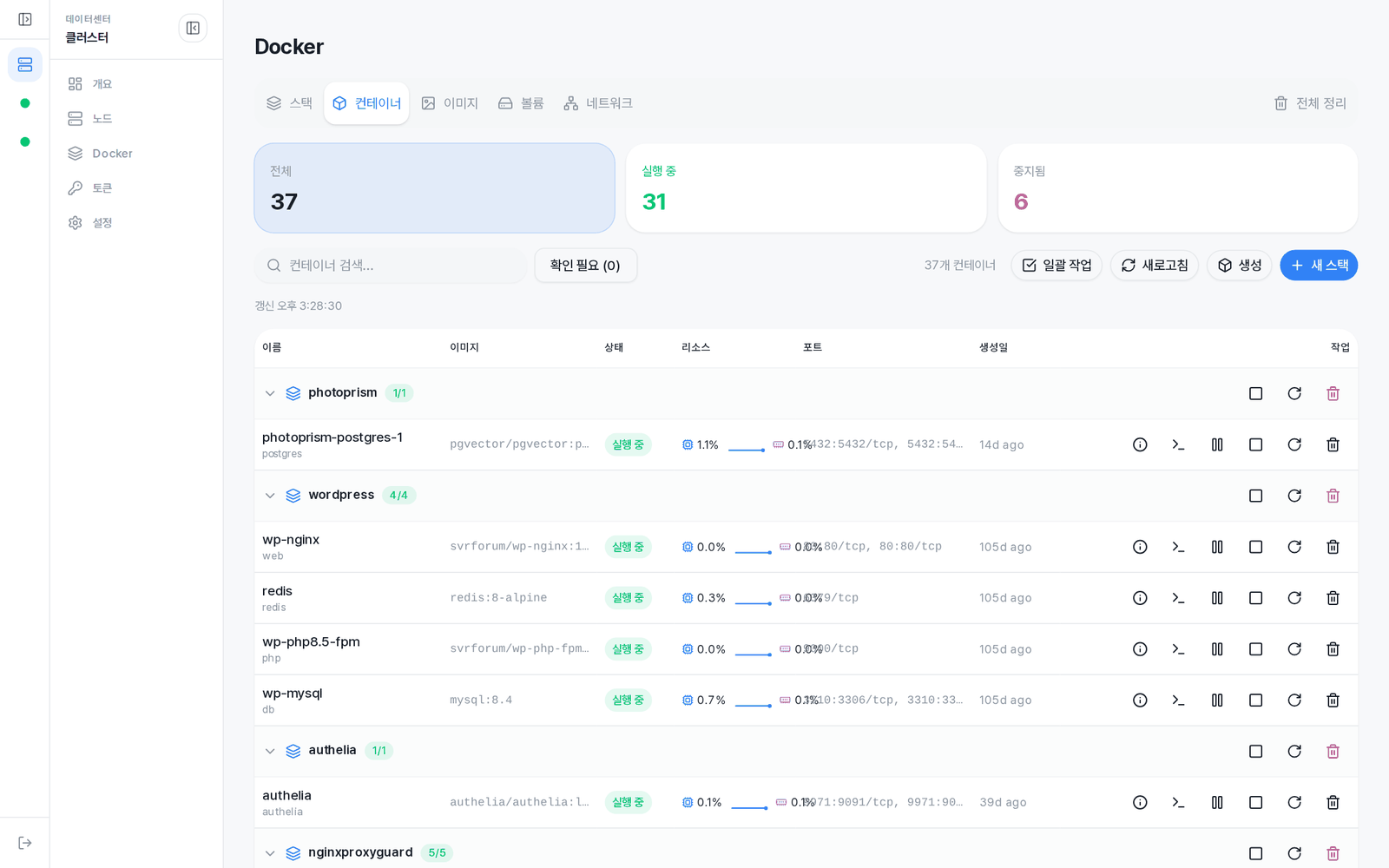 |
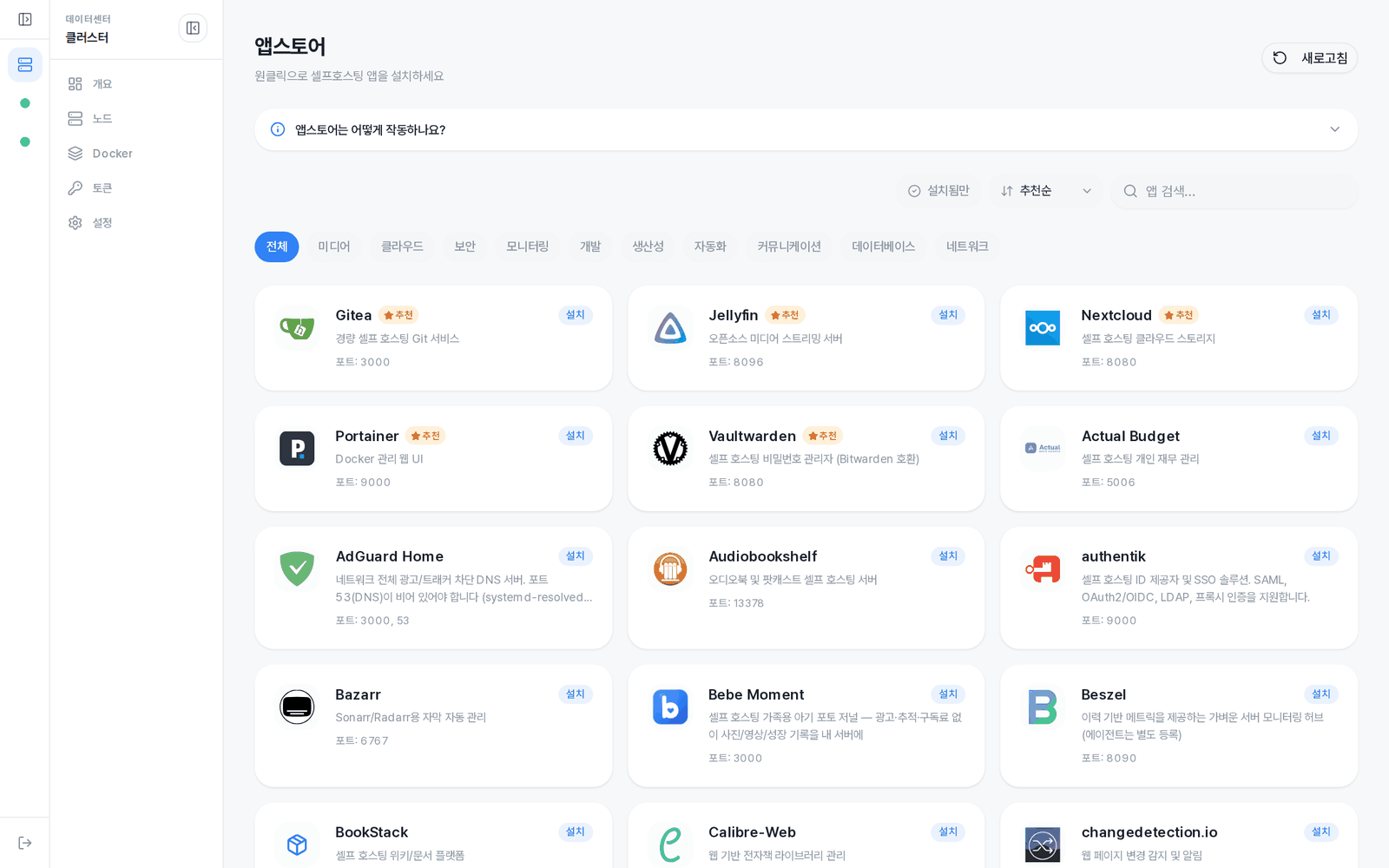 |
| **Cluster** | **Mobile** |
|
 |
 |
Shown with the Korean UI; English is built in and follows the browser language.
## Features
| Area | What it does |
|------|------|
| **Dashboard** | Organised around resource health and actionable alerts; real-time CPU/memory/disk/network monitoring (WebSocket), 24-hour history charts (range selection, data table), Docker summary, configurable shortcuts |
| **Docker** | Containers, images, volumes, networks (search, filters, sorting, network connect/disconnect); Compose stacks (change preview before deploy, per-service detail, current→target digest updates, rollback); risky-setting confirmation (docker.sock, host namespaces and the like are allowed after confirmation; mounting the panel's own secrets is refused); Hub search; resource pruning; node-to-node cold stack migration (compose + .env + volume/bind-mount data + images, retain/delete/clone disposition, optional transfer rate limit) |
| **App Store** | One-click install of **90+** curated self-hosted apps (\*arr, Nextcloud, Vaultwarden, Immich, AdGuard, Authentik, Forgejo and more). Recommended badges, sorting & search, "update available" badge, keep-data uninstall, post-install health check |
| **File manager** | In-browser file explorer + Monaco editor, recursive search, copy/multi-select delete, upload/download |
| **Terminal · AI coding** | Shells and AI CLIs (Claude Code, Codex, Gemini) run as tmux sessions that survive a closed browser or a panel restart; sessions listed by directory, launch options and account profiles, mobile key bar. Falls back to a PTY terminal without tmux |
| **Process · Service · Cron** | Process tree, renice, signals (TERM/KILL/STOP/CONT, …); systemd service control + unit view; crontab GUI + run-now with output capture + **system cron run logs** |
| **Logs** | Real-time streaming of system/custom logs (SSE), structured parsing (auth, UFW, Fail2ban, sfpanel), search, level coloring, download |
| **Network / VPN** | Interfaces (DHCP/Static), DNS, routing, bonding; **WireGuard** (peer management, key generation, client QR, boot autostart); **Tailscale** |
| **Disk** | Partitions, filesystems, LVM, RAID, swap; usage explorer; network drive (NFS/SMB) mounts; **S.M.A.R.T.** self-test runner + logs |
| **Firewall** | UFW rules (lockout guard), Fail2ban jails, Docker firewall (DOCKER-USER chain), unified port map (firewall × container × process) |
| **Packages** | APT search/install/upgrade + one-click install of Docker, Node.js, Claude, Codex, Gemini (live SSE streaming) |
| **Security · Audit** | Panel HTTPS (own CA, default on fresh installs), JWT + TOTP 2FA + one-time recovery codes, session restore after a browser restart, bcrypt, login rate-limiting (5 tries → 5 min), audit log (user, IP, path, status, node) |
| **Backup · Update** | Config backup/restore, scheduled backups (retention count), web self-update (SSE + cosign/SHA-256 verification, automatic .bak snapshot, watchdog rollback) |
| **Alerts** | Condition-based rules + channels (Discord, Telegram, Webhook = Slack/Mattermost compatible) + alert history |
| **Cluster** (optional) | Raft multi-node (automatic leader election, mTLS, join tokens), live overview WS, transparent `?node=` proxy, rolling updates startable from any node |
| **More** | Korean/English (auto-detect) · responsive + PWA · system tuning profiles · desktop app (Tauri, Win/macOS/Linux) |
## Architecture
```
Go Binary (Echo v4)
├── REST API (310+ endpoints) + WebSocket (8) + SSE (15+ streaming)
├── Embedded React SPA (go:embed)
├── SQLite (19 tables — auth, settings, audit log, metrics history, alerts, container events, volume usage, scheduled backups, …)
├── Docker Go SDK (direct socket; only the Docker routes disable when unavailable)
├── Compose Manager (filesystem-based, docker compose CLI)
├── System Metrics (gopsutil, 60s interval, 24-hour history)
└── Cluster (HashiCorp Raft + gRPC + mTLS)
├── Consensus-based config sync (JWT secret, admin account)
├── Non-leader API request proxy (gRPC 30s / SSE HTTP relay 5m)
├── WebSocket relay (remote-node terminal/logs/metrics)
├── Cluster overview WS push (/ws/cluster/overview, 5s sampler)
└── Heartbeat metric collection (CPU, memory, disk, containers)
```
```
internal/
├── api/
│ ├── router.go # Route registration
│ ├── middleware/ # JWT, audit log, cluster proxy, request logging
│ └── response/ # Standard responses, error codes (190+), output sanitizing
├── feature/ # 23 independent feature modules
│ ├── ai/ # AI coding and shell sessions (tmux, launch options, account profiles)
│ ├── auth/ # JWT, TOTP 2FA + recovery codes, password
│ ├── docker/ # Containers, images, volumes, networks
│ ├── compose/ # Docker Compose stacks (healthcheck composer, backup retention)
│ ├── portmap/ # Unified port map (firewall × container × process)
│ ├── firewall/ # UFW, Fail2ban, Docker firewall
│ ├── disk/ # Partitions, filesystems, LVM, RAID, swap
│ ├── network/ # Interfaces, WireGuard (peers/QR), Tailscale
│ ├── packages/ # APT, Docker, Node.js, Claude, Codex, Gemini
│ ├── cluster/ # Cluster management API
│ ├── alert/ # Alert channels (Discord/Telegram), rules, history
│ ├── system/ # Update, backup/restore, scheduled backups, tuning
│ ├── appstore/ # App store (runtime catalog fetch + catalog.json bundle, 90+ apps)
│ ├── services/ # systemd services
│ ├── files/ # File manager
│ ├── terminal/ # Web terminal (PTY, 10,000-line scrollback, 256KB server buffer for reconnect)
│ ├── websocket/ # WebSocket real-time data
│ ├── monitor/ # Dashboard metrics
│ ├── logs/ # Log viewer + custom sources
│ ├── cron/ # Cron jobs
│ ├── process/ # Process management
│ ├── audit/ # Audit log (50k rolling)
│ └── settings/ # Panel settings
├── cluster/ # Raft, gRPC, TLS, consensus engine
├── composex/ # Compose safety checks (refused / confirm tiers)
├── paneltls/ # Panel HTTPS (own CA + automatic certificate renewal)
├── db/ # SQLite migrations, schema
├── config/ # YAML config loading
├── docker/ # Docker SDK client
├── monitor/ # Metric history collection
└── common/
├── exec/ # Commander interface (with test Mock)
└── logging/ # slog structured logging
```
## Tech stack
| Area | Technology |
|------|------|
| Backend | Go 1.26, Echo v4, SQLite (modernc.org/sqlite, CGO-free) |
| Frontend | React 19, TypeScript 6, Vite 8 (rolldown), Tailwind CSS v4, shadcn/ui |
| UI | uplot (charts), xterm.js v6 (terminal), Monaco Editor (code editor) |
| Auth | JWT (golang-jwt/jwt/v5) + TOTP (pquerna/otp) + bcrypt + refresh token rotation |
| Docker | Docker Go SDK v28 |
| Cluster | HashiCorp Raft v1.7, gRPC v1.83, mTLS (auto-issued CA), peers.json quorum-loss recovery |
| Monitoring | gopsutil v4, gorilla/websocket |
| Desktop | Tauri 2 (Rust, Windows/Linux/macOS) |
| i18n | Korean / English (i18next) |
| E2E Test | Playwright |
## Requirements
- Linux (x86_64 or arm64)
- root privileges (needed to run system management commands)
- Docker (optional — the panel itself works without it)
> **Tested on** — **Ubuntu 24.04 LTS / 26.04 LTS**. It should run on most other Debian/Ubuntu-based distros (systemd + apt), but those two are the officially verified targets. **Proxmox VE 8 / 9** hosts are supported too — see [Proxmox VE](#proxmox-ve). Other distributions (RHEL/Fedora, Arch, …) are unverified and some package-management / service-control features may differ.
## Installation
> **SFPanel runs as root.** root is required for system management (Docker, firewall, disk, packages, …). After installing, be sure to **enable 2FA (TOTP)** to harden your account.
```bash
curl -fsSL https://raw.githubusercontent.com/svrforum/SFPanel/main/scripts/install.sh | sudo bash
```
The install script handles the following automatically:
- Installs the binary to `/usr/local/bin/sfpanel` after SHA-256 checksum verification
- Creates `/etc/sfpanel/config.yaml` (32-byte random JWT secret, mode 0600)
- Registers a systemd unit (`Restart=always`, `MemoryHigh=1G`, `TasksMax=4096`)
- Configures logrotate (`/etc/logrotate.d/sfpanel`, 7 daily files)
- Auto-snapshots the DB on upgrade (`sfpanel.db.bak-`, last 3 kept)
After installing:
1. Confirm the service is up: `sudo curl --cacert /etc/sfpanel/tls/ca.crt https://localhost:3628/api/v1/health` → `{"success":true,"data":{"status":"ok","version":"…"}}` (`/etc/sfpanel` is readable by root only, hence `sudo`)
A fresh install serves **HTTPS only**, from its own local CA. Panels installed earlier and upgraded keep their config, and with it `http://`.
2. **Decide on exposure first.** The panel runs as root — on a public VPS, restrict port 3628 to LAN/VPN with a firewall **before** anything else. To terminate TLS at a reverse proxy (Caddy / nginx / Cloudflare Tunnel) instead, set `server.tls.enabled: false` and put the proxy in front.
3. Create the admin account in the setup wizard — **first-run setup is restricted to the LAN / loopback**. On a LAN, open `https://:3628`; on a public host, tunnel it: `ssh -L 3628:127.0.0.1:3628 ` then open `https://127.0.0.1:3628`. The browser warns at first; download the CA (`sfpanel-ca.crt`) from **Settings → System** and install it on your devices once. A server that is about to join a cluster can skip this step ([see below](#adding-a-new-server-to-a-cluster)).
4. **Settings → Account → Two-Factor Authentication** — enable it (strongly recommended)
5. To edit the config file: `/etc/sfpanel/config.yaml` (run `systemctl restart sfpanel` after changes)
### Proxmox VE
SFPanel can run on a Proxmox VE 8 or 9 host itself. It manages the host's operating system — services, processes, disks, packages, logs, files, the terminal — and leaves the hypervisor to Proxmox: it does not manage VMs, containers, Proxmox storage or Proxmox firewall rules, and it refuses the changes that would break them.
- **Run as root, without `sudo`.** Proxmox VE has no sudo; root is its administrator. Leave `sudo` out of the commands in this README:
```bash
curl -fsSL https://raw.githubusercontent.com/svrforum/SFPanel/main/scripts/install.sh | bash
```
The cluster token page and `sfpanel cluster token` give the join command without sudo as well.
- **Firewall.** The host's packet filter belongs to the Proxmox firewall, so neither the installer nor the panel turns ufw on there: next to it, ufw cuts the web UI on 8006, the cluster and the guest consoles. While the datacenter firewall is on, the host drops 3628 until a rule allows it — **Datacenter → Firewall → Add**, or under `[RULES]` in `/etc/pve/firewall/cluster.fw`:
```
IN ACCEPT -source -p tcp -dport 3628
IN ACCEPT -source -p tcp -dport 3628:3630
```
The second rule is for an SFPanel cluster. The installer prints both when it finds the firewall on.
- **Read-only there:** the **network** (the bridges every guest hangs off are edited in the Proxmox UI, `:8006` → node → System → Network) and the **firewall** (the Proxmox firewall's state is shown in place of the ufw controls).
- **Refused or guarded there:**
- **Docker** — installing it on the host is refused: it changes forwarding and bridge filtering under every guest, and Proxmox recommends running it in a VM. A Docker that is already installed is managed as usual.
- **Services** — the units the node cannot lose (corosync, pve-cluster, watchdog-mux, the Proxmox firewall, networking) cannot be stopped or disabled; the other Proxmox services ask you to type their name first.
- **Processes** — a VM's process cannot be signalled; shut the VM down with `qm shutdown `.
- **Disks** — guest volumes (zvols, guest LVs, a disk a VM has open) and boot partitions are refused.
- **Done the Proxmox way:** **Upgrade All** runs `dist-upgrade`, as Proxmox requires, and the enterprise repository without a subscription is a warning rather than a failure; System Tuning leaves bridge filtering, IP forwarding and conntrack to Proxmox.
### Manual installation
When there's no systemd or you'd rather not use the install script:
```bash
# 1. Download the binary from GitHub Releases
ARCH=$(uname -m | sed 's/x86_64/amd64/;s/aarch64/arm64/')
VERSION=$(curl -fsSL https://api.github.com/repos/svrforum/SFPanel/releases/latest \
| grep '"tag_name"' | sed -E 's/.*"v([^"]+)".*/\1/')
curl -fsSL "https://github.com/svrforum/SFPanel/releases/download/v${VERSION}/sfpanel_${VERSION}_linux_${ARCH}.tar.gz" \
| sudo tar -xzC /usr/local/bin/
# 2. Directories + permissions
sudo install -d -m 700 /etc/sfpanel /var/lib/sfpanel
sudo install -d -m 755 /var/log/sfpanel
# 3. Write a minimal config.yaml (the JWT secret MUST be unique)
sudo tee /etc/sfpanel/config.yaml > /dev/null < In a manual install, handlers like cluster leave/disband and panel update exit the process on purpose, expecting a supervisor to restart it. Write a systemd unit alongside it where possible, or switch to the install script.
## Configuration
`/etc/sfpanel/config.yaml`:
```yaml
server:
host: "0.0.0.0"
port: 3628 # default: 3628 panel, 3629 cluster gRPC, 3630 Raft
tls:
enabled: true # default on fresh installs — own CA issues and renews the certificate (/etc/sfpanel/tls)
database:
path: "/var/lib/sfpanel/sfpanel.db"
auth:
jwt_secret: "random-secret-key" # auto-generated by the install script
token_expiry: "24h"
docker:
socket: "unix:///var/run/docker.sock"
log:
level: "info" # debug, info, warn, error
file: "/var/log/sfpanel/sfpanel.log"
cluster:
enabled: false
name: ""
node_id: ""
node_name: ""
grpc_port: 3629 # Raft transport is automatically grpc_port + 1 (3630)
data_dir: "/var/lib/sfpanel/cluster"
cert_dir: "/etc/sfpanel/cluster"
advertise_address: ""
raft_tls: false
```
Environment variable overrides:
| Variable | Description | Default |
|------|------|--------|
| `SFPANEL_PORT` | Server port | 3628 |
| `SFPANEL_JWT_SECRET` | JWT signing secret | config.yaml |
| `SFPANEL_DB_PATH` | SQLite DB path | config.yaml |
| `SFPANEL_LOG_LEVEL` | Log level (`debug`/`info`/`warn`/`error`) | `info` |
| `GOMAXPROCS` | Go concurrent core count | 2 (homeserver default) |
| `GOGC` | Go GC trigger ratio (%) | 50 (memory saving) |
> On an 8-core+ cluster host with heavy cluster fanout, raising `GOMAXPROCS=4` or `GOMAXPROCS=8` helps. Add `Environment="GOMAXPROCS=4"` to the `[Service]` section of the systemd unit, then `systemctl daemon-reload && systemctl restart sfpanel`.
## CLI commands
```bash
sfpanel # run with the default config.yaml
sfpanel /path/to/config.yaml # run with a specified config file
sfpanel version # version info
sfpanel update # update to the latest version from GitHub
sfpanel reset # reset the database (re-run the setup wizard)
sfpanel help # help
```
### Cluster CLI
```bash
sfpanel cluster init [--name NAME] [--advertise IP] # initialize a cluster
sfpanel cluster token [--ttl DURATION] [--agent] # generate a join token (prints the join command to run; --agent for an agent)
sfpanel cluster join ADDR:PORT TOKEN --ca FINGERPRINT [--advertise IP] # join a cluster (ADDR = the leader, PORT = 3629, FINGERPRINT = the CA fingerprint on the token page)
sfpanel cluster status # check cluster status
sfpanel cluster list # list nodes
sfpanel cluster remove NODE_ID [--force] # remove a node (--force: one of the last two voters, leaving a lone voter)
sfpanel cluster leave [--force] # leave the cluster (--force: even when the managers left could not form a quorum)
sfpanel cluster leader-transfer NODE_ID # hand leadership to another node
sfpanel cluster reissue-cert # reissue this node's certificate
```
All cluster commands support the `--config PATH` option (default: `/etc/sfpanel/config.yaml`).
### Agent CLI
An agent is a server the cluster manages without making it a member of Raft: it does not vote, has no login, accounts or web UI, and is managed from a manager's panel by selecting the node. On a manager, `sudo sfpanel cluster token --agent` prints the commands below with the leader address, token and CA fingerprint filled in.
```bash
sfpanel agent join ADDR:PORT TOKEN --ca FINGERPRINT [--advertise IP] [--name NAME] # join as an agent (ADDR = the leader, PORT = 3629)
sfpanel agent status # show the managers, leader, certificate and panel
sfpanel agent reset --yes # make it a standalone panel again (without --yes, only lists what it would do)
# New server — install and join as an agent in one line
curl -fsSL https://raw.githubusercontent.com/svrforum/SFPanel/main/scripts/install.sh | sudo bash -s -- --agent :3629 --ca [--name ]
```
Upgrade every manager to the latest release before adding agents. On an agent, `sfpanel cluster` commands refuse to run. Ports, the removal steps and why an agent's panel serves HTTPS are in "Agents" in [docs/specs/cluster-ops.md](docs/specs/cluster-ops.md#agents).
## Service management
```bash
sudo systemctl status sfpanel # check status
sudo systemctl restart sfpanel # restart
sudo systemctl stop sfpanel # stop
sudo journalctl -u sfpanel -f # live logs
```
## Upgrading
```bash
# Option 1: web UI
# Settings → Panel Update → Check for updates → Install update
# Option 2: CLI
sudo sfpanel update
# Option 3: re-run the install script (auto-detects an upgrade)
curl -fsSL https://raw.githubusercontent.com/svrforum/SFPanel/main/scripts/install.sh | sudo bash
```
### Integrity verification
Each release runs two verification stages:
1. **Sigstore cosign keyless OIDC** — verifies the Sigstore bundle (`checksums.txt.sigstore.json`, preferred by v0.56+) or the legacy pair (`checksums.txt.sig` + `checksums.txt.pem`) against the GitHub Actions OIDC identity (v0.13.0+ releases)
2. **SHA-256 checksum** — matches the binary archive hash against the verified `checksums.txt`
A downgrade attempt to an old release without cosign material is rejected (`release.IsForwardUpdate`), falling back to SHA-256 only.
### Automatic DB snapshot
Right before an upgrade (after the service stops for the install script, just before the binary swap for the CLI), a snapshot is auto-created as `sfpanel.db.bak-`. The last 3 are kept and older ones removed. To roll back when a migration regression keeps the panel from booting:
```bash
sudo systemctl stop sfpanel
sudo cp /var/lib/sfpanel/sfpanel.db.bak- /var/lib/sfpanel/sfpanel.db
sudo systemctl start sfpanel
```
### Rolling upgrade in a cluster
Restarting multiple nodes at once can cause a **15–20 second leader re-election delay** due to the mTLS handshake + Raft pre-vote flow. For zero-downtime upgrades, do one node at a time with at least 10 seconds between them. Or use the web UI's **Cluster → Update → rolling mode** (SSE progress streaming), which processes nodes one at a time automatically.
## Backup / restore
Backup/restore via the web UI at Settings → Config Backup.
What the backup includes:
- `sfpanel.db` — admin account (+ TOTP), settings, Compose project metadata, custom log sources, audit log, metrics history, alert rules/channels/history
- `config.yaml` — server port, JWT secret, DB path, Docker socket, cluster config
- `compose/*` — Docker Compose project files (docker-compose.yml, .env)
> Docker data (volumes, images, containers) is not included in the backup.
## Android app
The Android 8.0+ client combines native server connections and coding tools with the server's full web interface. It provides Shift/Ctrl/Alt keys, scrollback controls, multiline prompt composition, and output reading/search, with large touch targets, system font scaling, TalkBack labels, and Korean/English localization.
See the [Android guide](android/README.md) for build instructions and validation scope. Download the signed APK (`SFPanel-Android-*.apk`) from the [latest release](https://github.com/svrforum/SFPanel/releases/latest). Pushing an `android-v*` tag automatically tests, signs, verifies, and publishes the Android release, and attaches the same APK to the latest server release.
## Desktop app (Tauri)
Separate from the server binary, **Windows / macOS / Linux desktop apps** ship in the same release. The app is a simple WebView wrapper — it doesn't run a server of its own; you enter the address of an already-running SFPanel instance (`http://:3628`) and it opens that panel in a desktop window. There's no feature difference from a browser tab; it's handy when you want a separate window, or OS-native notifications/shortcuts.
Assets on the [Releases page](https://github.com/svrforum/SFPanel/releases/latest):
| OS | Asset | Note |
|----|------|------|
| Windows | `SFPanel__x64_en-US.msi` | Standard MSI install |
| Windows | `SFPanel__x64-setup.exe` | NSIS install wizard |
| Windows | `SFPanel_portable_windows_amd64.exe` | Portable (no install) |
| macOS | `SFPanel__aarch64.dmg` | Apple Silicon (M1/M2/M3) |
| Linux | `SFPanel__amd64.deb` | Debian/Ubuntu |
| Linux | `SFPanel--1.x86_64.rpm` | RHEL/Fedora |
| Linux | `SFPanel__amd64.AppImage` | Distro-agnostic (chmod +x then run) |
**Opening it on macOS for the first time:** the app is not notarized by Apple, so the first launch of an app installed from the downloaded dmg says it "is damaged and can't be opened". The file is not damaged. Move the app to Applications, run this once in Terminal and open it again. A fresh install from a new dmg may need it again.
```bash
xattr -cr /Applications/SFPanel.app
```
The desktop app is released on the **same version line as the server** (v0.13.5+; earlier desktop builds were a separate `0.6.x` line). When a new version lands on the release page, the app detects it automatically and shows an update dialog (ed25519 signature verification, `tauri-plugin-updater`). Update in place — no manual reinstall.
## Cluster
SFPanel supports a multi-node cluster built on the HashiCorp Raft consensus algorithm.
### Features
- **Automatic leader election** — a new leader is elected automatically if the leader fails
- **mTLS communication** — node-to-node gRPC uses auto-issued CA certificates
- **Token-based join** — nodes authenticate with time-limited HMAC-signed tokens
- **Zero-restart lifecycle** — creating/joining a cluster activates immediately, no service restart
- **Config sync** — JWT secret and admin account sync automatically across all managers (agents get neither)
- **API proxy** — API requests on non-leader nodes are relayed to the leader automatically
- **WebSocket relay** — connect to remote-node terminals and logs over a relay
- **Metric sharing** — each node's CPU, memory, disk and container metrics aggregate into the cluster overview
- **Cluster update** — update SFPanel across the whole cluster in rolling/simultaneous mode (SSE progress streaming). Startable from any node; the leader finishes the run even if the node you are connected to restarts
### Adding a new server to a cluster
**Before you start** — on every node:
- **Same version.** A new server installs the latest release. If the existing nodes are behind, update them first (Settings → System → Panel Update, or `sudo sfpanel update`). The join does not check versions.
- **Ports.** Nodes talk to each other on TCP **3628** (panel), **3629** (gRPC) and **3630** (Raft), in **both directions**. With ufw, on each node, for each other node: `sudo ufw allow from to any port 3628:3630 proto tcp`. On Proxmox VE, allow them in the Proxmox firewall instead ([see above](#proxmox-ve)).
- **Addresses that reach each other.** Put the nodes on one LAN or a VPN such as Tailscale. Joining hands the cluster's JWT secret and admin account to the new server, so keep it off the public Internet.
- **Clock sync.** Keep NTP (`systemd-timesyncd`) on; token expiry and certificate checks depend on it.
**From the CLI:**
```bash
# Existing node — create the cluster first if there is none yet
sudo sfpanel cluster init --name my-cluster --advertise
sudo sfpanel cluster token # prints the line to paste on the new server, leader address and token filled in
# New server — install and join in one line (no setup wizard needed)
curl -fsSL https://raw.githubusercontent.com/svrforum/SFPanel/main/scripts/install.sh | sudo bash && sudo sfpanel cluster join :3629 --ca
# Check — done when the new node shows follower / online within a minute
sudo sfpanel cluster list
```
On a server without sudo (Proxmox VE), run the same commands as root and leave `sudo` out; `sfpanel cluster token` prints the join command both ways.
**From the web UI:** on an existing node, open **Cluster**, press **Initialize Cluster** if there is none yet, and generate a token on the **Tokens** tab (it shows the one-line install-and-join command for a new server too). On the new server, create a temporary admin in the setup wizard, open **Cluster**, and enter the leader address (`:3629`) and the token under **Join Existing Cluster**. Unless you pick an address yourself, the one that reaches the leader is used.
**What joining changes:**
- The new server's local admin account **becomes the cluster admin account** (name, password, 2FA). From then on you sign in with the same account on every node.
- The new node joins without a vote and is promoted to voter once the leader hears from it, usually within a minute.
- **Node count:** Raft needs a majority alive to elect a leader. **A two-node cluster has no leader while either node is down**, so token creation, node removal, account changes and cluster updates stop (each node's local management keeps working). For fault tolerance, run **three or more**.
**Troubleshooting:**
| Symptom | What to do |
|---------|------------|
| `cannot reach leader …:3629` | Check the path from the new server to the leader's 3629 (firewall, address) |
| `not the cluster leader` | Run it against the leader — the address `sfpanel cluster token` printed is the leader's |
| `token has already been used` / `expired` / `does not exist` | Create a new token on the leader. Tokens live only on the node that made them, so a leader change invalidates old ones |
| The join succeeded but the new node stays offline | The leader cannot reach the new server's 3629/3630. Open them and it gets promoted |
| `found duplicate address in configuration` | An earlier attempt left a node behind on the leader. Find it with `sudo sfpanel cluster list`, `sudo sfpanel cluster remove `, then retry with a new token |
| After a reboot the Cluster page says "This node's cluster service did not start" | The cluster failed to start and the node is running on its own. `sudo systemctl restart sfpanel`, and read `journalctl -u sfpanel` for the cause |
Creating/joining a cluster activates immediately **without a service restart**, from both the web UI and the CLI (zero-restart, `JoinEngine` PreFlight → Execute pipeline). Leaving/disbanding does require a service restart and works safely under the `Restart=always` systemd unit installed by `scripts/install.sh` (the leave/disband handlers deliberately `os.Exit` to trigger a supervisor restart).
### TLS certificate lifetimes / rotation
| Item | Lifetime | Rotation method |
|------|------|-----------|
| Cluster CA | 10 years | Coordinated restart (all nodes trust the new CA simultaneously) |
| Node cert | 5 years | `sudo sfpanel cluster reissue-cert` (no restart, takes effect ≤1 min) |
### Quorum-loss recovery (peers.json)
When a hardware failure or permanent node loss drops surviving voters below quorum so a normal membership change is impossible:
```bash
# Write /var/lib/sfpanel/cluster/peers.json on a surviving node:
sudo tee /var/lib/sfpanel/cluster/peers.json > /dev/null <","address":":3630","non_voter":false},
{"id":"","address":":3630","non_voter":false}
]
EOF
sudo systemctl restart sfpanel
```
On boot, Raft detects the file, rewrites the local configuration via `RecoverCluster()`, and renames it to `peers.info` so it isn't re-applied on the next boot. The record of a node you left out stays in the node list: remove it on the leader with `sudo sfpanel cluster remove ` (a record the Raft configuration no longer holds passes the quorum check). For normal node removal, use `sudo sfpanel cluster remove ` too.
peers.json is also used — beyond quorum loss — for **changing the Raft transport port on a live cluster** (moving `grpc_port` makes the Raft port follow as `grpc_port + 1`, so the peer addresses baked into the existing membership must be rewritten to the new port). Both can break membership if done wrong, so follow the "Port migration on a live cluster" procedure in [docs/specs/cluster-partition-runbook.md](docs/specs/cluster-partition-runbook.md).
## Uninstall
```bash
curl -fsSL https://raw.githubusercontent.com/svrforum/SFPanel/main/scripts/install.sh | sudo bash -s -- uninstall
```
This removes only the binary and service. Config (`/etc/sfpanel`) and data (`/var/lib/sfpanel`) are preserved; to remove everything, also run:
```bash
sudo rm -rf /etc/sfpanel /var/lib/sfpanel /var/log/sfpanel
```
## Development
### Build
```bash
# Full build (frontend + backend → single binary)
make build
# Or manually:
cd web && npm install && npm run build
cd .. && go build -o sfpanel ./cmd/sfpanel
```
### Dev mode
```bash
# Terminal 1: frontend (hot reload, API proxy → :3628)
cd web && npm run dev
# Terminal 2: backend (must be root)
sudo go run ./cmd/sfpanel
```
> Manual-run caveat: when you launch the binary directly without systemd, pressing **cluster leave/disband** or **panel update** in the web UI makes the backend exit on purpose, and with no supervisor to restart it the panel stays down. Those buttons are only safe under the `Restart=always` systemd unit (installed by `scripts/install.sh`). Creating/joining a cluster activates without a restart, so it's safe even in a manual setup.
### Test
```bash
make test # Go unit tests
make test-coverage # coverage report
make lint # Go + frontend lint
make ci # full CI pipeline (lint + test + build)
# E2E tests (Playwright)
cd e2e && npm run test # headless
cd e2e && npm run test:headed # browser UI
```
## API
All REST responses use a uniform JSON shape:
```json
{"success": true, "data": {...}}
{"success": false, "error": {"code": "ERROR_CODE", "message": "..."}}
```
- Auth: `Authorization: Bearer ` header
- WebSocket auth: a single-use ticket from `POST /api/v1/auth/ws-ticket` (`?ticket=`, 60 s). `?token=` is accepted from loopback only
- Cluster remote-node calls: adding `?node=` to any protected route makes `ClusterProxyMiddleware` transparently forward to the target node (gRPC 30s; SSE/WS relay directly over HTTP/WS)
- 15+ SSE streaming endpoints (system update, Docker image pull, Compose up/update, stack migration, package/VPN install, appstore install, cluster update)
## Documentation
| Document | Contents |
|------|------|
| [docs/specs/tech-features.md](docs/specs/tech-features.md) | Full feature detail + tech stack |
| [docs/specs/api-spec.md](docs/specs/api-spec.md) | Complete REST/SSE endpoints + request/response schemas |
| [docs/specs/websocket-spec.md](docs/specs/websocket-spec.md) | 8 WebSocket + 15+ SSE message schemas + cluster relay |
| [docs/specs/db-schema.md](docs/specs/db-schema.md) | SQLite 19 tables + retention policy + migrations |
| [docs/specs/frontend-spec.md](docs/specs/frontend-spec.md) | Pages/components/routing/state/build |
| [docs/specs/cluster-partition-runbook.md](docs/specs/cluster-partition-runbook.md) | Cluster operator runbook: partition detection/recovery, forced disband, port migration procedure |
| [CHANGELOG.md](CHANGELOG.md) | Release notes |
| [CONTRIBUTING.md](CONTRIBUTING.md) | Contributor guide (build/test, code conventions, PR workflow) |
## Security notes
SFPanel **runs as root** and is a powerful tool that can manage the entire server. Be sure to apply the security measures below.
### What operators must apply themselves
- **2FA strongly recommended** — enable it with a TOTP app (Google Authenticator, etc.) under Settings → Two-Factor Authentication. If the panel is compromised, the whole server is at risk.
- **Strong password** — at least 12 characters during initial setup
- **Check HTTPS** — fresh installs serve the panel over HTTPS from its own CA (`server.tls.enabled`). On older installs, turn it on or terminate HTTPS with a reverse proxy (Nginx/Caddy/Cloudflare Tunnel etc.). Install the panel's CA certificate on your devices to avoid browser warnings.
- **Restrict access** — allow 3628/3629/3630 only to trusted IPs/CIDRs via a firewall (UFW; on Proxmox VE, the Proxmox firewall)
- **JWT secret on manual install** — set a unique value with `openssl rand -hex 32` (the install script generates it automatically)
### What the panel/script apply automatically
- **Login protection** — 5 failures blocks the IP for 5 minutes (built-in rate limiting)
- **JWT secret** — 32-byte random, auto-generated + config.yaml 0600 permissions
- **Cluster mTLS** — node-to-node gRPC/Raft traffic auto-encrypted (CA auto-issued)
- **Join token** — time-limited HMAC-signed, single use
- **systemd hardening** — `MemoryHigh=1G`, `TasksMax=4096` (for the unit installed by `scripts/install.sh`). Not `PrivateTmp`: it would keep the disks and network shares the panel mounts from the host and Docker. Not `RestrictSUIDSGID`: apt and dpkg, run by the panel, set the setuid bits of the packages they install, and an older unit has it removed when the panel starts.
- **Sensitive directory permissions** — `/etc/sfpanel/` 0700, `config.yaml` 0600, `/etc/sfpanel/cluster/*.key` 0600, `/var/lib/sfpanel/` 0700
## Sponsor / links
If SFPanel is useful to you, support its development with a cup of coffee. The same sponsor / GitHub links are also at the bottom of the panel sidebar.
[](https://buymeacoffee.com/svrforum)
[](https://github.com/svrforum/SFPanel)
## License
Copyright © 2026 svrforum
[GNU AGPL-3.0](LICENSE) — you're free to self-host, modify and redistribute, but if you offer a modified version **as a network service** you must also publish its source code (§13). Honest self-hosters have no extra obligation.
> **Commercial / closed-source licensing** — if you want to embed or resell SFPanel without the AGPL terms, a separate commercial license is available. Contact .