FLAP logo: a brushed command prompt, a chevron and a cursor # FLAP #### Fortran command Line Arguments Parser [![GitHub tag](https://img.shields.io/github/v/tag/szaghi/FLAP)](https://github.com/szaghi/FLAP/tags) [![GitHub issues](https://img.shields.io/github/issues/szaghi/FLAP)](https://github.com/szaghi/FLAP/issues) [![CI](https://github.com/szaghi/FLAP/actions/workflows/ci.yml/badge.svg)](https://github.com/szaghi/FLAP/actions/workflows/ci.yml) [![coverage](https://img.shields.io/endpoint?url=https://szaghi.github.io/FLAP/coverage.json)](https://github.com/szaghi/FLAP/actions/workflows/ci.yml) [![License](https://img.shields.io/badge/license-GPLv3%20%7C%20BSD%20%7C%20MIT-blue.svg)](#copyrights) > Describe your command line once, in pure Fortran 2018: FLAP parses it, reads the environment and the configuration files, > checks every value, writes the help, the errors, the man page and the shell completions, and tells scripts and AI agents > how to call your program. > From three options to git-style commands, with a handful of calls. a terminal session of a FLAP program: its help, some runs, a typo and an out-of-range value A real session of the short program of the quick start below: help, values and errors all come from FLAP. a terminal session of a FLAP program answering another program: its JSON description, a rejected command line, a JSON error, an exit status and a dry run The same definitions answer a script or an AI agent: chapter 10 of the tutorial builds this session.

๐Ÿงฉ Every kind of argument
Options with abbreviations, positionals, flags and --x/--no-x pairs, counters (-vvv), repeatable options, optional values, inline --opt=value, hidden arguments, value placeholders. Defining arguments
๐Ÿ”ข Typed values, lists and maps
One get for every integer and real kind, logicals and strings; fixed-size lists (nargs='3'), runtime-sized ones ('+', '*') into allocatable arrays, KEY=VALUE maps. Parsing & getting values ยท Maps
โœ… Validation built in
Required options, choices, numeric ranges with open bounds or clamping, path checks (exists, readable, writable), mutually exclusive sets, deprecation warnings: declared in the definition, checked for you. Ranges ยท Paths ยท Exclusive sets
๐Ÿ’ฌ Errors that help
switch "--tiems" is unknown! Did you mean "--times"? Suggestions, a hint line, the usage after an error, a named constant for every code, and your own errors printed in the same style. Errors
๐Ÿ”€ Commands
git-style commands, each with its options and its help; aliases, option sets shared between commands, mutually exclusive commands, several commands on one command line. Subcommands
๐ŸŒฑ Values from everywhere
Command line, environment variables (named or generated from a prefix), INI configuration files and defaults, in a fixed precedence; the source of every value reported, for reproducible runs. Value sources ยท Configuration files
๐Ÿ“„ Help, man page, Markdown
The help and the usage are generated from the definitions, with colours, examples and an epilog; --man and --markdown save the same content as a man page and a Markdown file. Output formats
โŒจ๏ธ Shell completion
Completion scripts for bash, zsh, fish and PowerShell, which the program prints or installs by itself: --show-completion, --install-completion. Shell completion
๐Ÿงช Testable command lines
Parse a string instead of the real command line, parse again, get statuses back instead of stops, send the messages to the units you choose: your CLI can be unit tested. Testing
๐Ÿ™‹ Interactive menus
An opt-in module asks for what is missing: single or multiple choice, defaults, yes/no questions, retries; it never blocks a batch job. Interactive menus
๐Ÿค– Ready for scripts and agents
Declared value types, a JSON description (--schema), a validate-only mode (--check), --dry-run, JSON errors with exit statuses that say what to change, and an agent skill generated from the definitions. Tutorial.
๐Ÿงพ Reproducible runs
A JSON manifest of every run: the command line and each value with its source, with no date or host, so the same inputs give the same bytes. Sensitive values stay masked, in errors too. Run manifest.
๐Ÿ› ๏ธ Standard Fortran, any build
Fortran 2018, tested with gfortran 16, nvfortran and Intel ifx; built with FoBiS, fpm, CMake or Make. Two small dependencies, fetched for you. Installation
๐Ÿ”“ Multi-licensed
GPL v3 for FOSS projects; BSD 2-Clause, BSD 3-Clause or MIT for closed source and commercial ones: pick the license that fits. Copyrights
**[Full documentation](https://szaghi.github.io/FLAP/)** ยท [Tutorial](https://szaghi.github.io/FLAP/manual/tutorial/01-first-cli) ยท [Cookbook](https://szaghi.github.io/FLAP/manual/cookbook) ยท [API reference](https://szaghi.github.io/FLAP/api/)
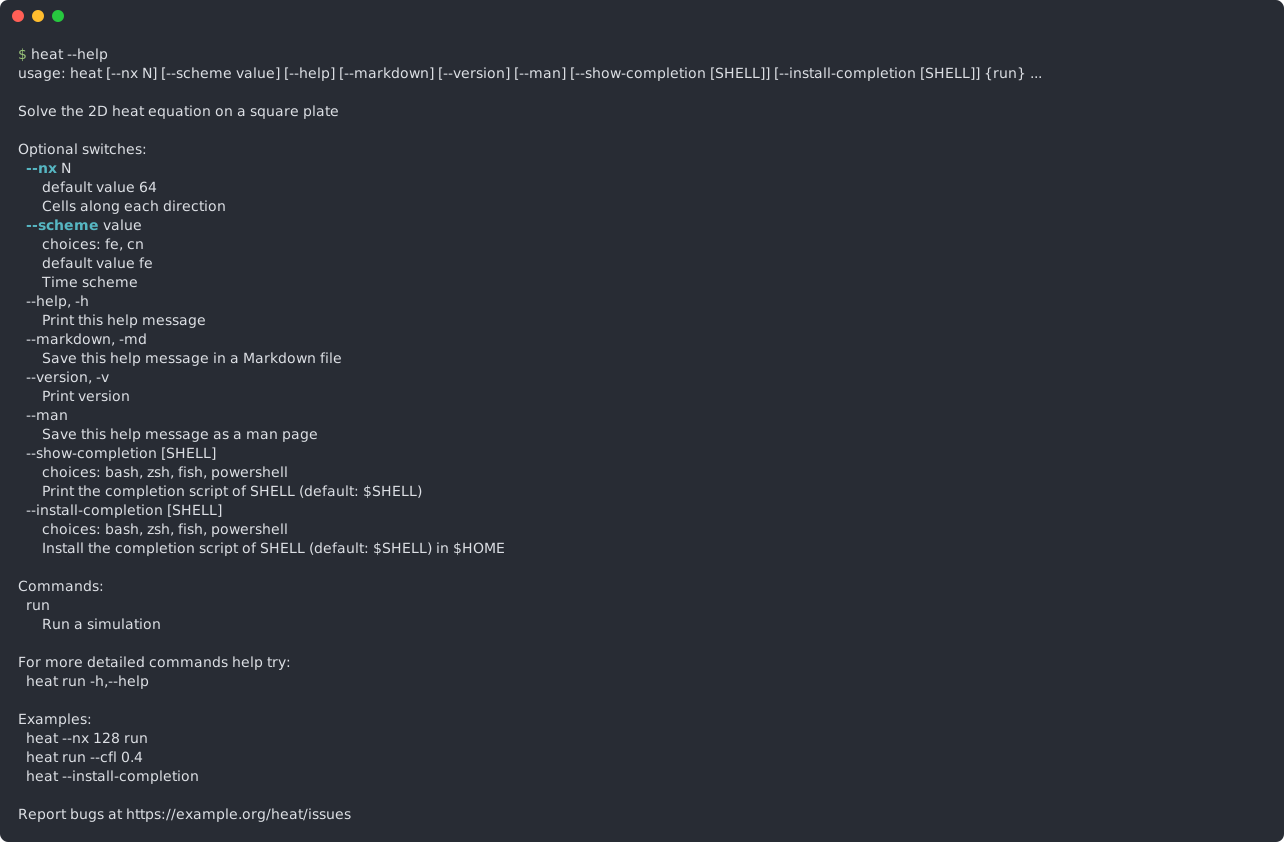
## Quick start Four steps: initialise, define, parse, get. This is the whole program behind the session above. ```fortran program greet !< Quick start: a positional, a ranged integer, a choice read from the environment too, a flag. use flap implicit none type(command_line_interface) :: cli character(32) :: name, lang, hello integer :: times, i, error logical :: shout call cli%init(progname='greet', version='v1.0', description='Greet someone, in a few languages', & error_color='red', error_style='bold_on') call cli%add(positional=.true., position=1, help='Who to greet', required=.true., metavar='NAME') call cli%add(switch='--times', switch_ab='-t', help='How many times', def='1', min='1', max='5', metavar='N', & help_color='cyan', help_style='bold_on') call cli%add(switch='--lang', help='Language', def='en', choices='en,it,fr', envvar='GREET_LANG', metavar='LANG', & help_color='cyan', help_style='bold_on') call cli%add(switch='--shout', help='Say it louder', act='store_true', def='.false.', & help_color='cyan', help_style='bold_on') call cli%parse(error=error) ! prints the help, the version or the error by itself if (error /= 0) stop 1, quiet=.true. call cli%get(position=1, val=name, error=error) ; if (error /= 0) stop 1, quiet=.true. call cli%get(switch='--times', val=times, error=error) ; if (error /= 0) stop 1, quiet=.true. call cli%get(switch='--lang', val=lang, error=error) ; if (error /= 0) stop 1, quiet=.true. call cli%get(switch='--shout', val=shout, error=error) ; if (error /= 0) stop 1, quiet=.true. select case(trim(lang)) case('it') ; hello = 'Ciao' case('fr') ; hello = 'Salut' case default ; hello = 'Hello' endselect do i = 1, times print '(A)', trim(hello)//' '//trim(name)//merge('!', '.', shout) enddo endprogram greet ``` That buys a typed positional, a ranged integer, a choice that can also come from `GREET_LANG`, a flag, a coloured `--help`, `--version`, and errors that say what to fix: ```console $ greet World --times 3 --shout Hello World! Hello World! Hello World! ``` ## Grows with your program The same calls scale to commands, configuration files, a man page and shell completion. This help is generated from the definitions of the `heat` solver built step by step in the [tutorial](https://szaghi.github.io/FLAP/manual/tutorial/01-first-cli):

the help of a FLAP program

New to FLAP? The [tutorial](https://szaghi.github.io/FLAP/manual/tutorial/01-first-cli) builds a complete program step by step; the [cookbook](https://szaghi.github.io/FLAP/manual/cookbook) has short recipes. Every feature has a compiled, runnable example in [`docs/examples/src`](docs/examples/src), shown with its real output in the [guide](https://szaghi.github.io/FLAP/guide/). ## Install ### One-line install ```bash curl -fsSL https://github.com/szaghi/FLAP/releases/latest/download/install.sh | bash ``` It installs the latest release into `~/.local` with the build system you choose among those FLAP ships (`--build fobis|fpm|cmake|make`: a menu asks when you do not say), the compiler you name (`--fc`, `--gnu`, `--intel`, `--nvidia`), one install per compiler (`lib/flap/-/`, `include/flap/-/`), and makes it usable through pkg-config (`pkg-config --cflags --libs flap`, with `PKG_CONFIG_PATH=$HOME/.local/lib/pkgconfig`). The release carries FLAP's dependencies (FACE, PENF), so CMake and make need no network. Pass options after `bash -s --`, e.g. `... | bash -s -- --build cmake --prefix /opt/flap`; `--help` lists them all, `--uninstall` removes the install. The installer is FoBiS's ([One-line installer](https://szaghi.github.io/FoBiS/cookbook/installer)). ### FoBiS **Standalone** โ€” clone, fetch dependencies, and build: ```bash git clone https://github.com/szaghi/FLAP && cd FLAP fobis fetch # fetch PENF, FACE fobis build --mode static-gnu # build static library ``` **As a project dependency** โ€” declare FLAP in your `fobos` and run `fetch`: ```ini [dependencies] deps_dir = src/third_party FLAP = https://github.com/szaghi/FLAP ``` ```bash fobis fetch # fetch and build fobis fetch --update # re-fetch and rebuild ``` ### fpm Add to your `fpm.toml`: ```toml [dependencies] FLAP = { git = "https://github.com/szaghi/FLAP", branch = "master" } ``` This follows `master`, which always has the features of this documentation. For a fixed version, use `tag = "vX.Y.Z"` with a [release](https://github.com/szaghi/FLAP/releases). ### CMake ```bash fobis fetch # PENF and FACE into src/third_party cmake -B build && cmake --build build ``` ### GNU Make ```bash fobis fetch make # static/libflap.a (make STATIC=no: the tests, into exe/) ``` A Fortran 2018 compiler is required: tested with gfortran 16, nvfortran 26.5 and Intel ifx 2025.3 (see [Installation](https://szaghi.github.io/FLAP/guide/install)). ## Authors - Stefano Zaghi โ€” [@szaghi](https://github.com/szaghi) Contributions are welcome โ€” see the [Contributing](https://szaghi.github.io/FLAP/guide/contributing) page. ## Copyrights This project is distributed under a multi-licensing system: - **FOSS projects**: [GPL v3](http://www.gnu.org/licenses/gpl-3.0.html) - **Closed source / commercial**: [BSD 2-Clause](http://opensource.org/licenses/BSD-2-Clause), [BSD 3-Clause](http://opensource.org/licenses/BSD-3-Clause), or [MIT](http://opensource.org/licenses/MIT) > Anyone interested in using, developing, or contributing to this project is welcome โ€” pick the license that best fits your needs.