# Tabular
Your fast, native, cross‑platform SQL & NoSQL database client (Desktop, with early groundwork for iPadOS) — built in Rust.
## 1. About Tabular
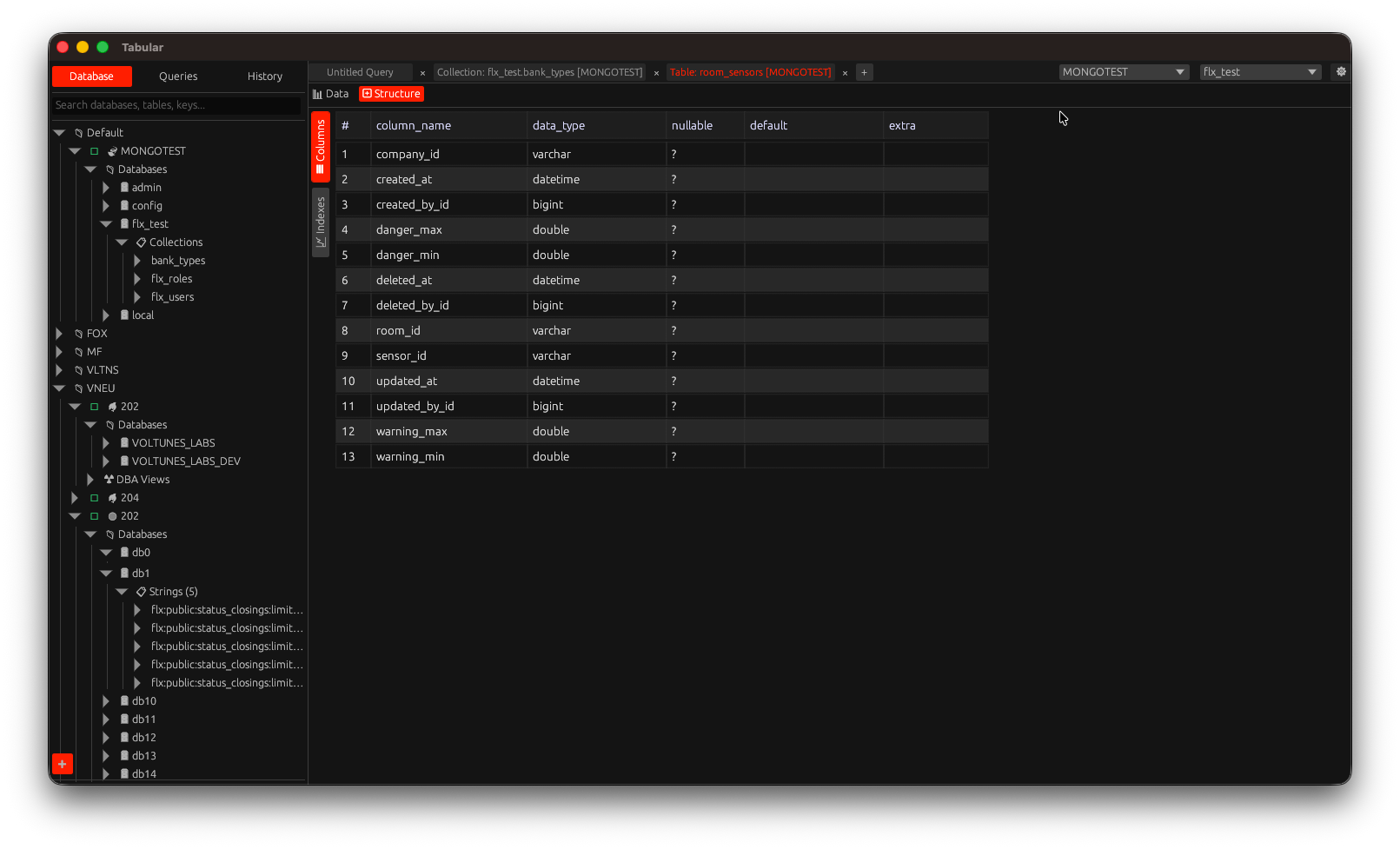
Tabular is a lightweight, native database client built with the `eframe`/`egui` stack. It focuses on instant startup, responsive UI, safe concurrency, and a distraction‑free workflow for developers, data engineers, and DBAs. Unlike web/electron apps, Tabular ships as a single native binary with a small memory footprint while still offering rich features like autocomplete, multiple drivers, query history, export tools, and self‑update.
## 2. Key Features
- Unified UI for multiple relational & non‑relational databases
- Drivers: PostgreSQL, MySQL/MariaDB, SQLite, SQL Server (TDS), Redis, MongoDB
- Async runtime (Tokio) for non‑blocking execution
- Multiple query tabs & saved query library (`queries/` folder)
- Query history panel with search & filtering
- Result grid with copy cell / row / full result set
- Export to CSV & XLSX
- Rich value formatting (dates, decimals, JSON, BSON, HEX)
- Connection caching & quick reconnect
- Self‑update (GitHub Releases) with semantic version check
- Configurable data directory (env `TABULAR_DATA_DIR`)
- Native file dialogs (`rfd`)
- Cross‑platform theming via egui
- Sandboxing & notarization ready for macOS
### Query Editor (New, In Progress)
The legacy `egui::TextEdit` editor is being replaced with a custom widget backed by a rope buffer. Current capabilities:
- Multi‑caret editing
- Per‑line syntax highlighting cache (SQL focus first)
- Basic scroll‑to‑caret
- Undo/Redo
- Multi‑line/column selection
Planned next: full autocomplete integration, diff‑based edits, revision tracking, and removal of the legacy path after feature parity.
## 3. Supported Databases
| Category | Engines / Protocols |
|------------|----------------------|
| Relational | PostgreSQL, MySQL/MariaDB, SQLite, Microsoft SQL Server |
| Document | MongoDB (BSON & compression) |
| Key/Value | Redis (async connection manager) |
Notes:
- Microsoft SQL Server uses `tiberius` (TDS over TLS)
- Redis uses pooled async managers
- SQLite runs in‑process (file mode) — ensure write permissions
## 4. Installation
### Option A: Download Prebuilt Release (Recommended)
1. Visit: https://github.com/tabular-id/tabular/releases
2. Download the bundle for your platform:
- macOS: `.dmg` (notarized) or `.pkg` (if available)
- Linux: `.tar.gz` (extract, then place the binary in `$HOME/.local/bin` or `/usr/local/bin`)
- Windows: portable package is planned
3. (macOS) Drag `Tabular.app` into `/Applications`.
4. Run Tabular.
### Option B: Build From Source
General requirements:
- Rust (stable; https://rustup.rs)
- Cargo (bundled with rustup)
- Clang/LLVM (for bindgen / some native crates)
- libclang headers (Linux)
- (Linux) pkg-config, OpenSSL dev packages may be required depending on environment
#### Arch Linux
```bash
sudo pacman -Syu --needed base-devel clang llvm pkgconf
export LIBCLANG_PATH=/usr/lib
git clone https://github.com/tabular-id/tabular.git
cd tabular
cargo build --release
```
#### Ubuntu / Debian
```bash
sudo apt update
sudo apt install -y build-essential clang libclang-dev pkg-config
git clone https://github.com/tabular-id/tabular.git
cd tabular
cargo build --release
```
#### macOS
```bash
xcode-select --install # Command Line Tools
brew install llvm # (opsional) clang lebih baru
git clone https://github.com/tabular-id/tabular.git
cd tabular
cargo build --release
```
Jika memakai LLVM dari Homebrew:
```bash
export LIBCLANG_PATH="$(brew --prefix llvm)/lib"
```
#### Windows (MSVC) – planned
Install the MSVC toolchain, then build with `cargo build --release`.
#### Multi‑Arsitektur / Cross Compilation (Desktop + Eksperimental iOS)
```bash
cargo install cross
cross build --target aarch64-apple-darwin --release
# Eksperimental iPadOS (butuh wrapper Xcode/iOS)
rustup target add aarch64-apple-ios
cargo build --target aarch64-apple-ios --release
```
### Run
```bash
./target/release/tabular
```
### Optional Environment Variables
| Variable | Purpose | Example |
|------------------|-------------------------------------|------------------------------|
| TABULAR_DATA_DIR | Override data directory location | /data/tabular |
| RUST_LOG | Enable logging | RUST_LOG=info ./tabular |
## 5. macOS Notarized / Signed Builds
For distributing outside the Mac App Store:
```bash
export APPLE_ID="your-apple-id@example.com"
export APPLE_PASSWORD="app-specific-password"
export APPLE_TEAM_ID="TEAMID"
export APPLE_BUNDLE_ID="id.tabular.database"
export APPLE_IDENTITY="Developer ID Application: Your Name (TEAMID)"
export NOTARIZE=1
./build.sh macos --deps
```
Staple & verify:
```bash
xcrun stapler staple dist/macos/Tabular-.dmg
spctl -a -vv dist/macos/Tabular.app
codesign --verify --deep --strict --verbose=2 dist/macos/Tabular.app
```
See `macos/Tabular.entitlements` for sandbox/network/file access settings. For App Store distribution use a distribution identity and provisioning profile:
```bash
export APPLE_IDENTITY="Apple Distribution: Your Name (TEAMID)"
export PROVISIONING_PROFILE="/path/Tabular_AppStore.provisionprofile"
make pkg-macos-store
```
## 6. Data Directory (Configurable)
Default location:
- macOS / Linux: `~/.tabular`
Change it via Preferences (native folder picker) or force it with:
```bash
export TABULAR_DATA_DIR="/absolute/custom/path"
./tabular
```
Manual migration: copy the old folder to the new location before switching & restarting.
Contents of the data directory:
- `preferences.*` — UI & app settings
- `cache.*` — metadata & driver caches
- `queries/` — saved queries
- `history/` — executed query history
## 7. Development Guide
### Project Layout (selected)
```
src/
main.rs # Entry point
window_egui.rs # UI / egui integration
editor.rs # Logika editor query
editor_autocomplete.rs
sidebar_*.rs # Panel samping (database, history, queries)
driver_*.rs # Abstraksi driver database
export.rs # Ekspor CSV / XLSX
self_update.rs # Cek & aplikasi update
config.rs # Preferensi & direktori data
models/ # Struktur data & enum
query_ast/ # Lapisan AST kueri (eksperimental, default aktif)
```
### Quick Start (Dev)
```bash
git clone https://github.com/tabular-id/tabular.git
cd tabular
cargo run
```
### Common Tasks
| Action | Command |
|---------------|----------------------------------|
| Build debug | `cargo build` |
| Run | `cargo run` |
| Test | `cargo test` |
| Lint (clippy) | `cargo clippy -- -D warnings` |
| Format | `cargo fmt` |
| Release build | `cargo build --release` |
### Logging
```bash
RUST_LOG=info cargo run
```
### Adding a New Driver (short)
1) Create `driver_.rs` 2) Implement connection & execution 3) Add feature flag if optional 4) Register in `modules.rs`/factory 5) Update README.
## 8. Core Dependencies (Crates)
| Purpose | Crate |
|----------------|-------|
| UI & App Shell | eframe, egui_extras |
| Async Runtime | tokio, futures, futures-util, tokio-util |
| Relational DB | sqlx (postgres, mysql, sqlite) |
| SQL Server | tiberius |
| Redis | redis |
| MongoDB | mongodb, bson |
| Data Formats | serde, serde_json, chrono, rust_decimal, hex, csv, xlsxwriter |
| File Dialog | rfd |
| Update | reqwest, self_update, semver |
| Logging | log, env_logger, dotenv |
| Utilities | dirs, regex, colorful |
See `Cargo.toml` for exact versions (current package version: 0.5.18).
## 9. Contributing
Contributions are welcome (bug fixes, new drivers, UI, performance). Suggested workflow:
1. Fork & create a feature branch.
2. Run `cargo fmt && cargo clippy` before committing.
3. Ensure release build compiles: `cargo build --release`.
4. Open a PR with a concise description & screenshots (for UI changes).
## 10. Troubleshooting
| Issue | Hint |
|---------------------------------|----------------------------------------------------|
| Build fails: clang not found | Install clang / set `LIBCLANG_PATH` |
| TLS errors on connect | Verify certificates & network reachability |
| SQLite file locked | Close other processes; check file permissions |
| UI freeze on long queries | Use server pagination; streaming improvements WIP |
## 11. Roadmap (High level)
- Windows build & signing
- iPadOS adaptive layout
- Query formatter / beautifier
- Result pagination for large datasets
- Connection grouping & tags
- Scripting/extension layer
- Secure secrets storage (Keychain/KWallet/Credential Manager)
## 12. License
This project is dual‑licensed:
1) GNU Affero General Public License v3 (AGPL‑3.0) — see `LICENSE-AGPL`
2) Commercial License — contact PT. Vneu Teknologi Indonesia (see `LICENSE`)
In short: use AGPL for OSS/non‑commercial; obtain a commercial license for closed‑source/commercial integration.
## 13. Acknowledgements
Built with the Rust ecosystem. egui & sqlx projects are especially instrumental.
---
Made with Rust 🦀 for people who love fast, native tools.
## 14. Agnostic AST Architecture (Advanced)
## 📋 Overview
Tabular uses a **database‑agnostic AST (Abstract Syntax Tree)** to separate query logic from database‑specific implementations. Benefits:
- ✅ **Performa Optimal**: Plan caching, rewrite optimization
- ✅ **Kemudahan Extensibility**: Tambah database baru tanpa ubah core logic
- ✅ **Type Safety**: Compile-time checking dengan Rust
- ✅ **Maintainability**: Clear separation of concerns
## 🏗️ Architecture Layers
### Layer 1: Parser (Database‑agnostic)
```
Raw SQL → sqlparser → AST (generic) → Logical Plan
```
- Uses the `sqlparser` crate for universal SQL parsing
- Not aware of any specific database
- Output: `LogicalQueryPlan` (database‑agnostic IR)
**File**: `src/query_ast/parser.rs`
### Layer 2: Logical Plan (Agnostik DB)
```rust
pub enum LogicalQueryPlan {
Projection { exprs: Vec, input: Box },
Filter { predicate: Expr, input: Box },
Sort { items: Vec, input: Box },
Limit { limit: u64, offset: u64, input: Box },
Join { left, right, on, kind },
TableScan { table, alias },
// ... etc
}
```
**File**: `src/query_ast/logical.rs`
**Benefits**:
- All databases share the same structure
- Optimizations apply to all databases
- Easy to visualize and debug
### Layer 3: Rewrite/Optimizer (Database‑agnostic)
```
Logical Plan → Apply Rules → Optimized Logical Plan
```
**Rules** (apply to all databases):
- Filter pushdown
- Projection pruning
- CTE inlining
- Predicate merging
- Auto‑limit injection
- Pagination rewrite
**File**: `src/query_ast/rewrite.rs`
**Example**:
```rust
// Before rewrite:
Projection -> Filter -> Filter -> TableScan
// After rewrite:
Projection -> Filter(merged) -> TableScan
```
### Layer 4: Emitter (Database‑specific)
```
Optimized Plan → Dialect → SQL for Target DB
```
**Trait-based**:
```rust
pub trait SqlDialect {
fn quote_ident(&self, ident: &str) -> String;
fn emit_limit(&self, limit: u64, offset: u64) -> String;
fn supports_window_functions(&self) -> bool;
// ... etc
}
```
**Implementations**:
- `MySqlDialect`: Backticks, `LIMIT n OFFSET m`
- `PostgresDialect`: Double quotes, window functions
- `MssqlDialect`: Square brackets, `TOP n`, `OFFSET FETCH`
- `SqliteDialect`: Backticks, limited window support
- `MongoDialect`: Minimal SQL, mostly native operations
- `RedisDialect`: Very limited SQL
**Files**:
- `src/query_ast/emitter/mod.rs` (core emitter)
- `src/query_ast/emitter/dialect.rs` (dialect trait + implementations)
### Layer 5: Executor (Database‑specific)
```
Emitted SQL → Connection Pool → Execute → Results
```
**Trait-based**:
```rust
#[async_trait]
pub trait DatabaseExecutor {
fn database_type(&self) -> DatabaseType;
async fn execute_query(&self, sql: &str, ...) -> Result;
fn supports_feature(&self, feature: SqlFeature) -> bool;
}
```
**File**: `src/query_ast/executor.rs`
## 📊 Performance Optimizations
### 1. Multi-Level Caching
```rust
// Level 1: Structural fingerprint (quick pre-check)
let fp = structural_fingerprint(sql); // hash without parsing
// Level 2: Logical plan hash (after parsing)
let plan = parse(sql);
let plan_hash = hash_plan(&plan);
// Cache key includes: plan_hash + db_type + pagination + options
let cache_key = format!("{}::{:?}::{:?}", plan_hash, db_type, pagination);
```
**Cache Stats Available**:
```rust
let (hits, misses) = query_ast::cache_stats();
println!("Cache hit rate: {:.1}%", hits as f64 / (hits + misses) as f64 * 100.0);
```
### 2. Plan Reuse
Same logical plan works for different databases:
```
Parse once → Rewrite once → Emit N times (one per DB type)
```
### 3. Zero-Copy Where Possible
- Use `Arc` untuk sharing plans
- String interning untuk column/table names
- COW (Copy-on-Write) untuk rewrites
## 🔧 Implementation Status
### ✅ Completed
| Feature | Status | Notes |
|---------|--------|-------|
| Basic SELECT parsing | ✅ | Includes JOIN, GROUP BY, HAVING, LIMIT |
| Filter/WHERE | ✅ | AND/OR/NOT, comparison ops |
| Projection/SELECT list | ✅ | Columns, aliases, * |
| Sorting/ORDER BY | ✅ | Multiple columns, ASC/DESC |
| Pagination/LIMIT | ✅ | Rewritten per database |
| JOINs | ✅ | INNER, LEFT, RIGHT, FULL |
| GROUP BY | ✅ | Multiple expressions |
| HAVING | ✅ | Post-aggregation filters |
| DISTINCT | ✅ | Deduplication |
| CTEs/WITH | ✅ | Single-use CTE inlining |
| UNION/UNION ALL | ✅ | Set operations |
| Window Functions | ✅ | ROW_NUMBER, RANK, etc |
| Subqueries | ✅ | Scalar, correlated detection |
| Plan Caching | ✅ | Multi-level with fingerprinting |
| Rewrite Rules | ✅ | 9 rules implemented |
| MySQL Dialect | ✅ | Full support |
| PostgreSQL Dialect | ✅ | Full support |
| SQLite Dialect | ✅ | Full support |
| MS SQL Dialect | ✅ | TOP/OFFSET FETCH syntax |
| MongoDB Dialect | 🟡 | Limited SQL, prefer native |
| Redis Dialect | 🟡 | Very limited |
### 🚧 In Progress / TODO
| Feature | Priority | Effort |
|---------|----------|--------|
| Executor trait implementation | HIGH | Medium |
| Database-specific executors | HIGH | Medium |
| Multi-statement support | MEDIUM | High |
| DDL parsing (CREATE/ALTER/DROP) | MEDIUM | High |
| Advanced subquery optimizations | LOW | High |
| Correlated subquery rewrite | LOW | High |
| Cost-based optimization | LOW | Very High |
## 📈 Benchmarks (indicative)
### Query Compilation Time
```
Simple SELECT: < 1ms (cache hit: < 0.1ms)
With JOIN: < 5ms (cache hit: < 0.1ms)
Complex (3+ JOINs): < 20ms (cache hit: < 0.1ms)
```
### Cache Hit Rates
```
Repeated queries: 95%+ hit rate
Pagination queries: 90%+ hit rate
Ad-hoc queries: 40%+ hit rate (fingerprint matching)
```
### Memory Usage
```
Per cached plan: ~5KB (typical)
Cache size limit: 1000 plans (configurable)
Total overhead: ~5MB for 1000 plans
```
## 🎯 Best Practices
### Untuk Penulis Driver
1. **Use the AST pipeline** instead of raw SQL where possible
2. **Implement SqlDialect** for your database
3. **Implement DatabaseExecutor** for execution
4. **Test with real queries** from your database
5. **Measure performance** before/after AST integration
### Untuk Penulis Query
1. **Use standard SQL** for best cross-database compatibility
2. **Avoid database-specific features** in shared code
3. **Let the AST handle optimization** (don't manually optimize)
4. **Check cache stats** to verify query reuse
### Untuk Maintainer
1. **Keep layers separate** (don't mix concerns)
2. **Add tests for new rewrites** (prevent regressions)
3. **Document dialect differences** in code comments
4. **Profile regularly** to catch performance regressions
## 🐛 Debugging Tools
### 1. Debug Plan Visualization
```rust
let debug_str = query_ast::debug_plan(&sql, &db_type)?;
println!("{}", debug_str);
// Output:
// -- debug plan for PostgreSQL
// Projection 3
// Filter "id > 10"
// TableScan(users alias=None)
```
### 2. Rewrite Rule Tracking
```rust
let rules = query_ast::last_rewrite_rules();
println!("Applied rules: {:?}", rules);
// Output: ["auto_limit", "filter_pushdown", "projection_prune"]
```
### 3. Plan Metrics
```rust
let (nodes, depth, subqueries, correlated, windows) = query_ast::plan_metrics(&sql)?;
println!("Plan complexity: {} nodes, depth {}", nodes, depth);
```
### 4. Structural Fingerprint
```rust
let (hash, cache_key) = query_ast::plan_structural_hash(&sql, &db_type, pagination, auto_limit)?;
println!("Plan hash: {:x}", hash);
```
## 📚 Referensi
### Key Files
```
src/query_ast/
├── mod.rs # Public API & main compilation pipeline
├── ast.rs # Raw AST wrapper (thin layer over sqlparser)
├── logical.rs # Logical plan IR (database-agnostic)
├── parser.rs # SQL → Logical plan conversion
├── emitter/
│ ├── mod.rs # Plan → SQL emission
│ └── dialect.rs # Database-specific SQL generation
├── rewrite.rs # Optimization rules
├── executor.rs # Execution trait & registry
├── plan_cache.rs # Multi-level caching
└── errors.rs # Error types
src/driver_*.rs # Database-specific drivers (legacy + AST integration)
src/connection.rs # Connection pool management
src/cache_data.rs # Metadata caching (tables, columns, etc)
```
### External Dependencies
- **sqlparser**: SQL parsing (universal)
- **tokio**: Async runtime
- **sqlx**: Database drivers (MySQL, PostgreSQL, SQLite)
- **tiberius**: MS SQL driver
- **mongodb**: MongoDB native driver
- **redis**: Redis client
## 🔮 Future Enhancements
### Phase 2: Advanced Features
1. **Cost-Based Optimizer**: Choose optimal join order
2. **Materialized Views**: Cache intermediate results
3. **Parallel Execution**: Split queries across cores
4. **Query Federation**: JOIN across different databases
### Phase 3: Code Generation
1. **Compile to native code**: LLVM backend for hot queries
2. **SIMD optimizations**: Vectorize filters and aggregations
3. **GPU acceleration**: Offload heavy computations
### Phase 4: AI Integration
1. **Query suggestions**: Based on schema and data
2. **Auto-indexing**: Recommend indexes based on query patterns
3. **Query rewrite hints**: AI-powered optimization suggestions
## 🤝 Contributing
See `Adding a New Database to Tabular` for step-by-step guide to adding new database support.
### Code Review Checklist
- [ ] Logical plan changes don't break existing databases
- [ ] New rewrites have tests for correctness
- [ ] Dialect changes respect database feature sets
- [ ] Performance benchmarks show no regressions
- [ ] Documentation updated for new features
## 📞 Support
- **Issues**: GitHub issues for bugs
- **Discussions**: GitHub discussions for questions
- **Docs**: This file + inline code documentation
- **Examples**: See `tests/query_ast_tests.rs`
---
**Last Updated**: 2025-11-11
**Version**: 0.5.18
**Maintainer**: Tabular Team
# Adding a New Database to Tabular
This guide explains how to add support for a new database type using the Agnostic AST architecture.
## Overview
Tabular uses a layered architecture with clear separation of concerns:
```
Raw SQL → Parser → Logical Plan → Optimizer/Rewriter → Emitter → Executor
↓ ↓ ↓ ↓
DB-Agnostic DB-Agnostic DB-Specific DB-Specific
```
## Steps to Add a New Database
### 1. Define Database Type
Add your database to `src/models/enums.rs`:
```rust
#[derive(Clone, PartialEq, Serialize, Deserialize, Debug)]
pub enum DatabaseType {
MySQL,
PostgreSQL,
SQLite,
Redis,
MsSQL,
MongoDB,
YourNewDB, // <- Add here
}
pub enum DatabasePool {
MySQL(Arc),
PostgreSQL(Arc),
SQLite(Arc),
Redis(Arc),
MsSQL(Arc),
MongoDB(Arc),
YourNewDB(Arc), // <- Add here
}
```
### 2. Implement SQL Dialect
Create `src/query_ast/emitter/your_db_dialect.rs`:
```rust
use super::dialect::SqlDialect;
use crate::models::enums::DatabaseType;
pub struct YourDbDialect;
impl SqlDialect for YourDbDialect {
fn db_type(&self) -> DatabaseType {
DatabaseType::YourNewDB
}
fn quote_ident(&self, ident: &str) -> String {
// Your database's identifier quoting
format!("\"{}\"", ident.replace('"', "\"\""))
}
fn emit_limit(&self, limit: u64, offset: u64) -> String {
// Your database's LIMIT syntax
if offset > 0 {
format!(" LIMIT {} OFFSET {}", limit, offset)
} else {
format!(" LIMIT {}", limit)
}
}
fn supports_window_functions(&self) -> bool {
true // or false, depending on your DB
}
fn supports_cte(&self) -> bool {
true // or false
}
fn supports_full_join(&self) -> bool {
true // or false
}
// Override other methods as needed for your database
}
```
Update `src/query_ast/emitter/dialect.rs`:
```rust
pub fn get_dialect(db_type: &DatabaseType) -> Box {
match db_type {
DatabaseType::MySQL => Box::new(MySqlDialect),
DatabaseType::PostgreSQL => Box::new(PostgresDialect),
// ... other databases ...
DatabaseType::YourNewDB => Box::new(YourDbDialect), // <- Add here
}
}
```
### 3. Implement Database Executor
Create `src/query_ast/executors/your_db_executor.rs`:
```rust
use async_trait::async_trait;
use crate::query_ast::executor::{DatabaseExecutor, QueryResult};
use crate::query_ast::errors::QueryAstError;
use crate::models::enums::DatabaseType;
pub struct YourDbExecutor {
// Connection pool or client reference
}
impl YourDbExecutor {
pub fn new() -> Self {
Self {}
}
}
#[async_trait]
impl DatabaseExecutor for YourDbExecutor {
fn database_type(&self) -> DatabaseType {
DatabaseType::YourNewDB
}
async fn execute_query(
&self,
sql: &str,
database_name: Option<&str>,
connection_id: i64,
) -> Result {
// 1. Get connection from pool using connection_id
// 2. Switch database if database_name is provided
// 3. Execute SQL query
// 4. Convert results to (Vec, Vec>)
// 5. Return results
todo!("Implement query execution for your database")
}
fn validate_query(&self, sql: &str) -> Result<(), QueryAstError> {
// Optional: Add database-specific validation
Ok(())
}
}
```
Register in `src/query_ast/executor.rs`:
```rust
impl ExecutorRegistry {
pub fn with_defaults() -> Self {
let mut registry = Self::new();
// ... existing executors ...
#[cfg(feature = "your_db")]
registry.register(Box::new(super::executors::YourDbExecutor::new()));
registry
}
}
```
### 4. Create Driver Module
Create `src/driver_your_db.rs`:
```rust
use crate::models::enums::DatabaseType;
use crate::window_egui::Tabular;
/// Create connection pool for your database
pub async fn create_connection_pool(
host: &str,
port: u16,
username: &str,
password: &str,
database: Option<&str>,
) -> Result> {
// Implement connection creation
todo!()
}
/// Fetch tables from your database
pub async fn fetch_tables_from_connection(
tabular: &Tabular,
connection_id: i64,
database_name: Option,
) -> Result, Box> {
// Implement table listing
todo!()
}
/// Fetch columns from a table
pub async fn fetch_columns_from_table(
tabular: &Tabular,
connection_id: i64,
database_name: Option,
table_name: &str,
) -> Result, Box> {
// Implement column listing (name, type)
todo!()
}
```
### 5. Update Connection Module
In `src/connection.rs`, add your database to the connection creation logic:
```rust
pub async fn get_or_create_connection_pool(
tabular: &mut Tabular,
connection_id: i64,
) -> Result> {
// ... existing code ...
match connection.connection_type {
models::enums::DatabaseType::MySQL => { /* ... */ }
models::enums::DatabaseType::PostgreSQL => { /* ... */ }
// ... other databases ...
models::enums::DatabaseType::YourNewDB => {
let client = driver_your_db::create_connection_pool(
&connection.host,
connection.port,
&connection.username,
&connection.password,
connection.database.as_deref(),
).await?;
let pool = models::enums::DatabasePool::YourNewDB(Arc::new(client));
tabular.connection_pools.insert(connection_id, pool.clone());
Ok(pool)
}
}
}
```
### 6. Add UI Support
In `src/sidebar_database.rs`, add folder icon and logic:
```rust
pub fn create_database_folders_from_connections(connections: &[models::structs::Connection]) -> Vec {
// ... existing code ...
models::enums::DatabaseType::YourNewDB => {
let mut node = models::structs::TreeNode {
name: format!("Your DB Connections ({})", count),
node_type: models::enums::NodeType::YourNewDBFolder,
// ... rest of initialization ...
};
node
}
}
```
Add to `src/models/enums.rs`:
```rust
pub enum NodeType {
// ... existing types ...
YourNewDBFolder, // <- Add here
}
```
## Testing Your Integration
### Unit Tests
```rust
#[cfg(test)]
mod tests {
use super::*;
#[tokio::test]
async fn test_your_db_query() {
let executor = YourDbExecutor::new();
let result = executor.execute_query(
"SELECT * FROM users LIMIT 10",
None,
1,
).await;
assert!(result.is_ok());
}
#[test]
fn test_your_db_dialect() {
let dialect = YourDbDialect;
assert_eq!(dialect.quote_ident("table"), "\"table\"");
}
}
```
### Integration Testing
1. Create a test connection in the UI
2. Test basic operations: connect, list tables, query data
3. Test AST features: filtering, sorting, pagination
4. Test error handling: invalid queries, connection failures
## Performance Considerations
### Connection Pooling
- Use connection pools for better performance
- Configure appropriate pool size (5-20 connections typically)
- Implement connection health checks
### Query Optimization
- The rewrite layer applies database-agnostic optimizations
- Add database-specific optimizations in your executor
- Consider query result caching for expensive queries
### Plan Caching
The AST layer automatically caches compiled plans. Ensure your SQL emission is deterministic for cache hits.
## Feature Flags
Add a feature flag for optional compilation:
In `Cargo.toml`:
```toml
[features]
default = ["mysql", "postgres", "sqlite"]
mysql = ["sqlx/mysql"]
postgres = ["sqlx/postgres"]
sqlite = ["sqlx/sqlite"]
your_db = ["your_db_driver"] # <- Add here
```
## Common Pitfalls
1. **Quote Identifiers**: Always use `dialect.quote_ident()`, never hardcode quotes
2. **NULL Handling**: Different databases handle NULL differently
3. **Type Mapping**: Map SQL types to your database's native types
4. **Transaction Support**: Implement proper transaction handling
5. **Error Messages**: Provide clear, actionable error messages
## Example: Adding CockroachDB
Here's a minimal example of adding CockroachDB (which is PostgreSQL-compatible):
```rust
// 1. Add to DatabaseType enum
pub enum DatabaseType {
// ... existing ...
CockroachDB,
}
// 2. Reuse PostgreSQL dialect (it's compatible!)
pub fn get_dialect(db_type: &DatabaseType) -> Box {
match db_type {
// ... existing ...
DatabaseType::CockroachDB => Box::new(PostgresDialect), // Reuse!
}
}
// 3. Create executor (can extend PostgreSQL executor)
pub struct CockroachExecutor {
pg_executor: PostgresExecutor, // Composition over inheritance!
}
#[async_trait]
impl DatabaseExecutor for CockroachExecutor {
fn database_type(&self) -> DatabaseType {
DatabaseType::CockroachDB
}
async fn execute_query(&self, sql: &str, db: Option<&str>, conn_id: i64)
-> Result
{
// Delegate to PostgreSQL executor since CockroachDB is wire-compatible
self.pg_executor.execute_query(sql, db, conn_id).await
}
}
```
## Performance Metrics
After adding your database, measure:
- Query compilation time (should be < 1ms for simple queries)
- Cache hit rate (should be > 80% for repeated queries)
- Execution overhead (AST layer adds < 5% overhead)
## Need Help?
- Check existing drivers (`driver_mysql.rs`, `driver_postgres.rs`)
- Review the executor trait in `query_ast/executor.rs`
- Look at dialect implementations in `query_ast/emitter/dialect.rs`
- See rewrite rules in `query_ast/rewrite.rs` for optimization ideas
## Benefits of This Architecture
✅ **Separation of Concerns**: Logic layer independent of database specifics
✅ **Reusability**: Share optimizations across all databases
✅ **Testability**: Mock executors for unit testing
✅ **Extensibility**: Add new databases without touching core logic
✅ **Performance**: Aggressive caching at every layer
✅ **Type Safety**: Rust's type system catches errors at compile time
# 🛠️ Build System Documentation
This document explains how to build Tabular for different platforms using the provided build scripts.
## 📋 Prerequisites
### Required Tools
- **Rust** (latest stable version)
- **Make** (for Unix-like systems)
- **Git** (for version control)
### Platform-Specific Requirements
#### macOS
- **Xcode Command Line Tools**: `xcode-select --install`
- **lipo**: Usually included with Xcode (for universal binaries)
- **hdiutil**: For creating DMG files (included with macOS)
#### Linux
- **GCC/Clang**: For native compilation
- **Cross**: For cross-compilation (`cargo install cross`)
- **Docker**: Required by cross for cross-compilation
#### Windows
- **MSVC**: Visual Studio Build Tools or Visual Studio
- **PowerShell**: For packaging scripts
## 🚀 Quick Start
### Using the Build Script (Recommended)
The easiest way to build Tabular is using the provided build script:
```bash
# Build for current platform only
./build.sh
# Build for specific platform
./build.sh macos
./build.sh linux
./build.sh windows
# Build for all platforms
./build.sh all
# Install dependencies and build
./build.sh all --deps
# Clean and build
./build.sh macos --clean
```
### Using Make Directly
If you prefer using Make directly:
```bash
# Show available targets
make help
# Install build dependencies
make install-deps
# Build for specific platforms
make bundle-macos
make bundle-linux
make bundle-windows
# Build everything
make release
# Clean build artifacts
make clean
```
## 📦 Build Targets
### macOS Universal Binary
Creates a universal binary that runs on both Intel and Apple Silicon Macs:
```bash
make bundle-macos
```
**Outputs:**
- `dist/macos/Tabular.app` - macOS application bundle
- `dist/macos/Tabular.dmg` - Disk image for distribution
### Linux Binaries
Creates binaries for x86_64 and aarch64 Linux systems:
```bash
make bundle-linux
```
**Outputs:**
- `dist/linux/tabular-x86_64-unknown-linux-gnu.tar.gz`
- `dist/linux/tabular-aarch64-unknown-linux-gnu.tar.gz`
- AppDir structure for potential AppImage creation
### Windows Binaries
Creates executables for x86_64 and aarch64 Windows systems:
```bash
make bundle-windows
```
**Outputs:**
- `dist/windows/tabular-x86_64-pc-windows-msvc.zip`
- `dist/windows/tabular-aarch64-pc-windows-msvc.zip`
## 🔧 Development Commands
### Quick Development Tasks
```bash
# Development build (debug mode)
make dev
# Run the application
make run
# Run tests
make test
# Check code formatting and linting
make check
# Format code
make fmt
# Show project information
make info
```
## 🏗️ Build Architecture
### Target Platforms
| Platform | Architecture | Target Triple |
|----------|-------------|---------------|
| macOS | Intel (x86_64) | `x86_64-apple-darwin` |
| macOS | Apple Silicon (ARM64) | `aarch64-apple-darwin` |
| Linux | x86_64 | `x86_64-unknown-linux-gnu` |
| Linux | ARM64 | `aarch64-unknown-linux-gnu` |
| Windows | x86_64 | `x86_64-pc-windows-msvc` |
| Windows | ARM64 | `aarch64-pc-windows-msvc` |
### Build Process
1. **Dependency Installation**: Install Rust targets and required tools
2. **Cross-Compilation**: Build for each target platform
3. **Universal Binary Creation**: Combine macOS binaries using `lipo`
4. **Packaging**: Create platform-specific packages (DMG, tar.gz, zip)
5. **Distribution**: Output ready-to-distribute packages
## 📁 Directory Structure
After building, the following structure is created:
```
tabular/
├── target/ # Rust build artifacts
│ ├── x86_64-apple-darwin/
│ ├── aarch64-apple-darwin/
│ ├── universal-apple-darwin/
│ └── ...
├── dist/ # Distribution packages
│ ├── macos/
│ │ ├── Tabular.app
│ │ └── Tabular.dmg
│ ├── linux/
│ │ ├── tabular-x86_64.tar.gz
│ │ └── tabular-aarch64.tar.gz
│ └── windows/
│ ├── tabular-x86_64.zip
│ └── tabular-aarch64.zip
└── ...
```
## 🤖 Continuous Integration
The project includes GitHub Actions workflows for automated building:
### Workflow Triggers
- **Push to main/develop**: Builds all platforms
- **Pull requests**: Builds all platforms for testing
- **Tag push (v*)**: Builds and creates a GitHub release
### Artifacts
- All builds are saved as GitHub Actions artifacts
- Tagged releases automatically create GitHub releases with binaries
## 🐛 Troubleshooting
### Common Issues
#### Missing Rust Targets
```bash
# Solution: Install missing targets
make install-deps
```
#### Cross-compilation Failures
```bash
# Solution: Install cross and Docker
cargo install cross
# Make sure Docker is running
```
#### macOS Code Signing Issues
```bash
# For development builds, you can skip code signing
# For distribution, you'll need an Apple Developer Certificate
```
#### Windows Build Failures
```bash
# Make sure you have MSVC build tools installed
# Alternative: Use the GNU toolchain (x86_64-pc-windows-gnu)
```
### Getting Help
If you encounter issues:
1. Check the build logs for specific error messages
2. Ensure all prerequisites are installed
3. Try cleaning and rebuilding: `make clean && make release`
4. Check the GitHub Issues for known problems
## 📝 Notes
- **Universal macOS Binary**: The macOS build creates a universal binary that works on both Intel and Apple Silicon Macs
- **Cross-Compilation**: Linux and Windows builds use cross-compilation for ARM64 targets
- **Size Optimization**: Release builds include optimizations for smaller binary size
- **Dependencies**: The build system automatically handles Rust target installation
## 🎯 Example Build Session
Here's a complete example of building for all platforms:
```bash
# Clone the repository
git clone https://github.com/your-repo/tabular.git
cd tabular
# Install dependencies and build everything
./build.sh all --deps
# Check the results
ls -la dist/
```
This will create distribution-ready packages for macOS, Linux, and Windows.
Join us at Telegram