# React Compare Image
[](#contributors-)
 Simple React component to compare two images using slider.
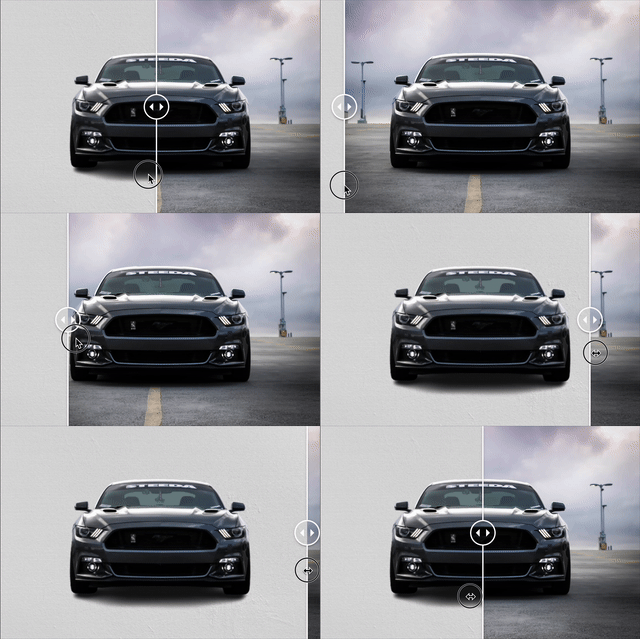
## Demo & Sample codes
[Demo & Sample codes](https://react-compare-image.yuuniworks.com/)
## Features
- Simple
- Responsive (always fit to the parent width)
- Horizontal & Vertical comparison
## How to use
```sh
yarn add react-compare-image
// or
npm install --save react-compare-image
```
Note: Version 1 or later works only with React16.8 or later. Use version 0 instead.
```jsx
import ReactCompareImage from 'react-compare-image';
;
```
## Props
| Prop (\* required) | type | default | description |
| ------------------------ | ----------------------- | :---------: | --------------------------------------------------------------------------------------------------------------------- |
| aspectRatio | `'taller'` or `'wider'` | `'taller'` | Which to choose if the aspect ratios of the images are different |
| handle | element | null | Custom handle element. Just pass `` if you want to remove handle. |
| handleSize | number (px) | 40 | diameter of slider handle (by pixel) |
| hover | boolean | false | Whether to slide at hover |
| leftImage \* | string | null | left image's url |
| leftImageAlt | string | `''` | alt props for left image |
| leftImageCss | object | {} | Additional css for left image |
| leftImageLabel | string | null | Label for the image (e.g. `before`) |
| onSliderPositionChange | function | null | Callback function called each time the slider changes. The position (0 to 1) of the slider is passed as arg |
| rightImage \* | string | null | right image's url |
| rightImageAlt | string | `''` | alt props for right image |
| rightImageCss | object | {} | Additional css for right image |
| rightImageLabel | string | null | Label for the image (e.g. `after`) |
| skeleton | element | null | Element displayed while image is loading |
| sliderLineColor | string | `'#ffffff'` | line color of slider |
| sliderLineWidth | number (px) | 2 | line width of slider (by pixel) |
| sliderPositionPercentage | number (float) | 0.5 | Default line position (from 0 to 1) |
| vertical | boolean | false | Compare images vertically instead of horizontally. The left image is on the top and the right image is on the bottom. |
## Supported browzer
Latest modern browsers(Chrome, Safari, Firefox, Edge)
Simple React component to compare two images using slider.

## Demo & Sample codes
[Demo & Sample codes](https://react-compare-image.yuuniworks.com/)
## Features
- Simple
- Responsive (always fit to the parent width)
- Horizontal & Vertical comparison
## How to use
```sh
yarn add react-compare-image
// or
npm install --save react-compare-image
```
Note: Version 1 or later works only with React16.8 or later. Use version 0 instead.
```jsx
import ReactCompareImage from 'react-compare-image';
;
```
## Props
| Prop (\* required) | type | default | description |
| ------------------------ | ----------------------- | :---------: | --------------------------------------------------------------------------------------------------------------------- |
| aspectRatio | `'taller'` or `'wider'` | `'taller'` | Which to choose if the aspect ratios of the images are different |
| handle | element | null | Custom handle element. Just pass `` if you want to remove handle. |
| handleSize | number (px) | 40 | diameter of slider handle (by pixel) |
| hover | boolean | false | Whether to slide at hover |
| leftImage \* | string | null | left image's url |
| leftImageAlt | string | `''` | alt props for left image |
| leftImageCss | object | {} | Additional css for left image |
| leftImageLabel | string | null | Label for the image (e.g. `before`) |
| onSliderPositionChange | function | null | Callback function called each time the slider changes. The position (0 to 1) of the slider is passed as arg |
| rightImage \* | string | null | right image's url |
| rightImageAlt | string | `''` | alt props for right image |
| rightImageCss | object | {} | Additional css for right image |
| rightImageLabel | string | null | Label for the image (e.g. `after`) |
| skeleton | element | null | Element displayed while image is loading |
| sliderLineColor | string | `'#ffffff'` | line color of slider |
| sliderLineWidth | number (px) | 2 | line width of slider (by pixel) |
| sliderPositionPercentage | number (float) | 0.5 | Default line position (from 0 to 1) |
| vertical | boolean | false | Compare images vertically instead of horizontally. The left image is on the top and the right image is on the bottom. |
## Supported browzer
Latest modern browsers(Chrome, Safari, Firefox, Edge)