# aidemo — your coding agent makes the demo video
**[aidemo.top](https://aidemo.top)** · [watch a real 51s output ▶](https://github.com/tandryukha/aidemo/releases/download/v0.3.0/wikipedia-showcase-demo.mp4) · [authoring guide](docs/AUTHORING.md) · [render in CI](docs/CI.md)
Tell your coding agent *"record a 45s demo of the checkout flow"* — get back a
polished **MP4 with voiceover, synced captions, and auto-zoom**. Any MCP-capable
agent (Claude Code, Codex CLI, Gemini CLI) writes one `storyboard.json`; the
headless engine drives a real Chrome, records a **deterministic replay**, voices
it, captions it, and trims the dead time. Because the replay is deterministic,
**the demo re-renders itself in CI** when the product changes — no re-recording,
no API key, about **$0 a render**. An **open-source (MIT) alternative to Screen
Studio, Clueso, or Demosmith** for when you'd rather your coding agent make the
demo.
[](https://aidemo.top)
[](https://github.com/tandryukha/aidemo/actions/workflows/ci.yml)
[](LICENSE)
[](https://www.npmjs.com/package/@tandryukha/aidemo)
[](https://github.com/tandryukha/homebrew-aidemo)
[](https://github.com/marketplace/actions/aidemo-demo-video)
[](https://registry.modelcontextprotocol.io)
[](#three-ways-to-use-it)
[](https://scorecard.dev/viewer/?uri=github.com/tandryukha/aidemo)
[](https://glama.ai/mcp/servers/tandryukha/aidemo)
**Install:** Claude Code `/plugin marketplace add tandryukha/aidemo` · any agent `npx skills add tandryukha/aidemo` (skill only; add the MCP server with `repo-init`) · CI `uses: tandryukha/aidemo@stable` · CLI `npx -y @tandryukha/aidemo` · Homebrew `brew install tandryukha/aidemo/aidemo`
Published on the [GitHub Marketplace](https://github.com/marketplace/actions/aidemo-demo-video), [npm](https://www.npmjs.com/package/@tandryukha/aidemo), a [Homebrew tap](https://github.com/tandryukha/homebrew-aidemo), and the [MCP Registry](https://registry.modelcontextprotocol.io).
[](https://github.com/tandryukha/aidemo/releases/download/v0.3.0/wikipedia-showcase-demo.mp4)
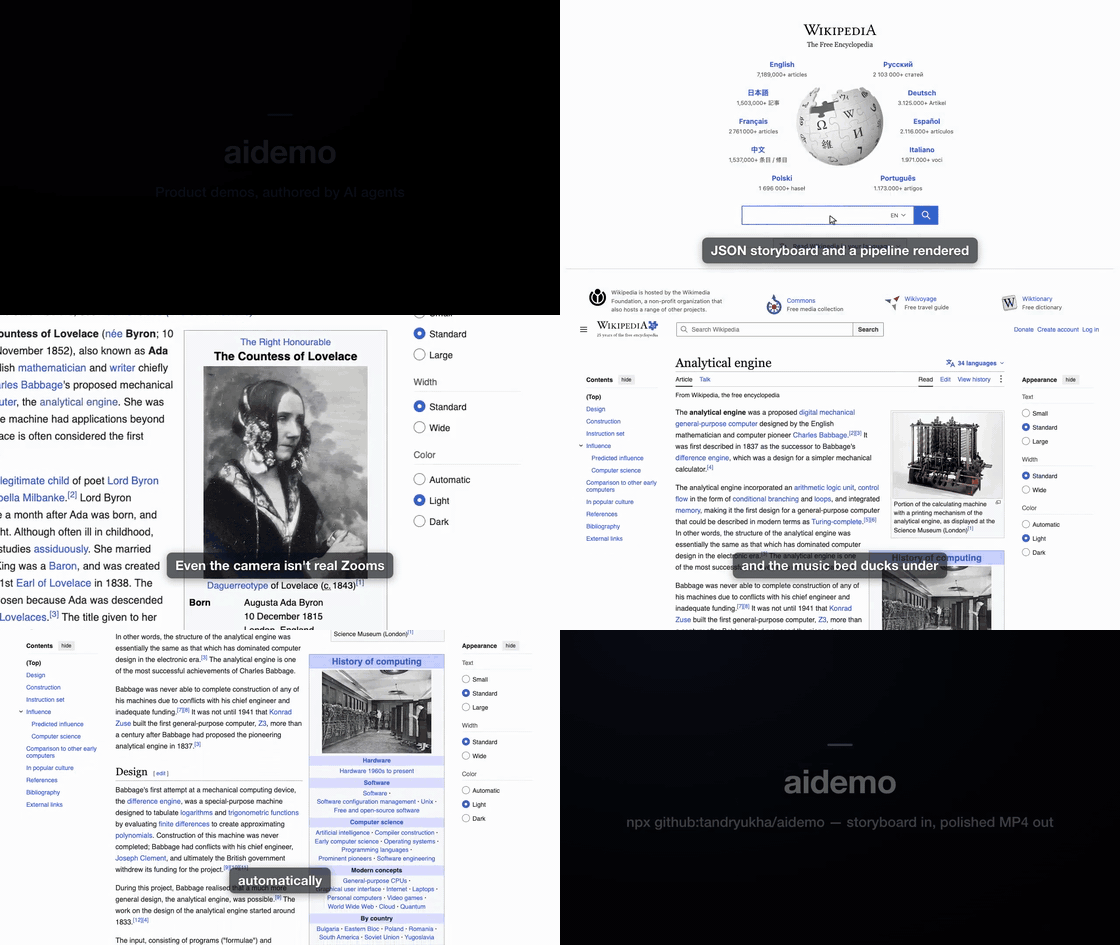
Real output — a ~51 s self-narrated tour of Wikipedia (portal search →
Ada Lovelace → focus-zoom → click through to the Analytical Engine → glide
scroll), authored by Claude from one `storyboard.json` and recorded as a
deterministic replay. The preview GIF is silent;
**[watch the full version with narration ▶](https://github.com/tandryukha/aidemo/releases/download/v0.3.0/wikipedia-showcase-demo.mp4)**.
## Three ways to use it
1. **From your coding agent** — the fastest path. In **Claude Code**:
`/plugin marketplace add tandryukha/aidemo` then
`/plugin install record-demo@aidemo` (bundles the skill **and** the MCP
server). In **Codex / Gemini / any MCP agent**:
`npx -y github:tandryukha/aidemo#stable repo-init`. Then just say
*"record a 45s demo of <flow>"* and the agent authors + renders it.
2. **Locally, free & offline** —
`AIDEMO_TTS_PROVIDER=local aidemo render --headless`. An in-process
voice model + script-timed captions mean **no API key, ~$0, fully offline**.
See [docs/LOCAL_MODELS.md](docs/LOCAL_MODELS.md).
3. **In CI, self-maintaining** — drop `uses: tandryukha/aidemo@stable` into a
workflow. When the product changes, it replays the committed storyboard and
commits fresh media — **no key, no LLM tokens, ~$0** on free runner minutes.
See [docs/CI.md](docs/CI.md).
**Free & open source.** MIT-licensed. Runs on GitHub's free Actions tier, or
fully local at $0 with the in-process voice — no API key, no cloud upload, no
telemetry. Works against **localhost and auth-walled apps** (your own Chrome).
## From one sentence to a narrated MP4
You type a sentence, the agent writes an artifact you can read and edit, the
engine records and cuts it:
**1 · What you type** — one line to any MCP-capable agent (Claude Code here):
```
claude "record a 45s demo touring Wikipedia: search for Ada Lovelace,
open the Analytical Engine, then glide down the article"
```
**2 · What the agent authors** — a plain, editable `storyboard.json` (excerpt:
narration + a fixed browser action-spec, side by side — no generated code):
```jsonc
{
"title": "A quick tour of Wikipedia",
"zoom": {}, // Screen-Studio-style auto-zoom
"scenes": [
{ "id": "search",
"narration": "Start at the Wikipedia portal and search for Ada Lovelace.",
"actions": [
{ "op": "goto", "url": "https://www.wikipedia.org/" },
{ "op": "type", "target": { "selector": "#searchInput" }, "text": "Ada Lovelace" },
{ "op": "click", "target": { "selector": "button[type=submit]" } } ] },
{ "id": "engine",
"narration": "Her notes on Babbage's Analytical Engine hold the first computer program.",
"actions": [
{ "op": "focus", "target": { "selector": "#firstHeading" } },
{ "op": "click", "target": { "selector": "a[href*='Analytical_Engine']" } },
{ "op": "scrollBy", "dy": 900, "easing": "glide" } ] }
]
}
```
**3 · How it's recorded + cut** — `aidemo render` drives a real Chrome (smooth
animated cursor, human-cadence typing, auto-zoom), then trims the dead time and
syncs to the narration:
```
storyboard.json
→ voice OpenAI / ElevenLabs / local TTS → audio/narration.mp3 + voice.json
→ record drives Chrome, animated cursor → recordings/raw.{webm,mp4} + timeline.json
→ captions Whisper word timestamps → generated/captions.{srt,vtt,cues.json}
→ compose trim idle · sync · auto-zoom · cards · caption · mux → output/final-demo.mp4
```
**4 · What you get** — `output/final-demo.mp4`, plus a README-ready GIF
(`aidemo gif`) and named stills (`aidemo stills`) from the same take. UI changed?
Re-run against the same storyboard — no re-recording by hand.
The design goal: demos that look **human-made and snappy**, not like an AI
clicking around and waiting between screenshots — by separating **authoring**
(slow, one-time — figure out the flow) from **recording** (a fast deterministic
replay with a smooth animated cursor).
## What teams render with it
- **GitHub README demos** — `aidemo gif demos/onboarding`, drop the autoplaying
GIF into the readme (the GIFs on this page are exactly that).
- **Landing-page hero videos** — the muted-autoplay MP4 on
[aidemo.top](https://aidemo.top) is a rendered demo, poster frame and all.
- **Release / what-shipped demos** — narrate the new feature, then
`gh release upload v1.4.0 demos/whats-new/output/final-demo.mp4`.
- **Customer & prospect demos** — personalized flows against your real app:
localhost, auth walls, your own logged-in Chrome; nothing leaves the machine.
## Render in CI (self-maintaining demos)
Commit a storyboard and the **[aidemo GitHub Action](docs/CI.md)** keeps its
demo media in sync — a fresh narrated, captioned MP4 (and GIF) on every relevant
change. Deterministic replay + a local voice mean **no API key, no LLM tokens,
about $0** (just free runner minutes). It's the loop a screen recorder can't
run: your demo maintains itself.
```yaml
# .github/workflows/demo.yml
- uses: actions/checkout@v4
- run: sudo apt-get update && sudo apt-get install -y ffmpeg # ubuntu ships Chrome, not ffmpeg
- uses: tandryukha/aidemo@stable
with:
demos: demos/*
tts: local # in-process voice → no keys, no tokens
gif: "true"
```
Full recipe, templates (auto-commit / PR-comment / cron-refresh), and the
always-fresh-embeds trick: **[docs/CI.md](docs/CI.md)**,
**[docs/EMBEDS.md](docs/EMBEDS.md)**, **[docs/recipes/](docs/recipes/)**.
## Quick start (self-contained smoke test)
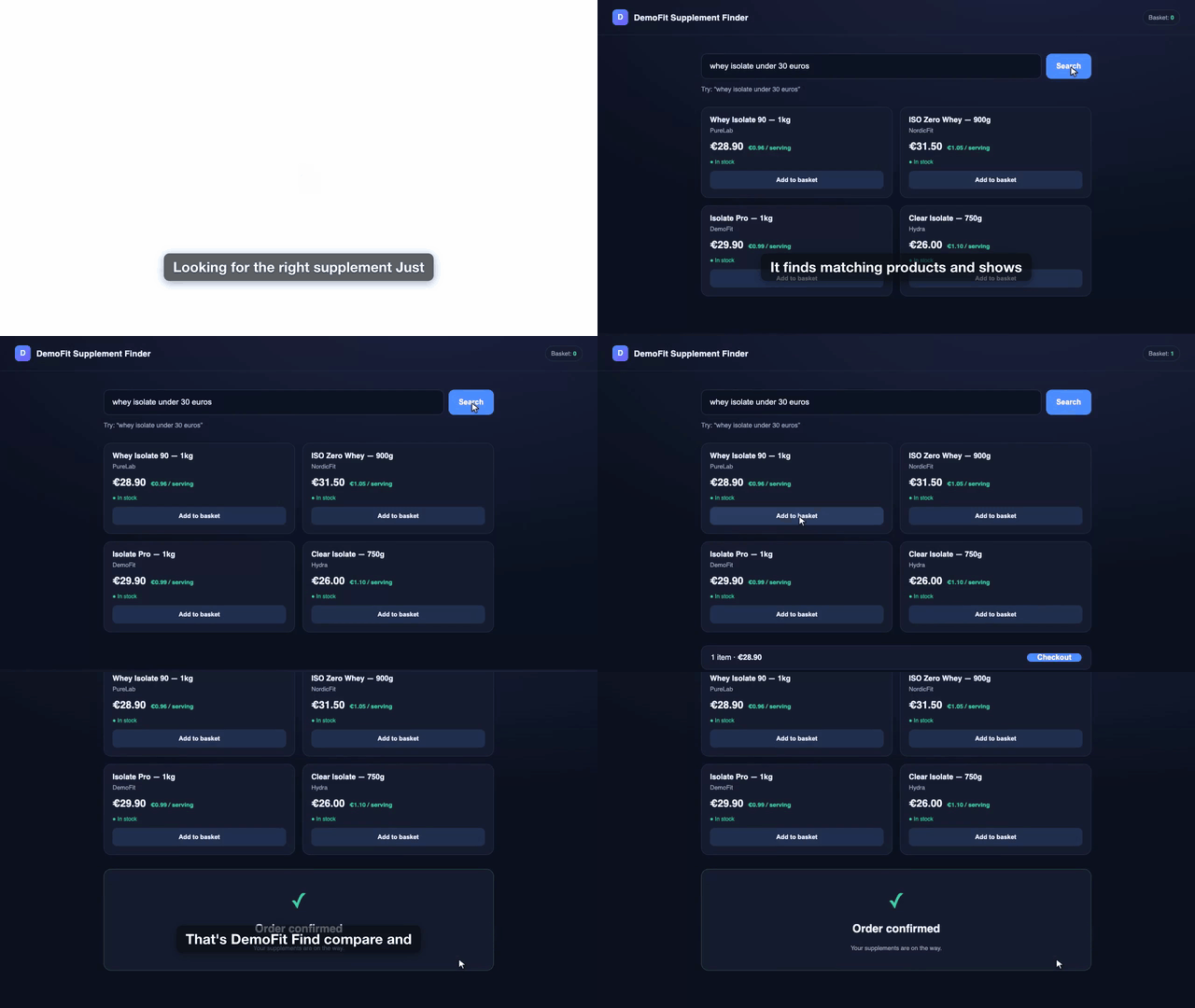
A bundled fixture store (search → results → cart → checkout) that renders a
finished demo with zero external dependencies:
```bash
npm install # Node 20+, system Chrome, ffmpeg on PATH
node examples/local-demo/serve.mjs # terminal 1: fixture on :8787
node bin/aidemo.mjs render examples/local-demo --headless # terminal 2
open examples/local-demo/output/final-demo.mp4 # xdg-open on Linux, start on Windows
```
Voice/captions need `OPENAI_API_KEY` in `.env` — **or** `AIDEMO_TTS_PROVIDER=local`
(no key, offline), **or** `OPENAI_BASE_URL` at a local server. See
[docs/LOCAL_MODELS.md](docs/LOCAL_MODELS.md). No Playwright browser download is
needed — the engine uses your system Chrome (`channel: "chrome"`).
[](https://github.com/tandryukha/aidemo/releases/download/v0.3.0/quickstart-demo.mp4)
The bundled fixture rendered end-to-end — narrated, captioned, auto-trimmed.
Silent preview; **[full version ▶](https://github.com/tandryukha/aidemo/releases/download/v0.3.0/quickstart-demo.mp4)**.
## CLI
Each step is independently runnable and re-runnable — regenerate voice without
re-recording, recompose without re-transcribing, etc.
```bash
aidemo init # scaffold demos// with a starter storyboard
aidemo init --from-url # …drafted from the live page's headings + real selectors
aidemo import-trace trace.zip --name # …or from a Playwright trace / *.spec.ts (actions + selectors → scenes)
aidemo voice # per-scene TTS → narration.mp3 + voice.json
aidemo record # drive Chrome → raw video + timeline.json
aidemo probe # record-only dry run (verify selectors), no key needed
aidemo validate # schema-check the storyboard, no browser (non-zero exit on issues)
aidemo lint # predict freezes/cuts + selector pitfalls before spending a take
aidemo captions # Whisper → captions.{srt,vtt,cues.json} (--offline for no network)
aidemo compose # trim + sync + zoom + cards + caption + mux → final-demo.mp4
aidemo gif # final-demo.mp4 → README-ready GIF (autoplays on GitHub)
aidemo frames # evenly spaced PNGs from the video for review (--source raw)
aidemo render # voice → record → captions → compose
aidemo guide # print the canonical authoring guide
aidemo doctor # check Node, ffmpeg, Chrome, voice endpoint
```
Add `--headless` for CI/fixtures; omit it for real sites that need your
logged-in session. `--profile ` picks the Chrome user-data dir; `--fresh`
records on a wiped one; `--storage-state ` / `--cookie "name=value;domain=host"`
seed a cookie-gated site before the first action (or declare `setup` in the
storyboard, which can also run a `preflight` script before every take);
`--capture native|obs` switches to high-fidelity screen capture. `voice`/`render`
**skip TTS for unchanged scenes**, and `record` **salvages a failed take** (keeps
the footage + drops a screenshot/frame-dump in `logs/`).
## Agent interface (MCP)
`aidemo mcp` runs a **stdio** MCP server (no network listener) exposing the engine
to any MCP client. The Claude Code plugin bundles it; `aidemo repo-init` registers
it agent-neutrally (`.mcp.json` for Claude Code, `.gemini/settings.json` for
Gemini; `codex mcp add aidemo -- npx -y github:tandryukha/aidemo#stable mcp` for
Codex).
- **Authoring tools** — `get_authoring_guide` serves
[docs/AUTHORING.md](docs/AUTHORING.md) version-matched from the engine (can't go
stale); `get_storyboard_schema`, `validate_storyboard`, `init_demo`, `doctor`.
- **Pipeline tools run as jobs** — `probe`/`record`/`render`/`voice`/`captions`/
`compose`/`gif` return a `jobId` immediately; `job_status` reports stage,
per-scene progress, and (on failure) the screenshot/frame-dump paths.
## Why it's built this way
- **Deterministic replay, not an LLM in the loop.** The recording runs a fixed
action-spec at full speed, so the video is smooth. The agent only *authors* the
storyboard (and confirms selectors once), never during capture.
- **Declarative action-spec + fixed player** (not generated `spec.ts`). Safer,
editable, and it emits a **timeline** for free — compose fits each scene's video
to its narration by trimming/speeding only the idle parts, freeze-holding a
static page for any remainder instead of ugly slow-motion.
- **Captions via overlaid PNGs, not libass.** Many ffmpeg builds lack
`subtitles`/`drawtext`; aidemo rasterizes each caption with headless Chrome and
overlays it with time-gated `enable` — works on any ffmpeg with `overlay`.
- **Cinematic polish is compose-time, not record-time** — a bad zoom is a
recompose, never a re-record. See [docs/POLISH.md](docs/POLISH.md).
## Deeper docs
- **[docs/AUTHORING.md](docs/AUTHORING.md)** — the canonical storyboard schema,
action vocabulary, and demo-director principles (served by the engine).
- **[docs/LOCAL_MODELS.md](docs/LOCAL_MODELS.md)** — no-key rendering: in-process
Kokoro voice, local speech servers (speaches), ElevenLabs, offline captions.
- **[docs/POLISH.md](docs/POLISH.md)** — auto-zoom, scroll easing, music ducking,
intro/outro cards, motion blur, cursor control, native/OBS high-fidelity capture.
- **[docs/CHATGPT_APPS.md](docs/CHATGPT_APPS.md)** — recording ChatGPT Apps SDK
widgets (dedicated profile, nested iframes, `waitForWidget`).
- **[docs/CI.md](docs/CI.md)** · **[docs/EMBEDS.md](docs/EMBEDS.md)** · **[docs/recipes/](docs/recipes/)** — CI rendering, always-fresh embeds, agent-in-CI recipes.
## Setup
Prereqs: **Node 20+**, **Google Chrome**, **ffmpeg + ffprobe** on `PATH`.
Developed and tested on macOS; Linux works for the default (Playwright) capture
and `--capture obs`. Run `aidemo doctor` to check your setup.
```bash
npm install
cp .env.example .env # add OPENAI_API_KEY, or use AIDEMO_TTS_PROVIDER=local (no key)
```
## Project layout (per demo)
```
demos// ← your working area (untracked; scaffold with `aidemo init`)
input/ brief.md
generated/ storyboard.json timeline.json captions.{srt,vtt,cues.json}
recordings/ raw.webm (or raw.mp4 for native/OBS capture)
audio/ scene-*.mp3 narration.mp3 voice.json
output/ final-demo.mp4
logs/ .log fail--.{png,json} (on a failed action)
```
## Security & trust
- **No telemetry, no analytics, no install-time scripts** (`package.json` has no
`postinstall`/`preinstall`).
- **Network is user-initiated only:** `api.openai.com` (only `voice`/`captions`,
your key — or a local server via `OPENAI_BASE_URL`), `api.elevenlabs.io` (opt-in),
`huggingface.co` (download-only, once, for `AIDEMO_TTS_PROVIDER=local`), and
`github.com` (your own `gh`, for `aidemo feedback`). Recording/composing are
fully local. The MCP server is **stdio-only** — no listener.
- **Small, auditable surface:** ~20 source files, 7 runtime deps, MIT. Pin an
immutable ref if you're wary of the moving `#stable` tag:
`npx -y github:tandryukha/aidemo#v0.14.0` (any released tag).
- Full detail: [docs/LOCAL_MODELS.md](docs/LOCAL_MODELS.md#what-leaves-the-machine)
· report vulnerabilities privately per [SECURITY.md](SECURITY.md).
## Roadmap
- **Comments on the video** (pause & comment) and **in-place transcript editing**:
captions map to scenes, so editing a line marks that scene dirty and
`aidemo voice --scene ` + `compose` regenerates only the delta.
- **Web UI**, project history, brand kits, changelog integrations.
- **Hosted public MCP** (see [docs/plans/public-mcp.md](docs/plans/public-mcp.md)).
Shipped: the **GitHub Action** (CI re-render), cinematic polish (auto-zoom,
scroll easing, music ducking, intro/outro cards, motion blur, post-hoc cursor
control), native/OBS capture, the agent-neutral **MCP server** + authoring guide,
ElevenLabs and **in-process local voice** providers, and the **Claude Code plugin**.
## Contributing
Issues and PRs welcome — see [CONTRIBUTING.md](CONTRIBUTING.md) for dev setup, the
smoke test, and the DCO sign-off requirement. Recording-session feedback has a fast
path: `aidemo feedback demos/` pre-fills a structured issue.
## License
[MIT](LICENSE) © Andrii Taran