#








## :zap: Introduction
**picows** is an ultra-fast, lightweight Python WebSockets client and server library for asyncio.
Originally developed as part of an algorithmic trading project, it features a very efficient C implementation, a zero-copy interface and all possible speedups for the common modern CPU architectures.
With picows, you get unmatched, best-in-class latency and throughput!
[](https://github.com/tarasko/websocket-benchmark/blob/master)
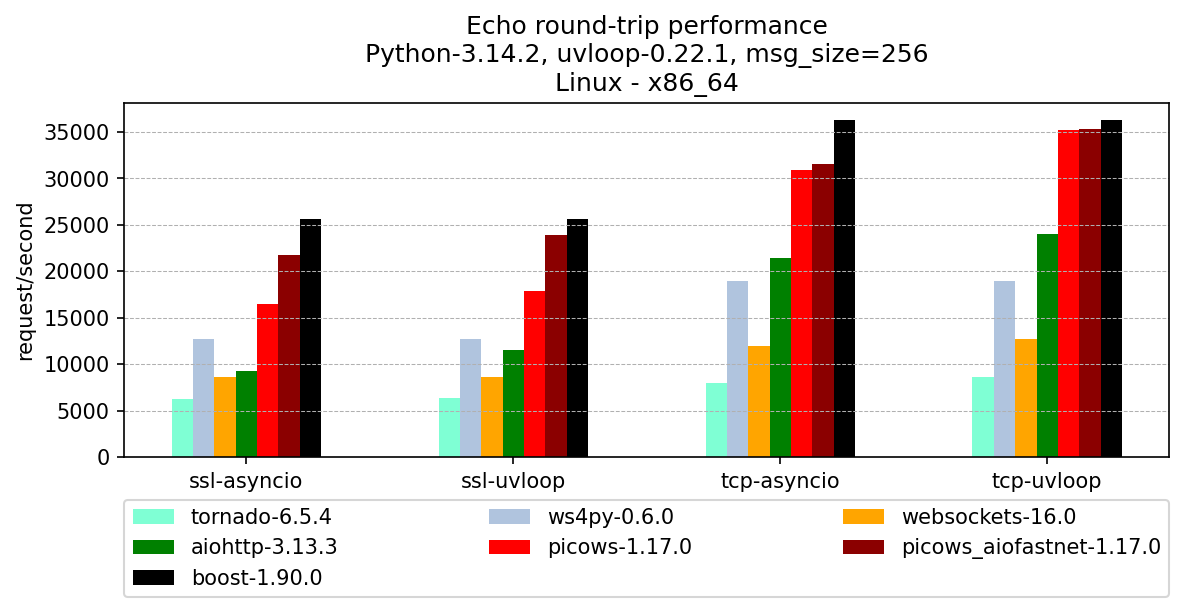
The above chart shows the performance of various echo clients communicating with the same high-performance C++ server through a loopback interface.
[boost.beast client](https://www.boost.org/library/latest/beast/) is also included for reference. You can find benchmark sources and more results [here](https://github.com/tarasko/websocket-benchmark).
## 💡 Key Features
- Faster (up to 2x) drop-in replacement for the popular [websockets](https://websockets.readthedocs.io/en/stable/) library.
- Maximally efficient WebSocket frame parser and builder implemented in C/Cython
- Reuse memory as much as possible, avoid reallocations, and avoid unnecessary Python object creation
- Use [aiofastnet](https://github.com/tarasko/aiofastnet) to achieve excellent TCP/TLS performance regardless of the event loop used
- Lower-level core API with non-async data path, to reduce latency and achieve maximum performance
- Provide a Cython `.pxd` for efficient integration of user cythonized code with picows
- Ability to check if a frame is the last one in the receiving buffer
- Auto ping-pong with an option to customize ping/pong messages
- Convenient method to measure websocket roundtrip time using ping/pong messages
## 📦 Installation
picows requires Python 3.9 or greater and is available on PyPI:
```bash
pip install picows
```
## 🤔 Getting started
picows provides two APIs:
* A reimplementation of the popular [websockets](https://websockets.readthedocs.io/en/stable/)
library's asyncio interface.
* A low-level and significantly more efficient (lower latency, better throughput, zero copy)
core API.
### websockets API
This is a drop-in replacement; you only need to change imports
to transition from websockets to picows.
Certain features from websockets library are not supported yet. Check out [documentation](https://picows.readthedocs.io/en/stable/websockets.html)
for the full list.
#### Client
```python
# Import picows.websockets instead of websockets
from picows.websockets.asyncio.client import connect
import asyncio
async def hello():
async with connect("ws://localhost:8765") as websocket:
await websocket.send("Hello world!")
message = await websocket.recv()
print(message)
if __name__ == "__main__":
asyncio.run(hello())
```
#### Server
```python
# Import picows.websockets instead of websockets
from picows.websockets.asyncio.server import serve
import asyncio
async def echo(websocket):
async for message in websocket:
await websocket.send(message)
async def main():
async with serve(echo, "localhost", 8765) as server:
await server.serve_forever()
if __name__ == "__main__":
asyncio.run(main())
```
### Core API
The Core API achieves superior performance by offering an efficient, non-async data path, similar to the
[transport/protocol design from asyncio](https://docs.python.org/3/library/asyncio-protocol.html#asyncio-transports-protocols).
The user handler receives WebSocket frame objects instead of complete messages.
Since a message can span multiple frames, it is up to the user to decide the most
effective strategy for concatenating them. Each frame object includes additional low-level
details about the current parser state, which may help to further optimize the behavior of the user's application.
The Core API doesn't offer high-level features like permessage-deflate extension support
or an async iterator interface for reading. These features are often not required in real-world
applications, significantly slow down the data path, and make a true zero-copy interface impossible.
#### Client
```python
import asyncio
from picows import ws_connect, WSFrame, WSTransport, WSListener, WSMsgType, WSCloseCode
class ClientListener(WSListener):
def on_ws_connected(self, transport: WSTransport):
transport.send(WSMsgType.TEXT, b"Hello world")
def on_ws_frame(self, transport: WSTransport, frame: WSFrame):
print(f"Echo reply: {frame.get_payload_as_ascii_text()}")
transport.send_close(WSCloseCode.OK)
transport.disconnect()
async def main():
transport, client = await ws_connect(ClientListener, "ws://127.0.0.1:9001")
await transport.wait_disconnected()
if __name__ == "__main__":
asyncio.run(main())
```
#### Server
```python
import asyncio
from picows import ws_create_server, WSFrame, WSTransport, WSListener, WSMsgType, WSUpgradeRequest
class ServerClientListener(WSListener):
def on_ws_connected(self, transport: WSTransport):
print("New client connected")
def on_ws_frame(self, transport: WSTransport, frame: WSFrame):
if frame.msg_type == WSMsgType.CLOSE:
transport.send_close(frame.get_close_code(), frame.get_close_message())
transport.disconnect()
else:
transport.send(frame.msg_type, frame.get_payload_as_memoryview())
async def main():
def listener_factory(r: WSUpgradeRequest):
# Routing can be implemented here by analyzing request content
return ServerClientListener()
server: asyncio.Server = await ws_create_server(listener_factory, "127.0.0.1", 9001)
for s in server.sockets:
print(f"Server started on {s.getsockname()}")
await server.serve_forever()
if __name__ == "__main__":
asyncio.run(main())
```
## :hammer: Contributing / Building From Source
Contributions are welcome!
1. Fork and clone the repository:
```bash
git clone git@github.com:tarasko/picows.git
cd picows
```
2. Create a virtual environment and activate it:
```bash
python3 -m venv picows-dev
source picows-dev/bin/activate
```
3. Install development dependencies:
```bash
# To run tests
pip install -r requirements-test.txt
```
4. Build in place and run tests:
```bash
python setup.py build_ext --inplace --dev
pytest -s -v
# Run specific test with picows debug logs enabled
pytest -s -v -k test_client_handshake_timeout[uvloop-plain] --log-cli-level 9
```
5. Run perf, see call graph
For Intel:
```bash
$ perf record -F 999 -g --call-graph lbr --user-callchains -- python -m examples.perf_test --msg-size 8192 --ssl
$ DEBUGINFOD_URLS= perf report -G -n --stdio
```
For AMD:
```bash
$ perf record -F 999 -g --call-graph dwarf --user-callchains -- python -m examples.perf_test --msg-size 8192 --ssl
$ DEBUGINFOD_URLS= perf report -G -n --stdio
```
6. Build coverage report:
Building for coverage testing requires enabling line tracing in cython, which
significantly slows down extension modules. It is disabled by default. You
would need to rebuild specifically with coverage support.
```bash
python setup.py build_ext --inplace --dev --with-coverage
pytest -s -v --cov=picows --cov-report=html
```
7. Build docs:
```bash
pip install -r docs/requirements.txt
make -C docs clean html
```