---
title: Data
nav_order: 4
tags:
- Guide
- External
- User
# exclude-from-main-guides-list
---
## Data
This section explains how to explore pedestrian network data in the OS-CONNECT Data Viewer, including feature types, attributes, and how to view feature details.
_For a list of all guides on the TCAT Wiki, refer to the [Guides List](../../../guides-list/index.md)._{ .guides-list-ref }
---
### Viewing Data
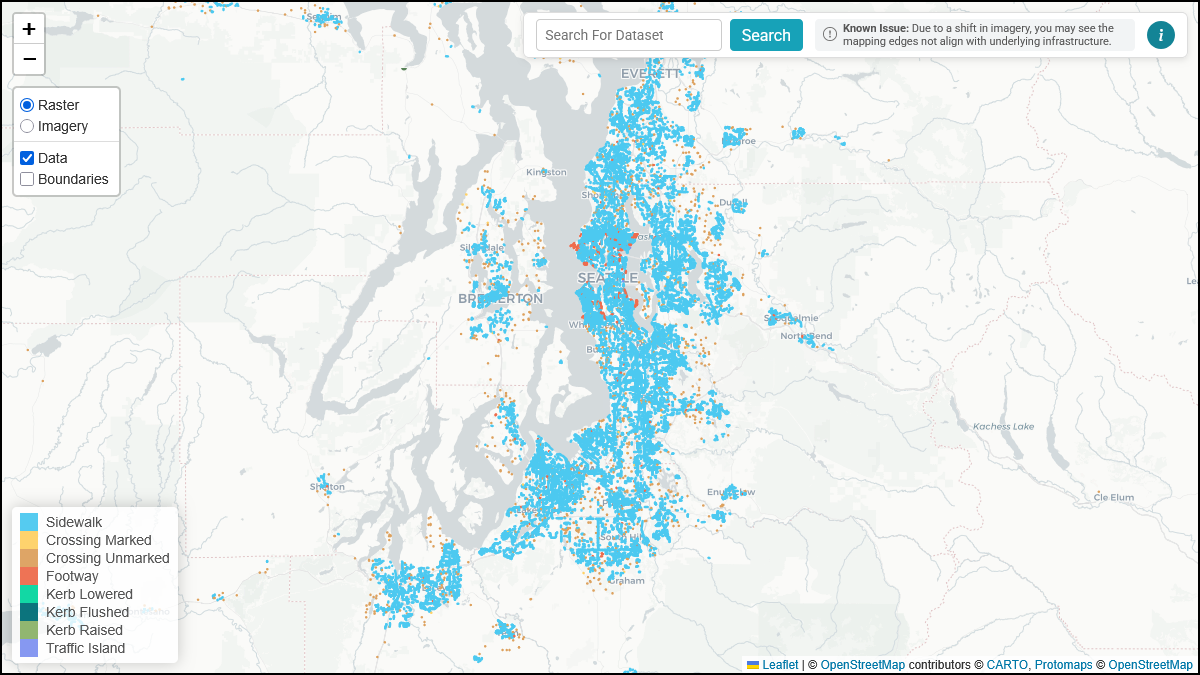
To view pedestrian network features on the map, ensure the **Data** toggle is enabled in the [layer toggles](interface.md#layer-toggles).
{ width="826" }
The Data Viewer displays feature data as colored lines and points on the map. To view detailed attributes for individual features, zoom in to **zoom level 16 or higher**.
!!! tip
Zoom level is shown in the URL. Refer to [URL Format](interface.md#url-format) for more details.
---
### Hovering Over Features
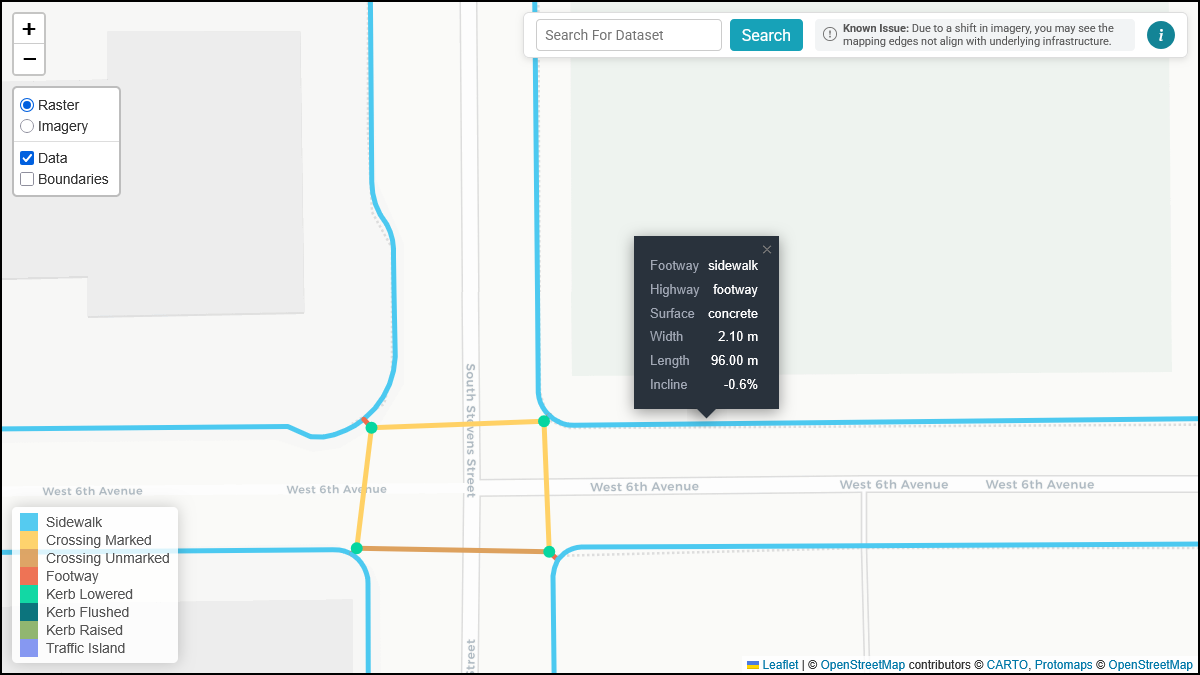
When you zoom in to **zoom level 16 or higher**, you can hover over (or tap on touch devices) any feature on the map to view a popup containing its attributes.
{ width="826" }
The popup displays the following attributes when available:
| Attribute | Description | Example Values |
|:-------------------|:----------------------------------------------------------------|:-----------------------------|
| **highway** | The type of way | `footway` |
| **footway** | The sub-classification of the footway | `sidewalk`, `crossing` |
| **kerb** | The type of curb | `lowered`, `flush`, `raised` |
| **barrier** | The type of barrier | `kerb` |
| **incline** | The slope grade of the feature, expressed as a percentage | `5%`, `-3%` |
| **width** | The width of the feature in meters | `1.5` |
| **length** | The length of the feature in meters | `42.3` |
| **foot** | Whether the feature permits pedestrian access | `yes`, `no` |
| **surface** | The surface material of the feature | `concrete`, `asphalt` |
| **tactile_paving** | Whether tactile paving (detectable warning surfaces) is present | `yes`, `no` |
!!! note
Not all attributes are present for every feature. The popup only displays attributes that are present in the dataset for that specific feature.
---
### Feature Types
The OS-CONNECT Data Viewer displays eight types of pedestrian network features, each rendered in a distinct color on the map. These features follow the [OpenSidewalks schema](../../../opensidewalks/schema/index.md).
#### Sidewalk
Sidewalks are pedestrian paths that run alongside a road. They are the most common feature type in the dataset and form the backbone of the pedestrian network.
- **Color:** Light blue
- **Identified by:** `highway=footway` + `footway=sidewalk`
#### Crossing (Marked)
Marked crossings are designated pedestrian paths across a road that have visible pavement markings (e.g., painted lines, zebra stripes).
- **Color:** Yellow
- **Identified by:** `footway=crossing` + `crossing:markings=yes`
#### Crossing (Unmarked)
Unmarked crossings are designated pedestrian paths across a road that do not have visible pavement markings.
- **Color:** Tan/orange
- **Identified by:** `footway=crossing` + `crossing:markings=no`
#### Footway
Footways are general pedestrian paths that are not categorized as sidewalks or crossings. These may include paths through parks, pedestrian plazas, or other dedicated walking areas.
- **Color:** Red-orange
- **Identified by:** `highway=footway` (without a `footway` sub-classification)
#### Kerb (Lowered)
Lowered kerbs ("curb ramps") are curb transitions where the curb height has been reduced to facilitate access, typically at crossings.
- **Color:** Teal
- **Identified by:** `barrier=kerb` + `kerb=lowered`
#### Kerb (Flushed)
Flushed kerbs ("flush curbs") are curb transitions where the curb is level with the road surface, providing a seamless transition between the sidewalk and the roadway.
- **Color:** Dark teal
- **Identified by:** `barrier=kerb` + `kerb=flush`
#### Kerb (Raised)
Raised kerbs are standard curbs that maintain their full height, which may present a barrier to wheelchair users.
- **Color:** Green
- **Identified by:** `barrier=kerb` + `kerb=raised`
#### Traffic Island
Traffic islands are raised or protected areas within a roadway that provide a refuge for pedestrians crossing wide or multi-lane roads.
- **Color:** Purple
- **Identified by:** `highway=footway` + `footway=traffic_island`
---
### Next Steps
- Notice an issue with the data? Learn how to [report it](feedback.md)!