Open-source, self-hosted AI app builder.
Prompt it and a coding agent builds real apps in isolated sandboxes on your
server — each live at a preview URL. You own the infra, code, and data. MIT.








Prompt → a real, running app on your server, at its own URL.
See it in action 👇
Describe what you want; a coding agent builds it inside an isolated sandbox and it appears at a live preview URL.
n8n, Ghost, Grafana, Gitea… 80+ curated apps, installed and live at their own URL.
Every action is a /v1 call — headless, scriptable, and easy to build into your own product.
▶ Try the live demo — click around a real console with sample data, no install.
--- ## What is sandboxd? The apps where you type *"build me a todo app"* and a working site appears at its own link — Lovable, Bolt, v0, Replit. **sandboxd is the open-source engine that makes that work, on your own server.** One HTTP request and it: 1. spins up a **private, isolated container** (its own filesystem + limits), 2. runs an **AI coding agent inside it** against your prompt, and 3. hands the app a **live preview URL**. Idle sandboxes **sleep and wake on demand**, so one ordinary box holds many apps instead of a VM each. Under the hood it's deliberately small: **one Go program driving Docker**, Traefik for URLs, SQLite for state — no Kubernetes, no separate database, no queue. ## Two ways to use it - **API-first** — everything is a `/v1` call, so you can build sandboxd into your own product. - **Optional web console** — the fastest, **no-code** way to use it hands-on: create an app, chat to a coding agent, watch the live preview, edit files, and review a git diff & push — all in a browser. It's a **pure `/v1` client**; the engine runs perfectly headless without it. > **New here? Start with the console. Building a product? Drive the API.** ## What can you run? (a lot — from one console, no code) The console isn't only for coders. Open it and, in **one click or one prompt**, you can: - **🚀 Run a ready-made open-source app** — a **Ghost** blog, **n8n** automations, a **Gitea** git host, **Grafana** / **Metabase** dashboards, **Uptime Kuma**, **Jupyter**, **Keycloak**… **80+ curated apps**, installed and live at their own URL. - **🧩 Start from a starter** — a React/Vite, Next.js, or FastAPI scaffold that boots to a live preview; then just *chat* to shape it. - **📥 Bring your own repo** — import any **public** Git repo (no credential needed) and let a coding agent work on it. - **✨ Build from scratch** — describe an app and watch the agent build it in the live preview, then commit & push.

























This is just a taste — if it's open-source, you can almost certainly run it.
Any Node, Python, or static-binary app boots as-is; anything else, bring your own base image or preset.
Ways to run an app → · Base image, stacks & presets · Architecture
> **Dev → prod, never shorter:** prompt an app into a sandbox, iterate on a live > preview, then self-host it on your own server in [one command](#-deploy-to-a-vps-in-one-click). ## Quick start Needs **Docker + the Compose plugin** and **git** on Linux (macOS via Docker Desktop is best-effort). Runs natively on **amd64 and arm64** — including Apple Silicon Macs and arm64 Linux hosts (e.g. AWS Graviton) — every image builds from multi-arch bases with no cross-compilation. Install in one line: ```bash curl -fsSL https://raw.githubusercontent.com/tastyeffectco/sandboxd/main/install.sh | bash ``` It builds the images, starts the stack **with the web console**, and prints your **console URL + a generated login** — no password step. Open it, connect an agent under **Settings**, create an app, and build. No code needed. - **Console:** `http://console.localhost` — the installer prints your login; lost it? run **`./console-login.sh`** to see it again anytime - **API:** `http://127.0.0.1:9090` (`curl http://127.0.0.1:9090/healthz` → `ok`) - **Headless (no console):** run with `SANDBOXD_CONSOLE=0` (or `--no-console`) - **Upgrade later:** run **`./upgrade.sh`** — it backs up your database first, health-checks the new version, and rolls back automatically if it fails ([Upgrading](docs/upgrading.md)). `./upgrade.sh --check` shows your version. Prefer the API? Connect an agent once, create a sandbox, hand it a prompt: ```bash API=http://127.0.0.1:9090 curl -s -XPOST $API/v1/agents/claude-code/api-key -d '{"api_key":"sk-ant-..."}' ID=$(curl -s -XPOST $API/sandbox -d '{"ports":[3000]}' | sed -E 's/.*"id":"([^"]+)".*/\1/') curl -s -XPOST $API/v1/sandboxes/$ID/tasks -d '{"prompt":"build a todo app on port 3000","agent":"opencode"}' # open the result at http://s-$ID-3000.preview.localhost ``` **Full walkthrough → [sandboxd.io/quickstart](https://sandboxd.io/quickstart).** ## 🚀 Deploy to a VPS in one click sandboxd needs one Linux server with Docker — nothing else. Grab a server below (2 vCPU / 4 GB is plenty to start), paste our [cloud-init file](deploy/cloud-init.yaml) at creation, and it installs itself. [](https://www.vultr.com/?ref=9912150) Then on the new server (or paste [`deploy/cloud-init.yaml`](deploy/cloud-init.yaml) as user-data and skip this): ```bash curl -fsSL https://raw.githubusercontent.com/tastyeffectco/sandboxd/main/deploy/bootstrap.sh | sudo bash ``` Full per-provider walkthrough: [deploy/DEPLOY.md](deploy/DEPLOY.md). > *Some links above are referral links — they cost you nothing and support > sandboxd's development.* ## What you get - **Isolated sandboxes** — a hardened container per app with a workspace + live preview URL; sleep/wake so idle apps cost nothing. - **Built-in agents** — OpenCode & Claude Code. **No credential ever enters a sandbox** (a proxy injects it on the wire), and every task is **checkpointed & revertible**. - **Runtime presets** — React/Vite, Next.js, Node/Express, FastAPI, Worker; boot to a preview and reload after agent edits. - **Files, Git & secrets** — in-browser editor + diffs, commit & push, per-app config/secrets (encrypted, write-only). - **Snapshots / fork / restore**, an activity timeline, per-process logs, and live lifecycle tuning. ## Who's it for? **✅ Use it** if you run **many sandboxes for other people** — an AI app-builder, an agent platform, a coding playground, per-user or per-branch preview environments, or team multi-app hosting. **❌ Skip it** if you just need one or two containers for yourself — a shell script or `docker run` is simpler. ([Why not just a script?](https://sandboxd.io/what-is-sandboxd)) ## Managed — we run it for you Don't want to run the server yourself? We'll **install, configure, and manage sandboxd on your own box** — BYOC (your compute, your data, no lock-in). One-time setup + optional monthly management. **[See Managed →](https://sandboxd.io/managed)** ## Documentation Full docs live at **[sandboxd.io](https://sandboxd.io)**: | Getting started | Guides | Reference | |---|---|---| | [What is sandboxd?](https://sandboxd.io/what-is-sandboxd) | [The web console](https://sandboxd.io/guides/console) · [Get an app running](https://sandboxd.io/guides/apps-in-the-console) | [API (OpenAPI)](https://sandboxd.io/reference/api) | | [Quickstart](https://sandboxd.io/quickstart) | [Coding agents](https://sandboxd.io/guides/agents) | [Configuration](https://sandboxd.io/reference/configuration) | | [Core concepts](https://sandboxd.io/concepts) | [Base image, stacks & presets](https://sandboxd.io/guides/images-stacks-presets) | [Architecture](https://sandboxd.io/reference/architecture) | | [Roadmap](https://sandboxd.io/roadmap) | [Presets & `sandbox.yaml`](https://sandboxd.io/guides/images-stacks-presets) · [Auto-detection & App Store](https://sandboxd.io/guides/runtime-and-store) · [Undo a task](https://sandboxd.io/guides/tasks) · [Production / TLS](https://sandboxd.io/guides/production-tls) · [Hardening](https://sandboxd.io/guides/hardening) · [Uninstall](https://sandboxd.io/guides/uninstall) | [`AGENTS.md`](AGENTS.md) · [`ARCHITECTURE.md`](ARCHITECTURE.md) | Building on it from your own agent? **[`AGENTS.md`](AGENTS.md)** is a copy-pasteable runbook. ## Roadmap & community - 🗺️ **Roadmap** — [what's shipped & next](https://sandboxd.io/roadmap) · [public project board](https://github.com/users/tastyeffectco/projects/3) - 💬 **Discussions** — [ask & get self-hosting help](https://github.com/tastyeffectco/sandboxd/discussions) - 🤝 **Contribute** — good first PRs: add a runtime preset or an App Store recipe ([`CONTRIBUTING.md`](CONTRIBUTING.md)) - 🔒 **Security** — report privately per [`SECURITY.md`](SECURITY.md) > **Beta · 0.x.** Container isolation (not VMs), single-server, and API auth off > by default — all fine for your own users; tighten before untrusted > multi-tenancy. See [Hardening](https://sandboxd.io/guides/hardening). Expect the > occasional breaking change before 1.0 — pin a version and update as you go. ## ⭐ If sandboxd is useful, star it Stars are how other builders find sandboxd — it's the fastest way to support the project (and it keeps us going). Thank you 🙏 [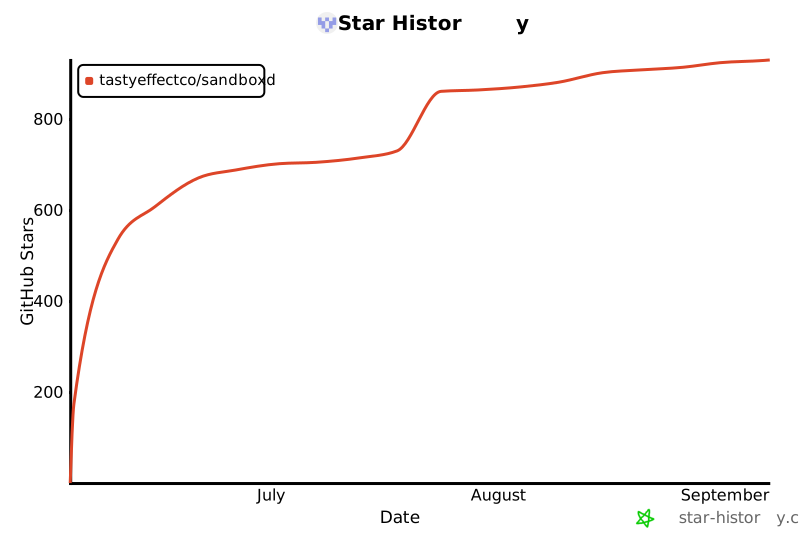](https://star-history.com/#tastyeffectco/sandboxd&Date) ## License [MIT](LICENSE). Use it, ship it, sell what you build on it. ## Sponsors sandboxd is free and MIT-licensed. **Sponsors keep it maintained and fund the [deploy roadmap](https://github.com/sponsors/tastyeffectco)** — thank you to everyone who chips in.No sponsors yet — be the first.