MeetPair

English (Default) | 简体中文

Local-First AI Meeting and Interview Review Assistant

High-performance audio processing powered by Rust, with speech recognition and LLM analysis running locally on your device,
and fixed stereo channels that reliably distinguish the other party from you.

Download the Latest Release · Build from Source · Architecture

Rust 1.88 Tauri 2 Local ASR Local LLM Supported platforms: macOS, Windows, Linux MIT License

--- MeetPair is a desktop assistant for meetings, interviews, and conversations. It captures system audio and microphone input at the same time, stores the two trusted sources as fixed stereo channels, and runs local ASR to produce a live role-tagged transcript. After the meeting, its built-in local LLM can generate a meeting recall summary, interview pass-rate analysis, and an interview retrospective. > [!IMPORTANT] > MeetPair keeps its default processing pipeline entirely local: audio capture, ASR, SQLite storage, and built-in LLM inference all run on your device. Content is sent to an external model provider only when you explicitly configure and select one. ## Core Capabilities

⚡ High-Performance Rust Core

The Rust / Tauri core handles audio capture, timeline alignment, channel processing, transcription scheduling, and local storage. Platform-specific acceleration is available through Metal, CoreML, CUDA, Vulkan, ROCm, or OpenBLAS.

🔒 Private Local AI

Whisper, Parakeet, and Chinese ASR models can run locally, while the built-in LLM uses a local sidecar. Audio, transcripts, and summaries do not need to be uploaded to the cloud by default.

🎧 Stereo Speaker Roles

System audio is fixed to the left channel for the other party, while the microphone is fixed to the right channel for you. Speaker roles come from trusted audio sources instead of relying only on post-processing guesses.

✨ AI Summaries & Interview Analysis

The same role-tagged transcript can produce a meeting recall summary, interview pass-rate analysis, and interview retrospective. Analysis templates distinguish facts, inferences, and missing evidence instead of inventing data.

## Architecture

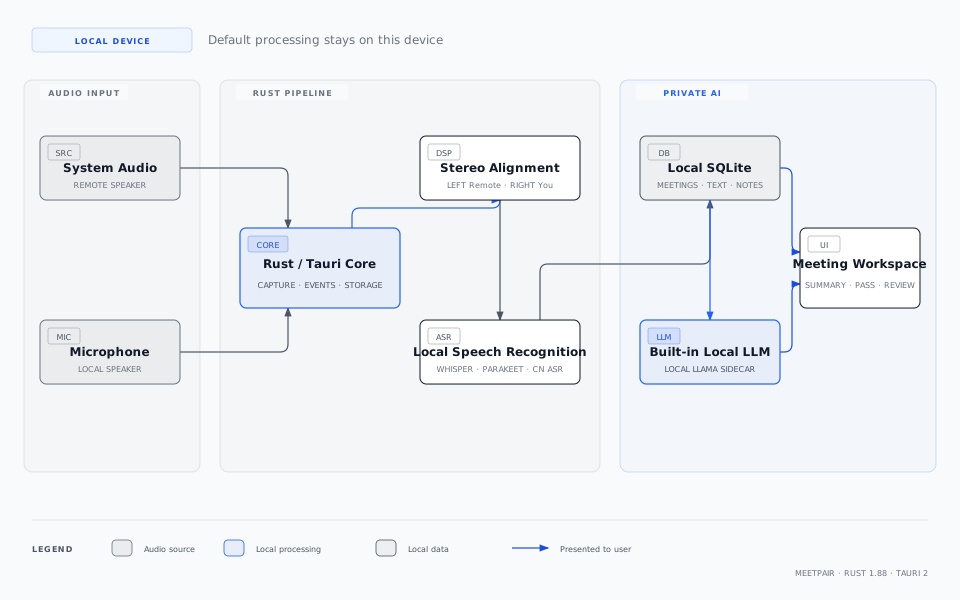
MeetPair local-first architecture: the Rust core connects stereo audio, local ASR, SQLite, a local LLM, and the desktop workspace

MeetPair separates the desktop interface from compute-intensive processing. Next.js handles interaction, Tauri exposes secure desktop commands, and the Rust core manages the audio pipeline, ASR, database, and local models. No separate FastAPI service, Docker backend, or whisper-server is required.
View diagram source files - [HTML source](docs/assets/meetpair-architecture.html) - [SVG](docs/assets/meetpair-architecture.svg)
## How Stereo Channels Identify Both Sides

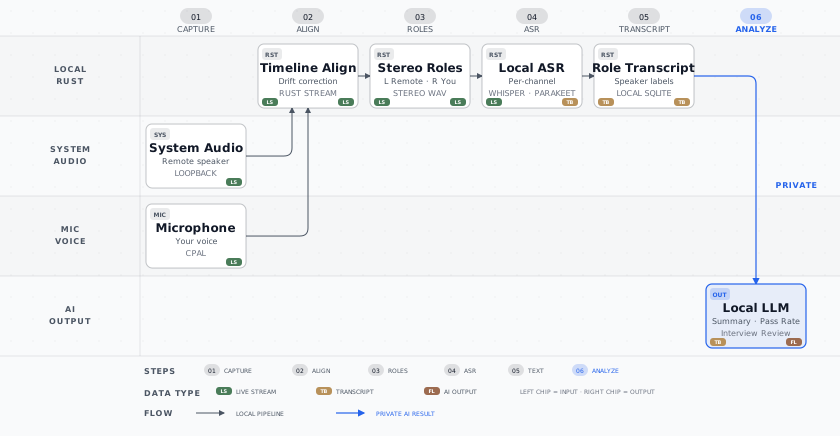
MeetPair stereo speaker-role pipeline: system audio and microphone input use fixed channels before local ASR produces a role-tagged transcript and AI analysis

| Audio Source | Fixed Channel | Role | Downstream Processing | | --- | --- | --- | --- | | System / loopback audio | Left | Other party | Independent VAD, ASR, and timestamps | | Microphone input | Right | You | Independent VAD, ASR, and timestamps | Both streams enter the Rust timeline aligner. If one source starts late, becomes temporarily unavailable, or drifts from the clock, missing intervals are padded with silence without swapping speaker roles. Role metadata follows the transcript through SQLite storage, recovery, pagination, copying, and summary generation.
View pipeline source files - [HTML source](docs/assets/meetpair-stereo-pipeline.html) - [SVG](docs/assets/meetpair-stereo-pipeline.svg)
## AI Outputs ### Meeting Recall Summary Turn a complete conversation into meeting context, key discussions, decisions, risks, action items, and follow-ups, making long meetings quickly searchable and actionable. ### Interview Pass-Rate Analysis Analyze pass rates from the roles, stages, candidate counts, and outcome evidence present in the transcript, then summarize: - pass rates across stages or candidate groups; - positive signals and recurring gaps across competency dimensions; - the main drivers of pass, reject, and inconsistent decisions; - recommendations for interviewer calibration, questions, scorecards, and the hiring process. When the transcript does not contain enough numerical evidence, MeetPair explicitly marks the data as insufficient instead of fabricating a pass rate. ### Interview Retrospective Review a single interview through candidate evidence, question effectiveness, process quality, decision rationale, missed follow-ups, and concrete improvements for next time, while preserving uncertainty and items that still need verification. ## Privacy Model Default local pipeline: ```text System Audio + Microphone ↓ Rust Stereo Processing ↓ Local ASR ↓ Local SQLite ↓ Built-in Local LLM ↓ Summary / Pass-Rate Analysis / Interview Retrospective ``` - Recording and transcription do not require a cloud account. - No separately deployed backend service is required. - Model files, meetings, transcripts, and summaries stay on the user device. - Built-in AI and local Ollama do not require a cloud API key. - OpenAI, Claude, Groq, OpenRouter, and custom OpenAI-compatible endpoints are optional and are used only after the user explicitly configures and selects them. ## Local Models and Acceleration ### ASR - Whisper: general-purpose multilingual local speech recognition. - Parakeet: fast transcription powered by ONNX Runtime. - SenseVoiceSmall / FireRedASR2: models optimized for Chinese. - Source-level VAD, denoising, resampling, and long-audio chunking. ### LLM - Built-in local model: inference through a local Llama sidecar shipped with the app. - Ollama: connect to an Ollama service on the same machine. - Custom templates: create, edit, or override summary and analysis templates. For detailed hardware acceleration setup, see the [GPU Acceleration Guide](docs/GPU_ACCELERATION.md). ## Platform Support | Platform | System Audio | Microphone | Acceleration | | --- | --- | --- | --- | | macOS | Core Audio Process Tap | System-selected input device | Metal / CoreML | | Windows | WASAPI Loopback | System-selected input device | CUDA / Vulkan / OpenBLAS | | Linux | PulseAudio or PipeWire-Pulse Monitor | System-selected input device | CUDA / Vulkan / ROCm / OpenBLAS | When Linux cannot provide a Monitor Source, the app reports the degraded state explicitly and can continue recording with microphone input only. ## Quick Start ### Requirements - Node.js 18 or later. - pnpm 8 or later. - Rust 1.88. - Platform-specific audio and build dependencies described in the [Build Guide](docs/BUILDING.md). ### Run the Development Build ```bash git clone https://github.com/tdog54646/MeetPair.git cd MeetPair/frontend pnpm install pnpm test pnpm tauri:dev ``` The frontend development server runs at `http://localhost:3118` by default. ### Build a Release ```bash cd frontend pnpm tauri:build ``` To select a hardware backend, use one of the following commands: ```bash pnpm tauri:build:metal pnpm tauri:build:coreml pnpm tauri:build:cuda pnpm tauri:build:vulkan pnpm tauri:build:hipblas pnpm tauri:build:openblas ``` Choose a command supported by your operating system and hardware. ## Project Structure ```text MeetPair/ ├── frontend/ │ ├── src/ # Next.js desktop interface │ ├── src-tauri/ # Rust / Tauri core │ │ ├── src/audio/ # Recording, stereo alignment, and retranscription │ │ ├── src/summary/ # Local/optional external LLMs and templates │ │ ├── src/database/ # SQLite data access │ │ └── templates/ # Built-in summary and interview templates │ └── tests/ # Frontend and component tests ├── llama-helper/ # Built-in local LLM sidecar ├── docs/ # Build, architecture, and GPU docs └── specs/ # Feature specs and acceptance scenarios ``` ## Validation ```bash cd frontend pnpm test pnpm build cd src-tauri cargo test --no-default-features cd ../.. bash scripts/audit-meetpair-brand.sh ``` Acceptance scenarios for stereo audio, degraded recording, language switching, and migration are documented in the [Quickstart Validation Guide](specs/001-meetpair-stereo-localization/quickstart.md). ## Related Documentation - [System Architecture](docs/architecture.md) - [Build from Source](docs/BUILDING.md) - [GPU Acceleration](docs/GPU_ACCELERATION.md) - [Template Development](frontend/src-tauri/templates/README.md) - [License and Upstream Attribution](NOTICE) ## Contributing Issues and pull requests are welcome. Before contributing, run the existing test suite and make sure new behavior remains consistent across the relevant audio paths on macOS, Windows, and Linux. ## License MeetPair is released under the [MIT License](LICENSE.md). See [NOTICE](NOTICE) for third-party projects and upstream attribution.