## ShelfView (iOS) ##
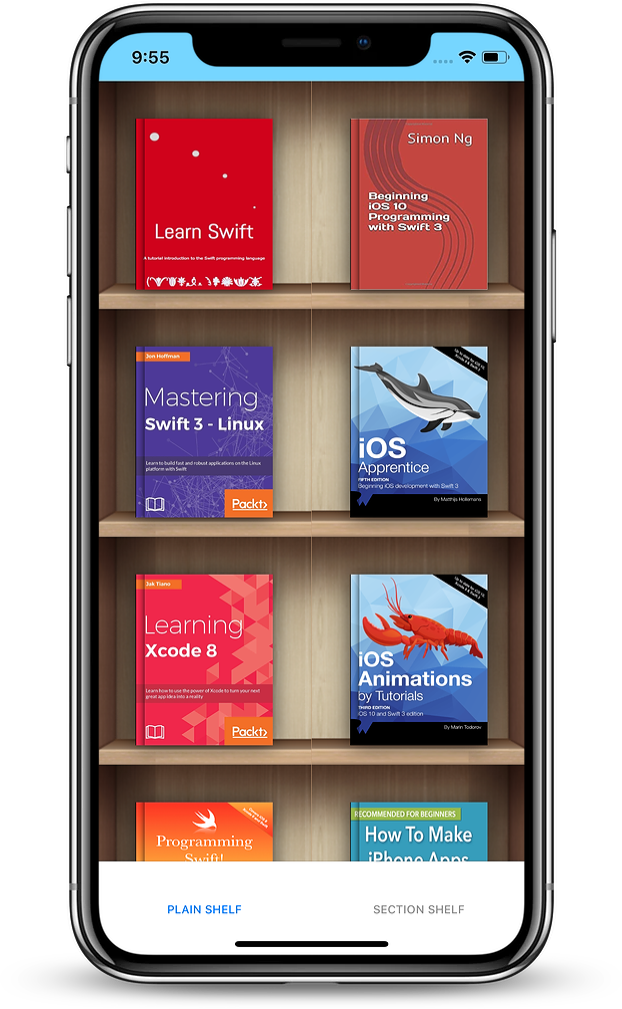
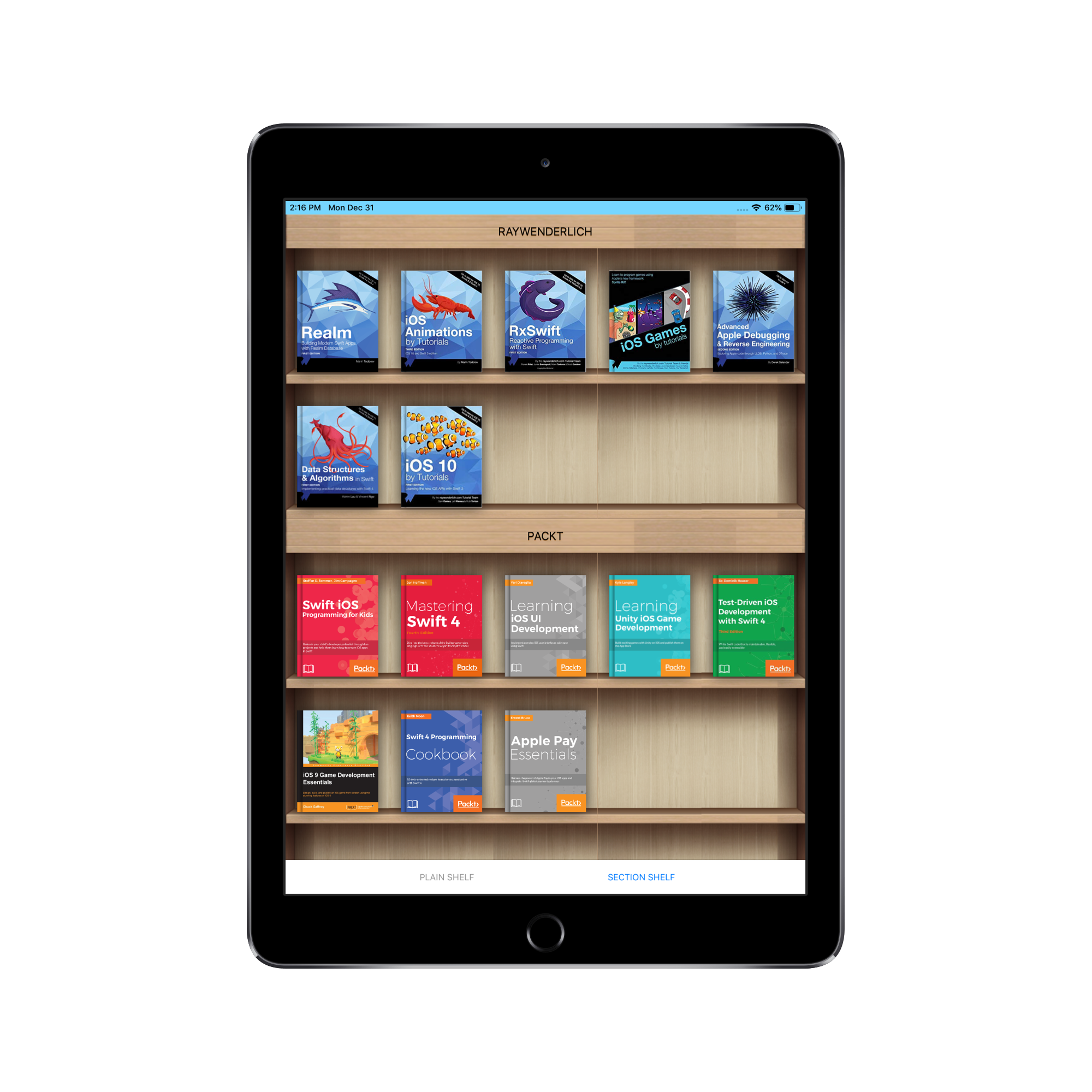
*iOS custom view to display books on shelf* ` ` **([Android version is available here](https://github.com/tdscientist/ShelfView))**
 Requirements
--------
* iOS 10.0+
* Swift 4.2
Installation
--------
`ShelfView` is available through [CocoaPods](https://cocoapods.org/). To install
it, simply add the following line to your Podfile:
```ruby
pod 'ShelfView'
```
**Note**
--------
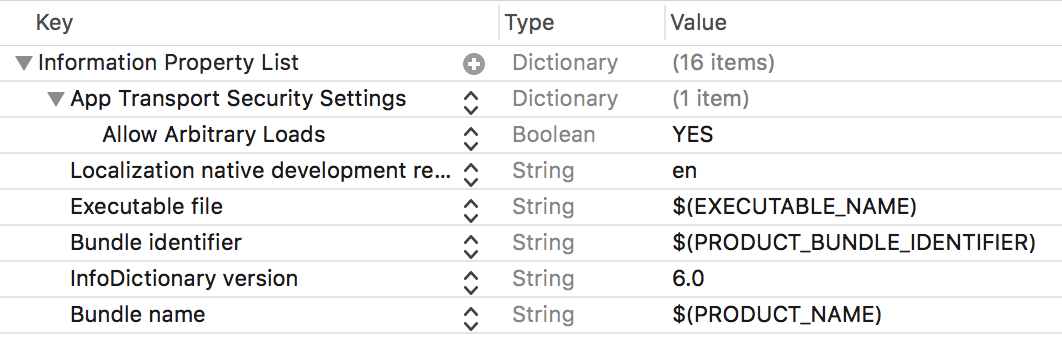
Because of book covers whose URLs are `http`, update your `info.plist` as follows:
* add `App Transport Security Settings` to the list
* add `Allow Arbitrary Loads` to the security settings added above; set it to `YES`.
Requirements
--------
* iOS 10.0+
* Swift 4.2
Installation
--------
`ShelfView` is available through [CocoaPods](https://cocoapods.org/). To install
it, simply add the following line to your Podfile:
```ruby
pod 'ShelfView'
```
**Note**
--------
Because of book covers whose URLs are `http`, update your `info.plist` as follows:
* add `App Transport Security Settings` to the list
* add `Allow Arbitrary Loads` to the security settings added above; set it to `YES`.
 Plain Shelf
--------
```swift
import ShelfView
class PlainShelfController: UIViewController, PlainShelfViewDelegate {
var shelfView: PlainShelfView!
override func viewDidLoad() {
super.viewDidLoad()
let books = [
BookModel(bookCoverSource: "https://files.kerching.raywenderlich.com/covers/d5693015-46b6-44f8-bf7b-7a222b28d9fe.png",
bookId: "0",
bookTitle: "Realm: Building Modern Swift Apps with Realm"),
BookModel(bookCoverSource: "https://encrypted-tbn0.gstatic.com/images?q=tbn:ANd9GcTYEkCQ_wu8HoGJzzs_gUH_FVusgI2RhntBKQ-WkmqnDJZnriwY6Q",
bookId: "1",
bookTitle: "iOS 10 by Tutorials: Learning the new iOS APIs with Swift 3")
]
shelfView = PlainShelfView(frame: CGRect(x: 0, y: 0, width: 350, height: 500),
bookModel: books, bookSource: PlainShelfView.BOOK_SOURCE_URL)
shelfView.delegate = self
self.view.addSubview(shelfView)
}
func onBookClicked(_ shelfView: PlainShelfView, index: Int, bookId: String, bookTitle: String) {
print("I just clicked \"\(bookTitle)\" with bookId \(bookId), at index \(index)")
}
}
```
Section Shelf
--------
```swift
import ShelfView
class SectionShelfController: UIViewController, SectionShelfViewDelegate {
var shelfView: SectionShelfView!
override func viewDidLoad() {
super.viewDidLoad()
let books = [
BookModel(bookCoverSource: "https://files.kerching.raywenderlich.com/covers/d5693015-46b6-44f8-bf7b-7a222b28d9fe.png",
bookId: "0",
bookTitle: "Realm: Building Modern Swift Apps with Realm"),
BookModel(bookCoverSource: "https://encrypted-tbn0.gstatic.com/images?q=tbn:ANd9GcTYEkCQ_wu8HoGJzzs_gUH_FVusgI2RhntBKQ-WkmqnDJZnriwY6Q",
bookId: "1",
bookTitle: "iOS 10 by Tutorials: Learning the new iOS APIs with Swift 3")
]
let bookModelSectionArray = [BookModelSection(sectionName: "RAYWENDERLICH",
sectionId: "0",
sectionBooks: books)]
shelfView = SectionShelfView(frame: CGRect(x: 0, y: 0, width: 350, height: 500),
bookModelSection: bookModelSectionArray,
bookSource: SectionShelfView.BOOK_SOURCE_URL)
shelfView.delegate = self
self.view.addSubview(shelfView)
}
func onBookClicked(_ shelfView: SectionShelfView, section: Int, index: Int,
sectionId: String, sectionTitle: String, bookId: String,
bookTitle: String) {
print("I just clicked \"\(bookTitle)\" with bookId \(bookId), at index \(index). Section details --> section \(section), sectionId \(sectionId), sectionTitle \(sectionTitle)")
}
}
```
**Add more books to ShelfView**
* Plain Shelf
```swift
addBooks(bookModel: [BookModel])
```
* Section Shelf
```swift
addBooks(bookModelSection: [BookModelSection])
```
**Reload books on ShelfView**
* Plain Shelf
```swift
reloadBooks(bookModel: [BookModel])
```
* Section Shelf
```swift
reloadBooks(bookModelSection: [BookModelSection])
```
**Loading book covers from other sources**
* iPhone/iPad document directory
```swift
let books = [
BookModel(bookCoverSource: "bookcover0.png", bookId: "0", bookTitle: "Book Title 0"),
BookModel(bookCoverSource: "bookcover1.png", bookId: "1", bookTitle: "Book Title 1")
]
shelfView = PlainShelfView(frame: CGRect(x: 0, y: 0, width: 350, height: 500),
bookModel: books, bookSource: PlainShelfView.BOOK_SOURCE_DEVICE_DOCUMENTS)
```
* iPhone/iPad library directory
```swift
let books = [
BookModel(bookCoverSource: "bookcover0.png", bookId: "0", bookTitle: "Book Title 0"),
BookModel(bookCoverSource: "bookcover1.png", bookId: "1", bookTitle: "Book Title 1")
]
shelfView = PlainShelfView(frame: CGRect(x: 0, y: 0, width: 350, height: 500),
bookModel: books, bookSource: PlainShelfView.BOOK_SOURCE_DEVICE_LIBRARY)
```
* iPhone/iPad cache directory
```swift
let books = [
BookModel(bookCoverSource: "bookcover0.png", bookId: "0", bookTitle: "Book Title 0"),
BookModel(bookCoverSource: "bookcover1.png", bookId: "1", bookTitle: "Book Title 1")
]
shelfView = PlainShelfView(frame: CGRect(x: 0, y: 0, width: 350, height: 500),
bookModel: books, bookSource: PlainShelfView.BOOK_SOURCE_DEVICE_CACHE)
```
* Directly from your project's source code
```swift
let books = [
BookModel(bookCoverSource: "bookcover0.png", bookId: "0", bookTitle: "Book Title 0"),
BookModel(bookCoverSource: "bookcover1.png", bookId: "1", bookTitle: "Book Title 1")
]
shelfView = PlainShelfView(frame: CGRect(x: 0, y: 0, width: 350, height: 500),
bookModel: books, bookSource: PlainShelfView.BOOK_SOURCE_RAW)
```
License
--------
`ShelfView` is available under the MIT license. See the LICENSE file for more info.
Author
--------
Adeyinka Adediji _(tdscientist@gmail.com)_
Contributions & Bug Reporting
--------
tdscientist@gmail.com
Credits
--------
* [Kingfisher](https://github.com/onevcat/Kingfisher)
Plain Shelf
--------
```swift
import ShelfView
class PlainShelfController: UIViewController, PlainShelfViewDelegate {
var shelfView: PlainShelfView!
override func viewDidLoad() {
super.viewDidLoad()
let books = [
BookModel(bookCoverSource: "https://files.kerching.raywenderlich.com/covers/d5693015-46b6-44f8-bf7b-7a222b28d9fe.png",
bookId: "0",
bookTitle: "Realm: Building Modern Swift Apps with Realm"),
BookModel(bookCoverSource: "https://encrypted-tbn0.gstatic.com/images?q=tbn:ANd9GcTYEkCQ_wu8HoGJzzs_gUH_FVusgI2RhntBKQ-WkmqnDJZnriwY6Q",
bookId: "1",
bookTitle: "iOS 10 by Tutorials: Learning the new iOS APIs with Swift 3")
]
shelfView = PlainShelfView(frame: CGRect(x: 0, y: 0, width: 350, height: 500),
bookModel: books, bookSource: PlainShelfView.BOOK_SOURCE_URL)
shelfView.delegate = self
self.view.addSubview(shelfView)
}
func onBookClicked(_ shelfView: PlainShelfView, index: Int, bookId: String, bookTitle: String) {
print("I just clicked \"\(bookTitle)\" with bookId \(bookId), at index \(index)")
}
}
```
Section Shelf
--------
```swift
import ShelfView
class SectionShelfController: UIViewController, SectionShelfViewDelegate {
var shelfView: SectionShelfView!
override func viewDidLoad() {
super.viewDidLoad()
let books = [
BookModel(bookCoverSource: "https://files.kerching.raywenderlich.com/covers/d5693015-46b6-44f8-bf7b-7a222b28d9fe.png",
bookId: "0",
bookTitle: "Realm: Building Modern Swift Apps with Realm"),
BookModel(bookCoverSource: "https://encrypted-tbn0.gstatic.com/images?q=tbn:ANd9GcTYEkCQ_wu8HoGJzzs_gUH_FVusgI2RhntBKQ-WkmqnDJZnriwY6Q",
bookId: "1",
bookTitle: "iOS 10 by Tutorials: Learning the new iOS APIs with Swift 3")
]
let bookModelSectionArray = [BookModelSection(sectionName: "RAYWENDERLICH",
sectionId: "0",
sectionBooks: books)]
shelfView = SectionShelfView(frame: CGRect(x: 0, y: 0, width: 350, height: 500),
bookModelSection: bookModelSectionArray,
bookSource: SectionShelfView.BOOK_SOURCE_URL)
shelfView.delegate = self
self.view.addSubview(shelfView)
}
func onBookClicked(_ shelfView: SectionShelfView, section: Int, index: Int,
sectionId: String, sectionTitle: String, bookId: String,
bookTitle: String) {
print("I just clicked \"\(bookTitle)\" with bookId \(bookId), at index \(index). Section details --> section \(section), sectionId \(sectionId), sectionTitle \(sectionTitle)")
}
}
```
**Add more books to ShelfView**
* Plain Shelf
```swift
addBooks(bookModel: [BookModel])
```
* Section Shelf
```swift
addBooks(bookModelSection: [BookModelSection])
```
**Reload books on ShelfView**
* Plain Shelf
```swift
reloadBooks(bookModel: [BookModel])
```
* Section Shelf
```swift
reloadBooks(bookModelSection: [BookModelSection])
```
**Loading book covers from other sources**
* iPhone/iPad document directory
```swift
let books = [
BookModel(bookCoverSource: "bookcover0.png", bookId: "0", bookTitle: "Book Title 0"),
BookModel(bookCoverSource: "bookcover1.png", bookId: "1", bookTitle: "Book Title 1")
]
shelfView = PlainShelfView(frame: CGRect(x: 0, y: 0, width: 350, height: 500),
bookModel: books, bookSource: PlainShelfView.BOOK_SOURCE_DEVICE_DOCUMENTS)
```
* iPhone/iPad library directory
```swift
let books = [
BookModel(bookCoverSource: "bookcover0.png", bookId: "0", bookTitle: "Book Title 0"),
BookModel(bookCoverSource: "bookcover1.png", bookId: "1", bookTitle: "Book Title 1")
]
shelfView = PlainShelfView(frame: CGRect(x: 0, y: 0, width: 350, height: 500),
bookModel: books, bookSource: PlainShelfView.BOOK_SOURCE_DEVICE_LIBRARY)
```
* iPhone/iPad cache directory
```swift
let books = [
BookModel(bookCoverSource: "bookcover0.png", bookId: "0", bookTitle: "Book Title 0"),
BookModel(bookCoverSource: "bookcover1.png", bookId: "1", bookTitle: "Book Title 1")
]
shelfView = PlainShelfView(frame: CGRect(x: 0, y: 0, width: 350, height: 500),
bookModel: books, bookSource: PlainShelfView.BOOK_SOURCE_DEVICE_CACHE)
```
* Directly from your project's source code
```swift
let books = [
BookModel(bookCoverSource: "bookcover0.png", bookId: "0", bookTitle: "Book Title 0"),
BookModel(bookCoverSource: "bookcover1.png", bookId: "1", bookTitle: "Book Title 1")
]
shelfView = PlainShelfView(frame: CGRect(x: 0, y: 0, width: 350, height: 500),
bookModel: books, bookSource: PlainShelfView.BOOK_SOURCE_RAW)
```
License
--------
`ShelfView` is available under the MIT license. See the LICENSE file for more info.
Author
--------
Adeyinka Adediji _(tdscientist@gmail.com)_
Contributions & Bug Reporting
--------
tdscientist@gmail.com
Credits
--------
* [Kingfisher](https://github.com/onevcat/Kingfisher)