# Register Grouped Format Type
[](https://badge.fury.io/js/%40technote-space%2Fregister-grouped-format-type)
[](https://github.com/technote-space/register-grouped-format-type/actions)
[](https://codecov.io/gh/technote-space/register-grouped-format-type)
[](https://www.codefactor.io/repository/github/technote-space/register-grouped-format-type)
[](http://www.gnu.org/licenses/gpl-2.0.html)
[](https://wordpress.org/)
*Read this in other languages: [English](README.md), [日本語](README.ja.md).*
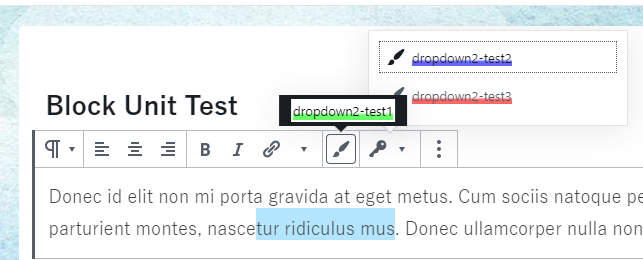
これは グループ化された RichText フォーマットタイプを登録する方法を提供する Gutenberg のライブラリです。
同じグループのフォーマットタイプが複数ある場合に DropDown によってまとまります。
コントロールはフォーマットを切り替えることができるときのみアクティブになります。
## Table of Contents
Details
- [サンプルプロジェクト](#%E3%82%B5%E3%83%B3%E3%83%97%E3%83%AB%E3%83%97%E3%83%AD%E3%82%B8%E3%82%A7%E3%82%AF%E3%83%88)
- [使用方法](#%E4%BD%BF%E7%94%A8%E6%96%B9%E6%B3%95)
- [グループ設定を使用](#%E3%82%B0%E3%83%AB%E3%83%BC%E3%83%97%E8%A8%AD%E5%AE%9A%E3%82%92%E4%BD%BF%E7%94%A8)
- [インスペクタを使用](#%E3%82%A4%E3%83%B3%E3%82%B9%E3%83%9A%E3%82%AF%E3%82%BF%E3%82%92%E4%BD%BF%E7%94%A8)
- [関数](#%E9%96%A2%E6%95%B0)
- [`registerGroupedFormatType`](#registergroupedformattype)
- [`registerFormatTypeGroup`](#registerformattypegroup)
- [WPの依存](#wp%E3%81%AE%E4%BE%9D%E5%AD%98)
- [依存](#%E4%BE%9D%E5%AD%98)
- [作者](#%E4%BD%9C%E8%80%85)
## サンプルプロジェクト
[Gutenberg Samples](https://github.com/technote-space/gutenberg-samples)
## 使用方法
```bash
yarn add @technote-space/register-grouped-format-type
```
e.g. `assets/register.js`
```js
import { RichText } from '@technote-space/register-grouped-format-type';
import { Helpers } from '@technote-space/gutenberg-utils';
const { registerGroupedFormatType } = RichText;
const { getToolbarButtonProps } = Helpers;
/** register grouped format types
*
* - test1 (⇒ not dropdown)
* |- format-test1
*
* - test2 (⇒ dropdown)
* |- format-test2
* |- format-test3
*/
registerGroupedFormatType( getToolbarButtonProps( 'test1', 'format-test1', 'admin-customizer' ) );
registerGroupedFormatType( getToolbarButtonProps( 'test2', 'format-test2', 'admin-customizer' ) );
registerGroupedFormatType( getToolbarButtonProps( 'test2', 'format-test3', 'admin-customizer' ) );
```
```html
```
## グループ設定を使用
グループのアイコン、ラベル、ポジションなどの設定をカスタマイズできます。
```js
import { RichText } from '@technote-space/register-grouped-format-type';
const { registerFormatTypeGroup } = RichText;
// register format type group setting
registerFormatTypeGroup( 'test2', {
icon: 'admin-network',
} );
```
## インスペクタを使用
```js
import { RichText } from '@technote-space/register-grouped-format-type';
import { Helpers } from '@technote-space/gutenberg-utils';
const { registerFormatTypeGroup, registerGroupedFormatType, getRemoveFormatButton } = RichText;
const { getColorButtonProps, getFontSizesButtonProps } = Helpers;
// register format group for inspector
registerFormatTypeGroup( 'inspector', {
inspectorSettings: {
title: 'test inspector',
initialOpen: true,
},
// set useContrastChecker = true to show ContrastChecker
useContrastChecker: true,
// set additional inspector (function: args => component)
additionalInspectors: [ getRemoveFormatButton( 'remove all formats' ) ],
} );
// register format type
registerGroupedFormatType( getColorButtonProps( 'inspector', 'font-color', 'Font Color', 'admin-site', 'color' ) );
registerGroupedFormatType( getColorButtonProps( 'inspector', 'background-color', 'Background Color', 'editor-textcolor', 'background-color' ) );
registerGroupedFormatType( getFontSizesButtonProps( 'inspector', 'font-size', 'Font Size', 'edit' ) );
```
## 関数
### `registerGroupedFormatType`
グループ化されたフォーマットタイプを追加します。
#### 定義
```
/**
* @param {string} name name
* @param {string} title title
* @param {string} tagName tag name
* @param {string} className class name
* @param {function?} create create component function
* @param {function?} createInspector create inspector component function
* @param {string?} group group
* @param {string?} inspectorGroup inspector group
* @param {object} settings settings
* @return {object|null} registered settings
*/
registerGroupedFormatType( {
name,
title = name,
tagName = 'span',
className = name,
create,
createInspector,
group = name,
inspectorGroup,
...settings
} )
```
#### 引数
- name (required)
- フォーマット名
- [詳細](https://github.com/WordPress/gutenberg/blob/release/5.6/packages/rich-text/src/register-format-type.js#L17)
- title
- フォーマットタイトル
- [詳細](https://github.com/WordPress/gutenberg/blob/release/5.6/packages/rich-text/src/register-format-type.js#L211)
- tagName
- タグ名
- [詳細](https://github.com/WordPress/gutenberg/blob/release/5.6/packages/rich-text/src/register-format-type.js#L19)
- className
- クラス名
- [詳細](https://github.com/WordPress/gutenberg/blob/release/5.6/packages/rich-text/src/register-format-type.js#L20)
- 複数のクラスを指定可能です (スペース区切り)。
- create (required)
- `ToolbarButton` のようなコンポーネントを返す関数を指定します。
- group (required)
- グループ名
- 同じグループ名のアイテムが複数ある場合に DropDown によってまとまります。
### `registerFormatTypeGroup`
フォーマットタイプグループの設定を行います。
#### 定義
```
/**
* @param {string} name group name
* @param {object} setting setting
* @returns {object} registered setting
*/
registerFormatTypeGroup( name, setting = {} )
```
#### 引数
- name (required)
- グループ名
- setting
- グループ設定
`default setting`
```
{
icon: 'admin-customizer',
position: 'top right',
label: name,
className: undefined,
menuClassName: undefined,
inspectorSettings: {},
toolbarGroup: undefined,
useContrastChecker: false,
additionalInspectors: [],
}
```
## WPの依存
- wp-block-editor
- wp-components
- wp-data
- wp-element
- wp-i18n
- wp-hooks
- wp-rich-text
- wp-url
- lodash
## 依存
[Gutenberg Utils](https://github.com/technote-space/gutenberg-utils)
## 作者
[GitHub (Technote)](https://github.com/technote-space)
[Blog](https://technote.space)