# TOC Generator
[](https://github.com/technote-space/toc-generator/actions)
[](https://codecov.io/gh/technote-space/toc-generator)
[](https://www.codefactor.io/repository/github/technote-space/toc-generator)
[](https://github.com/technote-space/toc-generator/blob/main/LICENSE)
*Read this in other languages: [English](README.md), [日本語](README.ja.md).*
これは目次を生成する`GitHub Actions`です。
[DocToc](https://github.com/thlorenz/doctoc) を実行し変更があればコミットします。
## Table of Contents
Details
- [インストール](#%E3%82%A4%E3%83%B3%E3%82%B9%E3%83%88%E3%83%BC%E3%83%AB)
- [スクリーンショット](#%E3%82%B9%E3%82%AF%E3%83%AA%E3%83%BC%E3%83%B3%E3%82%B7%E3%83%A7%E3%83%83%E3%83%88)
- [オプション](#%E3%82%AA%E3%83%97%E3%82%B7%E3%83%A7%E3%83%B3)
- [個別に指定](#%E5%80%8B%E5%88%A5%E3%81%AB%E6%8C%87%E5%AE%9A)
- [Action イベント詳細](#action-%E3%82%A4%E3%83%99%E3%83%B3%E3%83%88%E8%A9%B3%E7%B4%B0)
- [対象イベント](#%E5%AF%BE%E8%B1%A1%E3%82%A4%E3%83%99%E3%83%B3%E3%83%88)
- [Conditions](#conditions)
- [補足](#%E8%A3%9C%E8%B6%B3)
- [GITHUB_TOKEN](#github_token)
- [プルリクエストの作成](#%E3%83%97%E3%83%AB%E3%83%AA%E3%82%AF%E3%82%A8%E3%82%B9%E3%83%88%E3%81%AE%E4%BD%9C%E6%88%90)
- [Context variables](#context-variables)
- [Context PR variables](#context-pr-variables)
- [設定例](#%E8%A8%AD%E5%AE%9A%E4%BE%8B)
- [例1](#%E4%BE%8B%EF%BC%91)
- [例2](#%E4%BE%8B%EF%BC%92)
- [例3](#%E4%BE%8B%EF%BC%93)
- [Author](#author)
## インストール
1. 目次の位置を指定 (option)
```markdown
```
[詳細](https://github.com/thlorenz/doctoc#specifying-location-of-toc)
1. workflow を設定
例:`.github/workflows/toc.yml`
```yaml
on: push
name: TOC Generator
jobs:
generateTOC:
name: TOC Generator
runs-on: ubuntu-latest
steps:
- uses: technote-space/toc-generator@v4
```
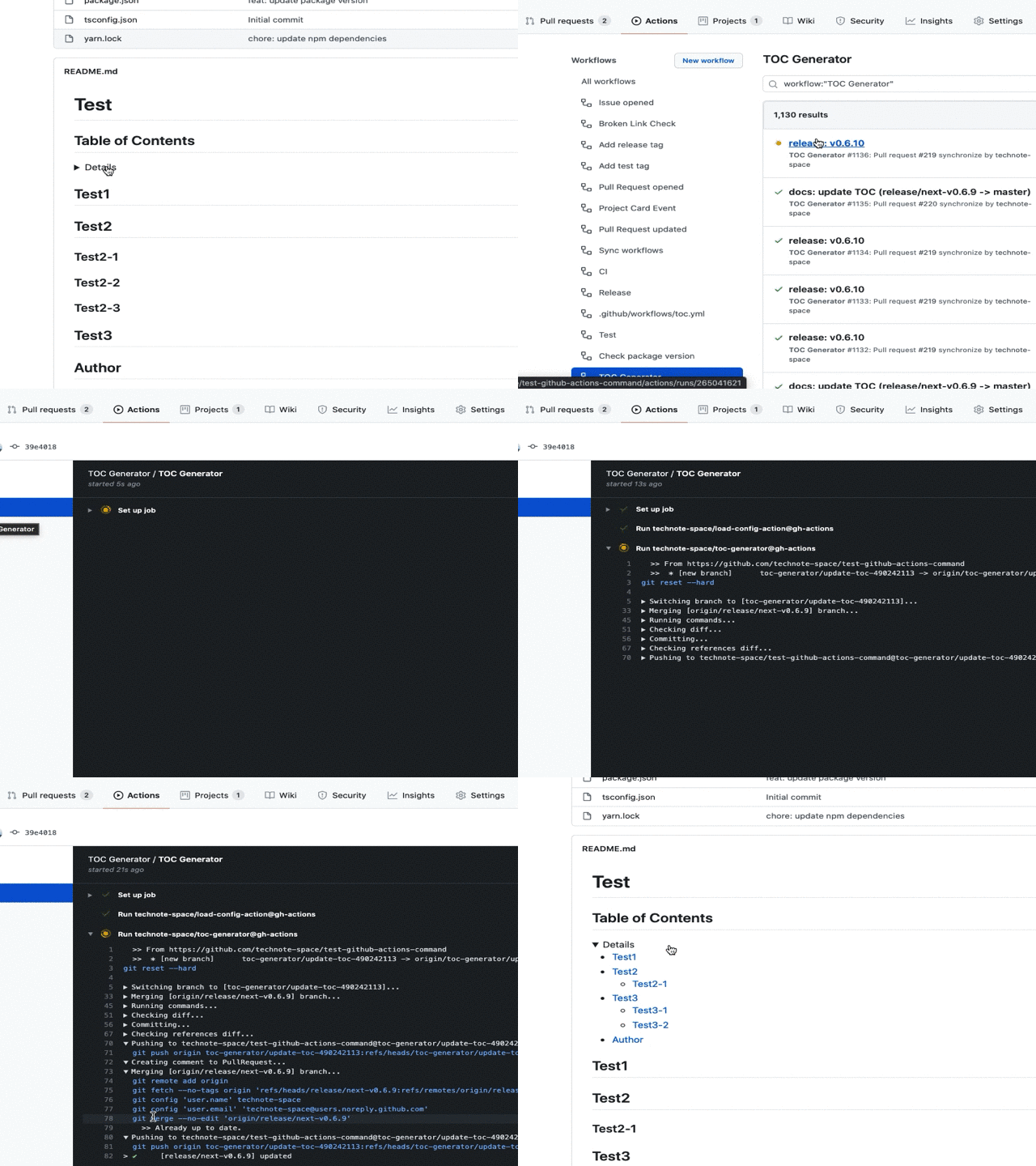
## スクリーンショット
## オプション
| name | description | default | e.g. |
|:---|:---|:---|:---|
|TARGET_PATHS|対象のファイルパス (カンマ区切り, [詳細](https://github.com/thlorenz/doctoc#adding-toc-to-individual-files))|`README*.md`|`README*.md,CHANGELOG.md`, `.`|
|TOC_TITLE|目次タイトル|`**Table of Contents**`|`''`|
|MAX_HEADER_LEVEL|Heading最大レベル ([詳細](https://github.com/thlorenz/doctoc#specifying-a-maximum-heading-level-for-toc-entries))| |`3`|
|CUSTOM_MODE|Customモードかどうか([生成例](samples/README.horizontal.md))|`false`|`true`|
|CUSTOM_TEMPLATE|Customテンプレート(Customモード)|`${ITEMS}
`| |
|ITEM_TEMPLATE|アイテムテンプレート(Customモード)|`${TEXT}`| |
|SEPARATOR|セパレータ(Customモード)|\|\| |
|FOLDING|目次を折りたたみ式にするかどうか|`false`|`true`|
|COMMIT_MESSAGE|コミットメッセージ|`chore(docs): update TOC`|`docs: update TOC`|
|COMMIT_NAME|コミット時に設定する名前|`${github.actor}`| |
|COMMIT_EMAIL|コミット時に設定するメールアドレス|`${github.actor}@users.noreply.github.com`| |
|CREATE_PR|プルリクエストを作成するかどうか|`false`|`true`|
|CHECK_ONLY_DEFAULT_BRANCH|デフォルトのブランチのみをチェックするかどうか|`false`|`true`|
|PR_BRANCH_PREFIX|プルリクエストのブランチプリフィックス|`toc-generator/`| |
|PR_BRANCH_NAME|プルリクエストのブランチ名
[Context variables](#context-variables)|`update-toc-${PR_ID}`|`toc-${PR_NUMBER}`|
|PR_TITLE|プルリクエストのタイトル
[Context variables](#context-variables)|`chore(docs): update TOC (${PR_MERGE_REF})`|`docs: update TOC`|
|PR_BODY|プルリクエストの本文
[Context PR variables](#context-pr-variables)|[action.yml](action.yml)| |
|PR_COMMENT_BODY|プルリクエストの本文(コメント用)
[Context PR variables](#context-pr-variables)|[action.yml](action.yml)| |
|PR_CLOSE_MESSAGE|プルリクエストを閉じるときのメッセージ|`This PR has been closed because it is no longer needed.`| |
|TARGET_BRANCH_PREFIX|ブランチ名のフィルタ| |`release/`|
|INCLUDE_LABELS|プルリクエストに付与されているかチェックするラベル| |`Label1, Label2`|
|OPENING_COMMENT|開始コメント (DocToc以外のため)|`
...
```
## Action イベント詳細
### 対象イベント
| eventName: action | condition |
|:---|:---|
|push: *|[condition1](#condition1)|
|pull_request: \[opened, synchronize, reopened, labeled, unlabeled]|[condition2](#condition2)|
|pull_request: \[closed]||
|schedule, repository_dispatch, workflow_dispatch||
- 次のアクティビティタイプは明示的に指定する必要があります。 ([詳細](https://help.github.com/ja/github/automating-your-workflow-with-github-actions/events-that-trigger-workflows#pull-request-event-pull_request))
- `labeled`, `unlabeled`, `closed`
### Conditions
#### condition1
- ブランチへのプッシュ (タグのプッシュではない)
- ブランチ名 ([`TARGET_BRANCH_PREFIX`](#%E3%82%AA%E3%83%97%E3%82%B7%E3%83%A7%E3%83%B3))
#### condition2
- 指定したラベルが付与されているかどうか ([`INCLUDE_LABELS`](#%E3%82%AA%E3%83%97%E3%82%B7%E3%83%A7%E3%83%B3))
- ブランチ名 ([`TARGET_BRANCH_PREFIX`](#%E3%82%AA%E3%83%97%E3%82%B7%E3%83%A7%E3%83%B3))
## 補足
### GITHUB_TOKEN
GitHub Actions で提供される`GITHUB_TOKEN`は連続するイベントを作成する権限がありません。
したがって、プッシュによってトリガーされるビルドアクションなどは実行されません。
これはブランチプロテクションを設定していると問題になる場合があります。
もしアクションをトリガーしたい場合は代わりに`personal access token`を使用してください。
1. public_repo または repo の権限で [Personal access token](https://help.github.com/ja/articles/creating-a-personal-access-token-for-the-command-line) を生成
(repo はプライベートリポジトリで必要です)
1. [ACCESS_TOKENとして保存](https://help.github.com/ja/actions/configuring-and-managing-workflows/creating-and-storing-encrypted-secrets)
1. `GITHUB_TOKEN`の代わりに`ACCESS_TOKEN`を使用するように設定
例:`.github/workflows/toc.yml`
```yaml
on: push
name: TOC Generator
jobs:
generateTOC:
name: TOC Generator
runs-on: ubuntu-latest
steps:
- uses: technote-space/toc-generator@v4
with:
GITHUB_TOKEN: ${{ secrets.ACCESS_TOKEN }}
```
### プルリクエストの作成
`CREATE_PR` に `true` を設定した場合は、プルリクエストが作成されます。
```yaml
on: pull_request
name: TOC Generator
jobs:
generateTOC:
name: TOC Generator
runs-on: ubuntu-latest
steps:
- uses: technote-space/toc-generator@v4
with:
CREATE_PR: true
```
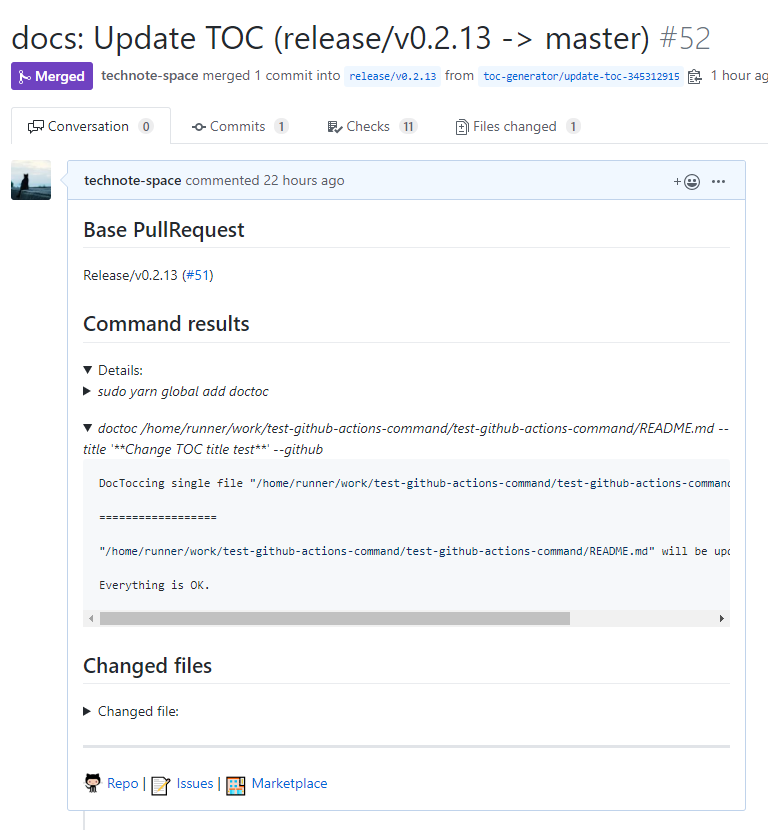
`closed`アクティビティタイプが設定されている場合、このアクションは不要になったプルリクエストを閉じます。
```yaml
on:
pull_request:
types: [opened, synchronize, reopened, closed]
name: TOC Generator
jobs:
generateTOC:
name: TOC Generator
runs-on: ubuntu-latest
steps:
- uses: technote-space/toc-generator@v4
```
### Context variables
| name | description |
|:---|:---|
| PR_NUMBER | pull_request.number (例:`11`) |
| PR_NUMBER_REF | `#${pull_request.number}` (例:`#11`) |
| PR_ID | pull_request.id (例:`21031067`) |
| PR_HEAD_REF | pull_request.head.ref (例:`change`) |
| PR_BASE_REF | pull_request.base.ref (例:`main`) |
| PR_MERGE_REF | pull_request.base.ref (例:`change -> main`) |
| PR_TITLE | pull_request.title (例:`update the README with new information.`) |
[Payload example](https://developer.github.com/v3/activity/events/types/#webhook-payload-example-28)
### Context PR variables
- [Context variables](#context-variables)
| name | description |
|:---|:---|
| PR_LINK | プルリクエストへのリンク |
| COMMANDS_OUTPUT | TOC コマンドの結果 |
| FILES_SUMMARY | 例:`Changed 2 files` |
| FILES | 変更されたファイル一覧 |
## 設定例
### 例1
ブランチを制限しないでPush時にアクションを実行し直接コミット
```yaml
on: push
name: TOC Generator
jobs:
generateTOC:
name: TOC Generator
runs-on: ubuntu-latest
steps:
- uses: technote-space/toc-generator@v4
```
### 例2
`release/` から始まるブランチのみを対象にPull Request更新時に実行しPull Requestを作成または更新
```yaml
on:
pull_request:
types: [opened, synchronize, reopened, closed]
name: TOC Generator
jobs:
generateTOC:
name: TOC Generator
runs-on: ubuntu-latest
steps:
- uses: technote-space/toc-generator@v4
with:
CREATE_PR: true
TARGET_BRANCH_PREFIX: release/
```
### 例3
デフォルトブランチのみを対象にスケジュールでアクションを実行し直接コミット
(他のワークフローの起動のために作成したTokenを使用)
```yaml
on:
schedule:
- cron: "0 23 * * *"
name: TOC Generator
jobs:
generateTOC:
name: TOC Generator
runs-on: ubuntu-latest
steps:
- uses: technote-space/toc-generator@v4
with:
GITHUB_TOKEN: ${{ secrets.ACCESS_TOKEN }}
CHECK_ONLY_DEFAULT_BRANCH: true
```
## Author
[GitHub (Technote)](https://github.com/technote-space)
[Blog](https://technote.space)