# TOC Generator
[](https://github.com/technote-space/toc-generator/actions)
[](https://codecov.io/gh/technote-space/toc-generator)
[](https://www.codefactor.io/repository/github/technote-space/toc-generator)
[](https://github.com/technote-space/toc-generator/blob/main/LICENSE)
*Read this in other languages: [English](README.md), [日本語](README.ja.md).*
This is a `GitHub Actions` to generate TOC (Table of Contents),
which executes [DocToc](https://github.com/thlorenz/doctoc) and commits if changed.
## Table of Contents
Details
- [Installation](#installation)
- [Screenshot](#screenshot)
- [Options](#options)
- [Specify options individually](#specify-options-individually)
- [Action event details](#action-event-details)
- [Target event](#target-event)
- [Conditions](#conditions)
- [Addition](#addition)
- [GITHUB_TOKEN](#github_token)
- [Create PullRequest](#create-pullrequest)
- [Context variables](#context-variables)
- [Context PR variables](#context-pr-variables)
- [Configuration Examples](#configuration-examples)
- [Example 1](#example-1)
- [Example 2](#example-2)
- [Example 3](#example-3)
- [Author](#author)
## Installation
1. Specify location of TOC (option)
e.g. `README.md`
```markdown
```
[detail](https://github.com/thlorenz/doctoc#specifying-location-of-toc)
1. Setup workflow
e.g. `.github/workflows/toc.yml`
```yaml
on: push
name: TOC Generator
jobs:
generateTOC:
name: TOC Generator
runs-on: ubuntu-latest
steps:
- uses: technote-space/toc-generator@v4
```
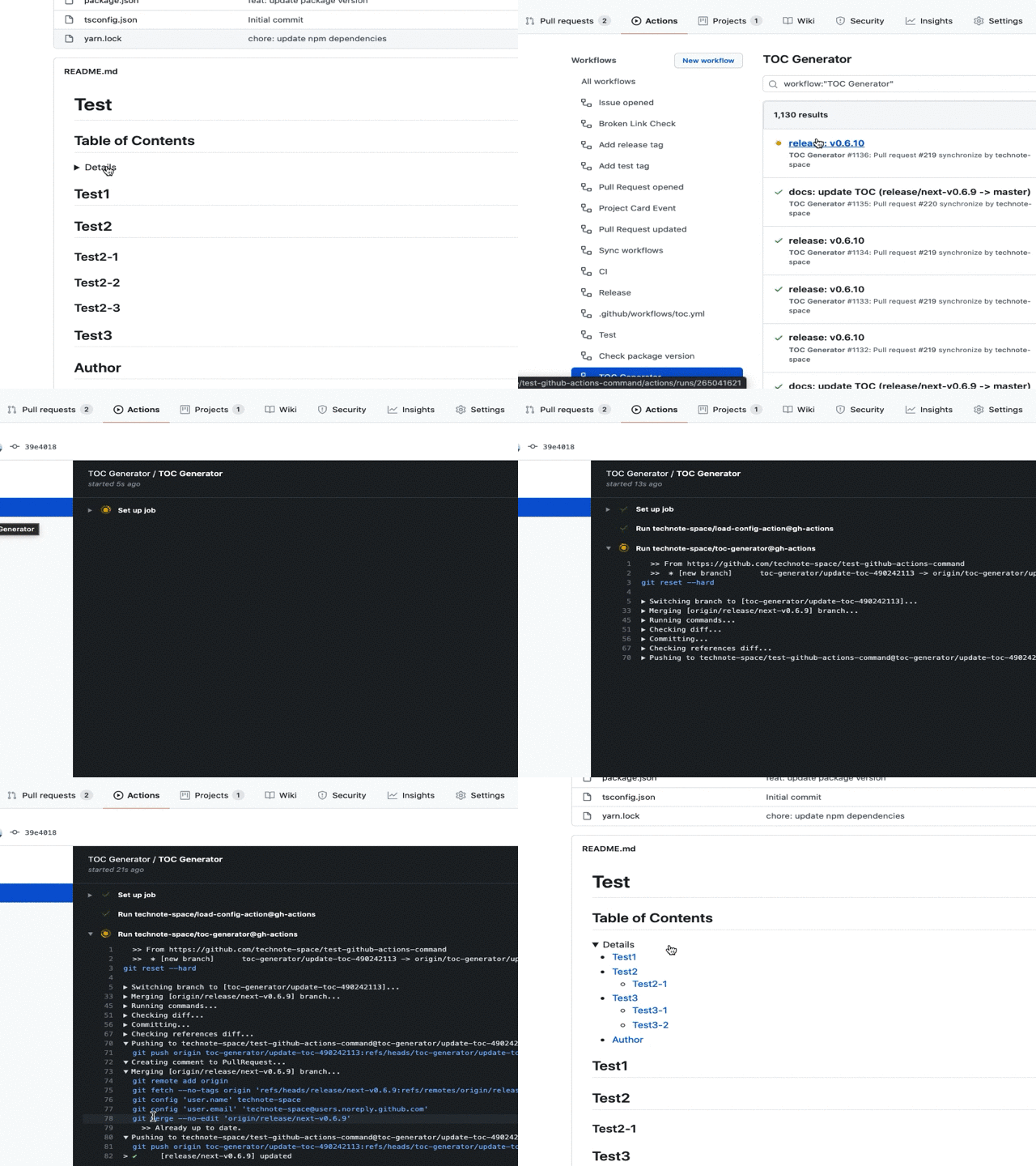
## Screenshot
## Options
| name | description | default | e.g. |
|:---|:---|:---|:---|
|TARGET_PATHS|Target file path. (Comma separated, [Detail](https://github.com/thlorenz/doctoc#adding-toc-to-individual-files))|`README*.md`|`README*.md,CHANGELOG.md`, `.`|
|TOC_TITLE|TOC Title|`**Table of Contents**`|`''`|
|MAX_HEADER_LEVEL|Maximum heading level. ([Detail](https://github.com/thlorenz/doctoc#specifying-a-maximum-heading-level-for-toc-entries))| |`3`|
|CUSTOM_MODE|Whether it is custom mode([Generated Example](samples/README.horizontal.md))|`false`|`true`|
|CUSTOM_TEMPLATE|Custom template for custom mode|`${ITEMS}
`| |
|ITEM_TEMPLATE|Item template for custom mode|`${TEXT}`| |
|SEPARATOR|Separator for custom mode|\|\| |
|FOLDING|Whether to make TOC foldable|`false`|`true`|
|COMMIT_MESSAGE|Commit message|`chore(docs): update TOC`|`docs: update TOC`|
|COMMIT_NAME|Git commit name|`${github.actor}`| |
|COMMIT_EMAIL|Git commit email|`${github.actor}@users.noreply.github.com`| |
|CREATE_PR|Whether to create PullRequest|`false`|`true`|
|CHECK_ONLY_DEFAULT_BRANCH|Whether to check only default branch|`false`|`true`|
|PR_BRANCH_PREFIX|PullRequest branch prefix|`toc-generator/`| |
|PR_BRANCH_NAME|PullRequest branch name
[Context variables](#context-variables)|`update-toc-${PR_ID}`|`toc-${PR_NUMBER}`|
|PR_TITLE|PullRequest title
[Context variables](#context-variables)|`chore(docs): update TOC (${PR_MERGE_REF})`|`docs: update TOC`|
|PR_BODY|PullRequest body
[Context PR variables](#context-pr-variables)|[action.yml](action.yml)| |
|PR_COMMENT_BODY|PullRequest body for comment
[Context PR variables](#context-pr-variables)|[action.yml](action.yml)| |
|PR_CLOSE_MESSAGE|Message body when closing PullRequest|`This PR has been closed because it is no longer needed.`| |
|TARGET_BRANCH_PREFIX|Filter by branch name| |`release/`|
|INCLUDE_LABELS|Labels used to check if the PullRequest has it| |`Label1, Label2`|
|OPENING_COMMENT|Opening comment (for other than DocToc)|`
...
```
## Action event details
### Target event
| eventName: action | condition |
|:---|:---|
|push: *|[condition1](#condition1)|
|pull_request: \[opened, synchronize, reopened, labeled, unlabeled]|[condition2](#condition2)|
|pull_request: \[closed]||
|schedule, repository_dispatch, workflow_dispatch||
- The following activity types must be explicitly specified ([detail](https://help.github.com/en/github/automating-your-workflow-with-github-actions/events-that-trigger-workflows#pull-request-event-pull_request))
- `labeled`, `unlabeled`, `closed`
### Conditions
#### condition1
- push to branch (not tag)
- branch name ([`TARGET_BRANCH_PREFIX`](#options))
#### condition2
- specified labels included? ([`INCLUDE_LABELS`](#options))
- branch name ([`TARGET_BRANCH_PREFIX`](#options))
## Addition
### GITHUB_TOKEN
The `GITHUB_TOKEN` that is provided as a part of `GitHub Actions` doesn't have authorization to create any successive events.
So it won't spawn actions which triggered by push.
This can be a problem if you have branch protection configured.
If you want to trigger actions, use a personal access token instead.
1. Generate a [personal access token](https://help.github.com/en/articles/creating-a-personal-access-token-for-the-command-line) with the public_repo or repo scope.
(repo is required for private repositories).
1. [Save as ACCESS_TOKEN](https://help.github.com/en/actions/configuring-and-managing-workflows/creating-and-storing-encrypted-secrets)
1. Add input to use `ACCESS_TOKEN` instead of `GITHUB_TOKEN`.
e.g. `.github/workflows/toc.yml`
```yaml
on: push
name: TOC Generator
jobs:
generateTOC:
name: TOC Generator
runs-on: ubuntu-latest
steps:
- uses: technote-space/toc-generator@v4
with:
GITHUB_TOKEN: ${{ secrets.ACCESS_TOKEN }}
```
### Create PullRequest
If `CREATE_PR` is set to `true`, a PullRequest is created.
```yaml
on: pull_request
name: TOC Generator
jobs:
generateTOC:
name: TOC Generator
runs-on: ubuntu-latest
steps:
- uses: technote-space/toc-generator@v4
with:
CREATE_PR: true
```
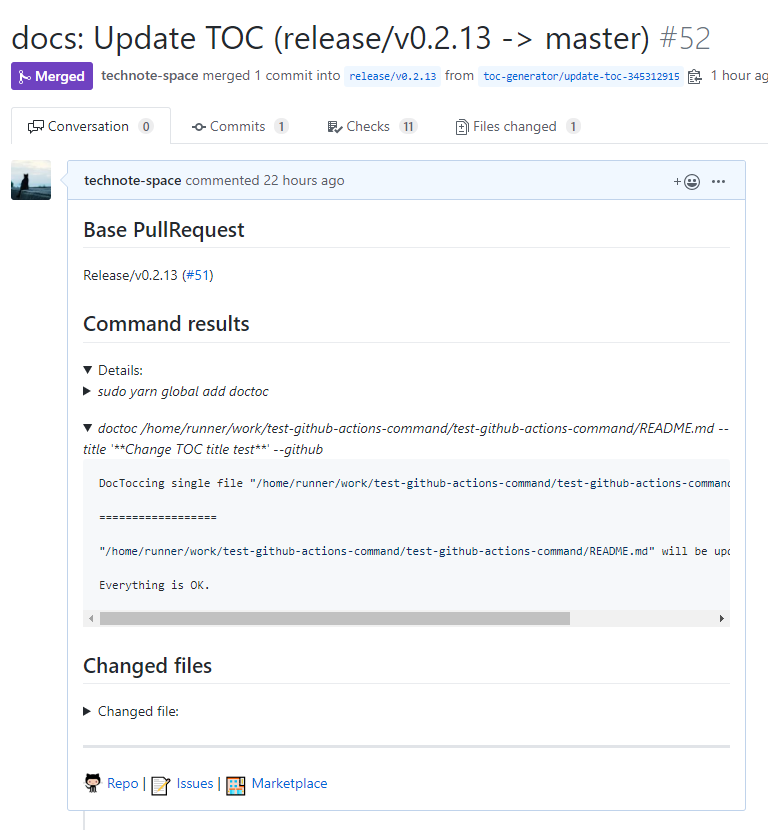
If the `closed` activity type is set, this action closes the PR when it is no longer needed.
```yaml
on:
pull_request:
types: [opened, synchronize, reopened, closed]
name: TOC Generator
jobs:
generateTOC:
name: TOC Generator
runs-on: ubuntu-latest
steps:
- uses: technote-space/toc-generator@v4
```
### Context variables
| name | description |
|:---|:---|
| PR_NUMBER | pull_request.number (e.g. `11`) |
| PR_NUMBER_REF | `#${pull_request.number}` (e.g. `#11`) |
| PR_ID | pull_request.id (e.g. `21031067`) |
| PR_HEAD_REF | pull_request.head.ref (e.g. `change`) |
| PR_BASE_REF | pull_request.base.ref (e.g. `main`) |
| PR_MERGE_REF | pull_request.base.ref (e.g. `change -> main`) |
| PR_TITLE | pull_request.title (e.g. `update the README with new information.`) |
[Payload example](https://developer.github.com/v3/activity/events/types/#webhook-payload-example-28)
### Context PR variables
- [Context variables](#context-variables)
| name | description |
|:---|:---|
| PR_LINK | Link to PR |
| COMMANDS_OUTPUT | Result of TOC command |
| FILES_SUMMARY | e.g. `Changed 2 files` |
| FILES | Changed file list |
## Configuration Examples
### Example 1
Execute actions at push without limiting the branch and commit directly
```yaml
on: push
name: TOC Generator
jobs:
generateTOC:
name: TOC Generator
runs-on: ubuntu-latest
steps:
- uses: technote-space/toc-generator@v4
```
### Example 2
Create or update a Pull Request by executing actions on a Pull Request update only for branches starting with `release/`.
```yaml
on:
pull_request:
types: [opened, synchronize, reopened, closed]
name: TOC Generator
jobs:
generateTOC:
name: TOC Generator
runs-on: ubuntu-latest
steps:
- uses: technote-space/toc-generator@v4
with:
CREATE_PR: true
TARGET_BRANCH_PREFIX: release/
```
### Example 3
Execute actions in the schedule for the default branch only and commit directly.
(Using the Token created for the launch of other workflows)
```yaml
on:
schedule:
- cron: "0 23 * * *"
name: TOC Generator
jobs:
generateTOC:
name: TOC Generator
runs-on: ubuntu-latest
steps:
- uses: technote-space/toc-generator@v4
with:
GITHUB_TOKEN: ${{ secrets.ACCESS_TOKEN }}
CHECK_ONLY_DEFAULT_BRANCH: true
```
## Author
[GitHub (Technote)](https://github.com/technote-space)
[Blog](https://technote.space)