Composable AI skills that teach assistants structured thinking — design-first, context-aware, and architecture-guided.
[](LICENSE)
[](https://claude.ai/marketplace)
[](https://cursor.com)
[](https://github.com/techygarg/lattice/blob/main/CONTRIBUTING.md)
[](https://martinfowler.com/articles/reduce-friction-ai/)
[](https://starmapper.bruniaux.com/techygarg/lattice?utm_source=badge&utm_medium=readme&utm_campaign=stargazer-map)
## What is Lattice?
AI coding assistants jump straight to code, silently make design decisions, forget constraints mid-conversation, and produce output nobody reviewed against real standards. Lattice fixes this with composable skills in three tiers — atoms, molecules, refiners — that embed battle-tested engineering disciplines plus a living context layer that accumulates your project's standards, decisions, and review insights across every feature cycle.
Three principles guided Lattice's design:
- **Skills over prompts** — versioned, team-owned skill files in the repository beat personal prompts on one developer's machine
- **Composability over monoliths** — small single-purpose skills that combine into workflows beat one instruction document that tries to cover everything
- **Living context over static config** — the `.lattice/` folder grows smarter with every feature cycle rather than being configured once and forgotten
## The Three Tiers
| Tier | Purpose |
|------|---------|
| **Atoms** | Single-principle guardrails — clean code, architecture, DDD, secure coding, test quality, design-first, and more |
| **Molecules** | Multi-step workflows that compose atoms — design, implement, refactor, fix, review |
| **Refiners** | Guided interviews that produce project-specific standards, customizing how atoms behave for your team |
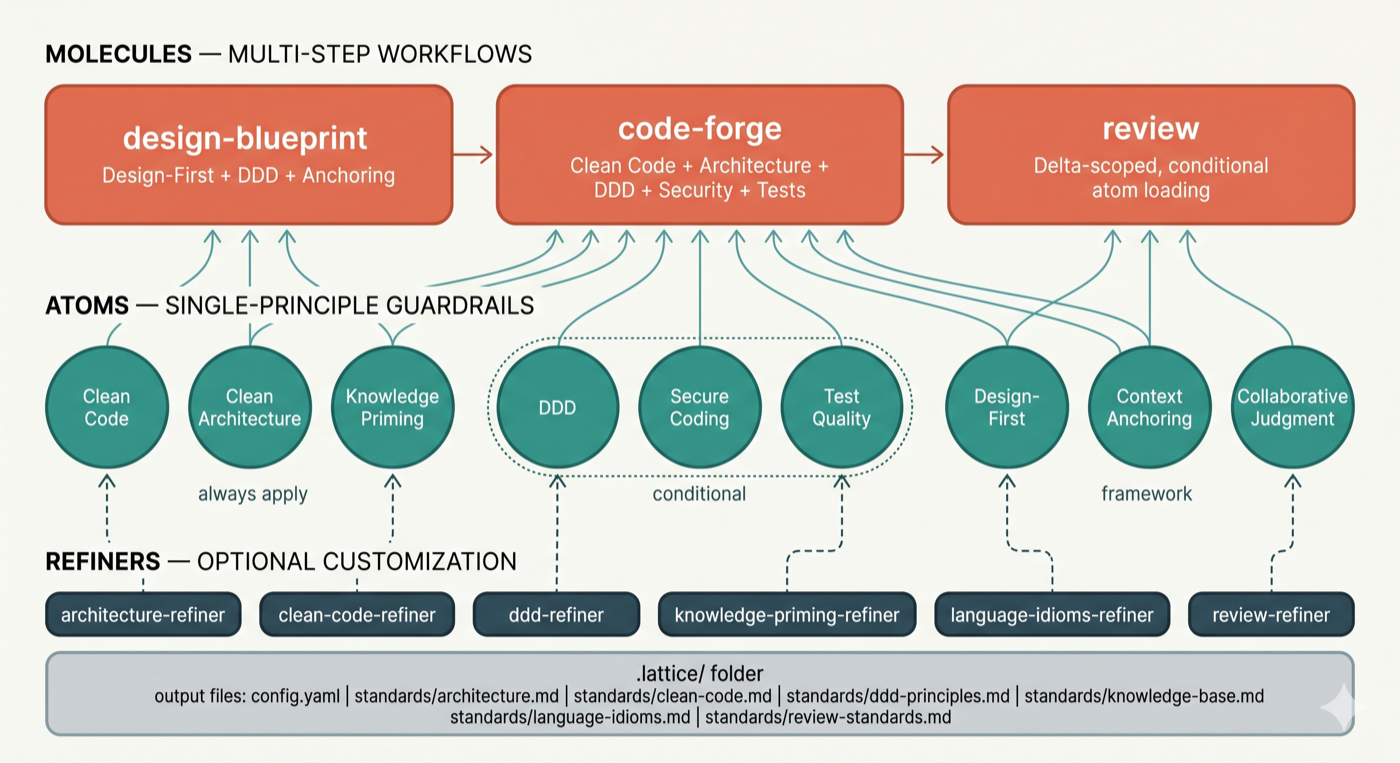
See [How It Works](docs/how-it-works.md) for the full skill inventory and mechanics.
## The Pipeline
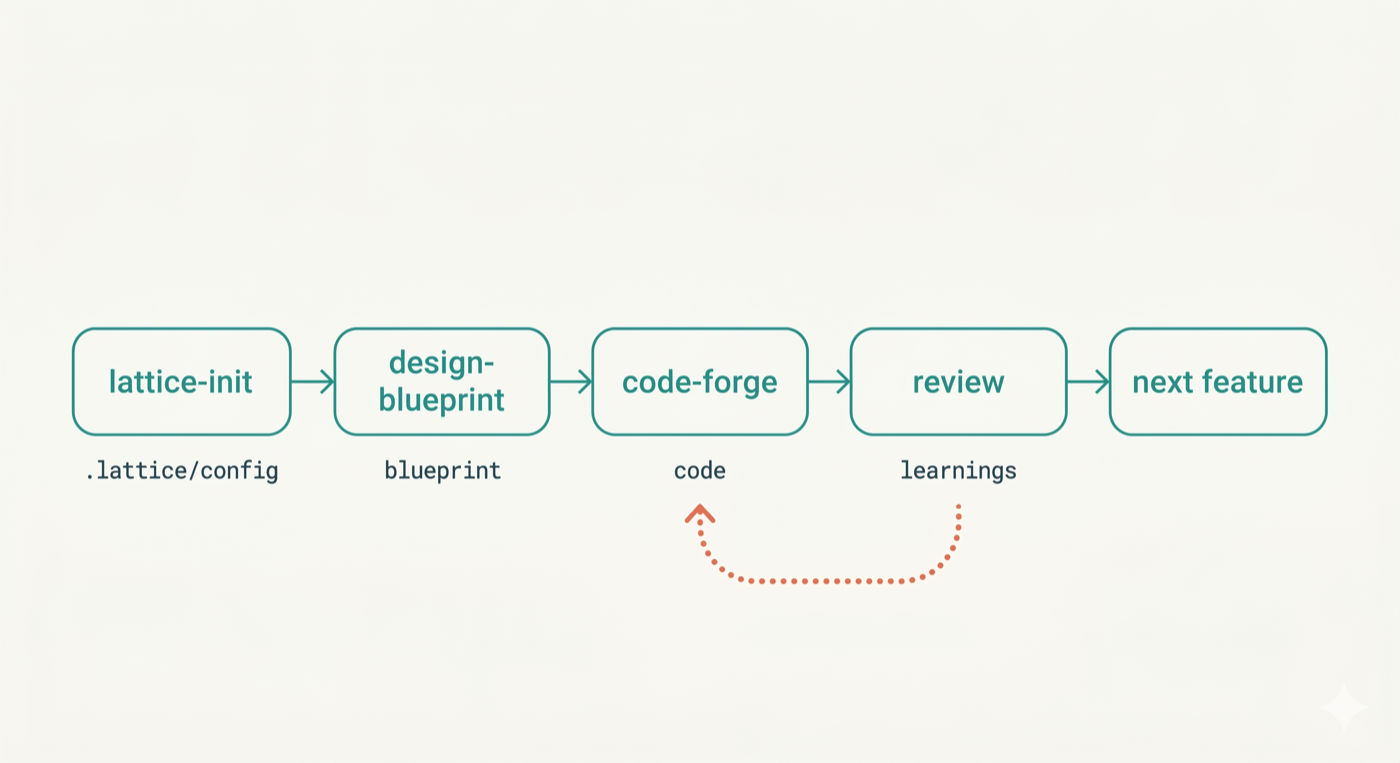
Skills form a delivery lifecycle: `requirement-forge` → `design-blueprint` → `code-forge` → `review`, with `refactor-safely` and `bug-fix` covering structural and defect-driven work. `requirement-forge` starts the pipeline — it acts as a senior PM + BA pair to produce structured feature specs in `.lattice/requirements/` that feed directly into `design-blueprint`. For teams with existing codebases, `architecture-compass` sits before the pipeline — it scans the repository, runs a structured interview, and produces an agreed architectural direction that orients the team before any code changes begin. Each stage consumes and produces artifacts in `.lattice/`, growing the living context layer.
## Getting Started
1. **Install Lattice** — choose the path that fits your setup:
**Option A — Claude Code plugin (also works in Cursor — reads Claude Code skills automatically)**
```
/plugins marketplace add techygarg/lattice
/plugins install lattice
/reload-plugins
```
**Option B — Codex-compatible plugin package**
```
codex plugin marketplace add techygarg/lattice
codex plugin add lattice@lattice
codex plugin list | rg -i lattice
```
The Codex plugin manifest lives in [`.codex-plugin/`](.codex-plugin/) and is registered by [`.agents/plugins/marketplace.json`](.agents/plugins/marketplace.json). Like every host plugin here, it's a thin manifest only — it points at the same shared, flat [`skills/`](skills/) folder every other host uses, plus the verification runner script (`scripts/run-verification.sh`) — Codex has no subagent concept, so verification always runs the script directly rather than via a subagent. Grok ([`.grok-plugin/`](.grok-plugin/)) and Kimi ([`.kimi-plugin/`](.kimi-plugin/)) follow the same pattern.
**Option C — Clone and install locally (any AI tool)**
```bash
git clone https://github.com/techygarg/lattice.git
cd lattice
./tools/install.sh /absolute/path/to/your/skills/folder
```
Pass the skills directory for your tool: `~/.claude/skills/` for Claude Code, `.cursor/skills/` for Cursor, or any tool's skills folder.
**Option D — [Agent Plugins 1.0](https://agent-plugins.org)-conformant clients**
A root [`plugin.json`](plugin.json) conforming to the open, vendor-neutral Agent Plugins standard ships alongside the host-specific manifests above — any conformant client auto-discovers skills straight from the [`skills/`](skills/) folder with zero extra install steps. Shipped in Codex CLI, Cursor, VS Code / GitHub Copilot, and Kiro as of this writing.
See [`docs/plugins.md`](docs/plugins.md) for the full per-host status table and how to add a new host.
> **Try it immediately.** The repo includes `sample/` — a realistic .NET 8 User Service spec with requirements, domain concepts, and constraints already written. Copy the `sample/` folder contents into any empty directory and follow the steps below.
2. **Run `/lattice-init`** in your AI tool's chat — scans the project, suggests refiners in priority order, creates `.lattice/config.yaml`. All skill commands (`/lattice-init`,`/requirement-forge`, `/design-blueprint`, `/code-forge`, etc.) are typed in the AI chat, not the terminal.
3. **Spec** *(optional but recommended)* — `/requirement-forge` acts as a senior PM + BA pair to define epics and feature specs before any design begins. Accepts existing PRDs, feature lists, or a verbal description. Produces `.lattice/requirements/` as direct input to design-blueprint.
4. **Design** — `/design-blueprint` walks through four progressive design levels (Capabilities, Components, Interactions, Contracts) before any code is written.
5. **Implement** — `/code-forge` generates implementation from the approved blueprint, applying all quality atoms.
6. **Review** — `/review` audits the change and persists insights into `.lattice/` for the next cycle.
## Learn More
- [Origin Story](docs/origin.md) — why Lattice exists, how five collaboration patterns became an installable framework, and the design philosophy behind it
- [How It Works](docs/how-it-works.md) — full skill inventory, composability mechanics, atoms/molecules/refiners in depth, the pipeline
- [Practical Guide](docs/practical-guide.md) — scenario-driven Q&A: getting started, customization, workflow, transformation, team usage, troubleshooting
- [Architecture Compass](docs/architecture-compass.md) — the architectural thinking partner: why it exists, what to expect, and how a session works
- [Configuration Reference](docs/configuration.md) — every `.lattice/config.yaml` key documented
- [Framework Intelligence](docs/framework-intelligence.md) — verification passes, feedback loops, AI compliance techniques
- [Collaborative Judgment](docs/collaborative-judgment.md) — why AI should ask on genuine judgment calls or missing/conflicting facts and how it works at runtime
- [Verification Agent](docs/agents/verification.md) — why the verifier subagent exists, the cost model behind it, and how to enable the done-gate manually or automatically per project
- [The Article Series](https://martinfowler.com/articles/reduce-friction-ai/) — the five collaboration patterns Lattice operationalizes (martinfowler.com)
## Dev Skills
Helper skills for creating and maintaining Lattice itself — see [`dev-skills/`](dev-skills/).
## StarMapper
## License
MIT