
Medha MCP




Git-backed AI Memory System
Medha is a Model Context Protocol (MCP) server that provides persistent, git-versioned memory storage for LLM applications. It combines the power of Git's version control with graph-based memory associations, enabling LLMs to maintain long-term memory.
## Features
- **🔐 Flexible Authentication**: Local mode (development) or SAML 2.0 (production with DUO/Okta)
- **📝 Git-Backed Storage**: Every memory change is a git commit with full history
- **🕸️ Graph Associations**: Link memories with typed relationships
- **🔍 Powerful Search**: Search by tags, dates, content, and associations
- **🧠 Semantic Search**: Optional AI-powered vector search with OpenAI embeddings
- **📊 Knowledge Graphs**: Traverse memory associations with N-hop queries
- **🔄 Auto-Sync**: Hourly synchronization to GitHub with PAT authentication
- **💾 Dual Storage**: Git repository (primary) + per-user SQL database (index)
- **🗑️ Soft Delete**: Archive memories while preserving complete history
- **🏢 Multi-Database**: SQLite for development / local, PostgreSQL for system database
- **🔒 Optimistic Locking**: Safe concurrent access from multiple AI agents
## Architecture
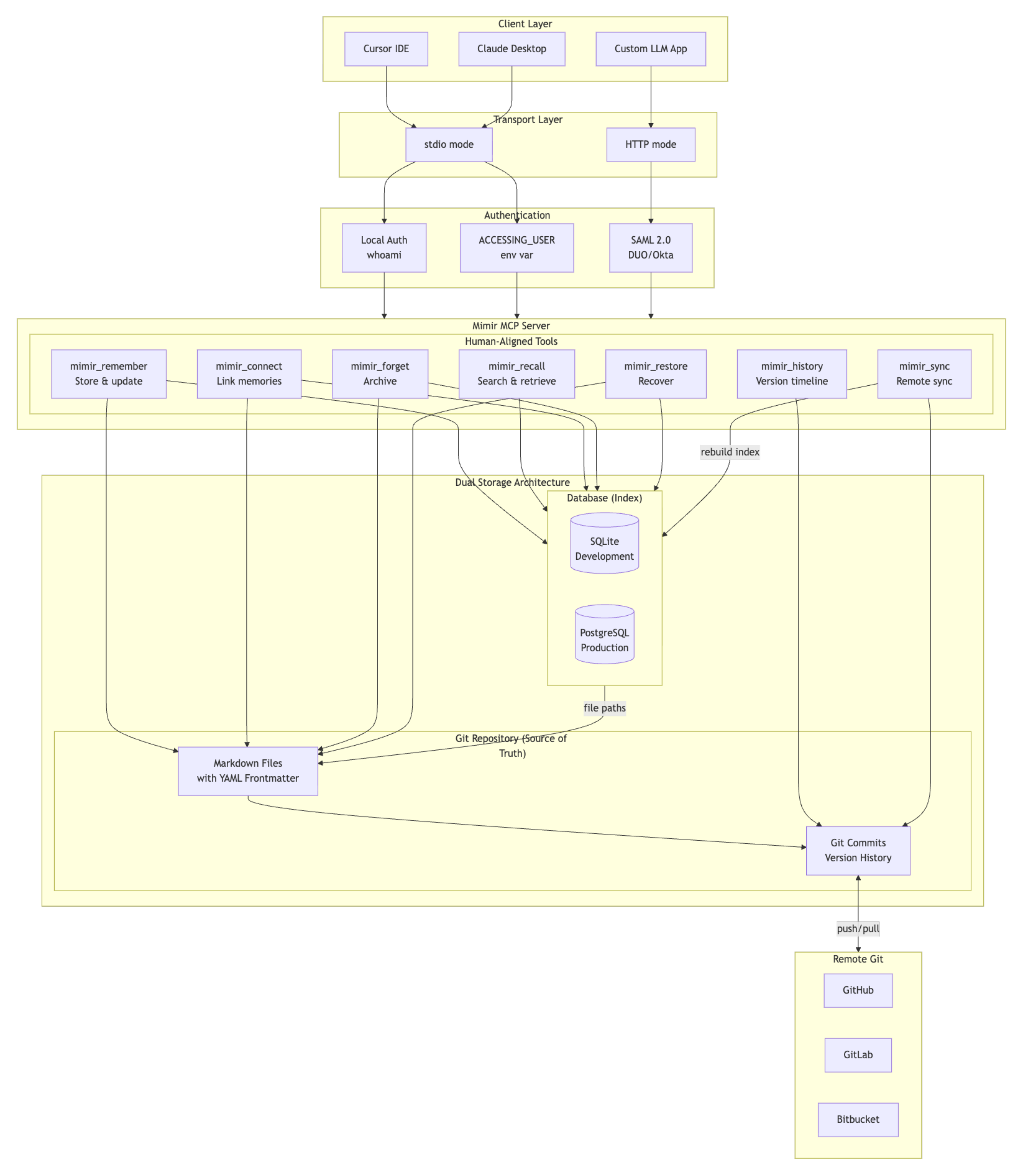
## Requirements
- **Go 1.24+** - For building from source
- **Git 2.x+** - Required for version-controlled memory storage (git must be in your PATH)
- **GCC/Build Tools** - Required for CGO (sqlite-vec vector search)
- macOS: `xcode-select --install`
- Linux: `sudo apt install build-essential`
- Windows: Use Docker (recommended) or MinGW
## Quick Start
### 1. Build
```bash
make setup # Run initial setup
make deps # Install dependencies
make build # Build the binary
```
### 2. MCP Client Integration
#### Option 1: Native Binary
Add to your MCP client config:
**Cursor** (`~/.cursor/mcp_settings.json`):
```json
{
"mcpServers": {
"medha": {
"command": "/path/to/bin/medha",
"env": {
"ENCRYPTION_KEY": "your-32-char-encryption-key-here"
}
}
}
}
```
**Claude Desktop** (`~/Library/Application Support/Claude/claude_desktop_config.json`):
```json
{
"mcpServers": {
"medha": {
"command": "/path/to/bin/medha",
"args": [],
"env": {
"ENCRYPTION_KEY": "your-32-char-encryption-key-here"
}
}
}
}
```
#### Option 2: Go Run
Run Medha directly using `go run` without installing - similar to `uvx` for Python or `npx` for Node.js.
**Prerequisites:** Install Go 1.24+ [go.dev/dl](https://go.dev/dl/) and Git in your PATH:
```bash
# macOS (Homebrew)
brew install go git
# Ubuntu/Debian
sudo apt update && sudo apt install golang-go git
# Windows (Chocolatey)
choco install golang git
```
**MCP Client Config:**
```json
{
"mcpServers": {
"medha": {
"command": "go",
"args": ["run", "github.com/tejzpr/medha-mcp/cmd/server@latest"],
"env": {
"ENCRYPTION_KEY": "your-32-char-encryption-key-here"
}
}
}
}
```
#### Option 3: Docker Container
Configure your MCP client to use the Docker Hub image (no build required).
**Simple mode (single user):**
Uses `whoami` inside container, which returns `medha`. All memories are stored under the `medha` user.
```json
{
"mcpServers": {
"medha": {
"command": "docker",
"args": [
"run", "-i", "--rm",
"-v", "/Users/yourname/.medha:/home/medha/.medha",
"-e", "ENCRYPTION_KEY=your-32-char-encryption-key-here",
"tejzpr/medha-mcp"
]
}
}
}
```
**Multi-user mode (with `--with-accessinguser`):**
Uses `ACCESSING_USER` env var for user identity. Useful when multiple users share the same Medha instance or when integrating with authenticated systems.
```json
{
"mcpServers": {
"medha": {
"command": "docker",
"args": [
"run", "-i", "--rm",
"-v", "/Users/yourname/.medha:/home/medha/.medha",
"-e", "ENCRYPTION_KEY=your-32-char-encryption-key-here",
"-e", "ACCESSING_USER=yourname",
"tejzpr/medha-mcp",
"--with-accessinguser"
]
}
}
}
```
> **Important:**
> - Replace `/Users/yourname` with your actual home directory path (e.g., `/Users/john` on macOS, `/home/john` on Linux)
> - Replace `yourname` in `ACCESSING_USER` with your actual username
> - MCP clients do not expand `$HOME` or `~` in JSON configs - use absolute paths
> - The `.medha` mount persists your database and git repositories
> - The container runs as user `medha` (uid 1000), data is stored at `/home/medha/.medha`
**Build locally (optional):**
```bash
docker build -t medha-mcp .
```
Then use `medha-mcp` instead of `tejzpr/medha-mcp` in your config.
**Required mounts:**
| Mount | Purpose |
|-------|---------|
| `/Users/yourname/.medha:/home/medha/.medha` | Persists database, config, and git repositories |
**Environment variables:**
| Variable | Purpose |
|----------|---------|
| `ENCRYPTION_KEY` | 32-character key for encrypting PAT tokens |
| `ACCESSING_USER` | Username for memory isolation (only with `--with-accessinguser`) |
**Flags explained:**
- `-i` = Interactive mode (required for stdio transport)
- `--rm` = Remove container when done
- `--with-accessinguser` = Use `ACCESSING_USER` env var instead of `whoami` for user identity
### 3. Run Modes
**stdio mode (default)**: For MCP client integration
```bash
./bin/medha # Uses system user (whoami)
./bin/medha --with-accessinguser # Uses ACCESSING_USER env var
```
- Communicates via stdin/stdout
- Automatically authenticates user
- No web interface needed
**HTTP mode**: For web interface
```bash
./bin/medha --http # Default port 8080
./bin/medha --http --port=9000 # Custom port
```
- Provides web authentication at `http://localhost:8080/auth`
- Supports SAML 2.0 for enterprise SSO
### 4. Configuration (Optional)
Edit `~/.medha/configs/config.json` for advanced settings:
```json
{
"auth": {
"type": "local"
},
"server": {
"host": "localhost",
"port": 8080
},
"database": {
"type": "sqlite",
"sqlite_path": "~/.medha/db/medha.db"
},
"git": {
"sync_interval_minutes": 60
},
"security": {
"token_ttl_hours": 24
},
"embeddings": {
"enabled": false,
"provider": "openai",
"model": "text-embedding-3-small",
"api_key_env": "OPENAI_API_KEY",
"dimensions": 1536
}
}
```
See [Configuration Guide](docs/configuration.md) for all options including SAML setup.
### 5. Enable Semantic Search (Optional)
For AI-powered semantic search, enable embeddings:
```bash
# Via command line
./bin/medha --enable-embeddings
# Or set in config.json
"embeddings": { "enabled": true }
```
**Requirements:**
- Set `OPENAI_API_KEY` environment variable
- Or configure a compatible embedding API endpoint
**Docker with embeddings:**
```json
{
"mcpServers": {
"medha": {
"command": "docker",
"args": [
"run", "-i", "--rm",
"-v", "/Users/yourname/.medha:/home/medha/.medha",
"-e", "ENCRYPTION_KEY=your-32-char-key",
"-e", "OPENAI_API_KEY=sk-your-key",
"-e", "MEDHA_EMBEDDINGS_ENABLED=true",
"tejzpr/medha-mcp"
]
}
}
}
```
## MCP Tools
Medha uses **human-aligned tools** that express intent rather than implementation. This makes them easier for LLMs to use correctly.
### medha_recall
**"What do I know about X?"** - Find and retrieve information:
```json
{
"topic": "authentication approach",
"limit": 10
}
```
Also supports `list_all: true` for browsing and `exact: "text"` for literal search.
### medha_remember
**"Store this for later"** - Create or update memories:
```json
{
"title": "Project Alpha Kickoff",
"content": "# Meeting Notes\n\nDiscussed project timeline...",
"tags": ["project", "meeting"],
"replaces": "old-meeting-notes"
}
```
Use `replaces` to supersede old information (marks it as outdated).
### medha_history
**"When did I learn about X?"** - Temporal queries:
```json
{
"slug": "project-alpha",
"show_changes": true,
"since": "7d"
}
```
### medha_connect
**"These are related"** - Link or unlink memories:
```json
{
"from": "project-alpha",
"to": "contact-john-doe",
"relationship": "person"
}
```
### medha_forget
**"No longer relevant"** - Archive a memory:
```json
{
"slug": "old-decision"
}
```
### medha_restore
**"Bring back that archived memory"** - Undelete:
```json
{
"slug": "old-decision"
}
```
### medha_sync
Manual sync to GitHub:
```json
{
"force": false
}
```
## Memory Format
Memories are stored as Markdown files with YAML frontmatter:
```markdown
---
id: project-alpha-kickoff-2024-01-15
title: "Project Alpha Kickoff Meeting"
tags: [project, meeting]
created: 2024-01-15T10:30:00Z
updated: 2024-01-15T14:00:00Z
associations:
- target: contact-john-doe
type: person
strength: 1.0
---
# Project Alpha Kickoff Meeting
## Attendees
- John Doe (Project Lead)
## Key Decisions
...
```
## Directory Structure
```
~/.medha/
├── configs/
│ └── config.json # User configuration
├── db/
│ └── medha.db # System database (users, auth, repos)
└── store/
└── medha-{username}/ # User's git repository
├── .medha/
│ └── medha.db # Per-user database (memories index)
├── 2024/
│ └── 01/ # Date-organized memories
├── tags/
│ └── meetings/ # Tag-based organization
└── archive/ # Soft-deleted memories
```
**Database Architecture (v2):**
- **System DB** (`~/.medha/db/medha.db`): Users, authentication, repository registry
- **Per-User DB** (`store/medha-{user}/.medha/medha.db`): Memory index, associations, tags (git-tracked)
## Development
> **Note:** CGO is required for sqlite-vec. Ensure GCC is installed.
```bash
# Build
make build # Build binary (CGO enabled)
make build-native # Build optimized for current platform
# Run tests
make test # Run unit tests
make test-integration # Run integration tests
make test-functional # Run functional tests
make test-all # Run all tests
# Run server
make run # stdio mode (MCP)
make run-http # HTTP server mode
make run-with-embeddings # With semantic search
# Code quality
make lint # Run linter
make vet # Run go vet
make coverage # View test coverage
# Docker
make docker-build # Build Docker image
make docker-run # Run container
make docker-run-with-embeddings # With embeddings
```
## Database Rebuild
If you need to rebuild the database index from your git repository:
```bash
# Rebuild system database from git
medha --rebuilddb
# Rebuild and overwrite existing data
medha --rebuilddb --force
# Rebuild per-user database (v2)
medha --rebuild-userdb all # All users
medha --rebuild-userdb username # Specific user
medha --rebuild-userdb /path/to/repo # By path
medha --rebuild-userdb all --force # Force overwrite
```
## Contributing
Contributions are welcome! Please ensure:
- All tests pass (`make test`)
- Code is properly formatted (`go fmt`)
- Linter passes (`make lint`)
- Documentation is updated
## License
This project is licensed under the [Mozilla Public License 2.0](LICENSE).