## What is envd?
envd (`ɪnˈvdɪ`) is a command-line tool that helps you create the container-based development environment for AI/ML.
Creating development environments is not easy, especially with today's complex systems and dependencies. With everything from Python to CUDA, BASH scripts, and Dockerfiles constantly breaking, it can feel like a nightmare - until now!
Instantly get your environment running exactly as you need with a simple declaration of the packages you seek in build.envd and just one command: `envd up`!
## Why use `envd`?
Environments built with `envd` provide the following features out-of-the-box:
**Simple CLI and language**
`envd` enables you to quickly and seamlessly integrate powerful CLI tools into your existing Python workflow to provision your programming environment without learning a new language or DSL.
```python
def build():
base(dev=True)
install.conda()
install.python()
install.python_packages(name = [
"numpy",
])
shell("fish")
config.jupyter()
```
**Isolation, compatible with OCI image**
With `envd`, users can create an isolated space to train, fine-tune, or serve. By utilizing sophisticated virtualization technology as well as other features like [buildkit](https://github.com/moby/buildkit), it's an ideal solution for environment setup.
`envd` environment image is compatible with [OCI image specification](https://github.com/opencontainers/image-spec). By leveraging the power of an OCI image, you can make your environment available to anyone and everyone! Make it happen with a container registry like Harbor or Docker Hub.
**Local, and cloud**
`envd` can now be used on a hybrid platform, ranging from local machines to clusters hosted by Kubernetes. Any of these options offers an efficient and versatile way for developers to create their projects!
```sh
$ envd context use local
# Run envd environments locally
$ envd up
...
$ envd context use cluster
# Run envd environments in the cluster with the same experience
$ envd up
```
Check out the [doc](https://envd.tensorchord.ai/teams/kubernetes.html) for more details.
**Build anywhere, faster**
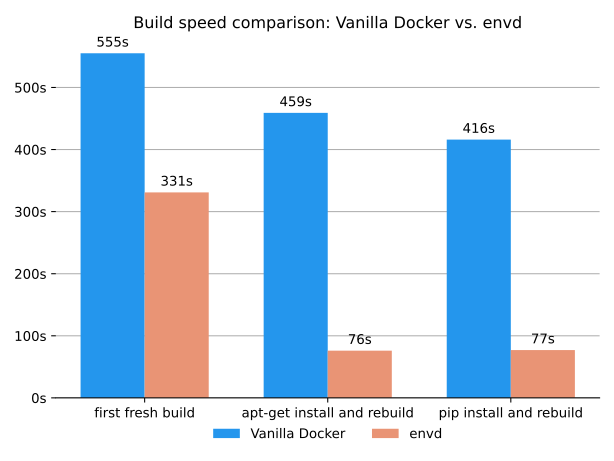
`envd` offers a wealth of advantages, such as remote build and software caching capabilities like pip index caches or apt cache, with the help of [buildkit](https://github.com/moby/buildkit) - all designed to make your life easier without ever having to step foot in the code itself!
Reusing previously downloaded packages from the PyPI/APT cache saves time and energy, making builds more efficient. No need to redownload what was already acquired before – a single download is enough for repeat usage!
With Dockerfile v1, users are unable to take advantage of PyPI caching for faster installation speeds - but `envd` offers this support and more!
Besides, `envd` also supports remote build, which means you can build your environment on a remote machine, such as a cloud server, and then push it to the registry. This is especially useful when you are working on a machine with limited resources, or when you expect a build machine with higher performance.
**Knowledge reuse in your team**
Forget copy-pasting Dockerfile instructions - use envd to easily build functions and reuse them by importing any Git repositories with the `include` function! Craft powerful custom solutions quickly.
```python
envdlib = include("https://github.com/tensorchord/envdlib")
def build():
base(dev=True)
install.conda()
install.python()
envdlib.tensorboard(host_port=8888)
```
envdlib.tensorboard is defined in github.com/tensorchord/envdlib
```python
def tensorboard(
envd_port=6006,
envd_dir="/home/envd/logs",
host_port=0,
host_dir="/tmp",
):
"""Configure TensorBoard.
Make sure you have permission for `host_dir`
Args:
envd_port (Optional[int]): port used by envd container
envd_dir (Optional[str]): log storage mount path in the envd container
host_port (Optional[int]): port used by the host, if not specified or equals to 0,
envd will randomly choose a free port
host_dir (Optional[str]): log storage mount path in the host
"""
install.python_packages(["tensorboard"])
runtime.mount(host_path=host_dir, envd_path=envd_dir)
runtime.daemon(
commands=[
[
"tensorboard",
"--logdir",
envd_dir,
"--port",
str(envd_port),
"--host",
"0.0.0.0",
],
]
)
runtime.expose(envd_port=envd_port, host_port=host_port, service="tensorboard")
```
## Getting Started 🚀
### Requirements
- Docker (20.10.0 or above)
### Install and bootstrap `envd`
`envd` can be installed with `pip`, or you can download the binary [release](https://github.com/tensorchord/envd/releases) directly. After the installation, please run `envd bootstrap` to bootstrap.
```bash
pip install --upgrade envd
```
After the installation, please run `envd bootstrap` to bootstrap:
```bash
envd bootstrap
```
Read the [documentation](https://envd.tensorchord.ai/guide/getting-started.html#install-and-bootstrap-envd) for more alternative installation methods.
> You can add `--dockerhub-mirror` or `-m` flag when running `envd bootstrap`, to configure the mirror for docker.io registry:
>
>```bash title="Set docker mirror"
>envd bootstrap --dockerhub-mirror https://docker.mirrors.sjtug.sjtu.edu.cn
>```
### Create an `envd` environment
Please clone the [`envd-quick-start`](https://github.com/tensorchord/envd-quick-start):
```bash
git clone https://github.com/tensorchord/envd-quick-start.git
```
The build manifest `build.envd` looks like:
```python title=build.envd
def build():
base(dev=True)
install.conda()
install.python()
# Configure the pip index if needed.
# config.pip_index(url = "https://pypi.tuna.tsinghua.edu.cn/simple")
install.python_packages(name = [
"numpy",
])
shell("fish")
```
*Note that we use Python here as an example but please check out examples for other languages such as R and Julia [here](https://github.com/tensorchord/envd/tree/main/examples).*
Then please run the command below to set up a new environment:
```bash
cd envd-quick-start && envd up
```
```bash
$ cd envd-quick-start && envd up
[+] ⌚ parse build.envd and download/cache dependencies 6.2s ✅ (finished)
[+] build envd environment 19.0s (47/47) FINISHED
=> CACHED [internal] setting pip cache mount permissions 0.0s
=> docker-image://docker.io/tensorchord/envd-sshd-from-scratch:v0.4.3 2.3s
=> => resolve docker.io/tensorchord/envd-sshd-from-scratch:v0.4.3 2.3s
=> docker-image://docker.io/library/ubuntu:22.04 0.0s
......
=> [internal] pip install numpy 2.5s
=> CACHED [internal] download fish shell 0.0s
=> [internal] configure user permissions for /opt/conda 1.0s
=> [internal] create dir for ssh key 0.5s
=> [internal] install ssh keys 0.2s
=> [internal] copy fish shell from the builder image 0.2s
=> [internal] install fish shell 0.5s
......
=> [internal] create work dir: /home/envd/envd-quick-start 0.2s
=> exporting to image 7.7s
=> => exporting layers 7.7s
=> => writing image sha256:464a0c12759d3d1732404f217d5c6e06d0ee4890cccd66391a608daf2bd314e4 0.0s
=> => naming to docker.io/library/envd-quick-start:dev 0.0s
------
> importing cache manifest from docker.io/tensorchord/python-cache:envd-v0.4.3:
------
⣽ [5/5] attach the environment [2s]
Welcome to fish, the friendly interactive shell
Type help for instructions on how to use fish
envd-quick-start on git master [!] via Py v3.11.11 via 🅒 envd as sudo
⬢ [envd]❯ # You are in the container-based environment!
```
### Set up Jupyter notebook
Please edit the `build.envd` to enable jupyter notebook:
```python title=build.envd
def build():
base(dev=True)
install.conda()
install.python()
# Configure the pip index if needed.
# config.pip_index(url = "https://pypi.tuna.tsinghua.edu.cn/simple")
install.python_packages(name = [
"numpy",
])
shell("fish")
config.jupyter()
```
You can get the endpoint of the running Jupyter notebook via `envd envs ls`.
```bash
$ envd up --detach
$ envd envs ls
NAME JUPYTER SSH TARGET CONTEXT IMAGE GPU CUDA CUDNN STATUS CONTAINER ID
envd-quick-start http://localhost:42779 envd-quick-start.envd /home/gaocegege/code/envd-quick-start envd-quick-start:dev false Up 54 seconds bd3f6a729e94
```
## Difference between v0 and v1 syntax
> [!NOTE]
> Start from `envd v1.0`, `v1` syntax is the default syntax for `build.envd` file, and `moby-worker` is the default builder.
| Features | v0 | v1 |
| --- | --- | --- |
| is default for `envd [!IMPORTANT]
> For more details, check the [upgrade to v1](https://envd.tensorchord.ai/guide/v1.html) doc.
## More on documentation 📝
See [envd documentation](https://envd.tensorchord.ai/guide/getting-started.html).
## Roadmap 🗂️
Please checkout [ROADMAP](https://envd.tensorchord.ai/community/roadmap.html).
## Contribute 😊
We welcome all kinds of contributions from the open-source community, individuals, and partners.
- Join our [discord community](https://discord.gg/KqswhpVgdU)!
- To build from the source, please read our [contributing documentation](https://envd.tensorchord.ai/community/contributing.html) and [development tutorial](https://envd.tensorchord.ai/developers/development.html).
[](https://gitpod.io/#https://github.com/tensorchord/envd)
## Contributors ✨
Thanks goes to these wonderful people ([emoji key](https://allcontributors.org/emoji-key/)):
This project follows the [all-contributors](https://github.com/all-contributors/all-contributors) specification. Contributions of any kind welcome!
## License 📋
[Apache 2.0](./LICENSE)