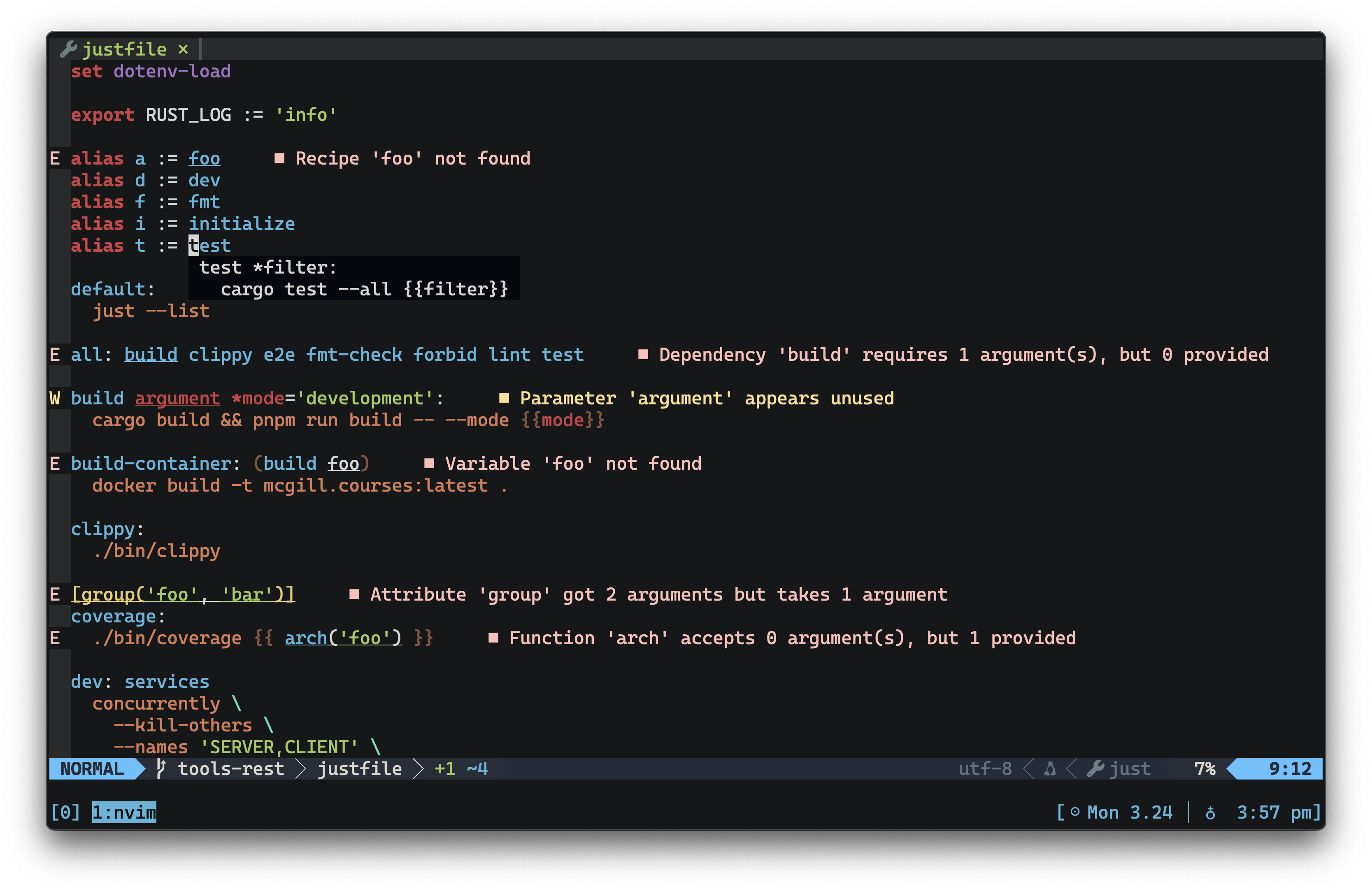
## just-lsp [![release](https://img.shields.io/github/release/terror/just-lsp.svg?label=release&style=flat&labelColor=282c34&logo=github)](https://github.com/terror/just-lsp/releases/latest) [![crates.io](https://shields.io/crates/v/just-lsp.svg)](https://crates.io/crates/just-lsp) [![CI](https://github.com/terror/just-lsp/actions/workflows/ci.yaml/badge.svg)](https://github.com/terror/just-lsp/actions/workflows/ci.yaml) [![codecov](https://codecov.io/gh/terror/just-lsp/graph/badge.svg?token=7CH4XDXO7Z)](https://codecov.io/gh/terror/just-lsp) [![downloads](https://img.shields.io/github/downloads/terror/just-lsp/total.svg)](https://github.com/terror/just-lsp/releases) [![dependency status](https://deps.rs/repo/github/terror/just-lsp/status.svg)](https://deps.rs/repo/github/terror/just-lsp) `just-lsp` is a server implementation of the [language server protocol](https://microsoft.github.io/language-server-protocol/) for [just](https://github.com/casey/just), the command runner. demo `just-lsp` brings rich editor support to your justfiles, including: - Completions for recipe names, variables, and all builtins: attributes, constants, functions, and settings. - Hover docs for whatever's under your cursor: recipe definitions, parameter declarations, variable assignments, and the full builtin reference. - Jump to definition for recipes, aliases, parameters, assignments, and builtin constants. - Diagnostics on every change, catching syntax errors, unknown recipes, bad dependencies, indentation issues, and more. See [`docs/diagnostics.md`](docs/diagnostics.md) for the full list of rules. - Rename and find references for recipes, aliases, variables, and parameters, scope-aware so refactors don't accidentally rewrite unrelated identifiers. - Run any recipe directly from your editor via a code action, with optional argument prompting before `just` is invoked. - Semantic highlighting, folding, and formatting via `just --fmt --unstable`. If you need help with `just-lsp` please feel free to open an issue or ping me on [Discord](https://discord.gg/ezYScXR). Feature requests and bug reports are always welcome! ## Installation `just-lsp` should run on any system, including Linux, MacOS, and the BSDs. The easiest way to install it is by using [cargo](https://doc.rust-lang.org/cargo/index.html), the Rust package manager: ```bash cargo install just-lsp ``` Otherwise, see below for the complete package list: #### Cross-platform
Package Manager Package Command
Cargo just-lsp cargo install just-lsp
Homebrew just-lsp brew install just-lsp
Nix just-lsp nix-env -iA nixpkgs.just-lsp
#### Linux
Operating System Package Manager Package Command
Alpine apk-tools just-lsp apk add just-lsp
Arch pacman just-lsp pacman -S just-lsp
Void XBPS just-lsp xbps-install -S just-lsp
![just-lsp package version table](https://repology.org/badge/vertical-allrepos/just-lsp.svg) ### Mason You can also install the server via [mason](https://github.com/williamboman/mason.nvim), the Neovim plugin that allows you to easily manage external editor tooling such as LSP servers, DAP servers, etc. Simply invoke `:Mason` in your editor, and find `just-lsp` in the dropdown to install it. ### Pre-built binaries Pre-built binaries for Linux, MacOS, and Windows can be found on [the releases page](https://github.com/terror/just-lsp/releases). ## Usage ### CLI Running `just-lsp` with no arguments starts the language server over stdin/stdout. #### `analyze` The `analyze` subcommand runs the diagnostic engine on a justfile and prints any warnings or errors to stderr, without starting the language server: ```bash just-lsp analyze [PATH] ``` When `PATH` is omitted it searches the current directory and its ancestors for a file named `justfile`. The exit code is non-zero if any error-severity diagnostic is found. ### Editor Integration `just-lsp` can be used with any LSP client, this section documents integration with some of the more popular ones. ### Neovim `nvim-lspconfig` exposes its server definitions to the builtin [`vim.lsp.config`](https://neovim.io/doc/user/lsp.html#lsp-config) API, so the old `require('lspconfig').just.setup()` pattern is deprecated. With Nvim 0.11.3+ and the latest nvim-lspconfig installed, enabling `just-lsp` looks like: ```lua vim.lsp.enable('just') ``` If you need to override the default command, capabilities, or hooks, define (or extend) the config before enabling it: ```lua vim.lsp.config('just', { cmd = { '/path/to/just-lsp' }, -- only needed when the binary is not on $PATH on_attach = function(client, bufnr) -- add your mappings or buffer-local options end, capabilities = require('cmp_nvim_lsp').default_capabilities(), }) vim.lsp.enable('just') ``` `vim.lsp.config` automatically merges your overrides with the upstream config shipped inside nvim-lspconfig's `lsp/just.lua`. `capabilities` describe what features your client supports (completion snippets, folding ranges, etc.). The helper from `cmp-nvim-lsp` augments the defaults so completion-related capabilities line up with `nvim-cmp`. If you do not use `nvim-cmp`, you can omit the field or build your own table. ### Visual Studio Code A third-party [**Visual Studio Code**](https://code.visualstudio.com/) extension is maintained over at https://github.com/nefrob/vscode-just, written by [@nefrob](https://github.com/nefrob). Follow the instructions in that repository to get it setup on your system. ### Zed A third-party [**Zed**](https://zed.dev/) extension is maintained over at https://github.com/jackTabsCode/zed-just, written by [@jackTabsCode](https://github.com/jackTabsCode) & [@mattrobenolt](https://github.com/mattrobenolt). Follow the instructions in that repository to get it setup on your system. ## Configuration `just-lsp` accepts configuration through the LSP `initializationOptions` object, sent from your editor when the server starts. The object is optional; omitted keys keep their default behavior. ```json { "formatting": { "indentation": "\t" }, "rules": { "unused-variables": "off", "unused-parameters": { "level": "warning" } } } ``` ### Formatting Formatting is delegated to `just --fmt --unstable --quiet`. By default, `just-lsp` lets `just` choose its normal indentation. Set `formatting.indentation` to pass a custom indentation string through `--indentation`: ```json { "formatting": { "indentation": " " } } ``` Common values are `"\t"` for tabs and `" "` for two spaces. ### Rules Individual diagnostic rules can be configured under the `rules` key. Each rule is keyed by its code (see [`docs/diagnostics.md`](docs/diagnostics.md)) and accepts either a level string or a table with a `level` field: ```json { "rules": { "unused-variables": "off", "unused-parameters": { "level": "error" } } } ``` Rule codes are listed in [`docs/diagnostics.md`](docs/diagnostics.md). Supported levels are: | Level | Behavior | | --------------------- | ----------------------------------------- | | `error` | Report the rule as an error. | | `warning` | Report the rule as a warning. | | `information`, `info` | Report the rule as informational. | | `hint` | Report the rule as a hint. | | `off` | Suppress diagnostics from the rule. | Rules that are not listed keep their default severity. ### Neovim With Neovim's builtin LSP client, pass the same configuration through `init_options`: ```lua vim.lsp.config('just', { init_options = { formatting = { indentation = '\t', }, rules = { ['unused-variables'] = 'off', ['unused-parameters'] = { level = 'warning' }, }, }, }) vim.lsp.enable('just') ``` ## Development I use [Neovim](https://neovim.io/) to work on this project, and I load the development build of this server to test out my changes instantly. This section describes a development setup using Neovim as the LSP client, for other clients you would need to look up their respective documentation. First, clone the repository and build the project: ``` git clone https://github.com/terror/just-lsp cd just-lsp cargo build ``` Add this to your editor configuration: ```lua local dev_cmd = '/path/to/just-lsp/target/debug/just-lsp' local on_attach = function(client, bufnr) -- Add your implementation here end local capabilities = require('cmp_nvim_lsp').default_capabilities() vim.lsp.config('just_dev', { cmd = { dev_cmd }, filetypes = { 'just' }, root_dir = function(fname) return vim.fs.root(fname, { '.git', 'justfile' }) end, on_attach = on_attach, capabilities = capabilities, }) vim.lsp.enable('just_dev') ``` This uses a separate config name (`just_dev`) so you can switch between the local development build and the stock `just` config. Replace `dev_cmd` with the absolute path to your freshly built binary. `on_attach` is a function that gets called after an LSP client attaches to a buffer, [mine](https://github.com/terror/dotfiles/blob/0cc595de761d27d99367ad0ea98920b7718be4fb/etc/nvim/lua/config.lua#L207) just sets up a few mappings: ```lua local on_attach = function(client, bufnr) -- ... map('n', 'ar', 'lua vim.lsp.buf.rename()') map('n', 's', 'lua vim.lsp.buf.format({ async = true })') -- ... end ``` As in the basic example above, we use `cmp_nvim_lsp.default_capabilities()` so that the dev build inherits completion-related capabilities from `nvim-cmp`. Swap in your own table if you use a different completion plugin. **n.b.** This setup requires the [nvim-lspconfig](https://github.com/neovim/nvim-lspconfig) plugin (and optionally [cmp-nvim-lsp](https://github.com/hrsh7th/cmp-nvim-lsp) for the capabilities helper). ### Extending the parser `just-lsp` vendors the [`tree-sitter-just`](https://github.com/terror/just-lsp/tree/master/vendor/tree-sitter-just) parser in `vendor/tree-sitter-just`. After changing the grammar or query files, rebuild and test the parser with the following commands: ```bash just -f vendor/tree-sitter-just/justfile gen cd vendor/tree-sitter-just && tree-sitter test cargo test ``` **n.b.** `just update-parser` will run all of the above for you. The generate step updates the parser artifacts under `vendor/tree-sitter-just/src/`. Commit those files together with any updated corpora in `vendor/tree-sitter-just/test/corpus` so downstream tooling sees your changes. ## Prior Art Check out [just](https://github.com/casey/just), the command runner.