 # 💪 Hercules
[](https://pepy.tech/projects/testzeus-hercules)

[](https://github.com/test-zeus-ai/testzeus-hercules/actions/workflows/main-test.yml)
[](https://join.slack.com/t/testzeuscommunityhq/shared_invite/zt-376oeo99x-3RAWe_C0H7x9zP0rtACcPA)
Testing modern web applications can be difficult, with frequent changes and complex features making it hard to keep up. That's where **Hercules** comes in. Hercules is the world's first open-source testing agent, built to handle the toughest testing tasks so you don't have to. It turns simple, easy-to-write Gherkin steps into fully automated **end to end** tests—no coding skills needed. Whether you're working with tricky enterprise platforms or running tests in your CI/CD pipeline, Hercules adapts to your needs and takes care of the details. With Hercules, testing becomes simple, reliable, and efficient, helping teams everywhere deliver better software. Here's a quick demo of lead creation using natural english language test (without any code):
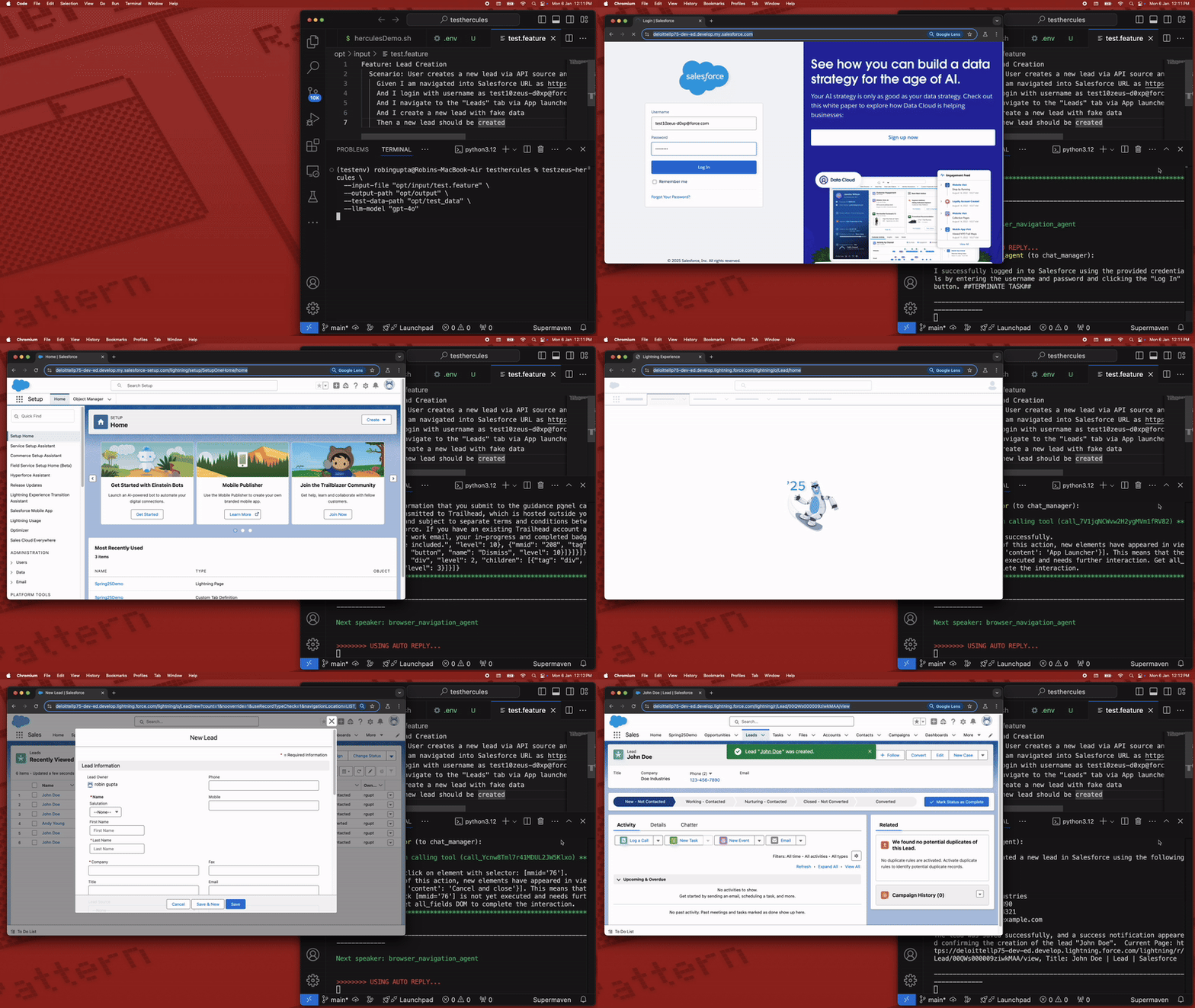
As you saw, using Hercules is as simple as feeding in your Gherkin features, and getting the results:

At [TestZeus](https://www.testzeus.com), we believe that **trustworthy and open-source code** is the backbone of innovation. That's why we've built Hercules to be transparent, reliable, and community-driven.
Our mission? To **democratize and disrupt test automation**, making top-tier testing accessible to everyone, not just the elite few. No more gatekeeping—everyone deserves a hero on their testing team!
### Video Tutorials: [@TestZeus](https://www.youtube.com/@TestZeus)
---
#### 🚀 **Getting Started with TestZeus Hercules**
- **Introduction to TestZeus Hercules**
Learn about the core features of TestZeus Hercules and how it can streamline end-to-end testing for your projects.
[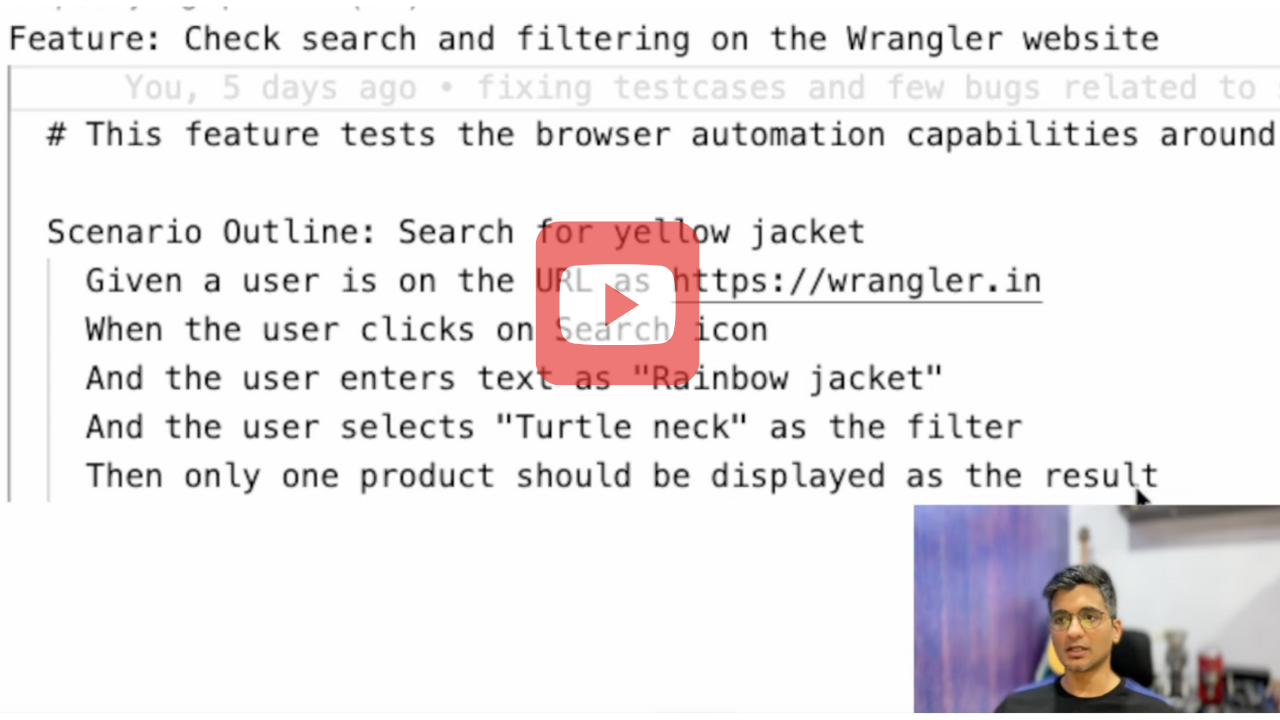](https://youtu.be/_m_NDjM6aZ0?si=ArtVKz8uSgGWTcAK)
- **Installation and Setup Guide**
Step-by-step instructions for installing and configuring TestZeus Hercules in your environment.
_[Watch now](https://youtu.be/9D-SZGoDrfc?si=GL0IArWkB1ZgBdx5)_
---
#### 🧪 **Writing and Executing Test Cases**
- **Creating BDD Test Cases**
Learn how to write Behavior-Driven Development (BDD) test cases for Hercules and use dynamic testdata.
_[Watch now](https://www.youtube.com/watch?v=yJD0cZ7Bx6Q&t)_
---
#### 🌐 **Integrations and Advanced Features**
- **Testing Multilingual content**
Learn how Hercules interacts with web browsers to perform Testing on Multilingual content via Multilingual testcase.
_[Watch now](https://youtu.be/vI9iGSqKpGA?si=6NGAvKnwFboSyHT2)_
---
#### 🛠️ **Customization and Community Tools**
- **Enhancing Hercules with Community-Driven Tools**
Discover how to customize Hercules and incorporate additional tools provided by the community.
_[Watch now](https://youtu.be/C8hUy5leRF0?si=yVMpZ7WFcI01BoI3)_
---
#### 🛠️ **API Testing**
- **API testing all the way, new ways to do end to end**
_[Watch now](https://youtu.be/qMt89DQH6LQ?si=lcSJbKOCaqqUGeQ8)_
---
#### 🛠️ **Security Testing**
- **Security Testing done end to end**
_[Watch now](https://youtu.be/o6MmfTakIh4?si=JL8iu4e3i85SWrxU)_
#### 🛠️ **Visual validations and assertions**
- **Using vision capabilities to check snapshots and components on the application**
_[Watch now](https://youtu.be/EKzllLEguhw)_
#### 🐍 **Python Sandbox Execution**
- **Execute custom Python scripts directly from Gherkin tests**
Run complex automation workflows, custom business logic, and reusable components with full Playwright access. Perfect for scenarios that need advanced selector strategies, conditional logic, or data processing. [Read the docs](docs/python_sandbox_execution.md)
**Quick Example:**
```gherkin
# In your feature file
And execute the apply_filter function from script at "scripts/apply_filter.py" with filter_type as "Turtle Neck"
```
```python
# In opt/scripts/apply_filter.py
async def apply_filter(filter_type: str) -> dict:
"""Apply filter with multiple fallback strategies."""
# page, logger, and other tools automatically available!
await page.wait_for_selector('[data-filter-section]')
# Try multiple selector strategies
for selector in [f'input[value="{filter_type}"]',
f'label:has-text("{filter_type}") input']:
if await page.locator(selector).count() > 0:
await page.locator(selector).click()
break
return {"status": "success", "filter": filter_type}
```
**Features:**
- 🎯 Full Playwright API access
- 🔒 Multi-tenant security (executor, data, API, restricted modes)
- 📦 Auto-injected modules (page, browser, logger, asyncio, etc.)
- 🔄 Reusable across multiple tests
- ⚙️ Configurable via environment variables
**Configuration:**
```bash
# Set tenant for module access
export SANDBOX_TENANT_ID="executor_agent" # Full access: requests, pandas, numpy, BeautifulSoup
# Or use CLI
testzeus-hercules --sandbox-tenant-id executor_agent --input-file test.feature
```
---
## ⚙️ Installation and Usage
Hercules offers multiple ways to get started, catering to different user preferences and requirements.
If you are new to the Python ecosystem and don't know where to begin, dont worry and read the footnotes on understanding the basics.
For a quick taste of the solution, you can try the notebook here:
[](https://colab.research.google.com/drive/1YiZsXem1POTwkcr17QqflXnihhuSqwM2?usp=sharing)
- **Note**: Colab might ask you to restart the session after installing TestZeus Hercules dependencies. Please restart the session if required and continue the execution. Also, we recommend one of the approaches below for getting the full flavor of the solution.
### Approach 1: Using PyPI Package
#### Installation
Install Hercules from PyPI:
```bash
pip install testzeus-hercules
```
Hercules uses Playwright to interact with web pages, so you need to install Playwright and its dependencies:
```bash
playwright install --with-deps
```
For detailed information about project structure and running tests, please refer to our [Run Guide](docs/run_guide.md).
For migration-specific runtime behavior, see
[docs/Migration/MIGRATION.md](docs/Migration/MIGRATION.md) and
[docs/Migration/ARCHITECTURE.md](docs/Migration/ARCHITECTURE.md).
#### Basic Parameters
Once installed, you will need to provide some basic parameters to run Hercules:
- `--input-file INPUT_FILE`: Path to the input Gherkin feature file to be tested.
- `--output-path OUTPUT_PATH`: Path to the output directory. The path of JUnit XML result and HTML report for the test run.
- `--test-data-path TEST_DATA_PATH`: Path to the test data directory. The path where Hercules expects test data to be present; all test data used in feature testing should be present here.
- `--project-base PROJECT_BASE`: Path to the project base directory. This is an optional parameter; if you populate this, `--input-file`, `--output-path`, and `--test-data-path` are not required, and Hercules will assume all the three folders exist in the following format inside the project base:
```text
PROJECT_BASE/
├── gherkin_files/
├── input/
│ └── test.feature
├── log_files/
├── output/
│ └── run_/
│ ├── test.feature_result.html
│ └── test.feature_result.xml
├── proofs/
│ └── User_opens_Google_homepage/
│ └── run_/
│ ├── network_logs.json
│ ├── screenshots/
│ └── videos/
└── test_data/
└── test_data.txt
```
- `--agents-llm-config-file AGENTS_LLM_CONFIG_FILE`: Optional path to an
`agents_llm_config.json` file for per-agent model routing.
- `--agents-llm-config-file-ref-key AGENTS_LLM_CONFIG_FILE_REF_KEY`: Optional
top-level provider/profile key inside that file.
- `--llm-model`, `--llm-model-api-key`, `--llm-model-base-url`, and related
direct LLM flags are still supported for simple single-profile setups. Use
`agents_llm_config.json` when you need separate planner, navigation, memory,
and helper model settings.
#### Environment Variables
In addition to command-line parameters, Hercules supports various environment variables for configuration:
- `LLM_MODEL_NAME`: Model name for direct single-model setup. Example: `gpt-4o`
- `LLM_MODEL_API_KEY`: API key for the selected model provider.
- `LLM_MODEL_BASE_URL`: Optional OpenAI-compatible base URL.
- `AGENTS_LLM_CONFIG_FILE`: Optional path to `agents_llm_config.json` for
per-agent model routing.
- `AGENTS_LLM_CONFIG_FILE_REF_KEY`: Optional top-level provider/profile key to
activate from that config file.
- `BROWSER_TYPE`: Type of browser to use (`chromium`, `firefox`, `webkit`). Default: `chromium`
- `HEADLESS`: Run browser in headless mode (`true`, `false`). Default: `true`
- `BROWSER_RESOLUTION`: Browser window resolution (format: `width,height`). Example: `1920,1080`
- `BROWSER_COOKIES`: Set cookies for the browser context. Format: JSON array of cookie objects. Example: `[{"name": "session", "value": "123456", "domain": "example.com", "path": "/"}]`
- `RECORD_VIDEO`: Record test execution videos (`true`, `false`). Default: `true`
- `TAKE_SCREENSHOTS`: Take screenshots during test (`true`, `false`). Default: `true`
For a complete list of environment variables, see our [Environment Variables Guide](docs/environment_variables.md).
#### Running Hercules
Set the direct model environment variables and run Hercules:
```bash
export LLM_MODEL_NAME=gpt-4o
export LLM_MODEL_API_KEY=replace-me
export LLM_MODEL_BASE_URL=https://api.openai.com/v1
testzeus-hercules \
--input-file opt/input/test.feature \
--output-path opt/output \
--test-data-path opt/test_data
```
Use `agents_llm_config.json` only when you need separate planner, navigation,
memory, and helper model settings; see `docs/run_guide.md`.
## ⚙️ Running Hercules on a Windows Machine
To set up and run Hercules on a Windows machine:
1. **Open PowerShell in Administrator Mode:**
- Click on the **Start Menu**, search for **PowerShell**, and right-click on **Windows PowerShell**.
- Select **Run as Administrator** to open PowerShell in administrator mode.
2. **Navigate to the Helper Scripts Folder:**
- Use the `cd` command to navigate to the folder containing the `hercules_windows_setup.ps1` script. For example:
```powershell
cd path\to\helper_scripts
```
3. **Run the Setup Script:**
- Execute the script to install and configure Hercules:
```powershell
.\hercules_windows_setup.ps1
```
4. **Follow On-Screen Instructions:**
- The script will guide you through installing Python, Playwright, FFmpeg, and other required dependencies.
5. **Run Hercules:**
- Once the setup is complete, you can run Hercules from PowerShell or Command Prompt using the following command:
```bash
testzeus-hercules --input-file opt/input/test.feature --output-path opt/output --test-data-path opt/test_data
```
---
#### Supported AI Models for TestZeus-Hercules
- OpenAI: Use models with reliable tool-calling support, such as GPT-4o,
GPT-4.1, o-series models, or GPT-5 family models where available.
- Anthropic: Use Claude models with tool-calling support.
- Gemini / Vertex AI: Supported through OpenAI-compatible gateways such as
LiteLLM. Keep tool schemas simple; tuple-style public tool inputs are not
provider-safe.
- Gemma: Supported through gateways or local providers that expose compatible
chat and tool-calling behavior.
- Groq, Mistral, Ollama, DeepSeek, Bedrock, Azure, and other providers can be
used when they support OpenAI-compatible chat and function/tool calling.
- Local: Ollama and other local providers can be used when their model reliably
returns strict planner JSON and supports the required tool-calling behavior.
The sample Ollama Modelfile lives at `docs/Migration/Modelfile`.
The planner model should be strong at structured JSON reasoning. Navigation
models must support tool calling. For a quick run, direct `LLM_MODEL_*`
environment variables are enough. Use `agents_llm_config.json` only when you
need separate planner, navigation, memory, and helper model settings. See
`docs/run_guide.md` and `docs/environment_variables.md` for full examples,
including LiteLLM proxy setup.
#### Execution Flow
Upon running the command:
- Hercules will start and attempt to open a web browser (default is Chromium).
- `SimpleHercules` creates a LangGraph state graph for the run.
- The planner node turns the feature file into strict JSON containing the
current plan, `next_step`, `target_helper`, and assertion fields.
- The executor node routes the planner's `target_helper` to a navigation helper
such as `browser_nav_agent`, `api_nav_agent`, `sec_nav_agent`, `sql_nav_agent`,
`time_keeper_nav_agent`, `mcp_nav_agent`, or `executor_nav_agent`.
- Navigation helpers bind registered LangChain `StructuredTool` objects and run
a bounded tool-call loop. Browser tasks use tools such as `open_url`, `click`,
`get_interactive_elements`, `bulk_enter_text`, and `bulk_select_option`.
- Helper responses are fed back to the planner until the planner terminates or
routes to assertion handling.
#### Output and Logs
Once the execution is completed:
- Logs explaining the sequence of events are generated.
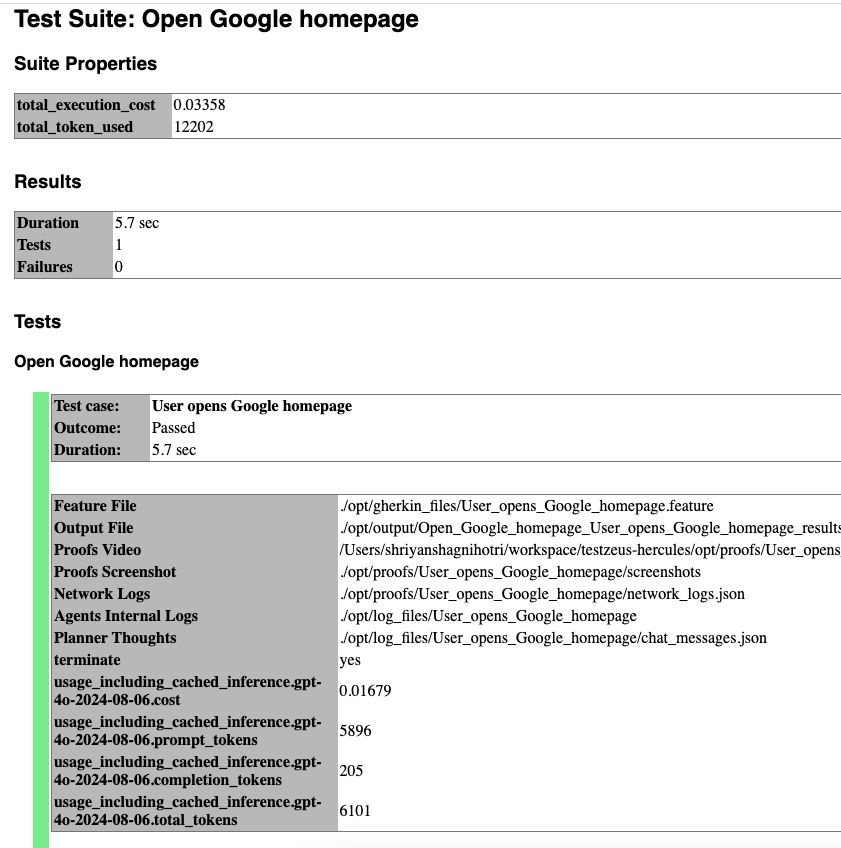
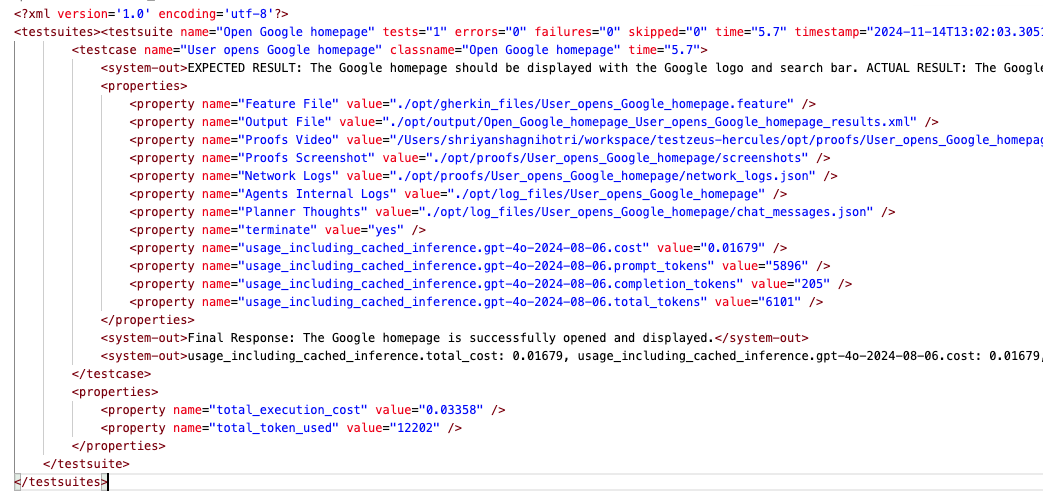
- The best place to start is the `output-path`, which will have the JUnit XML result file as well as an HTML report regarding the test case execution.
- You can also find proofs of execution such as video recordings, screenshots per event, and network logs in the `proofs` folder.
- To inspect the planner and helper trace, start with `agent_inner_thoughts.json`
under `log_files//run_/`.
#### Sample Feature File
Here's a sample feature file:
```gherkin
Feature: Product Search on Demo Store
Scenario: Successfully find a product
Given I am on the demo store home page
When I enter "wireless headphones" in the search field
And I click on the "Search" button
And I open the first matching product result
Then I should see the product details page
And I should see "wireless headphones" in the product title or description
```
#### Sample Result Screenshot
##### Sample HTML Result Screenshot
##### Sample XML Result Screenshot
---
### Approach 2: Using Docker
For all the scale lovers, Hercules is also available as a Docker image.
#### Pull the Docker Image
```bash
docker pull testzeus/hercules:latest
```
#### Running Hercules in Docker
Run the container using:
```bash
docker run --env-file=.env \
-v ./agents_llm_config.json:/testzeus-hercules/agents_llm_config.json \
-v ./opt:/testzeus-hercules/opt \
--rm -it testzeus/hercules:latest
```
- **Environment Variables**: All the required environment variables can be set by passing an `.env` file to the `docker run` command.
- **LLM Configuration**: Either pass direct `LLM_MODEL_*` values in `.env` or
mount `agents_llm_config.json` and set `AGENTS_LLM_CONFIG_FILE=agents_llm_config.json`
plus `AGENTS_LLM_CONFIG_FILE_REF_KEY=`. LiteLLM is one useful
provider profile when you run through an OpenAI-compatible proxy.
- **Mounting Directories**: Mount the `opt` folder to the Docker container so that all the inputs can be passed to Hercules running inside the container, and the output can be pulled out for further processing. The repository has a sample `opt` folder that can be mounted easily.
- **Simplified Parameters**: In the Docker case, there is no need for using `--input-file`, `--output-path`, `--test-data-path`, or `--project-base` as they are already handled by mounting the `opt` folder in the `docker run` command.
#### Browser Access in Docker
- While running in Docker mode, understand that Hercules has access only to a headless web browser.
- If you want Hercules to connect to a visible web browser, try the CDP URL option in the environment file. This option can help you connect Hercules running in your infrastructure to a remote browser like BrowserBase or your self-hosted grid.
- Use `CDP_ENDPOINT_URL` to set the CDP URL of the Chrome instance that has to be connected to the agent.
### Docker and Remote Browser Support
When running Hercules in Docker, you can connect to remote browser instances using various platforms:
1. **BrowserStack Integration**:
```bash
export BROWSERSTACK_USERNAME=your_username
export BROWSERSTACK_ACCESS_KEY=your_access_key
export CDP_ENDPOINT_URL=$(python helper_scripts/browser_stack_generate_cdp_url.py)
```
2. **LambdaTest Integration**:
```bash
export LAMBDATEST_USERNAME=your_username
export LAMBDATEST_ACCESS_KEY=your_access_key
export CDP_ENDPOINT_URL=$(python helper_scripts/lambda_test_generate_cdp_url.py)
```
3. **BrowserBase Integration**:
```bash
export CDP_ENDPOINT_URL=wss://connect.browserbase.com?apiKey=your_api_key
```
4. **AnchorBrowser Integration**:
```bash
export CDP_ENDPOINT_URL=wss://connect.anchorbrowser.io?apiKey=your_api_key
```
Note: Video recording is only supported on platforms that use connect_over_cdp (BrowserBase, AnchorBrowser). Platforms using the connect API (BrowserStack, LambdaTest) do not support video recording.
#### Output and Logs
After the command completion:
- The container terminates, and output is written in the mounted `opt` folder, in the same way as described in the directory structure.
- You will find the JUnit XML result file, HTML reports, proofs of execution, and logs in the respective folders.
---
### Approach 3: Building and running from Source Code
For the hardcore enthusiasts, you can use Hercules via the source code to get a complete experience of customization and extending Hercules with more tools.
#### Prerequisites
- Ensure you have **Python 3.13** installed for the branch CI target. The
package metadata supports Python `>=3.11,<3.14`.
#### Steps to Run from Source
1. **Clone the Repository**
```bash
git clone git@github.com:test-zeus-ai/testzeus-hercules.git
```
2. **Navigate to the Directory**
```bash
cd testzeus-hercules
```
3. **Use Make Commands**
The repository provides handy `make` commands.
- Use `make help` to check out possible options.
4. **Install UV**
```bash
make setup-uv
```
5. **Install Dependencies**
```bash
make install
```
6. **Configure the model**
```bash
export LLM_MODEL_NAME=gpt-4o
export LLM_MODEL_API_KEY=replace-me
export LLM_MODEL_BASE_URL=https://api.openai.com/v1
```
Use `agents_llm_config.json` only when you need per-agent routing for
planner, navigation, memory, and helper models. See `docs/run_guide.md`.
7. **Run Hercules**
```bash
make run
```
- This command reads the relevant feature files from the `opt` folder and executes them, putting the output in the same folder.
- The `opt` folder has the following format:
```
opt/
├── input/
│ └── test.feature
├── output/
│ └── run_/
│ ├── test.feature_result.html
│ └── test.feature_result.xml
├── log_files/
├── proofs/
│ └── User_opens_Google_homepage/
│ └── run_/
│ ├── network_logs.json
│ ├── screenshots/
│ └── videos/
└── test_data/
└── test_data.txt
```
8. **Interactive Mode**
You can also run Hercules in interactive mode as an instruction execution agent, which is more useful for RPA and debugging test cases and Hercules's behavior on new environments while building new tooling and extending the agents.
```bash
make run-interactive
```
- This will trigger an input prompt where you can chat with Hercules, and it will perform actions based on your commands.
### Approach 4: Setting Up via helper_script_custom.sh
For those who want a fully automated setup experience on Linux/macOS
environments, create the script below locally. It installs TestZeus Hercules and
sets up the base `opt` project directories with direct `LLM_MODEL_*`
environment variables for a simple local run.
#### Prerequisites
- Ensure you have **Python 3.13** installed, or another supported Python
version in the `>=3.11,<3.14` range.
#### Steps to Run from helper_script_custom.sh
1. **Download or Create the Script**
You can copy the script below into a file named helper_script_custom.sh:
```bash
#!/bin/bash
# set -ex
# curl -sS https://bootstrap.pypa.io/get-pip.py | python3.13
# Create a new Python virtual environment named 'test'
python3.13 -m venv test
# Activate the virtual environment
source test/bin/activate
# Upgrade the 'testzeus-hercules' package
pip install --upgrade testzeus-hercules
playwright install --with-deps
# create a new directory named 'opt'
mkdir -p opt/input opt/output opt/test_data
# Create a minimal environment file. For per-agent model routing, see
# docs/run_guide.md and docs/environment_variables.md.
cat > .env <<'ENV'
LLM_MODEL_NAME=gpt-4o
LLM_MODEL_API_KEY=replace-me
LLM_MODEL_BASE_URL=https://api.openai.com/v1
LLM_MODEL_API_TYPE=openai
HEADLESS=true
RECORD_VIDEO=true
TAKE_SCREENSHOTS=true
ENV
# prompt user that they need to edit the .env file, halt the script and open the file in an editor
echo "The '.env' file is located at $(pwd)/.env"
read -p "Press Enter if file is updated"
# Create starter input files.
cat > opt/input/test.feature <<'FEATURE'
Feature: Example browser check
Scenario: Open a public page
Given I open the page "https://example.com"
Then the page should contain "Example Domain"
FEATURE
cat > opt/test_data/test_data.txt <<'DATA'
{}
DATA
# Run the 'testzeus-hercules' command with the specified parameters
testzeus-hercules --project-base=opt
```
2. **Make the Script Executable and Run**
```bash
chmod +x helper_script_custom.sh
./helper_script_custom.sh
```
- The script will:
- Create a Python virtual environment named `test`.
- Install `testzeus-hercules` and Playwright dependencies.
- Create the `opt` folder structure for input, output, and test data.
- Create sample `.env`, feature, and test data files.
- Prompt you to edit `.env` before running.
3. **Script Output**
- After completion, the script automatically runs `testzeus-hercules --project-base=opt`.
- Your logs and results will appear in `opt/output`, `opt/log_files`, and `opt/proofs`.
---
## 📝 Configuration Details
For a comprehensive guide to all environment variables and configuration options available in TestZeus Hercules, please refer to our [Environment Variables and Configuration Guide](docs/environment_variables.md). This document provides detailed information about core environment variables, LLM configuration, browser settings, testing configuration, device configuration, logging options, and more.
### Telemetry
Telemetry is **enabled by default**. When enabled, Hercules sends an anonymous
usage summary to help us improve the product. This includes:
- A randomly generated installation ID
- The email you optionally provide at first run
- A config snapshot (mode, browser type, headless, etc.)
- Folder paths used for the run (project root, input, test data, output) — note
that these paths may include your OS username
**To disable telemetry, set `ENABLE_TELEMETRY=0`:**
```bash
export ENABLE_TELEMETRY=0
```
### Auto Mode
If `AUTO_MODE` is set to `1`, Hercules will not request an email during the run:
```bash
export AUTO_MODE=1
```
### Understanding the Environment File (`.env`)
To configure Hercules in detail:
- Copy the base environment file:
```bash
cp .env-example .env
```
## 🔌 MCP Support
Hercules includes an MCP Navigation Agent that can connect to MCP servers over `stdio`, `sse`, and `streamable-http`. It works out of the box with Composio-generated MCP servers.
- Quick start guide: see `docs/MCP_Usage.md`
- LangGraph lifecycle details: see `docs/Migration/ARCHITECTURE.md#MCP-Runtime`
- Composio docs: https://docs.composio.dev/docs/quickstart
Minimal setup:
1) Create `mcp_servers.json` at the repo root:
```
{
"mcpServers": {
"server_name": {
"transport": "streamable-http",
"url": "",
"headers": {
"Authorization": "Bearer "
}
}
}
}
```
2) In `.env`:
```
MCP_ENABLED=true
MCP_SERVERS=mcp_servers.json
MCP_TIMEOUT=30
```
Then, run Hercules as usual. The MCP helper waits for server readiness before
binding tools, discovers each server tool, and exposes it as a dynamic
LangChain `StructuredTool` while preserving the server tool's input schema.
### Example Testcase (Simple)
```
Feature: Read emails from Gmail
Scenario: Retrieve OTP from Gmail using MCP
Given Gmail is configured using MCP
When I connect to Gmail
And I read the email with OTP
```
For more testcases visit [MCP docs](docs/MCP_Usage.md).
Hercules can also run as an MCP server for other MCP clients:
```bash
testzeus-hercules-mcp
```
This starts a FastMCP streamable HTTP server at
`http://0.0.0.0:8000/mcp` by default and exposes tools such as
`generate_gherkin`, `run_test`, and `get_test_results`.
- Hercules considers a base folder that is by default `./opt` but can be changed by the environment variable `PROJECT_SOURCE_ROOT`.
- **Connecting to an Existing Chrome Instance**
- This is extremely useful when you are running Hercules in Docker for scale.
- You can connect Hercules running in your infrastructure to a remote browser like BrowserBase or your self-hosted grid.
- Use `CDP_ENDPOINT_URL` to set the CDP URL of the Chrome instance that has to be connected to the agent.
- **Controlling Other Behaviors**
You can control other behaviors of Hercules based on the following environment variables:
- `HEADLESS=true`
- `RECORD_VIDEO=false`
- `TAKE_SCREENSHOTS=false`
- `BROWSER_TYPE=chromium` (options: `firefox`, `chromium`)
- `CAPTURE_NETWORK=false`
For example: If you would like to run with a "Headful" browser, you can set the environment variable with ```export HEADLESS=false``` before triggering Hercules.
- **How to Use Tracing in Playwright**
Tracing in Playwright allows you to analyze test executions and debug issues effectively. To enable tracing in your Playwright tests, follow these steps:
1. Ensure that tracing is enabled in the configuration.
2. Traces will be saved to the specified path: `{proof_path}/traces/trace.zip`.
#### Enabling Tracing
To enable tracing, set the following environment variable:
```bash
export ENABLE_PLAYWRIGHT_TRACING=true
```
### LLM Configuration Details
Use direct `LLM_MODEL_*` environment variables for the simplest local runs.
Use `agents_llm_config.json` only when you need per-agent model routing across
`planner_agent`, `nav_agent`, and `helper_agent`. The full schema and examples
live in `docs/run_guide.md` and `docs/environment_variables.md`.
#### LiteLLM proxy integration
Hercules can route its LangGraph agents through a
[LiteLLM proxy](https://docs.litellm.ai/docs/simple_proxy). This provides one compatible endpoint for models from multiple providers while preserving separate model and generation settings for the planner, navigation, and helper roles.
Create `agents_llm_config.json` with a top-level `litellm` profile:
```json
{
"litellm": {
"planner_agent": {
"model_name": "",
"model_api_key": "",
"model_base_url": "http://localhost:4000/v1",
"model_api_type": "litellm",
"llm_config_params": { "temperature": 0, "max_tokens": 4096 }
},
"nav_agent": {
"model_name": "",
"model_api_key": "",
"model_base_url": "http://localhost:4000/v1",
"model_api_type": "litellm",
"llm_config_params": { "temperature": 0, "max_tokens": 4096 }
},
"helper_agent": {
"model_name": "",
"model_api_key": "",
"model_base_url": "http://localhost:4000/v1",
"model_api_type": "litellm",
"llm_config_params": { "temperature": 0, "max_tokens": 4096 }
}
}
}
```
Activate the profile and run Hercules:
```bash
export AGENTS_LLM_CONFIG_FILE=./agents_llm_config.json
export AGENTS_LLM_CONFIG_FILE_REF_KEY=litellm
testzeus-hercules --project-base=opt
```
The model names may be LiteLLM model aliases, so each agent role can be routed
independently by changing its `model_name`. Navigation models must support
native tool calling, and planner models must reliably return strict JSON.
Guided test creation (`--guided` or `--test`) uses the LiteLLM-backed Gherkin
generator and currently requires the active profile to be named `litellm`.
Keep API keys in environment-managed or private configuration and do not commit
them to the repository.
---
## ⚡️ Features
Hercules is production ready, and packs a punch with features:
### Gherkin In, Results Out
Hercules makes testing as simple as Gherkin in, results out. Just feed your end-to-end tests in Gherkin format, and watch Hercules spring into action. It takes care of the heavy lifting by running your tests automatically and presenting results in a neat JUnit format. No manual steps, no fuss—just efficient, seamless testing.
### Free and Open Source
With Hercules, you're harnessing the power of open source with zero licensing fees. Feel free to dive into the code, contribute, or customize it to your heart's content. Hercules is as free as it is mighty, giving you the flexibility and control you need.
### Enterprise UI Ready
Built to handle intricate enterprise UIs and other complex platforms with ease. Whether it's complicated DOM or multi-step business workflows, Hercules is ready and configurable.
### No Code Required
Say goodbye to complex scripts and elusive locators. Hercules is here to make your life easier with its no-code approach, taking care of the automation of Gherkin features so you can focus on what matters most—building quality software.
### Multilingual
With multilingual support right out of the box, Hercules is ready to work with teams across the globe. Built to bridge language gaps, it empowers diverse teams to collaborate effortlessly on a unified testing platform.
### Precisely Accurate
Hercules records video of the execution, and captures network logs as well, so that you dont have to deal with "It works on my computer".
### No Maintenance
Autonomous and adaptive, Hercules takes care of itself with auto-healing capabilities. Forget about tedious maintenance—Hercules adjusts to changes and stays focused on achieving your testing goals.
### UI Assertions
Grounded in the powerful foundations of TestZeus, Hercules tackles UI assertions with unwavering focus, ensuring that no assertion goes unchecked and no bug goes unnoticed. It's thorough, it's sharp, and it's ready for action.
### CI/CD Ready
Run Hercules locally or integrate it seamlessly into your CI/CD pipeline. Docker-native and one-command ready, Hercules fits smoothly into your deployment workflows, keeping testing quick, consistent, and hassle-free.
With Hercules, testing is no longer just a step in the process—it's a powerful, streamlined experience that brings quality to the forefront.
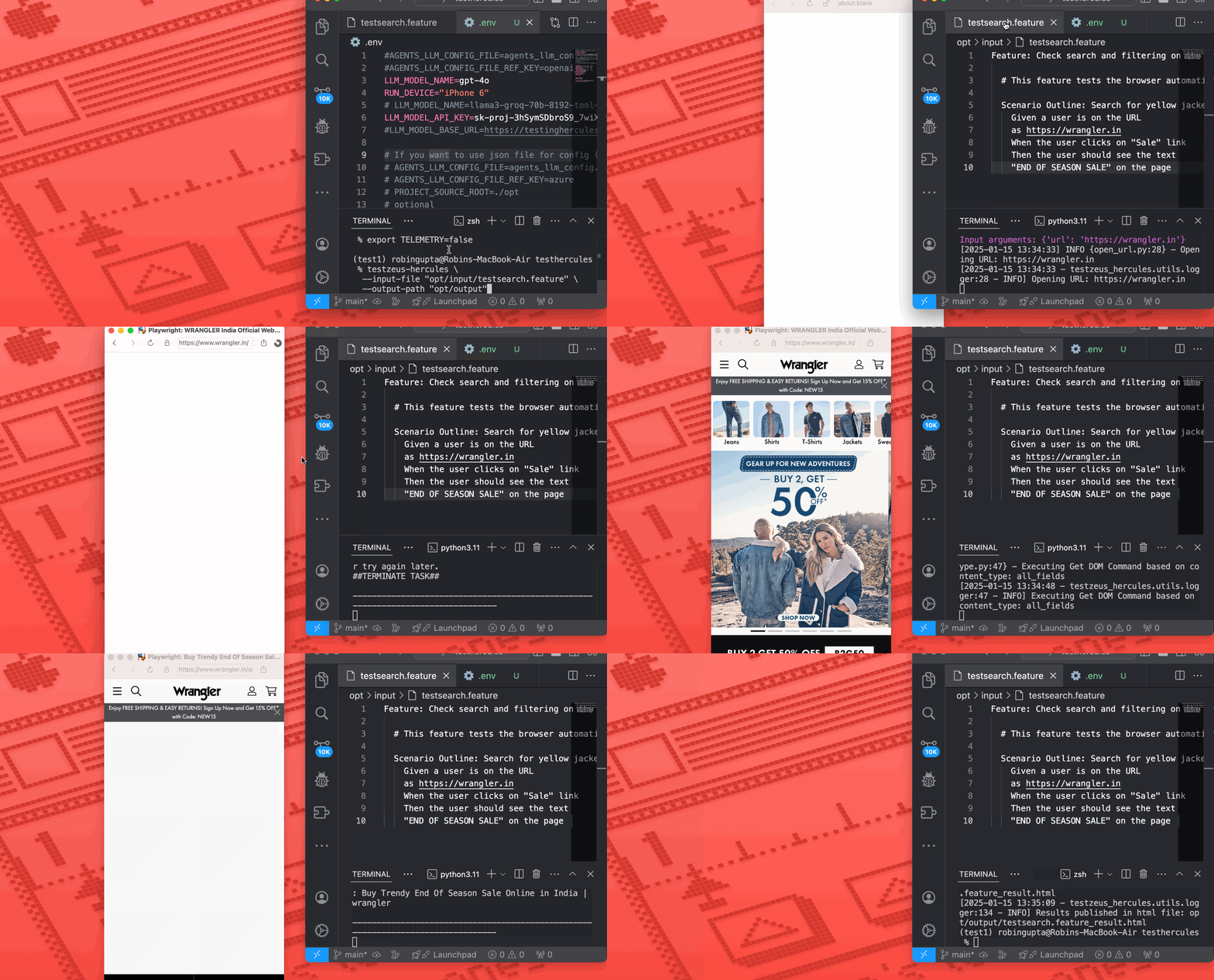
### Mobile Device Emulation
Hercules supports running the browser in "mobile mode" for a variety of device types. Playwright provides a large list of device descriptors here:
[List of mobile devices supported](https://github.com/microsoft/playwright/blob/main/packages/playwright-core/src/server/deviceDescriptorsSource.json)
#### Enabling Mobile Mode
Set the RUN_DEVICE environment variable in your .env (or directly as an environment variable):
```bash
RUN_DEVICE="iPhone 15 Pro Max"
```
When Hercules runs, it will now launch the browser with the corresponding viewport and user-agent for the chosen device, simulating a real mobile environment.
Here's a quick demo:
#### Attaching Advanced Tools
Hercules can be extended with more powerful tools for advanced scenarios. Enable it by setting:
```bash
LOAD_EXTRA_TOOLS=true
```
With LOAD_EXTRA_TOOLS enabled, Hercules looks for additional tool modules that can expand capabilities (e.g., geolocation handling).
For location-based tests, configure:
supported geo providers are maps.co and google
```bash
GEO_API_KEY=somekey
GEO_PROVIDER=maps_co
```
This allows Hercules to alter or simulate user location during test execution, broadening your test coverage for scenarios that rely on user geography.
Note: If you are looking for native app test automation, we've got you covered, as we've built out early support for Appium powered native app automation [here](https://github.com/test-zeus-ai/testzeus-hercules/pull/41)
---
## 🦾 Architecture
Hercules runs on a LangGraph state-machine architecture. The public interface
is still Gherkin in, reports out, but the runtime is structured as planner,
executor, and assertion graph nodes.
For the detailed architecture and current tool formats, see
[docs/Migration/ARCHITECTURE.md](docs/Migration/ARCHITECTURE.md).
For upgrade notes from the AG2 implementation, see
[docs/Migration/MIGRATION.md](docs/Migration/MIGRATION.md).
### Runtime Flow
1. `runner.py` sends a Gherkin scenario or command to `SimpleHercules`.
2. `SimpleHercules` runs a LangGraph `StateGraph` with `planner`, `executor`,
and `assertion` nodes.
3. `PlannerAgent` returns strict JSON containing `plan`, `next_step`,
`target_helper`, `terminate`, and assertion fields.
4. The executor routes `target_helper` to the appropriate navigation agent:
browser, API, security, SQL, time keeper, MCP, executor, or visual helper.
5. Navigation agents bind LangChain `StructuredTool` objects to their LLM and
run a bounded tool-call loop.
6. Tool results are returned to the helper agent, then summarized back to the
planner until the planner terminates or enters assertion handling.
### Tools Library
Hercules tools are regular Python functions registered with `@tool(...)`.
At runtime, `testzeus_hercules/utils/langchain_tools.py` converts them into
LangChain `StructuredTool` objects with Pydantic argument schemas.
Tool inputs are intentionally simple for provider compatibility:
- Use scalar values such as `str`, `float`, `bool`.
- Use `List[Dict[str, str]]` for bulk browser actions.
- Avoid public tuple inputs because some providers reject the generated
`prefixItems` JSON Schema.
- No-argument tools use explicit empty schemas so LangChain does not infer a
fake `kwargs` argument from wrappers.
### Browser Tools and DOM Format
Hercules injects an `md` attribute into DOM elements and uses that value as the
primary browser selector. Browser sensing tools return compact JSON or cleaned
text instead of raw page HTML.
Current browser sensing tools include:
- `get_interactive_elements`: compact clickable/focusable/input-like nodes
- `get_input_fields`: compact form and input nodes
- `get_page_text`: cleaned visible page text
- `geturl`: active page URL
Current browser action tools include:
- `open_url`
- `click`
- `hover`
- `press_key_combination`
- `bulk_enter_text`
- `bulk_select_option`
- `bulk_set_slider`
- `bulk_set_date_time_value`
- `click_and_upload_file`
- `test_page_accessibility`
- `captcha_solver`
DOM output is deliberately compacted because very large or deeply nested DOM
payloads can cause provider-side `INVALID_ARGUMENT` or token-limit errors,
especially on complex enterprise applications.
---
### Non-Functional Capabilities
#### Security Testing via Nuclei
Hercules integrates with **Nuclei** to automate vulnerability scanning directly from Gherkin test cases, identifying issues like **misconfigurations, OWASP Top 10 vulnerabilities**, and API flaws. Security reports are generated alongside testing outputs for seamless CI/CD integration.
#### Accessibility Testing
Hercules supports **WCAG 2.0, 2.1, and 2.2** at **A, AA, and AAA levels**, enabling accessibility testing to ensure compliance with global standards. It identifies accessibility issues early, helping build inclusive and user-friendly applications.
---
## 🔬 Testing and Evaluation: QEvals
We wanted to ensure that Hercules stands up to the task of end-to-end testing with immense precision. So, we have run Hercules through a wide range of tests such as running APIs, interacting with complex UI scenarios, clicking through calendars, or iframes. A full list of evaluations can be found in the [tests folder](tests/).
### Running Tests
To run the full test suite, use the following command:
```bash
make test
```
To run a specific test:
```bash
make test-case
```
Hercules builds on the work done by WebArena and Agent-E, and beyond that, to iron out the issues in the previous, we have written our own test cases catering to complex QA scenarios and have created tests in the `./tests` folder.
---
## 💡 Opinions
We believe that great quality comes from opinions about a product. So we have incorporated a few of our opinions into the product design. We welcome the community to question them, use them, or build on top of them. Here are some examples:
1. **Gherkin is a Good Enough Format for Agents**: Gherkin provides a semi-structured format for the LLMs/AI Agents to follow test intent and user instructions. It provides the right amount of grammar (verbs like Given, When, Then) for humans to frame a scenario and agents to follow the instructions.
2. **Tests Should Be Atomic in Nature**: Software tests should be atomic because it ensures that each test is **focused, independent, and reliable**. Atomic tests target one specific behavior or functionality, making it easier to pinpoint the root cause of failures without ambiguity.
**Here's a good example (Atomic Test)**:
```gherkin
Feature: User Login
Scenario: Successful login with valid credentials
Given the user is on the login page
When the user enters valid credentials
And the user clicks the login button
Then the user should see the dashboard
```
A non-atomic test confuses both the tester and the AI agent.
3. **Open Core and Open Source**: Hercules is built on an **open-core model**, combining the spirit of open source with the support and expertise of a commercial company, **TestZeus**. By providing Hercules as open source (licensed under AGPL v3), TestZeus is committed to empowering the testing community with a robust, adaptable tool that's freely accessible and modifiable. Open source offers transparency, trust, and collaborative potential, allowing anyone to dive into the code, contribute, and shape the project's direction.
4. **Telemetry** : All great products are built on good feedback. We have setup telemetry so that we can take feedback, without disturbing the user. Telemetry is enabled by default, but we also believe strongly in the values of "Trust" and "Transparency" so it can be turned off by the users.
5. **Prompting Hercules** : A detailed guide to write tests for Hercules can be found on our blog [here](https://testzeus.com/blog/mastering-ai-driven-testing-writing-effective-tests-for-hercules) .
---
## 🦾 HyperMind
### Summary
Hercules now gains the power of the Hypermind — a secure, multi-tenant Python sandbox that lets testers inject custom logic, AI-powered heuristics, and human-crafted intelligence directly into test scenarios.
When automation hits a wall, the Hypermind takes over — executing scripts with full Playwright access and controlled permissions.
### Core Capabilities
| Capability | Description |
| --- | --- |
| Run custom scripts from Gherkin | Invoke Python functions as test steps. |
| Full Playwright access | Direct control over browser, page, and context. |
| Auto-injected utilities | Common tools such as `logger`, `asyncio`, and `json` are preloaded. |
| Multi-tenant isolation | Executor, data, API, and restricted levels for safety. |
| Dynamic permissions | Control module access via CLI or environment. |
| Execution proofs | Pre/post screenshots and JSON execution reports. |
| Reusable logic | Use scripts across features or teams. |
### Usage Example
**Gherkin**:
```gherkin
Feature: Product Filtering
Scenario: Apply filter using Hypermind Script
Given a user is on the URL as https://example.com
When execute the apply_filter function from script at "scripts/apply_filter.py" with filter_type as "Turtle Neck"
Then the script should report successful filter application
```
**Python**: opt/scripts/apply_filter.py
```python
async def apply_filter(filter_type: str) -> dict:
"""Apply filter with fallback strategies."""
await page.wait_for_selector('[data-filter-section]')
for selector in [f'input[value="{filter_type}"]', f'label:has-text("{filter_type}") input']:
if await page.locator(selector).count() > 0:
await page.locator(selector).click()
break
count = await page.locator('.product-item').count()
return {"status": "success", "filter": filter_type, "products": count}
```
### Vision
“When automation falters, Hypermind awakens.”
Hypermind Scripts represent the next phase of AI-assisted testing — uniting autonomous precision with human adaptability. It’s not just fallback logic; it’s human creativity made executable.
## 🪙 Token Usage
Hercules is an AI-native solution and relies on LLMs to perform reasoning and actions. Based on our experiments, we have found that a complex use case as below could cost up to **$0.20** using OpenAI's APIs gpt-4o, check the properties printed in testcase output to calculate for your testcase:
```gherkin
Feature: Product Checkout on Demo Store
Scenario: Add a product to cart and verify checkout summary
Given I am on the demo store home page
When I search for "wireless headphones"
And I open the first matching product result
And I add the product to the cart
And I open the cart
Then I should see the selected product in the cart
And the cart total should be displayed
```
---
## ⭐️ Difference from Other Tools
Hercules isn't just another testing tool—it's an **agent**. Powered by synthetic intelligence that can **think, reason, and react** based on requirements, Hercules goes beyond simple automation scripts. We bring an industry-first approach to open-source agents for **software testing**. This means faster, smarter, and more resilient testing cycles, especially for complex platforms.
With **industry-leading performance** and a fully open-source foundation, Hercules combines powerful capabilities with community-driven flexibility, making top-tier testing accessible and transformative for everyone.
---
## 🚀 High-Level Roadmap
- **Enhanced LLM Support**: Integration with more LLMs and support for local LLM deployments.
- **Advanced Tooling**: Addition of more tools to handle complex testing scenarios and environments.
- **Improved DOM Distillation**: Refinements to the DOM distillation process for better efficiency and accuracy.
- **Community Contributions**: Encourage and integrate community-driven features and tools.
- **Extensive Documentation**: Expand documentation for better onboarding and usage.
- **Bounty Program**: Launch a bounty program to incentivize contributions.
---
## 🤗 Contribution
We welcome contributions from the community!
- **Read the [CONTRIBUTING.md](CONTRIBUTING.md) file** to get started.
- **Bounty Program**: Stay tuned for upcoming opportunities! 😀
### How to Contribute Back
1. **Developing Tools**
- If you are developing tools for Hercules and want to contribute to the community, make sure you place the new tools in the `additional_tools` folder in your Pull Request.
2. **Fixes and Enhancements**
- If you have a fix on sensing tools that are fundamental to the system or something in prompts or something in the DOM distillation code, then put the changes in the relevant file and share the Pull Request.
### Extending and Attaching Tools
1. **Creating a New Tool**
- You can start extending by adding tools to Hercules.
- Refer to `testzeus_hercules/core/tools/sql_calls.py` as an example of how to create a new tool.
- The key is the decorator `@tool` over the method that you want Hercules to execute.
- The tool decorator should have a very clear description and name so that Hercules knows how to use the tool.
- Also, in the method, you should be clear with annotations on what parameter is used for what purpose so that function calling in the LLM works best.
2. **Adding the Tool**
- Once you have created the new tools files in some folder path, you can pass the folder path to Hercules in the environment variable so that Hercules can read the new tools during the boot time and make sure that they are available during the execution.
- Use `ADDITIONAL_TOOL_DIRS` to pass the path of the new tools folder where you have kept the new files.
3. **Direct Addition (Not Recommended)**
- In case you opt for adding the tools directly, then just put your new tools in the `testzeus_hercules/core/tools` path of the cloned repository.
- **Note**: This way is not recommended. We prefer you try to use the `ADDITIONAL_TOOL_DIRS` approach.
---
## 🤙 Contact Us
Join us at our [Slack](https://join.slack.com/t/testzeuscommunityhq/shared_invite/zt-376oeo99x-3RAWe_C0H7x9zP0rtACcPA) to connect with the community, ask questions, and contribute.
---
## ✍️ Examples
- **E-bikes Example**: [Link](tests/test_not_for_ci/ebikes/ebikes.feature)
- **Wrangler Example**: [Link](tests/future_test_features/productSearch/productSearch.feature)
---
## 🙇 Credits
Hercules would not have been possible without the great work from the following sources:
1. [Agent-E](https://arxiv.org/abs/2407.13032)
2. [Q*](https://arxiv.org/abs/2312.10868)
3. [Agent Q](https://arxiv.org/abs/2408.07199)
4. [Autogen](https://arxiv.org/pdf/2308.08155) as historical inspiration for earlier agent orchestration
The Hercules project is inferred and enhanced over the existing project of [Agent-E](https://github.com/EmergenceAI/Agent-E). We have improved lots of cases to make it capable of doing testing, especially in the area of complex DOM navigation and iframes. We have also added new tools and abilities for complex enterprise navigation so that Hercules can perform better work over the base framework we had picked.
The current migration branch runs on LangGraph, LangChain tool binding, and MCP-compatible integrations.
Hercules also picks some inspiration from the legacy TestZeus repo [here](https://www.testzeus.org).
---
With Hercules, testing is no longer just a step in the process—it's a powerful, streamlined experience that brings quality to the forefront.
## 🚀 Footnotes: On virtual environments and other important commands in Python
If you're coming from a **Java** or **JavaScript** background, working with Python might feel a bit different at first—but don't worry! Python's simplicity, combined with powerful tools like virtual environments, makes managing dependencies easy and efficient.
### 🎓 **Understanding Virtual Environments**
In Java, you might use tools like Maven or Gradle to manage project dependencies, or in JavaScript, you'd use `npm` or `yarn`. In Python, **virtual environments** serve a similar purpose. They allow you to create isolated spaces for your project's dependencies, avoiding conflicts with other Python projects on your system.
Think of it like a sandboxed environment where TestZeus Hercules and its dependencies live independently from other Python packages.
### 🏗️ **Setup Instructions**
#### ✅ **1. Prerequisites**
First, ensure a supported Python version is installed. The package supports
Python `>=3.11,<3.14`, and this branch targets Python 3.13 in CI. You can
verify your version by running:
```bash
python --version
# or
python3 --version
```
If Python isn't installed, [download it here](https://www.python.org/downloads/) or if you are on Windows, just follow the instructions [here](https://github.com/test-zeus-ai/testzeus-hercules/#%EF%B8%8F-running-hercules-on-a-windows-machine).
---
#### 🏰 **2. Creating and Activating a Virtual Environment**
To set up a clean Python environment for your project:
```bash
# Create a virtual environment named 'venv'
python -m venv venv
# Activate the virtual environment
# On Windows:
venv\Scripts\activate
# On macOS/Linux:
source venv/bin/activate
```
You'll notice your terminal prompt changes—this indicates the virtual environment is active.
To **deactivate** the virtual environment later, simply run:
```bash
deactivate
```
---
#### 📥 **3. Installing TestZeus Hercules**
Once your virtual environment is activated, install the latest version of TestZeus Hercules directly from PyPI:
```bash
pip install testzeus-hercules
```
---
#### 🔄 **4. Updating TestZeus Hercules**
To update to the latest version, use:
```bash
pip install --upgrade testzeus-hercules
```
---
#### ❌ **5. Uninstalling TestZeus Hercules**
If you need to remove the package:
```bash
pip uninstall testzeus-hercules
```
---
#### 🔍 **6. Checking Installed Packages**
To verify that TestZeus Hercules is installed and check its version:
```bash
pip list
```
---
### 🔗 **Additional Tips for Java/JS Developers**
- **`pip`** is like `npm` or `mvn`—it's used for installing and managing Python packages.
- Python's simplicity means fewer configuration files—most things can be done directly from the command line.
---
### 💡 **Next Steps**
Now that TestZeus Hercules is installed and ready to go, dive into [our documentation](https://github.com/test-zeus-ai/testzeus-hercules/) to learn how to create and run your first test cases with ease!
---
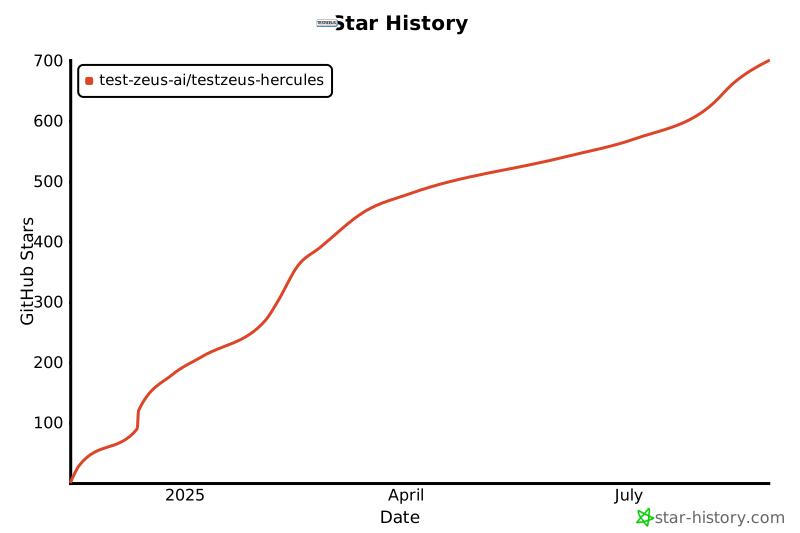
## Star History
[](https://star-history.com/#test-zeus-ai/testzeus-hercules&Date)
## ✅ Citation
If you use Hercules in your research or project, please cite:
```
@software{testzeus_hercules2024,
author = {Agnihotri, Shriyansh and Gupta, Robin},
title = {Hercules: World's first open source testing agent},
year = {2024},
publisher = {GitHub},
url = {https://github.com/test-zeus-ai/testzeus-hercules/}
}
```
# 💪 Hercules
[](https://pepy.tech/projects/testzeus-hercules)

[](https://github.com/test-zeus-ai/testzeus-hercules/actions/workflows/main-test.yml)
[](https://join.slack.com/t/testzeuscommunityhq/shared_invite/zt-376oeo99x-3RAWe_C0H7x9zP0rtACcPA)
Testing modern web applications can be difficult, with frequent changes and complex features making it hard to keep up. That's where **Hercules** comes in. Hercules is the world's first open-source testing agent, built to handle the toughest testing tasks so you don't have to. It turns simple, easy-to-write Gherkin steps into fully automated **end to end** tests—no coding skills needed. Whether you're working with tricky enterprise platforms or running tests in your CI/CD pipeline, Hercules adapts to your needs and takes care of the details. With Hercules, testing becomes simple, reliable, and efficient, helping teams everywhere deliver better software. Here's a quick demo of lead creation using natural english language test (without any code):

As you saw, using Hercules is as simple as feeding in your Gherkin features, and getting the results:

At [TestZeus](https://www.testzeus.com), we believe that **trustworthy and open-source code** is the backbone of innovation. That's why we've built Hercules to be transparent, reliable, and community-driven.
Our mission? To **democratize and disrupt test automation**, making top-tier testing accessible to everyone, not just the elite few. No more gatekeeping—everyone deserves a hero on their testing team!
### Video Tutorials: [@TestZeus](https://www.youtube.com/@TestZeus)
---
#### 🚀 **Getting Started with TestZeus Hercules**
- **Introduction to TestZeus Hercules**
Learn about the core features of TestZeus Hercules and how it can streamline end-to-end testing for your projects.
[](https://youtu.be/_m_NDjM6aZ0?si=ArtVKz8uSgGWTcAK)
- **Installation and Setup Guide**
Step-by-step instructions for installing and configuring TestZeus Hercules in your environment.
_[Watch now](https://youtu.be/9D-SZGoDrfc?si=GL0IArWkB1ZgBdx5)_
---
#### 🧪 **Writing and Executing Test Cases**
- **Creating BDD Test Cases**
Learn how to write Behavior-Driven Development (BDD) test cases for Hercules and use dynamic testdata.
_[Watch now](https://www.youtube.com/watch?v=yJD0cZ7Bx6Q&t)_
---
#### 🌐 **Integrations and Advanced Features**
- **Testing Multilingual content**
Learn how Hercules interacts with web browsers to perform Testing on Multilingual content via Multilingual testcase.
_[Watch now](https://youtu.be/vI9iGSqKpGA?si=6NGAvKnwFboSyHT2)_
---
#### 🛠️ **Customization and Community Tools**
- **Enhancing Hercules with Community-Driven Tools**
Discover how to customize Hercules and incorporate additional tools provided by the community.
_[Watch now](https://youtu.be/C8hUy5leRF0?si=yVMpZ7WFcI01BoI3)_
---
#### 🛠️ **API Testing**
- **API testing all the way, new ways to do end to end**
_[Watch now](https://youtu.be/qMt89DQH6LQ?si=lcSJbKOCaqqUGeQ8)_
---
#### 🛠️ **Security Testing**
- **Security Testing done end to end**
_[Watch now](https://youtu.be/o6MmfTakIh4?si=JL8iu4e3i85SWrxU)_
#### 🛠️ **Visual validations and assertions**
- **Using vision capabilities to check snapshots and components on the application**
_[Watch now](https://youtu.be/EKzllLEguhw)_
#### 🐍 **Python Sandbox Execution**
- **Execute custom Python scripts directly from Gherkin tests**
Run complex automation workflows, custom business logic, and reusable components with full Playwright access. Perfect for scenarios that need advanced selector strategies, conditional logic, or data processing. [Read the docs](docs/python_sandbox_execution.md)
**Quick Example:**
```gherkin
# In your feature file
And execute the apply_filter function from script at "scripts/apply_filter.py" with filter_type as "Turtle Neck"
```
```python
# In opt/scripts/apply_filter.py
async def apply_filter(filter_type: str) -> dict:
"""Apply filter with multiple fallback strategies."""
# page, logger, and other tools automatically available!
await page.wait_for_selector('[data-filter-section]')
# Try multiple selector strategies
for selector in [f'input[value="{filter_type}"]',
f'label:has-text("{filter_type}") input']:
if await page.locator(selector).count() > 0:
await page.locator(selector).click()
break
return {"status": "success", "filter": filter_type}
```
**Features:**
- 🎯 Full Playwright API access
- 🔒 Multi-tenant security (executor, data, API, restricted modes)
- 📦 Auto-injected modules (page, browser, logger, asyncio, etc.)
- 🔄 Reusable across multiple tests
- ⚙️ Configurable via environment variables
**Configuration:**
```bash
# Set tenant for module access
export SANDBOX_TENANT_ID="executor_agent" # Full access: requests, pandas, numpy, BeautifulSoup
# Or use CLI
testzeus-hercules --sandbox-tenant-id executor_agent --input-file test.feature
```
---
## ⚙️ Installation and Usage
Hercules offers multiple ways to get started, catering to different user preferences and requirements.
If you are new to the Python ecosystem and don't know where to begin, dont worry and read the footnotes on understanding the basics.
For a quick taste of the solution, you can try the notebook here:
[](https://colab.research.google.com/drive/1YiZsXem1POTwkcr17QqflXnihhuSqwM2?usp=sharing)
- **Note**: Colab might ask you to restart the session after installing TestZeus Hercules dependencies. Please restart the session if required and continue the execution. Also, we recommend one of the approaches below for getting the full flavor of the solution.
### Approach 1: Using PyPI Package
#### Installation
Install Hercules from PyPI:
```bash
pip install testzeus-hercules
```
Hercules uses Playwright to interact with web pages, so you need to install Playwright and its dependencies:
```bash
playwright install --with-deps
```
For detailed information about project structure and running tests, please refer to our [Run Guide](docs/run_guide.md).
For migration-specific runtime behavior, see
[docs/Migration/MIGRATION.md](docs/Migration/MIGRATION.md) and
[docs/Migration/ARCHITECTURE.md](docs/Migration/ARCHITECTURE.md).
#### Basic Parameters
Once installed, you will need to provide some basic parameters to run Hercules:
- `--input-file INPUT_FILE`: Path to the input Gherkin feature file to be tested.
- `--output-path OUTPUT_PATH`: Path to the output directory. The path of JUnit XML result and HTML report for the test run.
- `--test-data-path TEST_DATA_PATH`: Path to the test data directory. The path where Hercules expects test data to be present; all test data used in feature testing should be present here.
- `--project-base PROJECT_BASE`: Path to the project base directory. This is an optional parameter; if you populate this, `--input-file`, `--output-path`, and `--test-data-path` are not required, and Hercules will assume all the three folders exist in the following format inside the project base:
```text
PROJECT_BASE/
├── gherkin_files/
├── input/
│ └── test.feature
├── log_files/
├── output/
│ └── run_/
│ ├── test.feature_result.html
│ └── test.feature_result.xml
├── proofs/
│ └── User_opens_Google_homepage/
│ └── run_/
│ ├── network_logs.json
│ ├── screenshots/
│ └── videos/
└── test_data/
└── test_data.txt
```
- `--agents-llm-config-file AGENTS_LLM_CONFIG_FILE`: Optional path to an
`agents_llm_config.json` file for per-agent model routing.
- `--agents-llm-config-file-ref-key AGENTS_LLM_CONFIG_FILE_REF_KEY`: Optional
top-level provider/profile key inside that file.
- `--llm-model`, `--llm-model-api-key`, `--llm-model-base-url`, and related
direct LLM flags are still supported for simple single-profile setups. Use
`agents_llm_config.json` when you need separate planner, navigation, memory,
and helper model settings.
#### Environment Variables
In addition to command-line parameters, Hercules supports various environment variables for configuration:
- `LLM_MODEL_NAME`: Model name for direct single-model setup. Example: `gpt-4o`
- `LLM_MODEL_API_KEY`: API key for the selected model provider.
- `LLM_MODEL_BASE_URL`: Optional OpenAI-compatible base URL.
- `AGENTS_LLM_CONFIG_FILE`: Optional path to `agents_llm_config.json` for
per-agent model routing.
- `AGENTS_LLM_CONFIG_FILE_REF_KEY`: Optional top-level provider/profile key to
activate from that config file.
- `BROWSER_TYPE`: Type of browser to use (`chromium`, `firefox`, `webkit`). Default: `chromium`
- `HEADLESS`: Run browser in headless mode (`true`, `false`). Default: `true`
- `BROWSER_RESOLUTION`: Browser window resolution (format: `width,height`). Example: `1920,1080`
- `BROWSER_COOKIES`: Set cookies for the browser context. Format: JSON array of cookie objects. Example: `[{"name": "session", "value": "123456", "domain": "example.com", "path": "/"}]`
- `RECORD_VIDEO`: Record test execution videos (`true`, `false`). Default: `true`
- `TAKE_SCREENSHOTS`: Take screenshots during test (`true`, `false`). Default: `true`
For a complete list of environment variables, see our [Environment Variables Guide](docs/environment_variables.md).
#### Running Hercules
Set the direct model environment variables and run Hercules:
```bash
export LLM_MODEL_NAME=gpt-4o
export LLM_MODEL_API_KEY=replace-me
export LLM_MODEL_BASE_URL=https://api.openai.com/v1
testzeus-hercules \
--input-file opt/input/test.feature \
--output-path opt/output \
--test-data-path opt/test_data
```
Use `agents_llm_config.json` only when you need separate planner, navigation,
memory, and helper model settings; see `docs/run_guide.md`.
## ⚙️ Running Hercules on a Windows Machine
To set up and run Hercules on a Windows machine:
1. **Open PowerShell in Administrator Mode:**
- Click on the **Start Menu**, search for **PowerShell**, and right-click on **Windows PowerShell**.
- Select **Run as Administrator** to open PowerShell in administrator mode.
2. **Navigate to the Helper Scripts Folder:**
- Use the `cd` command to navigate to the folder containing the `hercules_windows_setup.ps1` script. For example:
```powershell
cd path\to\helper_scripts
```
3. **Run the Setup Script:**
- Execute the script to install and configure Hercules:
```powershell
.\hercules_windows_setup.ps1
```
4. **Follow On-Screen Instructions:**
- The script will guide you through installing Python, Playwright, FFmpeg, and other required dependencies.
5. **Run Hercules:**
- Once the setup is complete, you can run Hercules from PowerShell or Command Prompt using the following command:
```bash
testzeus-hercules --input-file opt/input/test.feature --output-path opt/output --test-data-path opt/test_data
```
---
#### Supported AI Models for TestZeus-Hercules
- OpenAI: Use models with reliable tool-calling support, such as GPT-4o,
GPT-4.1, o-series models, or GPT-5 family models where available.
- Anthropic: Use Claude models with tool-calling support.
- Gemini / Vertex AI: Supported through OpenAI-compatible gateways such as
LiteLLM. Keep tool schemas simple; tuple-style public tool inputs are not
provider-safe.
- Gemma: Supported through gateways or local providers that expose compatible
chat and tool-calling behavior.
- Groq, Mistral, Ollama, DeepSeek, Bedrock, Azure, and other providers can be
used when they support OpenAI-compatible chat and function/tool calling.
- Local: Ollama and other local providers can be used when their model reliably
returns strict planner JSON and supports the required tool-calling behavior.
The sample Ollama Modelfile lives at `docs/Migration/Modelfile`.
The planner model should be strong at structured JSON reasoning. Navigation
models must support tool calling. For a quick run, direct `LLM_MODEL_*`
environment variables are enough. Use `agents_llm_config.json` only when you
need separate planner, navigation, memory, and helper model settings. See
`docs/run_guide.md` and `docs/environment_variables.md` for full examples,
including LiteLLM proxy setup.
#### Execution Flow
Upon running the command:
- Hercules will start and attempt to open a web browser (default is Chromium).
- `SimpleHercules` creates a LangGraph state graph for the run.
- The planner node turns the feature file into strict JSON containing the
current plan, `next_step`, `target_helper`, and assertion fields.
- The executor node routes the planner's `target_helper` to a navigation helper
such as `browser_nav_agent`, `api_nav_agent`, `sec_nav_agent`, `sql_nav_agent`,
`time_keeper_nav_agent`, `mcp_nav_agent`, or `executor_nav_agent`.
- Navigation helpers bind registered LangChain `StructuredTool` objects and run
a bounded tool-call loop. Browser tasks use tools such as `open_url`, `click`,
`get_interactive_elements`, `bulk_enter_text`, and `bulk_select_option`.
- Helper responses are fed back to the planner until the planner terminates or
routes to assertion handling.
#### Output and Logs
Once the execution is completed:
- Logs explaining the sequence of events are generated.
- The best place to start is the `output-path`, which will have the JUnit XML result file as well as an HTML report regarding the test case execution.
- You can also find proofs of execution such as video recordings, screenshots per event, and network logs in the `proofs` folder.
- To inspect the planner and helper trace, start with `agent_inner_thoughts.json`
under `log_files//run_/`.
#### Sample Feature File
Here's a sample feature file:
```gherkin
Feature: Product Search on Demo Store
Scenario: Successfully find a product
Given I am on the demo store home page
When I enter "wireless headphones" in the search field
And I click on the "Search" button
And I open the first matching product result
Then I should see the product details page
And I should see "wireless headphones" in the product title or description
```
#### Sample Result Screenshot
##### Sample HTML Result Screenshot

##### Sample XML Result Screenshot

---
### Approach 2: Using Docker
For all the scale lovers, Hercules is also available as a Docker image.
#### Pull the Docker Image
```bash
docker pull testzeus/hercules:latest
```
#### Running Hercules in Docker
Run the container using:
```bash
docker run --env-file=.env \
-v ./agents_llm_config.json:/testzeus-hercules/agents_llm_config.json \
-v ./opt:/testzeus-hercules/opt \
--rm -it testzeus/hercules:latest
```
- **Environment Variables**: All the required environment variables can be set by passing an `.env` file to the `docker run` command.
- **LLM Configuration**: Either pass direct `LLM_MODEL_*` values in `.env` or
mount `agents_llm_config.json` and set `AGENTS_LLM_CONFIG_FILE=agents_llm_config.json`
plus `AGENTS_LLM_CONFIG_FILE_REF_KEY=`. LiteLLM is one useful
provider profile when you run through an OpenAI-compatible proxy.
- **Mounting Directories**: Mount the `opt` folder to the Docker container so that all the inputs can be passed to Hercules running inside the container, and the output can be pulled out for further processing. The repository has a sample `opt` folder that can be mounted easily.
- **Simplified Parameters**: In the Docker case, there is no need for using `--input-file`, `--output-path`, `--test-data-path`, or `--project-base` as they are already handled by mounting the `opt` folder in the `docker run` command.
#### Browser Access in Docker
- While running in Docker mode, understand that Hercules has access only to a headless web browser.
- If you want Hercules to connect to a visible web browser, try the CDP URL option in the environment file. This option can help you connect Hercules running in your infrastructure to a remote browser like BrowserBase or your self-hosted grid.
- Use `CDP_ENDPOINT_URL` to set the CDP URL of the Chrome instance that has to be connected to the agent.
### Docker and Remote Browser Support
When running Hercules in Docker, you can connect to remote browser instances using various platforms:
1. **BrowserStack Integration**:
```bash
export BROWSERSTACK_USERNAME=your_username
export BROWSERSTACK_ACCESS_KEY=your_access_key
export CDP_ENDPOINT_URL=$(python helper_scripts/browser_stack_generate_cdp_url.py)
```
2. **LambdaTest Integration**:
```bash
export LAMBDATEST_USERNAME=your_username
export LAMBDATEST_ACCESS_KEY=your_access_key
export CDP_ENDPOINT_URL=$(python helper_scripts/lambda_test_generate_cdp_url.py)
```
3. **BrowserBase Integration**:
```bash
export CDP_ENDPOINT_URL=wss://connect.browserbase.com?apiKey=your_api_key
```
4. **AnchorBrowser Integration**:
```bash
export CDP_ENDPOINT_URL=wss://connect.anchorbrowser.io?apiKey=your_api_key
```
Note: Video recording is only supported on platforms that use connect_over_cdp (BrowserBase, AnchorBrowser). Platforms using the connect API (BrowserStack, LambdaTest) do not support video recording.
#### Output and Logs
After the command completion:
- The container terminates, and output is written in the mounted `opt` folder, in the same way as described in the directory structure.
- You will find the JUnit XML result file, HTML reports, proofs of execution, and logs in the respective folders.
---
### Approach 3: Building and running from Source Code
For the hardcore enthusiasts, you can use Hercules via the source code to get a complete experience of customization and extending Hercules with more tools.
#### Prerequisites
- Ensure you have **Python 3.13** installed for the branch CI target. The
package metadata supports Python `>=3.11,<3.14`.
#### Steps to Run from Source
1. **Clone the Repository**
```bash
git clone git@github.com:test-zeus-ai/testzeus-hercules.git
```
2. **Navigate to the Directory**
```bash
cd testzeus-hercules
```
3. **Use Make Commands**
The repository provides handy `make` commands.
- Use `make help` to check out possible options.
4. **Install UV**
```bash
make setup-uv
```
5. **Install Dependencies**
```bash
make install
```
6. **Configure the model**
```bash
export LLM_MODEL_NAME=gpt-4o
export LLM_MODEL_API_KEY=replace-me
export LLM_MODEL_BASE_URL=https://api.openai.com/v1
```
Use `agents_llm_config.json` only when you need per-agent routing for
planner, navigation, memory, and helper models. See `docs/run_guide.md`.
7. **Run Hercules**
```bash
make run
```
- This command reads the relevant feature files from the `opt` folder and executes them, putting the output in the same folder.
- The `opt` folder has the following format:
```
opt/
├── input/
│ └── test.feature
├── output/
│ └── run_/
│ ├── test.feature_result.html
│ └── test.feature_result.xml
├── log_files/
├── proofs/
│ └── User_opens_Google_homepage/
│ └── run_/
│ ├── network_logs.json
│ ├── screenshots/
│ └── videos/
└── test_data/
└── test_data.txt
```
8. **Interactive Mode**
You can also run Hercules in interactive mode as an instruction execution agent, which is more useful for RPA and debugging test cases and Hercules's behavior on new environments while building new tooling and extending the agents.
```bash
make run-interactive
```
- This will trigger an input prompt where you can chat with Hercules, and it will perform actions based on your commands.
### Approach 4: Setting Up via helper_script_custom.sh
For those who want a fully automated setup experience on Linux/macOS
environments, create the script below locally. It installs TestZeus Hercules and
sets up the base `opt` project directories with direct `LLM_MODEL_*`
environment variables for a simple local run.
#### Prerequisites
- Ensure you have **Python 3.13** installed, or another supported Python
version in the `>=3.11,<3.14` range.
#### Steps to Run from helper_script_custom.sh
1. **Download or Create the Script**
You can copy the script below into a file named helper_script_custom.sh:
```bash
#!/bin/bash
# set -ex
# curl -sS https://bootstrap.pypa.io/get-pip.py | python3.13
# Create a new Python virtual environment named 'test'
python3.13 -m venv test
# Activate the virtual environment
source test/bin/activate
# Upgrade the 'testzeus-hercules' package
pip install --upgrade testzeus-hercules
playwright install --with-deps
# create a new directory named 'opt'
mkdir -p opt/input opt/output opt/test_data
# Create a minimal environment file. For per-agent model routing, see
# docs/run_guide.md and docs/environment_variables.md.
cat > .env <<'ENV'
LLM_MODEL_NAME=gpt-4o
LLM_MODEL_API_KEY=replace-me
LLM_MODEL_BASE_URL=https://api.openai.com/v1
LLM_MODEL_API_TYPE=openai
HEADLESS=true
RECORD_VIDEO=true
TAKE_SCREENSHOTS=true
ENV
# prompt user that they need to edit the .env file, halt the script and open the file in an editor
echo "The '.env' file is located at $(pwd)/.env"
read -p "Press Enter if file is updated"
# Create starter input files.
cat > opt/input/test.feature <<'FEATURE'
Feature: Example browser check
Scenario: Open a public page
Given I open the page "https://example.com"
Then the page should contain "Example Domain"
FEATURE
cat > opt/test_data/test_data.txt <<'DATA'
{}
DATA
# Run the 'testzeus-hercules' command with the specified parameters
testzeus-hercules --project-base=opt
```
2. **Make the Script Executable and Run**
```bash
chmod +x helper_script_custom.sh
./helper_script_custom.sh
```
- The script will:
- Create a Python virtual environment named `test`.
- Install `testzeus-hercules` and Playwright dependencies.
- Create the `opt` folder structure for input, output, and test data.
- Create sample `.env`, feature, and test data files.
- Prompt you to edit `.env` before running.
3. **Script Output**
- After completion, the script automatically runs `testzeus-hercules --project-base=opt`.
- Your logs and results will appear in `opt/output`, `opt/log_files`, and `opt/proofs`.
---
## 📝 Configuration Details
For a comprehensive guide to all environment variables and configuration options available in TestZeus Hercules, please refer to our [Environment Variables and Configuration Guide](docs/environment_variables.md). This document provides detailed information about core environment variables, LLM configuration, browser settings, testing configuration, device configuration, logging options, and more.
### Telemetry
Telemetry is **enabled by default**. When enabled, Hercules sends an anonymous
usage summary to help us improve the product. This includes:
- A randomly generated installation ID
- The email you optionally provide at first run
- A config snapshot (mode, browser type, headless, etc.)
- Folder paths used for the run (project root, input, test data, output) — note
that these paths may include your OS username
**To disable telemetry, set `ENABLE_TELEMETRY=0`:**
```bash
export ENABLE_TELEMETRY=0
```
### Auto Mode
If `AUTO_MODE` is set to `1`, Hercules will not request an email during the run:
```bash
export AUTO_MODE=1
```
### Understanding the Environment File (`.env`)
To configure Hercules in detail:
- Copy the base environment file:
```bash
cp .env-example .env
```
## 🔌 MCP Support
Hercules includes an MCP Navigation Agent that can connect to MCP servers over `stdio`, `sse`, and `streamable-http`. It works out of the box with Composio-generated MCP servers.
- Quick start guide: see `docs/MCP_Usage.md`
- LangGraph lifecycle details: see `docs/Migration/ARCHITECTURE.md#MCP-Runtime`
- Composio docs: https://docs.composio.dev/docs/quickstart
Minimal setup:
1) Create `mcp_servers.json` at the repo root:
```
{
"mcpServers": {
"server_name": {
"transport": "streamable-http",
"url": "",
"headers": {
"Authorization": "Bearer "
}
}
}
}
```
2) In `.env`:
```
MCP_ENABLED=true
MCP_SERVERS=mcp_servers.json
MCP_TIMEOUT=30
```
Then, run Hercules as usual. The MCP helper waits for server readiness before
binding tools, discovers each server tool, and exposes it as a dynamic
LangChain `StructuredTool` while preserving the server tool's input schema.
### Example Testcase (Simple)
```
Feature: Read emails from Gmail
Scenario: Retrieve OTP from Gmail using MCP
Given Gmail is configured using MCP
When I connect to Gmail
And I read the email with OTP
```
For more testcases visit [MCP docs](docs/MCP_Usage.md).
Hercules can also run as an MCP server for other MCP clients:
```bash
testzeus-hercules-mcp
```
This starts a FastMCP streamable HTTP server at
`http://0.0.0.0:8000/mcp` by default and exposes tools such as
`generate_gherkin`, `run_test`, and `get_test_results`.
- Hercules considers a base folder that is by default `./opt` but can be changed by the environment variable `PROJECT_SOURCE_ROOT`.
- **Connecting to an Existing Chrome Instance**
- This is extremely useful when you are running Hercules in Docker for scale.
- You can connect Hercules running in your infrastructure to a remote browser like BrowserBase or your self-hosted grid.
- Use `CDP_ENDPOINT_URL` to set the CDP URL of the Chrome instance that has to be connected to the agent.
- **Controlling Other Behaviors**
You can control other behaviors of Hercules based on the following environment variables:
- `HEADLESS=true`
- `RECORD_VIDEO=false`
- `TAKE_SCREENSHOTS=false`
- `BROWSER_TYPE=chromium` (options: `firefox`, `chromium`)
- `CAPTURE_NETWORK=false`
For example: If you would like to run with a "Headful" browser, you can set the environment variable with ```export HEADLESS=false``` before triggering Hercules.
- **How to Use Tracing in Playwright**
Tracing in Playwright allows you to analyze test executions and debug issues effectively. To enable tracing in your Playwright tests, follow these steps:
1. Ensure that tracing is enabled in the configuration.
2. Traces will be saved to the specified path: `{proof_path}/traces/trace.zip`.
#### Enabling Tracing
To enable tracing, set the following environment variable:
```bash
export ENABLE_PLAYWRIGHT_TRACING=true
```
### LLM Configuration Details
Use direct `LLM_MODEL_*` environment variables for the simplest local runs.
Use `agents_llm_config.json` only when you need per-agent model routing across
`planner_agent`, `nav_agent`, and `helper_agent`. The full schema and examples
live in `docs/run_guide.md` and `docs/environment_variables.md`.
#### LiteLLM proxy integration
Hercules can route its LangGraph agents through a
[LiteLLM proxy](https://docs.litellm.ai/docs/simple_proxy). This provides one compatible endpoint for models from multiple providers while preserving separate model and generation settings for the planner, navigation, and helper roles.
Create `agents_llm_config.json` with a top-level `litellm` profile:
```json
{
"litellm": {
"planner_agent": {
"model_name": "",
"model_api_key": "",
"model_base_url": "http://localhost:4000/v1",
"model_api_type": "litellm",
"llm_config_params": { "temperature": 0, "max_tokens": 4096 }
},
"nav_agent": {
"model_name": "",
"model_api_key": "",
"model_base_url": "http://localhost:4000/v1",
"model_api_type": "litellm",
"llm_config_params": { "temperature": 0, "max_tokens": 4096 }
},
"helper_agent": {
"model_name": "",
"model_api_key": "",
"model_base_url": "http://localhost:4000/v1",
"model_api_type": "litellm",
"llm_config_params": { "temperature": 0, "max_tokens": 4096 }
}
}
}
```
Activate the profile and run Hercules:
```bash
export AGENTS_LLM_CONFIG_FILE=./agents_llm_config.json
export AGENTS_LLM_CONFIG_FILE_REF_KEY=litellm
testzeus-hercules --project-base=opt
```
The model names may be LiteLLM model aliases, so each agent role can be routed
independently by changing its `model_name`. Navigation models must support
native tool calling, and planner models must reliably return strict JSON.
Guided test creation (`--guided` or `--test`) uses the LiteLLM-backed Gherkin
generator and currently requires the active profile to be named `litellm`.
Keep API keys in environment-managed or private configuration and do not commit
them to the repository.
---
## ⚡️ Features
Hercules is production ready, and packs a punch with features:
### Gherkin In, Results Out
Hercules makes testing as simple as Gherkin in, results out. Just feed your end-to-end tests in Gherkin format, and watch Hercules spring into action. It takes care of the heavy lifting by running your tests automatically and presenting results in a neat JUnit format. No manual steps, no fuss—just efficient, seamless testing.
### Free and Open Source
With Hercules, you're harnessing the power of open source with zero licensing fees. Feel free to dive into the code, contribute, or customize it to your heart's content. Hercules is as free as it is mighty, giving you the flexibility and control you need.
### Enterprise UI Ready
Built to handle intricate enterprise UIs and other complex platforms with ease. Whether it's complicated DOM or multi-step business workflows, Hercules is ready and configurable.
### No Code Required
Say goodbye to complex scripts and elusive locators. Hercules is here to make your life easier with its no-code approach, taking care of the automation of Gherkin features so you can focus on what matters most—building quality software.
### Multilingual
With multilingual support right out of the box, Hercules is ready to work with teams across the globe. Built to bridge language gaps, it empowers diverse teams to collaborate effortlessly on a unified testing platform.
### Precisely Accurate
Hercules records video of the execution, and captures network logs as well, so that you dont have to deal with "It works on my computer".
### No Maintenance
Autonomous and adaptive, Hercules takes care of itself with auto-healing capabilities. Forget about tedious maintenance—Hercules adjusts to changes and stays focused on achieving your testing goals.
### UI Assertions
Grounded in the powerful foundations of TestZeus, Hercules tackles UI assertions with unwavering focus, ensuring that no assertion goes unchecked and no bug goes unnoticed. It's thorough, it's sharp, and it's ready for action.
### CI/CD Ready
Run Hercules locally or integrate it seamlessly into your CI/CD pipeline. Docker-native and one-command ready, Hercules fits smoothly into your deployment workflows, keeping testing quick, consistent, and hassle-free.
With Hercules, testing is no longer just a step in the process—it's a powerful, streamlined experience that brings quality to the forefront.
### Mobile Device Emulation
Hercules supports running the browser in "mobile mode" for a variety of device types. Playwright provides a large list of device descriptors here:
[List of mobile devices supported](https://github.com/microsoft/playwright/blob/main/packages/playwright-core/src/server/deviceDescriptorsSource.json)
#### Enabling Mobile Mode
Set the RUN_DEVICE environment variable in your .env (or directly as an environment variable):
```bash
RUN_DEVICE="iPhone 15 Pro Max"
```
When Hercules runs, it will now launch the browser with the corresponding viewport and user-agent for the chosen device, simulating a real mobile environment.
Here's a quick demo:

#### Attaching Advanced Tools
Hercules can be extended with more powerful tools for advanced scenarios. Enable it by setting:
```bash
LOAD_EXTRA_TOOLS=true
```
With LOAD_EXTRA_TOOLS enabled, Hercules looks for additional tool modules that can expand capabilities (e.g., geolocation handling).
For location-based tests, configure:
supported geo providers are maps.co and google
```bash
GEO_API_KEY=somekey
GEO_PROVIDER=maps_co
```
This allows Hercules to alter or simulate user location during test execution, broadening your test coverage for scenarios that rely on user geography.
Note: If you are looking for native app test automation, we've got you covered, as we've built out early support for Appium powered native app automation [here](https://github.com/test-zeus-ai/testzeus-hercules/pull/41)
---
## 🦾 Architecture
Hercules runs on a LangGraph state-machine architecture. The public interface
is still Gherkin in, reports out, but the runtime is structured as planner,
executor, and assertion graph nodes.
For the detailed architecture and current tool formats, see
[docs/Migration/ARCHITECTURE.md](docs/Migration/ARCHITECTURE.md).
For upgrade notes from the AG2 implementation, see
[docs/Migration/MIGRATION.md](docs/Migration/MIGRATION.md).
### Runtime Flow
1. `runner.py` sends a Gherkin scenario or command to `SimpleHercules`.
2. `SimpleHercules` runs a LangGraph `StateGraph` with `planner`, `executor`,
and `assertion` nodes.
3. `PlannerAgent` returns strict JSON containing `plan`, `next_step`,
`target_helper`, `terminate`, and assertion fields.
4. The executor routes `target_helper` to the appropriate navigation agent:
browser, API, security, SQL, time keeper, MCP, executor, or visual helper.
5. Navigation agents bind LangChain `StructuredTool` objects to their LLM and
run a bounded tool-call loop.
6. Tool results are returned to the helper agent, then summarized back to the
planner until the planner terminates or enters assertion handling.
### Tools Library
Hercules tools are regular Python functions registered with `@tool(...)`.
At runtime, `testzeus_hercules/utils/langchain_tools.py` converts them into
LangChain `StructuredTool` objects with Pydantic argument schemas.
Tool inputs are intentionally simple for provider compatibility:
- Use scalar values such as `str`, `float`, `bool`.
- Use `List[Dict[str, str]]` for bulk browser actions.
- Avoid public tuple inputs because some providers reject the generated
`prefixItems` JSON Schema.
- No-argument tools use explicit empty schemas so LangChain does not infer a
fake `kwargs` argument from wrappers.
### Browser Tools and DOM Format
Hercules injects an `md` attribute into DOM elements and uses that value as the
primary browser selector. Browser sensing tools return compact JSON or cleaned
text instead of raw page HTML.
Current browser sensing tools include:
- `get_interactive_elements`: compact clickable/focusable/input-like nodes
- `get_input_fields`: compact form and input nodes
- `get_page_text`: cleaned visible page text
- `geturl`: active page URL
Current browser action tools include:
- `open_url`
- `click`
- `hover`
- `press_key_combination`
- `bulk_enter_text`
- `bulk_select_option`
- `bulk_set_slider`
- `bulk_set_date_time_value`
- `click_and_upload_file`
- `test_page_accessibility`
- `captcha_solver`
DOM output is deliberately compacted because very large or deeply nested DOM
payloads can cause provider-side `INVALID_ARGUMENT` or token-limit errors,
especially on complex enterprise applications.
---
### Non-Functional Capabilities
#### Security Testing via Nuclei
Hercules integrates with **Nuclei** to automate vulnerability scanning directly from Gherkin test cases, identifying issues like **misconfigurations, OWASP Top 10 vulnerabilities**, and API flaws. Security reports are generated alongside testing outputs for seamless CI/CD integration.
#### Accessibility Testing
Hercules supports **WCAG 2.0, 2.1, and 2.2** at **A, AA, and AAA levels**, enabling accessibility testing to ensure compliance with global standards. It identifies accessibility issues early, helping build inclusive and user-friendly applications.
---
## 🔬 Testing and Evaluation: QEvals
We wanted to ensure that Hercules stands up to the task of end-to-end testing with immense precision. So, we have run Hercules through a wide range of tests such as running APIs, interacting with complex UI scenarios, clicking through calendars, or iframes. A full list of evaluations can be found in the [tests folder](tests/).
### Running Tests
To run the full test suite, use the following command:
```bash
make test
```
To run a specific test:
```bash
make test-case
```
Hercules builds on the work done by WebArena and Agent-E, and beyond that, to iron out the issues in the previous, we have written our own test cases catering to complex QA scenarios and have created tests in the `./tests` folder.
---
## 💡 Opinions
We believe that great quality comes from opinions about a product. So we have incorporated a few of our opinions into the product design. We welcome the community to question them, use them, or build on top of them. Here are some examples:
1. **Gherkin is a Good Enough Format for Agents**: Gherkin provides a semi-structured format for the LLMs/AI Agents to follow test intent and user instructions. It provides the right amount of grammar (verbs like Given, When, Then) for humans to frame a scenario and agents to follow the instructions.
2. **Tests Should Be Atomic in Nature**: Software tests should be atomic because it ensures that each test is **focused, independent, and reliable**. Atomic tests target one specific behavior or functionality, making it easier to pinpoint the root cause of failures without ambiguity.
**Here's a good example (Atomic Test)**:
```gherkin
Feature: User Login
Scenario: Successful login with valid credentials
Given the user is on the login page
When the user enters valid credentials
And the user clicks the login button
Then the user should see the dashboard
```
A non-atomic test confuses both the tester and the AI agent.
3. **Open Core and Open Source**: Hercules is built on an **open-core model**, combining the spirit of open source with the support and expertise of a commercial company, **TestZeus**. By providing Hercules as open source (licensed under AGPL v3), TestZeus is committed to empowering the testing community with a robust, adaptable tool that's freely accessible and modifiable. Open source offers transparency, trust, and collaborative potential, allowing anyone to dive into the code, contribute, and shape the project's direction.
4. **Telemetry** : All great products are built on good feedback. We have setup telemetry so that we can take feedback, without disturbing the user. Telemetry is enabled by default, but we also believe strongly in the values of "Trust" and "Transparency" so it can be turned off by the users.
5. **Prompting Hercules** : A detailed guide to write tests for Hercules can be found on our blog [here](https://testzeus.com/blog/mastering-ai-driven-testing-writing-effective-tests-for-hercules) .
---
## 🦾 HyperMind
### Summary
Hercules now gains the power of the Hypermind — a secure, multi-tenant Python sandbox that lets testers inject custom logic, AI-powered heuristics, and human-crafted intelligence directly into test scenarios.
When automation hits a wall, the Hypermind takes over — executing scripts with full Playwright access and controlled permissions.
### Core Capabilities
| Capability | Description |
| --- | --- |
| Run custom scripts from Gherkin | Invoke Python functions as test steps. |
| Full Playwright access | Direct control over browser, page, and context. |
| Auto-injected utilities | Common tools such as `logger`, `asyncio`, and `json` are preloaded. |
| Multi-tenant isolation | Executor, data, API, and restricted levels for safety. |
| Dynamic permissions | Control module access via CLI or environment. |
| Execution proofs | Pre/post screenshots and JSON execution reports. |
| Reusable logic | Use scripts across features or teams. |
### Usage Example
**Gherkin**:
```gherkin
Feature: Product Filtering
Scenario: Apply filter using Hypermind Script
Given a user is on the URL as https://example.com
When execute the apply_filter function from script at "scripts/apply_filter.py" with filter_type as "Turtle Neck"
Then the script should report successful filter application
```
**Python**: opt/scripts/apply_filter.py
```python
async def apply_filter(filter_type: str) -> dict:
"""Apply filter with fallback strategies."""
await page.wait_for_selector('[data-filter-section]')
for selector in [f'input[value="{filter_type}"]', f'label:has-text("{filter_type}") input']:
if await page.locator(selector).count() > 0:
await page.locator(selector).click()
break
count = await page.locator('.product-item').count()
return {"status": "success", "filter": filter_type, "products": count}
```
### Vision
“When automation falters, Hypermind awakens.”
Hypermind Scripts represent the next phase of AI-assisted testing — uniting autonomous precision with human adaptability. It’s not just fallback logic; it’s human creativity made executable.
## 🪙 Token Usage
Hercules is an AI-native solution and relies on LLMs to perform reasoning and actions. Based on our experiments, we have found that a complex use case as below could cost up to **$0.20** using OpenAI's APIs gpt-4o, check the properties printed in testcase output to calculate for your testcase:
```gherkin
Feature: Product Checkout on Demo Store
Scenario: Add a product to cart and verify checkout summary
Given I am on the demo store home page
When I search for "wireless headphones"
And I open the first matching product result
And I add the product to the cart
And I open the cart
Then I should see the selected product in the cart
And the cart total should be displayed
```
---
## ⭐️ Difference from Other Tools
Hercules isn't just another testing tool—it's an **agent**. Powered by synthetic intelligence that can **think, reason, and react** based on requirements, Hercules goes beyond simple automation scripts. We bring an industry-first approach to open-source agents for **software testing**. This means faster, smarter, and more resilient testing cycles, especially for complex platforms.
With **industry-leading performance** and a fully open-source foundation, Hercules combines powerful capabilities with community-driven flexibility, making top-tier testing accessible and transformative for everyone.
---
## 🚀 High-Level Roadmap
- **Enhanced LLM Support**: Integration with more LLMs and support for local LLM deployments.
- **Advanced Tooling**: Addition of more tools to handle complex testing scenarios and environments.
- **Improved DOM Distillation**: Refinements to the DOM distillation process for better efficiency and accuracy.
- **Community Contributions**: Encourage and integrate community-driven features and tools.
- **Extensive Documentation**: Expand documentation for better onboarding and usage.
- **Bounty Program**: Launch a bounty program to incentivize contributions.
---
## 🤗 Contribution
We welcome contributions from the community!
- **Read the [CONTRIBUTING.md](CONTRIBUTING.md) file** to get started.
- **Bounty Program**: Stay tuned for upcoming opportunities! 😀
### How to Contribute Back
1. **Developing Tools**
- If you are developing tools for Hercules and want to contribute to the community, make sure you place the new tools in the `additional_tools` folder in your Pull Request.
2. **Fixes and Enhancements**
- If you have a fix on sensing tools that are fundamental to the system or something in prompts or something in the DOM distillation code, then put the changes in the relevant file and share the Pull Request.
### Extending and Attaching Tools
1. **Creating a New Tool**
- You can start extending by adding tools to Hercules.
- Refer to `testzeus_hercules/core/tools/sql_calls.py` as an example of how to create a new tool.
- The key is the decorator `@tool` over the method that you want Hercules to execute.
- The tool decorator should have a very clear description and name so that Hercules knows how to use the tool.
- Also, in the method, you should be clear with annotations on what parameter is used for what purpose so that function calling in the LLM works best.
2. **Adding the Tool**
- Once you have created the new tools files in some folder path, you can pass the folder path to Hercules in the environment variable so that Hercules can read the new tools during the boot time and make sure that they are available during the execution.
- Use `ADDITIONAL_TOOL_DIRS` to pass the path of the new tools folder where you have kept the new files.
3. **Direct Addition (Not Recommended)**
- In case you opt for adding the tools directly, then just put your new tools in the `testzeus_hercules/core/tools` path of the cloned repository.
- **Note**: This way is not recommended. We prefer you try to use the `ADDITIONAL_TOOL_DIRS` approach.
---
## 🤙 Contact Us
Join us at our [Slack](https://join.slack.com/t/testzeuscommunityhq/shared_invite/zt-376oeo99x-3RAWe_C0H7x9zP0rtACcPA) to connect with the community, ask questions, and contribute.
---
## ✍️ Examples
- **E-bikes Example**: [Link](tests/test_not_for_ci/ebikes/ebikes.feature)
- **Wrangler Example**: [Link](tests/future_test_features/productSearch/productSearch.feature)
---
## 🙇 Credits
Hercules would not have been possible without the great work from the following sources:
1. [Agent-E](https://arxiv.org/abs/2407.13032)
2. [Q*](https://arxiv.org/abs/2312.10868)
3. [Agent Q](https://arxiv.org/abs/2408.07199)
4. [Autogen](https://arxiv.org/pdf/2308.08155) as historical inspiration for earlier agent orchestration
The Hercules project is inferred and enhanced over the existing project of [Agent-E](https://github.com/EmergenceAI/Agent-E). We have improved lots of cases to make it capable of doing testing, especially in the area of complex DOM navigation and iframes. We have also added new tools and abilities for complex enterprise navigation so that Hercules can perform better work over the base framework we had picked.
The current migration branch runs on LangGraph, LangChain tool binding, and MCP-compatible integrations.
Hercules also picks some inspiration from the legacy TestZeus repo [here](https://www.testzeus.org).
---
With Hercules, testing is no longer just a step in the process—it's a powerful, streamlined experience that brings quality to the forefront.
## 🚀 Footnotes: On virtual environments and other important commands in Python
If you're coming from a **Java** or **JavaScript** background, working with Python might feel a bit different at first—but don't worry! Python's simplicity, combined with powerful tools like virtual environments, makes managing dependencies easy and efficient.
### 🎓 **Understanding Virtual Environments**
In Java, you might use tools like Maven or Gradle to manage project dependencies, or in JavaScript, you'd use `npm` or `yarn`. In Python, **virtual environments** serve a similar purpose. They allow you to create isolated spaces for your project's dependencies, avoiding conflicts with other Python projects on your system.
Think of it like a sandboxed environment where TestZeus Hercules and its dependencies live independently from other Python packages.
### 🏗️ **Setup Instructions**
#### ✅ **1. Prerequisites**
First, ensure a supported Python version is installed. The package supports
Python `>=3.11,<3.14`, and this branch targets Python 3.13 in CI. You can
verify your version by running:
```bash
python --version
# or
python3 --version
```
If Python isn't installed, [download it here](https://www.python.org/downloads/) or if you are on Windows, just follow the instructions [here](https://github.com/test-zeus-ai/testzeus-hercules/#%EF%B8%8F-running-hercules-on-a-windows-machine).
---
#### 🏰 **2. Creating and Activating a Virtual Environment**
To set up a clean Python environment for your project:
```bash
# Create a virtual environment named 'venv'
python -m venv venv
# Activate the virtual environment
# On Windows:
venv\Scripts\activate
# On macOS/Linux:
source venv/bin/activate
```
You'll notice your terminal prompt changes—this indicates the virtual environment is active.
To **deactivate** the virtual environment later, simply run:
```bash
deactivate
```
---
#### 📥 **3. Installing TestZeus Hercules**
Once your virtual environment is activated, install the latest version of TestZeus Hercules directly from PyPI:
```bash
pip install testzeus-hercules
```
---
#### 🔄 **4. Updating TestZeus Hercules**
To update to the latest version, use:
```bash
pip install --upgrade testzeus-hercules
```
---
#### ❌ **5. Uninstalling TestZeus Hercules**
If you need to remove the package:
```bash
pip uninstall testzeus-hercules
```
---
#### 🔍 **6. Checking Installed Packages**
To verify that TestZeus Hercules is installed and check its version:
```bash
pip list
```
---
### 🔗 **Additional Tips for Java/JS Developers**
- **`pip`** is like `npm` or `mvn`—it's used for installing and managing Python packages.
- Python's simplicity means fewer configuration files—most things can be done directly from the command line.
---
### 💡 **Next Steps**
Now that TestZeus Hercules is installed and ready to go, dive into [our documentation](https://github.com/test-zeus-ai/testzeus-hercules/) to learn how to create and run your first test cases with ease!
---
## Star History
[](https://star-history.com/#test-zeus-ai/testzeus-hercules&Date)
## ✅ Citation
If you use Hercules in your research or project, please cite:
```
@software{testzeus_hercules2024,
author = {Agnihotri, Shriyansh and Gupta, Robin},
title = {Hercules: World's first open source testing agent},
year = {2024},
publisher = {GitHub},
url = {https://github.com/test-zeus-ai/testzeus-hercules/}
}
```