# aevra
aevra Logo [![npm version](https://img.shields.io/npm/v/@the-long-ride/aevra.svg?style=flat-square&color=ffffff&labelColor=000000&logo=npm&logoColor=ffffff)](https://www.npmjs.com/package/@the-long-ride/aevra) [![Node.js](https://img.shields.io/badge/node-%3E%3D24.0.0-ffffff?style=flat-square&labelColor=000000&logo=node.js&logoColor=ffffff)](https://nodejs.org) [![License: MIT](https://img.shields.io/badge/License-MIT-ffffff?style=flat-square&labelColor=000000)](https://github.com/the-long-ride/aevra/blob/main/LICENSE) [![Platform](https://img.shields.io/badge/platform-Windows%20%7C%20macOS%20%7C%20Linux-ffffff?style=flat-square&labelColor=000000)](https://github.com/the-long-ride/aevra) [![MCP](https://img.shields.io/badge/MCP-2.0-ffffff?style=flat-square&labelColor=000000)](https://modelcontextprotocol.io/) [![MCP Gateway](https://img.shields.io/badge/MCP%20Gateway-%E2%9C%93-ffffff?style=flat-square&labelColor=000000)](https://modelcontextprotocol.io/) [![Desktop Control](https://img.shields.io/badge/Desktop%20Control-Background--Clicker-ffffff?style=flat-square&labelColor=000000&logo=data:image/svg%2Bxml;base64,PHN2ZyB4bWxucz0iaHR0cDovL3d3dy53My5vcmcvMjAwMC9zdmciIHZpZXdCb3g9IjAgMCAyNCAyNCIgZmlsbD0id2hpdGUiPjxwYXRoIGZpbGwtcnVsZT0iZXZlbm9kZCIgY2xpcC1ydWxlPSJldmVub2RkIiBkPSJNMiA1YTIgMiAwIDAgMSAyLTJoMTZhMiAyIDAgMCAxIDIgMnYxMGEyIDIgMCAwIDEtMiAyaC02djJoMi41YS43NS43NSAwIDAgMSAwIDEuNWgtN2EuNzUuNzUgMCAwIDEgMC0xLjVIMTF2LTJINGEyIDIgMCAwIDEtMi0yVjV6bTIgMGgxNnYxMEg0VjV6Ii8+PC9zdmc+)](https://github.com/the-long-ride/aevra/blob/main/docs/user-manual/19-desktop-control.md) [![Browser Control](https://img.shields.io/badge/Browser%20Control-Background--Clicker-ffffff?style=flat-square&labelColor=000000&logo=data:image/svg%2Bxml;base64,PHN2ZyB4bWxucz0iaHR0cDovL3d3dy53My5vcmcvMjAwMC9zdmciIHZpZXdCb3g9IjAgMCAyNCAyNCIgZmlsbD0id2hpdGUiPjxwYXRoIGZpbGwtcnVsZT0iZXZlbm9kZCIgY2xpcC1ydWxlPSJldmVub2RkIiBkPSJNMiA1YTIgMiAwIDAgMSAyLTJoMTZhMiAyIDAgMCAxIDIgMnYxNGEyIDIgMCAwIDEtMiAySDRhMiAyIDAgMCAxLTItMlY1em0yIDVoMTZ2OUg0di05em0yLTMuNWExIDEgMCAxIDAgMiAwIDEgMSAwIDAgMC0yIDB6bTMuNSAwYTEgMSAwIDEgMCAyIDAgMSAxIDAgMCAwLTIgMHptMy41IDBhMSAxIDAgMSAwIDIgMCAxIDEgMCAwIDAtMiAweiIvPjwvc3ZnPg==)](https://github.com/the-long-ride/aevra/blob/main/docs/user-manual/18-browser-control.md) [![ChatGPT](https://img.shields.io/badge/ChatGPT-%E2%9C%93-ffffff?style=flat-square&labelColor=000000&logo=data:image/svg%2Bxml;base64,PHN2ZyB4bWxucz0iaHR0cDovL3d3dy53My5vcmcvMjAwMC9zdmciIHZpZXdCb3g9IjAgMCAyNCAyNCI+PHBhdGggZmlsbD0id2hpdGUiIGQ9Ik0yMi4yODIgOS44MjFhNS45ODUgNS45ODUgMCAwIDAtLjUxNi00LjkxIDYuMDQ2IDYuMDQ2IDAgMCAwLTYuNTEtMi45QTYuMDY1IDYuMDY1IDAgMCAwIDQuOTgxIDQuMThhNS45ODUgNS45ODUgMCAwIDAtMy45OTggMi45IDYuMDQ2IDYuMDQ2IDAgMCAwIC43NDMgNy4wOTcgNS45OCA1Ljk4IDAgMCAwIC41MSA0LjkxMSA2LjA1MSA2LjA1MSAwIDAgMCA2LjUxNSAyLjlBNS45ODUgNS45ODUgMCAwIDAgMTMuMjYgMjRhNi4wNTYgNi4wNTYgMCAwIDAgNS43NzItNC4yMDYgNS45OSA1Ljk5IDAgMCAwIDMuOTk3LTIuOSA2LjA1NiA2LjA1NiAwIDAgMC0uNzQ3LTcuMDczek0xMy4yNiAyMi40M2E0LjQ3NiA0LjQ3NiAwIDAgMS0yLjg3Ni0xLjA0bC4xNDEtLjA4MSA0Ljc3OS0yLjc1OGEuNzk1Ljc5NSAwIDAgMCAuMzkyLS42ODF2LTYuNzM3bDIuMDIgMS4xNjhhLjA3MS4wNzEgMCAwIDEgLjAzOC4wNTJ2NS41ODNhNC41MDQgNC41MDQgMCAwIDEtNC40OTQgNC40OTR6TTMuNiAxOC4zMDRhNC40NyA0LjQ3IDAgMCAxLS41MzUtMy4wMTRsLjE0Mi4wODUgNC43ODMgMi43NTlhLjc3MS43NzEgMCAwIDAgLjc4IDBsNS44NDMtMy4zNjl2Mi4zMzJhLjA4LjA4IDAgMCAxLS4wMzIuMDY3TDkuNzQgMTkuOTVhNC41IDQuNSAwIDAgMS02LjE0LTEuNjQ2ek0yLjM0IDcuODk2YTQuNDg1IDQuNDg1IDAgMCAxIDIuMzY2LTEuOTczVjExLjZhLjc2Ni43NjYgMCAwIDAgLjM4OC42NzZsNS44MTUgMy4zNTUtMi4wMiAxLjE2OGEuMDc2LjA3NiAwIDAgMS0uMDcxIDBsLTQuODMtMi43ODZBNC41MDQgNC41MDQgMCAwIDEgMi4zNCA3Ljg3MnptMTYuNTk3IDMuODU1bC01LjgzMy0zLjM4N0wxNS4xMTkgNy4yYS4wNzYuMDc2IDAgMCAxIC4wNzEgMGw0LjgzIDIuNzkxYTQuNDk0IDQuNDk0IDAgMCAxLS42NzYgOC4xMDV2LTUuNjc4YS43OS43OSAwIDAgMC0uNDA3LS42Njd6bTIuMDEtMy4wMjNsLS4xNDEtLjA4NS00Ljc3NC0yLjc4MmEuNzc2Ljc3NiAwIDAgMC0uNzg1IDBMOS40MDkgOS4yM1Y2Ljg5N2EuMDY2LjA2NiAwIDAgMSAuMDI4LS4wNjFsNC44My0yLjc4N2E0LjUgNC41IDAgMCAxIDYuNjggNC42NnptLTEyLjY0IDQuMTM1bC0yLjAyLTEuMTY0YS4wOC4wOCAwIDAgMS0uMDM4LS4wNTdWNi4wNzVhNC41IDQuNSAwIDAgMSA3LjM3NS0zLjQ1M2wtLjE0Mi4wOEw4LjcwNCA1LjQ2YS43OTUuNzk1IDAgMCAwLS4zOTMuNjgxem0xLjA5Ny0yLjM2NWwyLjYwMi0xLjUgMi42MDcgMS41djIuOTk5bC0yLjU5NyAxLjUtMi42MDctMS41eiIvPjwvc3ZnPg==)](https://chat.openai.com) [![Claude](https://img.shields.io/badge/Claude-%E2%9C%93-ffffff?style=flat-square&labelColor=000000&logo=anthropic&logoColor=ffffff)](https://claude.ai) [![Grok](https://img.shields.io/badge/Grok-%E2%9C%93-ffffff?style=flat-square&labelColor=000000&logo=x&logoColor=ffffff)](https://grok.com) [![Gemini](https://img.shields.io/badge/Gemini-%E2%9C%93-ffffff?style=flat-square&labelColor=000000&logo=googlegemini&logoColor=ffffff)](https://gemini.google.com) [![Cursor](https://img.shields.io/badge/Cursor-%E2%9C%93-ffffff?style=flat-square&labelColor=000000)](https://cursor.com) [![Coding Agents](https://img.shields.io/badge/Coding%20Agents-%E2%9C%93-ffffff?style=flat-square&labelColor=000000)](https://github.com/the-long-ride/aevra) [![Manus](https://img.shields.io/badge/Manus-%E2%9C%93-ffffff?style=flat-square&labelColor=000000&logo=data:image/svg%2Bxml;base64,PHN2ZyB4bWxucz0iaHR0cDovL3d3dy53My5vcmcvMjAwMC9zdmciIHZpZXdCb3g9IjAgMCAyNCAyNCI+PHRleHQgeD0iMSIgeT0iMTkiIGZvbnQtZmFtaWx5PSJBcmlhbCxzYW5zLXNlcmlmIiBmb250LXdlaWdodD0iOTAwIiBmb250LXNpemU9IjE3IiBmaWxsPSJ3aGl0ZSI+TTwvdGV4dD48L3N2Zz4=)](https://manus.im)



**aevra** is a local **MCP execution gateway** that lets AI assistants (such as ChatGPT, Claude, and Grok), any AI platform with an MCP connector, and all AI coding agents (such as Cursor, Windsurf, Claude Code, Cline, Roo Code, and Copilot) work directly on your machine: edit files, run commands, manage Git repositories, automate desktop software, drive browsers, and bridge upstream MCP servers under explicit security boundaries. As a unified MCP gateway, aevra acts as both a secure execution host and an upstream proxy aggregator. It serves 79 built-in system tools while republishing external downstream MCP servers under collision-resistant namespaces (`server__tool`). When an AI client requests an action, aevra validates the request against your configured capability profile, enforces fine-grained path and command policies, prompts for human approval on sensitive operations, and records each action to a tamper-evident audit log. It supports any client or platform using the [Model Context Protocol (MCP)](https://modelcontextprotocol.io/) standard, runs on Windows, macOS, and Linux, and connects over local loopback, private networks, or public tunnels with floating-IP session continuity.
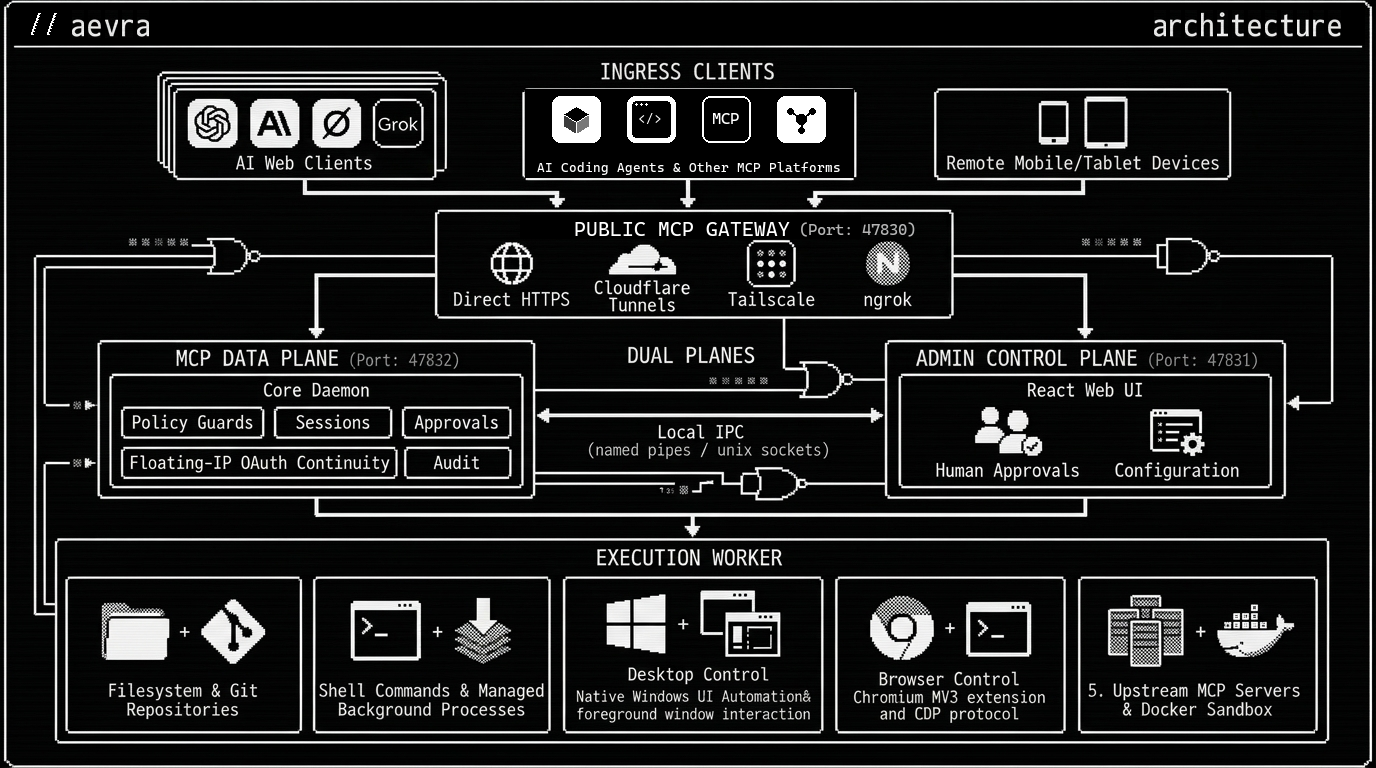
aevra architecture diagram

Architecture diagram details (text format) ```text Ingress Clients: - AI Web Clients & Assistants (ChatGPT, Claude, Grok, Gemini, Langdock, Manus) - AI Coding Agents & Other MCP Platforms (Cursor, Windsurf, Claude Code, Cline, Roo Code, any MCP connector) - Remote Supervisor Devices (Phones, tablets, secondary browsers accessing Admin Web UI) │ Public MCP Gateway (Port 47830 - Direct HTTPS / Cloudflare / Tailscale / ngrok / SSH) │ ┌─────────────────────────┴─────────────────────────┐ │ │ MCP Data Plane (Port 47832) Admin Control Plane (Port 47831) aevra Core Daemon React Web UI (policy · sessions · floating-IP continuity (approvals · live activity · settings · MCP upstreams · token metering · result shaper) · token usage analytics · tool surface controls) │ Local IPC (named pipe / unix socket) │ Execution Worker ├─ Filesystem & Git repositories ├─ Shell execution & managed background processes ├─ Desktop control (Windows UIA · macOS AX · Linux AT-SPI semantic actions) ├─ Browser control (Chromium MV3 extension & CDP) └─ Upstream MCP proxies & container sandbox ```
> **The central invariant:** The Core decides authority. The Worker executes only the exact authority it receives. --- ## Local AI agents and one browser extension Run `aevra agent list` to see which of Codex, Claude Code, OpenCode and Antigravity Aevra detects, then `aevra agent install` to connect them: it lists the detected agents and asks to confirm (`--yes` skips the question). You can also name targets, for example `aevra agent install codex` or `aevra agent install all`. stdio is the default; `--transport http` selects native HTTP for global connections. Add `--workspace ` to connect an agent to one registered workspace only (stdio, no skill). Settings offers the same controls, including a Connect dialog. Each target gets its own credential, and existing gateway approvals and access policy apply through either transport. Skills live in `~/.agents/skills/aevra`, with managed links into agent-specific folders. `aevra agent uninstall ` removes owned registration/link resources and revokes credentials. `aevra uninstall --purge` additionally removes owned service/state resources; user changes and the other product's shared files are preserved. Use `--dry-run` to inspect an installation or removal first. A single loaded extension serves both products. Pair with root Aevra's port `47831`, or standalone Browser's port `47841`, using a fresh code. One server is active at a time. See the [local agent guide](docs/user-manual/23-local-ai-agents.md) for transport, shared installation, cleanup and TLS details. ## Work alongside your AI agent Keep using your mouse and keyboard while an agent works through supported background actions in another application or browser tab. Desktop semantic operations address controls through UIA, AX or AT-SPI; browser actions address a selected tab through the extension or CDP. These paths avoid driving the system cursor or typing into whichever application you happen to be using. For desktop work, prefer `desktop_describe(mode:"background")` with `desktop_invoke`, `desktop_set_value`, `desktop_select` and `desktop_toggle`. For browser work, keep the agent pinned to its task tab while you use another tab or application. Coordinate edits to the same document, page or field: background targeting avoids input-device conflicts but does not merge simultaneous edits. Explicit desktop foreground click/type/key/scroll tools use shared OS input and need a coordinated turn. An application can also change focus or open a modal after a semantic action; a reported `focusChanged` suspends the desktop lease until a fresh describe. Explicit browser tab-focus commands change the selected tab, and the extension's visible-tab screenshot path requires an active tab rather than activating a background tab silently. **Shared engine, different products:** root Aevra and [Aevra Desktop](https://github.com/the-long-ride/aevra-desktop-use) use the same canonical native desktop implementation, including the background semantic path. Root runs it through a helper process under gateway policy; standalone runs it in-process under its app allowlist. They have independent sessions, grants and configuration. The common engine does not coordinate competing operations from both hosts on the same target. ## Choose the right Aevra project | Project | Choose it for | How you manage access | | ------------------------------------------------------------------- | ---------------------------------------------------------------------------------------------------- | ---------------------------------------------------------------------------------------------------- | | **Aevra — this repository** | One gateway for files, commands, Git, processes, browser/desktop automation and upstream MCP servers | Workspace policies, connector grants, approvals and audited execution in the Web UI | | [Aevra Desktop](https://github.com/the-long-ride/aevra-desktop-use) | A standalone native MCP server for controlling allowed desktop applications | A tray/settings app with an application allowlist and local Activity history; stdio or loopback HTTP | | [Aevra Browser](https://github.com/the-long-ride/aevra-browser) | A standalone browser MCP server shared by local clients | One paired browser daemon, extension or CDP transport, and stdio or authenticated loopback HTTP | Choose the gateway when browser and desktop actions belong to a wider workspace workflow with centralized policy and audit. Choose either standalone project when its focused toolset is all you need. Their access models and configuration are independent of the gateway. ## Recent changes in current source - **Clearer MCP management:** inspect server status, instructions, tool parameters and examples in searchable Detail views; pending catalog changes remain visible. - **Usage beyond the selected chart range:** view all-time token totals, savings, calls, failures and tool/connector breakdowns from the dashboard statistics dialog. - **Broader native desktop control:** the canonical helper now has a shared Rust library and guarded input executor used by the gateway and Aevra Desktop. Explicit capture/input adapters cover Windows, macOS 13+, Ubuntu X11, GNOME Wayland and KDE KWin 6.6. - **Safer target and session handling:** window reads retain their authorized identity through collection; stale native targets and revoked access refuse publication. Standalone disconnect/reconnect also invalidates pending connect/read completions and old refs. GNOME checks Shell keyboard ownership and decorated-window geometry; KDE supports fractional native wheel positions. These changes are tracked under [1.3.0](CHANGELOG.md#130---2026-10-17); source versions are Aevra **1.3.0** and both standalone packages **1.0.0**. Native macOS, physical-GPU capture and production Wayland approval/lock acceptance remain open. See [desktop platform support](docs/user-manual/19-desktop-control.md) and [Wayland setup](docs/user-manual/22-wayland-desktop.md). Aevra Browser retains its separately pinned driver/extension snapshot. ## What makes aevra different? Most local MCP servers do one job (files, a shell, or a browser) and trust whichever client launched them. aevra puts one policy layer in front of all of it. - **One gateway for every client, including web assistants.** ChatGPT, Claude, Grok, and other web clients reach your machine through OAuth and a tunnel you choose. Coding agents connect over loopback. Connections survive runner IP rotation and token refresh. - **Files, shell, Git, processes, browser, desktop, and upstream MCP servers behind one policy.** Upstream servers are republished as `server__tool`, and aevra stops serving one if its schema changes unexpectedly. - **Authority is decided in one place.** The Core checks capability profiles, path and command policy, and per-connection browser and desktop grants. The out-of-process Worker runs only the exact grant it receives. Sensitive actions wait for your approval in the Web UI. - **Evidence you can verify.** Every action lands in a hash-chained audit log. Secret paths are denied, sensitive output is masked, and multi-file edits are journaled change sets you can roll back. - **Computer use that stays out of your way.** Background desktop actions use native accessibility APIs (UIA, AX, AT-SPI), and browser actions stay pinned to their target tabs. You can keep using your mouse and keyboard elsewhere; explicit foreground/focus actions need coordination, and applications can still open or focus dialogs. Canvas and WebGL apps get browser-native coordinate clicks. Password, OTP, and payment fields are refused. See the [desktop](https://github.com/the-long-ride/aevra/blob/main/docs/user-manual/19-desktop-control.md) and [browser](https://github.com/the-long-ride/aevra/blob/main/docs/user-manual/18-browser-control.md) guides. - **Fewer model round trips.** Batch tools (`file_read_many`, `file_write_many`, `command_run_many`) and bounded browser and desktop plans do in one call what would otherwise take many. - **Built for token efficiency.** Compact advertised schemas cut definition tokens by ~20%. Results are automatically shaped at the edge: redundant batch wrappers and duplicate paths are flattened, security notices hoisted, whole ANSI escapes stripped, repeated lines collapsed, and output stream budgets (`maxOutputChars`) enforced. Connectors can toggle tool groups off to send only the tools that model needs. --- ## Core features - **79 built-in MCP tools and fast lane interfaces:** Includes batch file operations, binary file transfer (`files_download`, `files_upload`), command execution, workspace management, Git actions, background processes, change sets, browser automation, and desktop control. Upstream MCP tools load dynamically under namespaced names. - **MCP tool documentation:** The server Detail modal shows searchable instructions, parameters, advisory flags and example arguments for recorded tools, with pending catalog changes clearly labeled. - **Token usage metering & live analytics:** Accurately measures incoming, outgoing, and saved tokens using a lightweight heuristic estimator (`heuristic-v1`). Non-sensitive metrics accumulate in memory and persist to SQLite (`token_usage` table) with automatic 7-day roll-up. The React Admin Dashboard features live stat cards and an interactive historical SVG chart (24h to all-time), and an All-time statistics modal with totals and tool/connector breakdowns. See the [token usage and tool surface guide](https://github.com/the-long-ride/aevra/blob/main/docs/user-manual/21-token-usage-and-tool-surface.md). - **Per-connector tool surface, global switches & result formats:** Customize advertised tool groups (`files`, `commands`, `git`, `changes`, `skills`, `browser`, `desktop`, `control`, `upstream`) per AI client in **Connections**, or globally disable unneeded tools across all clients in **Settings > Tools** to drastically reduce session token overhead. Select between dual `both`, `text`-only, or `structured` MCP result formats. - **HTTP response compression & transport speed:** Automatically gzip-compresses MCP JSON responses of 1,024 bytes or larger for clients that accept it, caches serialized tool lists, and bounds activity log depth to keep local execution fast. - **Shared-semantic desktop automation & background auto-clicker (Windows, macOS, Linux):** Operates as a background auto-clicker and desktop automation engine. `desktop_invoke`, `desktop_set_value`, `desktop_select`, `desktop_toggle`, `desktop_release_window`, and background `desktop_describe` use native accessibility providers (UIA / AX / AT-SPI) without moving physical pointers, synthesizing host mouse or keyboard input, or stealing window focus. Windows keeps its additional integrity/secure-desktop defenses; macOS/Linux surface permission/provider failures explicitly. Strict `isolated` control never downgrades to the host session and is refused until a separately qualified runner is available. See the [desktop control guide](https://github.com/the-long-ride/aevra/blob/main/docs/user-manual/19-desktop-control.md). - **Foreground desktop capture and input:** Explicit tools have native adapters on Windows, macOS 13+, Ubuntu X11, GNOME Wayland and KDE KWin 6.6. macOS requires Accessibility/Screen Recording and still needs native acceptance. Wayland requires an explicitly enabled companion and approved helper path; GNOME/KDE private-compositor fixtures pass, while physical-GPU and production approval/lock acceptance remain open. Runtime capabilities report permission/session readiness. See [platform support](docs/user-manual/19-desktop-control.md) and [Wayland setup](docs/user-manual/22-wayland-desktop.md). - **Browser control, background auto-clicking, and enhanced canvas support:** Ten `browser_*` tools drive Chromium browsers through the Aevra MV3 browser extension or Chrome DevTools Protocol (CDP) under capability, risk, approval, DLP, and audit controls. It operates as a true background auto-clicker: CDP actions are target-pinned without activating another tab, and extension interactions work seamlessly in background tabs without stealing focus. **Enhanced canvas and WebGL handling:** drives HTML5 canvas viewports and web games with high-reliability vision coordinate mapping and native browser mouse clicks and drags (`Input.dispatchMouseEvent` via Chrome debugger or CDP) instead of brittle synthetic DOM events. Extension snapshot refs resolve through isolated-world opaque element identities rather than page-writable DOM attributes. `browser_execute_script` accepts a bounded Playwright-like action grammar for single-call multi-step interaction without exposing arbitrary JavaScript evaluation, and credential fields remain refused. The Web UI and `aevra status` report pairing state, with download and load-unpacked instructions via `aevra extension install`. See the [browser control guide](https://github.com/the-long-ride/aevra/blob/main/docs/user-manual/18-browser-control.md). - **Guarded local control plans:** `control_observe`, `control_execute`, owner-bound status/cancel, and `desktop_act_many` let Aevra validate, schedule, dispatch, and verify bounded browser/desktop workflows locally. Durable request IDs prevent blind replay after reconnect/restart, and compact deltas reduce model round trips. - **Floating-IP OAuth continuity and runner leases:** Decouples authentication and workspace authority from ephemeral cloud runner IP pools used by ChatGPT and Claude. Persists workspace grants across rotating IPs, adds atomic approval claims (`claimExecution`) to prevent double execution, shares connection rate limiters, and retains runner origin IPs in audit logs for 24 hours. - **Admin login lockout:** Repeated failed Admin sign-ins lock the login temporarily, per (address, username) and per address, with a doubling backoff from 1 minute to 1 hour. Locked requests return `429` with `Retry-After`, the login page shows a countdown, and each lockout is audited as a `security` event and raised as a desktop notification. See the [security guide](https://github.com/the-long-ride/aevra/blob/main/docs/user-manual/13-security-authentication.md). - **Host system capabilities:** The `aevra_status` MCP tool reports toolchains, available shells, and execution defaults to models and the Admin UI. - **Dynamic resources and instruction prompts:** Serves context files via MCP resources (`aevra://skill//`) and instruction prompts parsed from `AGENTS.md` and `CLAUDE.md`. - **MCP upstream proxy:** Connect external HTTP, SSE, or stdio MCP servers through the Admin UI or `aevra mcp`. Upstream tools republish under collision-resistant namespaced identifiers, with secret-backed credentials and catalog fingerprinting that pauses serving if schemas change unexpectedly. Servers can be disabled and re-enabled from the Admin UI or `aevra mcp enable|disable ` without losing their configuration. When a server changes its catalog, `aevra mcp list` marks it with `!` and prints a next-step hint; `aevra mcp review ` shows what changed and `aevra mcp accept --yes` accepts it. See the [MCP upstreams guide](https://github.com/the-long-ride/aevra/blob/main/docs/user-manual/20-mcp-upstreams.md). - **Workspace manifest (`aevra.json`):** Workspaces can advertise build, test, and lint commands, and declare sensitive or secret path globs that feed directly into the file security boundary. See the [manifest design specification](https://github.com/the-long-ride/aevra/blob/main/docs/specs/2026-09-12-aevra-manifest-design.md). - **Configuration backup and restore:** Download and restore complete gateway configurations as JSON through the Admin UI Data tab (`/api/data/export` and `/api/data/import`), excluding machine-specific secrets for safe portability. - **React 19 Admin dashboard:** Single-page dark theme dashboard with an edge-to-edge Request Activity timeline, universal switch toggles, upward-anchored dropdowns, live capability status, and modal confirmations for danger actions. - **Out-of-process worker sandbox:** The execution worker runs in an isolated child process over authenticated local IPC, with Docker and Podman container sandboxing support. --- ## Quick installation Install aevra globally via npm and start the gateway on your operating system: ### Windows (PowerShell) ```powershell # 1. Install aevra globally npm install -g @the-long-ride/aevra@latest ## Choose 2.1 or 2.2: # 2.1 Configure admin credentials for User scope (persists across sessions): [System.Environment]::SetEnvironmentVariable('AEVRA_USERNAME', 'admin', 'User') [System.Environment]::SetEnvironmentVariable('AEVRA_PASSWORD', 'YourSecurePassword', 'User') # 2.2. Apply to current session only: # $env:AEVRA_USERNAME = 'admin' # $env:AEVRA_PASSWORD = 'YourSecurePassword' # Start aevra with dashboard in browser aevra start --ui # If a default port is occupied, move all listeners to 50000 through 50003: aevra start --ui --basePort=50000 ``` ### macOS and Linux (zsh / bash) ```bash # 1. Install aevra globally npm install -g @the-long-ride/aevra@latest # 2. Configure admin credentials and launch daemon with Web UI export AEVRA_USERNAME="admin" export AEVRA_PASSWORD="YourSecurePassword" aevra start --ui # Or select ports individually (the aliases are --gp, --up, --mp and --wp): aevra start --ui --gateway-port=50000 --ui-port=51000 --mcp-port=52000 --ws-port=53000 ``` _(Optional)_ Run aevra automatically as a user-level background service: ```bash aevra service install aevra service start ``` --- ## Quick connect guide aevra exposes a standard MCP endpoint (`/mcp`) that can be accessed directly over HTTPS (such as `https://localhost:47830/mcp` or direct IP/domain) or exposed to the internet through a tunnel (Cloudflare Tunnel, ngrok, Tailscale Funnel, Caddy, FRP, reverse SSH). ### 1. Connect ChatGPT (Custom Action) 1. In ChatGPT, create a new Custom Plugin / Action: - **Name**: `aevra` (or any custom name) - **Server URL**: `https:///mcp` (your tunnel or public URL) - **Authentication**: `OAuth` 2. ChatGPT initiates the OAuth 2.0 PKCE discovery flow. Open your local aevra Web UI (`https://localhost:47831`) and click **Allow** on the pairing request. 3. Under ChatGPT plugin settings, grant **Permission for Plugins -> Allow all actions** so commands and tool calls execute through aevra without recurring client confirmation dialogs. ### 2. Connect Claude, Grok, and other MCP clients Claude example: 1. Open Claude, navigate to account **Settings**, then select **Connectors**. - **Name**: `aevra` (or any custom name) - **Server URL**: `https:///mcp` (your tunnel or public URL) - **Authentication**: `OAuth` 2. Approve the OAuth request in the aevra Web UI, following the same flow as ChatGPT. ### OAuth connection continuity Aevra cannot guarantee that an HTTP or MCP transport remains open indefinitely. It maintains logical continuity across reconnects by accepting short-lived access tokens and rotating refresh tokens against the same connection record. Access tokens expire after 60 minutes by default, refresh token families last up to 30 days, and interrupted MCP sessions retain a 15-minute grace window for reconnects. Durable connections preserve remembered workspace grants and connection-level policies, while session-only leases expire on disconnect. Aevra does not automatically replay a lost mutating request after reconnection. Call `operation_get` or `operation_list` to inspect the status of a previous operation before issuing another write, commit, delete, or command. --- ## Tips
Remote device control and desktop automation - **Automate machines remotely:** When running Aevra as a background service on Windows, an AI assistant connected through ChatGPT or Claude can control native desktop applications, system utilities, and local tools over a secure tunnel or HTTPS without needing a remote desktop viewer. - **Prefer background automation (background auto-clicker):** Use `desktop_describe(mode: 'background')` with action tools (`desktop_invoke`, `desktop_set_value`, `desktop_select`, `desktop_toggle`). These operate as a background auto-clicker using native UI Automation control patterns without moving the mouse cursor, typing into the active window, or stealing keyboard focus. You can continue using the computer while the agent works in the background, and tasks continue even when physical displays turn off. - **Fall back to foreground control when needed:** If an application uses custom canvas rendering, game viewports, or custom controls lacking accessibility trees, switch to foreground tools (`desktop_click`, `desktop_type`, `desktop_key`, `desktop_capture`). Foreground actions require identifiable windows and prompt for user approval before clicks and keystrokes. - **Window leases and snapshots:** Background automation holds an exclusive 60-second window lease. Each mutating action invalidates the snapshot to prevent stale handles. If a dialog appears or foreground focus changes, Aevra suspends the lease and returns `DESKTOP_FOCUS_CHANGED`. The agent should call `desktop_describe` to inspect the new layout before continuing. - **Security boundaries:** Windows User Interface Privilege Isolation (UIPI) prevents standard-user processes from injecting input into elevated windows. Aevra refuses input to unattributable windows, elevated processes, UAC dialogs, and secure desktop screens. - **Supervise approvals remotely:** High-risk desktop actions require confirmation. Keep the Aevra Web UI open on a phone, tablet, or separate browser to review and approve commands without switching away from the active app on the host.
Browser control and web automation - **Automate logged-in web sessions:** Install the Aevra MV3 browser extension to drive your primary browser profile. The AI can navigate internal portals, SaaS dashboards, and web consoles that already have active login sessions without exporting cookies or exposing credentials to the model. - **Background auto-clicking on tabs:** CDP actions and extension tools are target-pinned, allowing the AI to click, type, and run multi-step workflows as a background auto-clicker without activating the window or stealing focus from your active tabs. - **Enhanced canvas and game automation:** For interactive HTML5 canvas surfaces, WebGL games, or graphics viewports lacking semantic DOM trees, use vision snapshots with `browser_act_many` coordinate clicks (`op: "click"`) and drags (`op: "drag"`). Aevra delivers calibrated browser-native mouse input (`Input.dispatchMouseEvent` via Chrome debugger or CDP) directly to canvas targets rather than synthetic DOM events. - **Pairing and status:** Pair the browser in Settings under Browser control with a single-use pairing code. The top navigation bar in the Web UI shows connection status with a green dot when connected and a red dot when disconnected. - **Credential protection:** Aevra blocks commands targeting password, one-time code (OTP), or payment fields. Log into sensitive services yourself and tell the agent to resume once authentication is complete. - **Prefer accessibility snapshots:** Instruct the agent to call `browser_snapshot` rather than taking full-page screenshots. DOM accessibility snapshots cost fewer tokens and give reliable element references for `browser_act_many`. - **Isolated automation with CDP:** For unattended browser tasks that should not touch personal tabs or history, configure Aevra to connect through Chrome DevTools Protocol (CDP) to a dedicated Chromium instance running with `--remote-debugging-port`. - **Restricted URL schemes:** Aevra blocks navigation to local loopback administrative ports, internal `chrome://` settings pages, and local `file://` URIs to prevent prompt injection attacks against the host.
Security - **Rotate credentials:** Update `AEVRA_USERNAME` and `AEVRA_PASSWORD` in your user environment or shell profile, then restart aevra. - **Scope tunnel exposure:** Expose the MCP endpoint (`publicUrl`) for AI clients. Keep the Admin UI local unless you configure an explicit HTTPS `adminPublicUrl` with trusted Admin origins. - **Use capability profiles:** Assign the lowest required profile per connector in the Web UI, such as `Read-Only` or `Safe Dev` for AI web clients, reserving `Full Access` for trusted local sessions. - **Audit activity:** Review the audit log in the Web UI Activity tab to inspect tool calls and policy decisions.
Performance and token optimization - **Turn off unnecessary tools to reduce token usage:** Every advertised MCP tool consumes context window tokens on every conversation turn (~200–500 tokens per tool schema). - **Per-client tool surfaces:** Under **Connections**, click your client connector and open **Tool surface** to turn off groups it doesn't need (for example, disable `browser` and `desktop` for coding-only agents, or `git` and `processes` for writing/research models). - **Global tool switches:** Under **Settings > Tools**, switch off individual built-in or upstream MCP tools across all clients (`tools.disabled`). Switched-off tools are omitted from `tools/list`, drastically cutting system prompt overhead. - **Compact result formats:** Set **Result format** to _Text only_ in client settings if your client does not need structured JSON, saving roughly half the result tokens. See the [token usage and tool surface guide](https://github.com/the-long-ride/aevra/blob/main/docs/user-manual/21-token-usage-and-tool-surface.md). - **Scope workspace search:** Use `search` with explicit `include` and `exclude` glob patterns. Target specific subdirectories in large repositories to keep searches fast. - **Use managed processes for long tasks:** Run long builds or test suites with `process_start` and `process_wait` rather than blocking terminal commands. Aevra tracks them across reconnects. - **Use change sets for multi-file edits:** Journaled change sets allow rolling back multi-file edits in one step if a task fails halfway through. - **Run as a background service:** Install Aevra with `aevra service install && aevra service start` so the gateway starts on boot and reconnects automatically.
Remote work through AI chat web interfaces - **Save generated assets:** Ask ChatGPT or Claude to use `file_write` to save images, diagrams, or generated data directly into your local project folder. - **Run research and reporting:** Have the AI search your notes and data directories with `search`, summarize the findings, and write the report to a local file. - **Code collaboration:** Point ChatGPT or Claude at your local repository to read files, run tests, apply edits, and commit changes in a single conversation. - **Document processing:** Have AI clients read, draft, and update local markdown, CSV, and text files directly from chat. - **Multi-client workflows:** Connect multiple AI tools at the same time, giving each connector its own capability profile. - **Mobile development:** Use ChatGPT or Claude mobile apps to inspect repositories, run test suites, or generate files on your remote workspace while away from your desk.
Remote server setups and headless devices - **Always-on servers:** Run Aevra as a background service on a VPS, home lab server, or NAS to keep workspaces and background processes available without keeping a laptop powered on. - **Remote Admin dashboard:** Access the Web UI over a private network (such as Tailscale or WireGuard) or behind an authenticated reverse proxy to monitor activity and adjust workspace grants from a phone or tablet. - **Mobile approvals:** Approve or reject critical operations from your phone when an AI client requests a sensitive tool call. - **Split-plane network isolation:** Publish the MCP `publicUrl` for AI clients while keeping `adminPublicUrl` restricted to a private VPN or trusted origin.
Hooks - **Pre- and post-tool hooks:** Configure `hooks.pre` and `hooks.post` in `aevra.config.json` to run scripts before or after specific MCP tool calls, such as linting before a commit or notifying a webhook after a file write. - **Block unwanted operations:** A pre-hook that exits with a non-zero status cancels the tool call. Use this to prevent destructive commands in specific directories. - **Per-workspace configuration:** Hooks are defined per workspace configuration file and stay scoped to that project.
--- ## Documentation and guidelines - **[Installation & Development Guideline](https://github.com/the-long-ride/aevra/blob/main/GUIDELINE.md):** Building from source, development scripts, test suites, architecture boundaries, and troubleshooting. - **[Technical Specifications](https://github.com/the-long-ride/aevra/blob/main/docs/specs/README.md):** In-depth design documents for engineers and AI coding agents. - **[User Manual](https://github.com/the-long-ride/aevra/blob/main/docs/user-manual/README.md):** Modular guides for tunnels, connectors, workspaces, permissions, and service setups. - **[Token Usage & Tool Surface](https://github.com/the-long-ride/aevra/blob/main/docs/user-manual/21-token-usage-and-tool-surface.md):** Managing context tokens, result formats, and client tool groups. - **[Changelog](https://github.com/the-long-ride/aevra/blob/main/CHANGELOG.md):** Release history and version notes. --- ## Companions - **[AI Chatweb Supporter](https://github.com/the-long-ride/ai-chatweb-supporter):** A Chromium extension that adds productivity shortcuts to ChatGPT, Claude, and Grok web interfaces when working alongside aevra. - **[Markdown Explorer](https://github.com/the-long-ride/markdown-explorer/releases/latest):** A desktop tool to preview, search, and navigate Markdown files and document collections. --- ## Build and release automation GitHub Actions uses Node.js 24 and GitHub-maintained actions at `@v6`; the third-party Rust cache keeps its own supported version. `.node-version` selects Node 24 for local development. Pull requests, pushes to `main` and manual dispatch run the quality gate. The native helper matrix checks Rust formatting and strict Clippy before release builds/tests; GNOME/KDE acceptance runs separately. Version-tag or manual releases wait for a successful push-triggered quality run on the exact release commit and reuse its artifacts. See [release CI](docs/specs/10-package-and-test-runners.md#release-ci). ## License MIT (c) [aevra Contributors](https://github.com/the-long-ride/aevra/blob/main/LICENSE)


