GitDesktop is a free, open-source (Apache-2.0) Git client for Windows, macOS,
and Linux, built with Tauri 2 and React 19. It keeps GitHub
Desktop's approachable model and goes further: staging, diffs, branches, and
history for any remote, plus the whole pull-request loop (code review and
CI) on GitHub, GitLab, and Bitbucket, with issues in-app on GitHub and
GitLab or via Jira on Bitbucket. That includes things GitHub Desktop
doesn't do at all, like offline "local" pull requests and a GitHub Actions
cockpit.
AI runs through commits, reviews, and CI debugging, with the provider you
choose (local models included). It's also optional: one switch hides every AI
surface, leaving a keyboard-first Git client.
All GitHub access goes through the **GitHub CLI (`gh`)**: no OAuth app, and
the app never stores your tokens. Core git runs against any remote via system
`git`. Because `gh` detects each repo's host from its remote, **GitHub
Enterprise** servers work the same as github.com once you've run
`gh auth login --hostname `, and Settings → Accounts switches the
active account per host.
## Install
**[Download the latest release →](https://github.com/theBGuy/GitDesktop/releases/latest)**
Pick the installer for your OS under **Assets**. On macOS you can also install
with Homebrew: `brew install --cask thebguy/tap/gitdesktop`. Builds are signed
and keep themselves up to date (see [Updates](#updates)). To build from source
instead, see [Development](#development).
## Highlights
- **The whole PR lifecycle, in-app**: review, comment, approve, and merge
without the browser, plus offline [local PRs](#pull-requests) against any
two branches, promotable to real ones in one click.
- **Three forges, first-class**: GitHub, [GitLab](#gitlab), and
[Bitbucket Cloud](#bitbucket-cloud), each with PRs/MRs, CI, and project
settings in the same panels; [issues in-app](#issues-and-to-dos) on GitHub
and GitLab, or via [Jira](#jira-cloud-issues) on Bitbucket.
- **[My work](#my-work), one inbox across repos and forges**: your open
pull requests, merge requests, review requests, and issues from
GitHub, GitLab, and Bitbucket, with Enter opening each right where
the work lives.
- **A [GitHub Actions cockpit](#github-actions)**: runs, jobs, steps,
re-run / cancel / dispatch (from the run or a right-click on its row),
failed-step logs, and AI debugging.
- **[Coding agents](#coding-agent-sessions) with guardrails**: hand tasks to
Claude Code, Codex, Copilot, or opencode in isolated worktrees or
containers, watch every edit, and keep the result as a branch or local PR.
- **[AI review](#ai-review-and-security-audits) that doesn't quit or repeat
itself**: iterative, optionally agentic reviews and security audits that
remember prior rounds and fold in other reviewers' findings.
- **[MCP](#mcp-servers) in both directions**: bring your own servers to agent
sessions, or expose any repo, read-only by default, to Claude Desktop,
Cursor, or Claude Code.
- **Deep git tooling**: [interactive rebase](#history),
[merge prediction](#branches), lost-stash recovery, a worktree manager, and
bulk branch cleanup.
- **[Markdown, previewed in the diff](#changes-and-commits)**: a
Raw / Preview toggle renders markdown and MDX changes anywhere the app
can read the file locally.
- **Keyboard-first, privacy-first**: rebindable shortcuts, a command palette,
keys in the OS keychain, and one switch that
[hides every AI surface](#ai-configuration).
## Features
The full catalog, area by area. The deepest provider sections fold away;
expand them when you want the detail.
### Repositories
Clone, add local, create (with README / .gitignore / license scaffolding),
publish to GitHub, GitLab, or Bitbucket, and fork.
- **Pick the owner when you publish**: publishing a local repo to GitHub
starts with an **Owner** select (your account or one of your organizations);
Bitbucket picks a **workspace** the same way.
- **Repo switcher**: every repo grouped by owner, with a Recent section and a
filter. Each row carries identity badges (the forge's logo, a cloud for an
unrecognized remote, a folder for local-only, and a lock / buildings /
globe visibility icon for private / internal / public), aliases, and
recycle-bin-safe removal. Star or unstar from the menu.
- **Locate a moved repository**: when a repo's folder moves on disk, point
GitDesktop at its new home from the "no longer a git repository" notice.
The entry keeps its alias and badges, and its local PRs, issues, review
history, automations, and MCP server settings follow along.
- **macOS menu bar**: **File** carries **New / Open / Clone Repository…** and
an **Open Recent** list of your last ten repos; **Settings…** sits in the
GitDesktop menu. Items work from any screen.
- **Manage files git tracks or ignores** (beyond pending changes): untrack a
file committed by mistake (it stays on disk), or surface every ignored
file with the rule responsible and force-add it or remove that rule. With
AI features on, an **AI excluded** tab does the same for your AI ignore
patterns: every file they hide, the rule that hid it, and removal of that
rule from the repo file or your global settings.
GitHub repo settings (admin): rulesets, security toggles, secrets, webhooks, Pages, danger zone
Description and topics (with AI suggestions), merge options and default
commit messages, template and forking, **collaborators and invitations**,
**branch rulesets** (create/edit, reversible enable/disable), **code security
and analysis** toggles, **Actions/Dependabot/Codespaces secrets and
variables** (repo and environment scope), the **Sponsor button**
(`.github/FUNDING.yml`), webhooks with delivery history, **GitHub Pages**
config, a **danger zone** (rename, archive, change visibility, transfer,
delete), and deep links to the settings GitHub keeps browser-only.
### Changes and commits
A unified or split diff with syntax highlighting, collapsible surrounding
context, and image diffing. Filter the changes list by path or category, and
read a file's `+added -deleted` line counts without opening it. Show that
list flat or as a compacted directory tree: collapsible folders, single-child
folder chains merged into one row, and arrow keys that walk and fold it. The
working-tree diff is one whole-file view with hunk- and line-level staging
and discarding (drag across the line numbers, spanning hunks freely — a drag
picks up added and removed lines together in either view, Shift keeps it to
one side, and Ctrl, or Cmd on macOS, adds to a selection), including
committing or discarding only part of a brand-new (untracked) file. Partial
staging is for UTF-8 text; other encodings stage and discard as a whole file.
Stage or unstage a drag-made selection with `Ctrl`/`⌘`+`Shift`+`Enter`,
without reaching for the button. Press `Space` on a focused file to stage or
unstage it. Once the file you're viewing has nothing left to stage, whole or
line by line, the next file in the list opens (the one above it, at the end of
a section), and unstaging works the same way in Staged. Stage, unstage, or
discard single files or a multi-selection from the context menu (staging and
unstaging a selection sit in the command palette too); discarding a whole
untracked file goes to the recycle bin. Commit with title + body, co-authors
suggested from history, amend, undo, reset, and revert.
Markdown and MDX files add a Raw / Preview toggle to the diff, so you can
read a doc change as rendered prose (headings, tables, and code blocks) on
the working tree, commit details, stashes, an agent session's worktree
changes, a file's history, branch compare, and pull request files when the
PR's commits are available locally.
### Branches
Switch (with a bring-changes / stash prompt), create, rename, delete, and
**archive** (hide from the switcher without deleting); renaming a branch in
GitDesktop moves its open local pull requests to the new name. Each
switcher row shows the branch's push/pull state vs. its upstream (↑ to
push, ↓ to pull, plus markers for never-published and upstream-deleted
branches), its +/− divergence vs. the default branch (labeled with the
default's name), and a PR badge.
- **Clean up branches** ⭐: one reviewed list that archives or deletes your
stale branches — merged into the default branch (directly, or, where the
forge connection supplies them, by a recent pull request, so squash and
rebase merges count) or with no commits in a chosen window. Pull-request
matches go by branch name, so they only badge a row with the PR that took
it; pre-checking still comes from your own history: merged into the
default branch, or idle past that window. The dialog names pull requests
only where it read them, so its wording matches the checks behind the list.
- **Advanced merge tooling** ⭐: on Git 2.38+, predicts a merge's result in
memory before you commit (fast-forward, already up to date, clean, or
exactly which files will conflict), with `--no-ff` and a clearly cautioned
auto-resolve strategy (`-X ours/theirs`); GitHub Desktop's merge dialog
reports up to date, clean, or a count of conflicted files, with no
`--no-ff` or `-X` option. This is the *local* prediction; a remote PR's
conflict state comes from the forge itself, and falls back to this
prediction only where the forge publishes none.
- **Change base** ⭐: rebase a branch onto a different base when it was
branched off the wrong one, replaying only its own commits (the wrong
base's are left behind), with a preview of exactly which commits will
move.
- **No-checkout and remote-branch ops**: update a branch *without* checking
it out (from the default branch or its own upstream, e.g. to bring the
default current after a merged PR), and check out or delete remote-only
branches straight from the switcher's Remote section.
- **Push or publish without switching**: from the switcher's context menu,
push a branch that's ahead of the remote it tracks (its own remote, not
just `origin`) or publish an unpushed one, choosing the remote when
there's more than one. Works even when the branch is checked out in
another worktree. The list stays open while it runs: the branch's row
shows the push's progress and destination, and you can keep switching
and browsing.
- **Start a branch from any base**: the new-branch dialog's *Base it on*
picker is a searchable list of local and remote branches. Basing on a
remote branch (e.g. `origin/epic/big-feature`) starts from the remote tip
and leaves the new branch untracked, so its first push publishes it under
its own name.
- **Worktree manager**: create, switch between, rename, lock, promote a
worktree's branch into your main checkout, and remove linked worktrees, so
you can work on several branches in parallel folders without stashing. Each
row shows when that worktree was last active, so the ones you've finished
with are easy to spot. One-click jumps to the main workspace sit right in
the branch switcher, where selecting a branch that's checked out elsewhere
opens that folder straight away, that branch's context menu carries the
worktree actions, and a *Worktrees* row opens the full manager.
- **Compare**: a tab with a three-dot diff, commits ahead/behind,
merge/rebase, and jump-to-PR. Each ahead/behind commit shows its tag chips
and carries a context menu — checkout, cherry-pick, create a branch or tag,
copy the SHA, plus revert for commits on your branch.
- **Local branch-protection rules**: naming, merge methods, require-PR, and
force-push rules, shareable via a committed file or importable from
GitHub. A promotion-branches list marks pull requests from those branches
as promotions: their PRs stop offering the update from the base, and the
branch menus withhold the one-click update from the default branch, so
promotion flows keep their direction.
### History
Paged, filterable history with rich commit detail, commit-author avatars, and
an at-a-glance marker on every commit that hasn't been pushed yet. Per-file
history and line blame are reachable from any file list (History, pull
requests, Compare) or the command palette, pinned at that commit or branch
where it applies; each blame line's commit gets a hover-card preview and a
click to jump to it in History.
- **Interactive rebase** ⭐: an *Edit history* editor to reword, squash,
fixup, drop, or reorder unpushed commits behind an atomic replay engine
(a conflict rolls it back), or **edit** a commit to pause and amend its
contents in a real, resumable rebase (GitHub Desktop's history editing
stops at squashing and reordering, plus amending only the latest commit).
Cherry-pick onto the current or another branch, too.
- **Recover lost work** ⭐: a stash browser whose scan (via `git fsck`) finds
orphaned and dangling stashes, uncommitted work a `git stash` saved but
that fell out of `git stash list` (dropped, or abandoned by an interrupted
operation), and restores any of them non-destructively to the working
tree.
- **Operation journal** ⭐: records the risky compound operations GitDesktop
runs (local PR merges, cherry-picks, history edits, rebases). If one is
interrupted by a crash or restart, a calm recovery notice names what was
interrupted and the exact branch + commit it started from, browsable any
time via the *Operation history* command.
Plus tag management and releases: publish, edit, and delete them with asset
uploads. When a **GitHub** release carries a `latest.json` updater manifest,
editing its notes can refresh the manifest in the same save, so apps updating
from that release show the notes you just wrote.
**Submodules** get a manager of their own: add and remove them, update to the
commit your repo records or to the tip of the branch each one tracks
(recursing into nested submodules either way), edit a submodule's URL or
tracked branch, and open one as its own repository. Adding, removing, and
editing stage the change for you to commit, and the clone dialog can bring
every submodule down with the repo.
### Syncing and conflicts
Fetch, pull, and push, with the ahead/behind counts shown right on the Push
and Pull buttons. The Pull button is `--ff-only`; the menu's rebase and
merge modes reconcile a diverged branch. Divergence routes to a guarded
force push with `--force-with-lease --force-if-includes` (lease-only on
Git releases older than 2.30, or when the branch has no reflog for the
check to read). When a branch tracks a remote branch with a different
name and Git would refuse a plain push, **Push** opens a menu to push to
the tracked branch or publish under the branch's own name; there's no
force push until the names match. When the *remote* itself was rewritten
(a server-side rebase) and every local commit already landed there under
new ids, the Pull menu offers a confirmed **Reset to _origin/…_** that
lines the two up instead. Pulling with rebase pre-checks the upstream for
a rewrite that would take commits of yours off the branch, names them, and
asks whether to keep or drop them, recording a drop in **Operation
history**. When a repo has an `upstream` remote, the Pull menu adds
**Update from upstream**: one click fetches upstream and brings your
branch up to date (fast-forward when it can, a merge commit when cleanly
diverged, the conflict editor otherwise), for keeping a fork current.
**Auto-fetch** (on by default) quietly runs a background `git fetch` on an
interval while the window is focused, so the behind-count and incoming
commits stay current without pressing Fetch; it never pulls or merges, and
pushing and pulling stay manual.
- **Conflict editor**: an in-progress merge, rebase, cherry-pick, or revert
gets a conflict banner naming it, with gated Continue / Abort. Selecting
a conflicted file opens an in-app editor: each region shows Current (ours)
over Incoming (theirs) with Accept current / incoming / both, plus
whole-file Accept all current / incoming and Open in editor, and Mark
resolved to stage a file exactly as it stands on disk when you settled it
outside the app (edited, emptied, or deleted while both sides still have
a version of it).
- **AI conflict resolution**: one more option there. Ask your model to merge
a file, review the proposal as a diff, and accept it (per file or all at
once). Multi-provider, runs on local Ollama or a keyless Claude Code /
Codex agent, and never writes until you accept.
- **Stash and reapply**: when a pull, a merge into the branch you're on, a
rebase (the branch menu's *Rebase* and *Change base* alike), or a branch
update is blocked by uncommitted changes, or you switch branches with work
in progress, one click stashes them (untracked files included), runs the
operation, and reapplies them on the other side. A reapply that hits
conflicts drops the files into the changes list, where the banner says
the conflict came from your stash and, once they're resolved, offers to
drop the backup stash (after asking) or keep it. One that git refuses
outright leaves them safely stashed. (A squash, no-ff, or strategy merge
reports the refusal instead — the recovery redoes the merge plainly.)
**Automatically stash and reapply on pull, merge, rebase, and branch
updates** (Settings → General) makes it the default for all of them, and
the switch prompt remembers a **Reapply after switching** choice of its own.
### Pull requests
The full pull-request loop on GitHub, GitLab & Bitbucket, plus **local
PRs**: the same workflow against any two branches with no remote at all,
promotable to a real GitHub, GitLab, or Bitbucket PR (comments and all)
in one click.
- **Open, edit, merge**: review, comment, approve, edit, and merge (merge &
squash on all three; rebase on GitHub, fast-forward on Bitbucket) without
the browser. Labels and assignees on GitHub & GitLab (set them when you
open a PR/MR or any time after), request reviewers across GitHub, GitLab &
Bitbucket, see, link, and unlink a PR's **GitHub Projects** in its header
(open, closed, and merged alike) and set each board's **Status**,
**Priority**, **Iteration** and custom fields right there, with **Edit
projects…** and **Edit project fields…** in the command palette opening
either popup, flip a PR between **draft and ready for review**
either way on all three, and **create new PRs as drafts by default**
(Settings → General). Creating first checks the branch for an already-open
PR and offers the link instead of opening a duplicate. A new PR is visible
in the list it's headed for from the moment you start creating it: a **pending entry** holds its place with
the title, branches and draft state, picks up the number as the PR opens,
and hands over to the real row once the list catches up.
- **Linked issues**: link related issues when you open *or* edit a PR, as
chips **auto-detected** from your branch name and commits (a `fix/123-…`
branch seeds `#123`) or picked by hand. Each chip toggles between
**Closes** (auto-closes the issue on merge) and **Relates to** (GitHub &
GitLab; also on **local PRs**, where the refs carry into the promoted PR).
On a **Bitbucket** repo with a **linked Jira project**, the same row
surfaces linked-Jira issues (`KEY-123`) as **mention-only** *Relates to*
chips (Jira tickets aren't closed from PR text). Editing a PR peels any
trailing `Closes #N` / `Relates to #N` lines back into chips, so the chips
stay the single editor for the ref block.
- **Conflicts with the base**: every open PR keeps a one-line strip under its
header, so you always know whether it merges into its base. It reads
**Checking for conflicts…** while the answers load, and **No conflicts with
`main`** once the forge or the local prediction finds none. When neither can
answer, it says the conflicts can't be checked, and a PR that won't merge
cleanly gets a warning naming its base. **GitHub** and **GitLab** report
conflicts themselves; **Bitbucket** falls back to a local prediction, named
as such. A GitHub or GitLab answer that can't be read names the forge it
couldn't reach, offers **Retry**, and falls back to that same prediction
meanwhile. Open GitHub and GitLab rows in the list carry a **Conflicts**
chip too. **Resolve conflicts** merges the base into the PR's head in a
**hidden, isolated worktree** (your branch and working tree untouched),
hands you the conflicted files in the in-app conflict editor, and **Finish &
push** updates the PR's head branch, **never force-pushed**: a head that
moved meanwhile refuses the push and keeps your work. **Discard** drops the
worktree and nothing else, and an unfinished resolution is offered back from
any checkout of the repository as **Continue resolving**. Fork PRs are
excluded, since their head lives in another repository.
- **Blocked by branch protection**: a PR that merges cleanly but whose rules
refuse it gets its own strip line naming the reason. On **GitHub** that's
the required checks still outstanding (four, then *and N more*) plus the
approving-review count the rules demand; on **GitLab** it's the blocking
reason itself — approval, pipeline, unresolved discussions, and the rest of
its detailed merge statuses. **Merge** stays available (whoever holds bypass
permission can merge anyway), and a refused merge repeats the same line
beside the forge's own message.
- **Local PR merges**: a merge **pre-shows conflicts** and lets you resolve
them in the in-app editor, in an isolated worktree that never touches your
working tree, then **Finish** or **Abort**.
- **Activity feed**: a PR's Conversation is a **date-sorted timeline** of
reviews, comments, grouped **pushed commits** (each SHA clickable), and
events, every entry carrying a relative **timestamp** (hover for the exact
local time), with an approval or changes-request **marked stale** once
later commits land. Local PRs get the same feed (created → commits →
comments → merged/closed). GitHub carries the full event set (force-push,
label add/remove, review request, ready-for-review, convert-to-draft,
close, reopen, merge, rename, assignments, milestones, cross-references,
linked issues, lock/unlock); **GitLab MRs** add commits, label changes,
close/reopen/merge, and approvals (approved / changes-requested /
approval-withdrawn) but no force-push or draft events; **Bitbucket PRs**
add commits, merge/close, and approved / changes-requested (no labels or
review-requests).
- **CI rollup**: checks collapse into a **✓ passed · ✕ failed · ● pending ·
⊖ skipped** summary that auto-expands on failure — or on a required
GitHub check that was cancelled or went stale, surfaced just below the
failures and tagged *required*. A running **GitHub Actions** check shows
its current step inline and a live step checklist when expanded;
finished **GitHub Actions** and **GitLab pipeline** jobs peek their logs
inline (a GitLab MR whose pipeline runs in the contributor's fork lists
its jobs as links out, with no inline log or re-run); **Bitbucket**
build statuses and other external checks link out (name/state/URL, no
fetchable logs). A failing or cancelled rollup offers the re-run right
on its summary line — **Re-run failed jobs** on GitHub (**Re-run all
jobs** for a run that was cancelled without failing), **Retry
pipeline** on GitLab, and **Re-run failed jobs / Re-run all jobs /
Retry pipeline** in the command palette (Bitbucket has no
pull-request-scoped re-run). Each failed row with a fetchable job
re-runs on its own too: **Re-run** on GitHub (offered once the job's
run has finished) restarts that job plus any jobs that depend on it,
and **Retry** on GitLab (offered as soon as the job fails) retries
just that job.
- **Line-anchored review comments**, from Copilot, CodeRabbit, or humans:
rendered grouped by file in the Conversation and at their exact line in
the Files diff, with reply-in-thread, resolve/unresolve, and edit/delete
of your own. A reviewer's **suggested change** can be applied straight to
your working tree (verified against the file, staged when safe), on
**GitLab and Bitbucket** too — something even GitHub's API can't do.
- **Compose your own review** from the diff: click a line number, or drag a
range (a real multi-line anchor on GitHub & GitLab; Bitbucket anchors at
the last line; the "+" on any line of a drag opens the range composer).
Post a single comment, or **start a review** to batch drafts (persisted
per-PR, surviving restarts) that render at their anchors with a
pending-review count, then **Submit** with a verdict (Comment / Approve /
Request changes — all three always shown, one that isn't wired up yet
disabled and saying what it's waiting on), inserting a
**provider-correct suggestion** pre-filled with the selected code.
- **An unfinished GitHub review** (one you started on github.com or with
another tool and never submitted) says so up front: a notice at the top of
the pull request offers **Finish on GitHub**, which opens the page where the
draft can be submitted, and **Discard on GitHub…**, which deletes the review
and its draft comments after a confirm. A started review is never stranded,
and its drafts stay out of the app's threads until you submit it.
- **Commit-level comments**: the Commits tab is arrow-navigable; open a
commit for its full message, per-file diffs, and a whole-commit thread
plus line-anchored comments you can add, edit, and delete (a real
drag-range on GitLab; a single line on GitHub & Bitbucket). The same
commit comments are available from the **History tab** on any pushed
commit (an unpushed one shows a push hint).
- **Stacked PRs**: stacked rows get a **position badge** (*2/3*) in the PR
list, and the PR view gains a **Stack** section listing every member
bottom → top, keyboard-navigable, with palette commands for the next and
previous PR in the stack. GitHub's **native stacks** come straight from
its API; on **GitLab**, chains of merge requests are **detected
automatically**. On **GitHub** you can also **build the stack yourself**
from the PR view: when your open pull requests already form a chain
(same-repo PRs, in a list GitDesktop can see in full), it offers to **create
a stack** from it, or to **add it to** the stack the PR already sits on,
with a **preview** of exactly what will be stacked, bottom → top, before
anything is created. **Dissolve** (confirmed) takes a stack apart again
and leaves every pull request open on its branch. On GitHub, merging is
**stack-aware**: merging a stacked PR merges it *and* every still-open PR
below it, bottom-up, as one operation — or, when the base branch uses a
**merge queue**, hands the stack to the queue to land when it clears. The
merge dialog spells out that full scope before you confirm, naming the
pull requests it will merge, in order, whenever it has the list.
Separately, the **Edit** dialog can **retarget a PR's base branch** on
GitHub, GitLab, and Bitbucket; on a stacked GitHub PR the picker asks you
to dissolve the stack first.
- **Scope the list to your work**: a one-click **All | Mine | Needs review**
switch in the list toolbar, over a funnel that filters the **whole
repository** server-side — assigned to you, awaiting your review, by
**author**, or by **label**, on **GitHub & GitLab**. **Needs review** also
splits the open list into collapsible **Not reviewed yet**, **Updated since
my review**, and **Reviewed** groups, so a triage pass knows where to
start. The grouping is GitHub-only, and GitHub is also where your
**teams**' review requests can join the filter. Your scope choice is
remembered per repository, and a provider that can't express an axis says
so in the funnel rather than offering a dead control.
- **Refresh on demand**: a refresh button beside the list's search box (or
**Refresh pull requests** in the command palette) re-reads the list you're
looking at along with its checks, conflict chips, review-state grouping,
and your local pull requests.
- **Fork · Upstream lens**: on a GitHub fork (a repo with an `upstream`
remote), a **Fork | Upstream** switch in the list toolbar points the
remote PR list, and every PR you open under it (description, comments,
reviews, and metadata), at your fork or the **parent** repository. The
choice is remembered per repo (defaulting to your fork) and also sits in
the palette as the **Switch to fork / upstream view** commands.
Opening a PR targets a repository explicitly, offering your fork or the
upstream repo on a fork. When you're done with a fork, the repository menu
and command palette can **remove the upstream remote** (a local detach;
reversible; no admin needed — the admin-gated settings **Danger zone**
offers it too), or the Danger zone can **leave the fork network**
entirely: on **GitLab** this happens right in the app (Owner-only; open
MRs to the parent close), and on **GitHub** and **Bitbucket** it links out
to the provider's detach page. A **Re-check fork status** button refreshes
the fork badge in place afterward.
- **Maintaining a fork's PR** (GitHub): a pull request that's fallen
**behind its base** says so under its header, and **Update branch** brings
it up to date — a merge by default, or **Update with rebase…** behind a
confirmation, since that rewrites the contributor's branch. GitHub runs that
update as a background job, and the strip holds on it until a fresh
comparison shows the branch caught up. A workflow run GitHub is **holding
for approval** (its gate on a first-time contributor) carries **Approve
and run** on the run itself and in the PR's checks list. And publishing a
local branch that already holds an open fork PR's commits offers to push
them to the **contributor's fork branch** instead of leaving a stray copy
on `origin`, wherever the PR allows edits from maintainers.
- **Record management**: a local PR's context menu in the list (or the
command palette) can **Archive / Unarchive** or **Delete** it. Delete
confirms; the branches are untouched.
### AI review and security audits
Run an **AI review** or **security audit** on any PR, with an activity
indicator, a cancel, and a concurrency-capped queue; while one mode streams
you can **queue the other to run next** instead of waiting. Reviews keep
running while you move between PRs, and finish in the tray even after you
close the window.
- **Iterative**: re-runs remember the last round, fold in other reviewers'
findings, and ground against the prior discussion, including the triage
replies and decisions GitDesktop itself posted (past reviews and any
"fixed in ``" or refutation replies) as soft, re-verifiable context.
A finding it already refuted or marked fixed is treated as settled instead
of re-raised cold; the current diff is always the source of truth. Once
rounds accumulate well past the context budget, that history is distilled
into a compact ledger instead of being trimmed. Per PR, you can ignore the
prior review, trim a false finding, or opt out of external-bot folding.
- **Your models, per job**: pick a **review model** independent of the
generation model, and optionally a **separate model for security audits**
(e.g. a stronger model for audits, a faster one for general reviews).
- **Sized to your model**: a **Review context** setting scales the review's
context budget to the reviewing model's window (Auto probes a local
**Ollama** model's context length live), so a larger model sees more of
the PR before agentic review is needed.
- **Dial the review effort**: a **Review effort** setting picks how hard an
agent-CLI reviewer thinks, from a lighter, quicker pass to deepest
reasoning — for reviews and security audits alike, on Claude Code, GitHub
Copilot, and opencode. Default keeps each CLI's own setting.
- **Timeboxed on your terms**: agent-CLI reviews are timeboxed. Agentic ones
get 20 minutes before they're stopped (plain 5; Codex reviews are always
agentic), and a **Review timeout** setting pins a fixed limit when your
reviews need more room; the timeout error itself points at the knob.
HTTP/API reviews stream without a deadline.
- **Agentic review**, so there's no more "couldn't verify the truncated
part": the reviewer gets read-only tools to pull the *full* PR diff (past
the prompt budget), read any file at any ref, search the repo, and read
the PR's comments and history, reporting live what it's exploring
("Reading src/foo.rs…"). **Read-only end to end.** CLI agent models
(Claude Code, Copilot CLI, opencode) get GitDesktop attached as a
read-only MCP server; HTTP/API models (Anthropic, OpenAI, Google AI
Studio, OpenAI-compatible, OpenRouter, Ollama) use a native tool loop with
no workspace to prepare, so reviews start instantly. When a diff outgrows
the prompt budget, one click enables agentic review for full coverage.
- **Notes for reviewers**: hand the reviewer context up front. An agent
deposits per-branch notes via the GitDesktop MCP, or you type them in the
Create PR dialog; on create they post as the PR's first comment and reach
**every** review of a GitHub or GitLab PR as first-class context, both the
automated one and the reviews you run yourself, so a deliberate,
documented decision isn't re-flagged. An **Ignore author notes** toggle in
the review panel sets them aside.
- **Clearly machine-authored**: a branded header/footer and a robot-avatar
"GitDesktop" bot on local PRs; with a GitLab project/group access token,
it posts as the real **GitLab project bot** rather than your own account.
- **Drafts wait by default**: a draft PR's first automated review waits
until you mark it ready; flip **Review draft PRs when created** in
Settings → Automations to review on creation instead.
### Issues and to-dos
A dedicated tab for GitHub & GitLab issues and private **local to-dos** (no
remote needed; publishable to GitHub, GitLab, or linked Jira in one click).
Browse, create, and edit (drafting with AI from your repo's issue
templates), react with emoji, and manage the shared metadata: labels,
assignees, and milestones. On GitHub, add **projects** (GitHub Projects,
repo and owner level) and set each board's **Status**, **Priority**,
**Iteration**, dates, custom fields and your organization's issue fields
from the rail — a line per board below the chips, and one popup that edits
every field on every board, with
**Edit projects…** and **Edit project fields…** in the command palette
opening either one. Also on GitHub: issue type, sub-issues, dependencies
(blocked-by / blocking), and development links (linked and closing PRs and
branches, plus create-a-branch); on GitLab, related issues. Close or reopen
with a comment you've drafted posted alongside; duplicate, transfer (called
*move* on GitLab), pin/unpin (GitHub), lock/unlock, or delete. On a
**fork**, the same **Fork | Upstream** lens as the PR tab browses the
parent repository's issues (creating one under the Upstream lens opens it
**on the parent**), and a fork with issues turned off offers a one-click
switch to Upstream instead of a dead end. An **All | Mine** switch in the
list toolbar scopes the list to the issues **assigned to you**, and the
funnel at the right end of the row above narrows the whole repository's
issues by **author** or **label** (GitHub & GitLab). A refresh button beside
the search box (or **Refresh issues** in the command palette) re-reads the
forge list you're looking at, your local issues, and a linked Jira project's
list in one press.
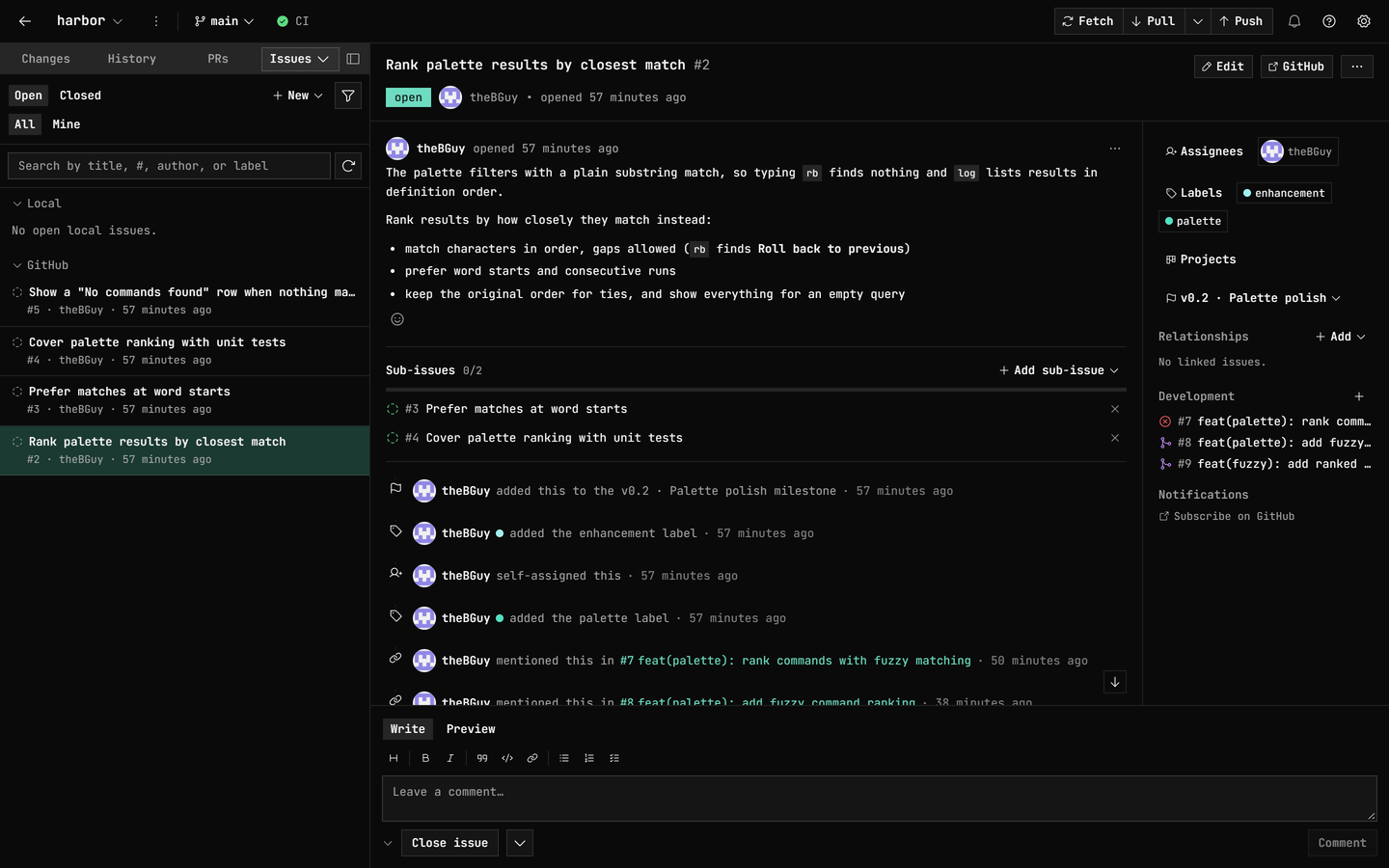
**Activity feed**: an issue's timeline events interleave with its comments,
date-sorted oldest-to-newest — labels, assignees, milestones, title renames,
**mentioned this in** cross-references, linked pull requests,
marked-as-duplicate, pin/lock/transfer, and close (with its reason) or
reopen. Each event row carries the actor's **avatar** and a relative
timestamp, and a cross-reference, link, or duplicate row pointing inside the
repository jumps to the pull request or issue it names (under a fork's
**Upstream** lens those rows stay plain text). GitLab issues report labels,
state changes, milestones, assignment, locks, duplicates, and same-project
mentions.
### Project boards
A tab that shows a **GitHub Project** as a live kanban board, so you can see
where a whole piece of work stands without leaving the app. Pick any board
the repository or its owner has (closed ones sit in their own group and stay
fully workable), and pick which of its single-select
**or iteration** fields makes the columns (**Status** to start with), with a
trailing column for anything the field doesn't cover. Grouping by an iteration
gives you a sprint board: a column per iteration the field defines, plus
finished ones that still hold cards. Cards carry their type and state, the
number, the owning repository when the board spans several, and up to three
assignees; **draft** items open their notes in place, dated with when the
note was written and when it last changed, and an item you can't see says so
rather than thinning the board silently. Open an issue or pull request
straight from its card, or press **Space** for a **details peek**: its title,
what it is, and when it was opened, joined this board, and last changed,
without leaving the columns. Page through a large board with **Load more**,
and move around the whole thing from the keyboard. **Add item** puts work on
the board without a trip to the browser: search this repository's issues and
pull requests and add several in a row, or write a **draft** — a Markdown
note that lives on the board alone until it earns an issue. Either way the
card is there as the write lands, drawn from GitHub's own answer to it.
**Right-click a card** (Shift+F10 on Windows and Linux) for its menu: open an
issue or pull request or **show its details**, **move the card to another
column**, **edit a draft** (title, Markdown notes and assignees) or
**convert it to a real issue**, **archive** the card, or **remove** it from
the project. Archived cards come back on demand: turn on **Show archived
cards** under **View options** and they sit in their columns, dimmed and
badged **Archived**, with **Restore card** on each one putting it back.
**Work on several cards at once**: `Ctrl`/`⌘`-click picks cards out
individually and `Shift`-click (or `Shift` with the arrow keys) takes a
range down a column, and a bar above the board then moves, archives,
restores or removes the cards each verb can reach — or **sets their
fields**, from a list of the board's own fields where every row starts on
**Leave as is**, so one **Apply** writes exactly the ones you drafted to
every eligible card, and each row tells you what the selection holds today.
Every count shows exactly what that verb will reach (archived cards sit out
a field edit, for instance), each prompt says where the cards go, and a card
that leaves the board leaves the selection. A move writes the board's
grouping field and re-draws the card where it lands, keyboard place and all.
`Alt`/`⌥`+`↑` and `Alt`/`⌥`+`↓` reorder the card you're on inside its
column, `Alt`/`⌥`+`Home` and `Alt`/`⌥`+`End` send it to that column's top or
bottom, and the card's menu and the command palette carry the same four
moves. That order is the project's own, so it's the order GitHub shows
everyone; hold the keys down and the board keeps up, writing where the card
finally lands. With archived cards shown, the same moves work, each landing
beside a card that isn't archived: down goes just below the next one, and up
goes above the previous one, usually above the archived cards directly over
it too. A saved view that sorts says so instead, since its columns are drawn
in the sort's order rather than the board's.
Creating an issue puts it straight on a board too: the **New issue** dialog
carries a **Projects** picker of its own. The board's **saved views** come
along as lenses: pick one and GitHub filters the read for you, its sort
orders the cards in each column (by **Title**, or by a text, number, date,
single-select or iteration field), its visible fields ride along as chips on
the cards, and its grouping seeds **Group by** while you stay free to
regroup. A view saved as a **table** opens as a table: a dense grid of the
view's own columns (assignees, labels, milestone, repository, reviewers and
linked pull requests among them, with a **+N** where a list runs long), a
header row and a **Title** column that stay in place while you scroll, rows
in the view's sort with each sorted column marked in its header, and the
view's row grouping drawn as sections you can fold away. Arrow keys move
cell by cell, rows take the same click and keyboard selection as cards, the
row menu and the selection bar work as they do on the board, a board field's
value can be edited right in its cell, and an unsorted, ungrouped table
reorders rows with the same `Alt`/`⌥` keys. A view saved as a **roadmap**
opens as a timeline: each item's bar runs from its start date to its target
along a month, quarter or year axis, with a line for today, the current
iteration shaded and named, and milestone due dates marked. **View options**
picks the date or iteration fields that place the items (the view's own date
fields come pre-picked), `Alt`/`⌥`+`←` and `→` shift the item you're on by a
day (or an iteration), and adding `Shift` moves its target date alone.
**Clear view** brings the whole item set back in the board's own order with
the chips off, leaving the grouping where you last put it. Picking a view
and regrouping the board never change what GitHub has saved.
**Create projects and manage saved views** from the board too. The menu
beside the project picker starts a **new project** (linked to this
repository whenever it can be read; the dialog says which), edits a
project's title and short description, closes or
reopens it, and deletes it after asking. **View options** adds a view in the
layout you pick, renames, duplicates or deletes the one on screen, and picks
which **fields** it shows; switch the view's **layout** for a look and
**Save layout to view** when it should stick. A duplicate copies the view's
layout, filter and shown fields, in the project's field order (GitHub offers
no way to copy its grouping or sort). An empty catalog offers **New
project…** in place of the board.
**Status updates** show the project's health at a glance: once a project
has one, a strip above the board carries the latest status (**On track**,
**At risk**, **Off track**, **Complete** or **Inactive**, always named as
well as coloured), the first line of its note, its target date and how long
ago it was posted. Press it to fold out the history, newest first, with
each update's author, dates and Markdown note, and post a new one from
**Add item → Post status update…** or the command palette. Updates you
wrote can be edited or deleted from their own menu.
Adding, moving, reordering, shifting roadmap dates, editing a draft,
converting, archiving, restoring, removing, posting status updates and
managing projects and views all need write access to the board and the
`project` sign-in scope (a new project needs the scope alone); reading one
needs only the `project` or `read:project` scope the Projects picker already
asks for.
### Code TODOs
A tab that scans your working tree for real `TODO`, `FIXME`, `HACK`, `BUG`,
and `XXX` comment markers (tracked and new-but-not-ignored files), groups
them by file, and lets you filter by text/path or marker. Select one for a
syntax-highlighted excerpt with blame attribution (who wrote the line, and
how long ago); then **open it in your editor**, **copy its `path:line`**, or
**promote it to a local issue**, pre-filled with the comment and a
`path:line` reference, from where it's publishable to GitHub, GitLab, or
Jira like any other local issue.
### Discussions
Browse and read a repository's GitHub Discussions, create and edit them, and
react or upvote, with Write/Preview markdown throughout. Close or reopen one
with a comment you've drafted posted alongside.
### GitHub Actions
A dedicated tab with live run status, run detail, re-run (all, failed
only, or one job), cancel, manual dispatch, and inline failed-step logs
(GitHub Desktop re-runs a checked-out pull request's checks, with no runs
tab, cancel, dispatch, or in-app logs), plus a current-branch CI badge in
the header and run-completion notifications. Right-click any run in the
list to re-run or cancel it, run its workflow again with the picker
already on that workflow, open it on the forge, or copy its link; those
actions are in the command palette too. The Run workflow picker marks
the workflows that can't be started by hand on the chosen ref, so a
dispatch that would be rejected is visible before you run it.
- **Debug failed CI with AI**: turn a failed job's logs into a streamed
root-cause + fix, ending with a ready-to-paste prompt for a coding agent.
### Security findings
A **Findings** tab (More ▾) lists a GitHub repo's open **Dependabot
alerts**, grouped by the vulnerable package, each row with its severity,
affected version range, first patched version, and a CVSS score when GitHub
has one; its **code scanning** alerts; its **secret scanning** alerts, with
a **validity** chip for the leaked credential; and the **security
advisories** published on the repository itself. Select a row for its
detail, then open it on GitHub. A Dependabot alert's detail adds a
base-metric table per CVSS version the advisory carries (3.x and 4.0), its
CWEs, labeled reference links, and whether the package is a direct or
transitive dependency. The GHSA, CVE, and CWE ids a detail shows link to
their advisory pages. When a category isn't reporting (scanning switched
off, a token that can't read it, or a check that didn't complete), the tab
says which and why; for the three scanning categories, **Open security
settings** (with repo-admin access) goes straight to Repository settings →
Security to turn scanning on. Repository advisories have no such switch;
they're only published on public repositories.
On a **GitLab** repo the same tab reads the newest completed **pipeline**
for your checked-out branch (falling back to the default branch, and
saying so) and lists its **SAST**, **secret detection**, and **code
quality** findings straight out of the pipeline's report artifacts,
including scans that run in triggered child pipelines. Those
analyzers run on every GitLab tier, Free included; it's GitLab's own
vulnerability report that's Ultimate-only, so this is often the only place
you'll see findings your pipelines already produce. A provenance strip
names the pipeline, branch, and commit the findings came from, with **View
pipeline**; a finding's detail adds its severity, `file:line`, the scanner
that raised it, its identifiers as links, the description, and **View file
on GitLab** — a permalink to that line at the scanned commit. Detected
secret *values* never leave the report: the raw extract is dropped before a
finding reaches the app. Rather than looking clean, each section explains
itself: scanning not set up (with **Open scanning setup on GitLab**), a
report GitLab won't serve (add the `gl-*-report.json` to `artifacts:paths`
in the job that produces it), expired artifacts, nothing finished yet, an
access problem, or a check that didn't complete. An empty section only
reads as clean once a parsed report proves it, and a partly unreadable
pipeline says how much was lost. When one cause covers all three (no
pipeline to read yet, or one problem across every category), a single card
stands in for them.
On a **Bitbucket** repo the tab reads the **Code Insights** reports
published against your branch's tip commit (falling back to the default
branch, and saying so), a section per report: its title, what it covers,
the reporter, its result chip (Passed, Failed, Pending, or Unspecified
when the tool posted none), its metrics strip (numbers, durations,
percentages, dates, and pass/fail flags, each formatted for its own type),
its description where the report carries one, and its **annotations**
worst-first with severity and `path:line`. A provenance strip names the
commit and ref the reports came from, linking the commit where Bitbucket
gives a URL. That strip shows above the no-reports card too, so a commit
with nothing published still says which commit and ref were read. Select
an annotation for its type, location, reporter, result, and full text, and
where the scanner attached a link, open it at the source it points to (an
advisory page, the rule's docs), named by its host rather than by the
forge. Coverage and test reports carry no annotations, so their section is
the header, metrics, and description — and where no scanner has published
anything yet, or a report's annotations couldn't be read, the tab says
which of those it is rather than showing a clean list. Any pipe that
writes Code Insights puts its results here, so a Bitbucket Pipelines
scanner needs nothing extra to show up.
### Insights
A repository-graphs tab (`Ctrl`/`⌘`+`9`): commit activity, code frequency
(additions vs. deletions), contributor churn, and a commit punch card, all
computed **locally from your clone**, so they work offline, on private
repos, with no token or rate limit, and without GitHub's 10k-commit chart
degradation. Plus the at-a-glance overview (languages, contributors, sizes,
branch-vs-default), a GitHub Actions success-rate / duration trend, a
community-health card, 14-day **traffic** (views/clones/referrers/paths,
with push access), a **dependencies** card, and quick links to the web-only
GitHub insights (Pulse, network, dependents, Actions metrics, stars over
time). A **Fork activity** card lists the repo's recently active direct
forks on **GitHub, GitLab & Bitbucket** (up to ten, most recent first,
each with its latest activity and stars where it has any), plus the total
fork count and a link to the full list; on GitHub, a per-fork **Compare**
fetches ahead/behind counts, so you can see which forks carry commits
yours doesn't. Charts ship one-line captions, data-table fallbacks, and
keyboard navigation.
### Explore repositories
A full-page browser across **GitHub, GitLab & Bitbucket**. Before you
type, it shows **the repositories you have access to** (your own, ones you
collaborate on, and those in an organization, group, or Bitbucket
workspace you belong to), grouped by owner, plus a **Popular** star-sorted
feed (GitHub & GitLab); typing searches GitHub, all public GitLab
projects, or your Bitbucket workspaces (Bitbucket retired global repo
search). Sort by best match, most stars, or recently updated. Open a
result for its README preview, then **clone** it, **fork** it (with an
offer to clone the fork), or **star** it (GitHub & GitLab), without ever
knowing the URL. **Fork** only shows on a repository that isn't already
yours, so on Bitbucket (where Explore lists just workspaces you belong to)
it doesn't normally appear. Fully keyboard-navigable.
### My work
A cross-repo inbox of the open work that involves you, across all three
forges. On **GitHub** it collects every pull request and issue you
authored, were assigned, were mentioned in, or commented on, plus
anything awaiting your review; **GitLab** adds the merge requests and
issues from each host you're signed in to, and **Bitbucket** the pull
requests from your recent repositories. Newest first, so what's waiting
on you is one screen away instead of one repository at a time. Every row
carries the mark of the forge it came from, each forge loads on its own,
and a forge you haven't connected simply doesn't appear. Narrow it with
the **All / Pull requests / Issues** tabs and a filter box that takes
arrow keys and Enter, then press Enter on a row: an item from a
repository you've added to GitDesktop usually opens right in the app, and
the ↗ marks the rows GitDesktop already knows will open on their host in
your browser — a row without it can still land there when its checkout
can't be confirmed as you open it. A pull request usually lands in the
**worktree** its head branch is checked out in (when GitDesktop can
resolve that in time), so you arrive in the checkout the work lives in;
**Shift+Enter** (or *Open in main workspace* on the row's right-click
menu) takes you to the main workspace instead.
Read-only, with a **Refresh** in the header, plus *Open on GitHub / GitLab /
Bitbucket* and *Copy link* alongside. Reach it with `Ctrl`/`⌘`+`Shift`+`M`,
from the welcome screen, or from the command palette (*My work*).
### GitLab
First-class, via the **GitLab CLI (`glab`)**, on gitlab.com or
**self-managed** (any host `glab auth login` knows). Browse and clone
projects, then read and act on merge requests, issues, pipelines, and
releases in the same panels: MR comments, commits, and diff; an issue's
labels/assignees/milestone rail; pipeline jobs with logs and a branch CI
badge; release notes with asset links. Star a project ("View on GitLab" plus
a fork link), **publish a local repo** (or local issues and PRs) to GitLab,
and Insights charts GitLab pipelines and lists the project's recently
active forks. GitHub is unchanged.
The full GitLab surface: merge requests, issues, time tracking, pipelines and releases, project settings
- **Merge requests**: comment (edit/delete your own), close/reopen with a
drafted comment posted alongside, edit title and description, retarget the
target branch, react with emoji (on descriptions and comments), edit labels
and assignees, **approve / unapprove**, request changes, and **merge**
(merge/squash), including **auto-merge** when the pipeline succeeds
(cancelable in place). Plus **create**: push-and-open, drafts,
duplicate-MR detection. GitLab's own merge status drives the **conflict**
strip, the list's **Conflicts** chip, and in-app conflict resolution.
- **Issues**: create, comment, close/reopen with a drafted comment posted
alongside, edit labels and assignees, set **milestone**, **due date**
(past-due cue), **confidential**, and **linked related issues**;
lock/unlock, move to another project, or delete.
- **Time tracking**: estimate + spent, on an issue *or* an MR.
- **Pipelines and releases**: retry, cancel, or run pipelines with CI/CD
variables and **play a manual job**; publish, edit, and delete
**releases** with asset uploads.
- **Project settings**: **General** (description, topics, default branch,
access levels, merge method and squash policy), **Members**, **Protected
branches** (per-rule access + force-push policy), **Webhooks** (delivery
log + re-send), **CI/CD variables**, and a **Danger zone** (rename and
transfer update your local `origin`; archive, visibility, delete).
### Bitbucket Cloud
Connect with an **Atlassian API token** (Settings → Accounts), then browse
and clone repositories and work pull requests and Pipelines (with step logs)
in the same panels. **Publish a local repo** to Bitbucket (creates the repo,
adds `origin`, pushes). Reopening a declined PR isn't available (a platform
limit), and issues live in **Jira**; link a project (below).
The full Bitbucket surface: pull requests, tasks, Pipelines, repo settings
- **Pull requests**: comment (edit/delete your own), decline, merge (merge /
squash / fast-forward, optionally deleting the source branch), edit, and
**create** (drafts, reviewers pickable at create time). **Approve /
unapprove**, **request changes** (a true toggle that revokes on every
plan), pick reviewers from your workspace, and flip **draft ↔ ready**
either way. Bitbucket publishes no mergeability field, so conflicts are
**predicted locally** from your fetched branches, and resolved in-app the
same way.
- **Tasks checklist**: add, edit, resolve/unresolve, and delete, with a
progress bar and an "N open tasks" header chip (read-only on a
closed/merged PR).
- **Pipelines**: rerun, trigger, and stop; on a repo with custom
`pipelines.custom.*` in `bitbucket-pipelines.yml`, **pick which pipeline
to run** (Default or a named custom one, with variables). Insights charts
Pipeline durations and lists the repo's recently active forks, with a
link-out to Bitbucket's Commits/Branches/Pipelines/Deployments.
- **Code Insights**: the [Findings](#security-findings) tab lists the reports
published against your branch's tip commit, a section each, with their
metrics and annotations.
- **Repo settings** (admin): **General** (description, website, language,
fork policy, default branch), **default reviewers**, **branch
restrictions** (block pushes/force-pushes/deletion, restrict merges,
require approvals/builds/tasks), **pipeline variables** (secured
supported) and **schedules** (cron), read-only **deployment
environments**, **webhooks**, and a **Danger zone** (rename updates your
local `origin`; no archive).
### Jira Cloud issues
Link a Jira Cloud site and project to any repo (the repo ⋯ menu's **Link
Jira project…**, or the palette), and its Issues tab gains a **Jira**
section. Connect with an **Atlassian API token** (validated, kept in your OS
keychain) or reuse a Bitbucket credential. Especially handy for
**Bitbucket**, whose tracker Atlassian retires **2026-08-20**. Agents reach
the linked project through GitDesktop's **MCP server**: `jira_*` tools to
list and read, and (behind `--allow-remote-write`) comment, close/reopen,
create, assign, log work (`jira_log_work`), and update an issue's due date,
priority, labels, and original/remaining estimates.
The full Jira surface: browse, agile fields, actions, linked keys
- **Browse and read**: filter issues (open / closed / all, mapped to Jira's
status categories) and read status, type, priority, assignee, labels, a
Markdown description, and comments, with **View in Jira** link-outs.
- **Agile fields** (when the project uses them): **story points** (also on
list rows), **sprint**, a clickable **epic / parent**, **components**, and
**fix versions**, auto-discovered per site with nothing to configure.
- **Act**: create (summary, description, type), comment in Markdown,
close/reopen along the project's workflow (or jump to any status from the
chip's status menu), assign/unassign, set a due date, change priority,
edit labels, **log work** (Jira's `2d 4h 30m` duration grammar, with an
optional note), **set the original/remaining estimates**, and edit/delete
your own comments and worklog entries. Actions your permissions don't
allow simply don't appear.
- **Linked in**: issue keys (e.g. `PROJ-123`) spotted in your branch name,
commits, and PR titles surface as a **referenced Jira issues** row that
jumps to the issue; a **local issue** can be published to Jira (comments
carry over, with a back-link).
### Accounts and sign-in
Reconnect **GitHub** (`gh`'s device-code flow) and **GitLab**
(`glab --web`) right from the not-signed-in panels, Settings → Accounts, or
the palette; no dropping to a terminal for github.com and gitlab.com (a
self-managed GitLab host needs `glab auth login --hostname …` once, in a
terminal).
GitDesktop tells an **expired-or-revoked session** apart from
never-signed-in, network blips, and a **GitHub API rate limit** (GitLab's
too, when its CLI names the limit). An expired session gets a badge with
one-click **Reconnect**; a rate limit gets its own badge, with the time
access resumes when GitHub reports it and nothing to reconnect. While a
GitHub rate limit is in effect, GitDesktop doesn't send most of the requests
the limit covers until it lifts, and most actions that need one say so.
GitDesktop also **warns before a token lapses**: GitLab and GitHub PAT
expiry, plus an optional Bitbucket **expiry date** you supply. For GitLab
it nudges the **browser (OAuth)** option, whose sessions renew themselves
instead of expiring.
### Coding agent sessions
Hand a coding task to a **Claude Code**, **Codex**, **GitHub Copilot**, or
**opencode** agent (the CLI you already have; opencode's hosted models are
free, no extra subscription). It works in an isolated worktree that never
touches your checkout.
- **Watch it work**: follow every file it reads and edits and command it
runs, expand any edit to its diff inline, then keep the result as a
branch, open a local PR from it, or discard it.
- **Several at once**: sessions organize into **Active** and **Kept** tabs,
searchable, with a notification when each finishes.
- **Sandbox**: confine writes to a **Docker/Podman container** (or rely on
each CLI's own worktree confinement on the host), pick worktree or
container **per session** from the composer's **Options** (with an inline
readiness check before it starts), and add per-repo tools (e.g.
Playwright) via a committed `.gitdesktop/agent.Dockerfile` that GitDesktop
builds into a per-repo image after you confirm it.
- **Drive each turn**: **slash commands and skills** (built-in starters,
custom commands, and the agent's own commands and **Agent Skills**,
project *and* global, incl. the shared `.agents/skills`), `@file`
mentions, a model/effort picker, and terminal-style prompt history.
- **An integrated terminal**: every agent session gets a real shell in a
resizable bottom dock, toggled with `Ctrl`/`⌘`+`J`. For a container
session it runs *inside* the session's container; you pick which
dev-server ports to publish *before* it starts, and can reconnect to or
stop one that's still running. For a host session it's a shell in the
worktree. A hidden terminal keeps running, so a dev server you start
stays up.
- **Run a task several ways and keep the best**: fan one task out across 2–5
arms (best-of-N), **each with its own agent, model, and effort**, so
different providers (Claude, Codex, Copilot, opencode) attack it
differently. Each runs in its own worktree; compare them and keep the
winner with a single **keep this, discard the rest**. Because fanning out
costs more, a confirmation first shows an **upfront estimate** drawn from
your own recent sessions, and the ensemble's **running total** as it
works. Opt-in, never the default.
- **Research before you plan**: a read-only, **web-enabled Research** mode
that sits upstream of Plan. **Brainstorm** surveys the web and your code
for several distinct directions with prior art; **Deep research**
investigates one direction in depth and writes a **cited** report,
rendered right in the app (never bounced to an external editor). **Switch
between the two mid-session** as the idea narrows; the conversation
carries over. Hand a report **straight to Plan**, or **save** it as a
local Markdown file (yours to review and commit, in `.gitdesktop/research/`).
It searches and reads but never writes, and runs on **any agent** (Claude,
Codex, Copilot, or opencode), each using its own native web search and
fetch.
- **Plan before you build**: a read-only **Plan** mode drafts an agent-ready
issue from a task (or an existing issue): a repo-aware agent explores your
code and writes the problem, approach, affected files, acceptance
criteria, and verify plan, with cited paths validated against your tree so
hallucinations are flagged. If the plan leaves decisions open, answer them
in an inline panel (pick a suggestion or write your own) and **refine**
the plan with your choices. Then file it as a local, GitHub, or GitLab
issue, or hand it **straight to a write-capable agent session** to
implement. Nothing is changed during planning; it never writes.
- **From issue to implementation**: a **Solve with agent** button on any
local, GitHub, or GitLab issue (and **Implement** on a finished plan)
seeds the agent composer with the spec, so you pick the agent and
confirm; then it builds it in an isolated worktree.
### MCP servers
Both directions: bring your own servers to agent sessions, or let outside
agents read this repo through GitDesktop.
- **Bring your own MCP servers**: register MCP servers (local `stdio` or
remote HTTP, secrets in your **OS keychain**) under Settings → MCP
servers, then opt a session into them from the composer's **MCP** picker;
change picks mid-session. Per agent: Claude, Copilot, or opencode (host or
container), and Codex in a container (host Codex can't approve MCP
calls). Claude runs **strict** (only your picks); Copilot and opencode
layer them on. In a container they run inside the sandbox, sharing an npm
cache so an `npx` server downloads once. **Browse** the official registry
in-app (with stars, weekly installs, and exactly what each runs, so you
can vet before adding) or **Import** existing config.
- **Use GitDesktop *as* an MCP server**: the reverse direction. Expose this
repo's **read-only-by-default** git and forge tools (status, log, diff,
blame, branches, file read/history, PRs, issues, CI logs) to any external
MCP client: **Claude Desktop**, **Cursor**, **Claude Code**. PR/issue/CI
tools route across **GitHub, GitLab & Bitbucket** by the repo's remote
(Bitbucket covers PRs and pipelines, not issues). The app runs as a
**stdio server** (its own binary on macOS/Linux, an update-safe
`gitdesktop-mcp` copy on Windows), so an agent can *understand* a repo
without touching it.
- **Set up in one click**: Settings → MCP servers gives a ready-to-paste
snippet, **writes it into the repo's `.mcp.json`** (with a **Shareable**
toggle for portable, committable paths), or **installs it globally** for
Claude Code or Copilot (into the client's user config, available in every
project). Per-client rows show each install's live state, with one-click
**Reinstall** / **Remove**, plus a one-click **Add to PATH** so bare
`gitdesktop-mcp` resolves in any terminal (user PATH on Windows, a
`~/.local/bin` symlink on macOS/Linux; reversible, no admin).
- **An escalating write ladder**: each tier is a separate flag, off by
default, so read-only stays the default (and agent-session branches are
refused by the branch-mutating tools):
- **`--allow-write`**: this repo's local PRs and issues (GitDesktop's own
app-data artifacts; nothing is pushed)
- **`--allow-remote-write`**: real forge writes under your identity (`gh`
/ `glab` / Bitbucket token): create/merge/update PRs,
create/extend/dissolve GitHub PR stacks, request reviewers, edit labels
and assignees, approve or resolve review threads, rerun or dispatch CI,
cut releases, and file or comment on issues (creating a PR pushes its
head branch, so it also needs `--allow-git-write`)
- **`--allow-git-write`**: recoverable git ops (stage, commit, branch,
push/pull/fetch, stash, merge, rebase, revert, cherry-pick, tags)
- **`--allow-destructive`**: the irreversible ones (discard, reset,
force-push, delete branch/tag)
- **Generation recipes**: hands a connected agent the fully assembled
commit-message, PR-description, or branch-name prompt (the same context
the in-app features build) to complete with its own model, as recipe
tools *and* as native **MCP prompts** (slash-command-like in clients).
### AI generation
AI where it helps, with the provider you choose: commit messages, branch
names, PR and issue titles and descriptions, repository descriptions and
topics. Generating a PR/MR description also proposes **suggested labels**
from the repo's existing set and **issue links** picked from a grounded
shortlist of your open issues (on a Bitbucket repo with a linked Jira
project, linked-Jira keys to mention instead). Bring your own provider:
cloud APIs, local **Ollama**, or a **keyless agent CLI** you already pay for
(Claude Code, Codex, GitHub Copilot, opencode), usable for generation *and*
review via its subscription login. The full list is under
[AI configuration](#ai-configuration).
### Around the app
- **Markdown everywhere you write**: Write/Preview tabs and a formatting
toolbar (`Ctrl`/`⌘`+`B / I / K`) on every comment, reply, and
release-notes field, rendered to match GitHub's own styling for task
lists and heading hierarchy, with code blocks syntax-highlighted in ~190
languages using the same colors as diffs and blame (light and dark).
- **Mention & reference autocomplete**: on GitHub and GitLab repos, type
`@` in a comment box, reply, edit, diff line comment, release notes, or a
local PR or issue's description and comments to pick a person and `#` to
pick from the recently updated open issues and pull requests, with arrow
keys and Enter to accept. GitLab adds `!` for merge requests; each forge
offers only the references it links.
- **References are links**: `#123` and `@user` in a rendered description,
comment, review thread, AI review, or release note open what they name. On
GitHub, `#123` opens that issue or pull request in the app, whichever it
turns out to be; on GitLab, `#123` opens the issue and `!123` the merge
request. `@user` opens the profile in your browser. Hover a reference, or
reach it with Tab, and a **preview card** shows what you'd be opening: the
state (Open, Merged, Closed, or Draft), title, and author of an issue or
pull request, or the avatar and handle of a person. Bitbucket bodies leave
references plain, matching Bitbucket itself, and a reference inside a code
span or fence stays plain text.
- **Link previews**: hover a web or `mailto:` link in a rendered body, or reach
it with Tab, and a card names its destination right away: a web link's domain
and full URL, or the address a `mailto:` link would write to. For a web link
it then fills in the page's title, description, and image where the site
publishes them. **Fetch link previews** (Settings → General) turns that
lookup off when you want the destination alone, and pages on private or
local network addresses are never fetched.
- **Images open fullscreen**: click a screenshot in a rendered description,
comment, or discussion (or either side of an image diff) to fill the window
over a dimmed backdrop, with its label and pixel dimensions, a
**Fit** / **100%** toggle, and **Open in browser** for one loaded from the
web. In **Fit** view ← and → walk the rest of the set (the other images in
that body, or the diff's old and new sides); at **100%** the arrow keys pan
the zoomed image instead, and Esc closes either way. Every image the
viewer opens takes the keyboard too: Tab to it and press Enter. A linked image
still follows its link, and badges and icons stay put.
- **Collapsible comment box**: fold the comment box down to a one-line strip to
read more of the thread, on every conversation surface — pull requests and
issues (local, on the forge, and Jira), discussions, and commits. Approve,
Review, and Close stay on the strip, a saved draft shows its first line there,
and the choice is remembered until you expand it again.
- **Jump to either end of a thread**: long pull request, issue, and
discussion conversations get scroll-aware arrow buttons by the scrollbar
that take you to the top or the newest activity at the bottom, with
**Jump to the top / bottom of the thread** in the command palette.
- **Keyboard-first**: rebindable shortcuts (single keys included) with
GitHub-Desktop-compatible defaults, a generated cheat sheet (`Ctrl`/`⌘`+`/`),
a command palette (`Ctrl`/`⌘`+`K`), a filterable shortcut list in Settings
(by name, category, or key), and arrow-key navigation everywhere.
- **Themes**: System, Light, Dark, and a softer **Slate** (a cool, lifted
blue-gray) that eases eye strain; switch in **Settings → Appearance** or
cycle from the command palette.
- **Privacy-first**: API keys live in the OS keychain (never in app files),
local models keep code on your machine, AI-ignore patterns keep sensitive
files out of context unless you opt into repo-aware review, and a single
switch hides every AI surface and pauses your automations.
- **Tasks**: save your own scripts (your release or build flow, say) and run
them from a dedicated **Tasks** tab or the command palette ("**Run a
task…**"), without dropping to a terminal. Point a task at an **existing
script in the repo** (it runs the live file, so edits take effect next
run) or write one **inline**; with an AI provider connected, **generate**
an inline script from a plain description, or **Analyze with AI** to read
the script and fill in its name, description, and the **arguments it
accepts** (`--help`-style docs, shown as a reference when you run). Each
task carries a description and default **arguments** (e.g. `--preview`;
quoted values stay intact), and a confirm-gated run lets you **adjust the
arguments per run**. Runs happen in an **interactive** in-app terminal in
the repo's folder, so scripts that prompt you (a version to release, a
yes/no) work and keep their colour; **Stop** kills the run and its child
processes, **Rerun** starts a fresh one. Pick the interpreter
(**PowerShell**, **cmd**, **Git Bash**, **bash/sh/zsh**, **Node**,
**Deno**, **Bun**, **Python**, or **Ruby**), with the editor showing
**which it detected** on your machine (and where). Task definitions live
in your app data, never read from repository content, so a cloned repo
can't plant one; running is **off until you enable it**, and each task
can **confirm before it runs**. Each task belongs to the repository you
create it in; set **Available in** to **All repositories** for one that
should follow you everywhere (tasks saved before this stay available
everywhere). Tasks from your other repositories stay listed under
**Other repositories**, ready to edit or delete, and run in the repo
they belong to. A run you confirm names the **exact script file** it
resolved and flags one that isn't there, and the run header shows that
path while it runs; a file task's first run in a repository always
confirms.
- **Automations**: a lifecycle grid (on commit / on PR opened / on new
commits to a reviewed PR) that runs AI review or security audit
automatically, with per-action branch conditions, Save/Discard drafts,
global defaults, and per-repo overrides (paused while **Hide AI** is on).
- **Automation history**: every decision a repository's automations made,
in one read-only log — what ran, what was skipped, and the reason for
each, with the repo's effective configuration at the top. Open it from
the activity bell or the repo ⋮ menu. **Run automations on this pull
request** (command palette) runs the configured reviews on demand,
confirming the modes and the posted comment before spending a model call.
- **Integrations**: open in any editor or terminal (auto-detected, point at
any executable, or set a full custom command with a `{path}` placeholder),
and per-source notification controls that send each kind of event to the
activity inbox, your desktop, both, or neither, with per-repository
overrides, CI sources that can watch just your pull requests or every open
one and narrow to just the failures (or just the successes), and
automation results that can narrow to failures only.
- **Activity and notifications**: a persistent bell in the header collects
terminal events (a finished review, checks passing/failing, a PR
approved/commented/merged, a pull request that failed to create, a review
requested from you, a completed CI run, or a finished agent / research /
plan run) into a clickable,
clearable history that survives a restart, so a review that finishes
while you're away is never a missed click. Open it from the command
palette; which events show follows your notification settings, where
each source sets its inbox and desktop channels independently. A
cancelled or failed **automated** review also lingers in a **Stopped**
group with one-click **Re-run** (re-firing exactly that run's mode) and
**Dismiss**, so a stopped automation isn't a dead end. The *review
failed* notification row itself states why the run failed, and for
automated runs carries the same one-click **Re-run** right on the row.
- **Environment check**: a Settings → **About** panel reports your
app/OS/Tauri versions and the status of every CLI GitDesktop uses (git,
the GitHub & GitLab CLIs, Claude Code, Codex): installed?, version,
resolved path, and sign-in state, with an Install link for anything
that's missing. A CLI that's installed but too old for a feature that
needs it (git, or the GitHub CLI) gets a warning naming the feature and
the version it wants, with an Update link. It also shows a live readout
of the window's current position, size, and display (with copy-coords).
- **Narrow windows and split-screen**: the window goes down to 640px wide,
so GitDesktop can sit beside your editor in a tiled layout. The
sidebar narrows with the window and collapses to an icon rail
(`Ctrl`/`⌘`+`Shift`+`B`), the file list beside a diff collapses on
demand or when its pane is tight, and the commit box pops out into a
roomier dialog reachable from any tab.
- **Window memory**: GitDesktop reopens at the size and position you left
it, and maximized if it was, validated against your current monitors so
an unplugged display can't strand it off-screen. Your layout is saved as
you arrange the window, so a crash or a killed process doesn't lose it.
- **Git settings**: Settings → **Git** configures your global git config
from the app: the **default branch** for new repos (`init.defaultBranch`,
honored by a command-line `git init` too), **line endings**
(`core.autocrlf`), and your **commit identity**, plus a **per-repository
override** (`git config --local`) so you can commit as a different author
in one repo without changing your global identity.
- **Git hooks**: view, edit, enable/disable, and template `.git/hooks`, with
husky / pre-commit / lefthook detection and install integration.
- **Self-updating**: signed, verified auto-updates from GitHub Releases,
checked at launch and periodically in the background, with a persistent
in-app indicator when one is ready. Always installed on your consent; see
[Updates](#updates).
## AI configuration
- **Providers**: Anthropic, OpenAI, **Google AI Studio** (Gemini), **any
OpenAI-compatible endpoint** (custom base URL, with one-click presets for
the Vercel AI Gateway, DeepSeek, Mistral, and Z.ai),
OpenRouter, **local or LAN Ollama**, **Ollama Cloud** (hosted models via
an API key), and the **Claude Code / Codex / GitHub Copilot / opencode
CLIs** (keyless, via your subscription, or opencode's free hosted models).
Separate models for generation vs. review; live model lists in a
searchable picker (the opencode, Codex, and Copilot CLI catalogs included).
- **Custom and LAN servers**: point Ollama or an OpenAI-compatible endpoint
at a box on your network, not just `localhost`. Non-built-in hosts must be
added to the **Allowed hosts** list (Settings → AI; one-click *Allow
host* on the URL field). GitDesktop enforces the list before every AI
request, and new MCP server registrations are checked against it.
- **Custom instructions**, included in every generation and every AI review:
- **Global**: Settings → AI instructions (e.g. "Follow Conventional
Commits").
- **Per-repo**: `.gitdesktop/instructions.md` in the repo. Takes
precedence.
- **AI ignore patterns**: keep files out of AI context (they still commit
normally), in `.gitignore` syntax: `secrets.env` hides that file at any
depth, `/secrets.env` only the copy at the repo root, `node_modules` or
`vendor/` a folder wherever it sits, and `docs/*.log` just that folder's
logs. A `!` line puts back something a broader pattern hid; to spare a
file inside an excluded folder, exclude the folder's *contents*
(`vendor/*`, not `vendor/`), since git never re-includes below an
excluded directory. Your global patterns are applied last, so a repo's
committed file can never re-expose what you excluded yourself. While
patterns are set, any part of a diff whose file can't be identified is
kept from AI too, so nothing reaches a model without being checked
against them. A model that reads your
repository itself isn't limited by them; that's what the PR panel's
**Agentic review** toggle turns on.
- **Global**: Settings → Excluded files (one pattern per line).
- **Per-repo**: `.gitdesktop/aiignore` in the repo. A changed file's
context menu → **Exclude from AI** (file, folder, or file type, or a
multi-selection) creates and updates this file for you, adding anchored
lines like `/src/config.ts` and `/vendor/` that mean exactly what you
picked.
- **See what they hide**: the repo ⋮ menu → **Manage files…** → **AI
excluded** lists every file your patterns currently hide, each labelled
with the rule that hid it and whether it came from the repo file or your
global settings. Above the list sit your rules in evaluation order with
per-rule match counts (click one to see just its files), and a warning
marks a `!` line that decides nothing. Select files and **Remove** the
rules behind them: repo lines leave `.gitdesktop/aiignore` (commit the
change), global lines leave Settings and affect every repository. The
**Tracked** tab's **Exclude … from AI** button excludes a whole selection
at once.
- **Keys**: kept in the OS keychain (Windows Credential Manager, macOS
Keychain, libsecret). **Hide AI** (Settings → General) hides the AI
surfaces (finished AI activity in the dock and notification inbox
included), mutes AI desktop notifications, and pauses your automations
while keeping your config; rules start firing again when you turn AI
features back on.
## Updates
GitDesktop checks GitHub Releases on launch and about every six hours in the
background while the app stays open (opt-out in Settings → Updates). A
pending update shows a dot on the Settings gear and an **Install & restart**
banner in Settings → Updates, and installs **only on your consent**.
If changes made offline are still waiting to send, GitDesktop asks before
the restart discards them. Updates are cryptographically signed and verified
by the app, separately from OS code signing.
## Requirements
- **git** on `PATH` (required).
- **GitHub CLI (`gh`)**, installed and authenticated (`gh auth login`), for
the pull-request and Actions features; optional (they stay hidden when it
isn't available).
- **GitLab CLI (`glab`)**, installed and authenticated (`glab auth login`),
for the GitLab features; optional.
- An **Atlassian API token** for the Bitbucket Cloud and Jira features
(you add it under Settings → Accounts for Bitbucket; a Jira link is set
up per repo and can reuse it); optional.
- An **AI provider** for the AI features (all optional): an API key
(Anthropic / OpenAI / **Google AI Studio** / OpenRouter / **Ollama
Cloud**), a local **Ollama** server, or a signed-in agent CLI (**Claude
Code / Codex / GitHub Copilot / opencode**).
## Development
Prereqs: Rust toolchain, Node 24+, pnpm.
```sh
pnpm install
pnpm tauri dev # run the app
pnpm build # typecheck + bundle the frontend
pnpm lint # biome
cargo test --manifest-path src-tauri/Cargo.toml # Rust unit tests
```
### Architecture
- `src-tauri/src/git/`: typed Tauri commands that shell out to system `git`
(porcelain v2 parsing, per-repo mutation locks, timeouts).
- `src-tauri/src/github/`: `gh`-backed commands: pull requests (`pr.rs`) and
GitHub Actions (`actions.rs`).
- `src-tauri/src/{hooks,secrets,instructions}.rs`: git-hook management, OS
keychain storage, and repo instruction/rule files.
- `src-tauri/src/agent.rs`: drives local coding-agent CLIs (Claude Code /
Codex / GitHub Copilot / opencode) for keyless AI review, sessions, and CI
debugging.
- `src/lib/`: invoke bindings + TanStack Query hooks (`git/`, `github/`),
the AI layer (`ai/`, Vercel AI SDK over the Tauri HTTP plugin so requests
bypass webview CORS), settings, and the hotkey registry.
- `src/features/`: the screens: repository, changes/diff, commit, history,
compare, pulls, actions, hooks, branch-rules, settings, and updates.
## Contributing
Contributions are welcome! See [CONTRIBUTING.md](CONTRIBUTING.md) for setup,
the conventions we follow (Conventional Commits, Biome, a `changelog.d/`
fragment for user-facing changes), and how to open a good PR. Please also
read the [Code of Conduct](CODE_OF_CONDUCT.md). For questions, see
[SUPPORT.md](.github/SUPPORT.md); to report a vulnerability, follow
[SECURITY.md](SECURITY.md).
## Sponsor
GitDesktop is free and open source under Apache 2.0. If it earns a place in
your daily workflow, you can support continued development:
- **[GitHub Sponsors](https://github.com/sponsors/theBGuy)**
- **[Buy Me a Coffee](https://buymeacoffee.com/theBGuy)**
## Privacy
GitDesktop never collects your code, file contents, or repository details.
Optional anonymous usage analytics can be turned off in Settings → General,
and masked session replay stays off until you opt in. Full details:
[PRIVACY.md](PRIVACY.md).
## License
Licensed under the [Apache License 2.0](LICENSE).