# PR Cockpit
**An extremely fast GitHub for pull request review.** PRs open in 20 ms instead of 1.4 s ([benchmark](docs/BENCHMARKS.md)).
PR Cockpit is a desktop app for GitHub pull requests on **macOS and Linux**. A local mirror, kept current by webhooks, holds every PR you care about, so the queue, the diff, the failed check logs and the review threads paint from disk. Keyboard for everything; GitHub stays the source of truth.
[Install](#install) · [See the workflow](#from-finding-the-pr-to-finishing-the-review) · [CLI for humans and agents](#the-same-pr-context-in-your-terminal) · [Website](https://prcockpit.com/)
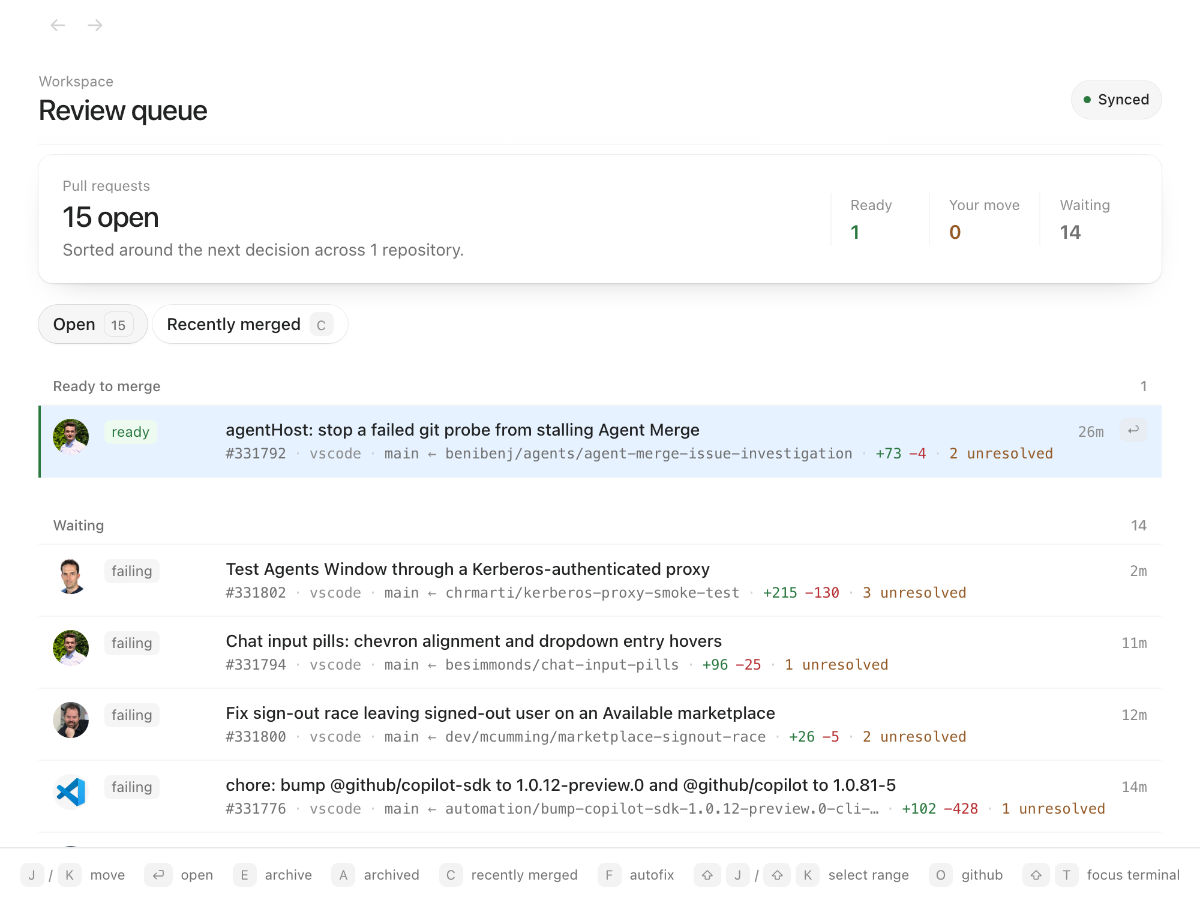
The queue separates **ready to merge**, **your move**, and **waiting**. Failed merge attempts appear under **FAILED TO MERGE** above pinned PRs in every grouping mode, until retried, dismissed, merged, or closed. With **Separate PRs that are cooking** on, open PRs labelled `kitchen: burnt` lead the queue under **Burnt**, and a PR labelled `order` cooks before Kitchen labels it; a stacked one shows **Waiting for lower layers**. Checks, conflicts, unresolved threads, and review state give you the context to decide what to open next. Stacked pull requests stay together.
Cooking rows show **since ordered** in the inbox and compact PR overlays, measured from the latest cached `order` label-addition event (REST `created_at` or timeline `LabeledEvent.createdAt`), not a Kitchen stage change. The clock is omitted when the label is no longer present or its addition time is unknown.
The PR header shows **Ordered** while an open PR has the `order` label; merged and closed states take precedence.
## Install
Run this in your terminal as your normal user, **not with `sudo`**:
```sh
curl -fsSL https://raw.githubusercontent.com/theolundqvist/pr-cockpit/main/scripts/bootstrap | bash
```
[Read the installer first](scripts/bootstrap). It checks prerequisites, installs the desktop app and `pr-cockpit` CLI, and opens setup. On macOS it offers to install missing tools where supported; on Linux it checks system prerequisites and installs missing Bun and GitHub CLI tools into the managed installation. Both install and update paths use private Bun 1.4.3, verified against official SHA-256 checksums, without replacing your own Bun.
**Supported platforms:** macOS and Linux, both with Git 2.38 or newer; the installer stops with the found version when Git is older. Linux also requires systemd and the desktop libraries listed by the installer; x64 and arm64 are supported. X11 is supported directly; Wayland uses XWayland, and global shortcuts depend on compositor policy. Windows is not supported.
### Try it on a PR you already know
- **Connect GitHub in the app.** Cockpit reuses your GitHub CLI (`gh`) login. If you need to sign in or grant additional access, setup opens the GitHub authorization flow in your browser.
- **Choose a repository you work in.** Start with an open PR you've authored or participated in. **Open** follows PRs involving you; **All PRs** shows every open PR in your selected repositories. You can enter `owner/repo` if it is not in the suggested list.
- **Enable live updates, or continue with polling.** Live updates use a GitHub App installation with access to your selected repositories. An organization may require an owner's approval; that need not block your first review.
- **Open the queue and pick that PR.** Read the conversation, press d to switch to Files, and inspect a change. Press ? whenever you want the shortcut guide.
The first sync fetches PRs involving you. **All PRs** loads on demand without expanding background polling. Press Tab to cycle Open, All PRs, and Recently merged. Repository and live-update configuration live in Settings.
Press r to filter repositories. Use arrows to highlight one, Enter to toggle it, or Shift+Enter to select only that repository.
Press h on a PR in the list to **Remind me**. Pick a time or type a date and time, then press Enter. The PR stays in Set Aside until then, or until new PR activity brings it back. Escape cancels; **⌘Z** / **Ctrl+Z** undoes the reminder. Set Aside shows its return time and lets you bring it back early. b still sets a PR aside indefinitely.
Enable **Date filters and sorting** in **Settings → Workspace** for **Opened** and **Order** controls in the main PR lists, plus **Grouping** in Your queue. Switch grouping between Status, Feature area, PR type, and Manual without leaving the queue. Opened, Order, Grouping, and Repository selections survive refreshes and app updates; only applied custom date bounds are saved. Filter to the last 24 hours, 7 days, 30 days, or a custom local date-and-time range; custom bounds apply when you press **Apply**. Order by newest or oldest opened, or most or least recently updated. **Queue order** keeps the usual priorities. Grouped queues keep their sections, manual pin order, and stacks; the Whiteboard is unchanged. PRs with an unknown opened date appear in All time but not an active date range.
## Investigating slowness
Run `pr-cockpit profile --seconds 20` while reproducing the slowdown (1–120 seconds), without restarting the server. It prints the output folder and top findings; CLI recordings cover the server only. In the desktop app, **View → Record Performance Profile** records both server and main renderer for 20 seconds, then reveals the folder. Nothing is sampled outside a recording. Profiles and summaries go to `~/Library/Logs/PR Cockpit/profiles//` on macOS, or `${XDG_STATE_HOME:-~/.local/state}/pr-cockpit/profiles//` on Linux. Open the `.cpuprofile` files in Chrome DevTools or speedscope; `summary.md` and `summary.json` include route/query timings, event-loop lag, GitHub requests, subprocess durations, memory, and (from the menu) renderer heap, DOM nodes, and long tasks. Profiles may contain local paths and SQL values: review them before sharing. Set `COCKPIT_PORT` to target a nondefault local server.
## From finding the PR to finishing the review
### Bring up a PR without leaving your editor
Press ⌥⌘K on macOS or Super+Alt+K on Linux X11 to search from another app. Move the pointer or use the arrow keys to select a result; Enter opens that highlighted result in Cockpit, with the cached PR ready to read. Typing a number such as `51` or `#51` lists that exact PR first, then PRs whose numbers contain it, open before closed and highest first, so `51` also finds `#10051`.
The search panel uses its own connection pool, so pending main-window requests cannot queue ahead of its page load. Shell updates take effect after relaunching the desktop app.

### Read the change, then follow the details
Diffs, threads, checks, and file history live in the same review workspace. Short diffs render without scrolling, including in tall windows. The header shows Closed or Merged even if the PR retains its draft flag. The PR check summary uses the latest workflow run and job attempt; earlier runs remain in Actions history. Press x to cycle **All files → Hide tests/generated → Only tests/generated**, keeping viewed marks. Generated files include `.generated.` names and committed `.gitattributes` rules marked `linguist-generated`; nested rules and overrides follow the reviewed revision. The default filter follows Settings.
Actions keeps recently read logs in memory for instant switching, with a 32 MiB text budget and at most 100 jobs. Larger logs stay readable but are not added to that cache; filter snapshots share the bounded recent-view cache.
Syntax highlighting covers Shiki's bundled languages in diffs, file previews, editors, and Markdown code blocks, including Swift, C/C++ headers, Objective-C, Kotlin, and C#. Grammars load on demand; unrecognized formats remain plain text.
Wide Markdown tables scroll horizontally without wrapping cells; smaller tables keep their natural width.
PR images are prefetched into each machine's persistent cache. SSH replicas download through their source server, so private images require no separate GitHub login on the replica. The source uses the installed `gh-img` extension when direct GitHub access is unavailable. Sign-in HTML is rejected and old cached sign-in pages are replaced on the next request.
SSH replicas forward the source's PR updates to an open conversation, including comment edits and PRs outside the inbox or already merged. Changed inbox snapshots also refresh the matching detail after import.
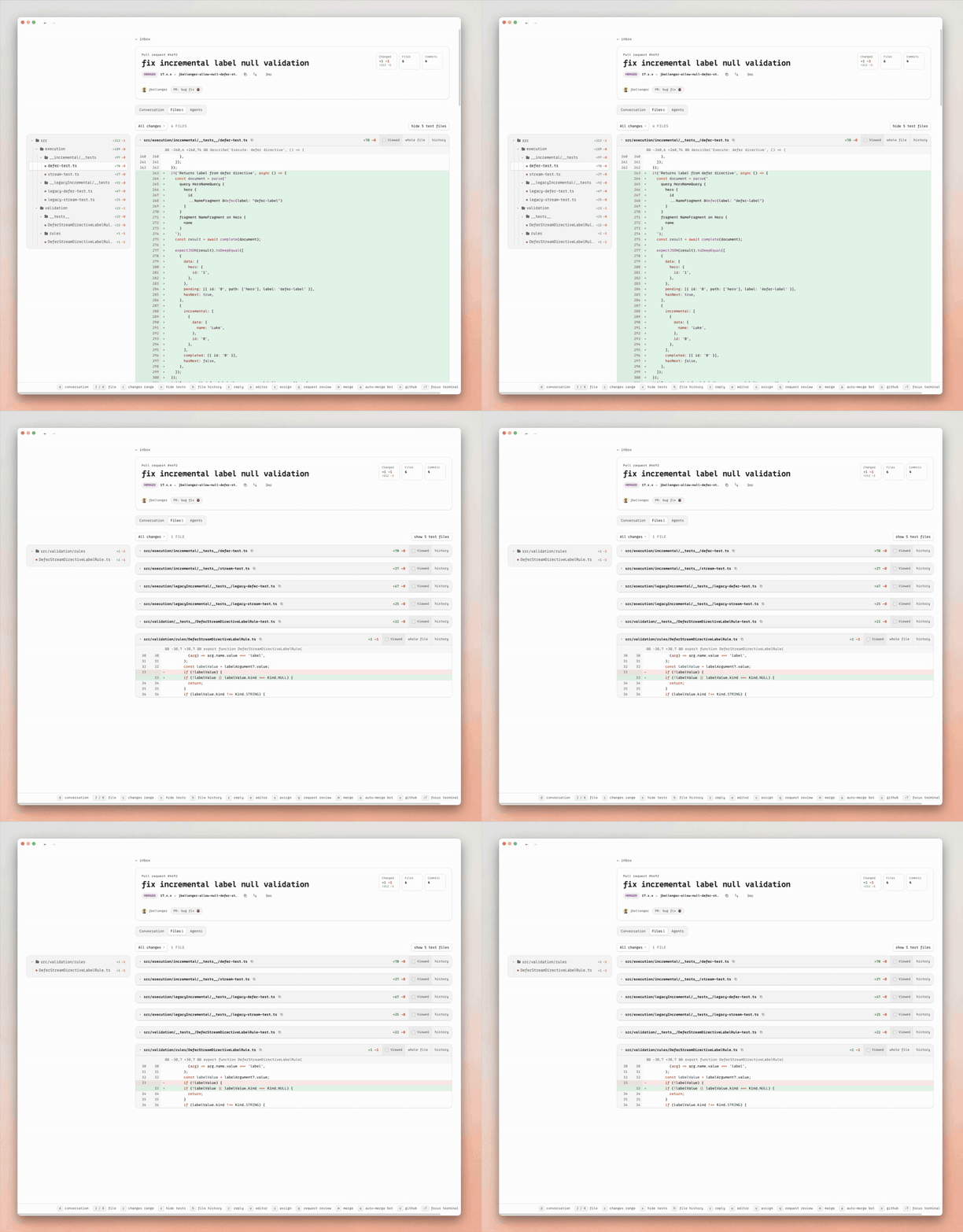
When the review needs a change, stay in context: e edits the open file and commits the patch to the PR; p opens the PR in your configured coding agent with review context. You can also revert a focused hunk or press h to inspect file history. A failed merge immediately requests fresh PR details to reveal conflicts or other blockers, while keeping the original error available to retry or dismiss.
Enable **Full-file finder** in **Settings → Review preferences**: ⌘P finds files, ⌘⇧F searches code, and ⌘⇧E opens Explorer; use Ctrl on Linux. Space-separated file queries match full paths in any order, with matched characters highlighted. In Explorer, ⌘P opens a quick picker without changing the editor until Enter; Escape cancels. Code search replaces the sidebar, not the open file; ⌘⇧E restores the tree and its scroll position. Arrow keys navigate folders, Enter opens files, and ⌘F finds within the open file. Search previews matching lines; opening a result loads the complete file.
The PR list's **Find file**, **Search code**, and **Explore files** actions use the selected repository's freshly fetched `staging` tip (its default branch when there is no `staging`). Inside a PR, they use that PR's exact head. Escape dismisses the current picker or search before closing the browser.
Reviewer badges show scores explicitly posted in reviews or comments, parsed without launching a scoring agent.
Enable **Pending reviews** in **Settings → Workspace** to save inline comments as a native GitHub draft and submit them together as one review. Drafts survive reloads and remain editable; if the PR head changes, submission stops until the stale draft is discarded. Published threads stay visible while the draft refreshes, including after a refresh failure; draft comments stay out of the published conversation. **Comment now** still posts a single comment immediately.
Enable **Mark changed descriptions** in **Settings → Workspace** to show a small blue dot to the left of the avatar, vertically centered on it, when the PR description differs from the one you last read. It is off by default. A description counts as read while it is on screen in the Conversation tab of a foreground window; PRs you have never read stay unmarked, and a description reverted to the version you read clears the dot.
Task-list checkboxes (`- [ ]`, `- [x]`) in a PR description can be ticked in the Conversation tab; comments stay read-only. Each tick is queued as a description edit that rewrites only that checkbox in the description GitHub currently holds, so text republished since you loaded the PR, such as a regenerated report, is kept. A task is matched by the PR number that starts it (`#123`), otherwise by its text; if it is gone or ambiguous the edit fails and you reload. Checkboxes stay disabled while a description edit is open, queued, or failed.
Right-click an open PR and choose **Close PR** to close it without opening the review. Cockpit asks for confirmation before queuing the close on GitHub.
Enable **Approve PRs for safe merge** in **Settings → Workspace**, then right-click a PR and choose **Approve for safe merge**. It appears above ordinary pins, below failed merges, without launching an agent. Approval covers that PR through fixes and base updates until revoked; closing it or disabling the feature clears approval. Ordinary pins remain bookmarks.
Enable **Rename and move PRs between groups** in **Settings → Workspace** to rename a PR from its right-click menu or move it onto another section or row. Rename edits the title inline: Enter saves and Escape cancels. Type grouping changes the title's conventional-commit type; feature grouping changes its scope; manual grouping changes only your assignment. Dragging preserves the summary, draft prefix, and breaking-change marker. Status sections remain read-only. Dropping into **Approved for safe merge** grants approval; dropping out revokes it.
Press **⌘Z** (Ctrl+Z on Windows/Linux) to undo a title change from Rename or a group move, including while it is saving. Undo restores the exact previous title on GitHub, not revoked merge approval. Title changes and Set Aside share undo order; text fields and the whiteboard keep their own undo.
Desktop notifications are off by default. In **Settings → Notifications**, choose events and combine rules for human or bot authors, comment text, repositories, and review requests. GitHub bot accounts and configured review bots count as bots; unknown authors match neither human nor bot filters.
Turn on **PRs I merge** in **Settings -> Notifications** to get a desktop notification when a PR you merged lands and a **Merged by me** filter in the Kitchen Notifications list; it works whether or not the custom rules are on. A PR counts as yours when you merged it, or when a merge-queue bot merged it after you last added its `order` label. Bot merges read that label history from GitHub only while the setting or an **I merged it** rule is on.
Repositories can add **quick actions** to the PR sidebar and the PR-row **Quick actions** submenu by committing `.github/pr-cockpit.json`. Each action posts a fixed comment or adds a label. Cockpit reads it from the repository's default branch and shows the actions on every open PR there:
```json
{
"quickActions": [
{ "label": "Preview", "comment": "@preview", "key": "P" },
{ "label": "Order", "addLabel": "order", "key": "O" }
]
}
```
Each entry needs exactly one of `comment` or `addLabel`; `key` is optional, and keys Cockpit already uses are ignored. **Settings → Agents & merging → Quick actions** shows the format and copies a prompt that asks your coding agent to write the file. **Your quick actions** in the same place apply only to your Cockpit, on top of each repository's file: an entry with a matching `label` changes only the fields it sets or hides that action with `"hidden": true`, other entries add buttons, and `"repos": ["owner/repo"]` limits an entry to those repositories.
Everyday shortcuts
| Key | Action |
| --- | --- |
| j / k | Move |
| enter / esc | Open / back |
| ⌘[ / ⌘] | Back / forward (macOS) |
| d | Conversation / Files |
| c / r | Comment / reply |
| p | Open in the configured agent |
| e | Edit the open file |
| x | Hide / show tests and generated files |
| h | Remind me from the list / file history in Files |
| m | Merge |
| ⌘z / Ctrlz | Undo a group-move rename, Set Aside or reminder |
| ? | Full shortcut guide |
### Keep personal review context on a whiteboard
Enable **Whiteboard (Experimental)** in **Settings → Workspace** to add the final review-queue tab. It is off by default. One personal canvas is saved in this installation's SQLite database; disabling the setting keeps it and stops board activity in every connected window. Unsaved work stays protected in its window with a visible export/re-enable banner; keep that window open until recovered. Board actions never change GitHub, manual queue groups, or queue order.
Open PRs, including drafts, start in sections based on your queue grouping, arranged to fit the canvas proportions. **Arrange** refreshes inbox-generated groups from the current queue, removes empty sections, and reflows the board; Undo restores the previous grouping and positions. Custom sections and their cards stay personal. Rename a generated section to make it personal. Cards outside the current queue remain under **On this board**. Ordinary refreshes and window resizing preserve your layout. Drag cards on the 16 px grid, Shift-click or drag empty space to select several objects, and move a section to carry its contents. Add personal notes, pen strokes and connectors with the toolbar. Double-click a card to open its real PR; returning keeps your location and selection. New PRs arrive below existing objects without rearranging them. New commits flag cards for another look; missing cached PRs keep clearly marked last-known metadata. Live metadata refreshes do not create personal saves. Clean windows adopt newer saved boards; unsaved edits require explicit conflict resolution.
**Scroll** zooms at the pointer; hold **Space** and drag to pan. Tool shortcuts are **V** select, **H** pan, **F** section, **P** pen, **T** note, and **C** connector, also shown beside each tool. **1** fits the board, **0** restores 100%, and **/** finds and locates objects. Arrows nudge the selection; **Delete** removes only board objects. **Ctrl/⌘ Z** and **Shift Ctrl/⌘ Z** undo/redo within the current session, without rolling back live PR metadata. Text editors retain their native text shortcuts. **Clear completed** removes closed/merged cards from the board only; it is undoable and those cards stay excluded on refresh. **Export** downloads a board backup. Failed saves and conflicting windows keep local edits and offer explicit retry/recovery controls.
## The same PR context in your terminal
The included `pr-cockpit` CLI reads the same local cache as the app. Use it yourself, or give your coding agent a way to inspect a PR without repeatedly fetching it from GitHub. Set up the app first; the CLI needs the local Cockpit server.
Replace `owner/repo#123` with your pull request:
```sh
pr-cockpit owner/repo#123 # state, checks, and review threads
pr-cockpit owner/repo#123 --diff # cached unified diff
pr-cockpit owner/repo#123 --file src/app.ts # file contents at the PR head
pr-cockpit owner/repo#123 --jobs # queued, running, and completed jobs
pr-cockpit owner/repo#123 --logs # failed and cancelled job logs with check annotations
pr-cockpit owner/repo#123 --logs verify --run 987 --attempt 2
pr-cockpit runs owner/repo --run 987 --logs # a run on a branch without a PR
```
`--run` selects a cached run even after the PR head advances; `--attempt` selects its rerun attempt. Without these selectors, jobs and logs use the current head. A log missing from the cache is fetched once more when you ask for it. If GitHub refuses to refresh Actions data, for example while quota is exhausted, reads print the reason and serve the cached rows.
**Waiting on CI or a review? Listen instead of polling.**
```sh
pr-cockpit listen owner/repo#123
```
`listen` waits for substantive cached state changes—a push, check result, review, comment, or merge conflict—then prints what changed and exits. It returns at once when the PR already has failing checks, open comments, or merge conflicts, but never from a snapshot older than known webhook activity: it waits for revalidation first. `--next-change` skips those current blockers and waits for the next change. `--ci-only`, `--comments-only`, and `--conflicts-only` narrow the wake signal; `--ci-only` waits for pending CI to settle or fail.
`pr-cockpit listen owner/repo#123 --run 987` waits for a specific run and reconciles it about every 30 seconds at the default interval, so missed webhooks cannot leave completion unobserved. GitHub failures during the wait are printed and retried; a finished run is delivered even when GitHub withholds some of its logs. Runs on branches without a PR use the repository instead: `pr-cockpit cache-run owner/repo 987` and `pr-cockpit listen owner/repo --run 987`.
CI completeness is durable for the observed head; an expired Actions viewing lease does not turn settled jobs back into pending work. Checks use the latest result per job name within each workflow/App, so metadata-only workflows with different names do not erase earlier required checks on that head. Skipped and neutral jobs retain their displayed state but satisfy required checks, [as on GitHub](https://docs.github.com/en/pull-requests/how-tos/merge-and-close-pull-requests/troubleshooting-required-status-checks); missing checks, incomplete pages, and unobserved jobs remain pending.
The CLI also supports comments, reviews, thread resolution, edits, base retargeting, reopening, and merges through Cockpit's mutation queue. A queued merge lands only the head Cockpit had when it was queued; a later push fails it for another review. Run **`pr-cockpit --help`** for commands and options, including `--body-file` for exact multiline text and `--json` for machine-readable status. The installer separately asks before adding Cockpit instructions to supported coding assistants.
Built-in agents launch from Cockpit's cached PR brief without spending GitHub API quota, and clone through Git rather than GitHub's API. They use `pr-cockpit` for PR reads and mutations; remote API operations still need available quota. With OMP, Opus uses the `opus` alias and Sonnet uses `anthropic/claude-sonnet-5-5`.
Arming auto-merge approves the feature and delegates safely landing it to the merger. It follows your global and repository instructions, addressing comments, conflicts, and CI failures caused by the PR; known unrelated failures need no rerun or post-merge proof. OMP loads global instructions automatically, and the agent reads repository instructions after cloning. A direct prompt can also authorize merging explicitly. In either case, Cockpit refreshes the PR and merges only the head the agent checked. Bypassing required GitHub checks or approvals still needs the repository's force-merge opt-in; conflicts, unresolved threads, and changes-requested reviews remain blockers.
Safe-merge approval is also visible in CLI output and as `approvedForSafeMerge` in `--json`; `listen` wakes when it changes. Agents must re-read approval immediately before merging and still satisfy the safety checks above. Approval is granted or revoked in the app, never by an agent approving itself.
`pr-cockpit mark-ready owner/repo#123` lists the PR's current head under **Marked ready**, directly below Burnt, unless a Kitchen label places it in a Kitchen stage first; a push, close, merge, `unmark-ready`, or n in the app clears it. `--json` shows `readyForReview` and `listen` wakes when it changes.
The PR detail’s Agents tab renders Markdown answers and expandable tool activity, shows an identical final-answer echo only once, and keeps available tool inputs, errors, and log tails inspectable.
In the Files tab, x cycles **All files → Hide tests/generated → Only tests/generated → All files**. The file tree and file finder follow the selection; viewed-file marks stay unchanged.
Enable **Agent conversations** in **Settings → Agents & merging** for a conversation-first **Agents** workspace beside the inbox tabs. Search sessions grouped into **Working**, **Needs attention**, and **Recent**, including closed PRs. Read **Conversation**, expand longer tasks in place, inspect **Log tail**, or open an older attempt from run history. Run links support Back/Forward; each run and view remembers its reading position. New output follows only when you’re at the end; otherwise **Jump to latest** signals unread output. Transcripts and logs contain the recent output available from the cache, not complete logs. PR filters and grouping sit below the inbox tabs.
Use ⌘J to ask general questions or ask about the current view. PR-specific answers use the visible PR evidence; general explanations do not require a matching excerpt.
Enable **Quick Generate** in **Settings → Agents & merging** to draft from anywhere with ⌥⌘J on macOS or Super+Alt+J on Linux X11. On macOS, selected text fills the prompt before the panel opens; no selection keeps the draft. Allow PR Cockpit in **System Settings → Privacy & Security → Accessibility**; protected or unsupported selections stay manual. Choose a key and model, then press ⌘Enter. Results stream as Markdown; **Copy** keeps the original text. The panel stays visible across apps. Escape closes it without losing the prompt, attachments, or result; resizing persists across restarts.
Paste images, drop files, or choose **Attach**; inspect or remove them before generating. Supported files are PNG/JPEG/WebP/GIF, PDFs, and UTF-8 text: up to eight files, 5 MiB each and 20 MiB total. Model-specific compatibility and limits are shown before sending. Cerebras Qwen accepts two PNG/JPEG images, up to 7 MiB total; PDFs need a native PDF-capable model. Images can be sent without a text prompt. Cockpit does not save prompts or attachments or silently change providers.
Keys are detected from `$XDG_CONFIG_HOME/.env` (or `~/.config/.env`), then `~/.env`, then the Cockpit server's environment; the first nonempty value wins. **API key file** selects a different file and accepts absolute paths, `~/`, `$HOME`, or `$XDG_CONFIG_HOME`. A missing selected file shows an error instead of falling back. Supported names are `CEREBRAS_API_KEY`, `OPENAI_API_KEY`, `ANTHROPIC_API_KEY`, `GROQ_API_KEY`, and `OPENROUTER_API_KEY`; suffixes such as `CEREBRAS_API_KEY_WORK` provide additional choices. Credentials stay on the Cockpit host and go only to their provider, including in replica mode. Models come from the provider's catalog, with Cerebras Qwen and OpenRouter's Auto Router preferred by default.
**Settings → Usage** shows separate REST and GraphQL balances and reset times for your user and each observed GitHub App installation; these budgets are never summed. Optional REST attribution is off by default. Enable **Record REST requests** to keep 72 hours of this server's attempts by source and endpoint. On replicas, the switch controls the authoritative source. Other-client usage stays unknown until uninterrupted recording covers the quota window with authoritative headers and known charges, and while responses remain in flight. Recording changes, reauthorization, failed ledger writes, restarts, automatically followed redirects, and unmetered GitHub CLI operations interrupt coverage without erasing history.
`/api/quota` and `/api/github-usage` also expose `userFallbacks`: always-on, bounded process-lifetime counts by repository/account scope, access reason, operation, and source, with the most recent attempt time. They contain no tokens or request bodies and do not require REST recording.
For extra quota, choose **Settings → Workspace → Live updates → Connect GitHub App**, or **Add GitHub App** in a quota warning, then approve creation and repository installation on GitHub. Settings shows each repository's last successful App read and current problems; configuration alone never counts as working. Installed repositories use the App first for reads, including searches, Actions, comments, review threads, merge preflights, and post-write refreshes. Non-authored maintenance actions also use the App: labels, assignees, requested reviewers, PR title/body/base edits, close/reopen/draft/ready state, thread resolution, code-scanning dismissals, and Actions failed-job reruns. User fallback is allowed only for missing App repository access or permissions and is logged and counted, never for App quota exhaustion or connection errors. Secondary rate limits pause all identities and APIs.
Comments, reviews, reactions, commit-producing actions, and merges retain your user identity. GitHub [attributes installation requests to the App](https://docs.github.com/en/apps/creating-github-apps/authenticating-with-a-github-app/authenticating-as-a-github-app-installation), and the [merge endpoint](https://docs.github.com/en/rest/pulls/pulls#merge-a-pull-request) cannot override the merger's identity; a squash commit's author is not its “merged by” actor. Read-quota exhaustion does not disable merging, but an exhausted User REST budget still cannot pay for the attributed merge PUT. Identity-only reads (your login, account repository discovery, and user-specific review state) cannot be replaced with an installation's identity.
New Apps request write access for Actions, issues, pull requests, and code-scanning alerts, and read access for checks, contents, metadata, and commit statuses. Existing read-only Apps need their owner to grant those write permissions and approve the installation update; until then unsupported writes use the explicitly recorded access fallback. Credentials stay on the source host, including in replica mode: `~/.config/pr-cockpit/github-app.json` contains `appId` and `privateKeyPath`; the private key and config are mode `0600`. `COCKPIT_GITHUB_APP_CONFIG` overrides the config path. Manual credential changes reload within 30 seconds; without a config, Cockpit uses only your existing GitHub login.
## Local reads. GitHub authority.
Cockpit is a client for your existing GitHub workflow, not a second place to maintain pull requests.
- **On your machine:** a Bun server caches PR state in SQLite and serves the desktop UI and CLI. In replica mode, cached lists stay local; GitHub searches, keyed PR titles, and embedded PR rows use the connected source.
- **Embeds:** `/#/embed?keys=owner%2Frepo%23123&overlay=1` shows compact PR rows with lifecycle, readiness, pin and Kitchen state, plus an E hide control, grouped like your review queue. The host owns hiding, persistence, and Undo; GitHub and the review queue stay unchanged.
- **Mirror storage:** Git mirrors compact automatically and evict the oldest unprotected caches toward a 20 GiB target. Active reads, recent use, and linked worktrees are protected, so the target is not a hard limit.
- **SQLite cache retention:** cached PR details, diffs, file contents, Actions runs, and webhook activity expire after 30 days; Actions jobs expire after 7 days, and their run refetches them from GitHub when next viewed. Cleanup continues hourly without restarting, in indexed batches of at most 20 rows separated by 100 ms. New databases reclaim free pages incrementally; older databases reuse freed space but do not shrink on disk unless compacted offline. Cockpit never runs a full `VACUUM` on the live server.
- **Back to GitHub:** comments, reviews, file edits, thread resolution, and merges use your GitHub CLI authentication. GitHub remains authoritative.
- **Keeping it current:** the hosted relay is enabled by default. It receives GitHub webhooks and delivers compact change markers and Actions run/job state, including runner assignment—not full PR contents or job logs—to Cockpit. Cockpit never sends the relay your GitHub token; it proves read access to each repository with commit data only readers can look up, and that proof rotates daily. Branch pushes refresh open PRs whose head or base matches, including recently viewed PRs outside the inbox. A direct GitHub poller repairs missed events.
- **Your relay, if you prefer:** you can configure a different relay URL. See [Self-hosting](docs/self-host-relay.md) for deployment and connection instructions.
Local caching does **not** mean the app makes no external connections. Besides GitHub and the relay, Cockpit sends [usage statistics](#usage-statistics) and, only if you turn it on, [error reports](#error-reports).
Updates, diagnostics, and configuration
In **Settings → Workspace → Developer**, choose **Check for updates** to fetch the latest `main` revision from GitHub. If an update is available, **Install update** runs the existing updater; the page reloads when the server reports the new revision. Installations with updates disabled reject both actions.
If the installed backend cannot start, the desktop launcher automatically tries an update before opening the app. Recovery is limited to once every five minutes, respects disabled updates, and leaves local edits and non-`main` branches untouched. It restarts only the backend, never an already-running desktop window. If no working update is available, startup reports the failure.
```sh
pr-cockpit update # update and reconcile the installed app
pr-cockpit status # identify the process supervising the local server
```
The installer manages the background server and desktop integration. On Linux, `$HOME/.pr-cockpit/scripts/uninstall` removes a default installation; adding `--purge` also removes its local data.
Use Settings for day-to-day configuration. Optional shell overrides live in `~/.config/pr-cockpit/config` (Linux respects `XDG_CONFIG_HOME`).
| Variable | Purpose |
| --- | --- |
| `COCKPIT_REPOS` | Comma-separated `owner/repo` list |
| `COCKPIT_PORT` | Local HTTP port; defaults to `4820` |
| `COCKPIT_DEFAULT_REPO` | Repository assumed when a PR number is passed alone |
| `COCKPIT_REPO_ROOTS` | Paths containing local checkouts |
| `COCKPIT_RELAY_URL` | Custom webhook relay URL |
| `COCKPIT_TAILSCALE_SERVE` | Set to `1` to publish Cockpit privately through Tailscale Serve |
| `COCKPIT_TAILSCALE_HTTPS_PORT` | Tailscale HTTPS port; defaults to `443` |
### Usage statistics
Cockpit counts how it is found, installed, and used. These statistics are not anonymous: events carry a random install id, and the relay links that id to the GitHub account id and login of the install's live-update sessions.
- **Sent:** names of the screens, controls, and keyboard shortcuts you use; named outcome steps such as first launch, GitHub sign-in state, repositories configured, PR opened, safe-merge approval and Marked ready changes, and the kind of each queued PR action (for example `comment` or `merge`) with whether it succeeded; `pr-cockpit` command names with whether they succeeded and a random per-run id; counts and timestamps; the install id, the install script's random run id, a short app version, and the OS family.
- **Never sent:** PR titles or bodies, comment or other typed text, file paths, branch names, repository names in events, or tokens.
- **Where:** about once a minute to the configured relay. Nothing is sent while the relay is off, and a replica sends nothing; its source install reports for it.
- **Retention:** raw daily counts for 180 days and active days for 400 days. Separately, the relay already keeps, per account per day, the login, session count, and repositories of live-update sessions for 89 days.
- **Turning it off:** **Settings → Usage**, or `COCKPIT_USAGE_STATS=0` or `DO_NOT_TRACK=1` in the server's environment, which keeps it off regardless of the setting.
prcockpit.com counts visits, where they came from (`utm_source` or the referring site), the OS family, and which of its links and buttons are pressed and whether the install command is copied, per browser tab without cookies; it honours Do Not Track and Global Privacy Control. The install script reports when it starts, finishes, or fails, with the failed stage, under a random run id; `DO_NOT_TRACK=1` or `COCKPIT_USAGE_STATS=0` turns that off.
### Error reports
Error reports are off until you turn on **Send error reports** in **Settings → Usage**. While off, the backend never initializes its [Sentry](server/sentry.ts) client and the installer sends nothing. While on, server errors go to the maintainer's Sentry with their messages and stack traces, and a failed install or update sends its stage and a redacted log tail. Messages can name repositories or file paths. An empty `COCKPIT_SENTRY_DSN` in the server's environment keeps reports off regardless of the setting.
## Contribute
Found friction in a real review? [Open an issue](https://github.com/theolundqvist/pr-cockpit/issues) with what you were trying to do and what got in the way. Keep reports and screenshots free of private repository data.
Fixes, functionality, themes, and UI polish are welcome. Read the [contributor and agent guide](AGENTS.md) for development setup and repository conventions. New functionality must default off; styling must be opt-in unless it is minor polish that preserves the default appearance. Pull requests must include before-and-after screenshots showing their effect in the app.
[MIT licensed](LICENSE).